Antivir Solution Pro (Free Instructions) - Simple Removal Guide
Antivir Solution Pro Removal Guide
What is Antivir Solution Pro?
Antivir Solution Pro is a rogue anti-spyware application that claims to keep the machine secure
Antivir Solution Pro is a program that could be considered to be a potentially unwanted application because it is distributed with other programs. This is the rogue tool from the same family as AV Security Suite and Antispyware Soft. This fake program is typically promoted via fake online scanners and misleading web pop-ups that appear when browsing bogus websites.
Those pop-ups will state that your computer is infected with adware, spyware, and other malware. Then you will be prompted to download and run their malware removal tool which is Antivir Solution Pro of course. Please also note that the rogue program may come bundled with other malware or it can enter your computer through software vulnerabilities. However, most of the time it has to be manually installed. If you find that your computer is infected with this virus, please follow the removal instructions below.
| Name | Antivir Solution Pro |
|---|---|
| Type | Rogue anti-spyware, PUP |
| Issues | The program triggers false detection lists with threats that are not related to the PC in question |
| Distribution | Freeware distribution sites can spread the rogue applications |
| Removal | Running a trustworthy anti-malware tool can help get rid of the PUP and other issues |
| Repair | Do not forget that PUPs can alter various parts of the system, so run FortectIntego to repair the damage |
Once Antivir Solution Pro is active, it will be configured to start automatically when loading Windows. The rogue program will scan your computer and detect non-existent or system files as infections, but won't let you remove them until you purchase the program.
This is obviously a scam because it asks you to pay for a license of a program that removes non-existent infections. What is more, the rogue program will display fake security alerts on your computer screen every one or two minutes. These alerts will range from warnings about your computer be hacked to active malware processes being detected. Some of the fake security alerts read:
INFILTRATION ALERT Virus Attack
Your computer is being attacked by an internet virus. It could be a password-stealing attack, a trojan – dropper or similar.
DETAILS
Attack from:152.179.59.20, port 4703
Attacked port: 29484
Threat: BankerFox.A
Do you want block this attack?

Get rid of the unwanted program
Antivir Solution Pro will block anti-spyware programs, Task Manager, Registry Editor, and other useful system tools to protect itself from being removed. It will also block nearly all websites and especially security-related ones. It won't let you download malware removal tools that why you will have to end these suspicious processes first or reboot your computer in Safe Mode with Networking.
As you can see, the main purpose of AntivirSolutionPro is to trick you into purchasing the program. Don't purchase it. If you have already paid for it then contact your credit card company and dispute the charges. Then please use the removal instructions below to remove this app from your computer as soon as possible.
You can rely on the Safe Mode with Networking when the threat is difficult to remove:
- Restart your computer. As your computer restarts but before Windows launches, tap “F8” key constantly. Use the arrow keys to highlight the “Safe Mode with Networking” option as shown in the image below, and then press ENTER.
- Open Internet Explorer. Click on the Tools menu and then select Internet Options.
- In the Internet Options window click on the Connections tab. Then click on the LAN settings button.
- Now you will see the Local Area Network (LAN) settings window.
- Uncheck the checkbox labeled Use a proxy server for your LAN under the Proxy Server section and press OK.
Getting rid of Antivir Solution Pro. Follow these steps
Repair damaged system components
Once a computer is infected with malware, its system is changed to operate differently. For example, an infection can alter the Windows registry database, damage vital bootup and other sections, delete or corrupt DLL files, etc. Once a system file is damaged by malware, antivirus software is not capable of doing anything about it, leaving it just the way it is. Consequently, users might experience performance, stability, and usability issues, to the point where a full Windows reinstall is required.
Therefore, we highly recommend using a one-of-a-kind, patented technology of FortectIntego repair. Not only can it fix virus damage after the infection, but it is also capable of removing malware that has already broken into the system thanks to several engines used by the program. Besides, the application is also capable of fixing various Windows-related issues that are not caused by malware infections, for example, Blue Screen errors, freezes, registry errors, damaged DLLs, etc.
- Download the application by clicking on the link above
- Click on the ReimageRepair.exe

- If User Account Control (UAC) shows up, select Yes
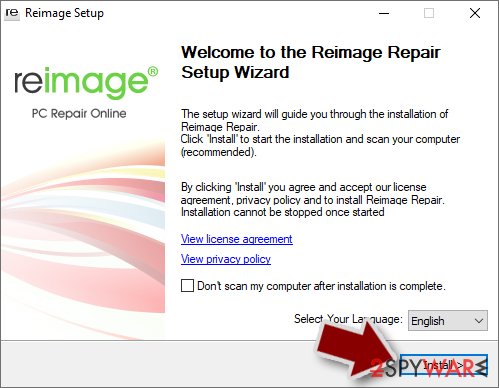
- Press Install and wait till the program finishes the installation process
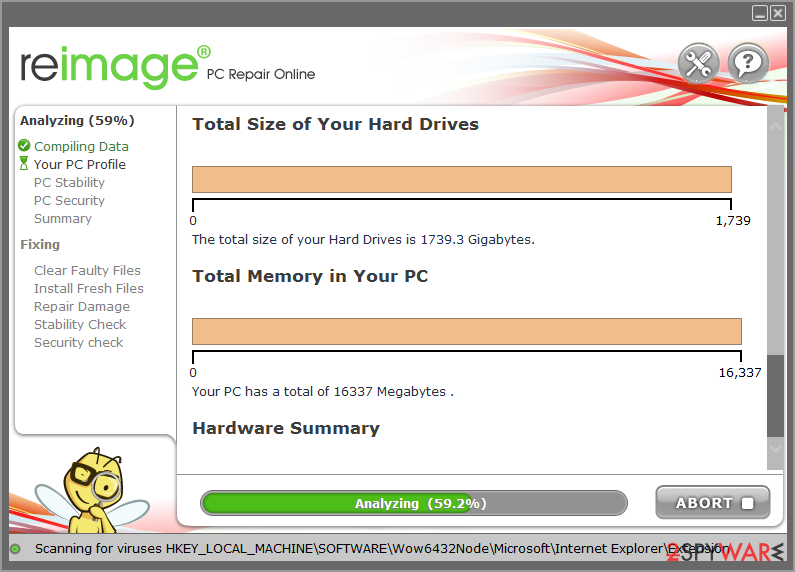
- The analysis of your machine will begin immediately
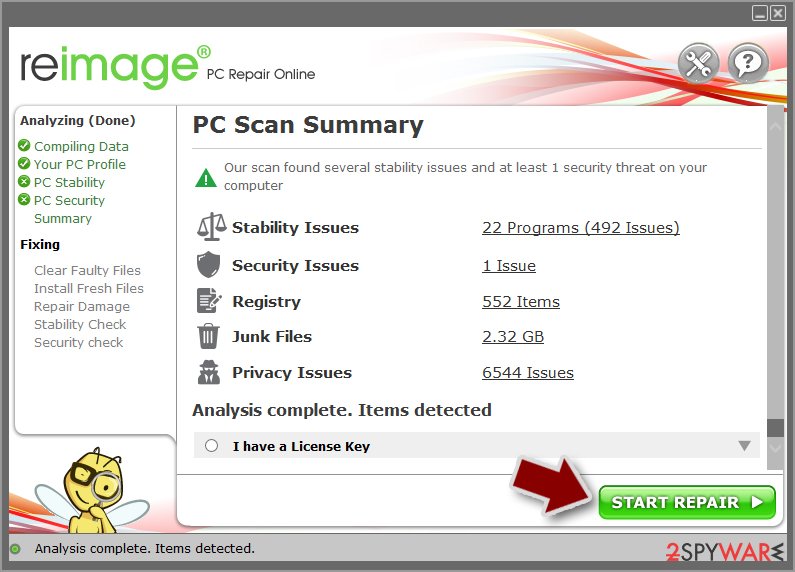
- Once complete, check the results – they will be listed in the Summary
- You can now click on each of the issues and fix them manually
- If you see many problems that you find difficult to fix, we recommend you purchase the license and fix them automatically.


By employing FortectIntego, you would not have to worry about future computer issues, as most of them could be fixed quickly by performing a full system scan at any time. Most importantly, you could avoid the tedious process of Windows reinstallation in case things go very wrong due to one reason or another.
Finally, you should always think about the protection of crypto-ransomwares. In order to protect your computer from Antivir Solution Pro and other ransomwares, use a reputable anti-spyware, such as FortectIntego, SpyHunter 5Combo Cleaner or Malwarebytes
How to prevent from getting rogue antispyware
Choose a proper web browser and improve your safety with a VPN tool
Online spying has got momentum in recent years and people are getting more and more interested in how to protect their privacy online. One of the basic means to add a layer of security – choose the most private and secure web browser. Although web browsers can't grant full privacy protection and security, some of them are much better at sandboxing, HTTPS upgrading, active content blocking, tracking blocking, phishing protection, and similar privacy-oriented features. However, if you want true anonymity, we suggest you employ a powerful Private Internet Access VPN – it can encrypt all the traffic that comes and goes out of your computer, preventing tracking completely.
Lost your files? Use data recovery software
While some files located on any computer are replaceable or useless, others can be extremely valuable. Family photos, work documents, school projects – these are types of files that we don't want to lose. Unfortunately, there are many ways how unexpected data loss can occur: power cuts, Blue Screen of Death errors, hardware failures, crypto-malware attack, or even accidental deletion.
To ensure that all the files remain intact, you should prepare regular data backups. You can choose cloud-based or physical copies you could restore from later in case of a disaster. If your backups were lost as well or you never bothered to prepare any, Data Recovery Pro can be your only hope to retrieve your invaluable files.

If this free guide helped you and you are satisfied with our service, please consider making a donation to keep this service alive. Even a smallest amount will be appreciated.