How to remove eType (Virus removal guide) Updated
search.etype.com redirect Removal Guide
What is search.etype.com redirect?
eType is the browser hijacker that comes together with shareware applications and can install additional extensions

Search.etype.com is the program that significantly affects time online with tons of redirects and altered search results so that it can be categorized as a browser hijacker. The program also called eType offers a dictionary, translator, and other options that seem to be useful for today's Internet user. However, people who have installed the suspicious software on purpose claim that their computers have started to behave strangely. People mostly report about continuous browser's redirections and commercial content injected on commonly visited pages.
In reality, Search.etype.com virus uses hijacking functionality and keeps the user form searching online normally. Also, it tends to alter DNS settings and redirect people to other domains filled with advertisements or even malicious material. If you suffer from annoying browser's redirections, your PC has been infected and affected by the PUP, so you should scan your computer immediately to end the annoying activities.
| Name | Search.etype.com |
|---|---|
| Alternate name | eType |
| Type | Browser hijacker |
| Category | Potentially unwanted program[1] |
| Symptoms | Makes changes on the browser, delivers pop-ups and redirects to suspicious pages, installs other extensions and toolbars |
| Main danger | Tracks online browsing-related data and details about users' habits online, location. This information can be shared with third-party companies |
| Distribution | Freeware, software bundling,[2] and other cyber threats |
| Elimination | Install FortectIntego for Search.etype.com removal |
eType is the alternate name of this browser hijacker program that infects common types of web browsers like Internet Explorer, Google Chrome, Mozilla Firefox, Safari. It adds plugins or toolbars and extensions that supposed to improve the in-browser searching activities and make a major difference in your satisfaction. The program keeps you from finding the needed information because commercial content is all that you see since redirecting is the main purpose the PUP got designed for.
Instead, this potentially unwanted program changes various settings on the machine and the browser itself. eType alterations include:
- new tab settings,
- homepage preferences,
- default search engine;
- startup program preferences.
Search.etype.com is not a genuine search provider, so you should avoid using it as your search engine on the browser. Instead, get rid of the PUP as soon as it appears on the machine, especially when your DNS and browser settings get altered without permission.

Search.etype.com has another annoying feature – installation of eType toolbar and other applications based on hijacking and redirecting the user. Although the extension claims to be a useful utility for dictionary and translation while you typing, the internet is filled with such useless tools and you can encounter more severe cyber infiltrations instead of getting the useful service.
eType, as any other PUP can access information about you:
- IP addresses;
- location;
- browsing history;
- most viewed items;
- commonly visited sites.
Bare this data tracking and sharing function in mind and rely on tools that experts[3] recommend for eType removal. Anti-malware tools are highly suggested for infections like this because of the information recording. Adware, rogue tools, browser hijackers and other viruses of this type haven't disclosed the issue fully.
All those details needed for the sponsor or publisher of the program- advertiser. So, eType itself can be promoted to other users and pushed as free download program on pop-up ads. Avoid clicking on such material yourself because PUPs can automatically install from these banners or redirects from one click on the content.
When inside the system, a user may be suffering not only from annoying redirections – this browser hijacker can also change the start page and also make the victim continuously confront sponsored advertisements, spam, and similar, suspiciously-looking websites. So, we do NOT recommend ignoring redirections to search.etype.com website because it's dangerous.
In order to stop this activity, you must uninstall eType software and also check your computer with an anti-malware program to remove search.etype.com from your computer altogether. For this, you can rely on FortectIntego and other anti-malware tools designed to eliminate such programs.

Hijacker spreading methods involve deceptive promotional content
Such useless and intrusive software can get inside the system either voluntary or not:
- it can be downloaded from its official page,
- loaded from misleading promotional notifications, that pop-up out of nowhere and offer free dictionaries and translators.
Basically, as soon as click on such alert, you may download the PUP on your computer, which alters homepage and other browser's settings. We do not recommend leaving this software on your computer because its advertisements may lead you to additional software of third party spyware platforms.
Also, choose Advanced or Custom options during the installation and de-select toolbars, add-ons, other suspicious material from the list on the installation setup. When you go to Recommended or Quick installations, all the included programs get automatically added on the computer.
Delete eType virus from the system and get rid of the unwanted behavior
You should focus on cleaning the system when performing Search.etype.com removal because the program reads and changes various settings, so you need to pay attention to alterations and reverse them back. Employ anti-malware tools, and this way you can save you precious time for resetting the browsers because that is the process that requires manual interference but the malware elimination gives better results with professional tools.
Finally, scan your computer with a reputable anti-malware program to remove Search.etype.com or any corrupted, useless, or even infected files from your computer. Tools like this can check the system fully and indicate various issues with your machine besides the infiltration of PUPs.
You may remove virus damage with a help of FortectIntego. SpyHunter 5Combo Cleaner and Malwarebytes are recommended to detect potentially unwanted programs and viruses with all their files and registry entries that are related to them.
Getting rid of search.etype.com redirect. Follow these steps
Uninstall from Windows
eType removal should improve the speed of the machine and affect the performance in a positive way
-
Click Start → Control Panel → Programs and Features (if you are Windows XP user, click on Add/Remove Programs).

-
If you are Windows 10 / Windows 8 user, then right-click in the lower left corner of the screen. Once Quick Access Menu shows up, select Control Panel and Uninstall a Program.

-
Uninstall search.etype.com and related programs
Here, look for search.etype.com or any other recently installed suspicious programs. -
Uninstall them and click OK to save these changes.


Delete from macOS
-
If you are using OS X, click Go button at the top left of the screen and select Applications.

-
Wait until you see Applications folder and look for search.etype.com or any other suspicious programs on it. Now right click on every of such entries and select Move to Trash.


Remove from Microsoft Edge
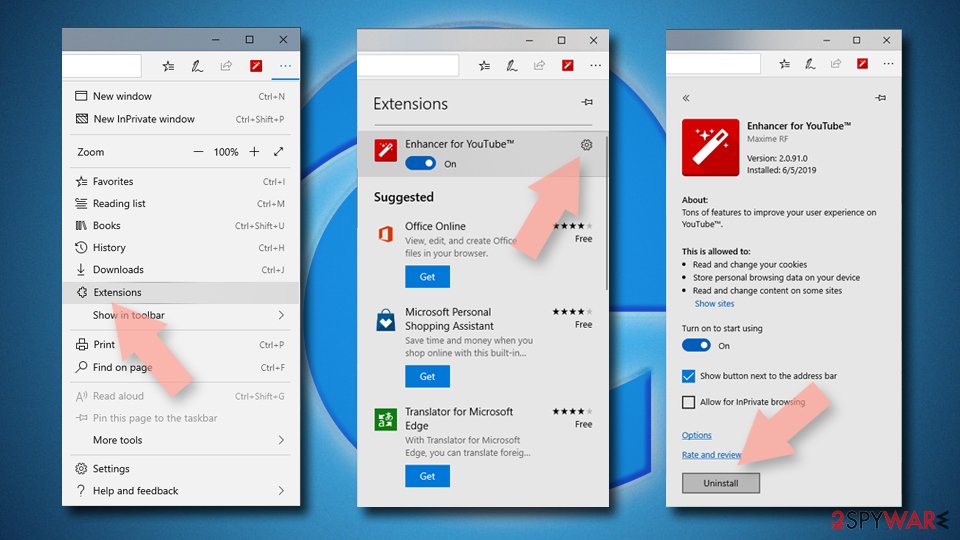
Delete unwanted extensions from MS Edge:
- Select Menu (three horizontal dots at the top-right of the browser window) and pick Extensions.
- From the list, pick the extension and click on the Gear icon.
- Click Remove.

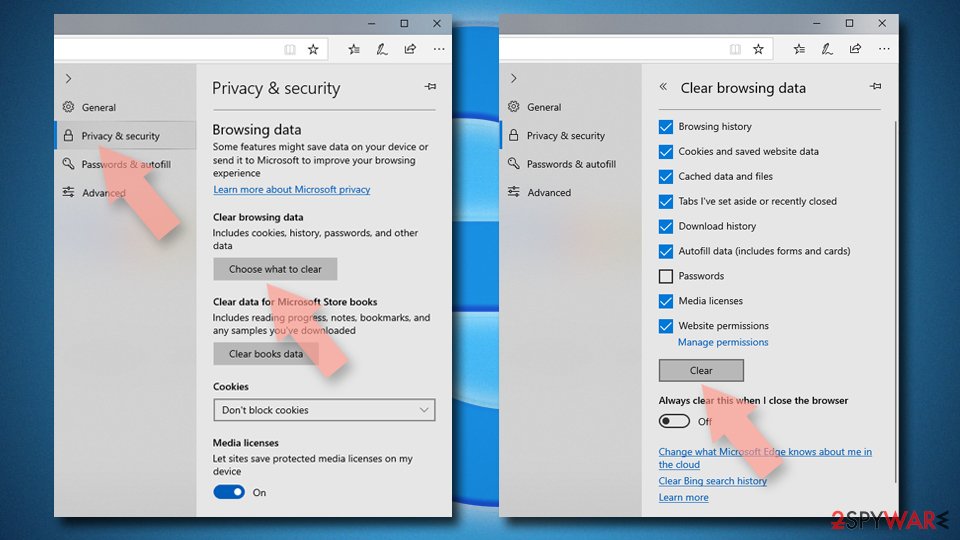
Clear cookies and other browser data:
- Click on the Menu (three horizontal dots at the top-right of the browser window) and select Settings > Privacy, search, and services..
- Under Clear browsing data, pick Choose what to clear.
- Select Cookies and other site data and Cached images and files. (apart from passwords, although you might want to include Media licenses as well, if applicable) and click on Clear.

Restore new tab and homepage settings:
- Click the menu icon and choose Settings.
- Then find On startup section.
- Click Remove next to any suspicious startup page.
Reset MS Edge if the above steps did not work:
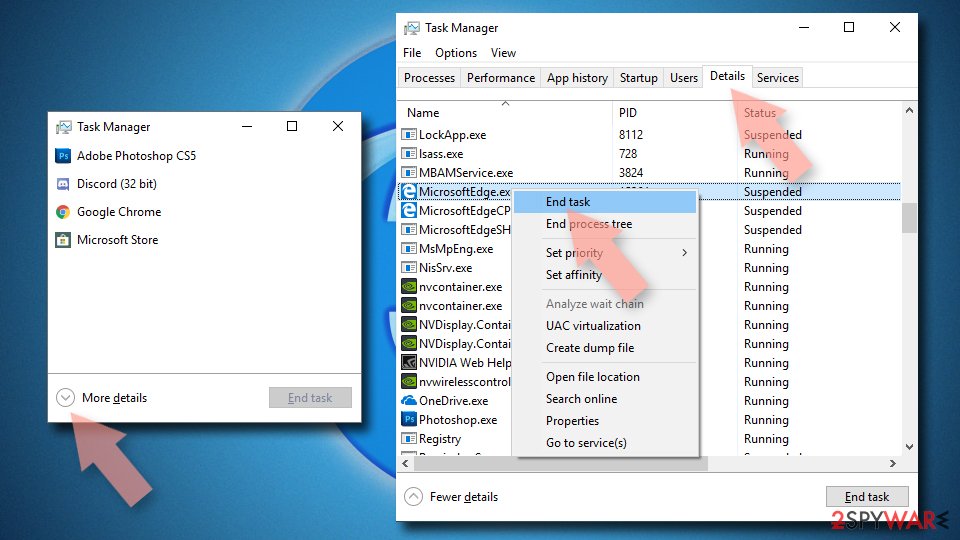
- Press on Ctrl + Shift + Esc to open Task Manager.
- Click on More details arrow at the bottom of the window.
- Select Details tab.
- Now scroll down and locate every entry with Microsoft Edge name in it. Right-click on each of them and select End Task to stop MS Edge from running.

Instructions for Chromium-based Edge
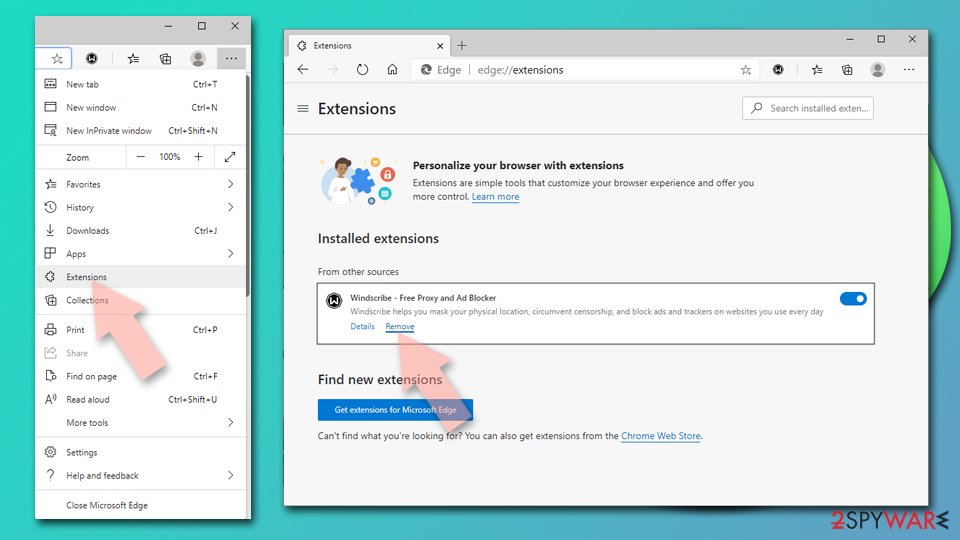
Delete extensions from MS Edge (Chromium):
- Open Edge and click select Settings > Extensions.
- Delete unwanted extensions by clicking Remove.

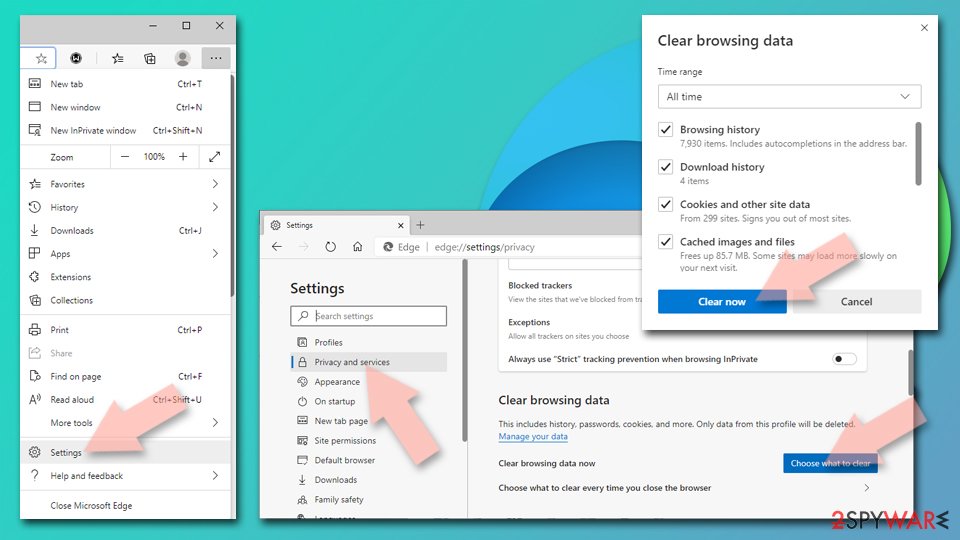
Clear cache and site data:
- Click on Menu and go to Settings.
- Select Privacy, search and services.
- Under Clear browsing data, pick Choose what to clear.
- Under Time range, pick All time.
- Select Clear now.

Reset Chromium-based MS Edge:
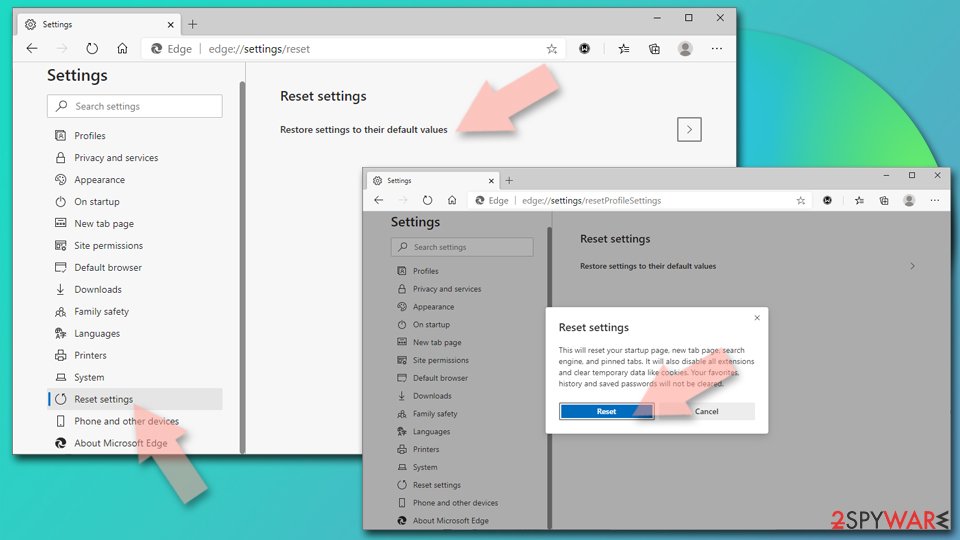
- Click on Menu and select Settings.
- On the left side, pick Reset settings.
- Select Restore settings to their default values.
- Confirm with Reset.
- This will disable extensions and reset startup pages but will not delete bookmarks, saved passwords, or browsing history.

Remove from Mozilla Firefox (FF)
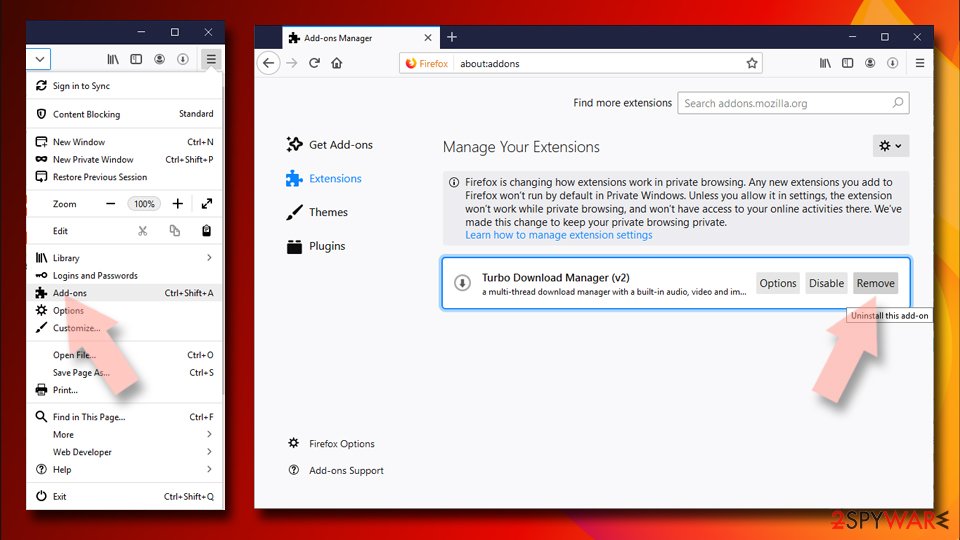
Remove dangerous extensions:
- Open Mozilla Firefox browser and click on the Menu (three horizontal lines at the top-right of the window).
- Select Add-ons.
- In here, select the unwanted extension and click Remove.

Reset the homepage:
- Click three horizontal lines at the top right corner to open the menu.
- Choose Settings.
- Under Home, set your preferred homepage and new tab settings.
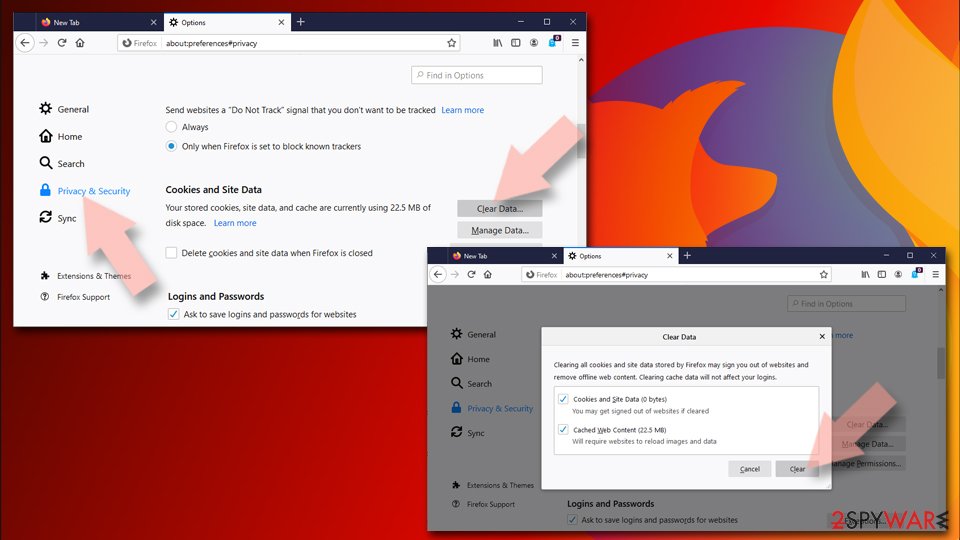
Clear cookies and site data:
- Click Menu and pick Settings.
- Go to Privacy & Security section.
- Scroll down to locate Cookies and Site Data.
- Click on Clear Data…
- Select Cookies and Site Data and Temporary cached files and pages, then click Clear.

Reset Mozilla Firefox
If clearing the browser as explained above did not help, reset Mozilla Firefox:
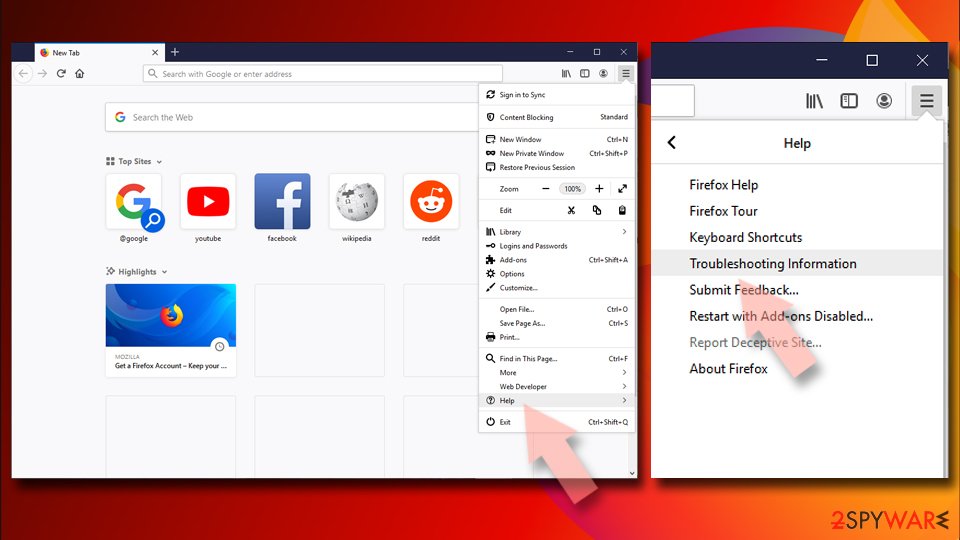
- Open Mozilla Firefox browser and click the Menu.
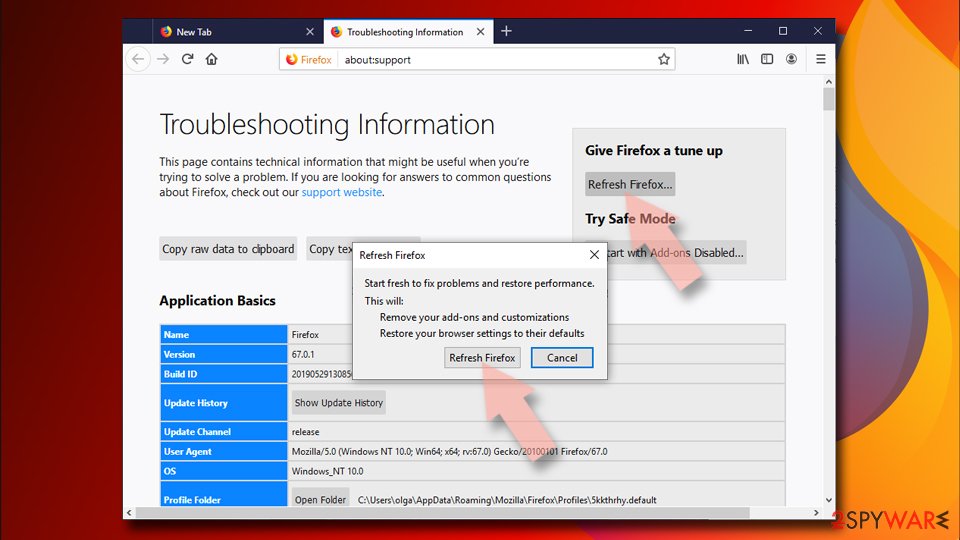
- Go to Help and then choose Troubleshooting Information.
- Under Give Firefox a tune up section, click on Refresh Firefox…
- Once the pop-up shows up, confirm the action by pressing on Refresh Firefox.


Remove from Google Chrome
You need to remove Search.etype.com from the browser too
Delete malicious extensions from Google Chrome:
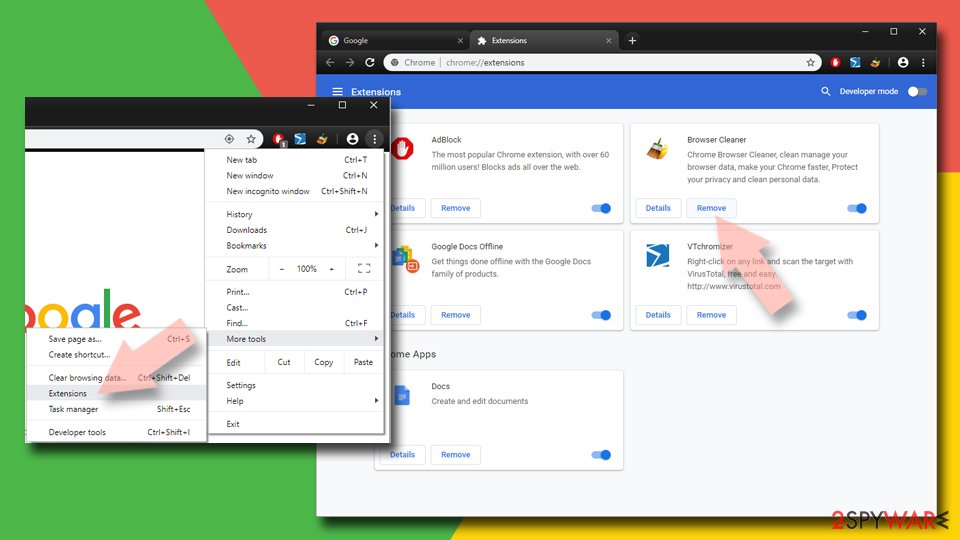
- Open Google Chrome, click on the Menu (three vertical dots at the top-right corner) and select More tools > Extensions.
- In the newly opened window, you will see all the installed extensions. Uninstall all suspicious extensions related to the unwanted program by clicking Remove.

Clear cache and web data from Chrome:
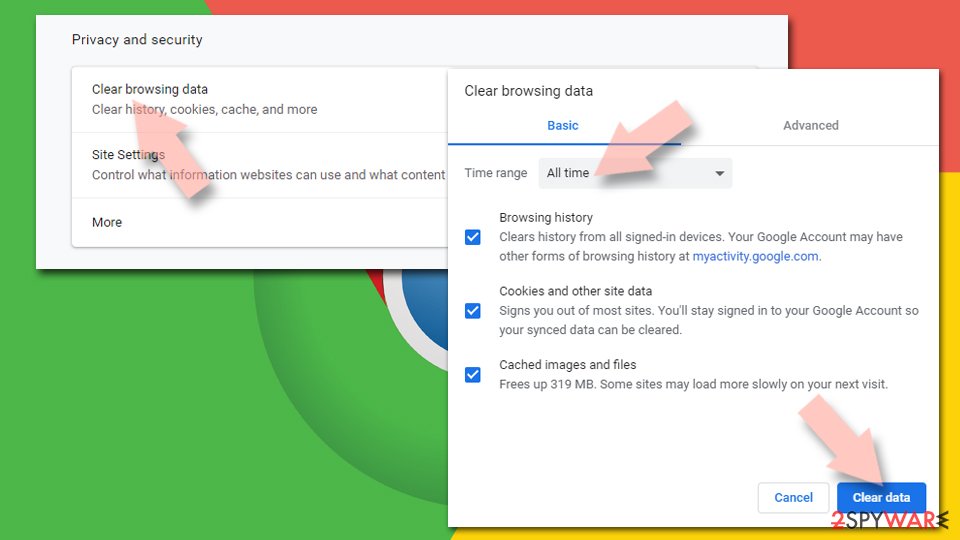
- Click on Menu and pick Settings.
- Under Privacy and security, select Clear browsing data.
- Select Browsing history, Cookies and other site data, as well as Cached images and files.
- Click Clear data.

Change your homepage:
- Click menu and choose Settings.
- Look for a suspicious site in the On startup section.
- Click on Open a specific or set of pages and click on three dots to find the Remove option.
Reset Google Chrome:
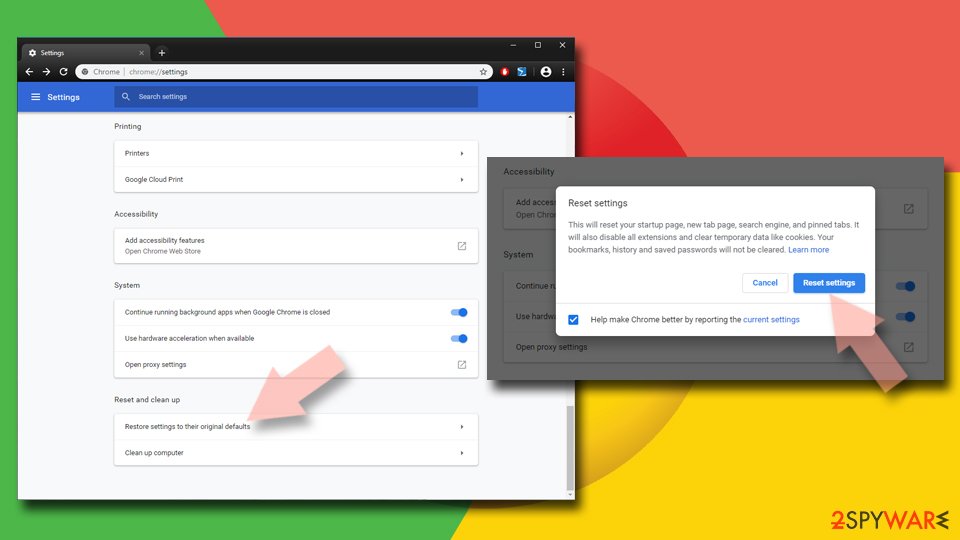
If the previous methods did not help you, reset Google Chrome to eliminate all the unwanted components:
- Click on Menu and select Settings.
- In the Settings, scroll down and click Advanced.
- Scroll down and locate Reset and clean up section.
- Now click Restore settings to their original defaults.
- Confirm with Reset settings.

Delete from Safari
-
Remove dangerous extensions
Open Safari web browser and click on Safari in menu at the top left of the screen. Once you do this, select Preferences.
-
Here, select Extensions and look for search.etype.com or other suspicious entries. Click on the Uninstall button to get rid each of them.

-
Reset Safari
Open Safari browser and click on Safari in menu section at the top left of the screen. Here, select Reset Safari....
-
Now you will see a detailed dialog window filled with reset options. All of those options are usually checked, but you can specify which of them you want to reset. Click the Reset button to complete search.etype.com removal process.


After uninstalling this potentially unwanted program (PUP) and fixing each of your web browsers, we recommend you to scan your PC system with a reputable anti-spyware. This will help you to get rid of search.etype.com registry traces and will also identify related parasites or possible malware infections on your computer. For that you can use our top-rated malware remover: FortectIntego, SpyHunter 5Combo Cleaner or Malwarebytes.
How to prevent from getting browser hijacker
Protect your privacy – employ a VPN
There are several ways how to make your online time more private – you can access an incognito tab. However, there is no secret that even in this mode, you are tracked for advertising purposes. There is a way to add an extra layer of protection and create a completely anonymous web browsing practice with the help of Private Internet Access VPN. This software reroutes traffic through different servers, thus leaving your IP address and geolocation in disguise. Besides, it is based on a strict no-log policy, meaning that no data will be recorded, leaked, and available for both first and third parties. The combination of a secure web browser and Private Internet Access VPN will let you browse the Internet without a feeling of being spied or targeted by criminals.
No backups? No problem. Use a data recovery tool
If you wonder how data loss can occur, you should not look any further for answers – human errors, malware attacks, hardware failures, power cuts, natural disasters, or even simple negligence. In some cases, lost files are extremely important, and many straight out panic when such an unfortunate course of events happen. Due to this, you should always ensure that you prepare proper data backups on a regular basis.
If you were caught by surprise and did not have any backups to restore your files from, not everything is lost. Data Recovery Pro is one of the leading file recovery solutions you can find on the market – it is likely to restore even lost emails or data located on an external device.

If this free guide helped you and you are satisfied with our service, please consider making a donation to keep this service alive. Even a smallest amount will be appreciated.