SpyAxe (Virus Removal Guide) - updated Aug 2018
SpyAxe Removal Guide
What is SpyAxe?
SpyAxe – a dangerous application that prompts users to pay for its licensed version

SpyAxe is an illegal and corrupt anti-virus application that is usually downloaded and installed without users' consent. It then spams fake security messages in the system tray. The pop-ups typically inform users that they are infected with Trojan-Downloader.Win32.Zlob, and attempts to connect to SpyAxe's official website to make them purchase the licensed version of the program. Nevertheless, this outrageous cooperation between Zlob malware and fake security software developers is only an attempt to monetize on unsuspecting users.
| Summary | |
| Name | SpyAxe |
| Type | Rogue security application |
| Delivered by | Trojan-Downloader.Win32.Zlob |
| Symptoms | Questionable system scans, flashing messages, pop-ups, ads, redirects, etc. |
| Danger level | High. Can result in loss of money and infect the PC with other malware |
| Detection and elimination | Use FortectIntego or SpyHunter 5Combo Cleaner |
Zlob malware (which is highly responsible for SpyAxe and other malicious application distribution) is typically obtained when users download and install codec pack[1] from the internet. Nevertheless, it can also be spread via malicious email attachments, or disguised as any executable on the world wide web. Regardless of how the rogue app installed on your machine, it is critical to take care of SpyAxe virus removal ASAP.
There are various versions of the SpyAxe trojan, and it injects machines with various fake alerts, but one of the most common ones displays the following:
Your computer is infected!
It is recommended ti use special antispyware tools to prevent data loss.
Windows will now download and install the most up-to-date antispyware for you.Click here to protect your computer from spyware
As soon as the user clicks on the pop-up, SpyAxe will be downloaded and installed automatically. In other cases, victims reported that they are led to the payment page of the application. If users proceed and pay for the full version, the program will conduct a fake scan and pretend that the malware is eliminated.
What makes matters worse is that the disclosed credit card information will most likely be used for illegal purposes, such as unauthorized purchases or even identity fraud.[2] Therefore, security experts[3] recommend to remove SpyAxe virus and never disclose any information.
SpyAxe malware can also perform the following tasks:
- Download and install additional (malicious) applications;
- Slowdown the computer operation;
- Result in several system crashes;
- Corrupt other software;
- Install toolbars, browser extensions and similar add-ons without users' consent, etc.
Because the bogus app is closely related to a trojan, manual SpyAxe removal is not recommended. Instead, users should download and install FortectIntego or SpyHunter 5Combo Cleaner for a secure elimination.

Avoid downloading suspicious files from third-party sites
Any executable can be malicious. That means that malicious actors can inject trojans and other malware into hacked websites. Additionally, hackers themselves might create a bogus site that distributes various executables. That is why downloading and executing any type of file is rather dangerous, especially if it was downloaded from a compromised website.
Therefore, refrain yourself from downloading data from file-sharing and torrent sites. Additionally, codec packs are not needed for a long time now, as browsers and software can play video and open other files without external applications.
You should also be careful when opening emails from unknown sources. Various MS office documents can be malware in disguise and should be not opened carelessly. If you need to open that type of file, make sure you scan it using anti-virus software first.
Eliminate SpyAxe and other malware from your machine
Because of the way the trojan works, it is highly likely that your machine is contaminated with multiple threats, which makes manual SpyAxe removal almost impossible. Thus, merely employ FortectIntego or SpyHunter 5Combo Cleaner and perform a full system scan. Note that the virus might block security software from working correctly. In such case, enter Safe Mode with Networking and perform the scan from there.
If you still struggle to remove SpyAxe virus in Safe Mode, then try using System Restore feature. We explain how to do that as well.
Getting rid of SpyAxe. Follow these steps
Manual removal using Safe Mode
To remove SpyAxe from your system safely, enter Safe Mode with Networking:
Important! →
Manual removal guide might be too complicated for regular computer users. It requires advanced IT knowledge to be performed correctly (if vital system files are removed or damaged, it might result in full Windows compromise), and it also might take hours to complete. Therefore, we highly advise using the automatic method provided above instead.
Step 1. Access Safe Mode with Networking
Manual malware removal should be best performed in the Safe Mode environment.
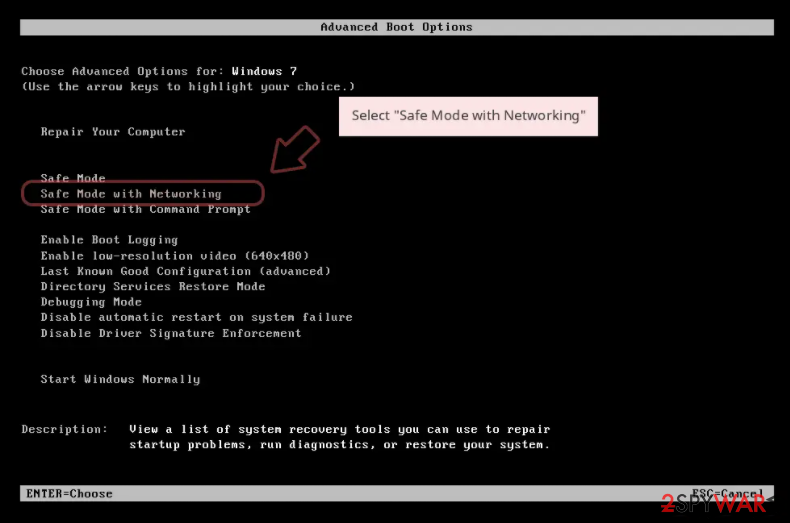
Windows 7 / Vista / XP
- Click Start > Shutdown > Restart > OK.
- When your computer becomes active, start pressing F8 button (if that does not work, try F2, F12, Del, etc. – it all depends on your motherboard model) multiple times until you see the Advanced Boot Options window.
- Select Safe Mode with Networking from the list.

Windows 10 / Windows 8
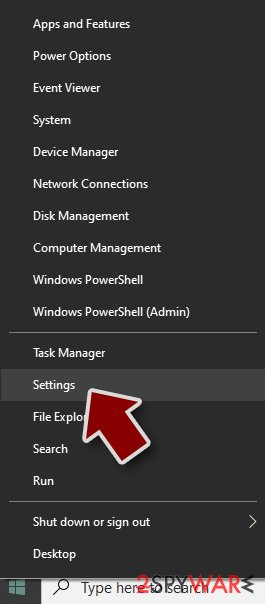
- Right-click on Start button and select Settings.
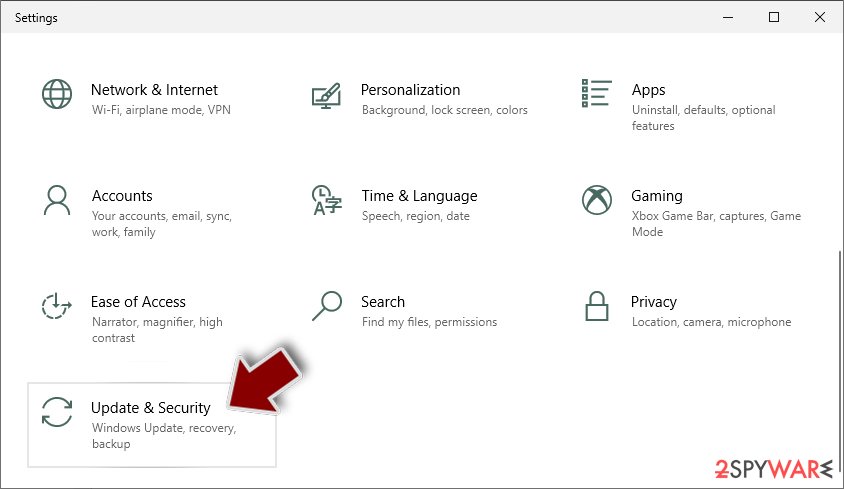
- Scroll down to pick Update & Security.
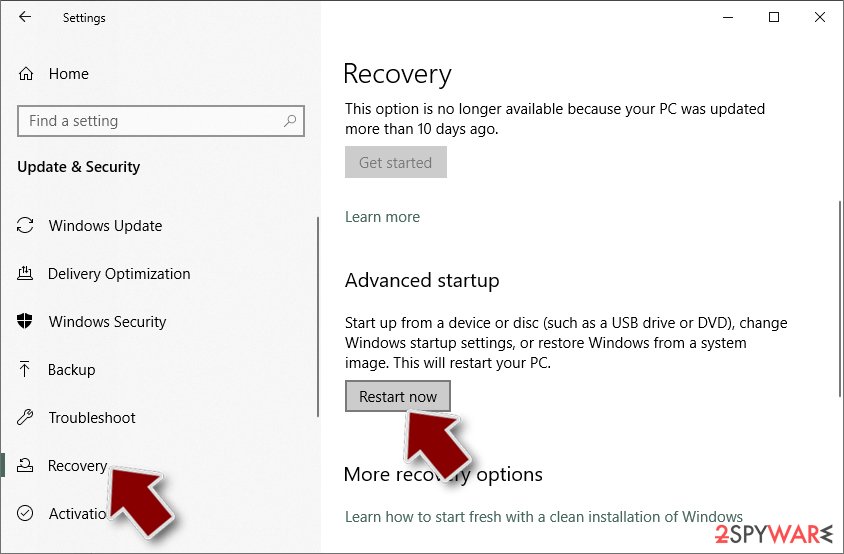
- On the left side of the window, pick Recovery.
- Now scroll down to find Advanced Startup section.
- Click Restart now.
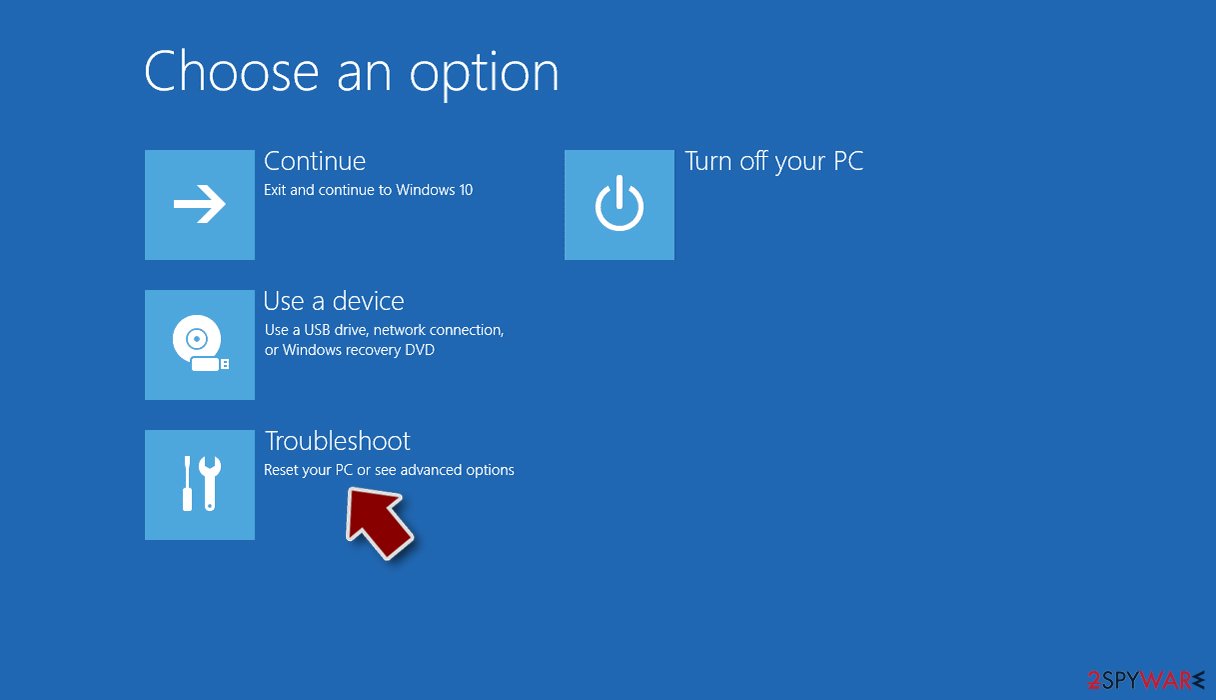
- Select Troubleshoot.
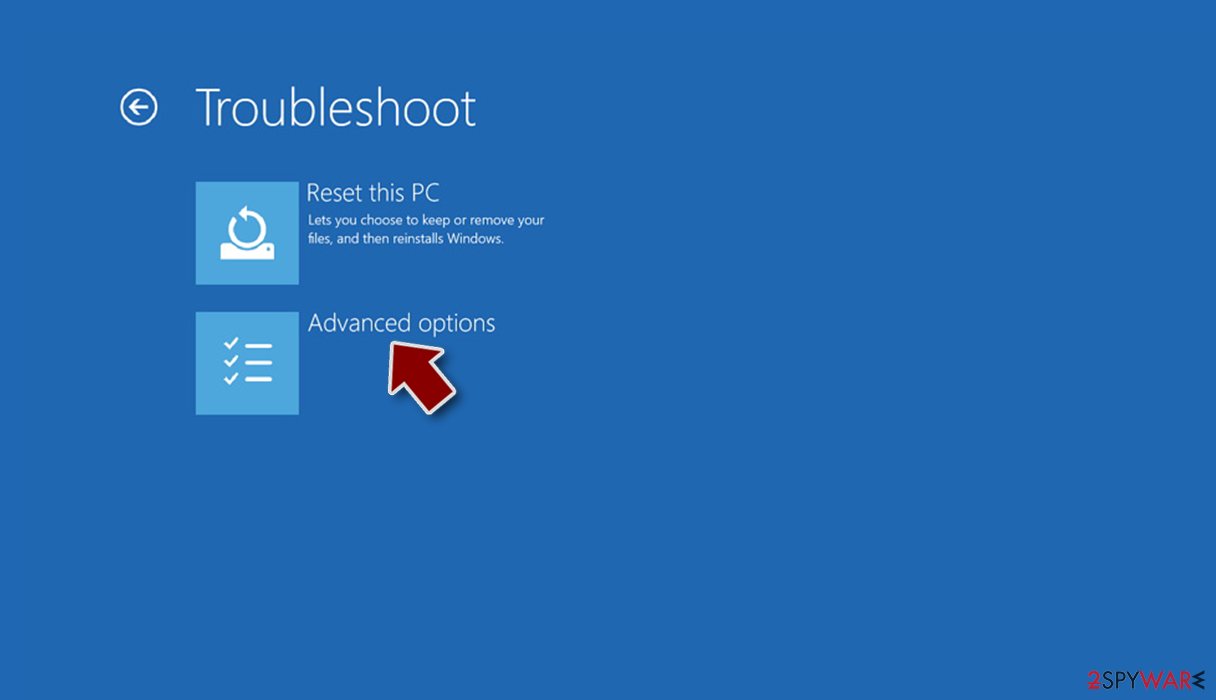
- Go to Advanced options.
- Select Startup Settings.
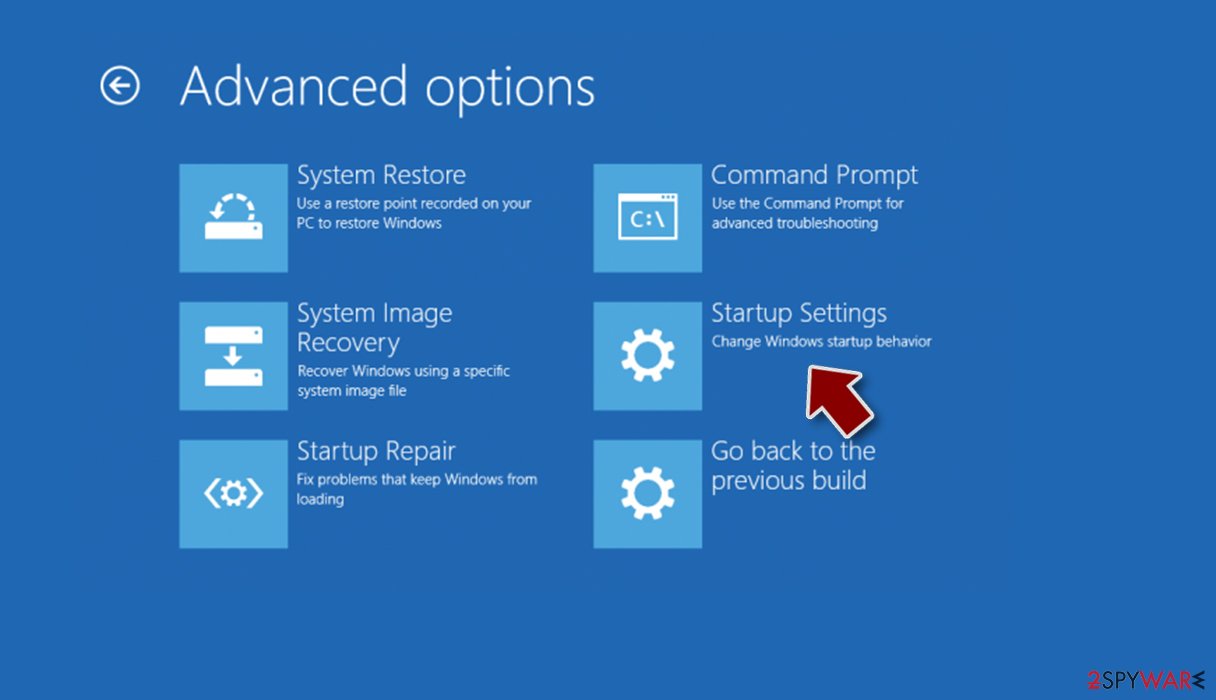
- Press Restart.
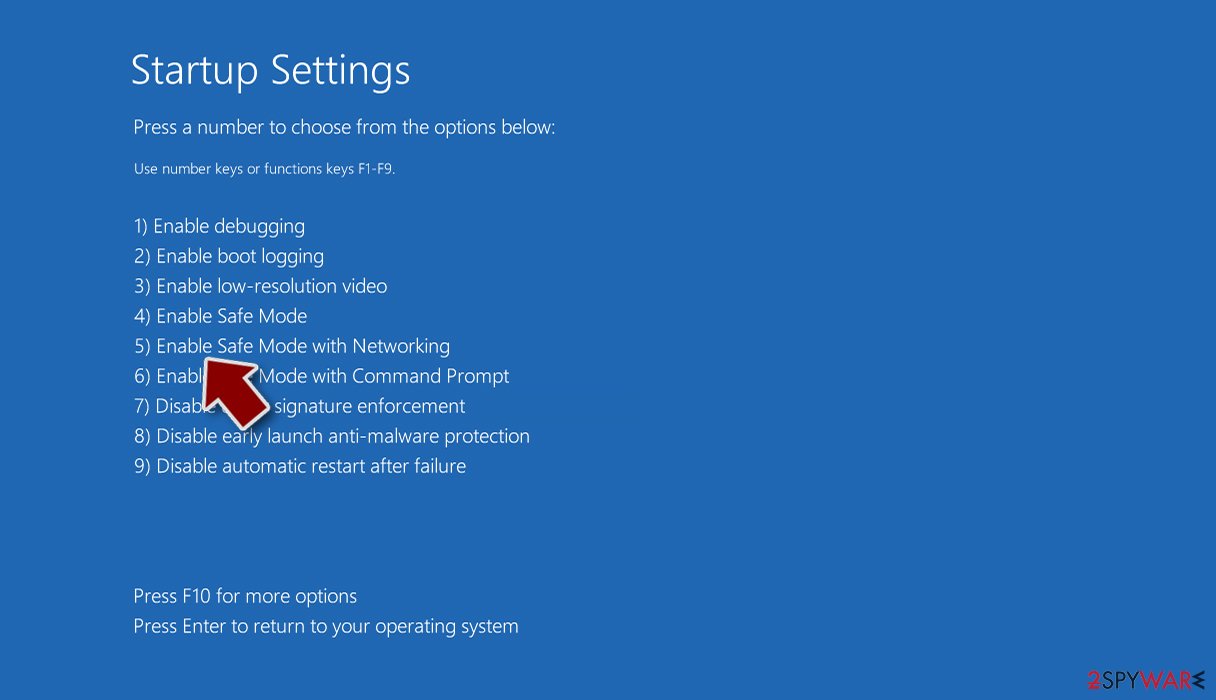
- Now press 5 or click 5) Enable Safe Mode with Networking.


Step 2. Shut down suspicious processes
Windows Task Manager is a useful tool that shows all the processes running in the background. If malware is running a process, you need to shut it down:
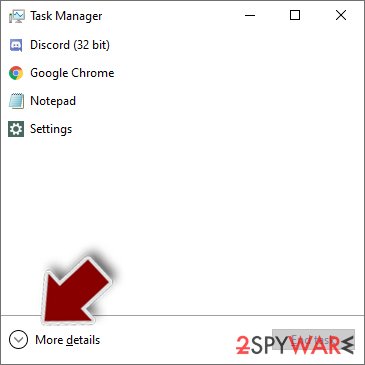
- Press Ctrl + Shift + Esc on your keyboard to open Windows Task Manager.
- Click on More details.
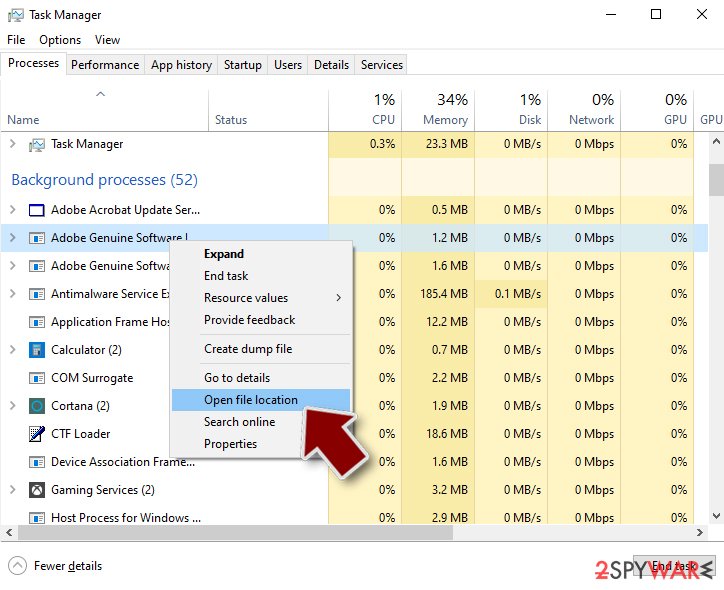
- Scroll down to Background processes section, and look for anything suspicious.
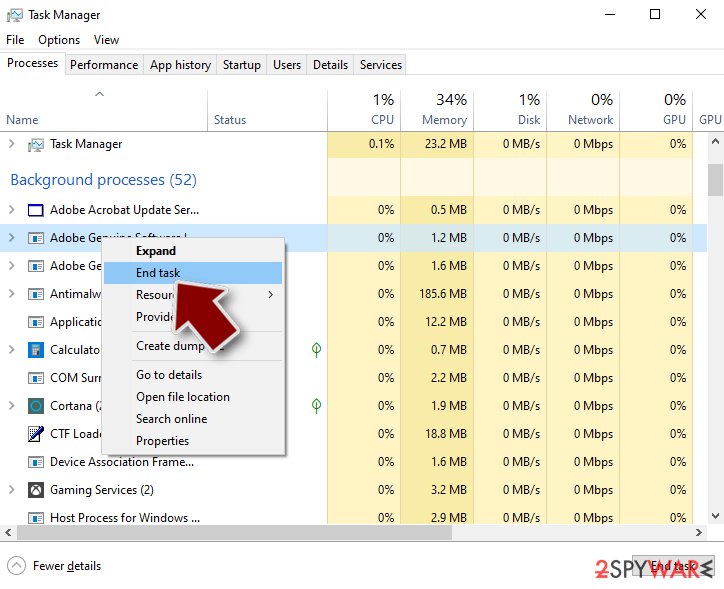
- Right-click and select Open file location.
- Go back to the process, right-click and pick End Task.
- Delete the contents of the malicious folder.


Step 3. Check program Startup
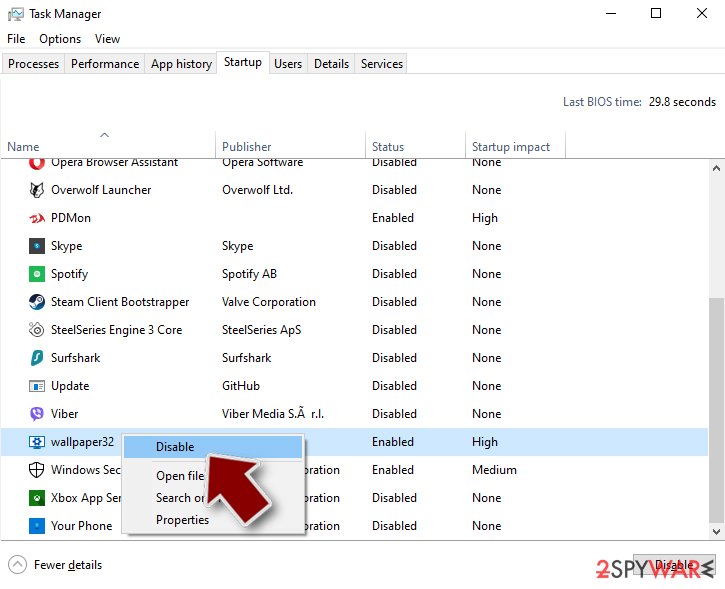
- Press Ctrl + Shift + Esc on your keyboard to open Windows Task Manager.
- Go to Startup tab.
- Right-click on the suspicious program and pick Disable.

Step 4. Delete virus files
Malware-related files can be found in various places within your computer. Here are instructions that could help you find them:
- Type in Disk Cleanup in Windows search and press Enter.
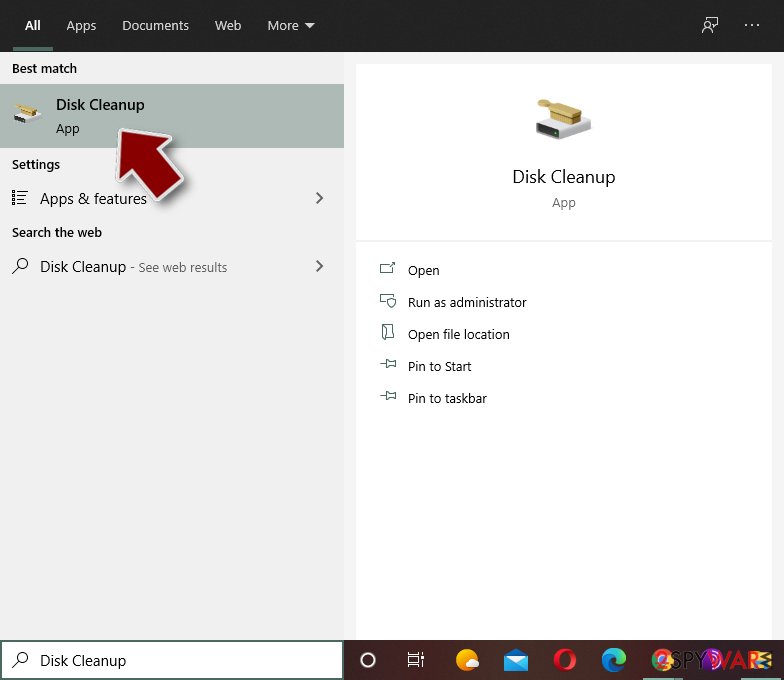
- Select the drive you want to clean (C: is your main drive by default and is likely to be the one that has malicious files in).
- Scroll through the Files to delete list and select the following:
Temporary Internet Files
Downloads
Recycle Bin
Temporary files - Pick Clean up system files.
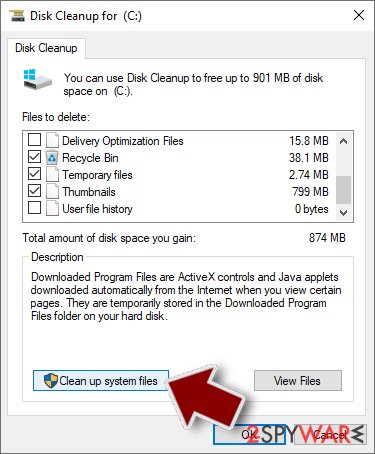
- You can also look for other malicious files hidden in the following folders (type these entries in Windows Search and press Enter):
%AppData%
%LocalAppData%
%ProgramData%
%WinDir%


After you are finished, reboot the PC in normal mode.
Remove SpyAxe using System Restore
You can also use System Restore to disable the virus:
-
Step 1: Reboot your computer to Safe Mode with Command Prompt
Windows 7 / Vista / XP- Click Start → Shutdown → Restart → OK.
- When your computer becomes active, start pressing F8 multiple times until you see the Advanced Boot Options window.
-
Select Command Prompt from the list

Windows 10 / Windows 8- Press the Power button at the Windows login screen. Now press and hold Shift, which is on your keyboard, and click Restart..
- Now select Troubleshoot → Advanced options → Startup Settings and finally press Restart.
-
Once your computer becomes active, select Enable Safe Mode with Command Prompt in Startup Settings window.

-
Step 2: Restore your system files and settings
-
Once the Command Prompt window shows up, enter cd restore and click Enter.

-
Now type rstrui.exe and press Enter again..

-
When a new window shows up, click Next and select your restore point that is prior the infiltration of SpyAxe. After doing that, click Next.


-
Now click Yes to start system restore.

-
Once the Command Prompt window shows up, enter cd restore and click Enter.


Finally, you should always think about the protection of crypto-ransomwares. In order to protect your computer from SpyAxe and other ransomwares, use a reputable anti-spyware, such as FortectIntego, SpyHunter 5Combo Cleaner or Malwarebytes
How to prevent from getting trojans
Protect your privacy – employ a VPN
There are several ways how to make your online time more private – you can access an incognito tab. However, there is no secret that even in this mode, you are tracked for advertising purposes. There is a way to add an extra layer of protection and create a completely anonymous web browsing practice with the help of Private Internet Access VPN. This software reroutes traffic through different servers, thus leaving your IP address and geolocation in disguise. Besides, it is based on a strict no-log policy, meaning that no data will be recorded, leaked, and available for both first and third parties. The combination of a secure web browser and Private Internet Access VPN will let you browse the Internet without a feeling of being spied or targeted by criminals.
No backups? No problem. Use a data recovery tool
If you wonder how data loss can occur, you should not look any further for answers – human errors, malware attacks, hardware failures, power cuts, natural disasters, or even simple negligence. In some cases, lost files are extremely important, and many straight out panic when such an unfortunate course of events happen. Due to this, you should always ensure that you prepare proper data backups on a regular basis.
If you were caught by surprise and did not have any backups to restore your files from, not everything is lost. Data Recovery Pro is one of the leading file recovery solutions you can find on the market – it is likely to restore even lost emails or data located on an external device.

If this free guide helped you and you are satisfied with our service, please consider making a donation to keep this service alive. Even a smallest amount will be appreciated.
- ^ Whitson Gordon. What Are Codec Packs and Should I Use Them?. LifeHacker. Life hacks.
- ^ Identity fraud. Wikipedia. The free encyclopedia.
- ^ SemVirus. SemVirus. Cybersecurity site.