41. by Guest. 2006-04-18 11:04:12
Used Spyware Doc but it took about 2 or 3 runs before everything was removed. Still have the blinking icon alerting me that there is a problem. How can I get rid of that?
Thanks!
42. by Guest. 2006-04-17 19:04:46
Spyware Doc. Thanks a million. I downloaded your program and love it. It has kept me free of
scumbag parasites ever since, Keep up the good work.
I you are having trouble removing this scumbag CS virious, follow the directions on this site.
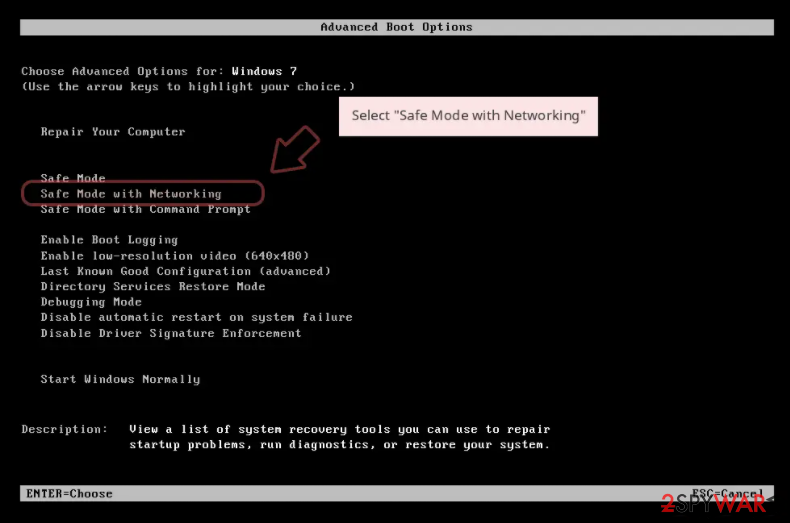
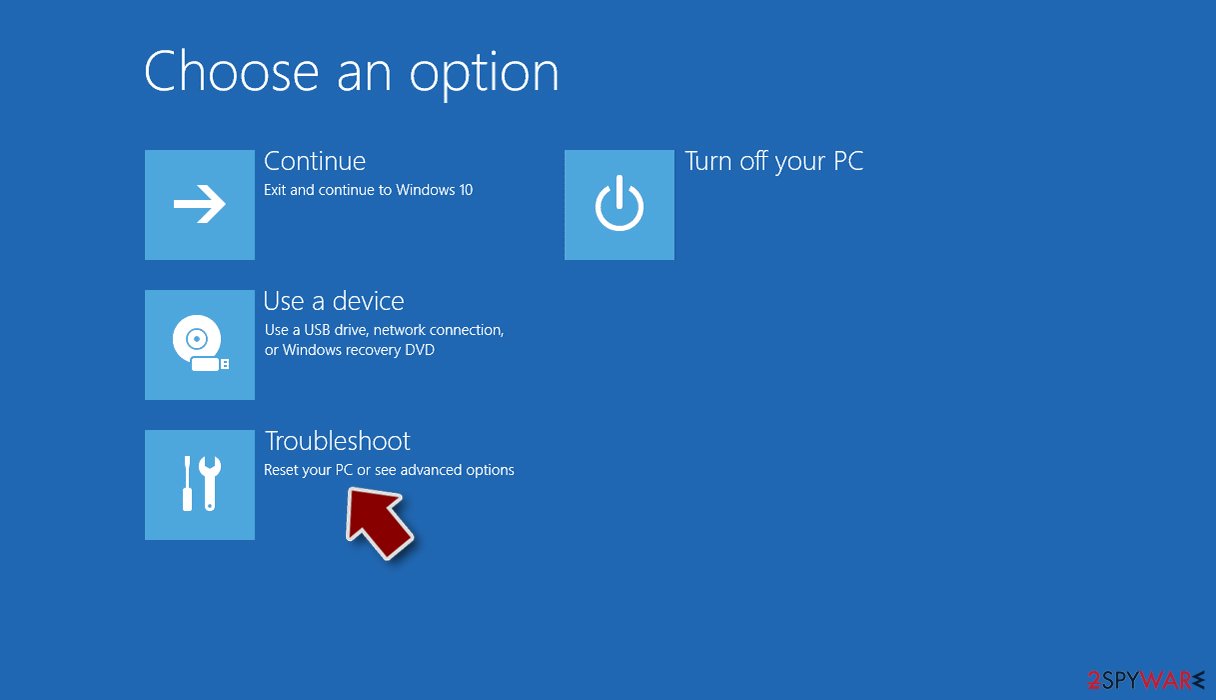
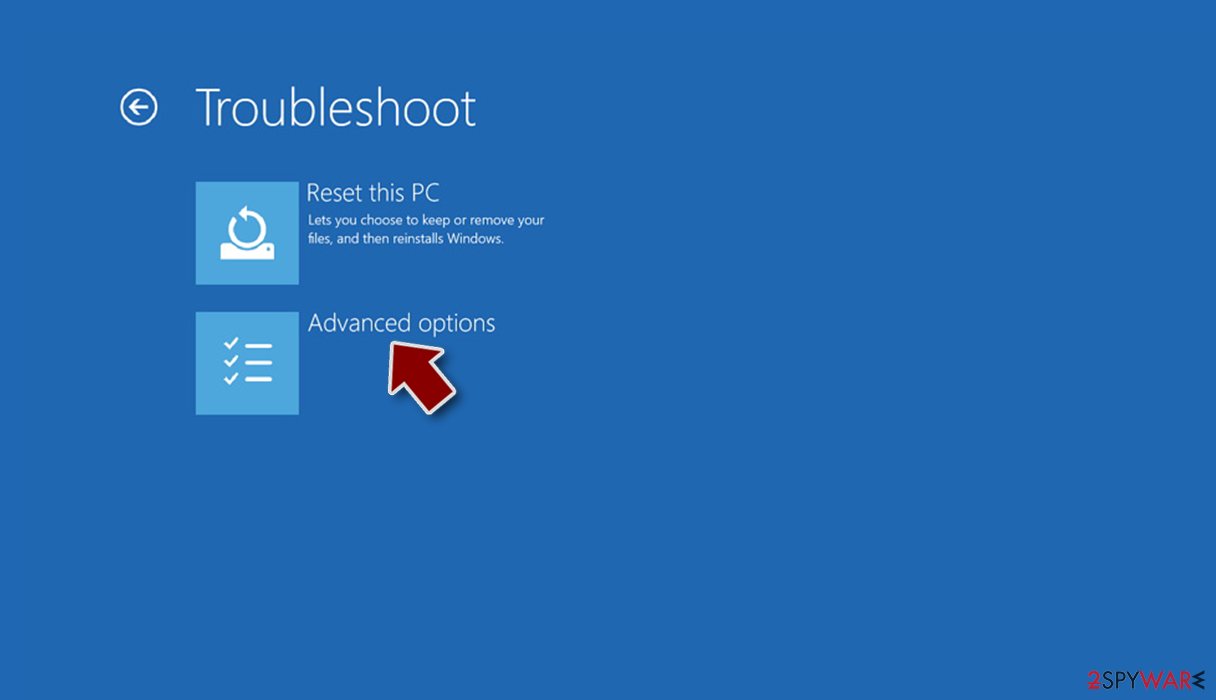
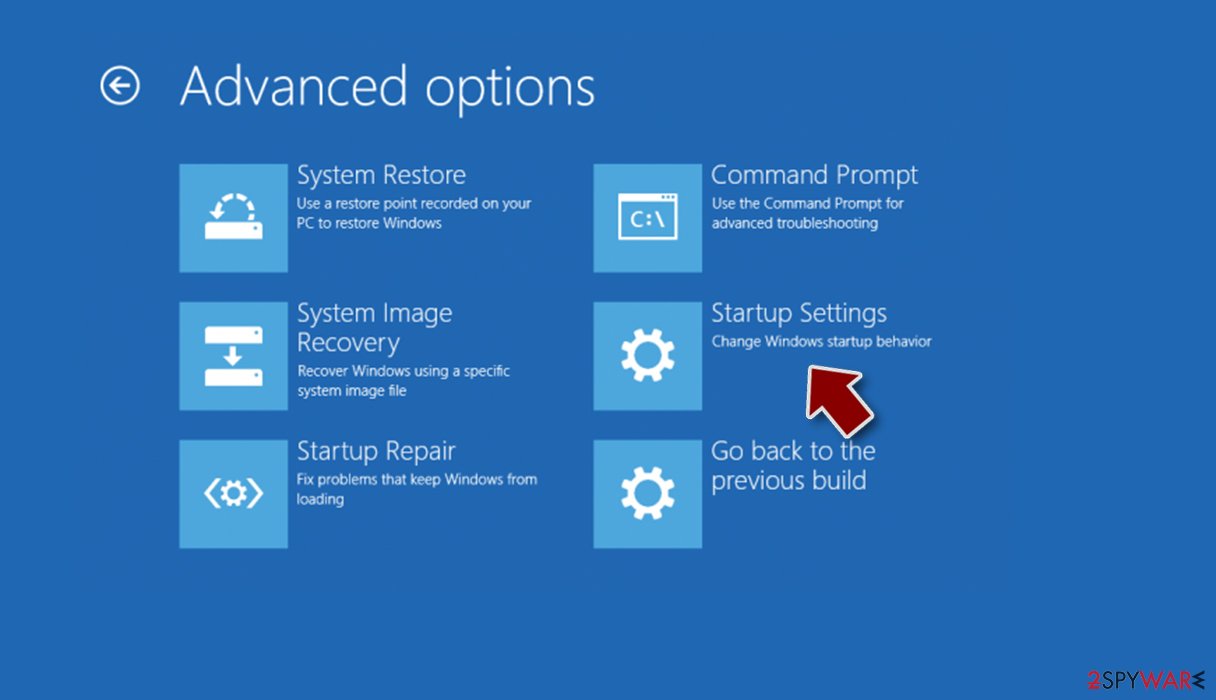
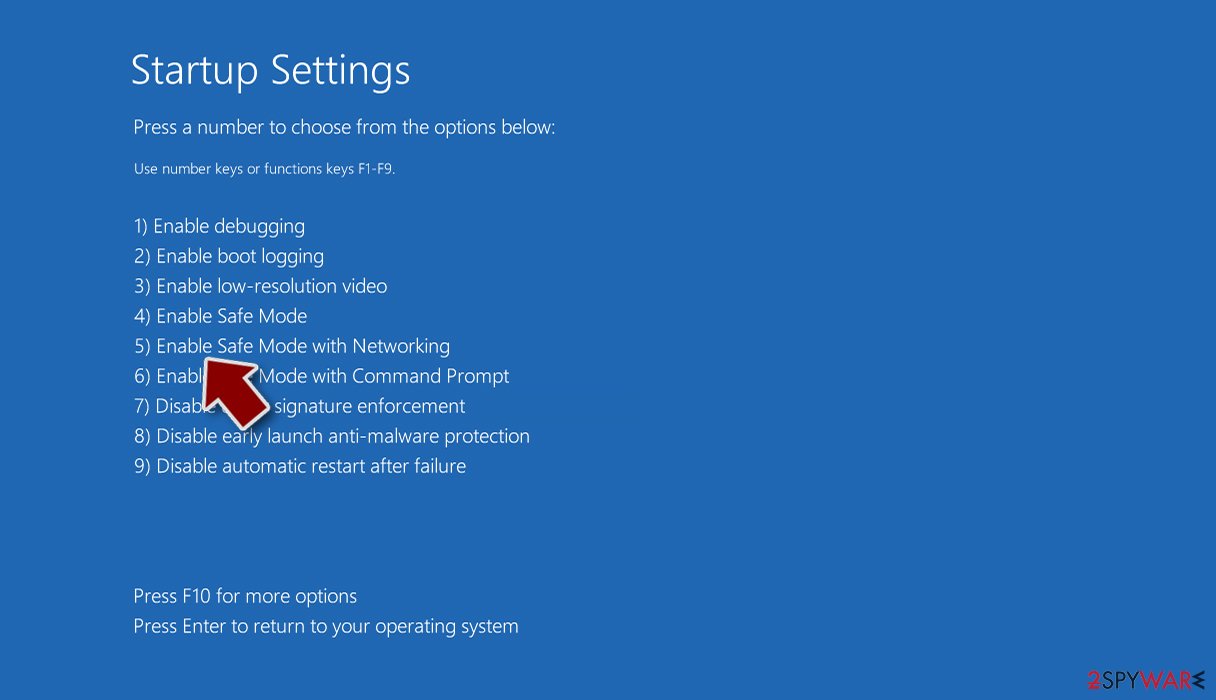
Only do it in SAFE MODE. This CS is so imbeded Windows will not allow you to remove all of it's content, allowing it to reload after re-start. Complete the task list in safe mode, before exiting safe mode dump your recycle bin. Then restart in normal mode. It may take TWO attempts but you will be free of this dirty little CS forever. Buy The DOC it will keep you clean..
A happy Customer in LV. NV.
43. by Guest. 2006-04-16 16:04:42
I tried everything i first ran Norton which didn't ANYTHING AT ALL then i ran Trend Micro Anti Spyware which found about 50 of the infectious files and deleted them only to have them return immediately.
I tried the manual remove in safe mode and whenever i would delete a file or kill a process it would start right back immediately but further down the list.
So i gave in and paid for Spyware Doctor and that found about 280 files and removed them but the annoying icons in my tray did not dissapear and eventually took back over and basically rendered Spyware Doctor useless.
Finally i just ran a simple System Restore going back only one day and it fixed it. Luckily PC Tools has a no questions asked 30 day money back guarantee on Spyware Doctor.
44. by Guest. 2006-04-16 13:04:58
from same poster below: ... I should add that the infected machine was running winxp sp2. Also, one of the files that Norton picked up in a full-system scan was stickrep.dll... there were others but i do not recall... anyway, good luck. I would also like to extend thanks the original author of the manual removal instructions. THANKS IT WORKED. ***read my previous post below***
45. by Guest. 2006-04-16 13:04:57
MANUAL REMOVAL posted here is the only thing that works for FREE here, as the SO-CALLED "automatic removal" link leads to a trial version of PC Tools Spyware Doctor which finds the parasite entries BUT WILL NOT REMOVE PARASITE UNTIL YOU REGISTER THE SOFTWARE... Anyway, as you are going through the manual removal procedure you will notice that not all files are present that these instructions say to remove..(depending on if you have conducted any virus scans with your anti-virus software ahead of time...Norton discovered some entries but not everything)
it is ok, for the most part, if some files are not present just make certain you ATTEMPT TO LOCATE THEM THOROUGHLY before going on to the next step in removal. If you follow the MANUAL REMOVAL instructions posted above then it will rid your system of the parasite successfully.
DO NOT do what i did and trust that the automatic removal was a ONE-SHOT solution that you could burn to disc and take to an infected machine because its A HOAX to get you to buy PC TOOLS SPYWARE DOCTOR (NOT A FREE SOLUTION) i.e. A WASTE OF MY TIME... (the poster of this "automatic removal" link should have forewarned that the app must be registered before removal will proceed.
best of luck Friends
46. by Guest. 2006-04-16 11:04:59
I went through all the deletion process and it worked very well, the blinking wheelchair icon disappeared, no more spywarequake... but still, every time i open my internet browser, the page www.perfectedsecurity.com appears instead of google, which is my original startpage. also, things seem to be working considerably more slowly... any ideas?
47. by Guest. 2006-04-15 20:04:15
The following files appeared on my machine (Windows XP Professional) at the same time as the files listed on this page related to SpywareQuake. They were not cleaned out by Spybot Search and Destroy or AVG (see below). My infected system boots from drive D: but most people use drive C:, so you probably need to change the D: to C:
File ot.ico was located in D:\WINDOWS\system- I think it is an icon used for the phoney security alert
Internet Shortcuts "Online Security Guide" and "Security Troubleshooting" were located in
D:\Documents and Settings\All Users\Start Menu
These two files direct the browser to http://realsecurityonline.com/ and http://youronlinesecurity.com/
I belive the first of these is responsible for redirecting the browser start page.
Internet Shortcut "Antivirus Test Online" was located in
D:\Documents and Settings\User\Favorites (User is the user name that was active when infected)
I might have saved this to my favorites list manually
This shortcut also directs the browser to http://youronlinesecurity.com/
The file
6d14e4b1d8ca773bab785d1be032546e_4293828e-4f6d-49de-99a6-037169c9ec5e
was in D:\Documents and Settings\All Users\Application Data\Microsoft\Crypto\RSA\S-1-5-18
I run AVG (free version) for virus protection. It took several runs over a few days time to clean out the offending executables.
I run Spybot Search and Destroy (also free version), which did several registry modifictions related to:
DKAndSuns Fake Security Toolbar (3 items)
Zlob Downloader (nvctrl.exe on each of two different runs)
Smitfraud-C (nvctrl.exe on each of two different runs)
SpywareQuake (A long list of 23 items including the ones listed in the main section of this page, but also many more in HKEY_CLASSES_ROOT)
Vcodec (ts.ico and ncompat.tlb on 3 different runs)
Follow the directions above to kill the running processes first, and things will probably clean up more easily than they did for me. Then you might want to check for some of these additional files.I found
48. by Guest. 2006-04-10 06:04:10
Hello guys. Is there any chance to get one of these files which infecting computers with Spyware Quake (vc3_05b.exe, VideoCodec3_05b.exe etc.) I need to do more research but failed to find an infection files. If you have one of these, please send me email with zipped file.
email: remove.spy@gmail.com
Thanks in advance
49. by Guest. 2006-04-10 00:04:04
thank you!
best method for me was safe mode and remove the exe's and dll's that couldn't be deleted in a normal running machine.
thank you again for your valuable , detailed and comprehensive information.
bless you.
50. by Guest. 2006-04-08 10:04:10
System restore seems to have done SpywareQuake in for me.
51. by Guest. 2006-04-08 01:04:02
Does anyone know of a spyware quake (and sisters) blocker? My AVG is not hacking it. I have just had to format my drive to remove it all
52. by Guest. 2006-04-07 21:04:41
Automatic Removal does NOT work it only scans for the spyware and then tries to convince you to buy the software involved.
53. by Guest. 2006-04-07 15:04:42
has any1 used the AutomaticSpywareQuake removal does it work??? because i dont want to go throught the manual removal havent got the time. someone please answer...
thanx Alex UK
54. by Guest. 2006-04-06 17:04:08
Wow! ...I can't beleive I have just gone through all this whole mess, and it did just like you said, added it's self under a false name, then redirected me to a false page to pay for removal! ...I wish I ahd of know about your Kind, & Much Appreciated Help Before now, Thank-YOU!! ..(I had tried everything except your listed comands on del process, (which is very cool! Thank-YOU!!) ..can we file suite over damages? (maybe with someone already filed a suite on this that you know of? )..Thanks! ..I had to do an entire " Clean Install " of Windows-XP Home, to get it back, as I had ran Adaware, Trojan Hunter, Adelphia Anti-Spy/Virus, & even tried a couple of new ones! ..but the only temp. help, (for just a few minutes, & guess never really was gone, even after a re-start, & clean memory before log on, was Spybot!) ...well, Thank-YOU! for this, & all your help.. GOD Knows, We Need YOU! ...Thanks! - Paul -
55. by Guest. 2006-04-06 15:04:17
I have a problem with norton running all the way through my files. Is it possible that the trojan is shuttng down the anti-virus at a certain point preventing detection?? Thoughts?
56. by Guest. 2006-04-05 12:04:18
Sorry for the mutiple posts. Here are a couple more thoughts:
First - try and restore your system to a date prior to around 3/18 (the first time this seems to have appeared).
Second - if that fails, update your antivirus and spyware files normally.
Third, shut off your system restore function.
Then follow the steps I outlined below.
Finally, run a full system scan with all your spyware and antivirus software WHILE IN SAFE MODE. That should pick up any remnants that you may have missed in the manual steps.
Good luck. I think I finally got it.
57. by Guest. 2006-04-05 10:04:08
I had the same problem as many of you have...it suddenly showed up in my system about two weeks ago. I removed it and kept getting antivirus alerts from the /1024 directory of my system32 folder (I run xp Pro). Here are a few tips:
1 - when you can't delete a file or folder, generally that's because it's in use by the system - i.e. it was loaded when you boot. Boot into safe mode and you can usually avoid that problem.
2 - if it keeps re-appearing, you haven't gotten all the remnants. I found only two files in my system todaydfrgsrv.exe and ld[X].tmp, which apparently was enough to keep getting it back.
3 - shut off your system restore function.
Here is my advice:
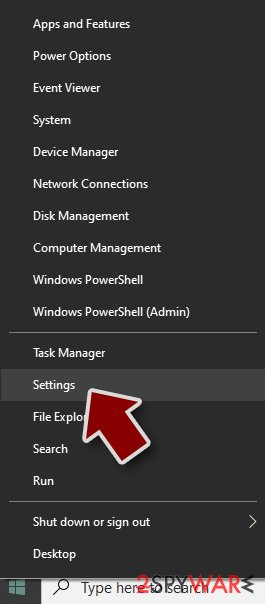
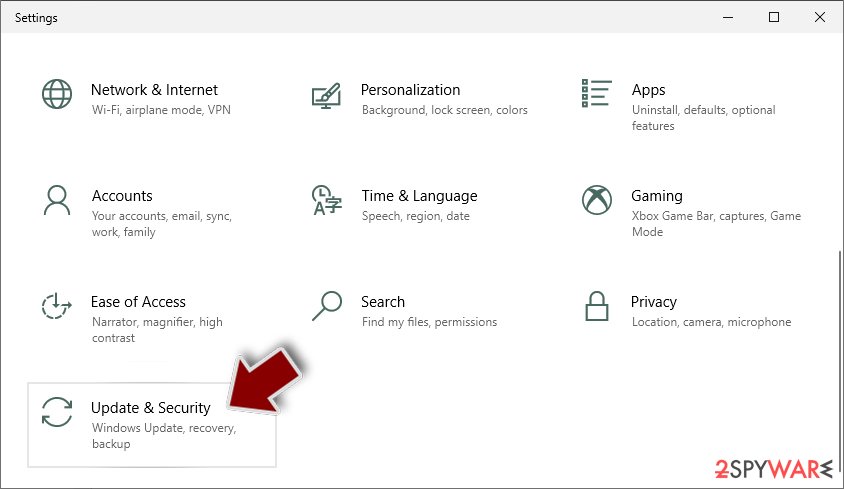
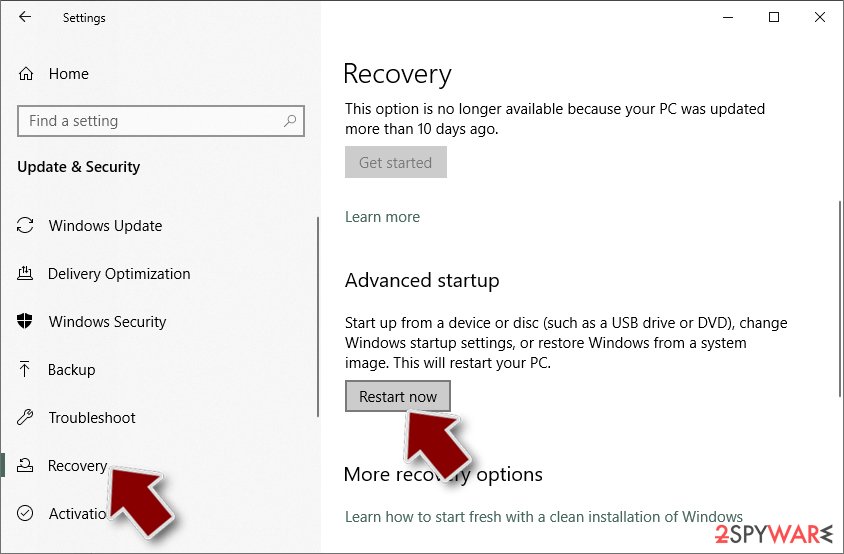
First, boot into safe mode.
Second, go through the manual removal instructions on this page.
Third, run a full system scan with your anti-spyware software (most of these packages don't pick it up though, including Windows Defender and Spybot S&D & AdAware).
Finally, do a full system scan with your anti-virus software.
That should get you a clean system.
Drew from Tampa
58. by Guest. 2006-04-05 09:04:12
geez man, I was going crazy trying to figure out how to remove this. I had already reformatted once and then as soon as I did it was right back onto my computer...
Thanks a lot
59. by Guest. 2006-04-05 08:04:09
i think i'm clean but we need a spyware cleaner which is best ?
Thanx - Alper From TURKEY
60. by Guest. 2006-04-04 15:04:20
I spent 30 min trying (delete files,registry values,ect)to rid myself of this only to find it back.
Thank you, Adam from Maine,USA
Used Spyware Doc but it took about 2 or 3 runs before everything was removed. Still have the blinking icon alerting me that there is a problem. How can I get rid of that?
Thanks!
42. by Guest. 2006-04-17 19:04:46
Spyware Doc. Thanks a million. I downloaded your program and love it. It has kept me free of
scumbag parasites ever since, Keep up the good work.
I you are having trouble removing this scumbag CS virious, follow the directions on this site.
Only do it in SAFE MODE. This CS is so imbeded Windows will not allow you to remove all of it's content, allowing it to reload after re-start. Complete the task list in safe mode, before exiting safe mode dump your recycle bin. Then restart in normal mode. It may take TWO attempts but you will be free of this dirty little CS forever. Buy The DOC it will keep you clean..
A happy Customer in LV. NV.
43. by Guest. 2006-04-16 16:04:42
I tried everything i first ran Norton which didn't ANYTHING AT ALL then i ran Trend Micro Anti Spyware which found about 50 of the infectious files and deleted them only to have them return immediately.
I tried the manual remove in safe mode and whenever i would delete a file or kill a process it would start right back immediately but further down the list.
So i gave in and paid for Spyware Doctor and that found about 280 files and removed them but the annoying icons in my tray did not dissapear and eventually took back over and basically rendered Spyware Doctor useless.
Finally i just ran a simple System Restore going back only one day and it fixed it. Luckily PC Tools has a no questions asked 30 day money back guarantee on Spyware Doctor.
44. by Guest. 2006-04-16 13:04:58
from same poster below: ... I should add that the infected machine was running winxp sp2. Also, one of the files that Norton picked up in a full-system scan was stickrep.dll... there were others but i do not recall... anyway, good luck. I would also like to extend thanks the original author of the manual removal instructions. THANKS IT WORKED. ***read my previous post below***
45. by Guest. 2006-04-16 13:04:57
MANUAL REMOVAL posted here is the only thing that works for FREE here, as the SO-CALLED "automatic removal" link leads to a trial version of PC Tools Spyware Doctor which finds the parasite entries BUT WILL NOT REMOVE PARASITE UNTIL YOU REGISTER THE SOFTWARE... Anyway, as you are going through the manual removal procedure you will notice that not all files are present that these instructions say to remove..(depending on if you have conducted any virus scans with your anti-virus software ahead of time...Norton discovered some entries but not everything)
it is ok, for the most part, if some files are not present just make certain you ATTEMPT TO LOCATE THEM THOROUGHLY before going on to the next step in removal. If you follow the MANUAL REMOVAL instructions posted above then it will rid your system of the parasite successfully.
DO NOT do what i did and trust that the automatic removal was a ONE-SHOT solution that you could burn to disc and take to an infected machine because its A HOAX to get you to buy PC TOOLS SPYWARE DOCTOR (NOT A FREE SOLUTION) i.e. A WASTE OF MY TIME... (the poster of this "automatic removal" link should have forewarned that the app must be registered before removal will proceed.
best of luck Friends
46. by Guest. 2006-04-16 11:04:59
I went through all the deletion process and it worked very well, the blinking wheelchair icon disappeared, no more spywarequake... but still, every time i open my internet browser, the page www.perfectedsecurity.com appears instead of google, which is my original startpage. also, things seem to be working considerably more slowly... any ideas?
47. by Guest. 2006-04-15 20:04:15
The following files appeared on my machine (Windows XP Professional) at the same time as the files listed on this page related to SpywareQuake. They were not cleaned out by Spybot Search and Destroy or AVG (see below). My infected system boots from drive D: but most people use drive C:, so you probably need to change the D: to C:
File ot.ico was located in D:\WINDOWS\system- I think it is an icon used for the phoney security alert
Internet Shortcuts "Online Security Guide" and "Security Troubleshooting" were located in
D:\Documents and Settings\All Users\Start Menu
These two files direct the browser to http://realsecurityonline.com/ and http://youronlinesecurity.com/
I belive the first of these is responsible for redirecting the browser start page.
Internet Shortcut "Antivirus Test Online" was located in
D:\Documents and Settings\User\Favorites (User is the user name that was active when infected)
I might have saved this to my favorites list manually
This shortcut also directs the browser to http://youronlinesecurity.com/
The file
6d14e4b1d8ca773bab785d1be032546e_4293828e-4f6d-49de-99a6-037169c9ec5e
was in D:\Documents and Settings\All Users\Application Data\Microsoft\Crypto\RSA\S-1-5-18
I run AVG (free version) for virus protection. It took several runs over a few days time to clean out the offending executables.
I run Spybot Search and Destroy (also free version), which did several registry modifictions related to:
DKAndSuns Fake Security Toolbar (3 items)
Zlob Downloader (nvctrl.exe on each of two different runs)
Smitfraud-C (nvctrl.exe on each of two different runs)
SpywareQuake (A long list of 23 items including the ones listed in the main section of this page, but also many more in HKEY_CLASSES_ROOT)
Vcodec (ts.ico and ncompat.tlb on 3 different runs)
Follow the directions above to kill the running processes first, and things will probably clean up more easily than they did for me. Then you might want to check for some of these additional files.I found
48. by Guest. 2006-04-10 06:04:10
Hello guys. Is there any chance to get one of these files which infecting computers with Spyware Quake (vc3_05b.exe, VideoCodec3_05b.exe etc.) I need to do more research but failed to find an infection files. If you have one of these, please send me email with zipped file.
email: remove.spy@gmail.com
Thanks in advance
49. by Guest. 2006-04-10 00:04:04
thank you!
best method for me was safe mode and remove the exe's and dll's that couldn't be deleted in a normal running machine.
thank you again for your valuable , detailed and comprehensive information.
bless you.
50. by Guest. 2006-04-08 10:04:10
System restore seems to have done SpywareQuake in for me.
51. by Guest. 2006-04-08 01:04:02
Does anyone know of a spyware quake (and sisters) blocker? My AVG is not hacking it. I have just had to format my drive to remove it all
52. by Guest. 2006-04-07 21:04:41
Automatic Removal does NOT work it only scans for the spyware and then tries to convince you to buy the software involved.
53. by Guest. 2006-04-07 15:04:42
has any1 used the AutomaticSpywareQuake removal does it work??? because i dont want to go throught the manual removal havent got the time. someone please answer...
thanx Alex UK
54. by Guest. 2006-04-06 17:04:08
Wow! ...I can't beleive I have just gone through all this whole mess, and it did just like you said, added it's self under a false name, then redirected me to a false page to pay for removal! ...I wish I ahd of know about your Kind, & Much Appreciated Help Before now, Thank-YOU!! ..(I had tried everything except your listed comands on del process, (which is very cool! Thank-YOU!!) ..can we file suite over damages? (maybe with someone already filed a suite on this that you know of? )..Thanks! ..I had to do an entire " Clean Install " of Windows-XP Home, to get it back, as I had ran Adaware, Trojan Hunter, Adelphia Anti-Spy/Virus, & even tried a couple of new ones! ..but the only temp. help, (for just a few minutes, & guess never really was gone, even after a re-start, & clean memory before log on, was Spybot!) ...well, Thank-YOU! for this, & all your help.. GOD Knows, We Need YOU! ...Thanks! - Paul -
55. by Guest. 2006-04-06 15:04:17
I have a problem with norton running all the way through my files. Is it possible that the trojan is shuttng down the anti-virus at a certain point preventing detection?? Thoughts?
56. by Guest. 2006-04-05 12:04:18
Sorry for the mutiple posts. Here are a couple more thoughts:
First - try and restore your system to a date prior to around 3/18 (the first time this seems to have appeared).
Second - if that fails, update your antivirus and spyware files normally.
Third, shut off your system restore function.
Then follow the steps I outlined below.
Finally, run a full system scan with all your spyware and antivirus software WHILE IN SAFE MODE. That should pick up any remnants that you may have missed in the manual steps.
Good luck. I think I finally got it.
57. by Guest. 2006-04-05 10:04:08
I had the same problem as many of you have...it suddenly showed up in my system about two weeks ago. I removed it and kept getting antivirus alerts from the /1024 directory of my system32 folder (I run xp Pro). Here are a few tips:
1 - when you can't delete a file or folder, generally that's because it's in use by the system - i.e. it was loaded when you boot. Boot into safe mode and you can usually avoid that problem.
2 - if it keeps re-appearing, you haven't gotten all the remnants. I found only two files in my system todaydfrgsrv.exe and ld[X].tmp, which apparently was enough to keep getting it back.
3 - shut off your system restore function.
Here is my advice:
First, boot into safe mode.
Second, go through the manual removal instructions on this page.
Third, run a full system scan with your anti-spyware software (most of these packages don't pick it up though, including Windows Defender and Spybot S&D & AdAware).
Finally, do a full system scan with your anti-virus software.
That should get you a clean system.
Drew from Tampa
58. by Guest. 2006-04-05 09:04:12
geez man, I was going crazy trying to figure out how to remove this. I had already reformatted once and then as soon as I did it was right back onto my computer...
Thanks a lot
59. by Guest. 2006-04-05 08:04:09
i think i'm clean but we need a spyware cleaner which is best ?
Thanx - Alper From TURKEY
60. by Guest. 2006-04-04 15:04:20
I spent 30 min trying (delete files,registry values,ect)to rid myself of this only to find it back.
Thank you, Adam from Maine,USA