The fake Microsoft Security Essentials Alert (scam) - Removal Guide
The fake Microsoft Security Essentials Alert Removal Guide
What is The fake Microsoft Security Essentials Alert?
The fake Microsoft Security Essentials Alert is a malicious program you should remove

The fake Microsoft Security Essentials Alert is a Trojan virus that impersonates the legitimate Microsoft Security Essentials antivirus program and states that your computer is infected with Unknown Win32/Trojan. This is a rogue program that spreads via fake scanners, malicious emails, and similar unsolicited methods.
This malicious software promotes five different fake anti-virus programs, including:
- Red Cross Antivirus,
- Peak Protection 2010,
- Pest Detector 4.1,
- Major Defense Kit
- AntiSpySafeguard.
| Name | The fake Microsoft Security Essentials Alert |
| Type | Rogue antispyware, malware |
| Distribution | Already installed Trojans, fake scanners, |
| Symptoms | Provides fake scan results in order to make users purchase its full version; promotes other rogue programs |
| Removal | You can uninstall unwanted programs via the Control Panel but to make sure that all the malicious components are eliminated, use SpyHunter 5Combo Cleaner or another reputable antivirus software |
| System fix | If your computer starts to malfunction after malware is eliminated, scan it with FortectIntego |
The fake Microsoft Security Essentials Alert will state that it could not remove Unknown Win32/Trojan threat and will prompt you to install one of those five rogue programs to remove the infection, which actually doesn't even exist on your computer. Actually, it will display a list with 35 different antivirus programs, 30 of which are legitimate, but it let you install only the rogue ones.
Once the rogue program is installed, it will prompt you to reboot your computer. After the reboot, it will scan your computer for malware once again and will state that all found infections can be removed only with a full version of the program.
That's the main goal of this malware – to trick you into purchasing the rogue program. The scan results are false, and you can safely ignore them. And, of course, don't purchase any of those rogue programs.
The fake Microsoft Security Essentials Alert and related rogue programs should be removed from the computer as soon as possible. However, if you already purchased it, then you should contact your credit card company and dispute the charges.
There are two other every annoying things about this malware: it blocks task manager, registry editor, and other legitimate programs, and it also displays fake security alerts to scare you into thinking that your computer is infected with spyware, adware, Trojans, and other malware. Some of the fake security alerts read:
The application taskmgr.exe was launched successfully but it was forced to shut down due to security reasons.
This happened because the application was infected by a malicious program which might pose a threat for the OS.
It is highly recommended to install the necessary heuristic module and perform a full scan of your computer to exterminate malicious programs from it.
Warning! Database updated failed!
Database update failed!
Outdated viruses database are not effective can't guarantee adequate protection and security for your PC! Click here to get the full version of the product and update the database!
Malware removal steps
The fake Microsoft Security Essentials Alert and all those five rogues Red Cross Antivirus, Peak Protection 2010, Pest Detector 4.1, Major Defense Kit, and AntiSpySafeguard should be removed from the system upon detection. It is evident that this is a scam.
None of those programs will actually protect your computer against malicious software. If your computer is infected with the virus or any of those five programs, please follow our removal instructions below to remove it from your computer either manually or with an automatic removal tool. Related files:
- tmp.exe
- kjkkklklj.bat
- hotfix.exe
You may remove virus damage with a help of FortectIntego. SpyHunter 5Combo Cleaner and Malwarebytes are recommended to detect potentially unwanted programs and viruses with all their files and registry entries that are related to them.
Getting rid of The fake Microsoft Security Essentials Alert. Follow these steps
Uninstall from Windows
-
Click Start → Control Panel → Programs and Features (if you are Windows XP user, click on Add/Remove Programs).

-
If you are Windows 10 / Windows 8 user, then right-click in the lower left corner of the screen. Once Quick Access Menu shows up, select Control Panel and Uninstall a Program.

-
Uninstall The fake Microsoft Security Essentials Alert and related programs
Here, look for The fake Microsoft Security Essentials Alert or any other recently installed suspicious programs. -
Uninstall them and click OK to save these changes.


Remove from Microsoft Edge
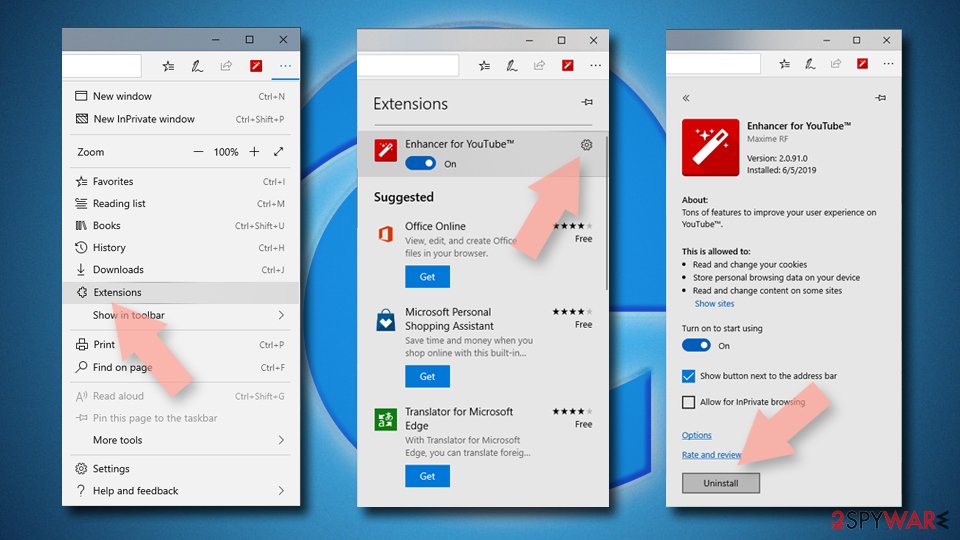
Delete unwanted extensions from MS Edge:
- Select Menu (three horizontal dots at the top-right of the browser window) and pick Extensions.
- From the list, pick the extension and click on the Gear icon.
- Click Remove.

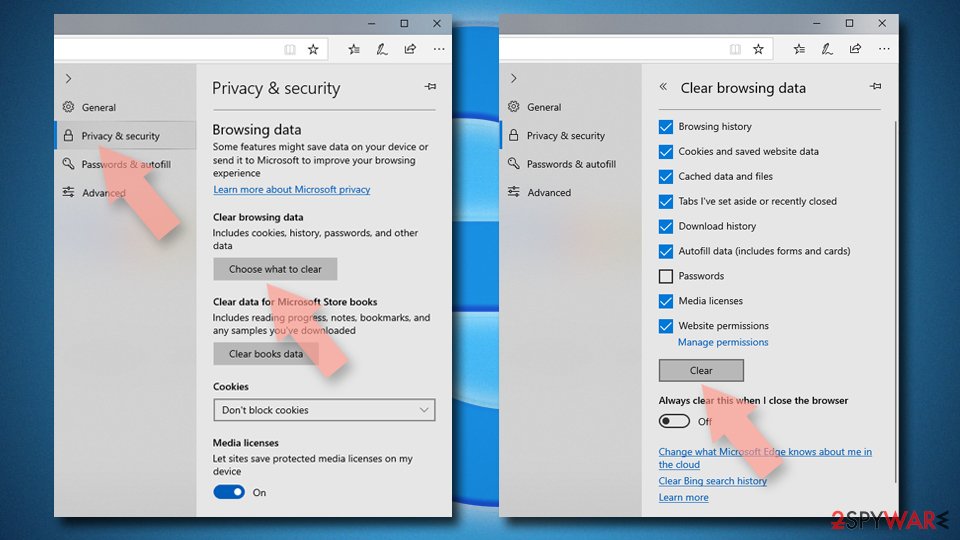
Clear cookies and other browser data:
- Click on the Menu (three horizontal dots at the top-right of the browser window) and select Settings > Privacy, search, and services..
- Under Clear browsing data, pick Choose what to clear.
- Select Cookies and other site data and Cached images and files. (apart from passwords, although you might want to include Media licenses as well, if applicable) and click on Clear.

Restore new tab and homepage settings:
- Click the menu icon and choose Settings.
- Then find On startup section.
- Click Remove next to any suspicious startup page.
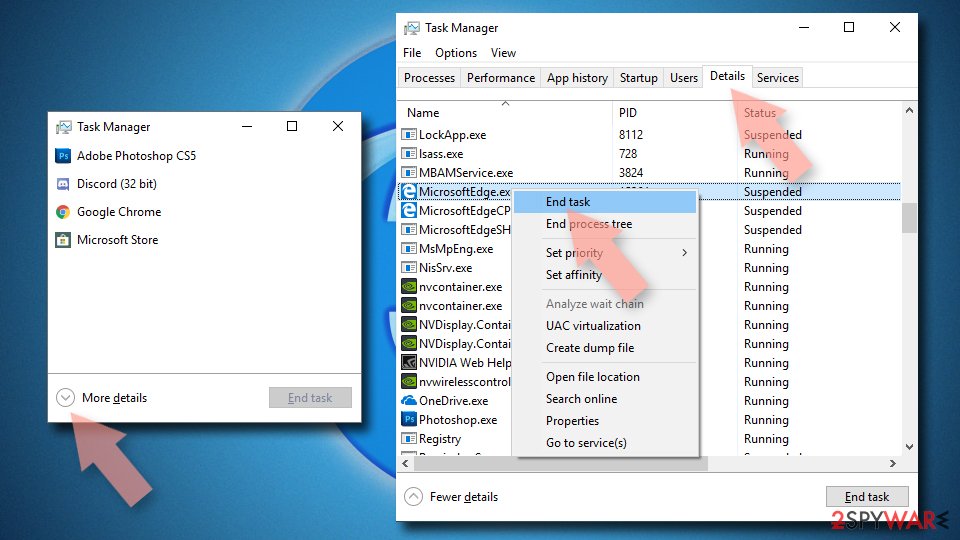
Reset MS Edge if the above steps did not work:
- Press on Ctrl + Shift + Esc to open Task Manager.
- Click on More details arrow at the bottom of the window.
- Select Details tab.
- Now scroll down and locate every entry with Microsoft Edge name in it. Right-click on each of them and select End Task to stop MS Edge from running.

Instructions for Chromium-based Edge
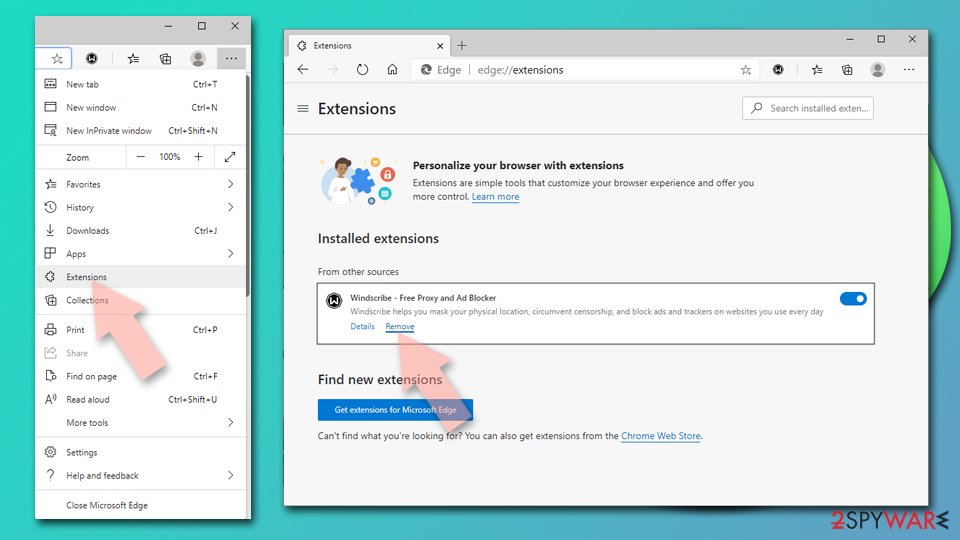
Delete extensions from MS Edge (Chromium):
- Open Edge and click select Settings > Extensions.
- Delete unwanted extensions by clicking Remove.

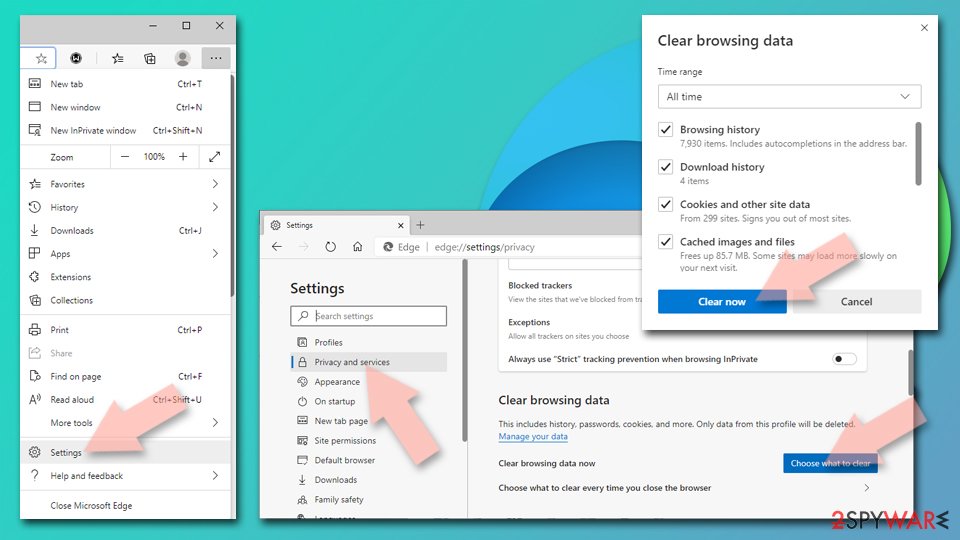
Clear cache and site data:
- Click on Menu and go to Settings.
- Select Privacy, search and services.
- Under Clear browsing data, pick Choose what to clear.
- Under Time range, pick All time.
- Select Clear now.

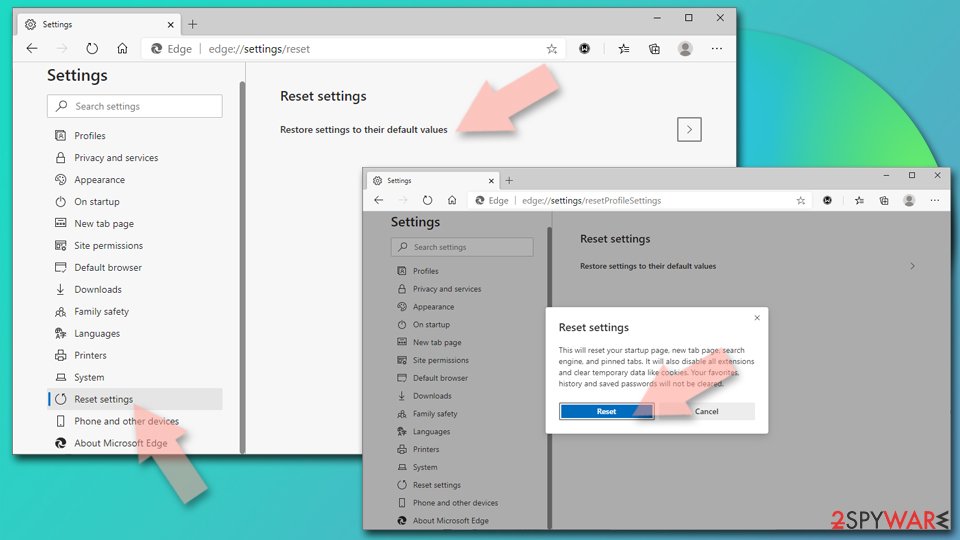
Reset Chromium-based MS Edge:
- Click on Menu and select Settings.
- On the left side, pick Reset settings.
- Select Restore settings to their default values.
- Confirm with Reset.
- This will disable extensions and reset startup pages but will not delete bookmarks, saved passwords, or browsing history.

Remove from Mozilla Firefox (FF)
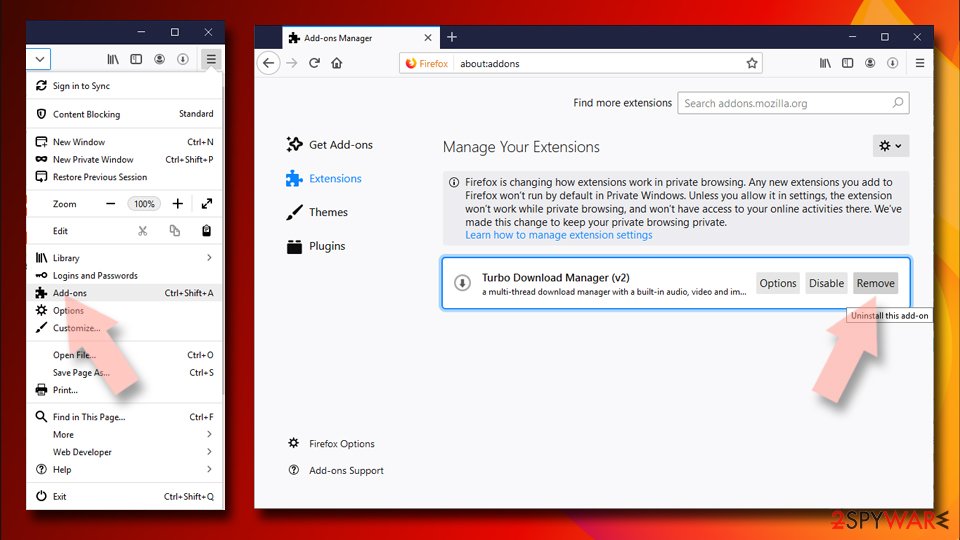
Remove dangerous extensions:
- Open Mozilla Firefox browser and click on the Menu (three horizontal lines at the top-right of the window).
- Select Add-ons.
- In here, select the unwanted extension and click Remove.

Reset the homepage:
- Click three horizontal lines at the top right corner to open the menu.
- Choose Settings.
- Under Home, set your preferred homepage and new tab settings.
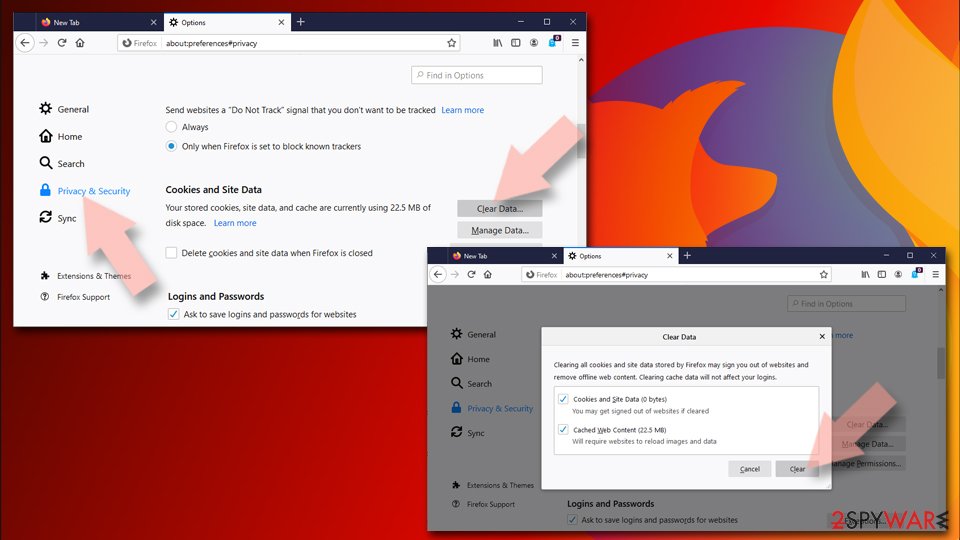
Clear cookies and site data:
- Click Menu and pick Settings.
- Go to Privacy & Security section.
- Scroll down to locate Cookies and Site Data.
- Click on Clear Data…
- Select Cookies and Site Data and Temporary cached files and pages, then click Clear.

Reset Mozilla Firefox
If clearing the browser as explained above did not help, reset Mozilla Firefox:
- Open Mozilla Firefox browser and click the Menu.
- Go to Help and then choose Troubleshooting Information.
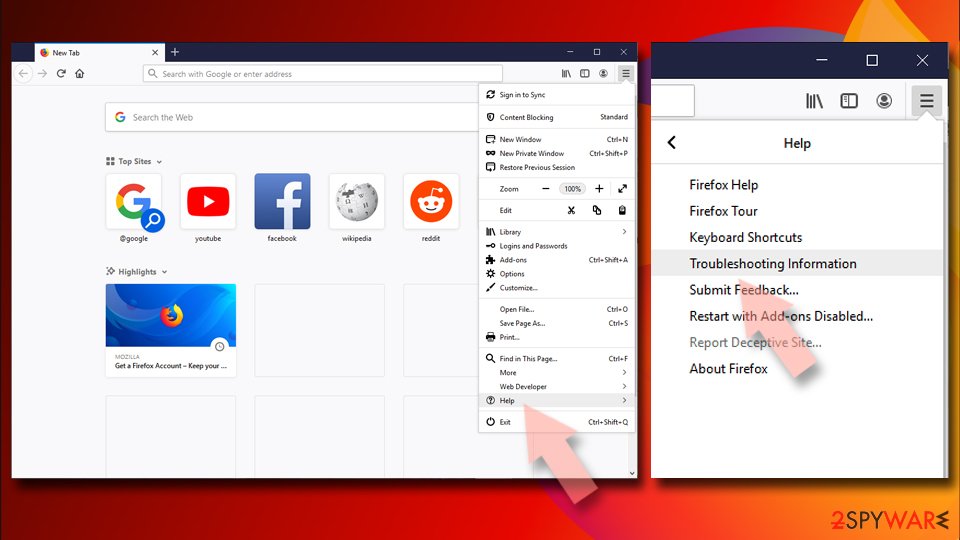
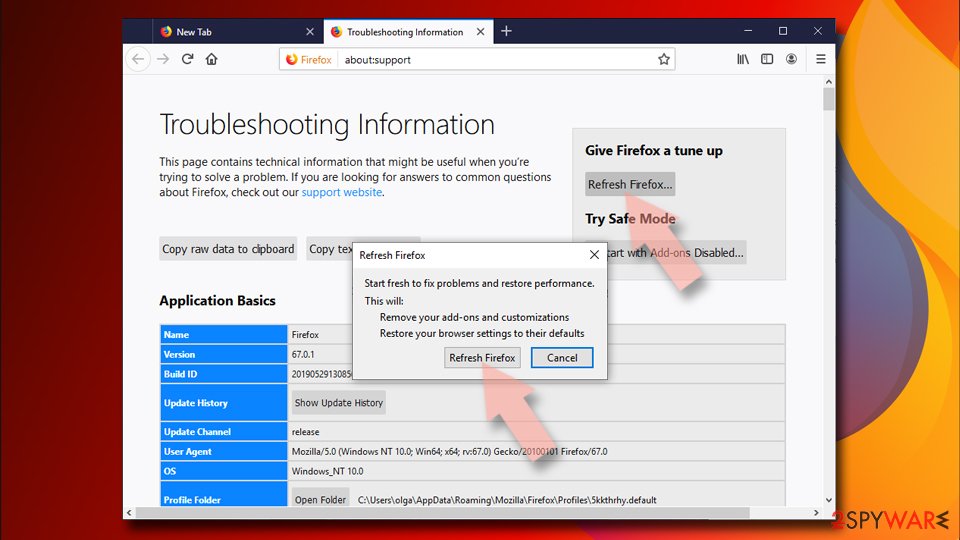
- Under Give Firefox a tune up section, click on Refresh Firefox…
- Once the pop-up shows up, confirm the action by pressing on Refresh Firefox.


Remove from Google Chrome
Delete malicious extensions from Google Chrome:
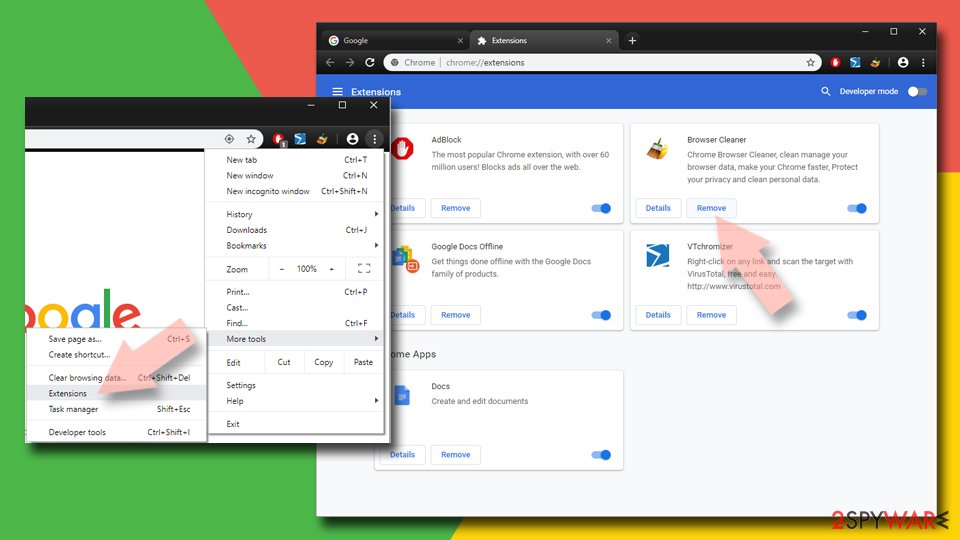
- Open Google Chrome, click on the Menu (three vertical dots at the top-right corner) and select More tools > Extensions.
- In the newly opened window, you will see all the installed extensions. Uninstall all suspicious extensions related to the unwanted program by clicking Remove.

Clear cache and web data from Chrome:
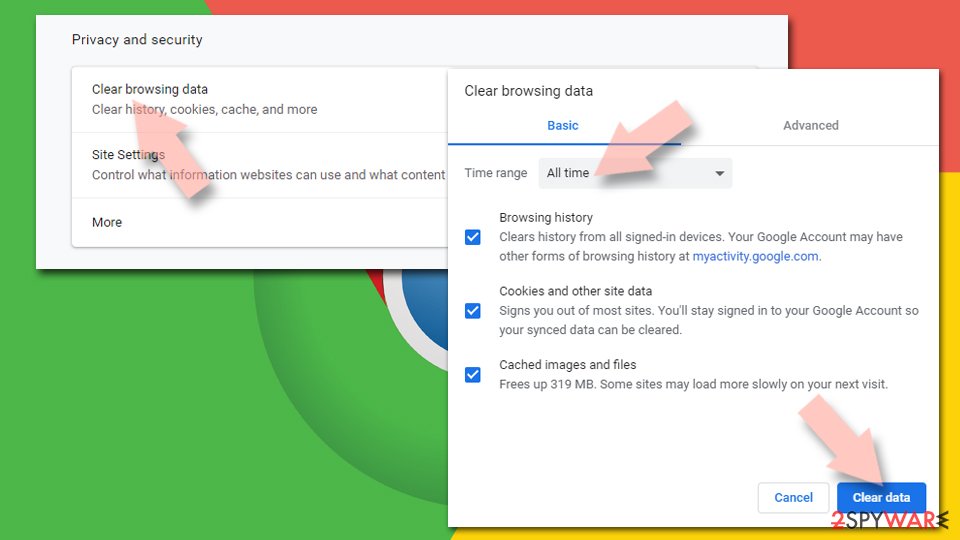
- Click on Menu and pick Settings.
- Under Privacy and security, select Clear browsing data.
- Select Browsing history, Cookies and other site data, as well as Cached images and files.
- Click Clear data.

Change your homepage:
- Click menu and choose Settings.
- Look for a suspicious site in the On startup section.
- Click on Open a specific or set of pages and click on three dots to find the Remove option.
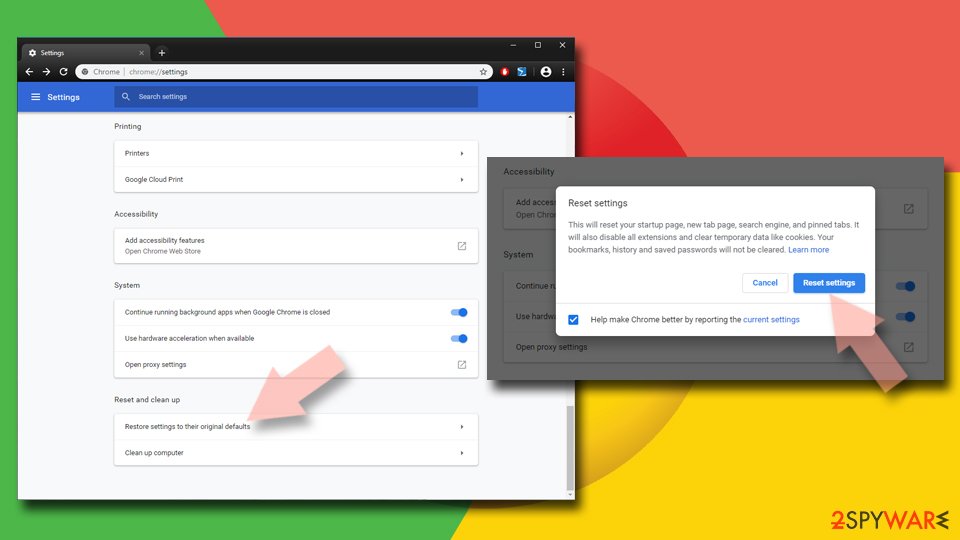
Reset Google Chrome:
If the previous methods did not help you, reset Google Chrome to eliminate all the unwanted components:
- Click on Menu and select Settings.
- In the Settings, scroll down and click Advanced.
- Scroll down and locate Reset and clean up section.
- Now click Restore settings to their original defaults.
- Confirm with Reset settings.

Delete from Safari
-
Remove dangerous extensions
Open Safari web browser and click on Safari in menu at the top left of the screen. Once you do this, select Preferences.
-
Here, select Extensions and look for The fake Microsoft Security Essentials Alert or other suspicious entries. Click on the Uninstall button to get rid each of them.

-
Reset Safari
Open Safari browser and click on Safari in menu section at the top left of the screen. Here, select Reset Safari....
-
Now you will see a detailed dialog window filled with reset options. All of those options are usually checked, but you can specify which of them you want to reset. Click the Reset button to complete The fake Microsoft Security Essentials Alert removal process.


After uninstalling this potentially unwanted program (PUP) and fixing each of your web browsers, we recommend you to scan your PC system with a reputable anti-spyware. This will help you to get rid of The fake Microsoft Security Essentials Alert registry traces and will also identify related parasites or possible malware infections on your computer. For that you can use our top-rated malware remover: FortectIntego, SpyHunter 5Combo Cleaner or Malwarebytes.
How to prevent from getting rogue antispyware
Protect your privacy – employ a VPN
There are several ways how to make your online time more private – you can access an incognito tab. However, there is no secret that even in this mode, you are tracked for advertising purposes. There is a way to add an extra layer of protection and create a completely anonymous web browsing practice with the help of Private Internet Access VPN. This software reroutes traffic through different servers, thus leaving your IP address and geolocation in disguise. Besides, it is based on a strict no-log policy, meaning that no data will be recorded, leaked, and available for both first and third parties. The combination of a secure web browser and Private Internet Access VPN will let you browse the Internet without a feeling of being spied or targeted by criminals.
No backups? No problem. Use a data recovery tool
If you wonder how data loss can occur, you should not look any further for answers – human errors, malware attacks, hardware failures, power cuts, natural disasters, or even simple negligence. In some cases, lost files are extremely important, and many straight out panic when such an unfortunate course of events happen. Due to this, you should always ensure that you prepare proper data backups on a regular basis.
If you were caught by surprise and did not have any backups to restore your files from, not everything is lost. Data Recovery Pro is one of the leading file recovery solutions you can find on the market – it is likely to restore even lost emails or data located on an external device.

If this free guide helped you and you are satisfied with our service, please consider making a donation to keep this service alive. Even a smallest amount will be appreciated.