XP Guardian (Simple Removal Guide)
XP Guardian Removal Guide
What is XP Guardian?
XP Guardian – a rogue tool that you should not trust

XP Guardian is a fake anti-spyware program that is distributed through the use of Trojans or comes bundled with other malware. Once a Trojan virus is installed, it will impersonate an Automatic Windows Updates window and downloads the rogue program onto your computer.
When the rogue program is active, it will imitate a system scan and report false system security threats. What is more, XPGuardian will constantly display fake security notifications and impersonate Windows Security Center to make the scam look more realistic. Finally, it will ask you to pay for a full version of the program to remove the infections which don't even exist. Don't purchase it and remove the virus from your computer upon detection.
| name | XP Guardian |
|---|---|
| Type | Rogue antispyware, fake security software |
| Purpose | Make users believe their PCs are infected with numerous viruses and that the only way to get rid of them is to buy a licensed product version |
| Risks | Money loss, virus infections |
| Elimination | You can remove this rogue software by using reliable security tools |
| System health | You can recover the damage done to your device's system by performing system diagnostics with the FortectIntego tune-up software |
The worst thing about XP Guardian is that it actually protects itself quite well. It blocks legitimate security software and hijacks web browsers. In some cases, it blocks all programs, not only anti-virus or anti-spyware software. Furthermore, it will detect many well-known and reputable websites as harmful and display fake security alerts stating that you may infect your PC if you open a particular portal.
And, of course, it disables certain Windows functions such as Task Manager or Regedit. But no matter how hard threat actors behind this bogus software try, you can still remove it. First, you will have to launch your computer in question in Safe Mode with Networking. If you're unsure how that's done, use our directions below.
Then download free but reliable anti-malware tools such as Malwarebytes or SpyHunter 5Combo Cleaner. Install and update your chosen security software and run a full threat scan. That will remove all cyber threats, including the article's culprit. And finally, run system diagnostics with time-proven software like the FortectIntego to undo all the damage that the rogue antispyware tool has caused to your system files and settings.
Getting rid of XP Guardian. Follow these steps
Manual removal using Safe Mode
Important! →
Manual removal guide might be too complicated for regular computer users. It requires advanced IT knowledge to be performed correctly (if vital system files are removed or damaged, it might result in full Windows compromise), and it also might take hours to complete. Therefore, we highly advise using the automatic method provided above instead.
Step 1. Access Safe Mode with Networking
Manual malware removal should be best performed in the Safe Mode environment.
Windows 7 / Vista / XP
- Click Start > Shutdown > Restart > OK.
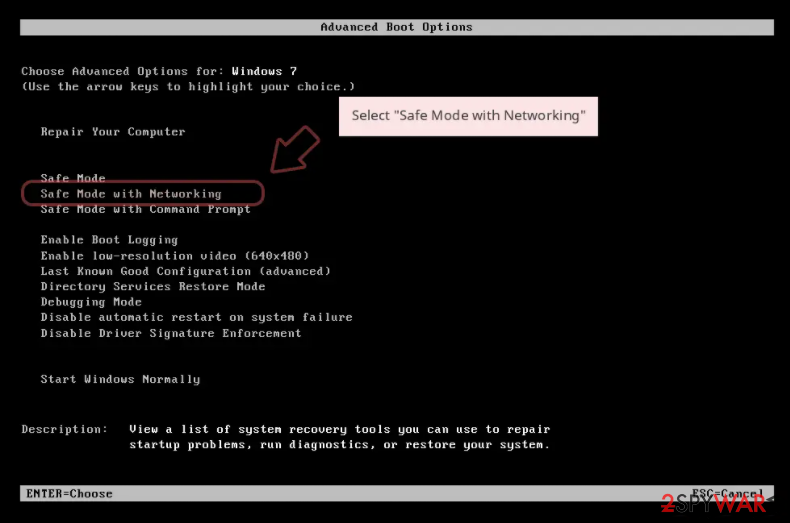
- When your computer becomes active, start pressing F8 button (if that does not work, try F2, F12, Del, etc. – it all depends on your motherboard model) multiple times until you see the Advanced Boot Options window.
- Select Safe Mode with Networking from the list.

Windows 10 / Windows 8
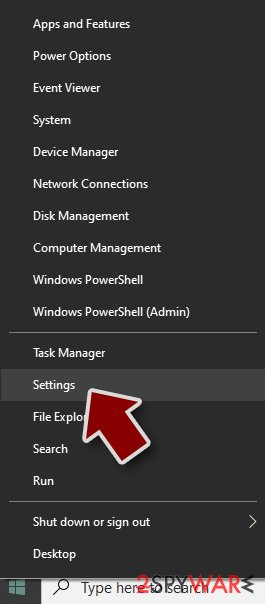
- Right-click on Start button and select Settings.
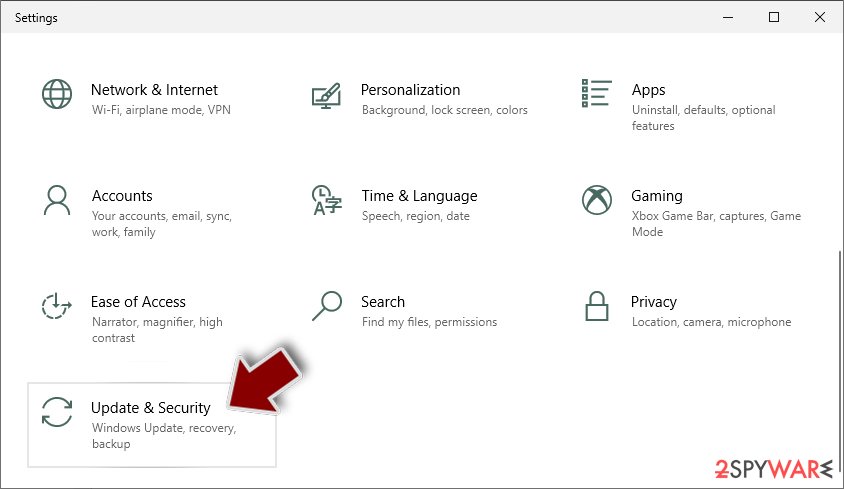
- Scroll down to pick Update & Security.
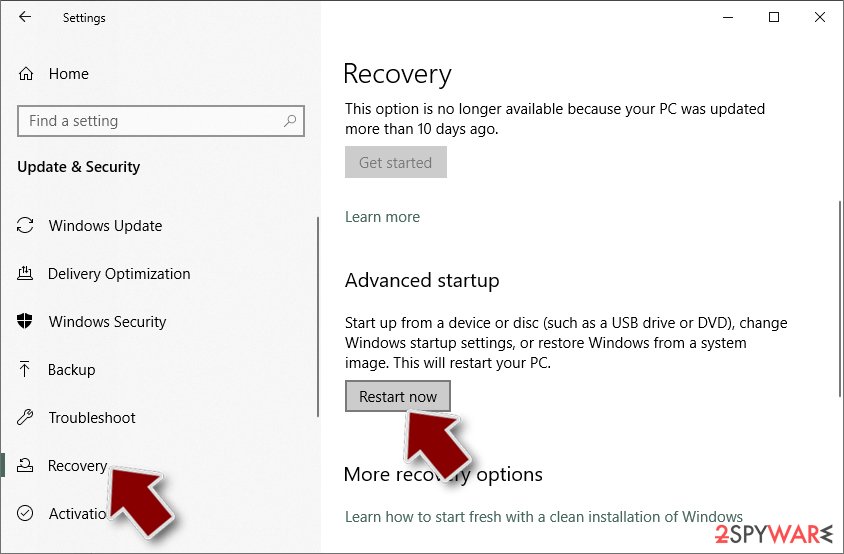
- On the left side of the window, pick Recovery.
- Now scroll down to find Advanced Startup section.
- Click Restart now.
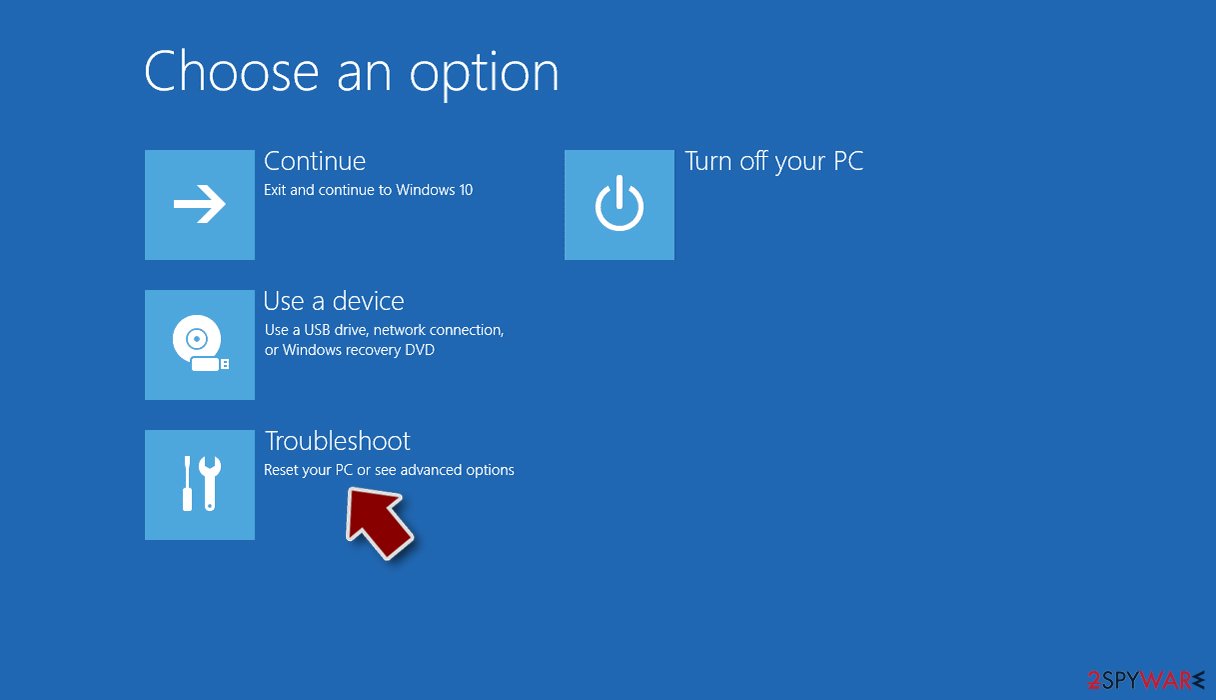
- Select Troubleshoot.
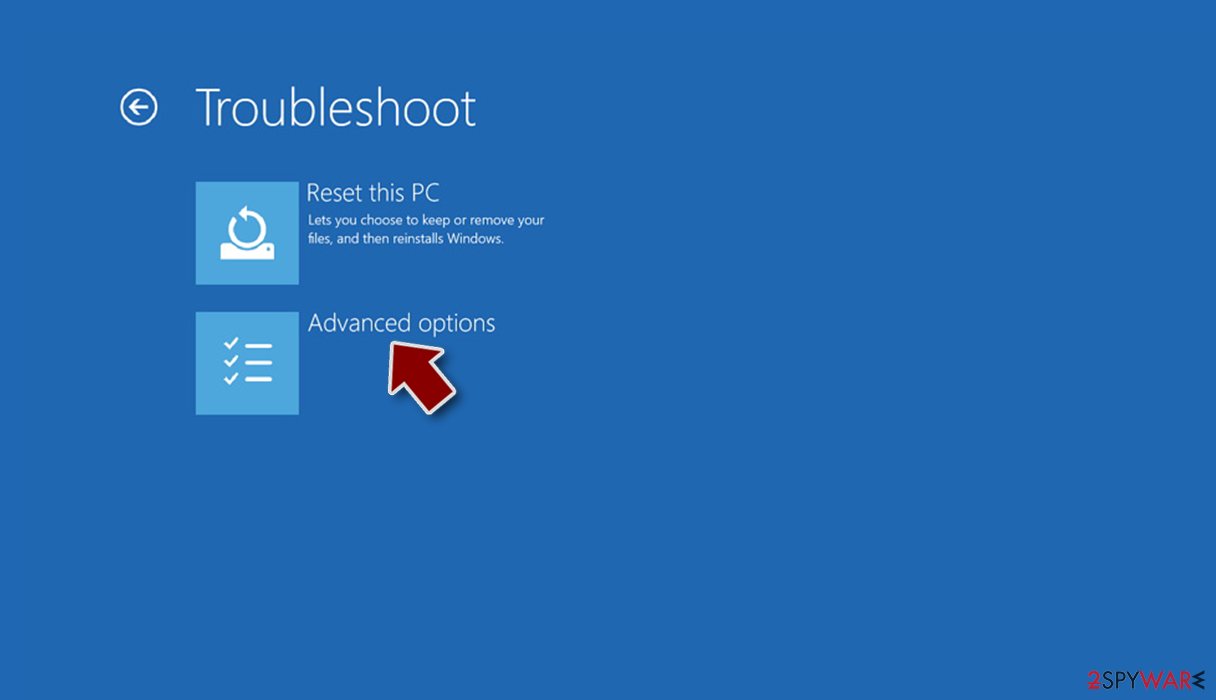
- Go to Advanced options.
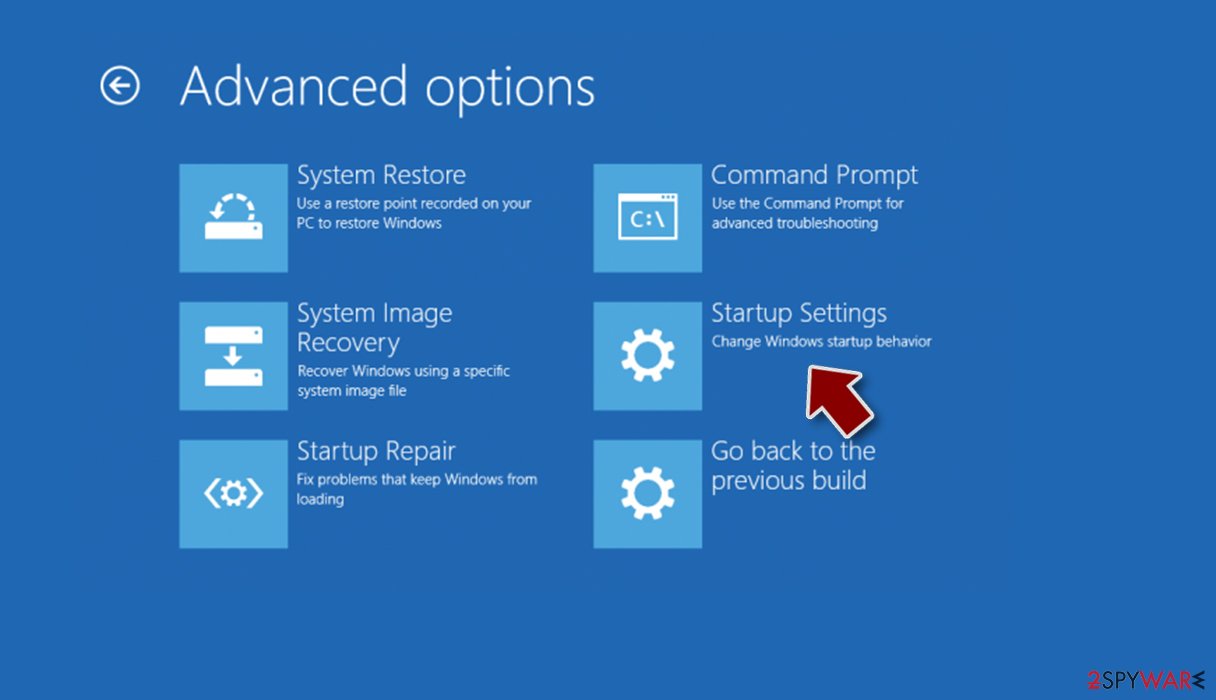
- Select Startup Settings.
- Press Restart.
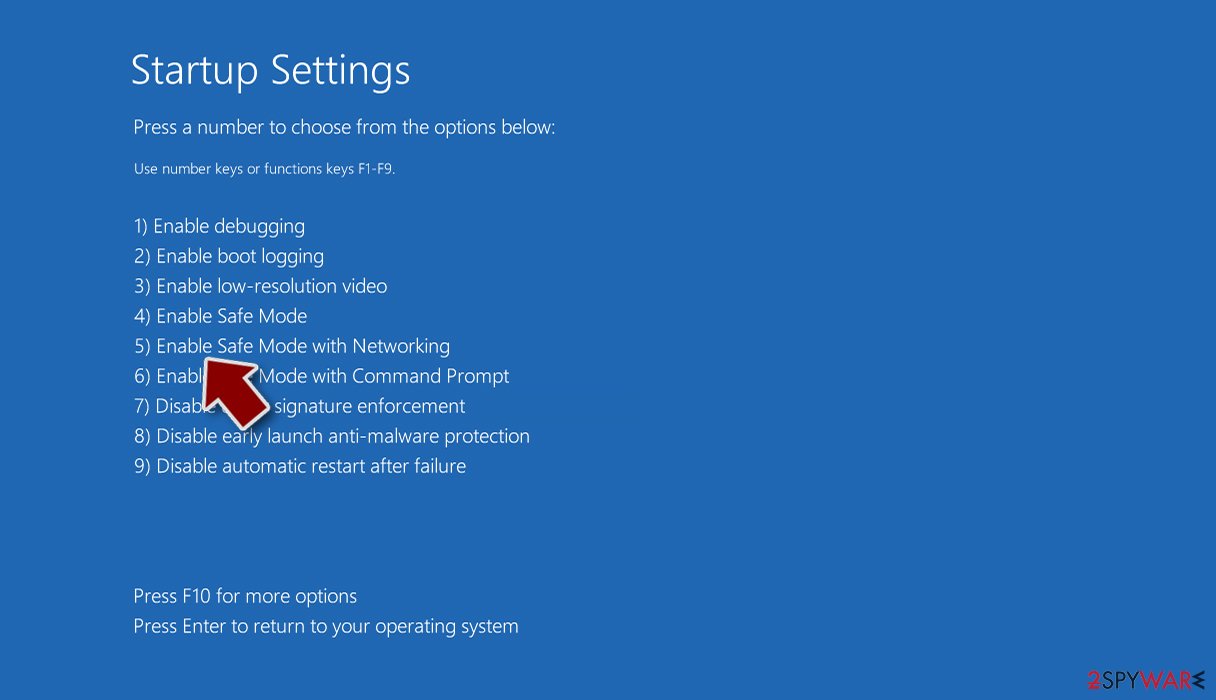
- Now press 5 or click 5) Enable Safe Mode with Networking.


Step 2. Shut down suspicious processes
Windows Task Manager is a useful tool that shows all the processes running in the background. If malware is running a process, you need to shut it down:
- Press Ctrl + Shift + Esc on your keyboard to open Windows Task Manager.
- Click on More details.
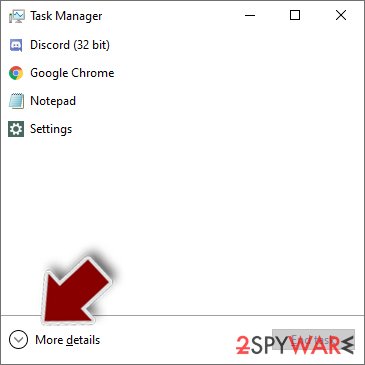
- Scroll down to Background processes section, and look for anything suspicious.
- Right-click and select Open file location.
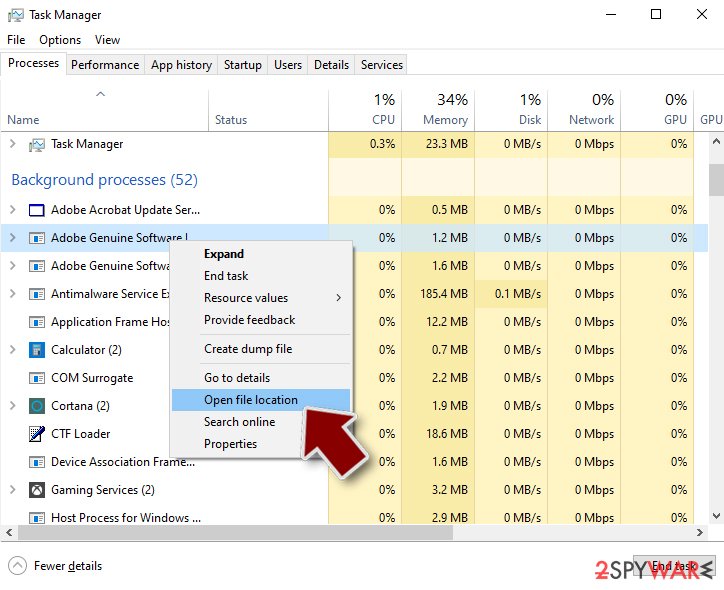
- Go back to the process, right-click and pick End Task.
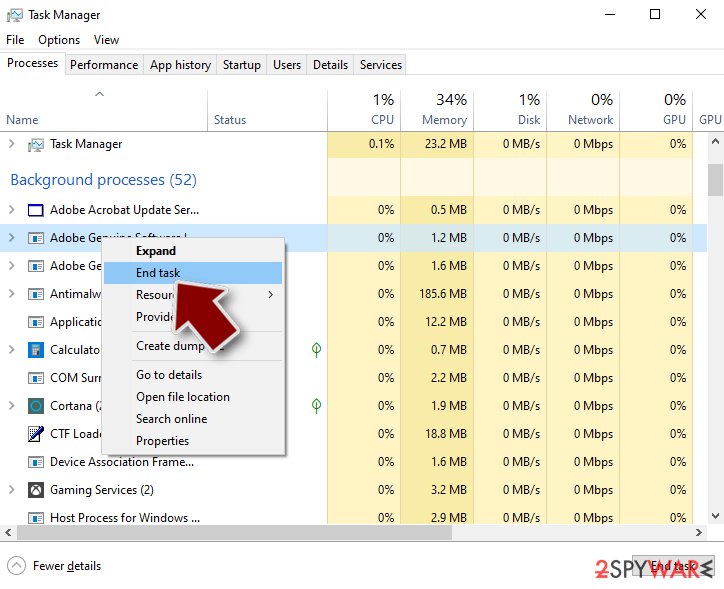
- Delete the contents of the malicious folder.


Step 3. Check program Startup
- Press Ctrl + Shift + Esc on your keyboard to open Windows Task Manager.
- Go to Startup tab.
- Right-click on the suspicious program and pick Disable.
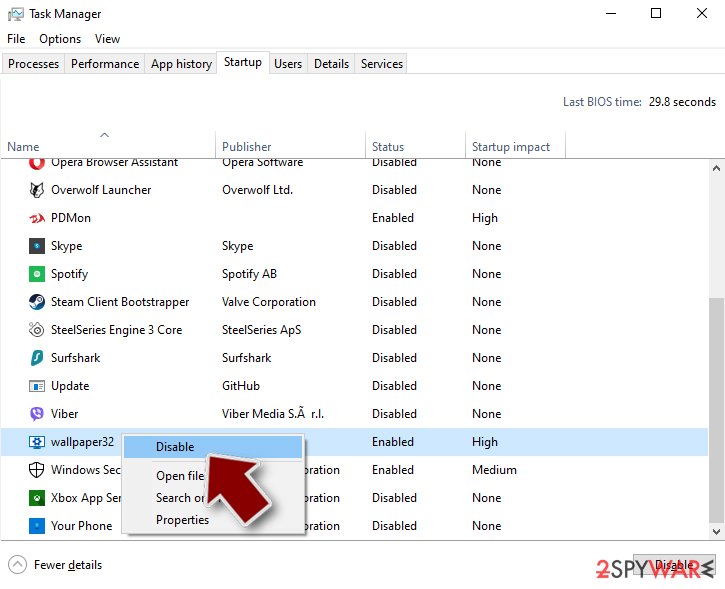

Step 4. Delete virus files
Malware-related files can be found in various places within your computer. Here are instructions that could help you find them:
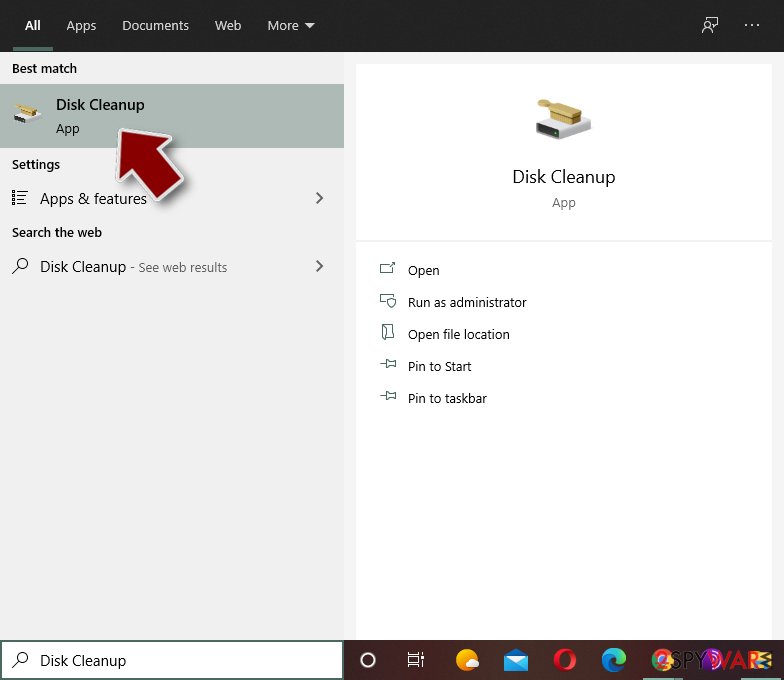
- Type in Disk Cleanup in Windows search and press Enter.
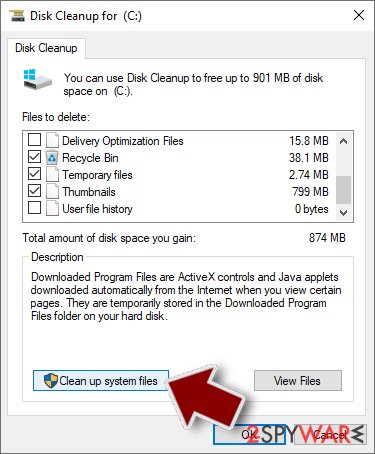
- Select the drive you want to clean (C: is your main drive by default and is likely to be the one that has malicious files in).
- Scroll through the Files to delete list and select the following:
Temporary Internet Files
Downloads
Recycle Bin
Temporary files - Pick Clean up system files.
- You can also look for other malicious files hidden in the following folders (type these entries in Windows Search and press Enter):
%AppData%
%LocalAppData%
%ProgramData%
%WinDir%


After you are finished, reboot the PC in normal mode.
Finally, you should always think about the protection of crypto-ransomwares. In order to protect your computer from XP Guardian and other ransomwares, use a reputable anti-spyware, such as FortectIntego, SpyHunter 5Combo Cleaner or Malwarebytes
How to prevent from getting rogue antispyware
Stream videos without limitations, no matter where you are
There are multiple parties that could find out almost anything about you by checking your online activity. While this is highly unlikely, advertisers and tech companies are constantly tracking you online. The first step to privacy should be a secure browser that focuses on tracker reduction to a minimum.
Even if you employ a secure browser, you will not be able to access websites that are restricted due to local government laws or other reasons. In other words, you may not be able to stream Disney+ or US-based Netflix in some countries. To bypass these restrictions, you can employ a powerful Private Internet Access VPN, which provides dedicated servers for torrenting and streaming, not slowing you down in the process.
Data backups are important – recover your lost files
Ransomware is one of the biggest threats to personal data. Once it is executed on a machine, it launches a sophisticated encryption algorithm that locks all your files, although it does not destroy them. The most common misconception is that anti-malware software can return files to their previous states. This is not true, however, and data remains locked after the malicious payload is deleted.
While regular data backups are the only secure method to recover your files after a ransomware attack, tools such as Data Recovery Pro can also be effective and restore at least some of your lost data.

If this free guide helped you and you are satisfied with our service, please consider making a donation to keep this service alive. Even a smallest amount will be appreciated.