
HiddenTear ransomware: what it is and how to remove it
Hidden Tear is an open-source ransomware project that was initially developed for educational purposes back in 2015 by Turkish researcher Utku Sen. However, cybercriminals did not wait too long to adapt the code and use it for money extortion purposes, infecting Windows computers and locking files with a sophisticated AES algorithm.
Facts checked October 7, 2026. Removal steps tested on Windows 11 (26H2) and checked against Microsoft's and the browser makers' current documentation. Sections marked as our earlier report are the original text: they describe the threat as it was then and have not been reviewed since. The 2026 status, the removal steps and the questions are current.
Automatic
Get a free scan and check if your PC is infected.
Fortect finds malware, unwanted programs and the Windows damage they leave behind, and repairs it in one pass.
Before you restore backups, a full scan can confirm the program that added .locked is gone.
Do it yourself · free Remove HiddenTear ransomware yourself 6 steps, about 18 minutes, no software needed.
Start the steps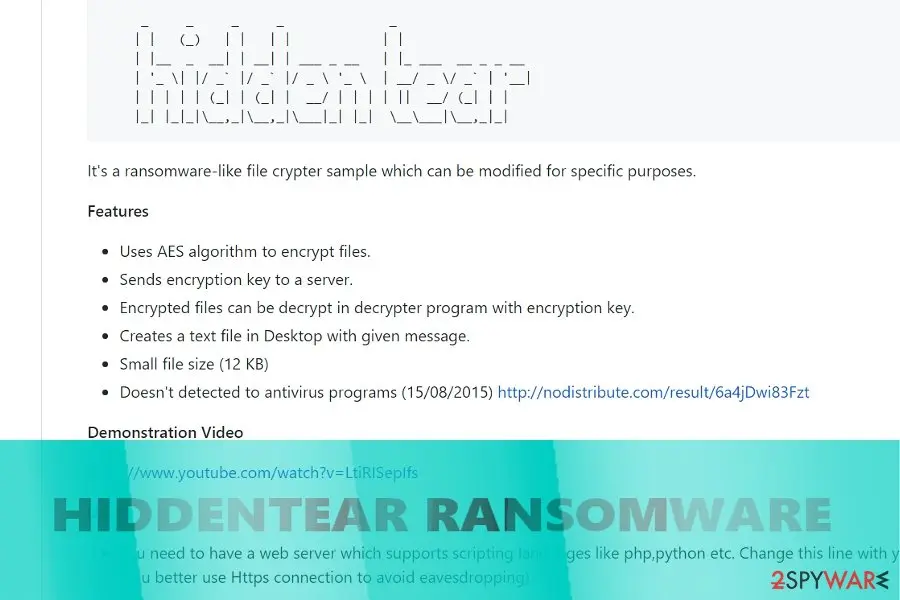
HiddenTear ransomware: summary
| Distribution | Spam email attachments, backdoor |
|---|---|
| Name | HiddenTear |
| Type | Ransomware (open-source) |
| Versions | Winsec, BlackRose, Karmen, Kampret, Mora Project, Sorry, etc. (full list below) |
| Symptoms | Personal files locked, ransom note created on the desktop |
| Decryptable? | Yes. Decrypt Hidden Tear locked files with Decrtyptor 1 (link) or Decryptor 2 (link) |
| Removal | Scan the PC with security software to find and remove the malware and anything installed with it. Fortect scans Windows for malware and repairs the system files and settings it damaged. Remove it nowTo use the full-featured product, you have to purchase a license for Fortect. The scan is free. |
Show 13 more facts
| Danger level | High. Initiates multiple system's changes, including Windows Registry and Boot. Can result in permanent data loss |
|---|---|
| Detection names | No Microsoft detection name is known |
| Ransom note | README.txt; the text of the note is not in our records |
| Contact | leprogames777@gmail.com, heyklog@pronmail.com, resurrection777@protonmail.com |
| Encrypted file extension | .locked |
| Decryptor | No free decryptor is known for this variant; check No More Ransom (nomoreransom.org) for updates |
| Damage | Not recorded in the old report |
| Evidence | 9 write-ups by security sites; no sample analysed yet |
| Encrypted files | .locked |
| Attacker contacts | leprogames777@gmail.com |
| Free decryptor | No free decryptor is known (checked 7 October 2026) |
| First seen | 8 February 2019 |
| Facts checked | 7 October 2026 |
- File extension:
.locked - Note file:
README.txt - Contact:
leprogames777@gmail.com
From our report of Feb 2019 · not reviewed since
More from our earlier report on HiddenTear
- To recover from system damage caused by Hidden Tear ransomware, use
How HiddenTear ransomware behaves
From our report of Feb 2019 · not reviewed since
Hidden Tear variants
HiddenTear 2.0 ransomware virus.
This version of ransomware encrypts files and provides data recovery instructions in README.txt file. The ransom note tells that victims have to use a password in DecryptPassword.txt file that has been hidden somewhere in the targeted computer.
However, the file is located in My Documents folder. Once you decrypt your files, you should also scan the computer with reputable security software. Faizal ransomware virus. Malware spreads as a fake installer package of "Street Racing Club" game which is popular in Southeast Asia.
However, ransomware mostly aims at Indonesian computer users. To the encrypted files, it appends .gembok file extension. Following data encryption, the virus delivers a ransom note called PENTING !!!.htm where cyber criminals ask to send a voucher code of 100.000 Indonesian Rupees to leprogames777@gmail.com.
Nevertheless, the size of the ransom is not high (about $7.50); paying is not recommended. Kindest ransomware virus. It's an educational version of Hidden Tear ransomware. Instead of encrypting files, ransomware asks to show a YouTube video about file-encrypting viruses.
Once people finishes watching the video, malware is supposed to delete itself. FailedAccess ransomware virus. Also known as CryptoSomware virus, this cyber threat appends .FailedAccess file extension and demands to pay the ransom. However, victims of the ransomware can use StupidDecryptor and restore corrupted files for free.
Thus, after the attack, the only thing you need to do is to perform virus removal. Mordor ransomware virus. The virus uses AES-256 cryptography to damage files on the targeted computers. Once all files have the .mordor extension, it opens a ransom note from READ_ME.html file.
Written in English, Japan, Italian, Chinese, Indian, Portuguese, French and German languages, the ransom note says that victims have to pay 0.07066407 BTC in order to recover the files. Undoubtedly, instead of paying, you should get rid of the virus. Ruby ransomware virus. Behind this crypto-malware stands a hacker named Hayzam Sheriff.
The virus is designed to append the .ruby file extension to each of the targeted data. Once this hazardous task is done, malware automatically opens a ransom note rubyLeza.html. However, author of the virus does not reveal how much Bitcoins victims have to transfer. Thus, there's nothing else left to do, just remove Ruby from the PC.
GruxEr ransomware virus. This variant of HiddenTear uses three executables to run different malicious programs on the affected computer:
- TEARS.exe
- WORM.exe
- GRUXER.exe
Nevertheless, malware encrypts numerous file of types; the priority is JPG files. Cyber criminals provide data recovery instructions in READ_IT.txt file and run a program window. In order to decrypt corrupted data, victims are asked to pay $250 in Bitcoins. Decryption Assistant ransomware virus.
This malware spreads as a fake Adobe Flash Player update. Once victim installs it, ransomware starts encrypting files and appending the .pwned file extension to each of them. Then it runs a program window that includes data recovery instructions and the timer that shows how much time left to pay the ransom.
However, you'd better hurry up with virus removal. MoWare H.F.D ransomware virus. The significant feature of the ransomware is added file extension - .H_F_D_locked file extension. Then malware informs about the possibility to obtain decryption software for 0.02 Bitcoins.
However, if users do not take this offer within 4 days, the size of the ransom will increase to 0.05 Bitcoins. After transferring the money, victims need to contact hackers via heyklog@pronmail.com and send their Bitcoin transaction ID. However, following these instructions may lead to financial loss. Crying ransomware virus.
This file-encrypting virus enters the system as ECRYING.exe file and starts encrypting files with AES cryptography. After encryption, all targeted files have .crying file extension. It also installs a ransom note called READ_IT.txt and runs a program window where authors of Crying malware gives Bitcoin wallet address where victims have to transfer the ransom. R3store ransomware virus.
The virus marks targeted files with .r3store file extension that prevents victims from using them. It downloads a ransom note called READ_IT.txt to each folder that includes encrypted data. The ransom-demanding message reveals that data recovery with hackers' software costs $450. However, no one can guarantee that this tool is actually working.
Resurrection ransomware virus. It encrypts files with AES-256 cipher and adds .(random).resurrection file extension to the targeted data. Once it's done, ransomware opens the README.html file in browser's window. Here cyber criminals ask to contact them via resurrection777@protonmail.com and transfer 1.77 Bitcoin in order to get a decryption key.
Executioner ransomware virus. It's a Turkish version of Hidden Tear malware. It appends a random file extension to encrypted files and provides ransom payment instructions in .txt and .html files. The Sifre_Cos_Talimat.html informs that victims have to contact attackers executioner.ransom@protonmail.com and send 150 in Bitcoins.
However, doing this is not necessary because malware is decryptable. KKK ransomware virus. Malware spreads as an obfuscated Facebook.exe file. Undoubtedly, the file name is tricky and misleading.
Once this payload is downloaded to the system, malware starts data encryption and adds .KKK file extension to targeted files. Then malware runs an "Information" window that provides instructions how to redeem encrypted files. To get back their files, people have to transfer 0.05 bitcoins (not recommended). BeethoveN ransomware virus.
The virus is designed to encrypt files using a combination of AES and RSA ciphers. It appends .beethoveN extension to each of the targeted file. Once it's done malware delivers ransom payment instructions in the FILEUST.tx file and program window. Victims are supposed to transfer the ransom within 168 hours (not recommended).
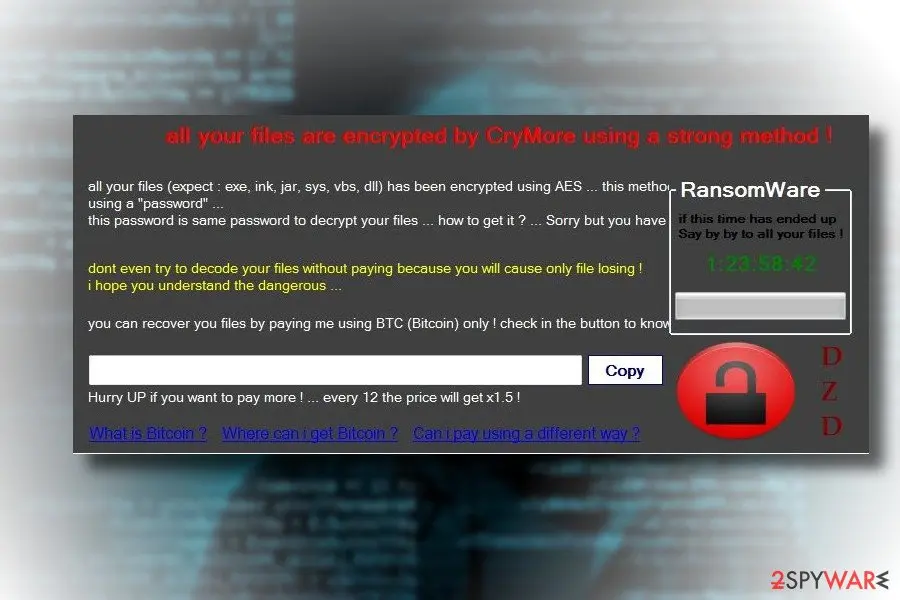
CryMore ransomware virus. The hacker named "TMC" was inspired by WannaCry and make a virus which name resembles the infamous cyber threat. Ransomware uses AES encryption to lock the most popular types of files on the affected computer.
In the poorly written ransom note, victims are asked to pay the ransom within 12 hours. Later the demanded sum of money will increase. CryptoGod ransomware virus. During data encryption, the virus adds .payforunlock file extension to each of the targeted document, audio, video, image and other files.
The ransom note tells of paying 0.03 BTC for data recovery. The size of the payment will increase up to 0.05 Bitcoins after provided deadline. After the transaction, victims have to send an email to cryptogod@airmail.cc.
However, you may not receive an answer and help to restore your files. $usyLocker ransomware virus. This variant of HiddenTear is executed from VapeHacksLoader.exe. After infiltration, malware encrypts data and appends .WINDOWS file extension.
In the ransom note called READ_IT.txt criminals inform that victims have to pay 0.16 Bitcoins. However, it's a risky business that may lead to money loss. CryForMe ransomware virus. The virus pretends to be related to the infamous WannaCry ransomware.
Malware is executed from CryForMe.exe. On the affected device it starts data encryption procedure immediately. When all targeted files are secured, the malware runs a blue ransom-demanding window. Cyber criminals ask to pay €250 in bitcoins within 7 days time.
Mora Project ransomware virus. This variant of Hidden Tear prevents victims from opening their files by appending .encrypted file extension. People are suggested to use The-decrypter.exe program to recover their files for $40.000. However, following the instructions provided in ReadMe_Important.txt file is not recommended.
FlatChestWare ransomware virus presents a few interesting features. While the operation mode does not differ much from its previous versions, as it encodes files and appends .flat file extension to the affected data, it displays a fake Windows UAC message.
After you open the FlatChestWare.exe file gets executed, the malware will prompt a User Account Message asking you to restart the system in order for the supposed Windows update to complete successfully. Note that there the genuine Windows Update messages slightly differ. Latest messages do not remind you to save data.
Furthermore, in Windows 10 systems such messages do not appear anymore. A similar message appeared due to the bug in 2918614. It seems that the developer – the fan of anime – failed to make the malware a full-fledged malware as this version is decryptable.
Sorry ransomware. Detected at the end of March, 2018, it's the latest variant based on this open-source ransomware project. Upon successful infiltration, the ransomware runs a task called John Cena, schtasks.exe file, which is responsible for rooting, and releases multiple cmd.exe scripts, including the one that commands to remove Volume Shadow Copies.
After that, Sorry virus changes the extensions of the most files to .sorry and creates a ransom note c:\Windows\hrf.txt. To render personal files useless, it renders symmetric encryption algorithm (AES) cryptography model, which can be cracked only by entering a personal ID number. The victim of the Sorry ransomware is demanded to pay the ransom, which currently ranges from $500 to $1500 in Bitcoins.
To get a guidance on how the payment has to be transmitted, the victim is asked to write a personal ID on emails svchostport@tutanota.com or cjhost@tuta.io. Nevertheless, we do not recommend paying the ransom. Instead, Sorry Randomwar3e and try to decrypt files using a free HiddenTear decryptor.

From our report of Feb 2019 · not reviewed since
Hidden Tear is a first-ever open source ransomware trojan that allows even inexperienced devs to lock victims' files
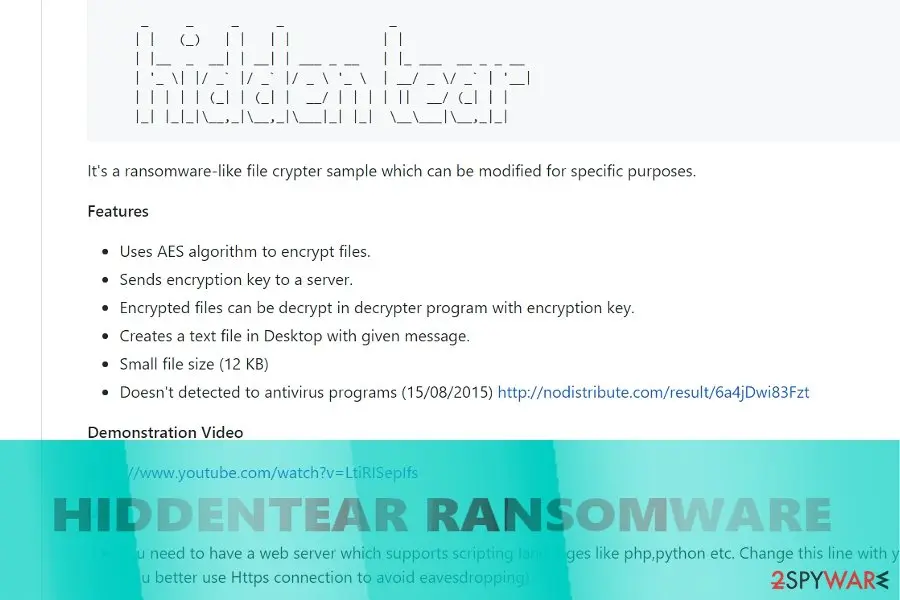
Hidden Tear is an open-source ransomware project that was initially developed for educational purposes back in 2015 by Turkish researcher Utku Sen.
However, cybercriminals did not wait too long to adapt the code and use it for money extortion purposes, infecting Windows computers and locking files with a sophisticated AES algorithm. Hidden Tear has a modifiable ransomware kit, meaning that even novice hackers could use the code.
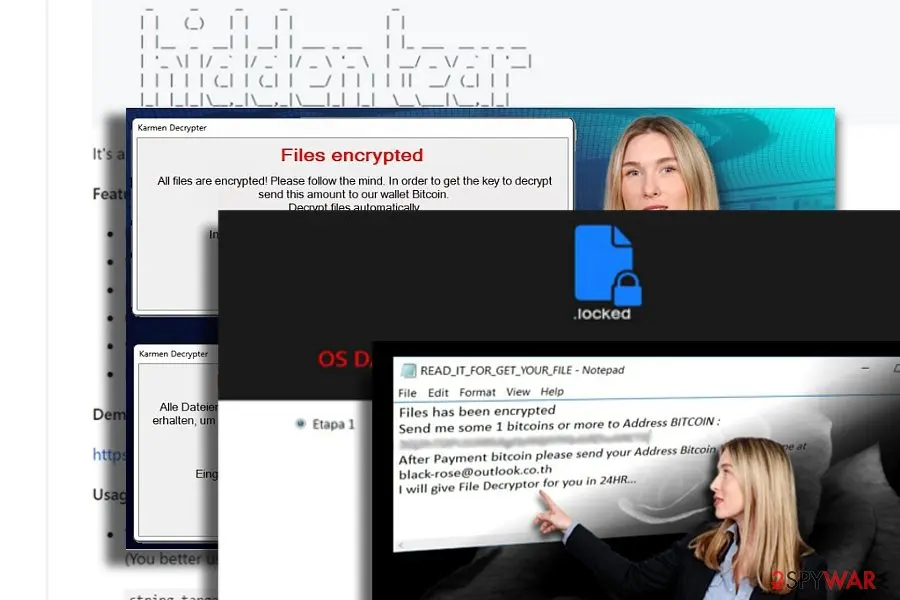
It resulted in a massive outbreak of viruses that are based on HiddenTear code, such as Winsec virus, BlackRose, Karmen, Kampret, Mora Project, Educrypt, Sorry, SorpionLocker, etc. The viruses appended a variety of different file extensions (.lock, .cerber, .LoveYou, .Lime, etc.), and prevented victims from accessing them unless they pay for the decryption key.
Nevertheless, most crypto-locker's variants can be decrypted with the help of two official tools released by security researchers.
Hidden Tear author, Turkish programmer named Utku Sen, uploaded the payload in GitHub page for the first time in 2015. Whether he anticipated the virus to evolve into such malware pattern helping other hackers to make money remains a rhetoric question entirely. Since its introduction, cybercriminals have been actively exploiting the programming code for their malicious intentions.
A few French versions were detected. Unlike other counterparts, the first variation contains very detailed payment site. After finishing the encryption procedure, it appends .locked file extension. Further instructions are delivered in READ_IT_FOR UNLOCK.txt and Tutoriel.bmp files.
The second variation appends the same file extension, but it introduces itself as VideoBelle ransomware. Interestingly, while the ransom note is written in French, it still demands 150 British pounds as a ransom.
While the majority of Hidden Tear variations are created to extort money, some versions of this malware are designed for fun. One of the recent variations uses a photo of a famous virus researcher called Karsten Hahn. Luckily, this version does not encrypt files.
Within such short period of existence, the heir of the malware – HiddenTear 2.0 dwells on the web as well. Indeed, it has developed into one of the biggest cyber issues.
On the other hand, IT professionals have already presented a decrypter for this malware and several other viruses which are based on this code. Note that HiddenTear removal must be performed before jumping to a file-decrypting procedure. or is capable of completing efficient termination.
One of the main factors, which have determined such wide-spread of the Hidden Tear, was its accessibility on the world wide web. The GitHub page with the pattern of the malware is accessible for everyone and does not require the access to Tor or dark web.
According to its author, Hidden Tear malware uses the standard AES encryption method. It generates a public key which is additionally transmitted to a remote Command and Control server. In order to decrypt files encoded with this tool, a special private key is required.
On the other hand, a certain level of programming knowledge is also needed. A web server, which supports Python, PHP, JavaScript and other variations of programming languages, is necessary to complete the configuration of HiddenTear malware.
Despite warnings not to use this malware for other than educational needs, a string of Hidden Tear-based viruses have emerged. Exceptional feature unifying these threats is that they do not have GUI or Graphical user Interface.
In other words, once the virus fully occupies the system, it creates a .txt file. Depending on the author, the ransom note may include an extensive description of the virus and detailed instructions on how to get rid of the virus.
Usually, victims are required to pay a ransom which should encourage the bad guys to recover victims' files. However, such cases are quite rare. Elaborating on GUI feature, WinSec ransomware sample negates the rule as it presents its unique interface in the Portuguese language.
Thus, it suggests that the availability of Hidden Tear ransomware also gives room for crafting more exquisite versions. One of the versions even targeted Pokemon Go players in Central Asia a while ago .
From our report of Feb 2019 · not reviewed since
Distribution methods remain the same
Another feature for the malware which contributed to the success of the malware was its transmission techniques.
Mainly, it traveled as an email attachment appended to "urgent" and "highly important" emails. Some users may even get alarmed with fake notifications from a tax institution or the FBI.
Thus, do not rush to unwrap such attached file before verifying the sender. You may also pay attention to certain details which hint the origin of the message:
- grammar mistakes
- types
- altered credentials
Furthermore, trojans also facilitate Hidden Tear hijack. In order to reduce the risk of such infiltration, combine your anti-virus app with anti-spyware software. Regardless of the claims about the immunity to AV programs, the majority of HiddenTear variations are detectable .
The HiddenTear ransomware note
The note is called README.txt.
We did not record the full text of the ransom note in our report.
How to remove HiddenTear ransomware
Tools you'll need
All of these are free except where noted. Download them on a clean device if the infected PC is offline.
- A USB stick: to keep the ransom note, two or three encrypted files and screenshots off the infected PC.
- Microsoft Defender Offline: built into Windows 11 and Windows 10; scans before Windows starts, so running malware cannot hide.
- Microsoft Safety Scanner: a second, portable scanner with current signatures; each download works for 10 days.
- ID Ransomware: identifies the family from the note and one encrypted file and says whether a decryptor exists.
- No More Ransom: the free decryptors from police and security companies; check it again every few months.
- Fortect (optional): scans Windows for malware and repairs the system files and settings it damaged. The free scan is in the box above.
How to remove HiddenTear and get your files back
Work in this order.
Disconnecting comes first, removal comes before any restore, and nothing here asks you to contact the attackers.
Step 1: Disconnect the PC and unplug backup drives
Unplug the network cable or turn off Wi-Fi, and disconnect USB drives, external disks and network shares, so HiddenTear cannot reach more files. Pause OneDrive, Google Drive or Dropbox sync, because synced folders upload the encrypted copies over the good ones.
Leave the PC on but offline while you read the next steps, since a restart can let the ransomware run again. This applies to Windows 11 and Windows 10 alike.
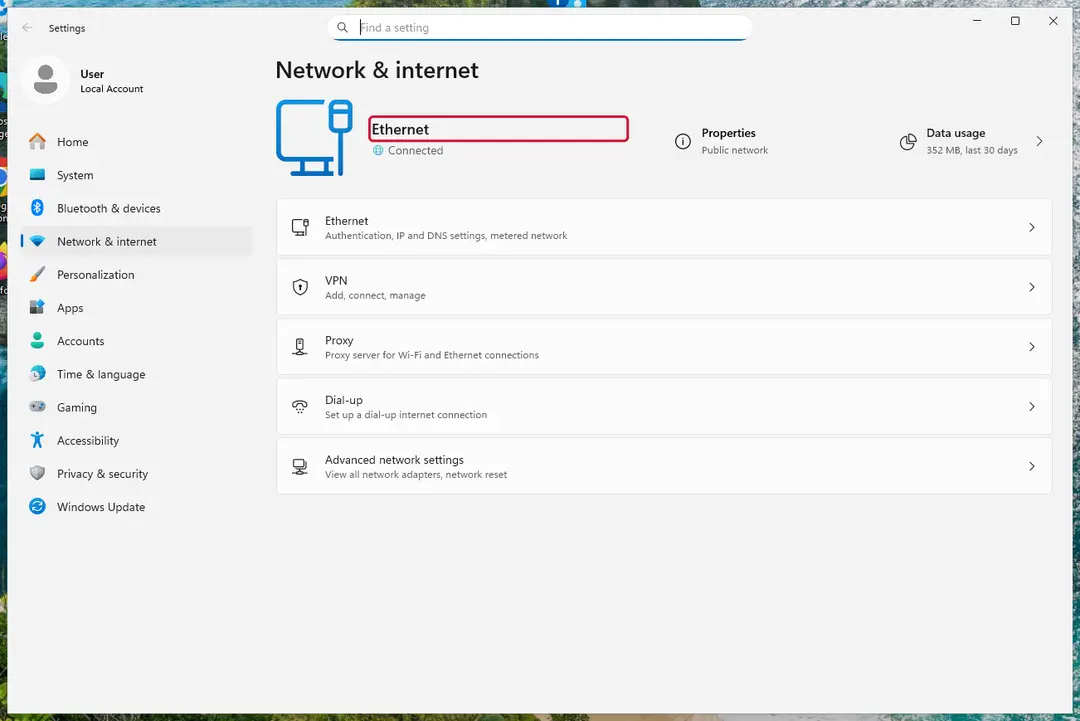
Windows 11: turn off Wi-Fi to take the PC offline. Full procedure with screenshots: Ransomware: first steps, finding a decryptor and recovering files
Step 2: Save the ransom note and confirm the family
Your files now end in
.lockedand the instructions are inREADME.txt. Save both to a USB stick, a copy of the note and two small encrypted files, before anything else.On another device, check them with ID Ransomware or Crypto Sheriff: the family name decides which decryptor, if any, can help. Keep the note's ID and contact line for your report.
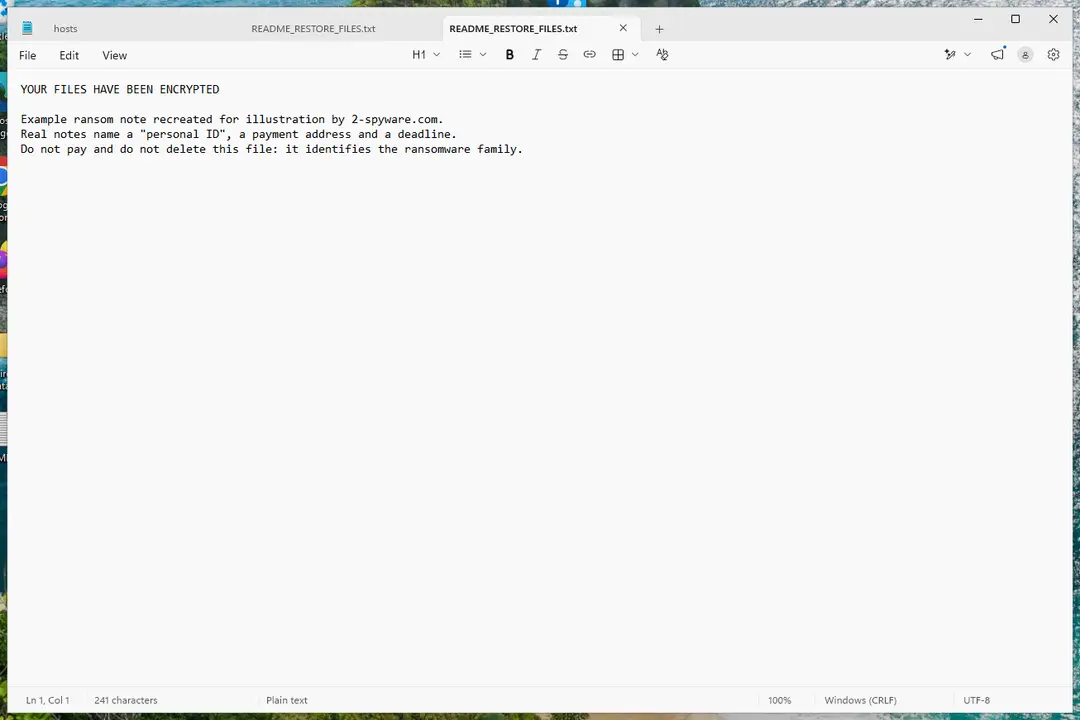
Windows 11: the ransom note and encrypted files to copy for identification. Full procedure with screenshots: Ransomware: first steps, finding a decryptor and recovering files
Step 3: Check for a free decryptor
Our last check found that for HiddenTear, no free decryptor is known (checked 7 October 2026). Look again yourself in the No More Ransom list and the free decryptor pages of Emsisoft, Avast and Kaspersky, which add new families every year.
A decryptor needs the ransomware gone first, or it encrypts the files again. Keep at least one copy of the encrypted files on an external drive, even if no tool works yet.
Full procedure with screenshots: Ransomware: first steps, finding a decryptor and recovering files
Step 4: Remove the ransomware before you restore or decrypt
Removing HiddenTear does not bring the files back, but it has to come first. Start with Defender's Full scan, then the offline scan from the same Scan options page, which checks the disk before Windows loads.
If the scan cannot start, use Safe Mode with Networking. Delete the ransom notes only after you have saved a copy, because removal tools sometimes leave them behind on Windows 11 and Windows 10.

Windows 11: Windows Security > Virus & threat protection > Scan options. Full procedure with screenshots: Run a Microsoft Defender Offline scan
Step 5: Look for shadow copies of the files
Windows keeps shadow copies for restore points and backups, and some ransomware fails to delete them.
vssadmin list shadowsin an administrator Command Prompt tells you at once whether any exist.If they do, right-click the folder that held your files, open Properties > Previous Versions, select a version from before the attack, and click Open to check it before you Restore or copy the files out. Windows 11 and Windows 10 both have the tab.
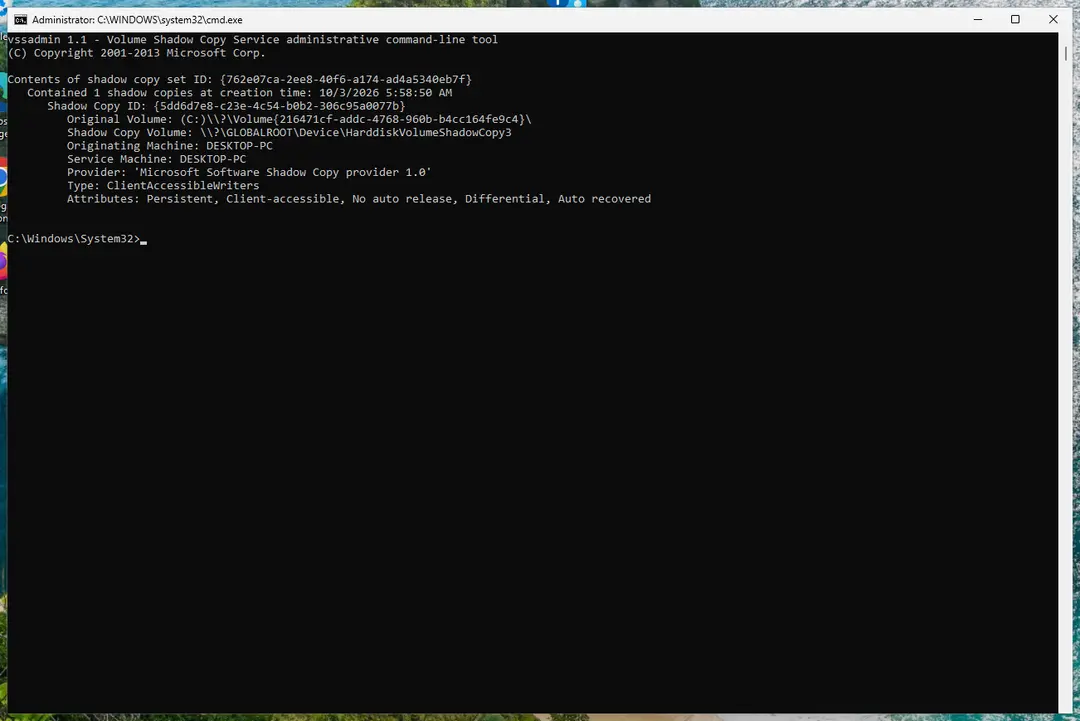
Windows 11: vssadmin list shadows shows whether shadow copies exist. Full procedure with screenshots: Ransomware: first steps, finding a decryptor and recovering files
Step 6: Restore the files from a backup or recover deleted originals
A backup made before the attack is the surest way back. Connect it only once the PC is clean, then restore from File History, Windows Backup, OneDrive's Restore your OneDrive or your own external copies.
Without a backup, try file recovery: the originals that HiddenTear deleted may still be on the disk until something overwrites them. Install nothing new on the drive you want to recover from on the Windows 11 or Windows 10 PC.
Full procedure with screenshots: Recover deleted files (Recycle Bin, backups, OneDrive) On uGetFix
Instructions for each browser and system
The detailed steps for every browser and system this guide covers. Open the one you use.
Manual removal using Safe Mode
Important! →
Manual removal guide might be too complicated for regular computer users. It requires advanced IT knowledge to be performed correctly (if vital system files are removed or damaged, it might result in full Windows compromise), and it also might take hours to complete. Therefore, we highly advise using the automatic method provided above instead.
Step 1. Access Safe Mode with Networking
Manual malware removal should be best performed in the Safe Mode environment.
Windows 7 / Vista / XP
- Click Start > Shutdown > Restart > OK.
- When your computer becomes active, start pressing F8 button (if that does not work, try F2, F12, Del, etc. - it all depends on your motherboard model) multiple times until you see the Advanced Boot Options window.
- Select Safe Mode with Networking from the list.
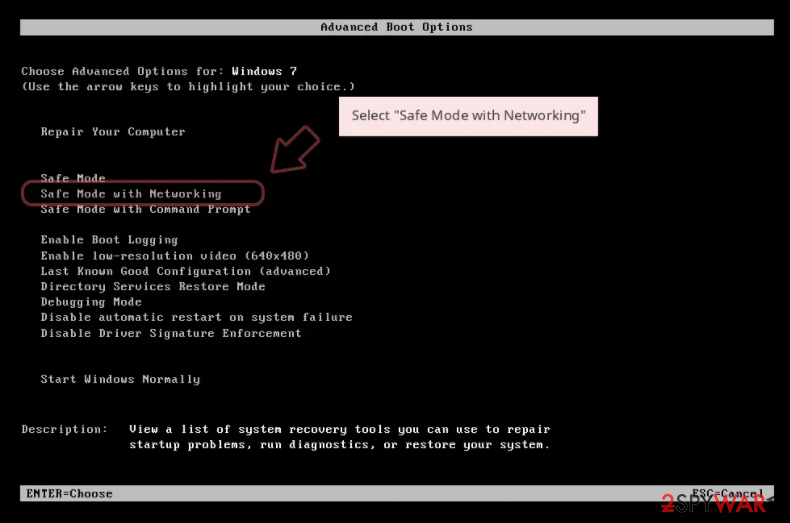
Windows 10 / Windows 8
- Right-click on Start button and select Settings.
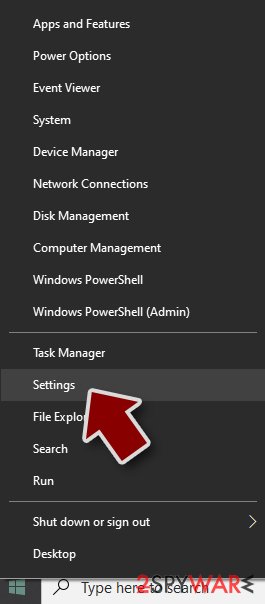
- Scroll down to pick Update & Security.
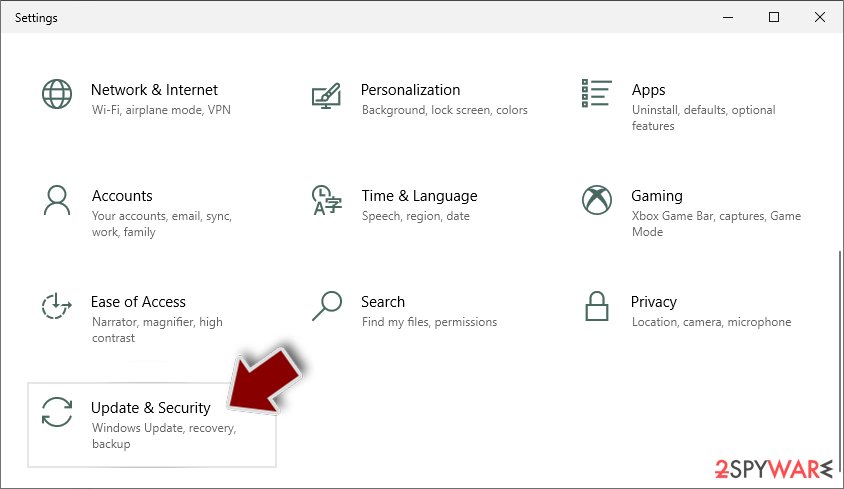
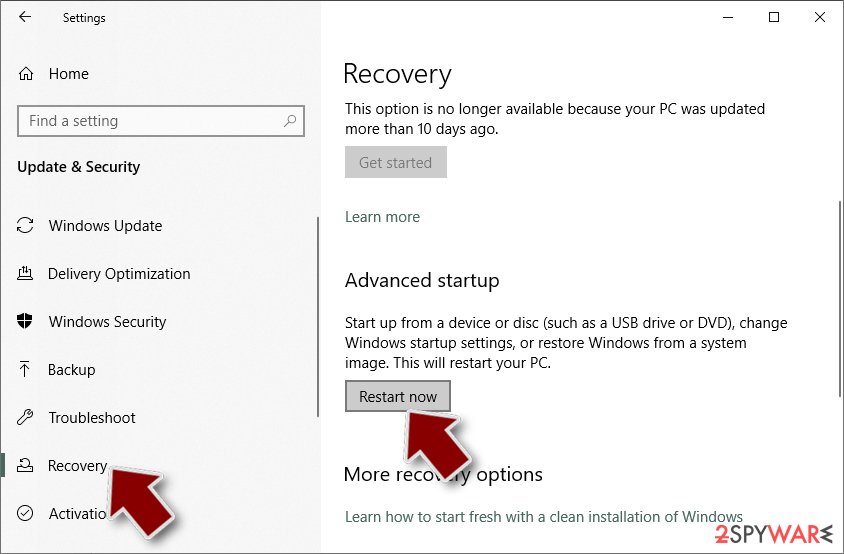
- On the left side of the window, pick Recovery.
- Now scroll down to find Advanced Startup section.
- Click Restart now.
- Select Troubleshoot.
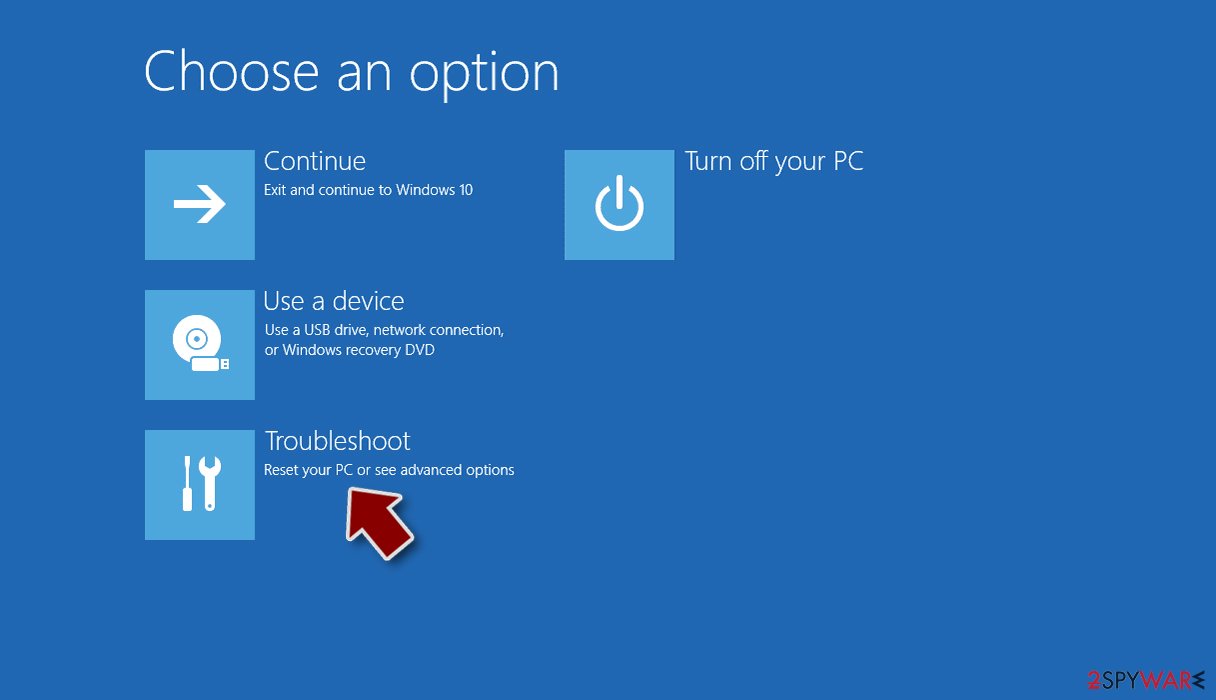
- Go to Advanced options.
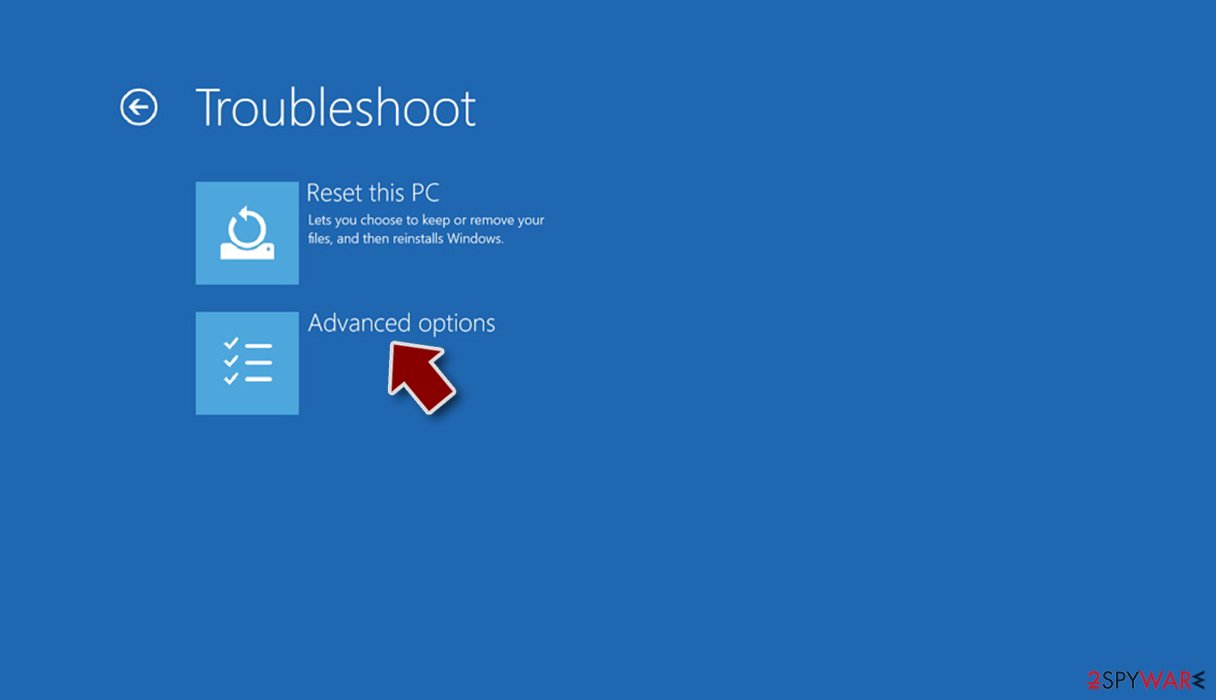
- Select Startup Settings.
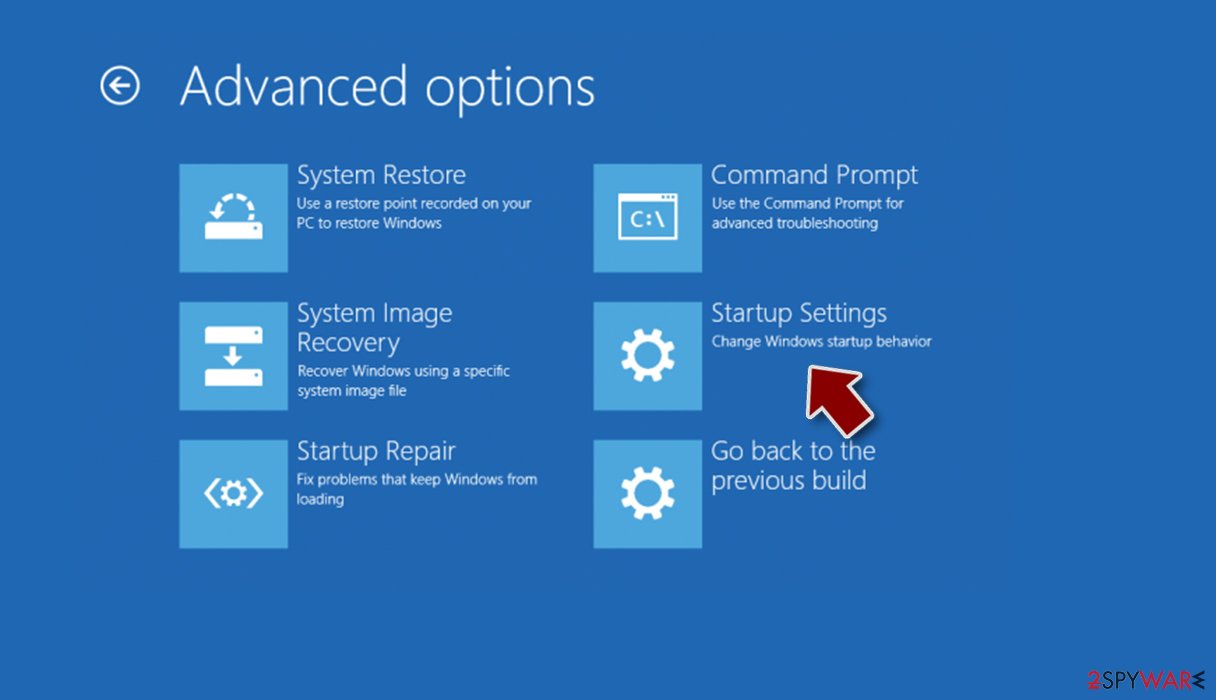
- Press Restart.
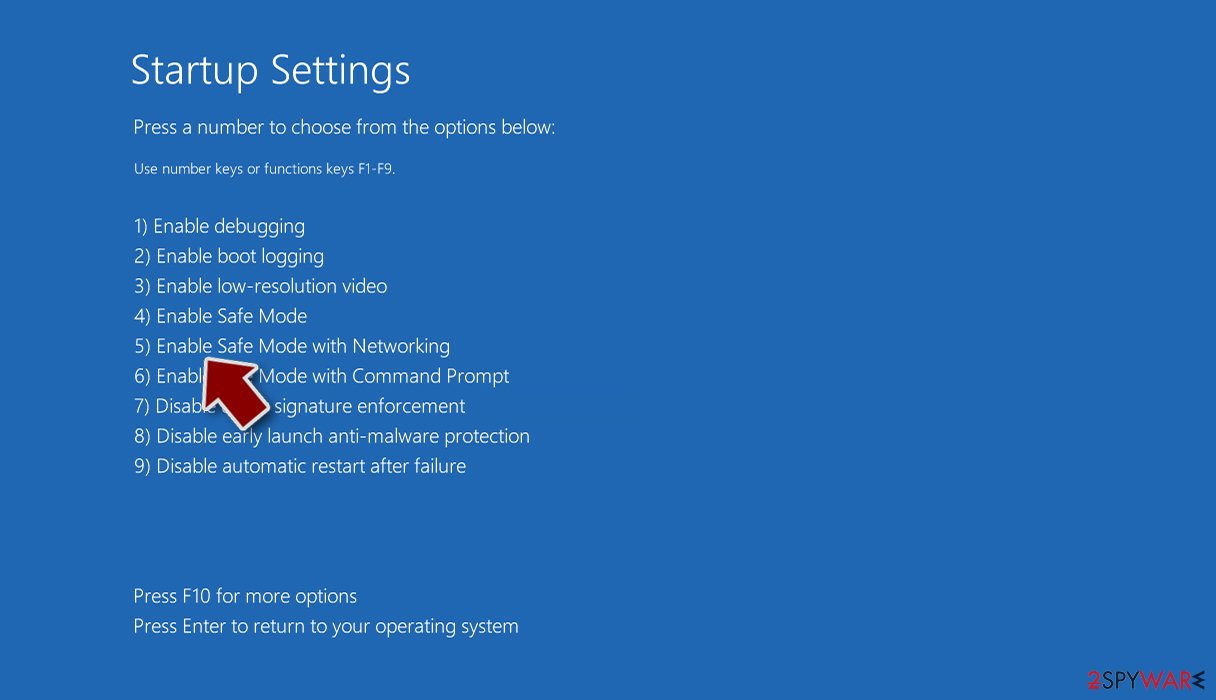
- Now press 5 or click 5) Enable Safe Mode with Networking.
Step 2. Shut down suspicious processes
Windows Task Manager is a useful tool that shows all the processes running in the background. If malware is running a process, you need to shut it down:
- Press Ctrl + Shift + Esc on your keyboard to open Windows Task Manager.
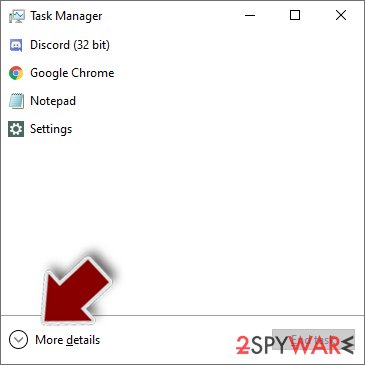
- Click on More details.
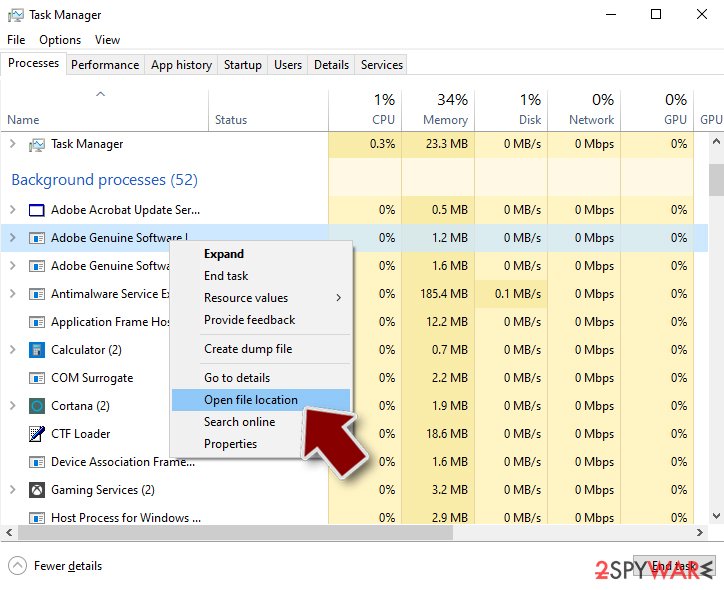
- Scroll down to Background processes section, and look for anything suspicious.
- Right-click and select Open file location.
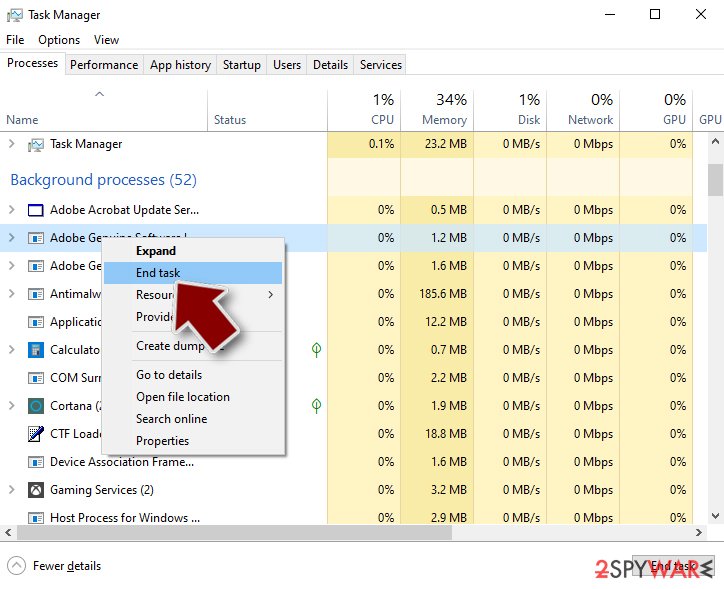
- Go back to the process, right-click and pick End Task.
- Delete the contents of the malicious folder.
Step 3. Check program Startup
- Press Ctrl + Shift + Esc on your keyboard to open Windows Task Manager.
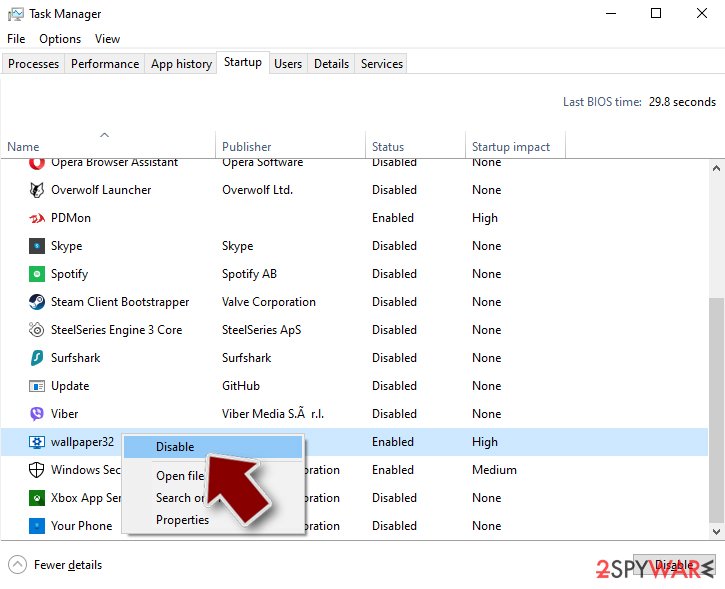
- Go to Startup tab.
- Right-click on the suspicious program and pick Disable.
Step 4. Delete virus files
Malware-related files can be found in various places within your computer. Here are instructions that could help you find them:
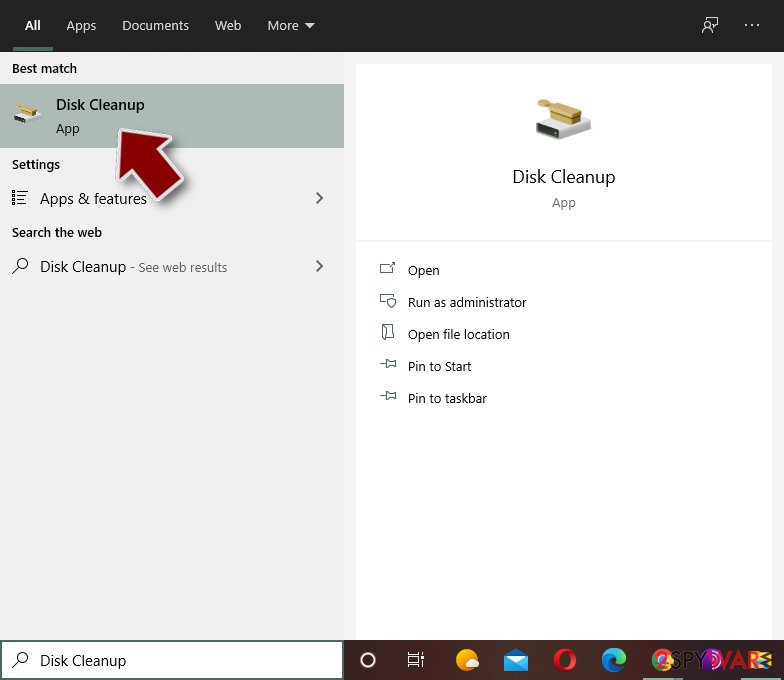
- Type in Disk Cleanup in Windows search and press Enter.
- Select the drive you want to clean (C: is your main drive by default and is likely to be the one that has malicious files in).
- Scroll through the Files to delete list and select the following:
Temporary Internet Files
Downloads
Recycle Bin
Temporary files - Pick Clean up system files.
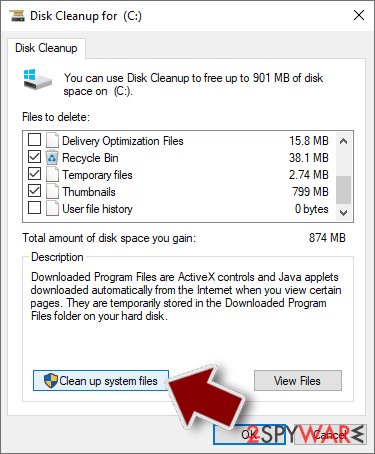
- You can also look for other malicious files hidden in the following folders (type these entries in Windows Search and press Enter):
%AppData%
%LocalAppData%
%ProgramData%
%WinDir%
After you are finished, reboot the PC in normal mode.
From our report of Feb 2019 · not reviewed since
Steps to terminate HiddenTear infection
When it comes to the original version of Hidden Tear virus or a derivative version, brush aside the idea to terminate it manually.
The malware is capable of disguising its source files and processes so manual eradication may not be successful. Thus, let a cyber security application remove HiddenTear.
While the original version hardly behaves as a screen locking threat, some of the newer ones may disable specific system functions which result in a lock screen. In that case, benefit from the below instructions. Once you regain full control, continue Hidden Tear removal with the help reputable security software.
[GI=method-1]Recover the access to all computer functions with Safe Mode function.
This program claims to be able not only recover the encrypted files but lost emails as well.
The benefit of ShadowExplorer
Despite the popularity of HiddenT ear virus, it hardly deletes shadow volume copies – the tool for Shadow Explorer to recover your encoded data.
Hidden Tear Decrypter
You can now decrypt the majority of viruses originating from this malware. There are two alternative versions:
- Decrypter No 1
- Decrypter No 2
Report it and recover your files
Report it
Report the attack even if you do not expect the files back: insurers and banks ask for the report number, and police use the contacts in the note to link cases.
- United States
- FBI IC3 · FTC ReportFraud
- United Kingdom
- Report Fraud (formerly Action Fraud) · NCSC
- Australia
- ReportCyber (ASD)
- EU countries
- Europol: national reporting sites
Give the victim ID, the note and the date the files were encrypted. A business that holds personal data may also have to notify its data protection authority, in the EU within 72 hours.
Protect the files you restore
Restore only after the scans are clean and the PC no longer shows files that end in .locked and no longer open; otherwise the restored copies can be damaged again.
Then build a backup that survives the next infection:
- one copy in the cloud with version history
- one on an external drive that is disconnected between backups
- the working copy on the PC
Version history matters because a backup that syncs damaged files overwrites the good ones.
How to do this with the tools built into Windows: the 3-2-1 backup rule on Windows.
Access your website securely from any location
When you work on the domain, site, blog, or different project that requires constant management, content creation, or coding, you may need to connect to the server and content management service more often. The best solution for creating a tighter network could be a dedicated/fixed IP address.
If you make your IP address static and set to your device, you can connect to the CMS from any location and do not create any additional issues for the server or network manager that needs to monitor connections and activities. VPN software providers like can help you with such settings and offer the option to control the online reputation and manage projects easily from any part of the world.
Recover files after data-affecting malware attacks
While much of the data can be accidentally deleted due to various reasons, malware is one of the main culprits that can cause loss of pictures, documents, videos, and other important files.
More serious malware infections lead to significant data loss when your documents, system files, and images get encrypted. In particular, ransomware is is a type of malware that focuses on such functions, so your files become useless without an ability to access them.
Even though there is little to no possibility to recover after file-locking threats, some applications have features for data recovery in the system. In some cases, can also help to recover at least some portion of your data after data-locking virus infection or general cyber infection.
Questions about HiddenTear ransomware
How do I open .locked files?
You cannot open them by renaming or with another program, because the content of files ending in .locked has been encrypted. The only ways back are a working decryptor for the family, or clean copies from elsewhere:
- OneDrive versions
- File History
- an offline backup drive
- Previous Versions if the ransomware did not delete them
Identify the family first by uploading the ransom note and one encrypted file to ID Ransomware or No More Ransom. Avoid websites and programs that promise to open any encrypted file; they do not work and some are scams.
Is there a free HiddenTear decryptor?
We last checked on 7 October 2026, and for HiddenTear no free decryptor is known. We check No More Ransom, which collects free tools from police and security companies, and the decryptor pages of the major antivirus vendors. A working decryptor exists only when the encryption has a flaw or the keys were leaked or seized.
Ignore sites and videos that offer a "HiddenTear decryptor" for download or for a fee: these are usually scams or malware. Real decryptors are free and come from known security companies or law enforcement. Keep the encrypted files in case a tool appears later.
Did HiddenTear steal my files or passwords?
We do not know yet. Nothing published so far shows data theft by HiddenTear, but the only confirmed sign is files that end in .locked and no longer open, which says nothing about what happened before. Many current ransomware attacks copy files or run a password stealer first, so it is wise to act as if they did.
From a clean device, change the passwords that were saved in the browsers on this PC, starting with e-mail and banking, sign out of all sessions and turn on two-step verification. Watch bank statements and account activity for the next few weeks.
Should I pay the ransom?
We advise against it, and so do the FBI, Europol and national cyber agencies. Payment does not guarantee a working tool: some attackers never reply, some tools damage files, and some variants have no decryptor at all. Paying also funds further attacks and can make you a target again.
Before considering payment, try every recovery option in this guide and report the attack. Companies must involve their legal adviser and insurer, because payments to sanctioned groups can be illegal. If files are truly irreplaceable, store the encrypted copies and wait; decryptors sometimes appear later.
Can a data-recovery company decrypt my files for a fee?
Only if a decryptor already exists or the company pays the attackers for you. Some "ransomware recovery" services advertise that they can decrypt families with no known flaw; in practice they negotiate with the attackers and add their own fee. Others use the same free tools listed on No More Ransom.
Before you hire anyone, ask in writing how they will recover the files, whether they will contact the attackers and what happens if they fail. A legitimate service answers clearly. If a free decryptor exists for your family, you can run it yourself.
How did HiddenTear get on my computer?
The way HiddenTear spreads has not been documented yet, so look at your own recent activity. On home PCs, ransomware most often comes with cracked programs, game cheats, key generators and fake updates, or with an e-mail attachment that was opened. On business networks, attackers usually log in through Remote Desktop with a stolen or guessed password.
Think back to what was downloaded or installed in the days before files that end in .locked and no longer open, and check the Downloads folder and Installed apps sorted by date. Keep anything suspicious for your report, but do not run it again.
Is HiddenTear the same as other ransomware with a similar name?
Not necessarily. Ransomware names come from the file extension, the note or a word in the code, so unrelated families often end up with similar names, and one family can appear under several names. The difference matters: a decryptor or advice for one family does not fit another and can damage files.
Compare the ending added to your files and the exact name of the note with the summary table at the top of this guide, then upload the note and one encrypted file to ID Ransomware from a clean device. If the result names another family, follow the guide for that family instead.
Will Fortect remove HiddenTear?
Fortect scans Windows for malware and unwanted programs and repairs the system files and settings they change, and its free scan shows what it finds on your PC before you decide anything.
For HiddenTear, follow the plan above as well: the browser steps take back permissions and settings that no scanner treats as a threat, and uninstalling the program that brought it removes the source.
Run Microsoft Defender's full scan and, if anything was found, its offline scan as a second opinion. If the symptoms are gone after the plan and both scans are clean, there is nothing more to do.
Sources
- GitHub: hidden-tear (read October 7, 2026)
- Lesvirus: Eliminate computer threats (read October 7, 2026)
- SearchSecurity: Command-and-control servers: The puppet masters that govern malware (read October 7, 2026)
- CISA: StopRansomware (read October 7, 2026)
- No More Ransom (read October 7, 2026)