
PC MightyMax: what it is and how to remove it
PC MightyMax is considered to be a fake optimization tool which displays only fake warnings during its activity on victim's system. Once inside the computer, it starts producing numerous warnings about various system threats and infections.
Facts checked October 7, 2026. Removal steps tested on Windows 11 (26H2) and checked against Microsoft's and the browser makers' current documentation. Sections marked as our earlier report are the original text: they describe the threat as it was then and have not been reviewed since. The 2026 status, the removal steps and the questions are current.
Automatic
Get a free scan and check if your PC is infected.
Fortect finds malware, unwanted programs and the Windows damage they leave behind, and repairs it in one pass.
Programs like PC MightyMax usually arrive in groups; a free scan lists the companions that are easy to miss.
Do it yourself · free Remove PC MightyMax yourself 5 steps, about 15 minutes, no software needed.
Start the steps
PC MightyMax: summary
| Distribution | Bundled freeware, dubious websites, fake ads, its official page |
|---|---|
| Name | PC MightyMax |
| Type | Fake optimization tool |
| Symptoms | Displays fake alerts about various false computer infections, pop-ups |
| Danger level | Medium |
| PREVENTION | Install an antivirus for higher protection |
| Removal | Scan the PC with security software to find and remove the malware and anything installed with it. Fortect scans Windows for malware and repairs the system files and settings it damaged. Remove it nowTo use the full-featured product, you have to purchase a license for Fortect. The scan is free. |
Show 5 more facts
| Detection names | No Microsoft detection name is known |
|---|---|
| Damage | Not recorded in the old report |
| Evidence | 4 write-ups by security sites; details still limited |
| First seen | 18 July 2018 |
| Facts checked | 7 October 2026 |
What PC MightyMax does on an infected PC
From our report of Jul 2018 · not reviewed since
PC MightyMax - fake cleaning tool which manages to bombard the computer user with false alerts about detected malware
PC MightyMax is considered to be a fake optimization tool which displays only fake warnings during its activity on victim's system.
Once inside the computer, it starts producing numerous warnings about various system threats and infections. However, all of them are false because PC MightyMax has no virus database and cannot detect any threat or PC-related issue. All these errors it displays are showed just to gain income from PC users. Developers collect revenue from people who fall into believing that they need to buy the full version of this harmful.
The main functionality of PC MightyMax is quite annoying because it starts system scans to "detect" various threats each time the PC is rebooted. Additionally, it starts showing you numerous alerts announcing about numerous computer infections. If you leave the sound on, it might even produce beeping sounds while active.
Although such fake fixing program claims to be "trusted by over 8,000,000 users worldwide", all this is due to trick users into downloading such hazardous software on their computers.
If you ever encounter this app and its notofications , be careful and do not fall for it as numerous gullible users have already done. Even more, do NOT buy its license as it is a straight way to the money loss and identity theft.
If you want to stop the annoying activity, you need to remove PC MightyMax virus from your computer the same minute you spot it. For such purpose, you can uninstall the app manually or rely on anti-malware tools. The antivirus program will also help you with PUP's removal.
There are lots of similar PC optimization tools that are fake. You should ignore their fake warning messages and get rid of them without wasting the time. Otherwise, they may start tracking your browsing routine and fill your favorite websites with fake warning messages.
PC MightyMax removal is the only way to stop the false warnings caused by this PUP. They bring no real value to the user and just interrupt your activity by interrupting you while you are using your computer.
- Win Speedup 2018;
- PC Fixer Pro 2018;
- Clean PC Pro 2018;
- etc.


How PC MightyMax got on your PC
From our report of Jul 2018 · not reviewed since
According to cybersecurity professionals , PUPs such as fake cleaning tools enter the system through other legitimate programs.
They come bundled within them without any clear notice due to the users' careless behavior. When downloading regular software, people might rush or skip thru installation steps.
To avoid various infections, go to the Custom or Advanced section while installing freeware and shareware on your computer. Then, opt out of all unnecessary components that are typically presented as optional.
Fake PC optimization tools can also be downloaded from their original sites. Here, they are presented as legitimate and trustworthy tools. However, you should always read several reviews about the app before installing it on the system.
Some other ways used for the distribution of PUPs are various ads that interrupt people while they are browsing the Internet. Once you click on such content, it redirects you to a fake page used to promote useless apps and goods. Better stay away from questionable sites and leave them if any of them occurs in your way.
How to remove PC MightyMax
A loader's job is to install other malware, so treat the PC as infected with more than one program until the scans are clean.
Step 1: Delete scheduled tasks that bring it back
Open Task Scheduler from the Start menu and click Task Scheduler Library. Select each task you do not recognise and read the Actions tab:
- a task that starts a file in
%AppData%or%Temp% - runs
powershellwith a long encoded line - opens a web address belongs to PC MightyMax or a similar program
Right-click such a task and choose Delete, and check the subfolders too. Leave tasks from Microsoft, your PC's maker and programs you use. Task Scheduler is the same in Windows 11 and Windows 10.
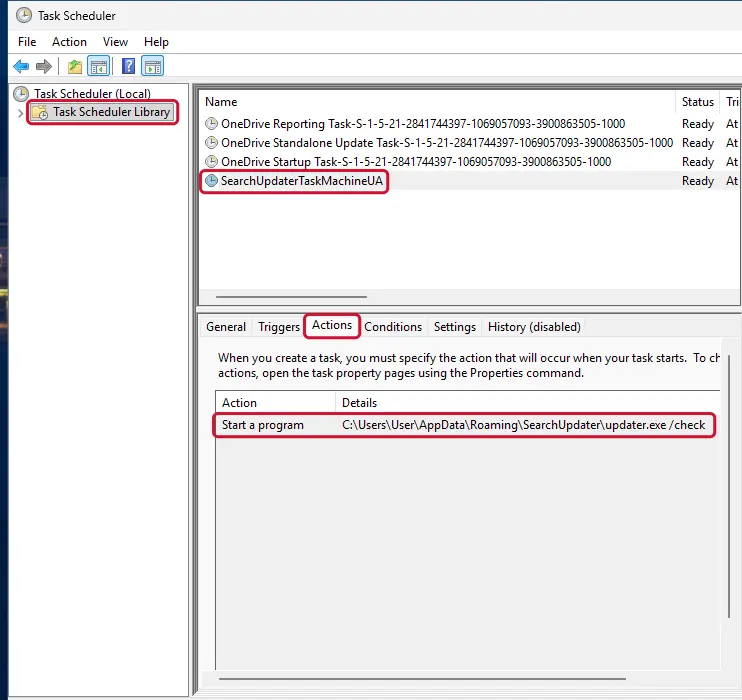
Windows 11: Task Scheduler Library, the task selected, the Actions tab shows the file it runs. Full procedure with screenshots: Remove what malware leaves behind in Windows
- a task that starts a file in
Step 2: Remove it from startup
Whatever PC MightyMax installed usually starts with Windows. Open Task Manager with Ctrl + Shift + Esc, go to Startup apps in Windows 11 or the Startup tab in Windows 10, and disable what you do not know, starting with entries that have an empty Publisher column.
Open file location on the right-click menu shows the file, which helps you decide and tells you what to delete later. Disabling is safe: if something you need stops working, switch it back on.
Full procedure with screenshots: Stop apps from opening at startup On uGetFix
Step 3: Delete the folders left behind
What the uninstaller leaves behind is usually in the user folders. Open File Explorer, switch on View > Show > Hidden items (in Windows 10 View > Hidden items), and go through
%LocalAppData%,%AppData%, %ProgramData% and the two Program Files folders.Sort by Date modified and delete folders that appeared together with the problem and belong to no program you use. Folders with random names that hold
.exe,.dll, .js or .ps1 files are the strongest sign.Full procedure with screenshots: Remove what malware leaves behind in Windows
Step 4: Scan the PC, then run the offline scan
Open Windows Security > Virus & threat protection > Scan options, run a Full scan and remove everything it finds. Then select Microsoft Defender Antivirus (offline scan) and click Scan now: the PC restarts and scans before Windows loads, which finds files that hide while Windows runs.
Save your work first, because the offline scan takes about 15 minutes. Both scans are built into Windows 11 and Windows 10, and a second scanner from another vendor is a useful extra opinion.
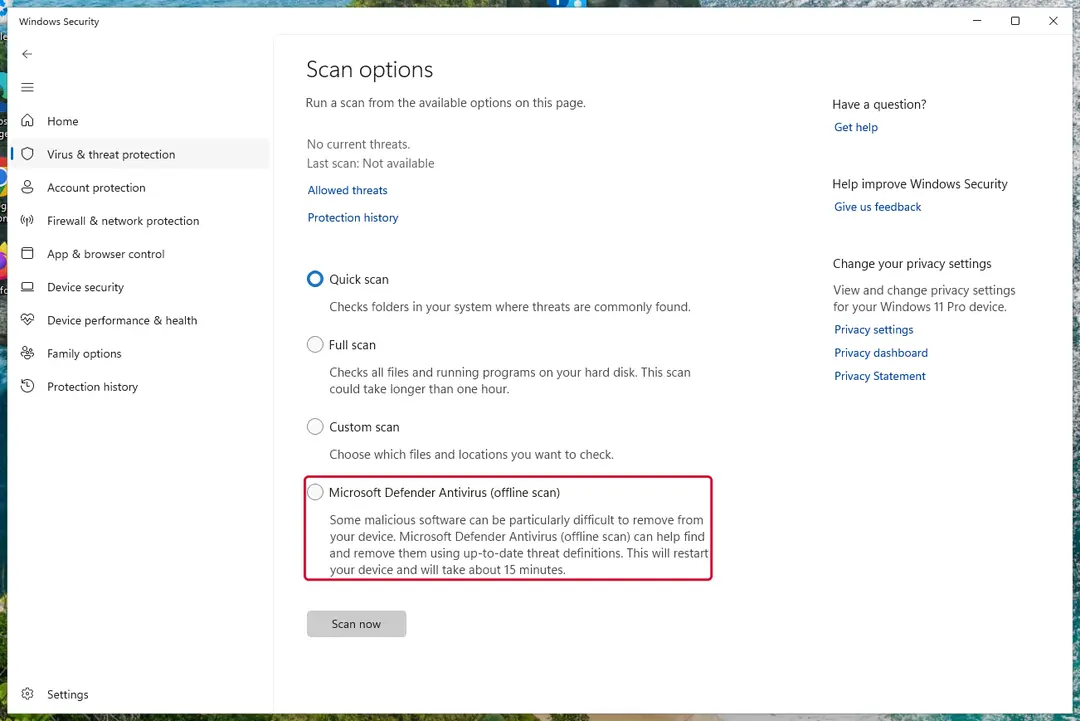
Windows 11: Windows Security > Virus & threat protection > Scan options. Full procedure with screenshots: Run a Microsoft Defender Offline scan
Step 5: Change passwords from another device and sign out other sessions
Assume that the passwords saved in this PC's browsers, and the accounts that were open in them, are known to the attacker. From a phone or a clean computer, change the e-mail password first, then banking, shopping, social and gaming accounts.
Use each service's option to sign out of all other sessions, because stolen cookies keep a session open even after a password change. Turn on two-step verification on each account. Wait with the infected Windows 11 or Windows 10 PC until the scans are clean.
Full procedure with screenshots: Turn on two-step verification / secure a hacked account
Instructions for each browser and system
The detailed steps for every browser and system this guide covers. Open the one you use.
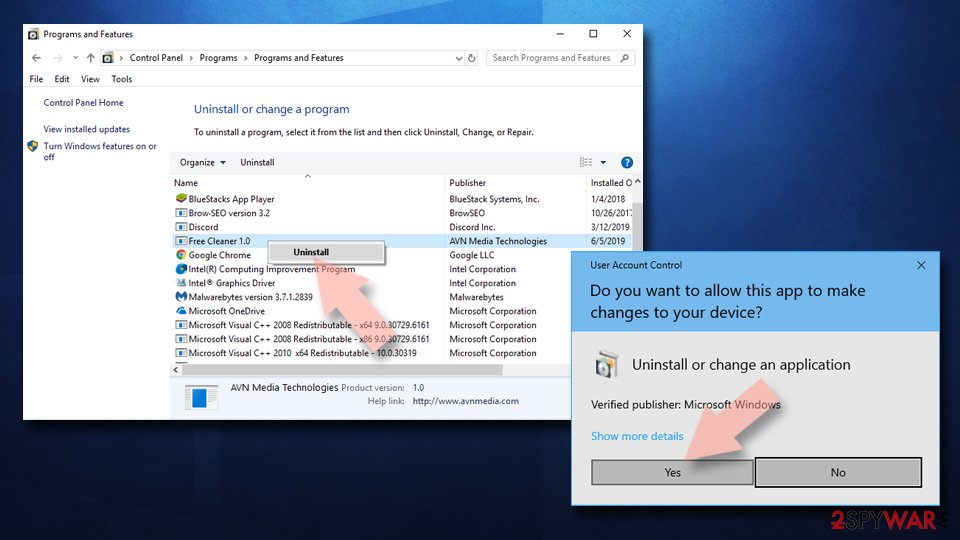
Uninstall from Windows
To delete PC MightyMax from your Windows OS, follow these steps:
Uninstall from Windows 10/8:
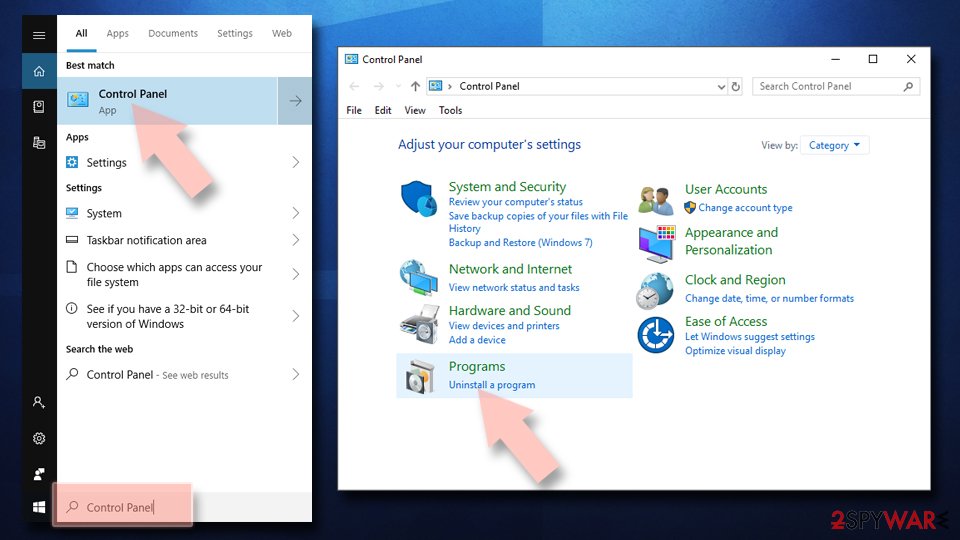
- Type Control Panel into the Windows search box and open the result.
- Under Programs, select Uninstall a program.
Uninstall from Windows 7/XP:
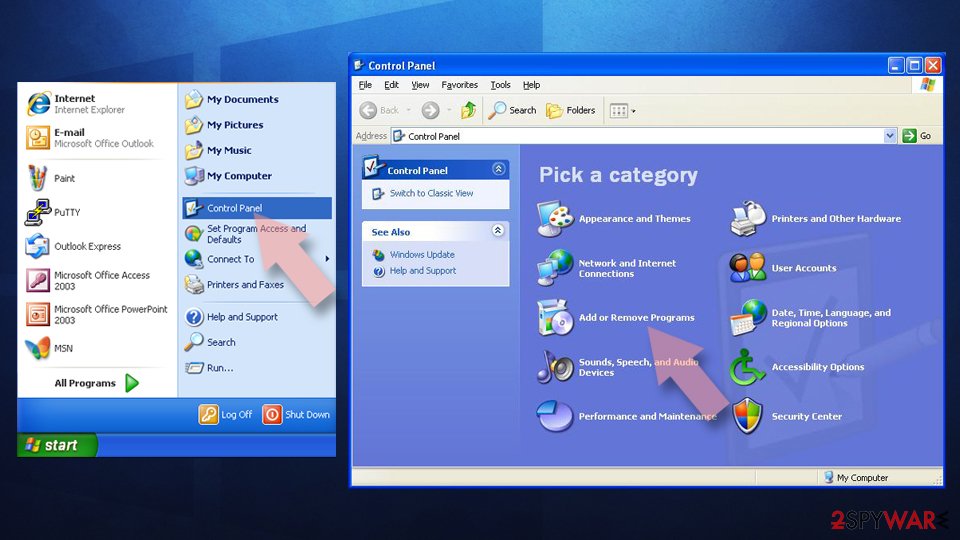
- Click on Windows Start > Control Panel (Windows XP users should click on Add/Remove Programs).
- In Control Panel, select Programs > Uninstall a program.
Remove the unwanted program:
- In the Programs and Features window, look for any recently installed suspicious entries, select them, and click Uninstall.
- If User Account Control appears, click Yes to confirm, then complete the removal.
Delete from macOS
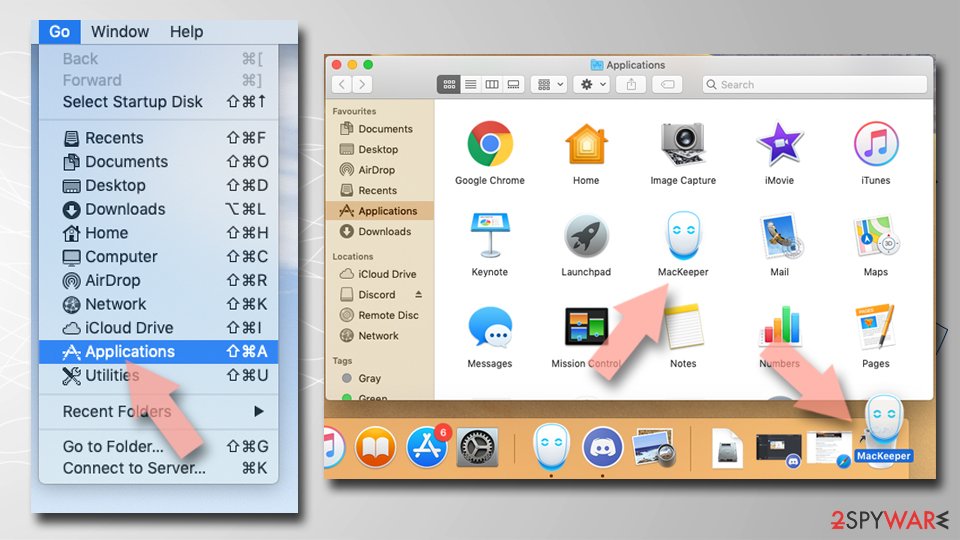
Remove the unwanted application:
- From the menu bar, select Go > Applications.
- In the Applications folder, look for any suspicious entries, then drag them to Trash (or right-click and pick Move to Trash).
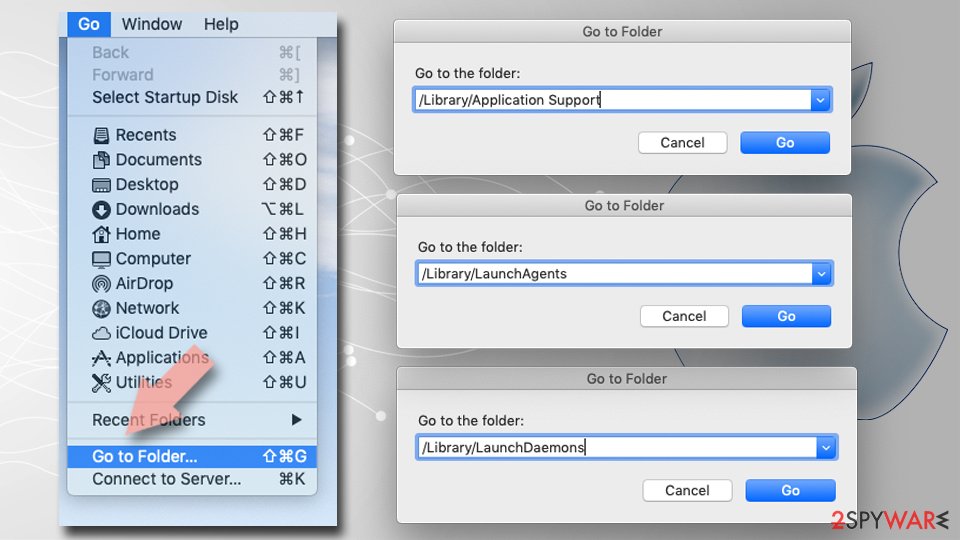
Delete leftover files and folders:
- Select Go > Go to Folder.
- Enter /Library/Application Support and remove any suspicious folders related to the unwanted program.
- Repeat the same check in the /Library/LaunchAgents and /Library/LaunchDaemons folders, deleting any suspicious entries.
- Finally, empty the Trash to permanently remove the leftovers.
From our report of Jul 2018 · not reviewed since
Delete PC MightyMax virus and its fake alerts
To remove PC MightyMax virus you need to download and install anti-malware.
Such professional help is required if you want to get rid of the cyber threat permanently. You should take care of the process as soon as you spot the fake optimization tool on your system.
Furthermore, to avoid damaging consequences that are typically caused if PC MightyMax removal is not initiated, you need to make sure that no PUP-related components are left on your system. For this reason, open Task manager and run thru your apps. Guiding steps will help you doublecheck your system.
After removal: passwords, accounts and prevention
Your passwords after PC MightyMax
Removing PC MightyMax does not undo what it may already have sent out while the PC showed PC MightyMax in the list of installed apps.
Treat saved browser passwords and logged-in sessions on this PC as known to the attacker.
From another device, change the e-mail password first and end all its sessions. Then do the same for the bank, PayPal, Microsoft, Google and Apple accounts. Stolen session cookies keep working after a password change until you sign out everywhere.
Move crypto to a new wallet created on a clean device. A step-by-step order for every kind of account is in our guide to account security after an infection.
Stream videos without limitations, no matter where you are
There are multiple parties that could find out almost anything about you by checking your online activity.
While this is highly unlikely, advertisers and tech companies are constantly tracking you online. The first step to privacy should be a secure browser that focuses on tracker reduction to a minimum.
Even if you employ a secure browser, you will not be able to access websites that are restricted due to local government laws or other reasons. In other words, you may not be able to stream Disney+ or US-based Netflix in some countries. To bypass these restrictions, you can employ a powerful VPN, which provides dedicated servers for torrenting and streaming, not slowing you down in the process.
Data backups are important - recover your lost files
Ransomware is one of the biggest threats to personal data.
Once it is executed on a machine, it launches a sophisticated encryption algorithm that locks all your files, although it does not destroy them. The most common misconception is that anti-malware software can return files to their previous states. This is not true, however, and data remains locked after the malicious payload is deleted.
While regular data backups are the only secure method to recover your files after a ransomware attack, tools such as can also be effective and restore at least some of your lost data.
Questions about PC MightyMax
What is PC MightyMax and why is it on my PC?
PC MightyMax is a program that was installed on the PC, most likely together with something else you downloaded. Free software sites and many installers add extra programs on setup pages with pre-ticked boxes, so the extra install looks like your choice even though nobody read the page.
Check the install date in Settings, Apps, Installed apps: the program you installed that day is the probable carrier. If you do not need PC MightyMax, uninstall it. If it belongs to your hardware or to a program you use, search its exact name and publisher first, because drivers and their tools can have unfamiliar names.
PC MightyMax will not uninstall. What can I do?
First restart the PC and try again, because the program may have been running and locked its own files. If the uninstaller is missing or fails, start Windows in Safe Mode, where most third-party programs do not start, and remove PC MightyMax from Installed apps there.
If it still refuses, delete its startup entry and its scheduled task, restart, and try once more. A program that actively prevents removal is behaving like malware, so finish with a Microsoft Defender offline scan. Avoid third-party uninstallers offered on search ads; several of them are unwanted programs themselves.
What are the signs of a trojan infection?
Most trojans try to leave no visible signs, so look for side effects. Common ones:
- Windows Security turned off or unable to update
- new entries in Startup apps or Task Scheduler
- programs in Installed apps you did not install
- browser settings that changed by themselves
- unusual network activity while the PC is idle
- password-reset or login-alert e-mails you did not trigger
None of these proves an infection on its own. Together with an antivirus alert naming PC MightyMax, they are a strong reason to follow the full plan.
Why didn't my antivirus stop PC MightyMax?
New trojan builds are packed and changed often so that signatures do not match, and some are signed with stolen or bought certificates. Many arrive inside password-protected archives, which scanners cannot open until you extract them.
Some downloads also tell the user to turn off the antivirus "because it gives false alarms", a common line in cracked software instructions. Keep real-time protection on, never disable it for an installer, and run the offline scan whenever you suspect something slipped through.
Can a normal remote support program be a backdoor?
Yes. Tools such as AnyDesk, TeamViewer and ScreenConnect are legitimate, but whoever controls the account behind them controls the PC. Scammers install them during fake support calls, and some trojan campaigns install them silently because antivirus programs do not flag a genuine, signed product.
If you find one you did not set up, uninstall it, check Startup apps for related entries and change passwords from another device. If money or accounts were involved, call your bank and report the incident.
Should I reset my PC because of PC MightyMax?
Only if the signs point to deeper access. Reset when you see PC MightyMax in the list of installed apps again after removal, when Windows Security cannot start or update, when remote access tools you did not install keep appearing, or when you simply cannot trust the PC any more.
Otherwise, the plan in this guide plus an offline scan is enough. If you do reset, choose Remove everything and Cloud download for a fresh copy of Windows, restore only documents and photos, and reinstall programs from their official sites. Change important passwords from the clean system afterwards.
Can PC MightyMax spread to other devices on my network?
Most trojans aimed at home users stay on the PC they infected, but an attacker with remote access can look at the network, open shared folders and try passwords on other devices. Loaders sometimes deliver worms or ransomware that do spread.
Disconnect the PC while cleaning, run a full scan on other Windows PCs, change the router's admin password and the Wi-Fi password if they were saved on the infected PC, and update the router's firmware. If other PCs show the same detection, treat them as infected too.
Is a trojan infection worth reporting to the police?
If there was harm, yes. Unauthorised payments, accounts used for fraud, blackmail or a remote session during a scam call all belong in a report, and banks often ask for its reference number before they refund anything.
If antivirus caught PC MightyMax before it ran and nothing was misused, there is nothing to report. Keep the evidence anyway:
- protection history
- the original download
- the dates
Businesses may also have to notify a data protection authority if personal data could have been accessed.
Why can't I find PC MightyMax in antivirus databases?
Because it is new or because it is listed under a different name. Antivirus companies name threats after the family they belong to, and a program that appears as PC MightyMax on your PC may carry a generic or unrelated label in their databases.
Many new samples are first detected only by behaviour, without a family name. What you saw, PC MightyMax in the list of installed apps, is enough to act on:
- end the program
- remove its startup entry
- run a Microsoft Defender offline scan
- secure your accounts
A detection name from a scan is worth noting for later.
Will Fortect remove PC MightyMax?
Fortect scans Windows for malware and unwanted programs and repairs the system files and settings they change, and its free scan shows what it finds on your PC before you decide anything.
For PC MightyMax, follow the plan above as well: the browser steps take back permissions and settings that no scanner treats as a threat, and uninstalling the program that brought it removes the source.
Run Microsoft Defender's full scan and, if anything was found, its offline scan as a second opinion. If the symptoms are gone after the plan and both scans are clean, there is nothing more to do.
Sources
- Speed Up New: Warning - Are PC Optimization Downloads a Scam? (read October 7, 2026)
- Wikipedia: Pop-up ad (read October 7, 2026)
- FTC: How to recognize, remove and avoid malware (read October 7, 2026)
- Microsoft Learn: Microsoft Defender Offline (read October 7, 2026)
- Microsoft Learn: How Microsoft names malware (read October 7, 2026)