
System Defender: what it is and how to remove it
System Defender is a malicious program that specializes in showing users fake notifications about virus infections on their systems. The app represents itself as a tool that can protect from online risks, while in reality is malware itself, the goal of which is to scare users with false-positives and make them pay for the licensed version.
Facts checked October 6, 2026. Removal steps tested on Windows 11 (26H2) and checked against Microsoft's and the browser makers' current documentation. Sections marked as our earlier report are the original text: they describe the threat as it was then and have not been reviewed since. The 2026 status, the removal steps and the questions are current.
Automatic
Get a free scan and check if your PC is infected.
Fortect finds malware, unwanted programs and the Windows damage they leave behind, and repairs it in one pass.
If System Defender keeps coming back after uninstalling, a scan can find what reinstalls it.
Do it yourself · free Remove System Defender yourself 5 steps, about 15 minutes, no software needed.
Start the steps
System Defender: summary
| Name | System Defender |
|---|---|
| Type | Rogue anti-spyware, malware |
| Other versions | The name of the malicious app was later changed to Security Defender, although the infected users might also be offered identical programs like Malware Defender, Defender PRO 2015, Antivirus Defender 2015, and others |
| Infiltration | Users might get infected with malware in various ways, but System Defender is usually spread as an optional component within a software bundle. Users might also install it after being tricked after visiting a scam site |
| Main dangers | Money loss, installation of other malware, credit card information exposure to cybercriminals, etc. |
| Symptoms | Secure applications are marked as malicious Persistent automatic scans show fake results that claim dangerous malware infections System Defender removal issues Legitimate anti-virus programs cannot be installed Restricted access to the internet via the browsers |
| Removal | Scan the PC with security software to find and remove the malware and anything installed with it. Fortect scans Windows for malware and repairs the system files and settings it damaged. Remove it nowTo use the full-featured product, you have to purchase a license for Fortect. The scan is free. |
Show 7 more facts
| Detection names | No Microsoft detection name is known |
|---|---|
| Distribution | Not recorded in the old report |
| Damage | Not recorded in the old report |
| Evidence | 4 write-ups by security sites; details still limited |
| Program | System Defender |
| First seen | 2 January 2020 |
| Facts checked | 6 October 2026 |
Is System Defender a real security program?
From our report of Jan 2020 · not reviewed since
System Defender is a rogue anti-malware that tries to imitate Microsoft's Windows Defender
System Defender is a malicious program that specializes in showing users fake notifications about virus infections on their systems.
The app represents itself as a tool that can protect from online risks, while in reality is malware itself, the goal of which is to scare users with false-positives and make them pay for the licensed version. In other words, System Defender is a scam that performs malicious activities behind users' backs, so it should never be trusted.
Those who decide to pay for a full System Defender license might not only damage their computers due to inadequate changes to it but also expose their credit card information to unknown parties, potentially - cybercriminals. As a result, victims might suffer from money loss or even identity fraud/theft. For that reason, System Defender removal should not be delayed, and no payments are made for scammers.
System Defender is a generic application that showed up at the time when the internet was not a safe place at all - users could stumble upon malicious links or JavaScript on various pages accessed via legitimate search results. For that reason, many wanted to protect themselves from online dangers, and cybercrooks were quick to utilize that fact.
Creating malicious programs that act as malware and presenting them as security software is one of the tactics that threat actors use.
It is worth noticing that System Defender tries to imitate the legitimate Microsoft tool Windows Defender that was integrated into and shipped with Windows 7 and later versions, although Windows XP users could have also downloaded it from the official sources. This mimicking is not coincidental as, by imitating a legitimate and trusted software, System Defender increased the chances of users trusting the app.
Once installed, System Defender performs a full system scan immediately, although its functionality is utterly bogus - the scan is fake, and so are the results. Users are immediately shown an extensive list of "infections" under names like:
Additionally, System Defender notifications are riddled with grammar or spelling mistakes:
Besides showing fake notifications to users, System Defender malware goes even further and prevents users from installing legitimate anti-malware applications, starting up legitimate programs like Mozilla Firefox, and tampering with their web browsing activities. All in all, you should remove System Defender as soon as possible, as it is high threat to your online safety and computer security. For more details, check our removal section below.
- Win32/Nuqel.E
- Trojan-SMS.J2ME.RedBrowser.a
- Virus.Win32.Faker.a
- Trojan-Spy.Win32.WMPatch
- Trojan-Spy.HTML.Citifraud
- Azero.B
- Trojan-Spy.HTML.Sunfraud.a
- Packed.Win32.PolyCrypt
- Trojan-PSW.Win32.Antigen.a
- BAT.Looper
- Trojan-PSW.Win32.Delf.d, etc.


From our report of Jan 2020 · not reviewed since
Rogue anti-spyware can find many ways into your computer - avoid it
Fake security programs became a huge business for crooks that employ social engineering in order to make users believe that their computers are infected and need help.
While it is true that security software is an essential component for any operating system, rogue anti-spyware is not something that users should rely on.
Not only it shows fake virus alerts, but it also renders the machine vulnerable to real malware attacks. In other cases, poor quality security software can also provide a false sense of security, providing very little protection from online threats.
Thus, it is important to select a reputable anti-malware for your computer and avoid fake security tools completely. To do that, you should be aware of how these malicious programs are propagated:
- Scam websites. Users might stumble upon a scam page at any time, for example, after being redirected from an insecure website. Additionally, those infected with adware ten to see online scams more often than those who are not. In most cases, users are presented with a fake scanner that "detects" malware on a computer and urges them to download software to allegedly eliminate it.
- Software bundles. This is possibly one of the most common methods for unwanted program propagation, as users often skip steps during the installation process. Thus, they should never rush the installation of freeware, pick official sources for downloads, remove ticks from pre-selected boxes, and always opt for Advanced/Custom settings instead of Recommended/Quick ones.
- Malicious websites. Sites that host software cracks and torrents are often infested with malware. Therefore, never download malicious tools like cracks/keygens/loaders and protect your browser with an ad-blocking extension to avoid automatic malware installation.

From our report of Jan 2020 · not reviewed since
More from our earlier report on System Defender
- Access Safe Mode with Networking and scan your machine with reputable anti-malware software
- System Defender may negatively impact the registry, consequently corrupting Windows OS.
- This might result in system crashes and unstable performance of the PC.
- To remediate the damaged Windows, scan it with
- Windows has detected 75 critical system objects.
- This threats may compromise your privacy or damage your computer.
- Possible consequences of it include: Bank details and credit card information can be stolen by trojan programs.
- System executes commands from an attacker.
- PC will be used for criminal activity.
- Spyware program can tracks your activity and all Web page content.
- Browser add-ons will display pop-up advertisements.
- Spam-bot can use your computer to send spam emails worldwide.
- Bank details and credit card information can be stolen by trojan programs.
How to remove System Defender
Nothing it reports is real.
These steps remove it and undo a payment if you made one.
Step 1: Do not pay, and undo a payment if you made one
Nothing that System Defender says it found needs fixing by System Defender. Close its windows and do not enter card details.
If you bought it, contact your bank or card issuer about a dispute and cancel any renewal, keeping the receipt e-mail as evidence. Uninstalling it from Windows 11 or Windows 10 removes the program but leaves the subscription running.
Full procedure with screenshots: What to do after paying a scammer
Step 2: Uninstall System Defender
System Defender is removed like any other program, from the list of installed apps. In Windows 11 that is Settings > Apps > Installed apps, in Windows 10 Settings > Apps > Apps & features, and in both you can also use Control Panel > Programs and Features.
Select System Defender, click Uninstall and follow the uninstaller to the end. Then look at the entries just above and below it when the list is sorted by date: bundled programs install at the same minute.
Full procedure with screenshots: Uninstall a program or app in Windows On uGetFix
Step 3: Remove it from startup
Press Ctrl + Shift + Esc to open Task Manager and select Startup apps (Windows 11) or the Startup tab (Windows 10). Disable entries you do not recognise, especially ones with no publisher or with a name that copies a Windows component.
Right-click an entry and choose Open file location to see where it runs from: programs in
%AppData%or%Temp%deserve a closer look. Some entries are not listed there but in the registry Run keys, which the procedure below shows how to check.Full procedure with screenshots: Stop apps from opening at startup On uGetFix
Step 4: Delete the folders left behind
Uninstalling often leaves the program's folders, and some threats reinstall themselves from them.
Press Windows + R, type
%LocalAppData%and press Enter, then do the same for%AppData%and %ProgramData%, and look for folders named after System Defender, its publisher or created on the day the problem started.Delete those folders, and check
C:\Program FilesandC:\Program Files (x86)too.If Windows says a file is in use, end it in Task Manager or delete the folder after a restart in Safe Mode. The folders are the same in Windows 11 and Windows 10.
Full procedure with screenshots: Remove what malware leaves behind in Windows
Step 5: Scan the PC, then run the offline scan
A scan finds the parts of System Defender that the manual steps cannot see. In Windows Security > Virus & threat protection > Scan options, start a Full scan and quarantine what it reports.
Follow it with Microsoft Defender Antivirus (offline scan) > Scan now, which restarts the PC and checks the disk while Windows and the malware are not running.
It takes about 15 minutes and works the same in Windows 11 and Windows 10. If either scan finds something, run the full scan again after removal until it comes back clean.
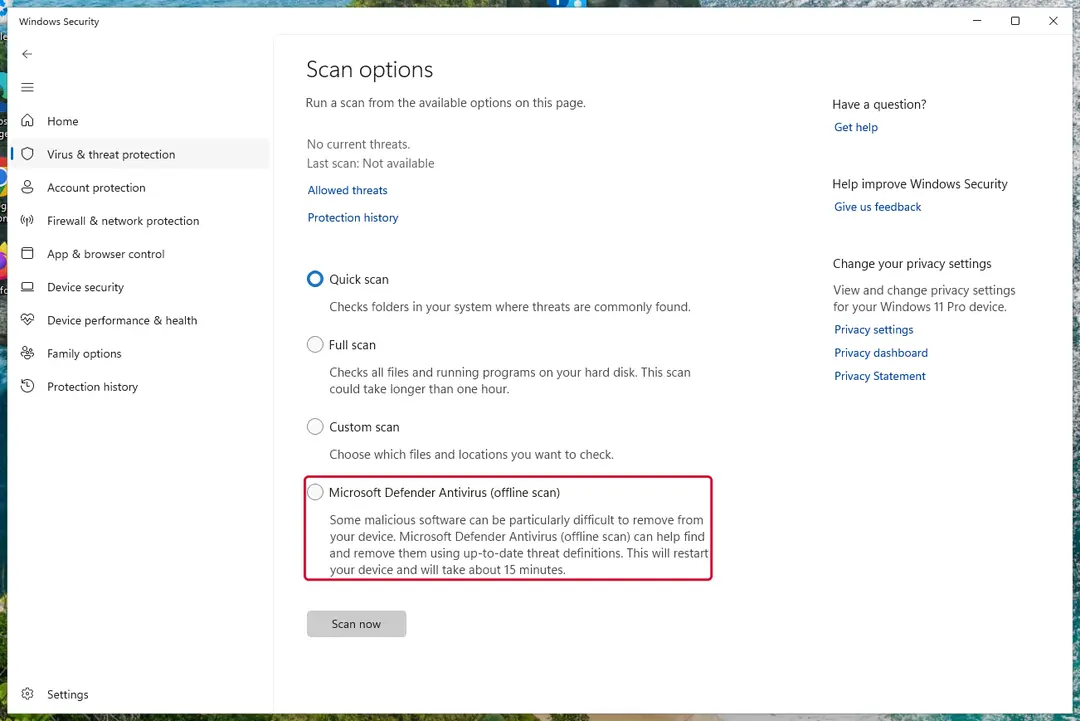
Windows 11: Windows Security > Virus & threat protection > Scan options. Full procedure with screenshots: Run a Microsoft Defender Offline scan
Access your website securely from any location
When you work on the domain, site, blog, or different project that requires constant management, content creation, or coding, you may need to connect to the server and content management service more often. The best solution for creating a tighter network could be a dedicated/fixed IP address.
If you make your IP address static and set to your device, you can connect to the CMS from any location and do not create any additional issues for the server or network manager that needs to monitor connections and activities. VPN software providers like can help you with such settings and offer the option to control the online reputation and manage projects easily from any part of the world.
Recover files after data-affecting malware attacks
While much of the data can be accidentally deleted due to various reasons, malware is one of the main culprits that can cause loss of pictures, documents, videos, and other important files.
More serious malware infections lead to significant data loss when your documents, system files, and images get encrypted. In particular, ransomware is is a type of malware that focuses on such functions, so your files become useless without an ability to access them.
Even though there is little to no possibility to recover after file-locking threats, some applications have features for data recovery in the system. In some cases, can also help to recover at least some portion of your data after data-locking virus infection or general cyber infection.
From our report of Jan 2020 · not reviewed since
System Defender virus removal guide
If you are experiencing fake alerts, act now and remove System Defender.
For this, we strongly recommend relying on the automatic removal option and avoiding manual removal. When relying on this option, you should just download a reputable anti-spyware, update it, and run a full system scan. If you need a detailed guide explaining how to do that, read this guide.
When trying to remove System Defender, our recommended programs are and because they can easily detect every hidden component that belongs to this and other cyber threats. If you experience any system crashes and errors post-termination, scan your machine with .
ATTENTION! As we have already mentioned previously, System Defender may try to block the installation and activity of legitimate security programs. If you can't download or launch any them, try these options:
From our report of Jan 2020 · not reviewed since
1. USING SYSTEM RESTORE TO DISABLE VIRUS
- Go to the Windows 8 Start Screen and type restore point in the Search section.
- Now click on Settings -> Create a restore point.
- When in System Protection tab, select System Restore.
- Click Next button to see your restore points and left click on the entry you need.
- Now select Scan for affected programs -> Close -> Next -> Finish.
- Once your PC reboots, download and run a full system scan after updating it.
From our report of Jan 2020 · not reviewed since
2. REBOOTING TO SAFE MODE WITH NETWORKING
- Click on Windows key and go to the bottom-right corner.
- Select Settings -> Change PC Settings -> General.
- Click the Restart Now button under Advanced Startup.
- Now select Troubleshoot -> Advanced Options -> Startup Settings.
- Now choose Restart and press F5.
From our report of Jan 2020 · not reviewed since
3. USING ANOTHER PC FOR DOWNLOADING ANTI-SPYWARE
- Take another computer that is not infected by this virus and download or on it.
- After completing the procedure, transfer this anti-malware to the CD/DVD, external drive, or USB flash drive.
- In the meanwhile, kill malicious processes on your infected computer. For that you can use this tutorial.
- Stick the device you used for transferring anti-spyware program to your infected PC and launch it.
Questions about System Defender
What is System Defender and why is it on my PC?
System Defender is a program that was installed on the PC, most likely together with something else you downloaded. Free software sites and many installers add extra programs on setup pages with pre-ticked boxes, so the extra install looks like your choice even though nobody read the page.
Check the install date in Settings, Apps, Installed apps: the program you installed that day is the probable carrier. If you do not need System Defender, uninstall it. If it belongs to your hardware or to a program you use, search its exact name and publisher first, because drivers and their tools can have unfamiliar names.
System Defender will not uninstall. What can I do?
First restart the PC and try again, because the program may have been running and locked its own files. If the uninstaller is missing or fails, start Windows in Safe Mode, where most third-party programs do not start, and remove System Defender from Installed apps there.
If it still refuses, delete its startup entry and its scheduled task, restart, and try once more. A program that actively prevents removal is behaving like malware, so finish with a Microsoft Defender offline scan. Avoid third-party uninstallers offered on search ads; several of them are unwanted programs themselves.
Is System Defender an antivirus?
No. It looks like one, with a shield, a scan and a list of threats, but System Defender is a rogue antivirus: its scans are designed to find something every time, and every fix leads to a payment page.
A real antivirus detects the same threats consistently, removes them without asking for money first and does not block other security tools. Windows 11 and Windows 10 already include Microsoft Defender in Windows Security, which is enough for most home users. Remove System Defender and keep Defender on.
What if I paid System Defender?
Contact your bank or card issuer the same day, explain that the payment went to a fake security program and ask for a chargeback. Keep screenshots of system Defender in the list of installed apps, the payment receipt and any e-mails.
If you gave card details in the program, ask the bank to block and replace the card. Then uninstall the program and run a full scan in Windows Security. If you also called a number and let someone connect to your PC, uninstall the remote-access tool they used and change your passwords from another device.
Is Windows Security enough to protect me from programs like System Defender?
For most home users, yes, especially with Potentially unwanted app blocking turned on in Windows Security > App & browser control > Reputation-based protection settings. That setting blocks many scareware installers before they run.
No security tool stops every scam, though, because programs like System Defender are usually installed by the user after a frightening message. The habit that helps most is simple: ignore any website or pop-up that claims to have scanned your PC, and never call a number shown in a warning.
System Defender will not uninstall. What can I do?
Close it in Task Manager first, then uninstall it from Settings > Apps > Installed apps (in Windows 10, Apps & features). If it blocks this or restarts itself, start Windows in Safe Mode, where third-party programs do not start automatically, and uninstall from there.
Afterwards run a Microsoft Defender offline scan and delete any leftover folder named after System Defender in C:\Program Files or %AppData%. If nothing works, Windows can be reset while keeping your personal files, which removes the program together with any settings it changed.
Is System Defender a real Windows warning?
No. Real Windows Security notifications appear in the notification area and in the Windows Security app, use Microsoft's design and never ask you to call a phone number or pay to fix anything. What people report is system Defender in the list of installed apps, drawn by a program that copies the look of a system message.
Open Windows Security from the Start menu to see the real status of your PC. If it shows no threats while the window keeps appearing, the window itself is the problem, and the plan in this guide removes the program that shows it.
What could the caller do while connected to my PC?
Anything you could do. Callers working with fake alerts like System Defender typically show you Windows logs as "proof", install their own remote tool for later, and steer you to online banking or a gift card purchase. Some add a password to Windows or lock the PC if you refuse to pay.
Remove every remote access program you did not install yourself, check Settings > Accounts > Other users for new accounts, and change important passwords from a clean device. If you cannot be sure what was changed, a reset of Windows is the safe choice.
Someone called offering a refund for System Defender. Is it genuine?
Almost certainly not. Refund calls are a well-known second stage of scareware and tech support scams. The caller says you are owed money, asks you to install a remote access program to "process" it, then opens your online banking, makes it look as if too much was refunded and asks you to send the difference back.
Hang up. Real refunds go back to the card or PayPal account you paid with, through your bank or the payment provider, and never need remote access or a gift card.
Will Fortect remove System Defender?
Fortect scans Windows for malware and unwanted programs and repairs the system files and settings they change, and its free scan shows what it finds on your PC before you decide anything.
For System Defender, follow the plan above as well: the browser steps take back permissions and settings that no scanner treats as a threat, and uninstalling the program that brought it removes the source.
Run Microsoft Defender's full scan and, if anything was found, its offline scan as a second opinion. If the symptoms are gone after the plan and both scans are clean, there is nothing more to do.
Sources
- CSO Online: Malware explained: How to prevent, detect and recover from it (read October 6, 2026)
- Heimdal: JavaScript Malware – a Growing Trend Explained for Everyday Users (read October 6, 2026)
- Wikipedia: Social engineering (security) (read October 6, 2026)
- FTC: How to recognize, remove and avoid malware (read October 6, 2026)
- Microsoft Learn: Microsoft Defender Offline (read October 6, 2026)