
Trojan.LockScreen: what it is and how to remove it
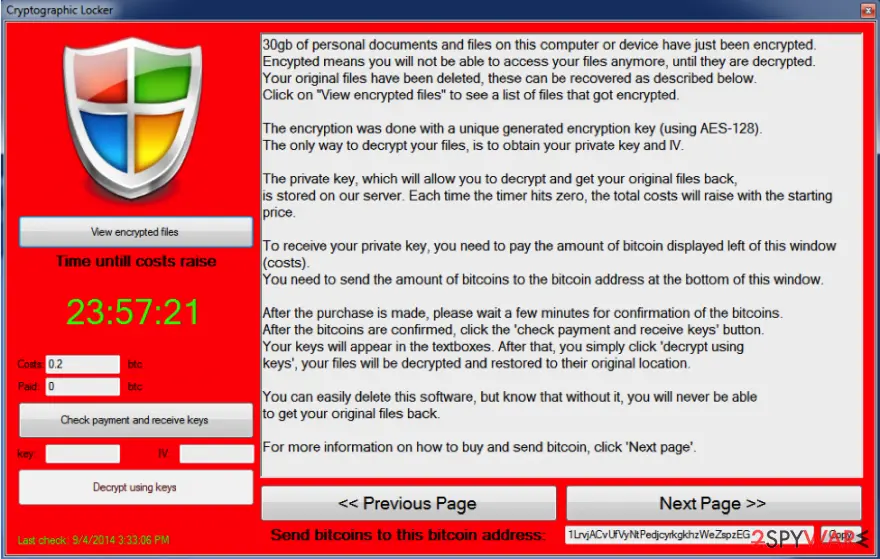
Trojan.LockScreen is an especially dangerous cyber threat that belongs to the trojan and ransomware categories. Its main goal is to encrypt all personal files on the device with the help of AES cipher and then demand ransom for a decryption tool.
Facts checked October 7, 2026. Removal steps tested on Windows 11 (26H2) and checked against Microsoft's and the browser makers' current documentation. Sections marked as our earlier report are the original text: they describe the threat as it was then and have not been reviewed since. The 2026 status, the removal steps and the questions are current.
Automatic
Get a free scan and check if your PC is infected.
Fortect finds malware, unwanted programs and the Windows damage they leave behind, and repairs it in one pass.
If Trojan.LockScreen keeps coming back after uninstalling, a scan can find what reinstalls it.
Do it yourself · free Remove Trojan.LockScreen yourself 5 steps, about 15 minutes, no software needed.
Start the steps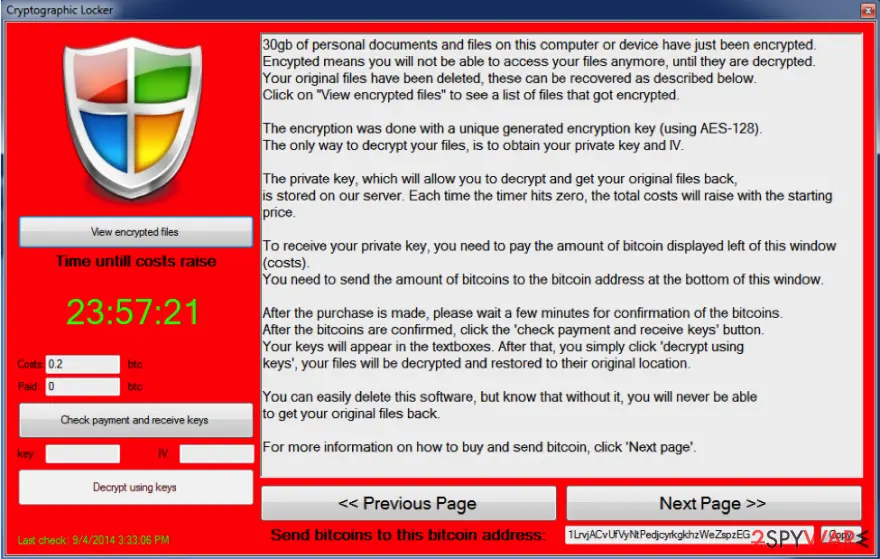
Trojan.LockScreen: summary
| Detection names | No Microsoft detection name is known |
|---|---|
| Distribution | Not recorded in the old report |
| Damage | Not recorded in the old report |
| Name | Trojan.LockScreen |
| Type | Loader |
| Symptoms | An unknown program in Installed apps |
| Removal | Scan the PC with security software to find and remove the malware and anything installed with it. Fortect scans Windows for malware and repairs the system files and settings it damaged. Remove it nowTo use the full-featured product, you have to purchase a license for Fortect. The scan is free. |
Show 3 more facts
| Evidence | One write-up by a security site; details still limited |
|---|---|
| First seen | 12 January 2021 |
| Facts checked | 7 October 2026 |
What Trojan.LockScreen does on an infected PC
From our report of Jan 2021 · not reviewed since
Trojan.LockScreen - ransomware that locks all data on the system with AES encryption algorithm
Trojan.LockScreen is an especially dangerous cyber threat that belongs to the trojan and ransomware categories.
Its main goal is to encrypt all personal files on the device with the help of AES cipher and then demand ransom for a decryption tool. The attackers typically ask for 0.2 bitcoin for it, although this sum might vary from person to person.
Unfortunately, cybercriminals are right about one thing: only they have decryption software that could decrypt your data. Cybersecurity researchers actively advise users to avoid contacting malicious actors, as they might not fulfill their promises, resulting in monetary losses.
Mostly, Trojan.LockScreen infection comes inside its target PC system undetected. Once inside and active, this trojan horse starts playing one of the most important roles in the functionality of the Ukash and Police virus. In addition, it is known that it has also been involved in the propagation of:
Please, stay away from these threats as far as you can because they are capable of blocking important files and then asking to pay a ransom in exchange for unblocking them.
Typically, such viruses are interested in the most commonly-used files (and Trojan.LockScreen is no exception) such as:
Unfortunately, it is very hard to unlock encrypted files without a key, held by cybercriminals on a remote server. If you are in such a situation right now, you should waste no time and disconnect your PC from the Internet and perform a full Trojan.LockScreen removal.
Finally, you should try the available decryption tools provided by various security teams. Additionally, we provide alternative methods for data recovery below.
- Cryptolocker,
- CTB Locker,
- Cryptowall, and similar ransomware.
From our report of Jan 2021 · not reviewed since
More from our earlier report on Trojan.LockScreen
- .jpg, .gif, .mp4, .pdf, .doc, .html, .zip, .rar, .psd, .dat, .txt, etc.
How Trojan.LockScreen got on your PC
From our report of Jan 2021 · not reviewed since
While there is still unknown the exact scheme of Trojan.LockScreen propagation, security experts guess that this trojan infection relies on spam and infected email attachments.
That's why you should stay away from suspicious emails that were sent to you by a person that you don't know.
Also, make sure that you monitor the installation of free software because you can never know how harmless or harmful it may be. If Trojan.LockScreen infects a computer; it scans it and starts looking for predetermined files. After finding them, a virus encrypts them and starts showing the huge alert message belonging to the Ukash virus or one of crypto-ransomware.
Note that this trojan can also be used for various other purposes and can perform the following actions (to revert these changes, we highly recommend ):
As we have already mentioned, Trojan.LockScreen gets inside the system with a help of various means of distribution, like freeware, shareware and similar. Once it gets inside, it downloads ransomware on the PC and causes other unwanted changes.
Typically, with the help of Trojan.LockScreen, you can get infected with FBI Moneypak, FBI Green Dot Moneypak virus, IPA virus, and similar malware. They all act almost identically: they display a huge alert that looks like it was sent by governmental authorities and says to the user that he has been doing illegal activities on his computer.
That includes spreading copyrighted content, watching pornographic videos, or even spreading malware. Additionally, they require to pay the fine for all these activities.
- modify Windows Registry
- remove or download certain files
- steal information, etc.
How to remove Trojan.LockScreen
A loader's job is to install other malware, so treat the PC as infected with more than one program until the scans are clean.
Step 1: Delete scheduled tasks that bring it back
Open Task Scheduler from the Start menu and click Task Scheduler Library. Select each task you do not recognise and read the Actions tab:
- a task that starts a file in
%AppData%or%Temp% - runs
powershellwith a long encoded line - opens a web address belongs to Trojan.LockScreen or a similar program
Right-click such a task and choose Delete, and check the subfolders too. Leave tasks from Microsoft, your PC's maker and programs you use. Task Scheduler is the same in Windows 11 and Windows 10.
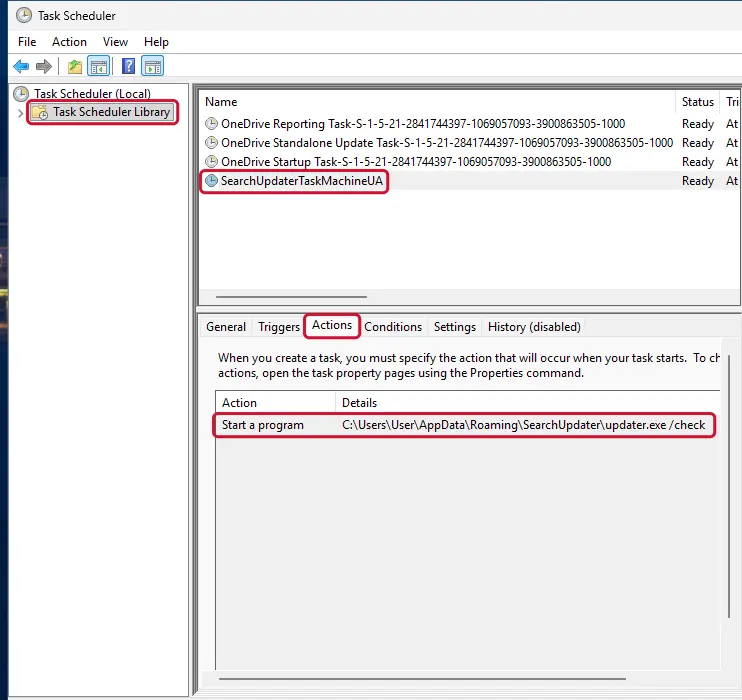
Windows 11: Task Scheduler Library, the task selected, the Actions tab shows the file it runs. Full procedure with screenshots: Remove what malware leaves behind in Windows
- a task that starts a file in
Step 2: Remove it from startup
Whatever Trojan.LockScreen installed usually starts with Windows. Open Task Manager with Ctrl + Shift + Esc, go to Startup apps in Windows 11 or the Startup tab in Windows 10, and disable what you do not know, starting with entries that have an empty Publisher column.
Open file location on the right-click menu shows the file, which helps you decide and tells you what to delete later. Disabling is safe: if something you need stops working, switch it back on.
Full procedure with screenshots: Stop apps from opening at startup On uGetFix
Step 3: Delete the folders left behind
What the uninstaller leaves behind is usually in the user folders. Open File Explorer, switch on View > Show > Hidden items (in Windows 10 View > Hidden items), and go through
%LocalAppData%,%AppData%, %ProgramData% and the two Program Files folders.Sort by Date modified and delete folders that appeared together with the problem and belong to no program you use. Folders with random names that hold
.exe,.dll, .js or .ps1 files are the strongest sign.Full procedure with screenshots: Remove what malware leaves behind in Windows
Step 4: Scan the PC, then run the offline scan
Open Windows Security > Virus & threat protection > Scan options, run a Full scan and remove everything it finds. Then select Microsoft Defender Antivirus (offline scan) and click Scan now: the PC restarts and scans before Windows loads, which finds files that hide while Windows runs.
Save your work first, because the offline scan takes about 15 minutes. Both scans are built into Windows 11 and Windows 10, and a second scanner from another vendor is a useful extra opinion.
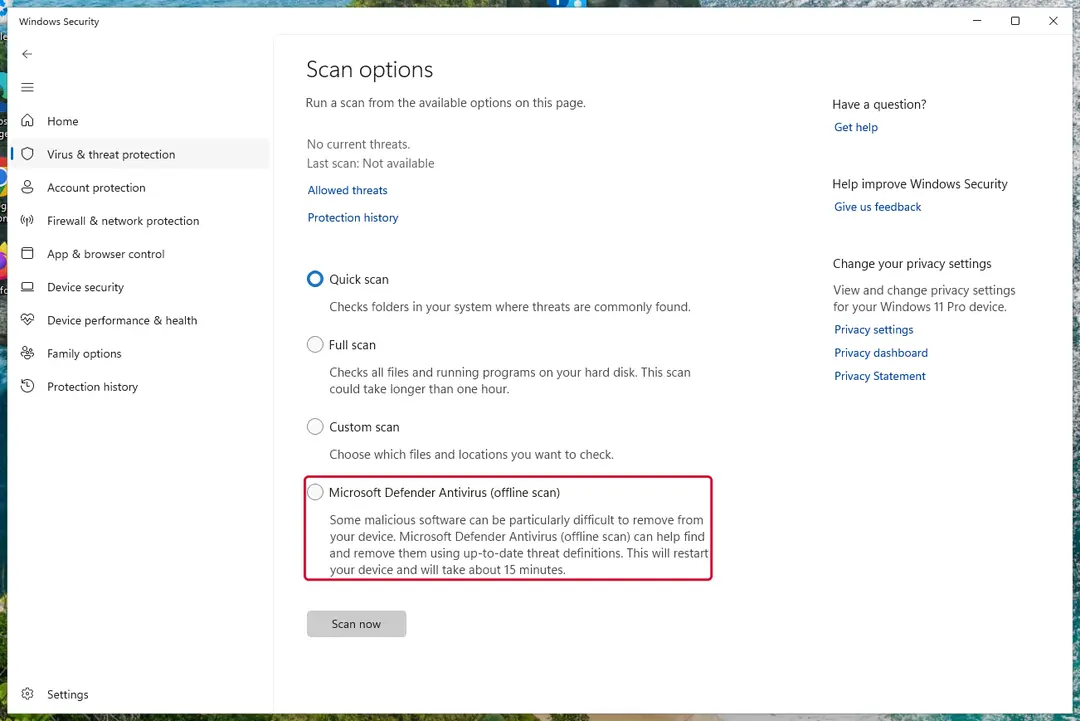
Windows 11: Windows Security > Virus & threat protection > Scan options. Full procedure with screenshots: Run a Microsoft Defender Offline scan
Step 5: Change passwords from another device and sign out other sessions
Assume that the passwords saved in this PC's browsers, and the accounts that were open in them, are known to the attacker. From a phone or a clean computer, change the e-mail password first, then banking, shopping, social and gaming accounts.
Use each service's option to sign out of all other sessions, because stolen cookies keep a session open even after a password change. Turn on two-step verification on each account. Wait with the infected Windows 11 or Windows 10 PC until the scans are clean.
Full procedure with screenshots: Turn on two-step verification / secure a hacked account
Instructions for each browser and system
The detailed steps for every browser and system this guide covers. Open the one you use.
Manual removal using Safe Mode
Important! →
Manual removal guide might be too complicated for regular computer users. It requires advanced IT knowledge to be performed correctly (if vital system files are removed or damaged, it might result in full Windows compromise), and it also might take hours to complete. Therefore, we highly advise using the automatic method provided above instead.
Step 1. Access Safe Mode with Networking
Manual malware removal should be best performed in the Safe Mode environment.
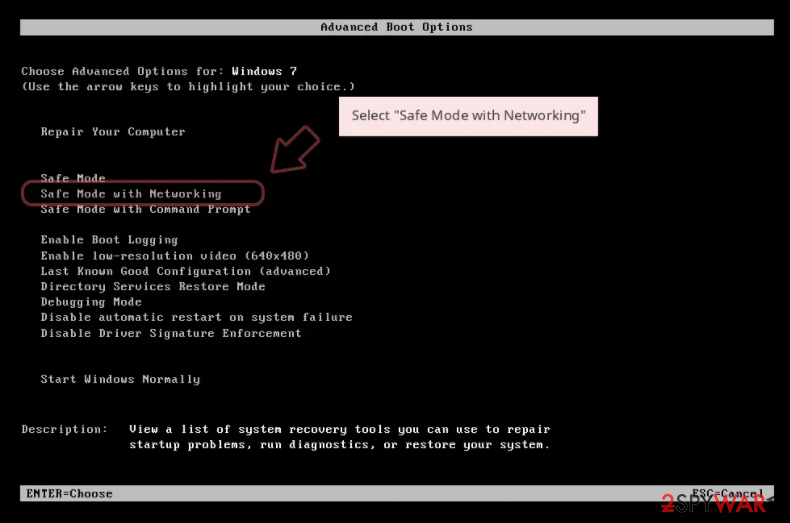
Windows 7 / Vista / XP
- Click Start > Shutdown > Restart > OK.
- When your computer becomes active, start pressing F8 button (if that does not work, try F2, F12, Del, etc. - it all depends on your motherboard model) multiple times until you see the Advanced Boot Options window.
- Select Safe Mode with Networking from the list.
Windows 10 / Windows 8
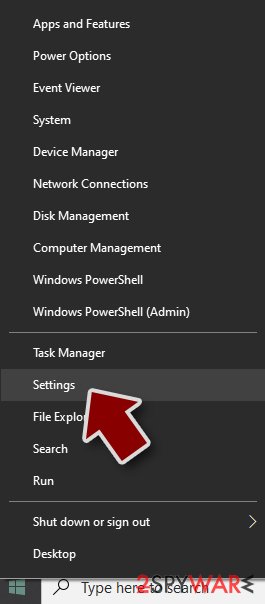
- Right-click on Start button and select Settings.
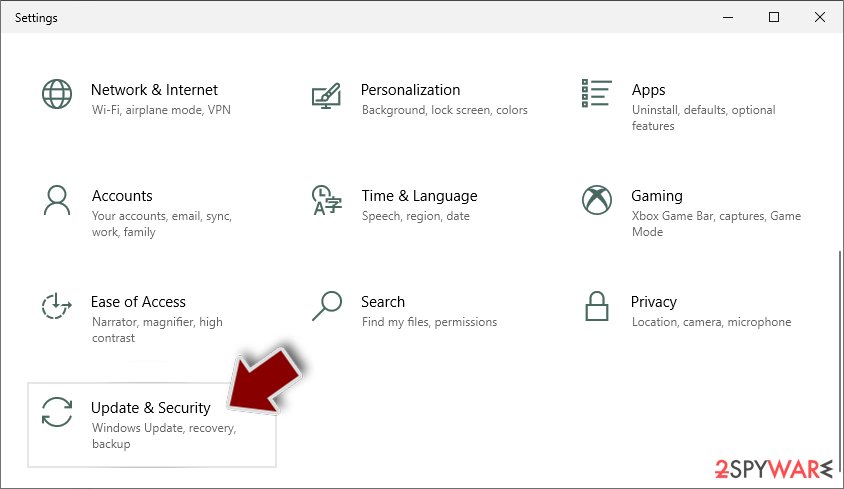
- Scroll down to pick Update & Security.
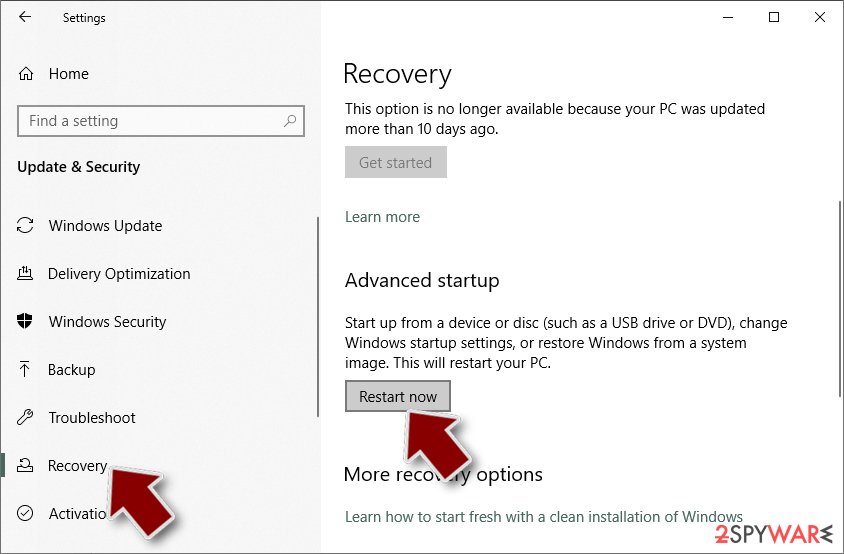
- On the left side of the window, pick Recovery.
- Now scroll down to find Advanced Startup section.
- Click Restart now.
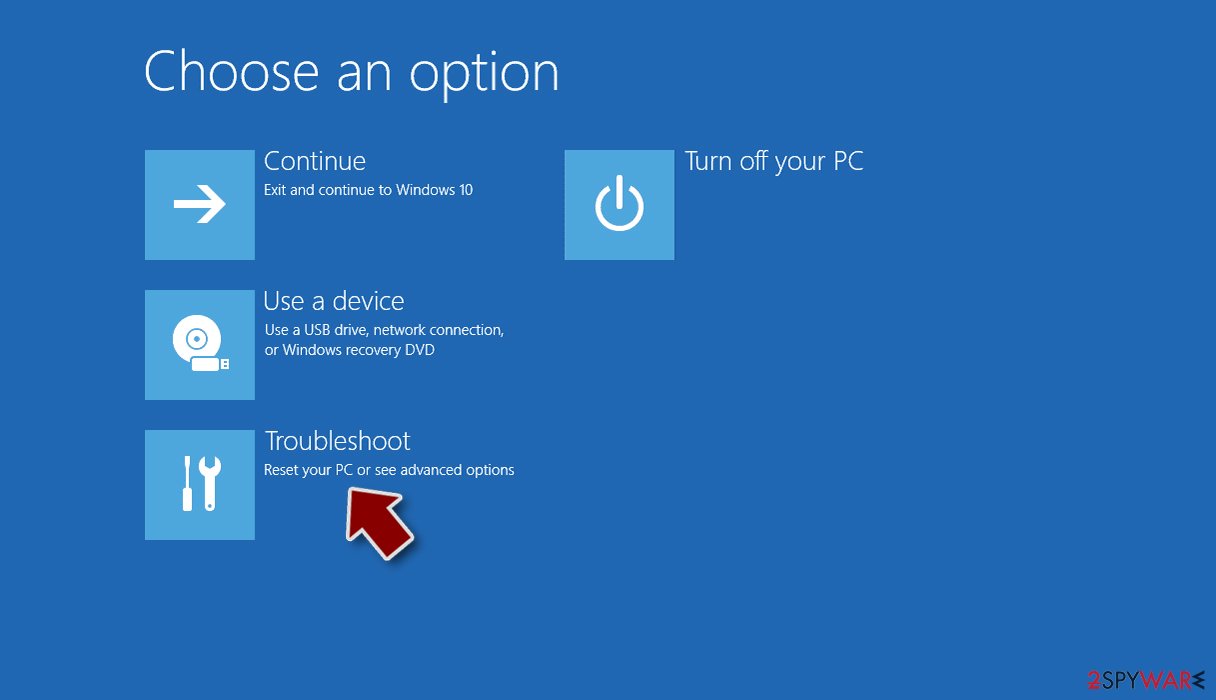
- Select Troubleshoot.
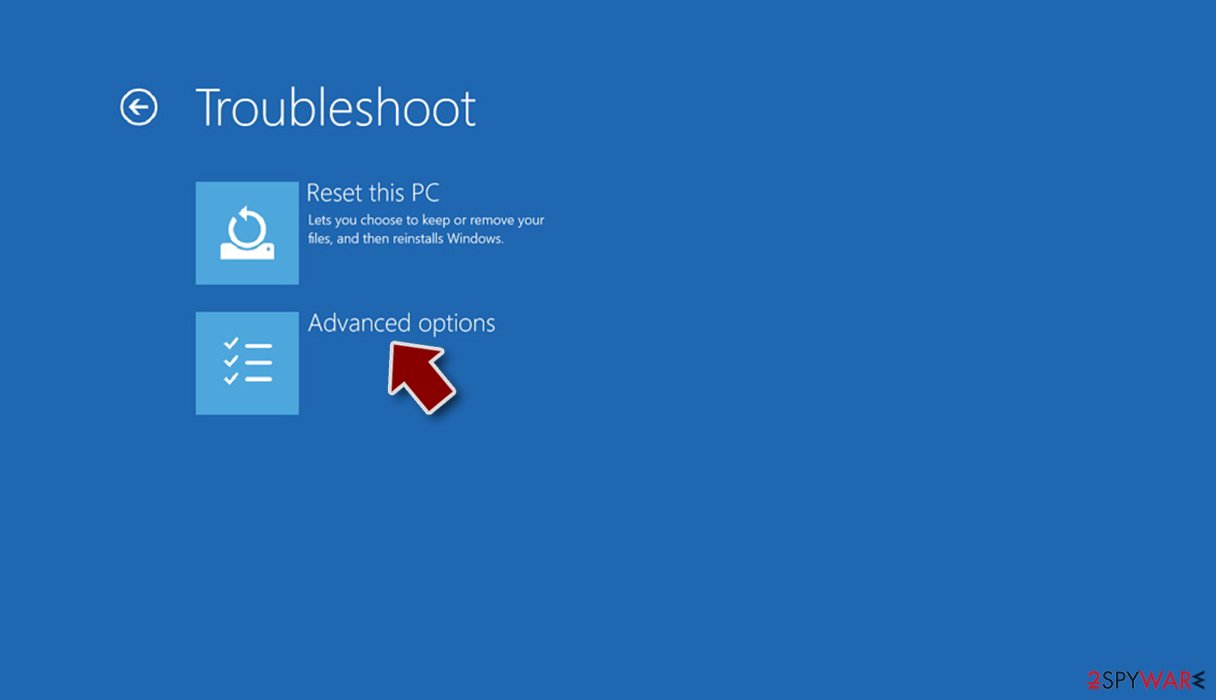
- Go to Advanced options.
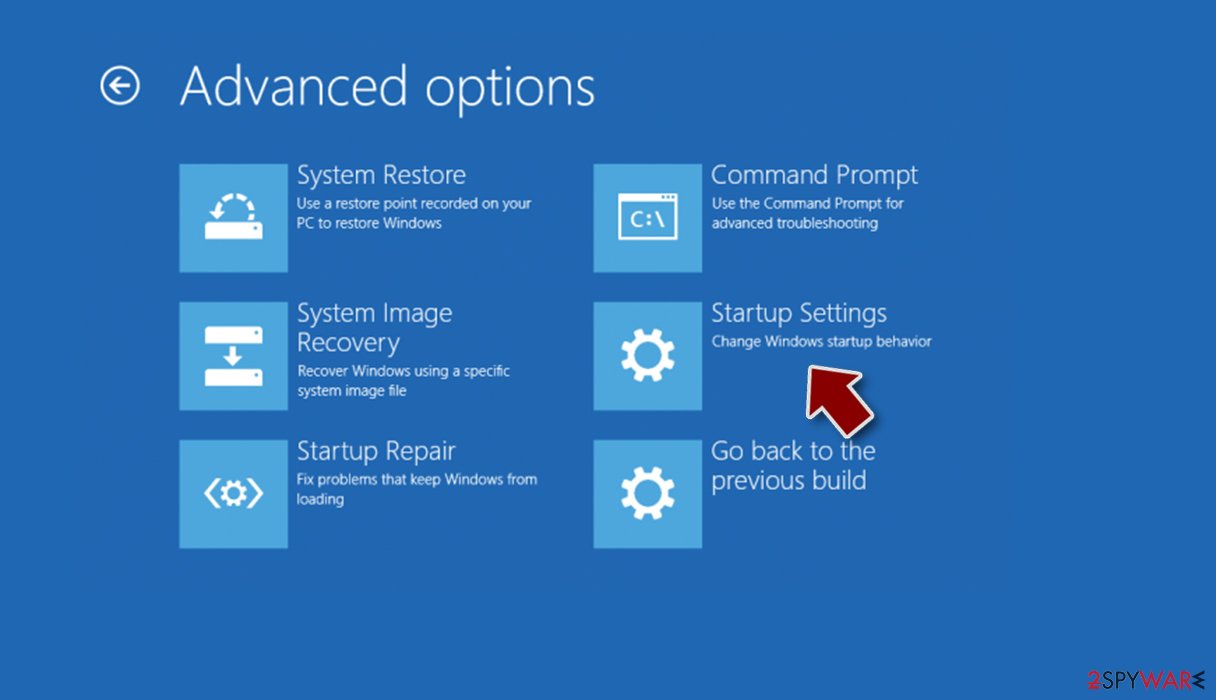
- Select Startup Settings.
- Press Restart.
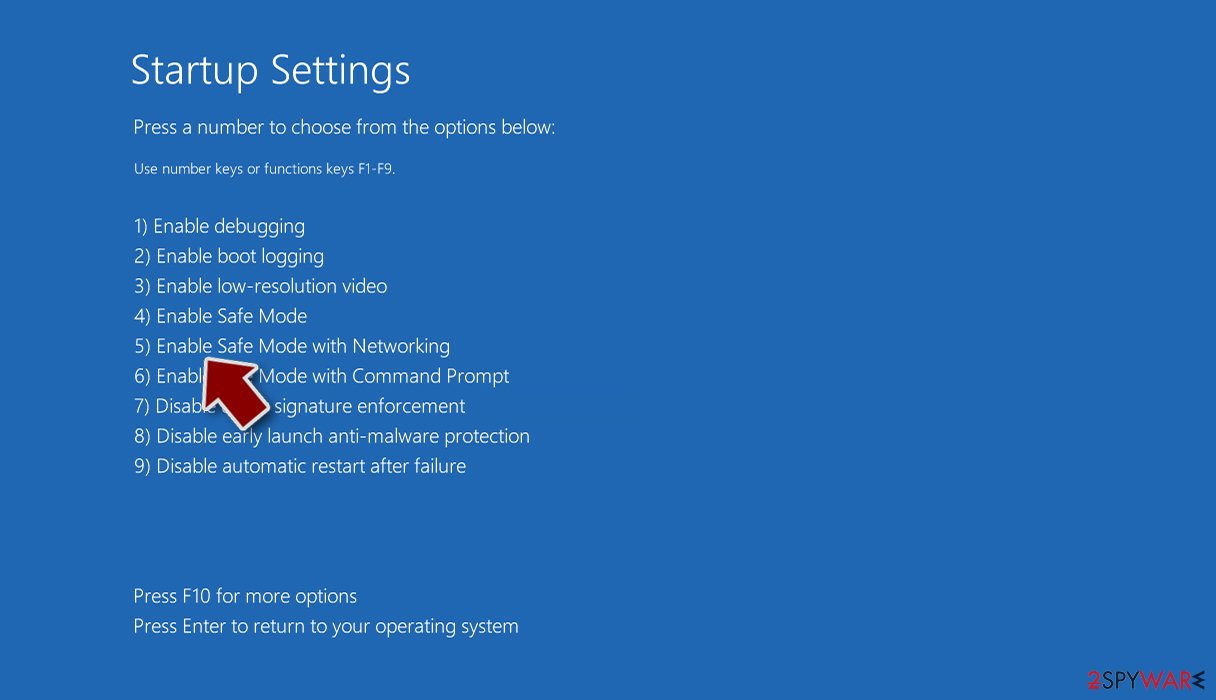
- Now press 5 or click 5) Enable Safe Mode with Networking.
Step 2. Shut down suspicious processes
Windows Task Manager is a useful tool that shows all the processes running in the background. If malware is running a process, you need to shut it down:
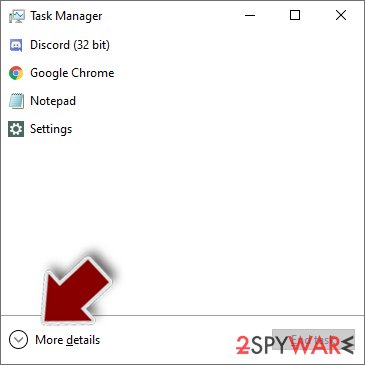
- Press Ctrl + Shift + Esc on your keyboard to open Windows Task Manager.
- Click on More details.
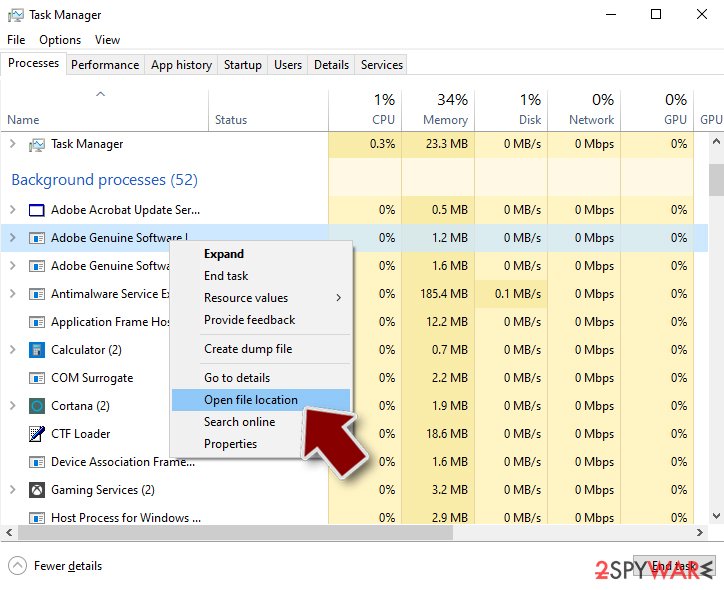
- Scroll down to Background processes section, and look for anything suspicious.
- Right-click and select Open file location.
- Go back to the process, right-click and pick End Task.
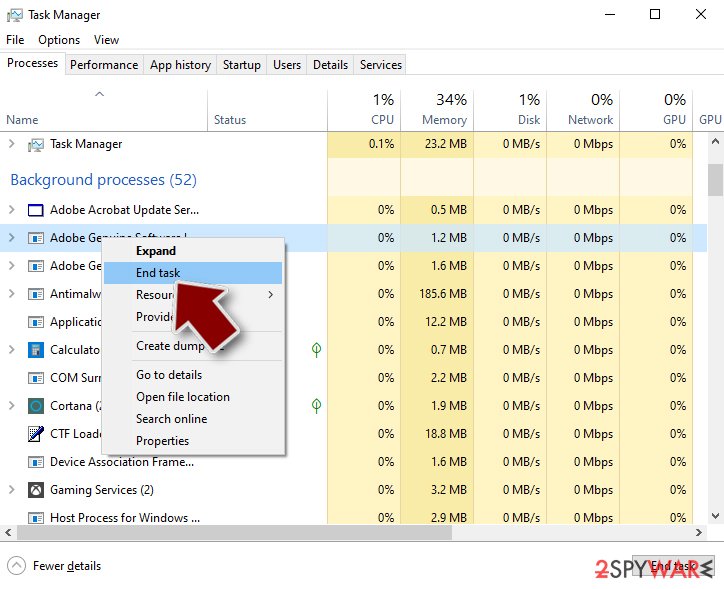
- Delete the contents of the malicious folder.
Step 3. Check program Startup
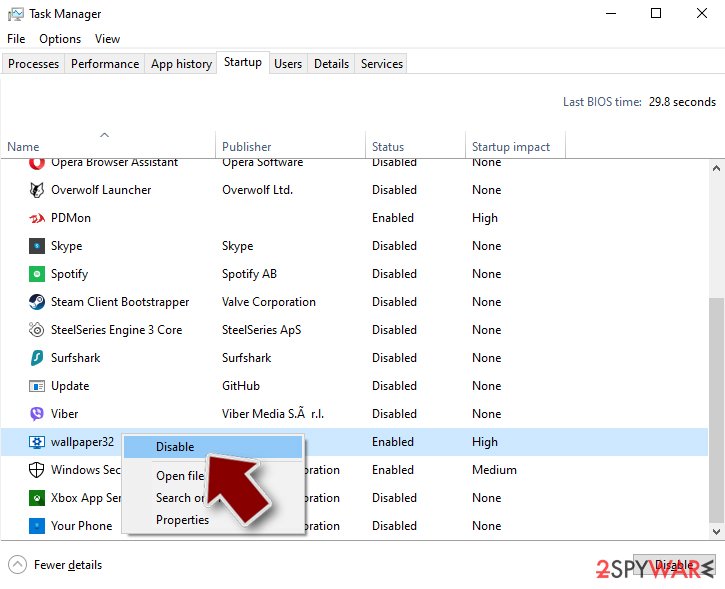
- Press Ctrl + Shift + Esc on your keyboard to open Windows Task Manager.
- Go to Startup tab.
- Right-click on the suspicious program and pick Disable.
Step 4. Delete virus files
Malware-related files can be found in various places within your computer. Here are instructions that could help you find them:
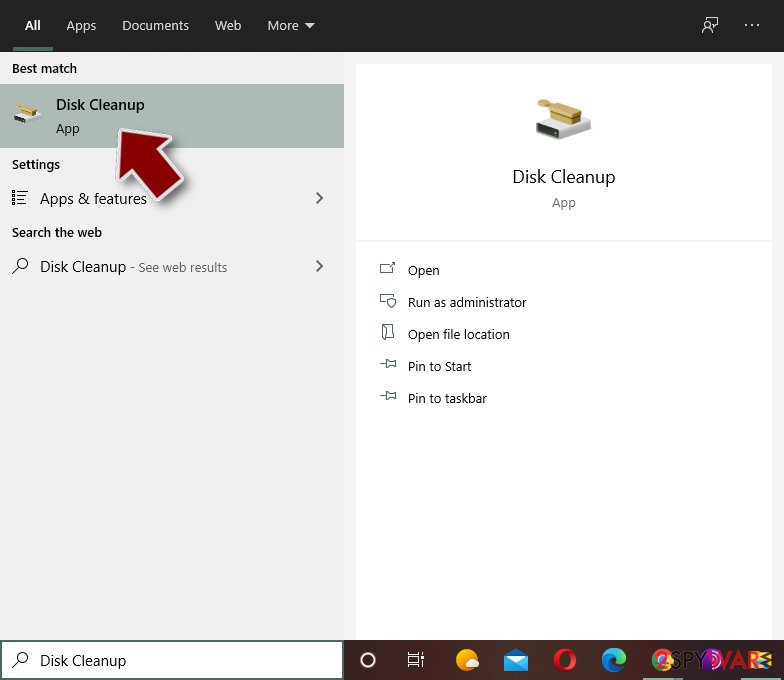
- Type in Disk Cleanup in Windows search and press Enter.
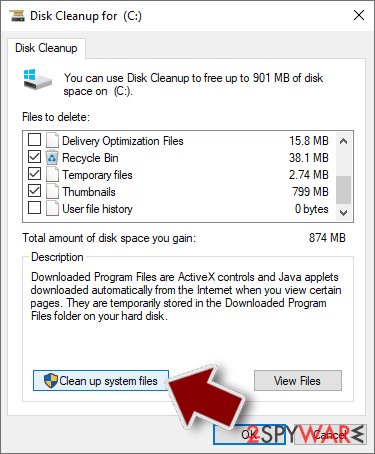
- Select the drive you want to clean (C: is your main drive by default and is likely to be the one that has malicious files in).
- Scroll through the Files to delete list and select the following:
Temporary Internet Files
Downloads
Recycle Bin
Temporary files - Pick Clean up system files.
- You can also look for other malicious files hidden in the following folders (type these entries in Windows Search and press Enter):
%AppData%
%LocalAppData%
%ProgramData%
%WinDir%
After you are finished, reboot the PC in normal mode.
From our report of Jan 2021 · not reviewed since
Manual Trojan.LockScreen removal is out of the question
As you can see, Trojan.LockScreen removal should be performed as soon as possible, as it might continue encrypting the incoming files or start collecting personal information such as passwords and logins. However, this process should only be performed after making copies of all the affected files on your computer; otherwise, in case something goes wrong, they might be damaged permanently.
After you back up the encrypted data, you should remove Trojan.LockScreen ransomware from your machine. To do that, you should download and install a reputable anti-malware program, such as , and perform a full system scan.
Try available decryptors
Try these tools for decrypting your encrypted files:
- R-Studio
- Photorec
- Kaspesky Ransomware Decryptor
After removal: passwords, accounts and prevention
Secure your accounts after the clean-up
Assume that whatever was saved in the browsers on this PC while the PC showed trojan.LockScreen in the list of installed apps has been copied:
- passwords
- cookies
- autofill data
Work from a clean device, or from this PC once the offline scan finds nothing.
Start with your main e-mail account, because it can reset everything else, then banking and payment, then social and gaming accounts. Change each password, sign out of all sessions and turn on two-step verification: Turn on two-step verification / secure a hacked account.
The full order, including crypto wallets and card replacement, is in securing your accounts after malware.
Do not let government spy on you
The government has many issues in regards to tracking users' data and spying on citizens, so you should take this into consideration and learn more about shady information gathering practices.
Avoid any unwanted government tracking or spying by going totally anonymous on the internet.
You can choose a different location when you go online and access any material you want without particular content restrictions. You can easily enjoy internet connection without any risks of being hacked by using VPN.
Control the information that can be accessed by government any other unwanted party and surf online without being spied on. Even if you are not involved in illegal activities or trust your selection of services, platforms, be suspicious for your own security and take precautionary measures by using the VPN service.
Backup files for the later use, in case of the malware attack
Computer users can suffer from data losses due to cyber infections or their own faulty doings.
Ransomware can encrypt and hold files hostage, while unforeseen power cuts might cause a loss of important documents. If you have proper up-to-date backups, you can easily recover after such an incident and get back to work. It is also equally important to update backups on a regular basis so that the newest information remains intact - you can set this process to be performed automatically.
When you have the previous version of every important document or project you can avoid frustration and breakdowns. It comes in handy when malware strikes out of nowhere. Use for the data restoration process.
Questions about Trojan.LockScreen
What is Trojan.LockScreen and why is it on my PC?
Trojan.LockScreen is a program that was installed on the PC, most likely together with something else you downloaded. Free software sites and many installers add extra programs on setup pages with pre-ticked boxes, so the extra install looks like your choice even though nobody read the page.
Check the install date in Settings, Apps, Installed apps: the program you installed that day is the probable carrier. If you do not need Trojan.LockScreen, uninstall it. If it belongs to your hardware or to a program you use, search its exact name and publisher first, because drivers and their tools can have unfamiliar names.
Trojan.LockScreen came back after I uninstalled it. Why?
Something else is reinstalling it. Common causes are a second program from the same publisher, a scheduled task that downloads it again, or a browser extension that keeps prompting for it. Sort Installed apps by install date and uninstall each entry from the same day that you did not choose.
Then open Task Scheduler and look in the Task Scheduler Library for tasks with updater-style names that you do not recognise. Check Startup apps in Task Manager too. If Trojan.LockScreen still returns, start Windows in Safe Mode, uninstall it there and run a Microsoft Defender offline scan, which looks for loaders that ordinary scans can miss.
Should I reset my PC because of Trojan.LockScreen?
Only if the signs point to deeper access. Reset when you see trojan.LockScreen in the list of installed apps again after removal, when Windows Security cannot start or update, when remote access tools you did not install keep appearing, or when you simply cannot trust the PC any more.
Otherwise, the plan in this guide plus an offline scan is enough. If you do reset, choose Remove everything and Cloud download for a fresh copy of Windows, restore only documents and photos, and reinstall programs from their official sites. Change important passwords from the clean system afterwards.
Why didn't my antivirus stop Trojan.LockScreen?
New trojan builds are packed and changed often so that signatures do not match, and some are signed with stolen or bought certificates. Many arrive inside password-protected archives, which scanners cannot open until you extract them.
Some downloads also tell the user to turn off the antivirus "because it gives false alarms", a common line in cracked software instructions. Keep real-time protection on, never disable it for an installer, and run the offline scan whenever you suspect something slipped through.
Can Trojan.LockScreen spread to other devices on my network?
Most trojans aimed at home users stay on the PC they infected, but an attacker with remote access can look at the network, open shared folders and try passwords on other devices. Loaders sometimes deliver worms or ransomware that do spread.
Disconnect the PC while cleaning, run a full scan on other Windows PCs, change the router's admin password and the Wi-Fi password if they were saved on the infected PC, and update the router's firmware. If other PCs show the same detection, treat them as infected too.
What are the signs of a trojan infection?
Most trojans try to leave no visible signs, so look for side effects. Common ones:
- Windows Security turned off or unable to update
- new entries in Startup apps or Task Scheduler
- programs in Installed apps you did not install
- browser settings that changed by themselves
- unusual network activity while the PC is idle
- password-reset or login-alert e-mails you did not trigger
None of these proves an infection on its own. Together with an antivirus alert naming Trojan.LockScreen, they are a strong reason to follow the full plan.
Is a trojan infection worth reporting to the police?
If there was harm, yes. Unauthorised payments, accounts used for fraud, blackmail or a remote session during a scam call all belong in a report, and banks often ask for its reference number before they refund anything.
If antivirus caught Trojan.LockScreen before it ran and nothing was misused, there is nothing to report. Keep the evidence anyway:
- protection history
- the original download
- the dates
Businesses may also have to notify a data protection authority if personal data could have been accessed.
How dangerous is Trojan.LockScreen?
Treat it as serious until proven otherwise. The visible sign is trojan.LockScreen in the list of installed apps, and programs that behave this way often have more abilities than they show:
- copying passwords
- downloading other malware
- giving remote access
Its family is not known yet, so nobody can say which of these it uses. The good news is that the response is the same in every case and takes about an hour:
- cut the network
- remove the startup entry
- run an offline scan
- change passwords from a clean device
If someone had remote control, a full reset is safer.
Why can't I find Trojan.LockScreen in antivirus databases?
Because it is new or because it is listed under a different name. Antivirus companies name threats after the family they belong to, and a program that appears as Trojan.LockScreen on your PC may carry a generic or unrelated label in their databases.
Many new samples are first detected only by behaviour, without a family name. What you saw, trojan.LockScreen in the list of installed apps, is enough to act on:
- end the program
- remove its startup entry
- run a Microsoft Defender offline scan
- secure your accounts
A detection name from a scan is worth noting for later.
Will Fortect remove Trojan.LockScreen?
Fortect scans Windows for malware and unwanted programs and repairs the system files and settings they change, and its free scan shows what it finds on your PC before you decide anything.
For Trojan.LockScreen, follow the plan above as well: the browser steps take back permissions and settings that no scanner treats as a threat, and uninstalling the program that brought it removes the source.
Run Microsoft Defender's full scan and, if anything was found, its offline scan as a second opinion. If the symptoms are gone after the plan and both scans are clean, there is nothing more to do.
Sources
- FTC: How to recognize, remove and avoid malware (read October 7, 2026)
- Microsoft Learn: Microsoft Defender Offline (read October 7, 2026)
- Microsoft Learn: How Microsoft names malware (read October 7, 2026)