

 Best browser hijacker removal tools in 2026
 Chrome "Managed by your organization": what it means and how to remove it
What is a browser hijacker?
A browser hijacker is software that takes over the places where your browsing starts. It changes the default search engine, the home page, the new tab page and the pages that open at startup. All of them then point to a search site that its operators own or are paid by.
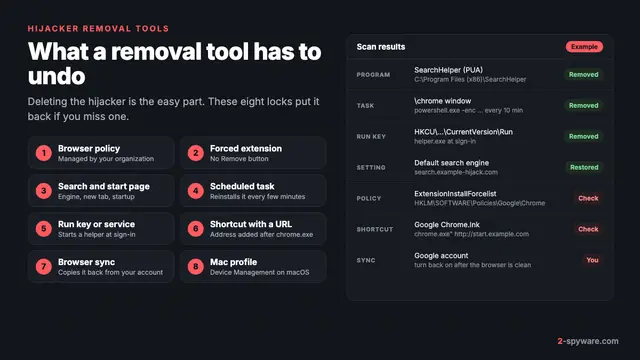
Most hijackers arrive as a browser extension. Others are programs installed in Windows or macOS, browser policies written into the system, or configuration profiles on a Mac. Many use two or three of these at once, which is why a hijacked search engine keeps coming back after you change it.
Microsoft describes the behavior well. In its rules for unwanted software, a program shows a lack of control if it prevents you from viewing or changing browser settings, redirects web traffic without notice and consent, or modifies web page content without your consent [1]. It also says software that changes your browsing must use the browser's supported extension model to install and remove itself [1]. Hijackers break most of these rules.
This page covers what hijackers are, why they exist and how to remove them on every system. Below it you will find our individual hijacker removal guides, from fake search engines to policy-locked extensions.
The business behind browser hijackers
A browser hijacker exists to sell searches. Large search engines pay partners who send them search traffic, through syndicated search feeds and affiliate deals. A partner gets a share of the ad revenue from the sponsored results that searchers click. The more searches a partner sends, the more it earns.
A hijacker turns your browser into a steady source of that traffic. When you type in the address bar, the query goes to the hijacker's page first, for example a search.something.com address. That page adds a partner or campaign ID, often bounces through one or two redirect domains that count the click, and then hands the query to Bing or Yahoo.
That is why people search for a "Bing redirect virus" or a "Yahoo search redirect virus". Bing and Yahoo are not the problem. They are the last hop of a chain that someone else is paid for. Our collections on the Yahoo search redirect and the Bing search redirect list the domains readers see most often in those chains.
Search data is the second income. Your queries reveal health worries, money trouble, travel plans and names. A hijacker's privacy policy usually allows it to log the query, your IP address and browser details, and share them with ad partners. Some families go further and inject their own ads into real search result pages.
Browser hijacker vs adware vs redirect virus
These three terms overlap, and scanners often use them for the same program. The difference is what the software takes over and how it earns money. Knowing which one you have tells you where to look first.
| Term | What it takes over | How it earns | What you notice |
|---|---|---|---|
| Browser hijacker | Search engine, home page, new tab, startup pages | Paid search feeds and search data | Searches pass through an unfamiliar domain |
| Adware | Pages you visit, the screen corner, notifications | Ad views, clicks and installs | Pop-ups, injected banners, new tabs |
| Redirect virus | Not a separate type: a user's name for either of the above | Whatever the redirect leads to | You land on pages you did not ask for |
| Potentially unwanted program | Installs other software, shows offers | Bundling fees and upsells | New programs and toolbars after an install |
In practice, one installer often brings both a hijacker and adware. If your search engine changed and you also see pop-ups, follow this guide first and then the adware guide. If ads come from site notifications instead, see push notification spam.
Is a browser hijacker a virus?
Usually not. A hijacker does not copy itself into other files and does not spread over a network. Microsoft files most of this software as potentially unwanted applications and states that PUAs are not considered malware [1]. Antivirus names reflect that: you will see labels such as BrowserModifier, PUA, PUP.Optional or not-a-virus. Our page on antivirus detection names explains how to read them.
Some hijackers do cross into malware. Adrozek, which Microsoft studied in 2020, injected ads into search results in Edge, Chrome, Yandex Browser and Firefox [2]. At its August peak it was seen on more than 30,000 devices a day [2]. It also turned off browser updates through a policy and stole saved passwords from Firefox [2].
How a browser hijacker gets in
A hijacker almost always needs one click from you. It hides that click inside something you wanted. These are the routes we see most in the guides we write and in reader reports.
- Free extensions with a catch. A PDF converter, weather widget, recipe finder, streaming search or "new tab" theme offers a small feature and sets its own search engine as part of the deal. Our malicious browser extensions collection lists hundreds of them.
- Software bundling. A free program's installer adds a search or home page offer, preselected, unless you choose Custom or Advanced setup and untick it.
- Fake updates and download buttons. A page says your browser or video player is out of date, or shows a large Download button that is really an ad. Google advises skipping such pop-ups and going to the program's official site [3].
- Pirated software and free movie sites. Cracked games and players are packed with hijacker installers. ChromeLoader spread this way, inside disk image files promising free games and films. See our cracked software guide.
- Coupon and shopping tools. Some coupon and shopping extensions change search to earn affiliate commission on top of their main feature.
- Extensions that change hands. A trusted extension is sold, and a later update adds a search redirect. Nothing changes on your side except the search page.
Signs your browser is hijacked
Google lists the symptoms of unwanted software in Chrome: a homepage or search engine that keeps changing without your permission, extensions or toolbars that keep coming back, and browsing that is hijacked and redirects to unfamiliar pages or ads [3]. In practice, look for these signs.
| What you see | What it usually means | Where to look first |
|---|---|---|
| Searches from the address bar flash through an odd domain before results load | A search extension or a changed default search engine | Search engine settings, then extensions |
| The new tab page is a search box or news feed you did not choose | An extension that overrides the new tab | Extensions list |
| The search engine changes back after you fix it | An extension controls the setting, or a program reinstalls it | Extensions, then installed programs |
| The browser menu says Managed by your organization | Browser policies on a home computer | chrome://policy, edge://policy or about:policies |
| An extension has no Remove button | It was installed by a policy | Chrome managed by your organization |
| The hijacker returns on a freshly reset browser | Account sync, a scheduled task or a Mac profile | Sync settings, Task Scheduler, profiles |
| Redirects come as desktop alerts with the browser closed | A site was allowed to send notifications | Notification settings |
Managed by your organization
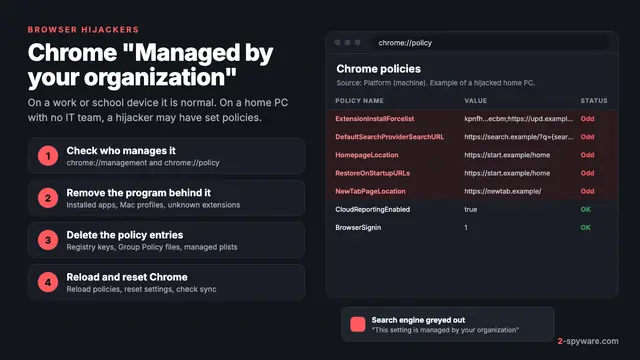
Chrome shows "Managed by your organization" at the bottom of its menu when policies apply [4]. Firefox shows "Your browser is being managed by your organization" at the top of Settings [5]. On a work or school device this is normal: an administrator can install extensions, restrict features and monitor activity [4].
On a home computer it means some program wrote policies. Mozilla names the usual causes: work or school management, antivirus, parental control or security software, or someone setting local policies by hand [5]. Hijackers use the same mechanism, because a policy beats anything you set in the browser. Our separate guide on Chrome managed by your organization walks through every policy and registry key.
Sync brings it back
If you sign in to Chrome, Edge or Firefox with sync on, extensions and settings travel between your computers. A hijacker extension removed on one PC can return from another, and a reset can be undone the next time sync runs. Remove the hijacker from every computer on the same account, or pause sync while you work.
Is a browser hijacker dangerous?
A hijacker is rarely built to damage your computer. The risk lies in what it records, where its results send you and how hard it makes your settings to control.
- Search logging. Every query you type passes through its servers before you see a result. Over weeks, that is a detailed profile of your life.
- Broad page access. Many search extensions ask to read and change data on all websites. That permission is wide enough to read what you type into forms.
- Weak ad checks. Sponsored results on hijacker pages lead to fake updates, repackaged installers and tech support scams more often than results on mainstream search engines.
- Locked settings. Policy hijackers can block the extensions page, disable Safe Browsing or stop browser updates. Adrozek turned off browser updates and Safe Browsing in its victims' browsers [2].
- Hidden network changes. A changed DNS server or proxy can send a real bank address to a fake copy. Microsoft lists DNS manipulation that redirects traffic or blocks security updates as tampering [1].
Treat a plain search extension as a privacy problem to fix today. Treat a policy lock, a forced extension, a Mac profile or a DNS change as urgent. If you typed passwords while the hijacker was active, change them afterwards and follow our guide on how to secure your accounts after malware.
Types of browser hijackers and real examples
Hijackers come in a few repeat forms. Each one is removed in a different place, so it helps to know which kind you face.
Search-redirect extensions
The most common form. An extension sets its own search engine and new tab, and Chrome or Edge note that an extension is controlling the setting. Swift Searcher, BlazeSearch and Gaming News Feed are typical. Removing the extension usually fixes the browser, unless a program installs it again.
Fake search engines
The page in your address bar has no search index of its own. It forwards your query and keeps the ad income. Find-it.pro and Goto-searchitnow.global.ssl.fastly.net, a redirect hop that leads to Searchitnow.info, are two that readers searched for most. Our fake search engines collection holds thousands more.
Toolbar-era search families
Older families still show up on long-used PCs. Hp.myway.com comes from Mindspark, whose free toolbars set MyWay search. The MyWay, Conduit and Trovi families set the pattern that today's extensions follow.
Policy-based hijacks
A program writes enterprise policies that force-install an extension and fix the search engine. The browser says it is managed, the setting is greyed out and the extension has no Remove button. Direct Search and Web.bwanet.ca are examples that are hard to shake for this reason. ChromeLoader went further and loaded its extension with a script and a scheduled task.
Mac profile hijacks
On macOS, hijackers install a configuration profile that sets Chrome or Safari behavior, plus launch agents that restart a helper app. Search Baron, Safe Finder and Nearbyme work this way, and they often ride with Adload Mac adware.
Notification-based redirects
No software at all. You clicked Allow on a page, and it now sends alerts that open redirect pages. It looks like a hijack but sits in the browser's notification list. Our guide to stopping site notifications removes it in a minute.
Regional search pages and false alarms
Some home pages are regional portals set by bundled software, such as 2345.com for Chinese users. Others are not hijacks at all. Google WebHP is often the address of Google's own home page, and only odd redirects around it need a closer look.

How to remove a browser hijacker from Windows
Work from the source outwards. If you change the search engine first, the extension or policy simply sets it back. Google gives the same order: check your computer for unwanted programs before you reset browser settings [3].
- Pause browser sync while you clean, so another computer cannot push the hijacker back.
- Open Settings, then Apps, then Installed apps on Windows 11, or Apps and features on Windows 10 [3]. Sort by install date and uninstall anything you do not recognize from the day the search changed. Our uninstall guide covers programs that refuse to go.
- Type chrome://policy in Chrome or edge://policy in Edge. On a home PC with no school or work account, the list should be empty [4]. If you see entries you did not set, follow our Managed by your organization guide to delete them.
- Remove the hijacker extension from every browser. Our extension removal guide covers greyed-out ones too.
- Set your search engine, home page and new tab back, or reset the browser.
- Right-click each browser shortcut, choose Properties and check that Target ends with the program's .exe file and not a web address.
- Open Task Scheduler and look in the Task Scheduler Library for tasks that open a URL or run a script from your user folder.
- If real sites load the wrong page, check the hosts file and look at the DNS and proxy settings under Settings, then Network and internet.
- Run a full scan in Windows Security, and a Microsoft Defender Offline scan if the hijacker returns.
Microsoft's advice for Adrozek was to reinstall the affected browsers [2], because that family patched browser files directly. For ordinary search extensions a reinstall is not needed. Leftover services and Run keys are covered in our malware leftovers guide, and our Windows help forum takes cases that do not fit.
How to remove a browser hijacker from a Mac
Mac hijackers depend more on profiles and launch agents than Windows ones do. The full folder by folder walkthrough is in our guide on how to remove adware from a Mac, which applies to hijackers as well. The short version follows.
- Open Finder, then Applications, and move unknown apps to the Trash, then empty it [3]. Search helpers often pose as players, PDF tools or system cleaners.
- Check profiles. On macOS Sequoia and newer, open System Settings, then General, then Device Management. On Sonoma, open Privacy and Security, then Profiles. Remove any profile you did not install for work or school.
- Open System Settings, then General, then Login Items and Extensions. Remove unknown entries and turn them off under Allow in the Background.
- Look in ~/Library/LaunchAgents, /Library/LaunchAgents and /Library/LaunchDaemons for .plist files with random or fake Apple-style names. Move the ones that match the helper app to the Trash.
- Clean Safari and every other browser on the Mac, as described in the next section.
- Restart the Mac and confirm the search engine stays the way you set it.
Our Mac viruses guide and the Mac help forum cover the families that come back after this, mainly Adload variants.

How to remove a browser hijacker from Chrome, Edge, Firefox and Safari
Do this in every browser installed on the computer, even ones you never open. Bundled installers change every browser they find. Our browser reset guide has screenshots if a menu has moved in a recent update.
Google Chrome
- Extensions: open the menu, then Extensions, then Manage extensions, and remove what you did not add.
- Search: open Settings, then Search engine. Pick your engine, then open Manage search engines and site search and delete the hijacker entry.
- Start pages: open Settings, then On startup, and remove unknown pages. Check the home button address under Appearance.
- Policies: type chrome://policy. A home browser should show no policies [4].
- Reset: open Settings, then Reset settings, then Restore settings to their original defaults [3]. Chrome turns extensions off after a reset, so turn back on only the ones you trust [3].
Chrome also checks at every launch whether unwanted programs changed its settings, and restores safe values on its own [3]. If you see a notice that search was reset, that check found something [3]. More cases are on our Chrome topic page.
Microsoft Edge
- Extensions: open the menu, then Extensions, then Manage extensions.
- Search: open Settings, then Privacy, search, and services, then Address bar and search, and change the search engine used in the address bar.
- Start pages: open Settings, then Start, home, and new tab page.
- Policies: type edge://policy and look for entries you did not set.
- Reset: open Settings, then Reset settings, then Restore settings to their default values.
Mozilla Firefox
- Add-ons: open the menu, then Add-ons and themes, then Extensions, and remove unknown ones.
- Search: open Settings, then Search, and pick a default search engine. Remove the hijacker from the search shortcuts list.
- Home: open Settings, then Home, and set Homepage and new windows and New tabs.
- Policies: click the managed message at the top of Settings to open Policy Details, or type about:policies [5].
- Reset: open Help, then More troubleshooting information, then Refresh Firefox.
Safari
- Extensions: open Safari, then Settings, then Extensions, and uninstall unknown ones. Safari extensions come inside apps, so delete the app too.
- Search: open Settings, then Search, and pick a search engine. Safari offers only a short built-in list, so a hijack there comes from an extension or profile.
- Home page: open Settings, then General, and check Homepage and New windows open with.
- Notifications: open Settings, then Websites, then Notifications, and remove unknown sites.
How to remove a browser hijacker from Android and iPhone
Phones rarely get the policy and profile hijacks seen on computers. Most phone hijacks come from a browser app you installed, a site's notification permission or a changed default browser.
Android
- Open Settings, then Apps, and uninstall browsers, "search" apps and cleaners you do not remember installing.
- Under Settings, then Apps, then Default apps, check that Browser app is the browser you chose.
- In Chrome, tap the menu, then Settings, then Search engine, and pick your engine.
- In Chrome, open Settings, then Site settings, then Notifications, and block the sites pushing redirects.
- On Samsung phones, check Samsung Internet too: its own search engine and notification settings are separate from Chrome's.
If an app shows full-screen ads or refuses to uninstall, our Android adware guide covers device admin rights and safe mode. The Android help forum takes harder cases.
iPhone and iPad
- Open Settings, then Apps, then Safari, then Search Engine, and pick yours. On iOS 17 and older, Safari sits directly in Settings.
- In the same Safari settings, open Extensions and turn off anything you do not use.
- Open Settings, then General, then VPN and Device Management, and remove profiles you did not install.
- Clear the browsing data under Safari's Clear History and Website Data.
- Delete unknown subscribed calendars, which can push redirect links as events.
More phone cases are collected on our iPhone topic page and in the iPhone help forum.
How to prevent browser hijackers
- Read the prompt Chrome and Edge show when an extension changes your search engine, and choose to change it back if you did not expect it.
- Install extensions only when you need the feature, from the official store, from a publisher you can identify. A PDF tool that wants your search engine is a hijacker.
- Choose Custom or Advanced setup in every installer and untick search, home page and toolbar offers.
- Get software from the developer's site, not from ads or download buttons on other pages [3].
- Turn on potentially unwanted app blocking in Windows Security, under App and browser control, then Reputation-based protection settings.
- Check chrome://policy or edge://policy after you install free software. An empty list on a home PC is the healthy state [4].
- Review your extensions every few months. Extensions are sold and updated with new behavior.
When to use a browser hijacker removal tool
You can remove a single search extension by hand in a few minutes. A scanner earns its place when the hijacker returns after cleanup, when policies or profiles reappear, or when you cannot find which program is behind it. It also finds leftover tasks, services and launch agents that you would miss by eye.
Start with what you have: a full scan in Windows Security, or a free second opinion with Microsoft Safety Scanner. Avoid any "cleaner" offered through a pop-up or a hijacker's own results, which is how rogue security software sells itself.
Our comparison of the best browser hijacker removal tools sets the scanners we reviewed side by side, starting with our Fortect review for Windows and Combo Cleaner for Mac. Not sure a link is safe before you click it? Paste it into our link check.
Frequently asked questions
What is a browser hijacker in simple terms?
It is software that changes where your browser starts and searches. It sets its own search engine, home page or new tab so your searches pass through its page first. The operators earn money from the ads on the results and from the search data they collect.
Is a browser hijacker a virus?
Usually not. It does not copy itself or spread on its own, and Microsoft classes most of this software as potentially unwanted applications rather than malware. Some families do more, such as stealing saved passwords or turning off browser updates, so scan the computer after removing one.
How do I remove a browser hijacker from Chrome?
First uninstall unknown programs from Windows or the Mac. Then type chrome://policy and remove any policies you did not set. Remove the extension under Manage extensions, set your search engine under Settings, then Search engine, and use Reset settings if anything remains. Turn back on only the extensions you trust.
Why does my search engine keep changing back?
Something on the computer keeps setting it. Usually an extension controls the setting, a browser policy locks it, or a program or scheduled task reinstalls the extension. Account sync can also restore it from another computer. Remove the source first, then set the search engine again.
Why are my searches redirected to Bing or Yahoo?
A hijacker sends your query through its own page, which is paid for passing search traffic on. The last stop is often Bing or Yahoo, so the results look normal. Bing and Yahoo are not infected. Remove the extension or program that sends you there.
What does Managed by your organization mean on a home computer?
It means browser policies exist on that computer. On work or school devices that is normal. On a home PC with no IT department, they often come from a hijacker that uses them to lock the search engine and force its extension. Antivirus and parental control apps can also set them, so check what each policy does.
Will resetting the browser remove a hijacker?
Often, but not always. A reset restores the search engine, start pages and new tab and turns extensions off. It does not remove programs, policies, Mac profiles, hosts file lines, DNS or proxy changes, or edited shortcuts. If any of those remain, the hijacker returns after the reset.
Can a browser hijacker steal my passwords?
Most only log searches. An extension that can read and change data on all websites, though, can see what you type into pages, and some families have stolen saved browser passwords. If you typed passwords while it was active, change them from a clean device and turn on two-step verification.
Do I need to reinstall my browser?
Usually not. Removing the program, policies and extension, then resetting, fixes most hijacks. A reinstall helps when a family patched the browser's own files, as Adrozek did. Uninstall, restart, then install a fresh copy from the official site, and keep sync paused until it is clean.
Can an iPhone or Android phone get a browser hijacker?
Yes, but in a simpler form. On Android it is usually a browser or search app you installed, or a changed default browser. On iPhone it is usually a Safari extension, a configuration profile, or notifications and calendar subscriptions from a spam site. Removing that one item normally fixes it.
Sources
- Microsoft Learn: How Microsoft identifies malware and potentially unwanted applications read 2026-10-08
- Microsoft Security Blog: Widespread malware campaign seeks to silently inject ads into search results, affects multiple browsers (Adrozek, December 2020) read 2026-10-08
- Google Chrome Help: Remove unwanted ads, pop-ups and malware read 2026-10-08
- Google Chrome Help: Check if your Chrome browser is managed read 2026-10-08
- Mozilla Support: Why Firefox says "Your browser is being managed by your organization" read 2026-10-08