
Smart Protection 2012: what it is and how to remove it
Smart Protection 2012 is a dangerous malware that must be eliminated as soon as it starts displaying faked alerts on victim's computer. Just like its earlier version Security Phere 2012, this program should be categorized as rogue anti-spyware because it uses misleading tactics based on faked messages and systemscanners for the only reason – to make victims believe that they must purchase the licensed its version.
Facts checked October 7, 2026. Removal steps tested on Windows 11 (26H2) and checked against Microsoft's and the browser makers' current documentation. Sections marked as our earlier report are the original text: they describe the threat as it was then and have not been reviewed since. The 2026 status, the removal steps and the questions are current.
Automatic
Get a free scan and check if your PC is infected.
Fortect finds malware, unwanted programs and the Windows damage they leave behind, and repairs it in one pass.
Programs like Smart Protection 2012 usually arrive in groups; a free scan lists the companions that are easy to miss.
Do it yourself · free Remove Smart Protection 2012 yourself 5 steps, about 15 minutes, no software needed.
Start the steps
Smart Protection 2012: summary
| Detection names | No Microsoft detection name is known |
|---|---|
| Distribution | Not recorded in the old report |
| Damage | Not recorded in the old report |
| Name | Smart Protection 2012 |
| Type | Rogue antivirus |
| Symptoms | An unknown program in Installed apps |
| Removal | Scan the PC with security software to find and remove the malware and anything installed with it. Fortect scans Windows for malware and repairs the system files and settings it damaged. Remove it nowTo use the full-featured product, you have to purchase a license for Fortect. The scan is free. |
Show 4 more facts
| Evidence | One write-up by a security site; details still limited |
|---|---|
| Program | Smart Protection 2012 |
| First seen | 26 April 2021 |
| Facts checked | 7 October 2026 |
From our report of Apr 2021 · not reviewed since
What Smart Protection 2012 is
Smart Protection 2012 is a dangerous malware that must be eliminated as soon as it starts displaying faked alerts on victim's computer.
Just like its earlier version Security Phere 2012, this program should be categorized as rogue anti-spyware because it uses misleading tactics based on faked messages and systemscanners for the only reason – to make victims believe that they must purchase the licensed its version. For that Smart Protection 2012 will 'detect' tons of trojans, adware and other kinds of viruses and then will start initiating annoying redirections to its purchase page.
Please, ignore this ultimate money-hunter and remove SmartProtection2012 without any delay. In addition, never buy this rogue anti-spyware because it may steal your credit card information and all the money found on your account. As a rule, Smart Protection 2012 uses trojans for trying to get inside the system. As soon as they manage to come, they start messing it up afterwards and make some unnoticeable changes to system parameters.
These changes help for Smart Protection 2012 to launch once the PC is rebooted. In addition, this scam will do its best in making it look like you really need the registered its version, so it will drop some faked harmless files first and then will detect them as malicious. Trying to mislead its victims, it reports:
Security experts report that Smart Protection 2012 has empty virus database, so it can be hard to imagine how it detects viruses and removed them from the system. In addition, it clearly returns misleading results for the only reason – to make its victims concerned about their machines and buy its license.
Rememeber, all the scanners and detection alerts or Smart Protection 2012 are nothing but pre-designed popups used for tricking the unsuspecting user. Do not believe them and remove Smart Protection 2012 without any delay. If you simply ignore this scamware, soon you will notice that malware is consuming your CPU resources and your PC is really slow because of that.
You may also find some internet connection problems and browser redirections to its affiliate websites as well. If you find it difficult to launch your anti-spyware program and scan PC for Smart Protection 2012, reboot your PC to safe mode with networking first. In addition, go online to download Spyware Doctor and run a full system scan with it to remove infected Smart Protection 2012 files.
Is Smart Protection 2012 a real security program?
From our report of Apr 2021 · not reviewed since
More from our earlier report on Smart Protection 2012
- Warning: Your computer is infected Detected spyware infection!
- Smart Protection 2012 Warning Your computer is still infected with dangerous viruses.
- Activate antivirus protection to prevent data loss and avoid theft of your credit card details.
- Smart Protection 2012 Warning Intercepting programs that may compromise your privacy and harm your system have been detected on your PC.
How to remove Smart Protection 2012
Nothing it reports is real.
These steps remove it and undo a payment if you made one.
Step 1: Do not pay, and undo a payment if you made one
Nothing that Smart Protection 2012 says it found needs fixing by Smart Protection 2012. Close its windows and do not enter card details.
If you bought it, contact your bank or card issuer about a dispute and cancel any renewal, keeping the receipt e-mail as evidence. Uninstalling it from Windows 11 or Windows 10 removes the program but leaves the subscription running.
Full procedure with screenshots: What to do after paying a scammer
Step 2: Uninstall Smart Protection 2012
Smart Protection 2012 is removed like any other program, from the list of installed apps. In Windows 11 that is Settings > Apps > Installed apps, in Windows 10 Settings > Apps > Apps & features, and in both you can also use Control Panel > Programs and Features.
Select Smart Protection 2012, click Uninstall and follow the uninstaller to the end. Then look at the entries just above and below it when the list is sorted by date: bundled programs install at the same minute.
Full procedure with screenshots: Uninstall a program or app in Windows On uGetFix
Step 3: Remove it from startup
Press Ctrl + Shift + Esc to open Task Manager and select Startup apps (Windows 11) or the Startup tab (Windows 10). Disable entries you do not recognise, especially ones with no publisher or with a name that copies a Windows component.
Right-click an entry and choose Open file location to see where it runs from: programs in
%AppData%or%Temp%deserve a closer look. Some entries are not listed there but in the registry Run keys, which the procedure below shows how to check.Full procedure with screenshots: Stop apps from opening at startup On uGetFix
Step 4: Delete the folders left behind
Uninstalling often leaves the program's folders, and some threats reinstall themselves from them.
Press Windows + R, type
%LocalAppData%and press Enter, then do the same for%AppData%and %ProgramData%, and look for folders named after Smart Protection 2012, its publisher or created on the day the problem started.Delete those folders, and check
C:\Program FilesandC:\Program Files (x86)too.If Windows says a file is in use, end it in Task Manager or delete the folder after a restart in Safe Mode. The folders are the same in Windows 11 and Windows 10.
Full procedure with screenshots: Remove what malware leaves behind in Windows
Step 5: Scan the PC, then run the offline scan
A scan finds the parts of Smart Protection 2012 that the manual steps cannot see. In Windows Security > Virus & threat protection > Scan options, start a Full scan and quarantine what it reports.
Follow it with Microsoft Defender Antivirus (offline scan) > Scan now, which restarts the PC and checks the disk while Windows and the malware are not running.
It takes about 15 minutes and works the same in Windows 11 and Windows 10. If either scan finds something, run the full scan again after removal until it comes back clean.
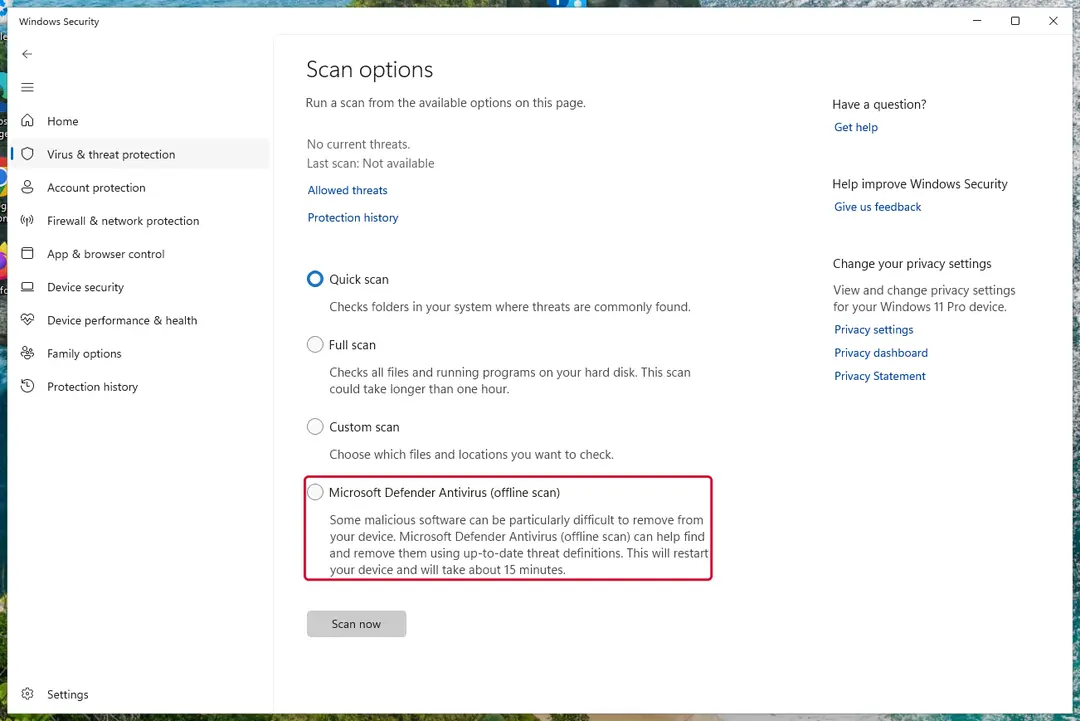
Windows 11: Windows Security > Virus & threat protection > Scan options. Full procedure with screenshots: Run a Microsoft Defender Offline scan
Choose a proper web browser and improve your safety with a VPN tool
Online spying has got momentum in recent years and people are getting more and more interested in how to protect their privacy online.
One of the basic means to add a layer of security - choose the most private and secure web browser. Although web browsers can't grant full privacy protection and security, some of them are much better at sandboxing, HTTPS upgrading, active content blocking, tracking blocking, phishing protection, and similar privacy-oriented features.
However, if you want true anonymity, we suggest you employ a powerful VPN - it can encrypt all the traffic that comes and goes out of your computer, preventing tracking completely.
Lost your files? Use data recovery software
While some files located on any computer are replaceable or useless, others can be extremely valuable.
Family photos, work documents, school projects - these are types of files that we don't want to lose. Unfortunately, there are many ways how unexpected data loss can occur:
- power cuts
- Blue Screen of Death errors
- hardware failures
- crypto-malware attack
- even accidental deletion
To ensure that all the files remain intact, you should prepare regular data backups. You can choose cloud-based or physical copies you could restore from later in case of a disaster. If your backups were lost as well or you never bothered to prepare any, can be your only hope to retrieve your invaluable files.
Questions about Smart Protection 2012
Is Smart Protection 2012 a virus?
Most programs that appear the way Smart Protection 2012 did are not viruses in the strict sense. They are potentially unwanted programs:
- real software that arrives bundled with other downloads and then shows offers
- changes browser settings
- starts with Windows
Some are harmless, some are annoying and a few carry adware. What makes it worth removing is that you did not choose it.
Uninstall it from Installed apps and check the startup list and the browsers for anything added the same day. If it refuses to uninstall or returns after a restart, treat it as more serious and run a Microsoft Defender offline scan.
Smart Protection 2012 will not uninstall. What can I do?
First restart the PC and try again, because the program may have been running and locked its own files. If the uninstaller is missing or fails, start Windows in Safe Mode, where most third-party programs do not start, and remove Smart Protection 2012 from Installed apps there.
If it still refuses, delete its startup entry and its scheduled task, restart, and try once more. A program that actively prevents removal is behaving like malware, so finish with a Microsoft Defender offline scan. Avoid third-party uninstallers offered on search ads; several of them are unwanted programs themselves.
Why does Smart Protection 2012 look so official?
Because copying the design costs nothing and makes people trust it. The program behind smart Protection 2012 in the list of installed apps borrows Windows colours, icons and wording, sometimes even the name of a well-known security brand. None of that gives it access to real security information.
A real alert can be checked in seconds: open Windows Security from the Start menu and look at Protection history. If nothing is listed there, the official-looking window is fake, and the program that draws it is what needs to be removed.
What if I paid Smart Protection 2012?
Contact your bank or card issuer the same day, explain that the payment went to a fake security program and ask for a chargeback. Keep screenshots of smart Protection 2012 in the list of installed apps, the payment receipt and any e-mails.
If you gave card details in the program, ask the bank to block and replace the card. Then uninstall the program and run a full scan in Windows Security. If you also called a number and let someone connect to your PC, uninstall the remote-access tool they used and change your passwords from another device.
Is Smart Protection 2012 an antivirus?
No. It looks like one, with a shield, a scan and a list of threats, but Smart Protection 2012 is a rogue antivirus: its scans are designed to find something every time, and every fix leads to a payment page.
A real antivirus detects the same threats consistently, removes them without asking for money first and does not block other security tools. Windows 11 and Windows 10 already include Microsoft Defender in Windows Security, which is enough for most home users. Remove Smart Protection 2012 and keep Defender on.
Do I need to reinstall Windows to get rid of Smart Protection 2012?
Usually not. A thorough clean-up is enough when the offline scan finds nothing afterwards and you do not see smart Protection 2012 in the list of installed apps again. A reset is the safer choice if an attacker had remote control, if security tools were switched off, or if detections come back after every clean-up.
Windows 11 can reset itself without a USB stick under Settings > System > Recovery > Reset this PC. Copy documents and photos out first and scan the copies. A reset does not change passwords or undo stolen data, so the account steps still apply.
Someone called offering a refund for Smart Protection 2012. Is it genuine?
Almost certainly not. Refund calls are a well-known second stage of scareware and tech support scams. The caller says you are owed money, asks you to install a remote access program to "process" it, then opens your online banking, makes it look as if too much was refunded and asks you to send the difference back.
Hang up. Real refunds go back to the card or PayPal account you paid with, through your bank or the payment provider, and never need remote access or a gift card.
Is Windows Security enough to protect me from programs like Smart Protection 2012?
For most home users, yes, especially with Potentially unwanted app blocking turned on in Windows Security > App & browser control > Reputation-based protection settings. That setting blocks many scareware installers before they run.
No security tool stops every scam, though, because programs like Smart Protection 2012 are usually installed by the user after a frightening message. The habit that helps most is simple: ignore any website or pop-up that claims to have scanned your PC, and never call a number shown in a warning.
Is my card safe after buying Smart Protection 2012?
Treat it as exposed. The order page belongs to the seller of Smart Protection 2012, and you cannot know how the number is stored or shared. Ask your bank for a replacement card, which is usually free, and dispute the original charge as a misrepresented product.
Until the new card arrives, check your account daily for small or foreign transactions. If the bank offers alerts for every card payment, turn them on. Keep the receipt and screenshots, because they support the dispute.
Will Fortect remove Smart Protection 2012?
Fortect scans Windows for malware and unwanted programs and repairs the system files and settings they change, and its free scan shows what it finds on your PC before you decide anything.
For Smart Protection 2012, follow the plan above as well: the browser steps take back permissions and settings that no scanner treats as a threat, and uninstalling the program that brought it removes the source.
Run Microsoft Defender's full scan and, if anything was found, its offline scan as a second opinion. If the symptoms are gone after the plan and both scans are clean, there is nothing more to do.
Sources
- FTC: How to recognize, remove and avoid malware (read October 7, 2026)
- Microsoft Learn: Microsoft Defender Offline (read October 7, 2026)
- Microsoft Learn: How Microsoft names malware (read October 7, 2026)