

Antivir is an application that should be a great tool for the system security

Antivir is a misleading anti-spyware application that reports false or exaggerated system security threats and infections to make you think that your computer is infected with malware. Once installed, it will simulate system scans and display a list of infections but won't let you remove those supposed infections unless you pay for a full version of the program. The report lists various infections not related to your machine and once you click the Fix Now button a purchase form appears. As you can see, the main goal of this misleading application is to trick you into purchasing the program. This is nothing more but a scam. Do not pay for it and uninstall it from your computer as soon as possible, if you noticed the intruder already added on the PC.
| Name | Antivir |
|---|---|
| Type | Rogue anti-spyware program |
| Issues | Applications like this rely on false scan results filled with fake reports about malware infections to promote other tools |
| Danger | Users can end up paying for the full version of this tool and suffer monetary losses |
| Distribution | Freeware bundling, promotional advertisements, other PUPs |
| Removal and system help | The system can e cleaned with anti-malware tools that remove the app fully. But altered registry entries and other system files require help from apps like FortectIntego |
Antivir is promoted through the use of random promotional ads that come mostly from fake online anti-malware scanners. Of course, scammers use other misleading methods to promote their bogus products. Social engineering is a very popular distribution method too. You shouldn't accept invitations or open links received from unknown people.
The program can be downloaded from various platforms that rely on advertisements, promotional material. Torrent sites and similar services rely on software bundling method that is often used to spread adware-type intruders around. This rogue security tool often is included as the additional piece that cannot be removed unless you click Advanced or Custom options and control all the included programs on the list.

When installed, PUPs download the rogue application and displays fake security alerts. Those fake security alerts or notifications will state that your computer is infected, for example: “Warning! Identity theft attempt detected”. Other fake notification states:
Trojan:W32/Inject is a large family of malware that secretly makes changes to the Windows Registry. Variants in the family make also makes changes to other running processes.
Furthermore, Antivir may block legitimate anti-spyware software and block security-related websites. There shouldn't be any doubts about this bogus application – it must be removed upon detection. Most importantly, do not purchase the application yourself. Otherwise, you will simply lose your money.
Make sure to get rid of the shady tool
If your computer is infected with this rogue tool, please use the removal guide below to remove Antivir manually for free. Also, make sure to scan your PC with a legitimate system optimization application to remove the remains or additionally installed malware and repair any damage.
Uninstall from Windows
Uninstall from Windows 10/8:
- Type Control Panel into the Windows search box and open the result.
- Under Programs, select Uninstall a program.


Uninstall from Windows 7/XP:
- Click on Windows Start > Control Panel (Windows XP users should click on Add/Remove Programs).
- In Control Panel, select Programs > Uninstall a program.


Remove the unwanted program:
- In the Programs and Features window, look for any recently installed suspicious entries, select them, and click Uninstall.
- If User Account Control appears, click Yes to confirm, then complete the removal.


Delete from macOS
Remove the unwanted application:
- From the menu bar, select Go > Applications.
- In the Applications folder, look for any suspicious entries, then drag them to Trash (or right-click and pick Move to Trash).
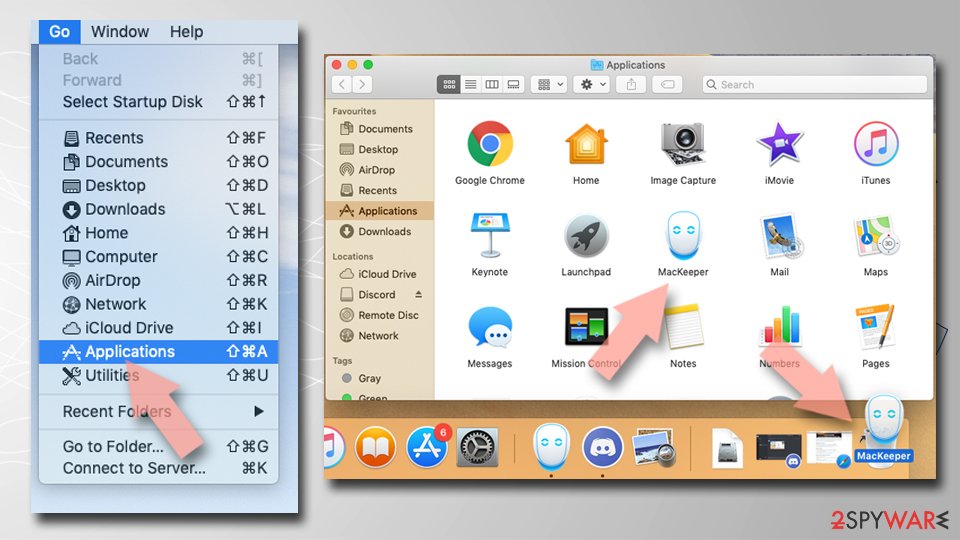

Delete leftover files and folders:
- Select Go > Go to Folder.
- Enter /Library/Application Support and remove any suspicious folders related to the unwanted program.
- Repeat the same check in the /Library/LaunchAgents and /Library/LaunchDaemons folders, deleting any suspicious entries.
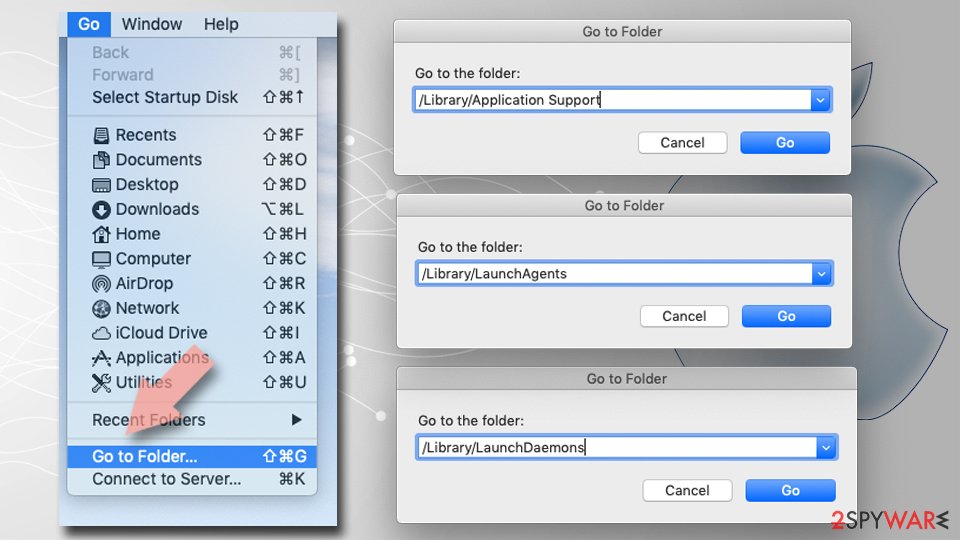
- Finally, empty the Trash to permanently remove the leftovers.

Remove from Microsoft Edge
Delete unwanted extensions from MS Edge:
- Select Menu (three horizontal dots at the top-right of the browser window) and pick Extensions.
- From the list, pick the extension and click on the Gear icon.
- Click Remove.
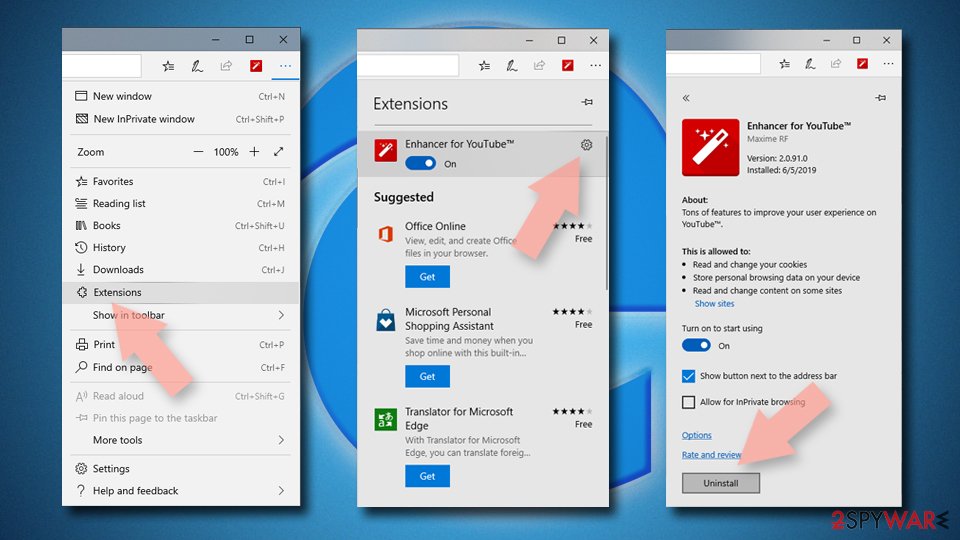

Clear cookies and other browser data:
- Click on the Menu (three horizontal dots at the top-right of the browser window) and select Settings > Privacy, search, and services..
- Under Clear browsing data, pick Choose what to clear.
- Select Cookies and other site data and Cached images and files. (apart from passwords, although you might want to include Media licenses as well, if applicable) and click on Clear.
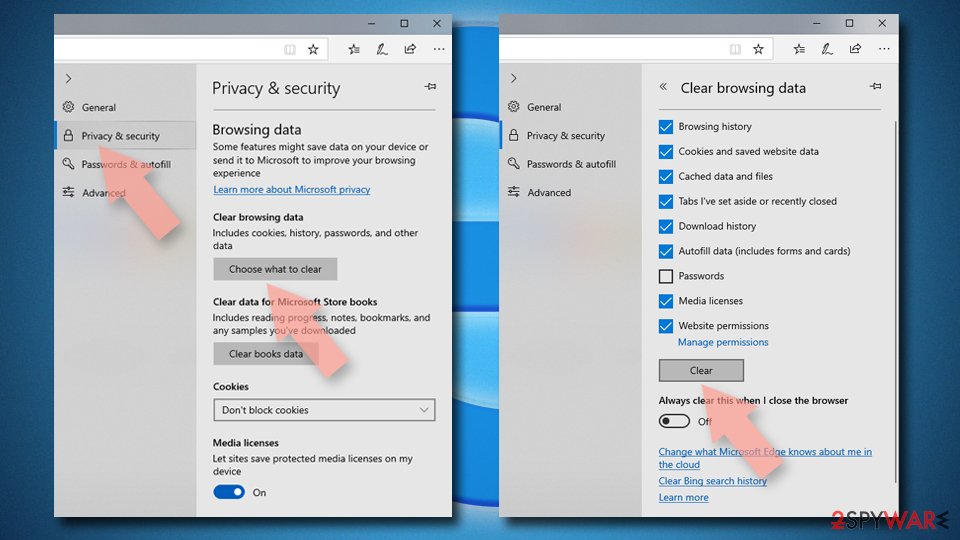

Restore new tab and homepage settings:
- Click the menu icon and choose Settings.
- Then find On startup section.
- Click Remove next to any suspicious startup page.
Reset MS Edge if the above steps did not work:
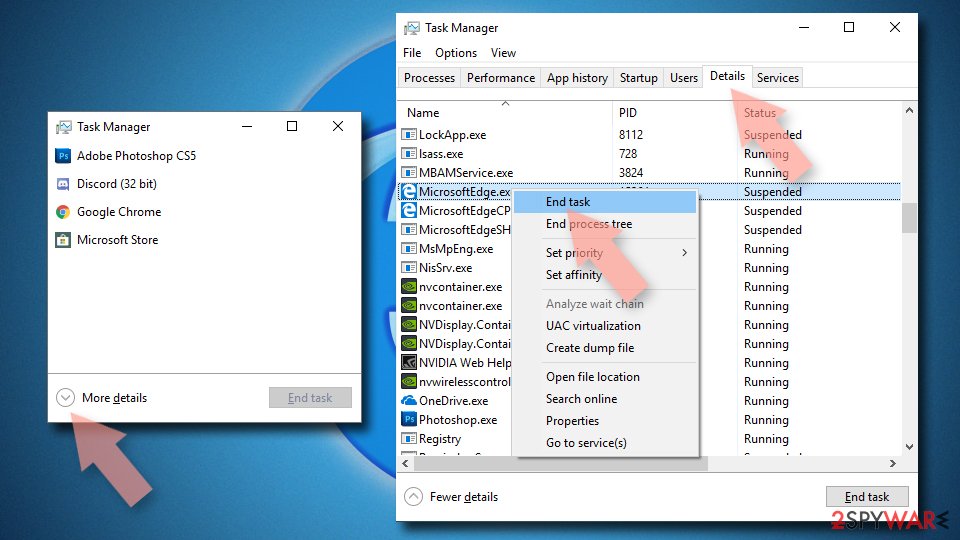
- Press on Ctrl + Shift + Esc to open Task Manager.
- Click on More details arrow at the bottom of the window.
- Select Details tab.
- Now scroll down and locate every entry with Microsoft Edge name in it. Right-click on each of them and select End Task to stop MS Edge from running.

Instructions for Chromium-based Edge
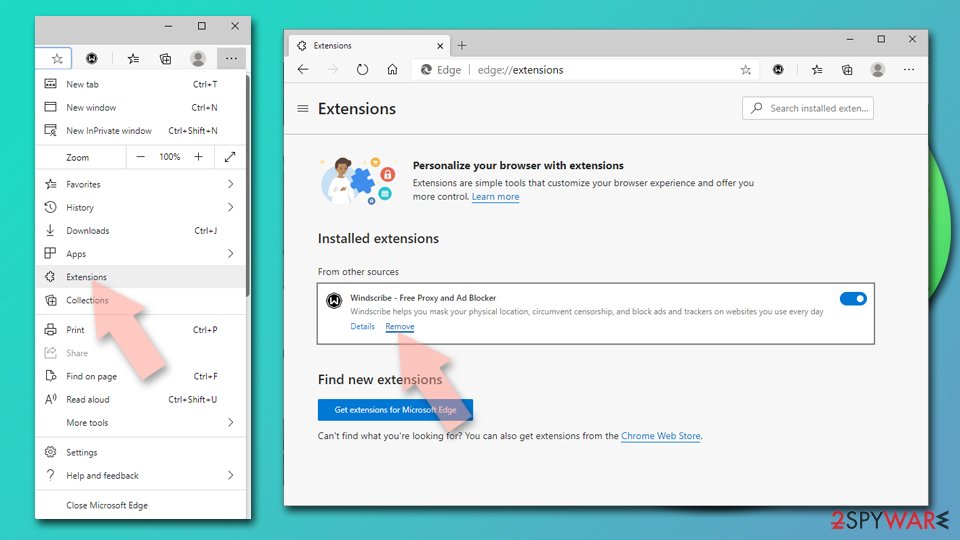
Delete extensions from MS Edge (Chromium):
- Open Edge and click select Settings > Extensions.
- Delete unwanted extensions by clicking Remove.

Clear cache and site data:
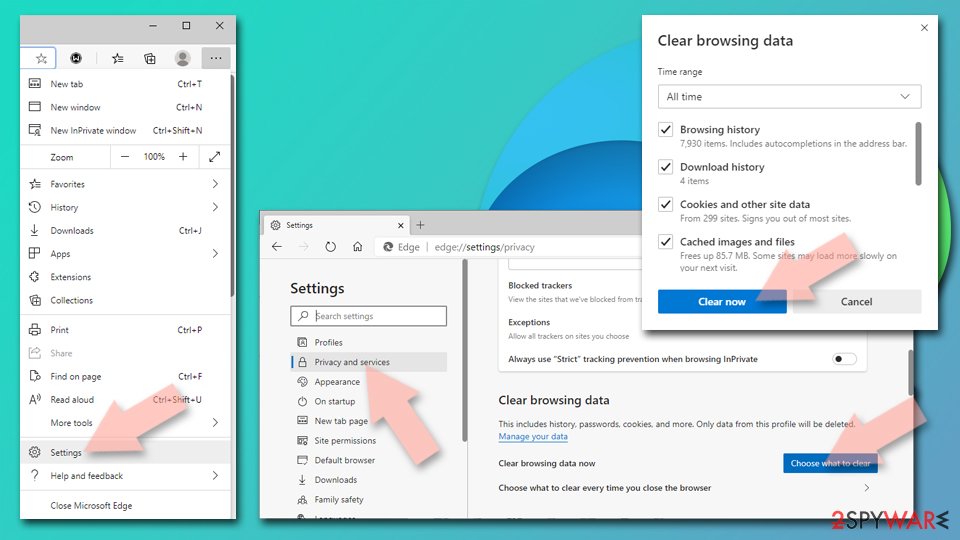
- Click on Menu and go to Settings.
- Select Privacy, search and services.
- Under Clear browsing data, pick Choose what to clear.
- Under Time range, pick All time.
- Select Clear now.

Reset Chromium-based MS Edge:
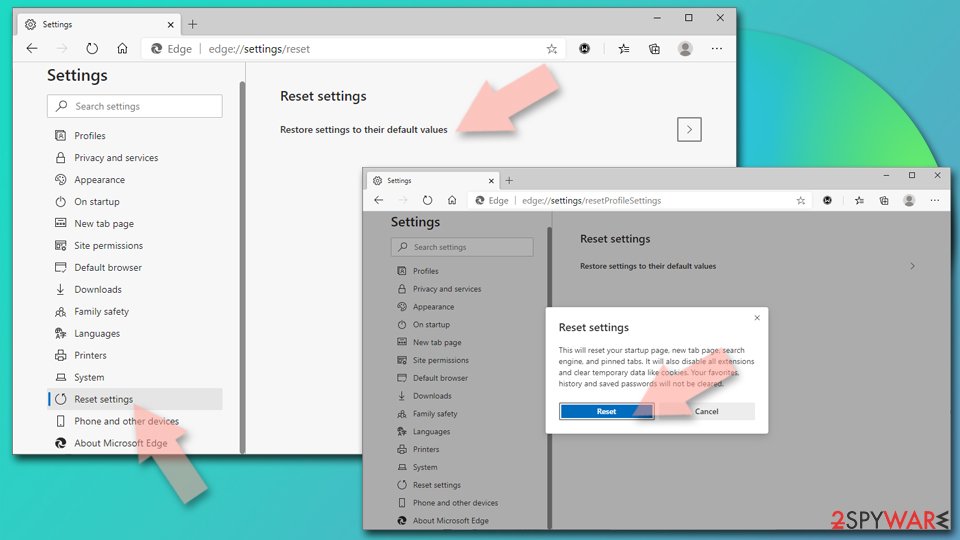
- Click on Menu and select Settings.
- On the left side, pick Reset settings.
- Select Restore settings to their default values.
- Confirm with Reset.
- This will disable extensions and reset startup pages but will not delete bookmarks, saved passwords, or browsing history.

Remove from Mozilla Firefox (FF)
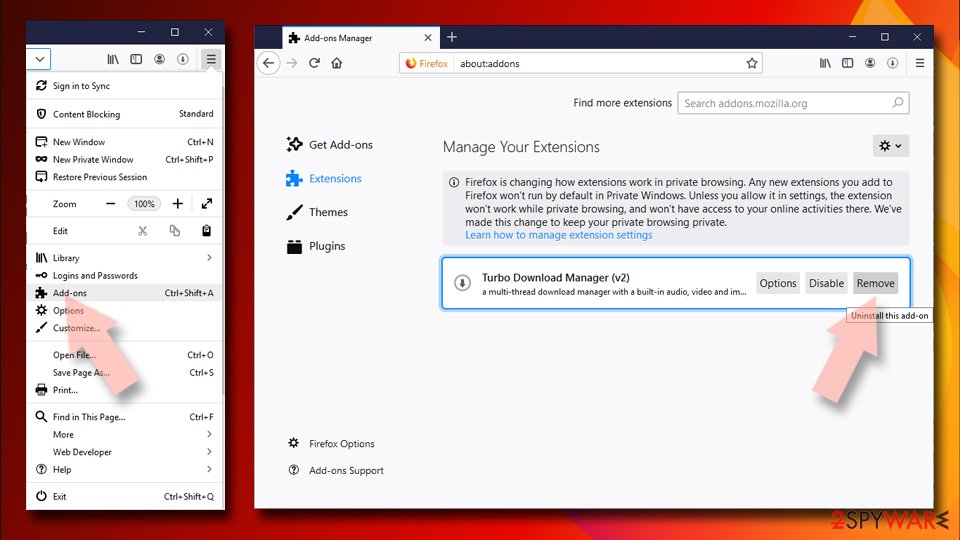
Remove dangerous extensions:
- Open Mozilla Firefox browser and click on the Menu (three horizontal lines at the top-right of the window).
- Select Add-ons.
- In here, select the unwanted extension and click Remove.

Reset the homepage:
- Click three horizontal lines at the top right corner to open the menu.
- Choose Settings.
- Under Home, set your preferred homepage and new tab settings.
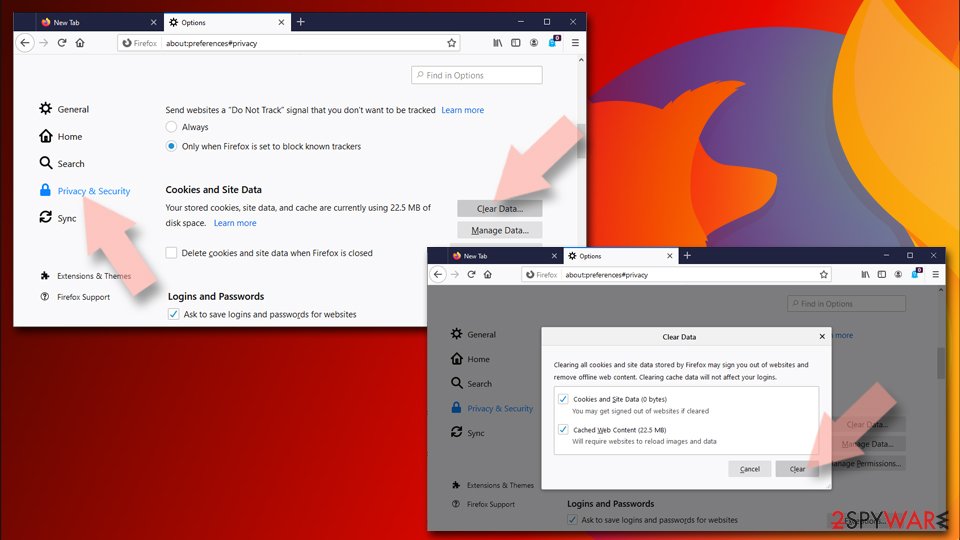
Clear cookies and site data:
- Click Menu and pick Settings.
- Go to Privacy & Security section.
- Scroll down to locate Cookies and Site Data.
- Click on Clear Data...
- Select Cookies and Site Data and Temporary cached files and pages, then click Clear.

Reset Mozilla Firefox
If clearing the browser as explained above did not help, reset Mozilla Firefox:
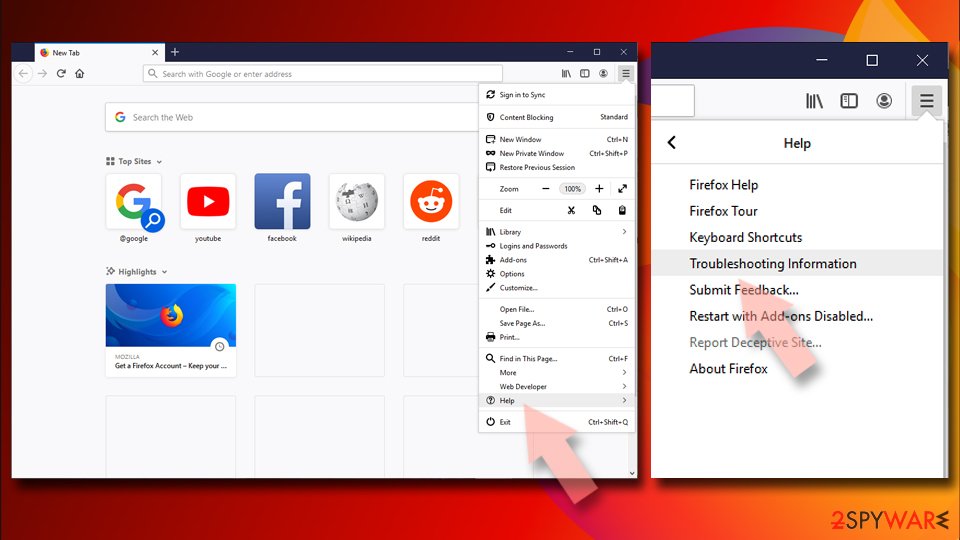
- Open Mozilla Firefox browser and click the Menu.
- Go to Help and then choose Troubleshooting Information.
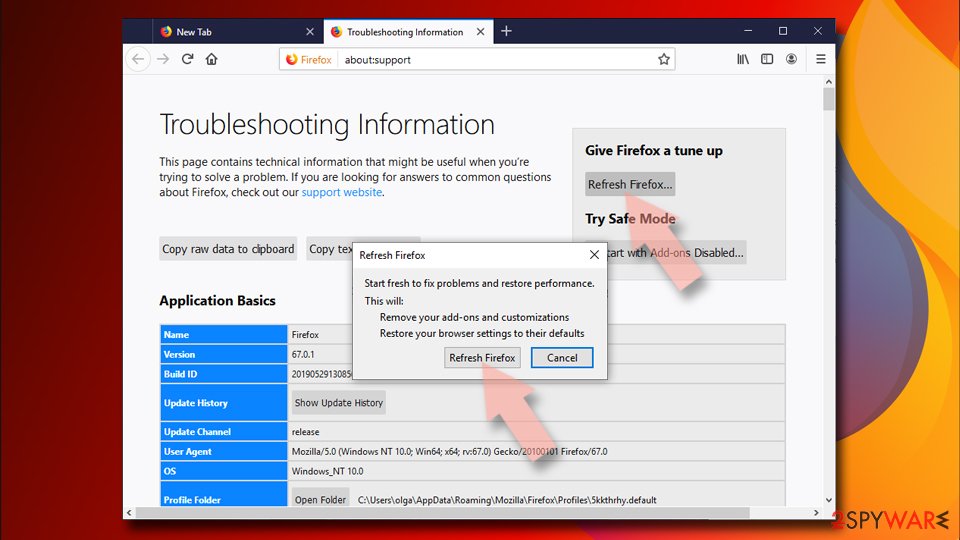
- Under Give Firefox a tune up section, click on Refresh Firefox...
- Once the pop-up shows up, confirm the action by pressing on Refresh Firefox.


Remove from Google Chrome
Delete malicious extensions from Google Chrome:
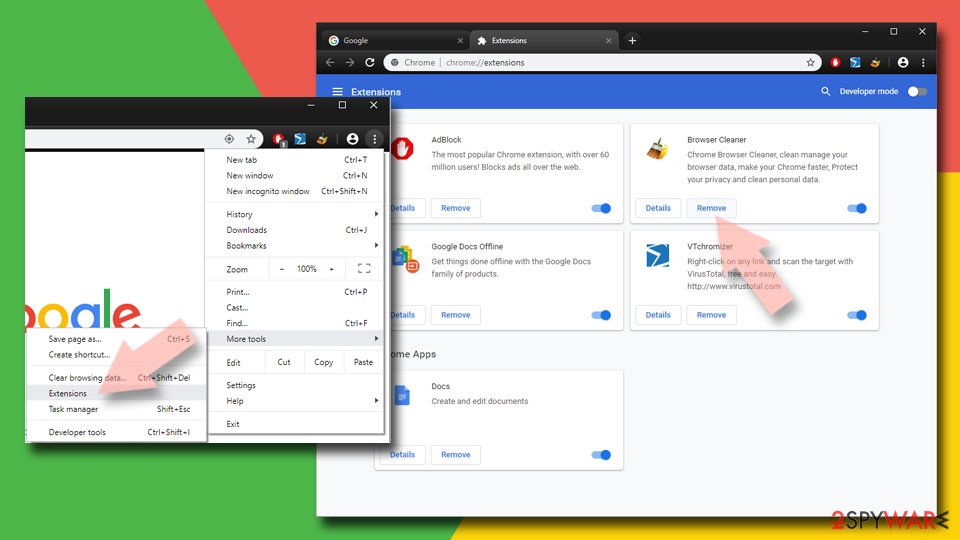
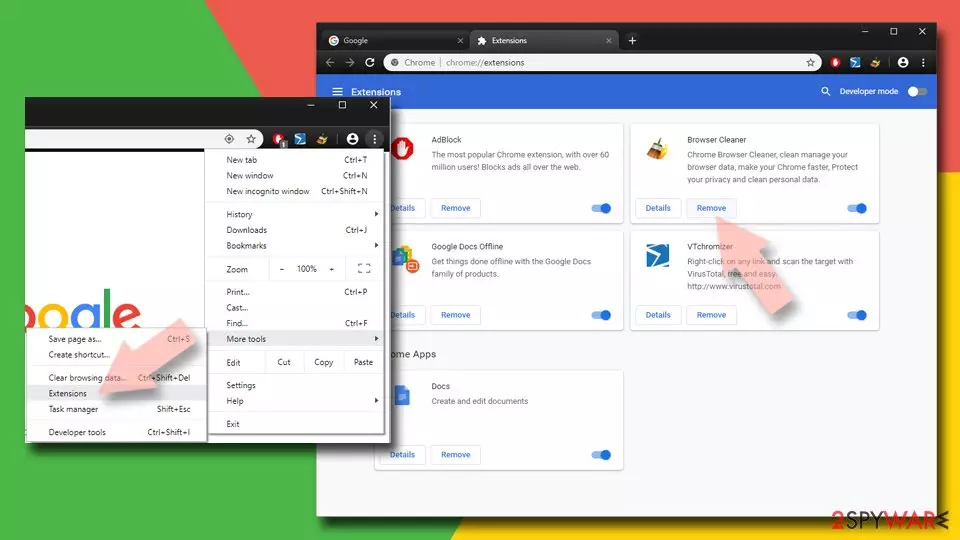
- Open Google Chrome, click on the Menu (three vertical dots at the top-right corner) and select More tools > Extensions.
- In the newly opened window, you will see all the installed extensions. Uninstall all suspicious extensions related to the unwanted program by clicking Remove.
Clear cache and web data from Chrome:
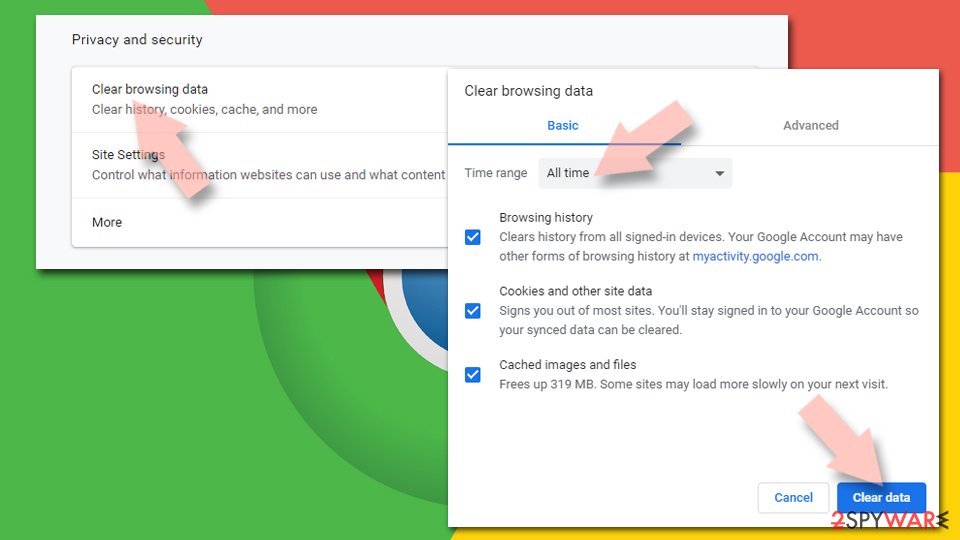
- Click on Menu and pick Settings.
- Under Privacy and security, select Clear browsing data.
- Select Browsing history, Cookies and other site data, as well as Cached images and files.
- Click Clear data.

Change your homepage:
- Click menu and choose Settings.
- Look for a suspicious site in the On startup section.
- Click on Open a specific or set of pages and click on three dots to find the Remove option.
Reset Google Chrome:
If the previous methods did not help you, reset Google Chrome to eliminate all the unwanted components:
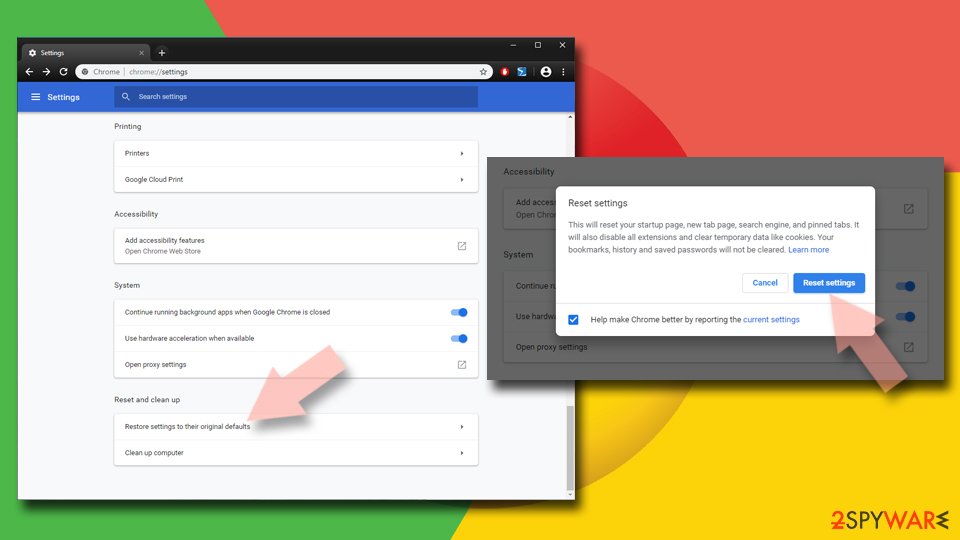
- Click on Menu and select Settings.
- In the Settings, scroll down and click Advanced.
- Scroll down and locate Reset and clean up section.
- Now click Restore settings to their original defaults.
- Confirm with Reset settings.

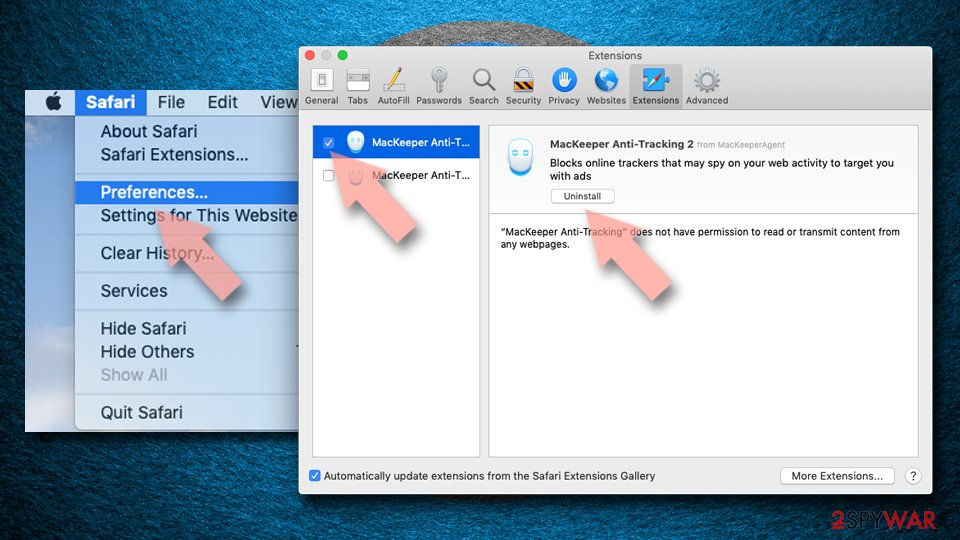
Delete from Safari
Remove dangerous extensions:
- Open Safari, click Safari in the menu at the top-left of the screen, and select Preferences.
- Go to the Extensions tab, look for any suspicious entries, and click Uninstall to remove them.

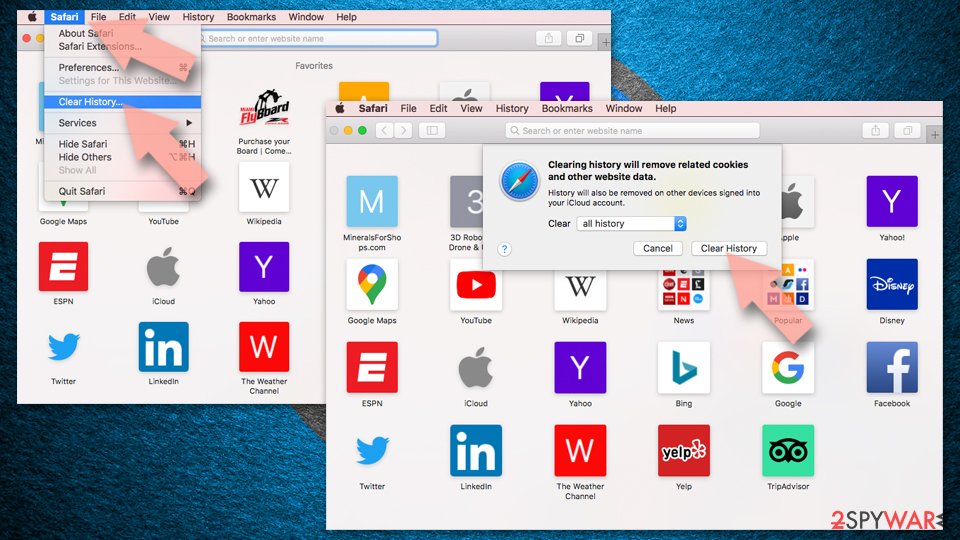
Clear history and website data:
- Click Safari in the menu and pick Clear History.
- Set Clear to all history and confirm with Clear History.

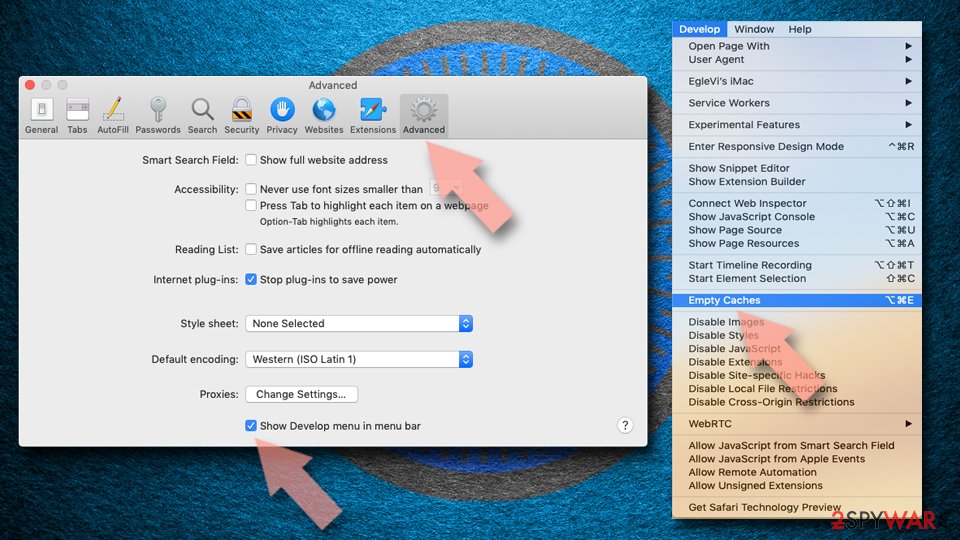
Reset Safari:
- Click Safari in the menu and select Preferences > Advanced.
- Enable Show Develop menu in menu bar.
- From the menu bar, click Develop and select Empty Caches.

Did this guide help?
Be the first to comment