

What is AutoLocky virus and how should you deal with it?
It seems that the growth of new ransomware variants is not going to stop anytime soon. A new virus was released, and it is called AutoLocky ransomware. It seems that this computer threat attempted to use the infamous Locky virus name to appear to be very scary; fortunately, the research has revealed that it is just a less sophisticated virus. Unlike the severe computer viruses, this one is programmed in AutoIt language. Not surprisingly, it didn’t take a long time for computer experts to crack it and create AutoLocky decryption tool.
This virus is designed to act similar like Locky virus. Once it manages to slither into victim’s computer, it encrypts victim’s personal files using AES-128 encryption algorythm. Just like Locky, AutoLocky malware appends encrypted file with .locky file extension. This malicious virus can affect a wide range of file types, including .doc, .txt, .xls, .docx, .doxm, .rar, .jpeg, and many other file types. If you did not know this yet, encrypted files become inaccessible, which means you cannot open them. Therefore, cyber criminals who work behind AutoLocky provide a solution – you can buy your files out for a certain price , or, in other words, you have to pay a ransom if you want to get your files back. This virus demands 0.75 Bitcoin, which is approximately around 325 USD. However, no matter how important your files are to you, you should not rush to pay up.
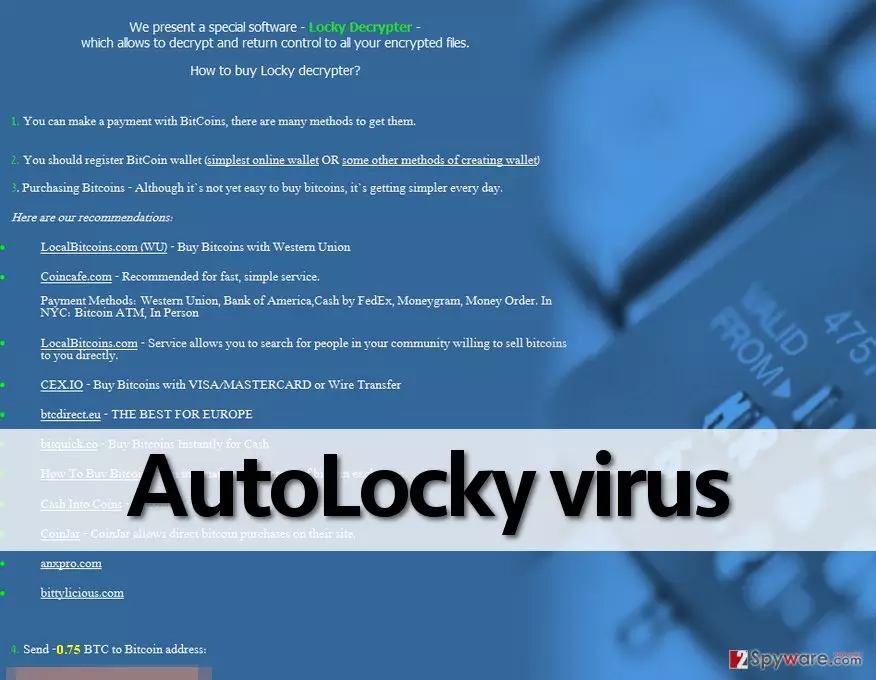
So when all files are encrypted, AutoLocky virus creates two files – Info.txt and Info.html, which provide instructions how to transfer money to cyber criminals. At the same time, this virus removes decryption keys from the computer and sends them to its command and control servers. Now, there is something that you should know about this virus. Unlike Locky, AutoLocky ransomware CAN be decrypted. It only conceals itself behind Locky’s name so that computer users would get scared after searching its name on the web. You can find a link to download AutoLocky decryption tool on the page 2. However, you have to remove AutoLocky virus before you try to decrypt your files using the decryption tool. More or less dangerous, ransomware is a complicated, and we do not recommend you to try to remove it manually. To delete this virus from your system, you should use a powerful anti-malware software, for example, FortectIntego.
How does AutoLocky virus spreads?
Although there is no exact information on how this virus spreads, the fact that it reaches victims’ computer disguised as a PDF file is a reasonable argument to believe that it spreads the same way like the majority of ransomware viruses do. We assume that it spreads via spam emails, and all you need to do to prevent AutoLocky’s attack is to avoid opening suspicious emails sent by unknown individuals or companies. Especially avoid opening files attached to such emails and also refrain yourself from opening emails that fall into Spam or Junk email folders.
To find out how to decrypt your files and to find detailed AutoLocky removal instructions, please navigate to page 2.
Remove AutoLocky ransomware and decrypt your files
Luckily, computer experts managed to find a flaw in AutoLocky virus which helped them to create a decryption tool. Therefore, victims who have their files locked by AutoLocky can now safely decrypt their data. You can download AutoLocky decryption tool here. Please remember that before you attempt to download this decryption tool and recover your files, you MUST entirely uninstall AutoLocky malware and all of its components to ensure that its remains will not pose a threat to your computer in the future. If you are an advanced computer user, you can attempt to uninstall this virus by following manual AutoLocky removal instructions given below. However, we strongly recommend you to opt for a better and safer automatic removal option. For that, we recommend you to install FortectIntego anti-spyware software, run a full system scan with it and then remove all malicious files on your system just with a few clicks. Then you can safely recover your files using the decryption tool. Good luck!
Did this guide help?
4 comments
Manillla
DECRYPTED! THANKS!!!!!
Birdy37
oh my god, I admit that for a moment I believed this was Locky. Thanks God it wasnt!
Freddie17
thank u thank u thank u thank u! definitely donating!!!
h4ckr
i beat ransomware! yasss!