

DealPly is the advertising service that gets detected as a suspicious program with a heuristic Adware.DealPly name by AV tools
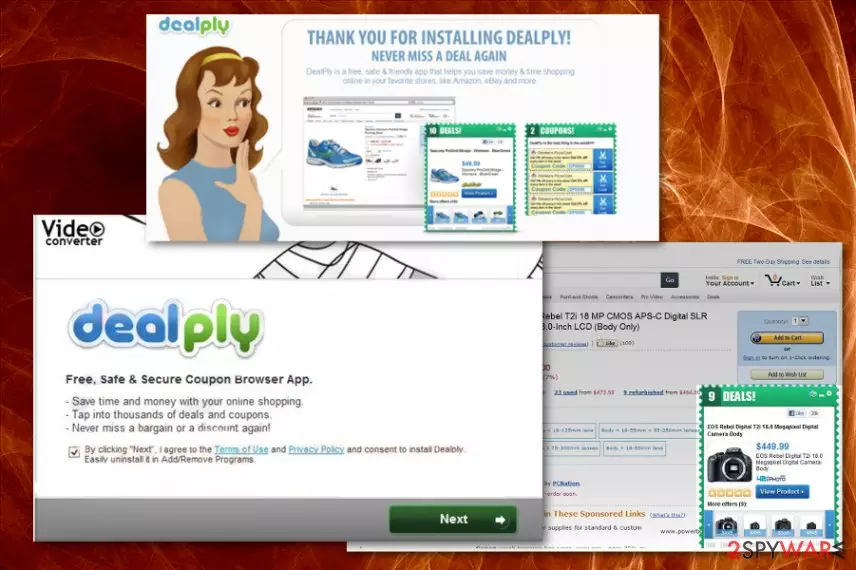
Even though DealPly Ads gets promoted online as a useful feature, and you think you need this in your life – online ads are not promoting trustworthy tools and browser extensions. Especially when redirects keep you from accessing common content and sites that you often visit. These online traffic reroutes and additional pop-ups, other processes significantly affect the performance and speed of your machine.
| Name | DealPly |
|---|---|
| Type | Adware |
| Detection names |
|
| Symptoms | The program injects commercial content, deals, coupons, promotional ads on various sites that typically don't have such advertisements. Clicking on the material triggers redirects and opens more pages with such content |
| Danger | The adware can install browser extensions and display advertisements with potentially malicious material, various redirects expose the user to harmful material online and can lead to privacy issues or even malware infections |
| Distribution | Freeware installations lead to the infiltration of PUPs when the software bundling method is employed to spread freeware packed alongside other programs. Deceptive sites and promotional ads trigger direct installs too |
| Elimination | To remove DealPly from the machine and get rid of all the symptoms of this adware, you need to get anti-malware tool and clean the system fully |
| Optimization | The potentially unwanted program can make changes without your permission or knowledge, so PC repair tools and system cleaning utilities like FortectIntego may fix that damage for you |
It is known that adware like DealPly Ads can install browser content that also helps to display advertisements directly on the victim's browser. This PUP also has a modular code and robust C&C infrastructure. This service can avoid detections and gather information about users on the command and control servers.
DealPly abuses the SmartScreen service that is a security feature designed to warn Windows users when visiting potentially malicious domains that are indicated as deceptive or pushing malware. Recommended processes and warnings also appear when users try to install malicious applications. This adware takes advantage of the feature and manages to infect the machine without getting detected.[1]
Also, the DealPly virus uses infiltrated computers as a distributed network of machines for harvesting this data. It delivers an empty request to the C2 server and hashes the URL to the query. Developers also implement the technique that allows them to update their installers ahead of AV tools and lowers their detection rate. It makes this adware more persistent and immune to AV tools.
However, some engines still can detect the threat, so rely on anti-malware tools to remove DealPly ads by scanning the machine fully. The following detection names can differ from tool to tool:
- Adware:Win32/DealPly,
- Adware/DealPly
- Adware.DealPly,
- BrowserModifier:Win32/DealPly
DealPly is a potentially unwanted application, which has also been categorized as an adware-type program. This means that this program may start causing tons of advertisements that are supposed to trick users into visiting affiliate websites.[2] That's how it collects the money and makes revenue for the publisher. Besides, this program may infiltrate your computer without an appropriate permission asked and then may hijack each of your web browsers and change preferences or settings directly.
That's why there are thousands of people who have started to call it a DealPly virus. If you want to avoid its sneaky distribution method and havoc that it may try to initiate on your computer after getting inside the system, you should start paying more attention to freeware's installation process. 
This program may easily bombard you with unwanted pop-up ads, banners, redirects, and notifications that may show up on each of your web browsers, including Internet Explorer, Mozilla Firefox, and Google Chrome or Safari. In addition, these ads may redirect you to unknown and very suspicious websites that are actively trying to increase their page rank or sales. That's why you should stay away from these programs and content delivered by DealPly.
Finally, this program may start tracking your browsing on the web for getting more knowledge about your browsing habits.[3] If you don't want to reveal your personally non-identifiable information, you should remove DealPly as soon as possible. If you want to avoid the havoc that may be initiated by it, you should remove it from the system alongside all the related programs and files. For that, you can use anti-malware tools and clean the machine fully.
Such a DealPly removal method is especially recommended if you haven't installed this program consciously because stealthy infiltration may happen way before you start experiencing any intrusive redirects. When the application is installed willingly or not it affects settings and preferences on the system itself besides all the web browsing tools, so get a PC repair tool and run a check to indicate or possibly fix those issues. FortectIntego may be the tool you need for this. 
Shady techniques of adware infiltration
Adware-type program or any PUP can be downloaded manually from its official website and its associates, promotional ads, or free download pages. However, on most of the occasions, such intruders get inside the system through unprotected parts of the device or in a bundle with other suspicious programs.
If you want to avoid such infiltration, you should uncheck the pre-checked checkmark that claims that you want to install all applications from the list on the system. For getting such ability, you should select Custom or Advanced installation options on the freeware installation setup.
Otherwise, the unwanted program may modify your system's settings and then may start interrupting you with its coupons and deals. If you choose Recommended or Quick installations, every app that is included on the list gets automatically loaded straight on the machine. Please, remove the suspicious application immediately if you haven't installed it yourself and make sure to go through settings that got altered by the PUP.
Tips for proper DealPly Ads elimination
When trying to remove DealPly, you should remove it from the folder that contains other programs. If it doesn't appear there, we recommend using automated options that involve anti-malware tools and a full system scan. It is common that PUPs don't come to Programs folder or creates a shortcut on the Desktop, so you cannot easily find the intruder and remove it.
This is why we recommend going for the automatic DealPly removal that requires help from anti-malware tools or antivirus software. When you install the program designed to fully clean the machine from any suspicious applications and files, it checks many places where the adware can be hidden and indicates any potential threats.
Then you only need to deal with potential DealPly virus damage and alterations caused behind your back. You can do that by getting a PC optimizer, system tool or repair program, and checking system settings, registry, startup preferences. The utility fixes system damage, and you can manually go through web browsing tools and remove additionally installed browser-based PUPs.
Uninstall from Windows
Uninstall from Windows 10/8:
- Type Control Panel into the Windows search box and open the result.
- Under Programs, select Uninstall a program.


Uninstall from Windows 7/XP:
- Click on Windows Start > Control Panel (Windows XP users should click on Add/Remove Programs).
- In Control Panel, select Programs > Uninstall a program.


Remove the unwanted program:
- In the Programs and Features window, look for any recently installed suspicious entries, select them, and click Uninstall.
- If User Account Control appears, click Yes to confirm, then complete the removal.


Delete from macOS
Remove the unwanted application:
- From the menu bar, select Go > Applications.
- In the Applications folder, look for any suspicious entries, then drag them to Trash (or right-click and pick Move to Trash).
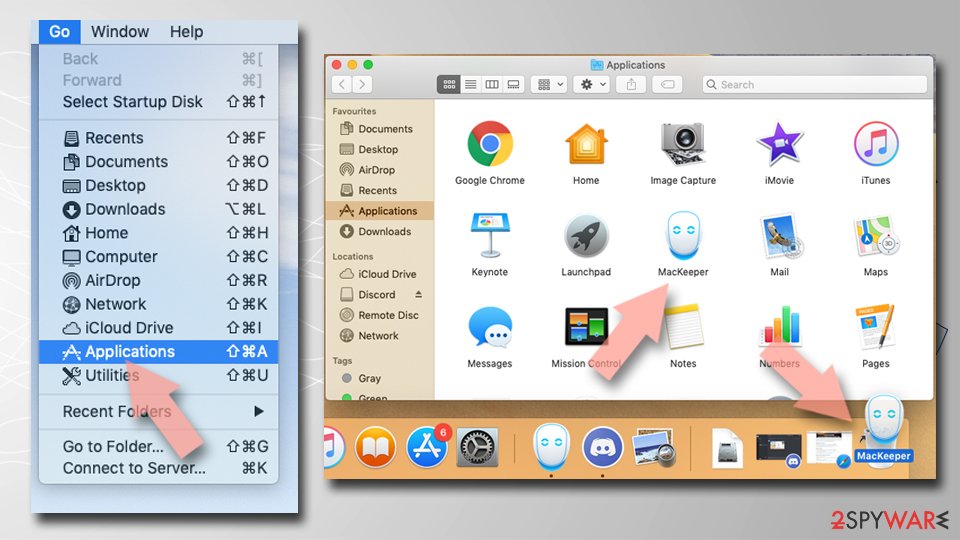

Delete leftover files and folders:
- Select Go > Go to Folder.
- Enter /Library/Application Support and remove any suspicious folders related to the unwanted program.
- Repeat the same check in the /Library/LaunchAgents and /Library/LaunchDaemons folders, deleting any suspicious entries.
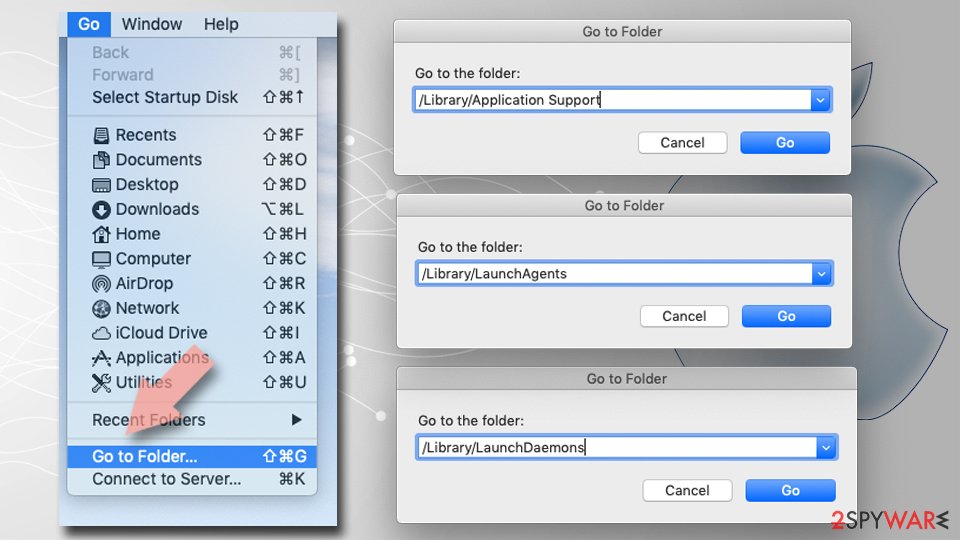
- Finally, empty the Trash to permanently remove the leftovers.

Reset Internet Explorer
Remove dangerous add-ons:
- Open Internet Explorer, click on the Gear icon (IE menu) on the top-right corner of the browser
- Pick Manage Add-ons.
- You will see a Manage Add-ons window. Here, look for suspicious plugins. Click on these entries and select Disable.
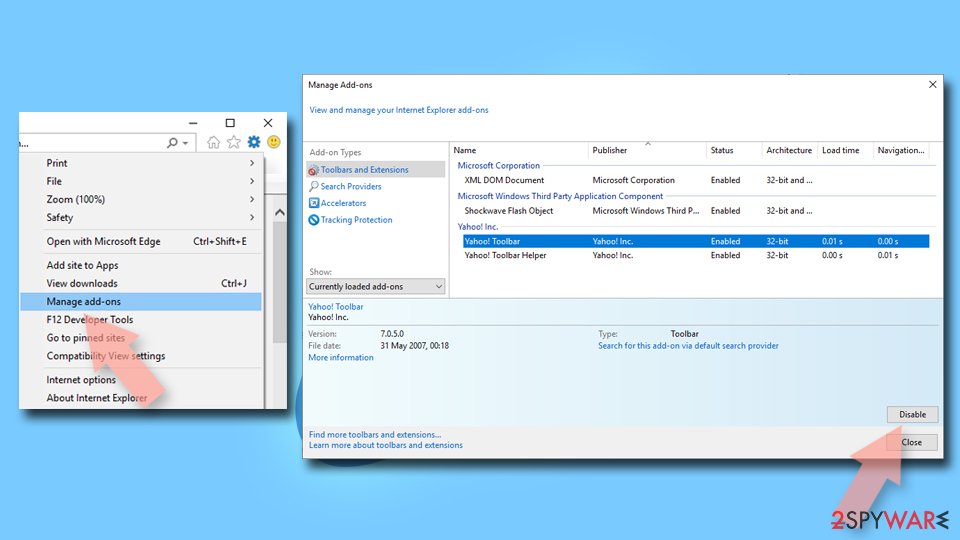

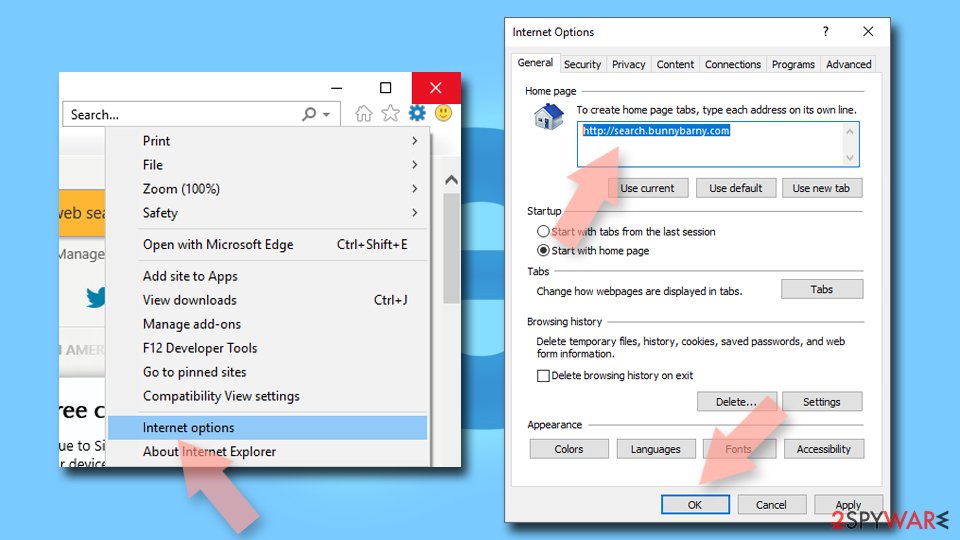
Change your homepage if it was altered:
- Open IE and click on the Gear icon.
- Select Internet Options.
- In the General tab, delete the Home page address and replace it by your preferred one (for example, Google.com).
- Click Apply and then select OK.

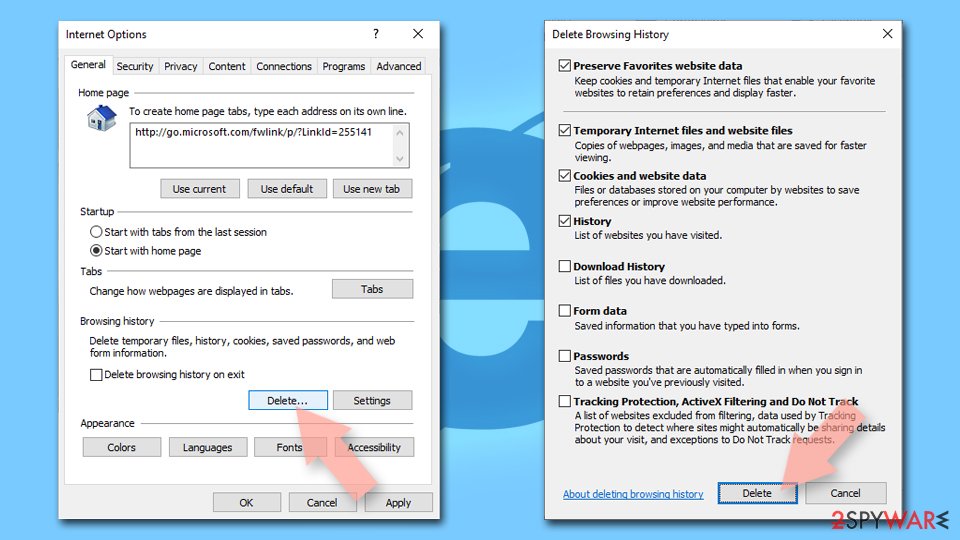
Delete temporary files:
- Press on the Gear icon and select Internet Options.
- Under Browsing history, click Delete...
- Select relevant fields and press Delete.

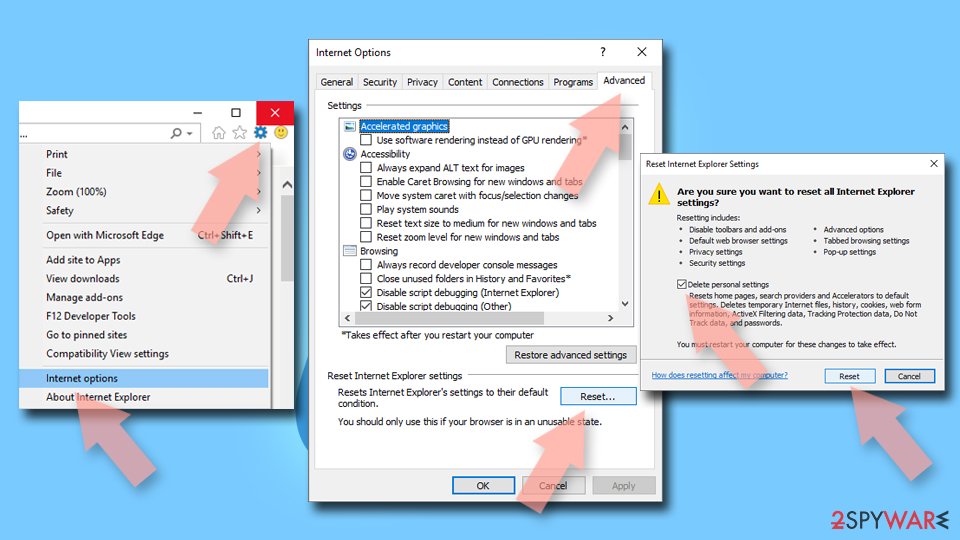
Reset Internet Explorer:
- Click on Gear icon > Internet options and select Advanced tab.
- Select Reset.
- In the new window, check Delete personal settings and select Reset.

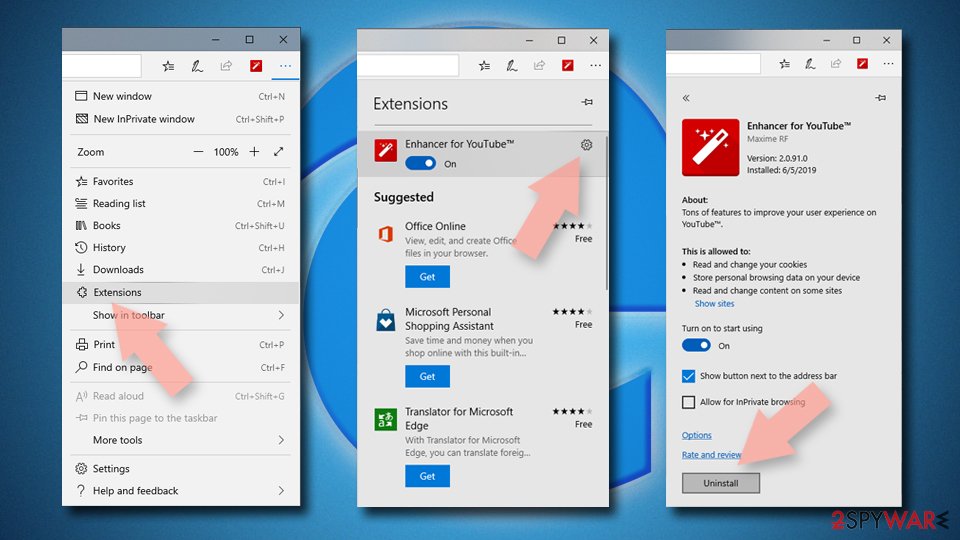
Remove from Microsoft Edge
Delete unwanted extensions from MS Edge:
- Select Menu (three horizontal dots at the top-right of the browser window) and pick Extensions.
- From the list, pick the extension and click on the Gear icon.
- Click Remove.

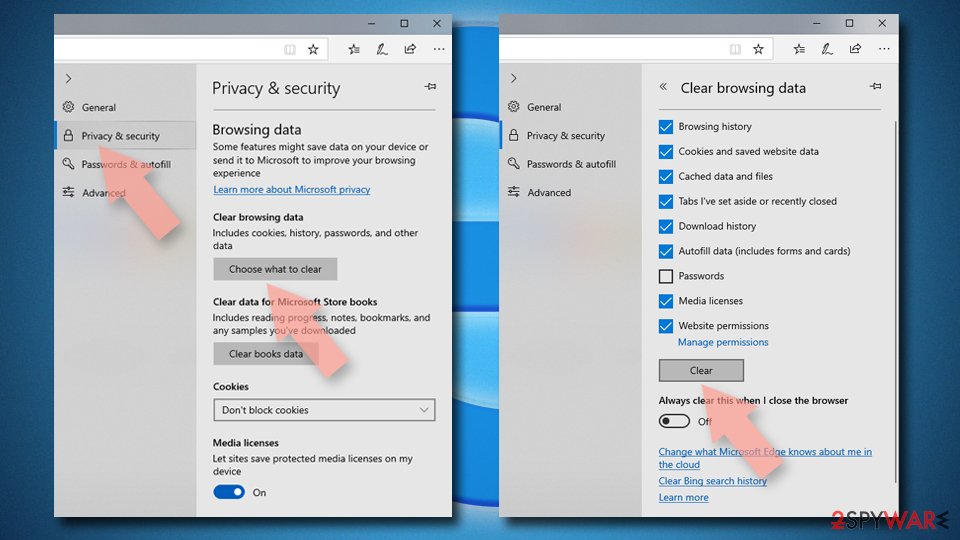
Clear cookies and other browser data:
- Click on the Menu (three horizontal dots at the top-right of the browser window) and select Settings > Privacy, search, and services..
- Under Clear browsing data, pick Choose what to clear.
- Select Cookies and other site data and Cached images and files. (apart from passwords, although you might want to include Media licenses as well, if applicable) and click on Clear.

Restore new tab and homepage settings:
- Click the menu icon and choose Settings.
- Then find On startup section.
- Click Remove next to any suspicious startup page.
Reset MS Edge if the above steps did not work:
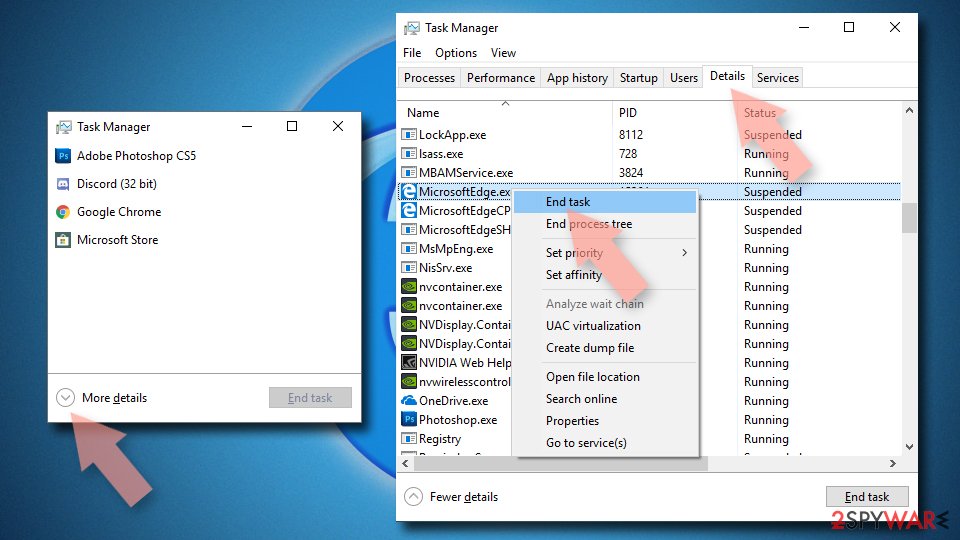
- Press on Ctrl + Shift + Esc to open Task Manager.
- Click on More details arrow at the bottom of the window.
- Select Details tab.
- Now scroll down and locate every entry with Microsoft Edge name in it. Right-click on each of them and select End Task to stop MS Edge from running.

Instructions for Chromium-based Edge
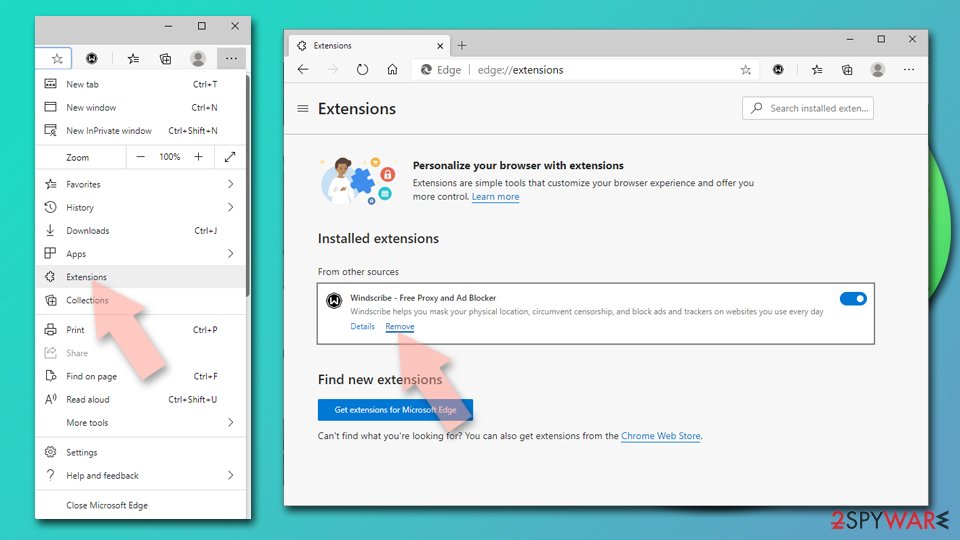
Delete extensions from MS Edge (Chromium):
- Open Edge and click select Settings > Extensions.
- Delete unwanted extensions by clicking Remove.

Clear cache and site data:
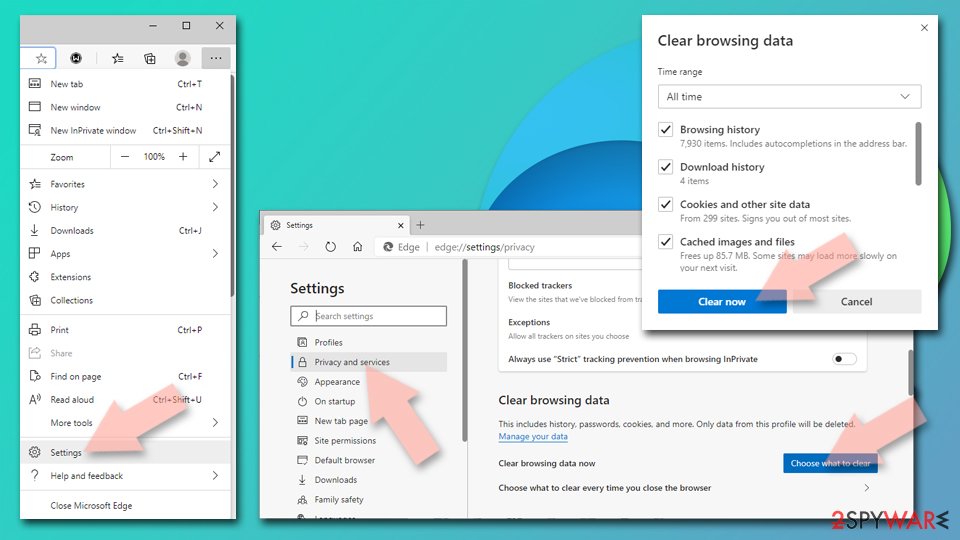
- Click on Menu and go to Settings.
- Select Privacy, search and services.
- Under Clear browsing data, pick Choose what to clear.
- Under Time range, pick All time.
- Select Clear now.

Reset Chromium-based MS Edge:
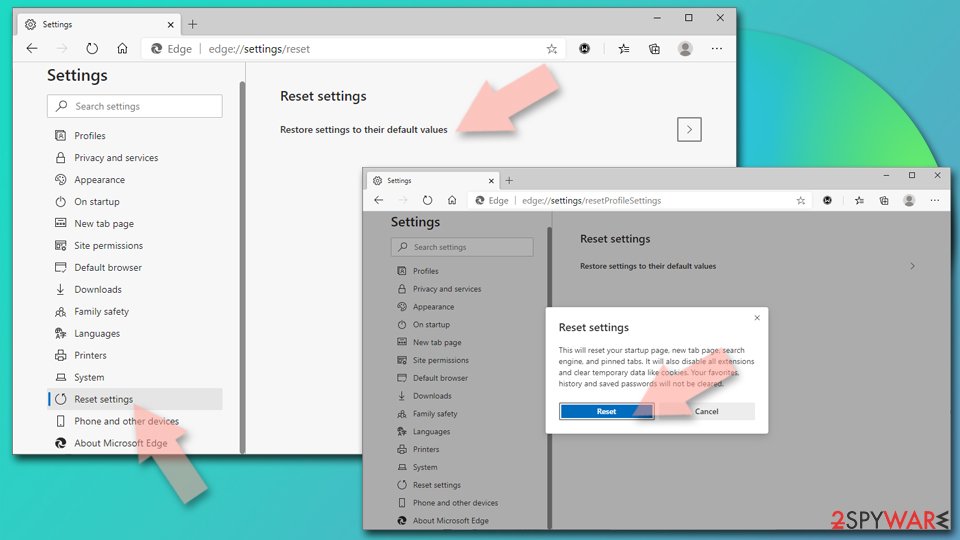
- Click on Menu and select Settings.
- On the left side, pick Reset settings.
- Select Restore settings to their default values.
- Confirm with Reset.
- This will disable extensions and reset startup pages but will not delete bookmarks, saved passwords, or browsing history.

Remove from Mozilla Firefox (FF)
Remove dangerous extensions:
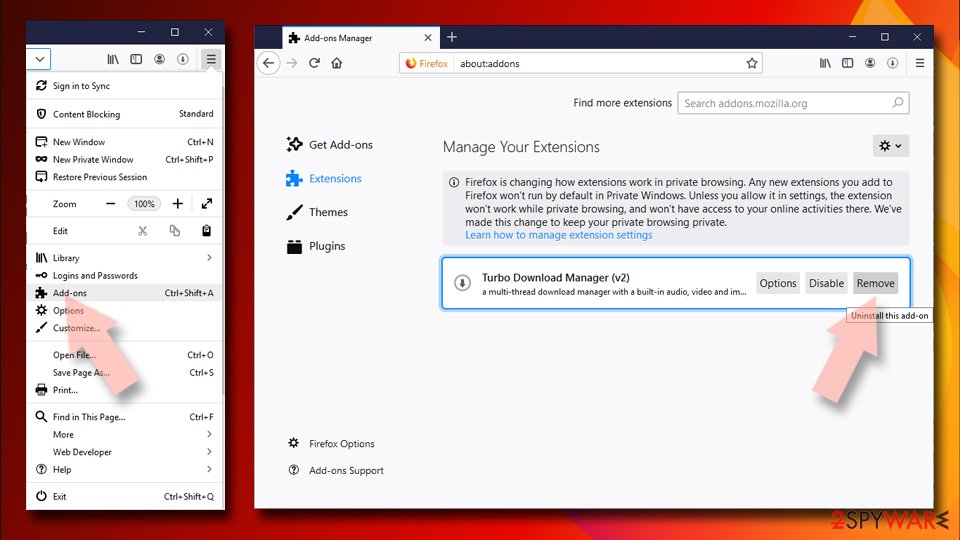
- Open Mozilla Firefox browser and click on the Menu (three horizontal lines at the top-right of the window).
- Select Add-ons.
- In here, select the unwanted extension and click Remove.

Reset the homepage:
- Click three horizontal lines at the top right corner to open the menu.
- Choose Settings.
- Under Home, set your preferred homepage and new tab settings.
Clear cookies and site data:
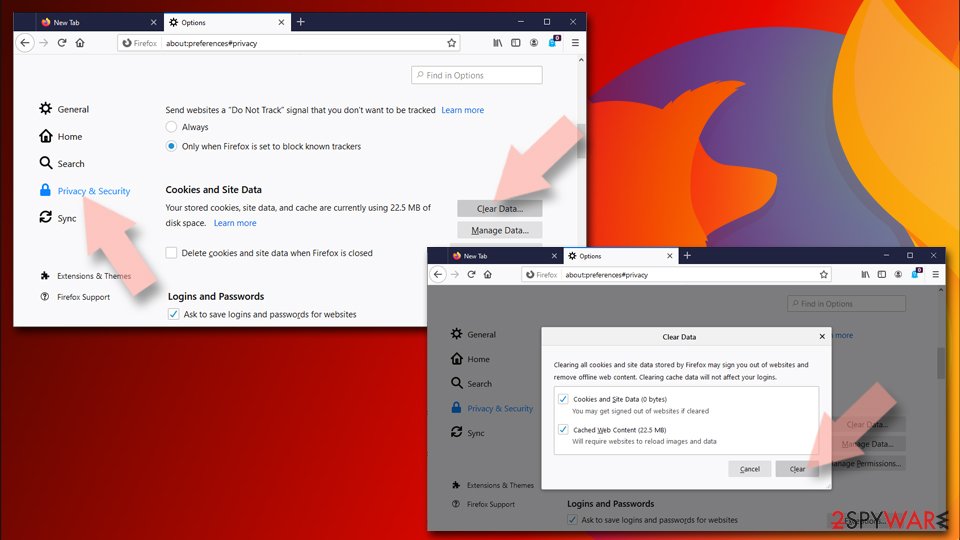
- Click Menu and pick Settings.
- Go to Privacy & Security section.
- Scroll down to locate Cookies and Site Data.
- Click on Clear Data...
- Select Cookies and Site Data and Temporary cached files and pages, then click Clear.

Reset Mozilla Firefox
If clearing the browser as explained above did not help, reset Mozilla Firefox:
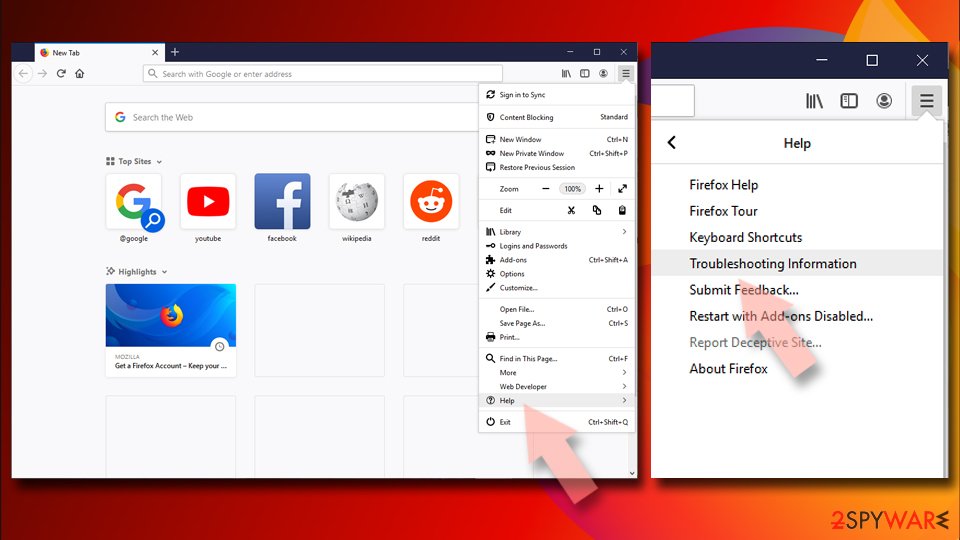
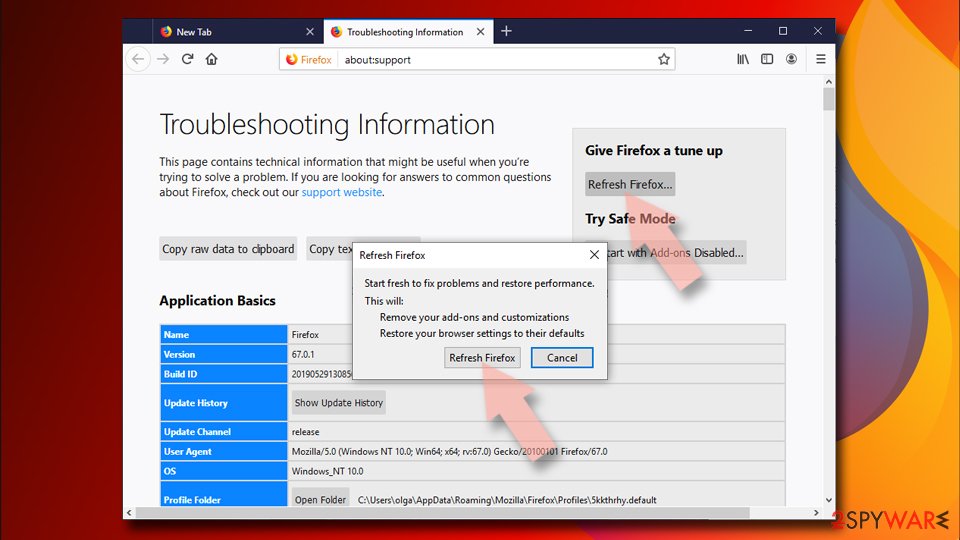
- Open Mozilla Firefox browser and click the Menu.
- Go to Help and then choose Troubleshooting Information.
- Under Give Firefox a tune up section, click on Refresh Firefox...
- Once the pop-up shows up, confirm the action by pressing on Refresh Firefox.


Remove from Google Chrome
Delete malicious extensions from Google Chrome:
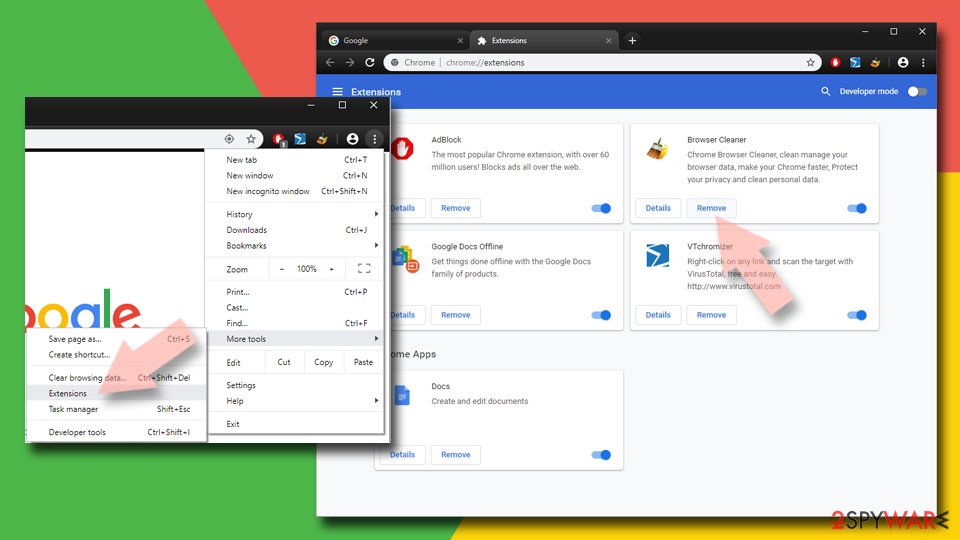
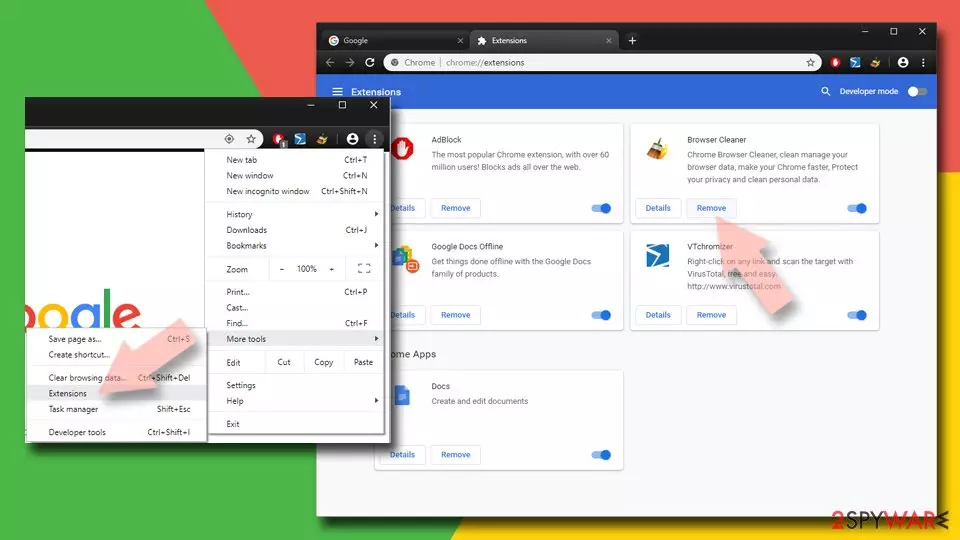
- Open Google Chrome, click on the Menu (three vertical dots at the top-right corner) and select More tools > Extensions.
- In the newly opened window, you will see all the installed extensions. Uninstall all suspicious extensions related to the unwanted program by clicking Remove.
Clear cache and web data from Chrome:
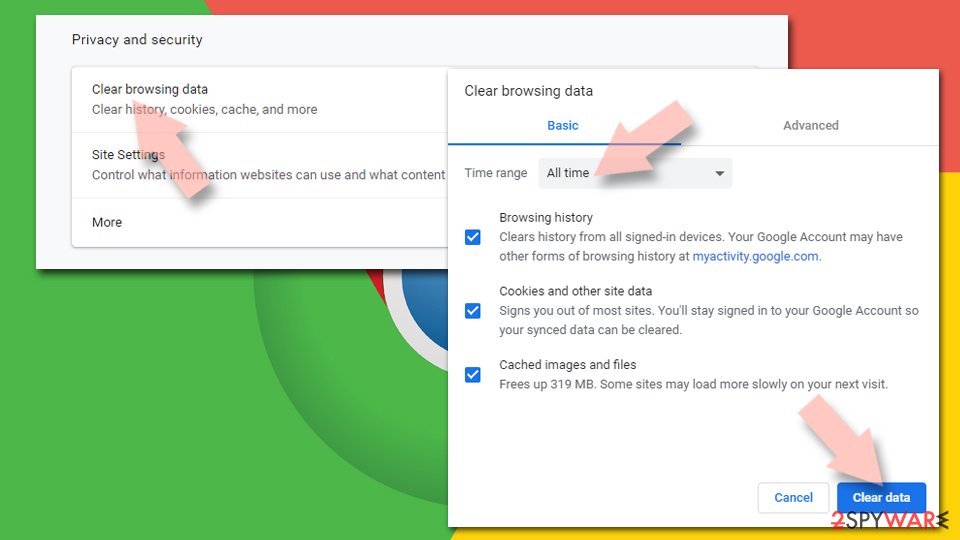
- Click on Menu and pick Settings.
- Under Privacy and security, select Clear browsing data.
- Select Browsing history, Cookies and other site data, as well as Cached images and files.
- Click Clear data.

Change your homepage:
- Click menu and choose Settings.
- Look for a suspicious site in the On startup section.
- Click on Open a specific or set of pages and click on three dots to find the Remove option.
Reset Google Chrome:
If the previous methods did not help you, reset Google Chrome to eliminate all the unwanted components:
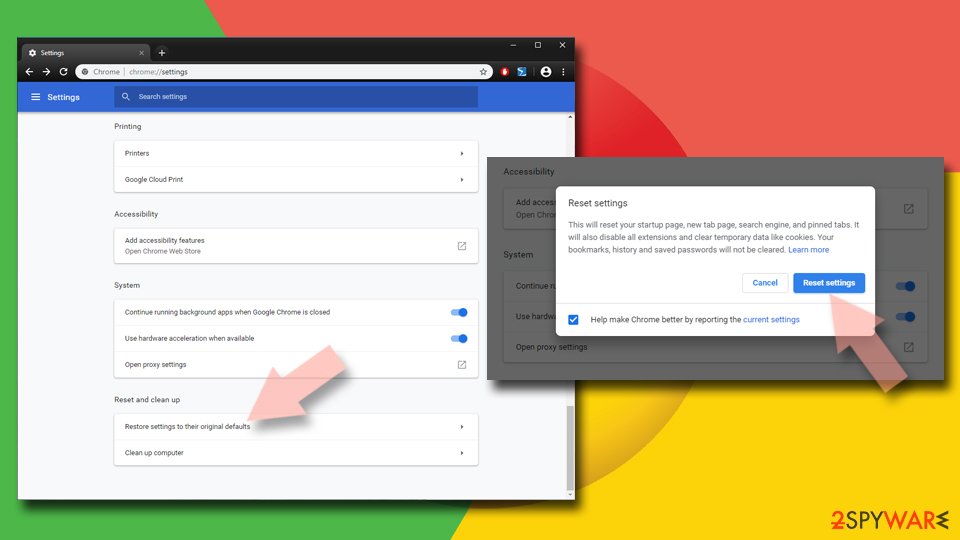
- Click on Menu and select Settings.
- In the Settings, scroll down and click Advanced.
- Scroll down and locate Reset and clean up section.
- Now click Restore settings to their original defaults.
- Confirm with Reset settings.

Delete from Safari
Remove dangerous extensions:
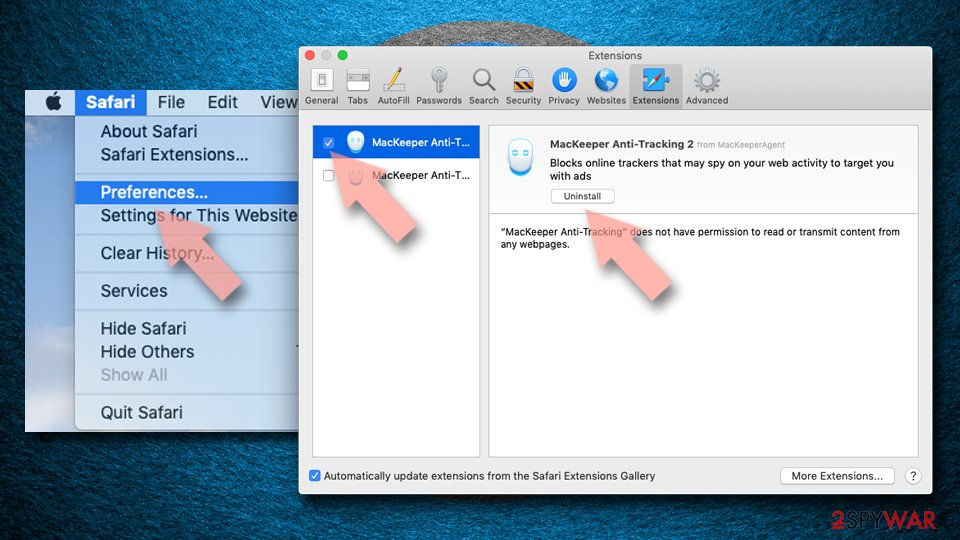
- Open Safari, click Safari in the menu at the top-left of the screen, and select Preferences.
- Go to the Extensions tab, look for any suspicious entries, and click Uninstall to remove them.

Clear history and website data:
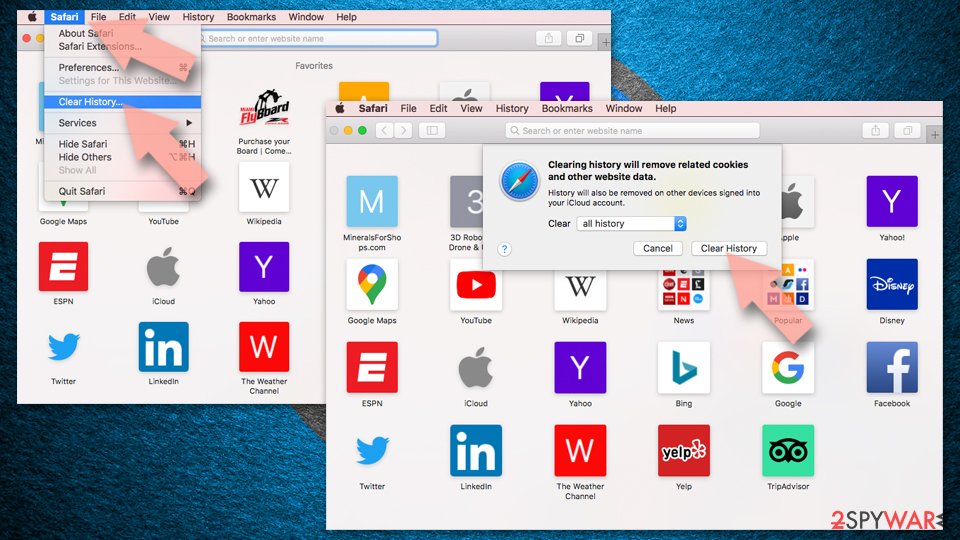
- Click Safari in the menu and pick Clear History.
- Set Clear to all history and confirm with Clear History.

Reset Safari:
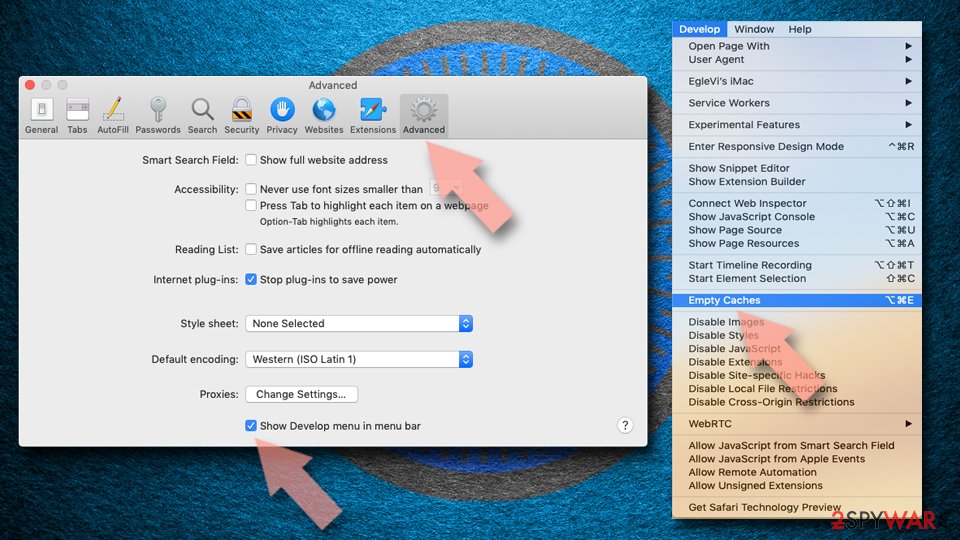
- Click Safari in the menu and select Preferences > Advanced.
- Enable Show Develop menu in menu bar.
- From the menu bar, click Develop and select Empty Caches.

Did this guide help?
10 comments
The Thinker
This article uses defamatory language and thus should be edited or removed.
DealPLy is not a "virus" nor does it "get(s) inside the system through its backdoors". People are specifically asked (and can opt out) if they wish to install the browser plugin. This plugin is no different from the Ask! searchbar or the Adobe PDF reader plugin. It uses the same mechanism to install itself as those and thousands of other browser add-ons do.
If you are going to post an article please try to adhere to fundamental principles of truth and fairness and abide by the rules of the website you are posting to.
I cannot comment on the effectiveness of the removal procedure since I have always opted out of installing this particular browser plugin.
Sincerely,
The Thinker
Kyle
This IS a virus, The Thinker. I just got rid of it, I hope this method will rid me of it for good. But also remember to manually uninstall from your system. It made all three of my installed browsers have melt downs and crash almost hourly.
Netizen
This got installed without my permission while installing some other software, then it should be called trojan?
I really hate dealply. I almost killed my beloved system to get rid of it.
Huy
Yeah. This isnt a virus. It doesnt worth to be called virus.
ITS JUST A PURE SHIT, WHICH IS AS ANNOYING AS VIRUS.
Thats all.
CRC
Hi:
I crossed information about the instalaltion date of DealPly and some other applications installation dates in my PC.
Free Youtube downloader 3.5.174 has the same installation date as DealPly, so I assume that Dealply was installed during Youtubedownloader installation.
Sincerly I do not remember to be asked about that during Youtubedownloader installation at all...
I hope this helps smeone.
Kind regards.
CRC
pinter
Dealply installs without permission or asking with Drivermax (and other questionable programs). So it is really a backdoor pest. Removing it is hard because it has more than 250 entries in program files, program data, users, and in the registry. If not securely deleted it instals itself again.
Dont use programs it comes with!!!!!!
Dealply Hater!
DealPly is the worst kind of virus! It absolutely is backdoored in with other programs, and the most telling point? Its own uninstaller wont uninstall. These guys should give their confo if they stand behind the product, so I can sue them for some sense of satisfaction.
Deal Ply Virus Victim
The fact that Dealply is impossible to uninstall from either my browser of programs list, determines that you lie. For all practical purposes, it is a virus, as it takes space, memory and processing power without the users permission.
Educated Windows User
Dealply is a virus for I have uninstalled it from the extensions tab of addons in the Firefox Browser and from the add/remove programs in the control panel. I have run Hitman Pro, Malwarebytes, Spyhunter, and others and it refuses to be removed.
Nathaniel
Dealply sucks i would call it a virus, it (somebody) changed my administrative settings and made a new account on my laptop that was hidden from the main menu. It then made its self the administrative account and denies my account from making anychanges to any type of settings.