

What is Funmoods?
Funmoods has been added to 2-spyware.com for several reasons. If you have been using this program for a while, beware that it may cause several issues on each of your web browsers, including redirects to unknown websites, annoying pop-up ads and slow downs on each of your web browsers. The developers of this program think they are not doing anything bad, but you need only to set this search engine your start page or the default search engine, and you will see how many troubles it may cause.
First of all, we should mention that Funmoods may show up on your computer without any sign. That’s because it has been actively spread with the help of bundling. Also, as soon as it enters the system, it may try to alter its settings. As soon as it finishes these changes, the victim starts suffering from redirects to Funmoods and other websites. Please, do NOT think that such activity is harmless! If you don’t want to be tricked into visiting very suspicious websites, you should stay away from this browser hijacker. Besides, as 2-spyware team notifies, this program may start tracking your browsing activity and may collect your search terms, mostly visited websites and data that you add when visiting them. Beware that there is no information about third parties that are capable of reaching this data.
If Funmoods has already hijacked your web browser, you should stay away from its search results that may be corrupted. If you want to avoid such questionable and sometimes even aggressive marketing technique that seeks to turn visitors into customers, you should remove Funmoods hijacker. The easiest way to remove it and prevent infiltration of other suspicious programs in the future is by running a full system scan with FortectIntego. Make sure its updated and has a full database if you want to find all components that are related to this potentially unwanted program.
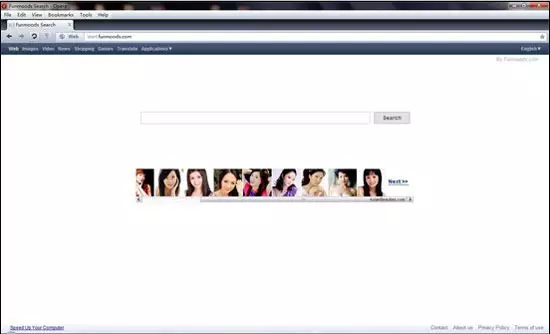
How could funmoods hijack my computer?
There are several ways how you can get infected with funmoods. You can install it yourself because it is presented as a funny tool that allows filling your chats with moods. However, its developers have never been warning PC users that the installation of this program may lead them to various issues, like unwanted ads and redirects. In addition, Funmoods can be installed without your consent because it has also been spread in a bundle with freeware and shareware. If you want to avoid it, you need to monitor installation of the freeware by selecting Custom or Advanced installation option. If this program hijacks your search page and your start page, it may redirect all of your search queries to spammy websites. The most of its ads is related to Russia, such as ‘Meet Real Russian Women!’, ‘Chat with Sexy Russian Women’ and so on.
How to remove Funmoods?
Funmoods is not difficult PUP, so you shouldn’t find problems when trying to remove it from the system. If you want to get rid of it, you should follow a special uninstall guide, which is provided down below. However, we advise you to use automated tools. The problem is that the most of anti-spyware tools do not detect funmoods as there are several opinions regarding classification of this program. Lately, some vendors tried to add new detection techniques, so we would recommend using automatic removal tools to get rid of funmoods.
Uninstall from Windows
Uninstall from Windows 10/8:
- Type Control Panel into the Windows search box and open the result.
- Under Programs, select Uninstall a program.


Uninstall from Windows 7/XP:
- Click on Windows Start > Control Panel (Windows XP users should click on Add/Remove Programs).
- In Control Panel, select Programs > Uninstall a program.


Remove the unwanted program:
- In the Programs and Features window, look for any recently installed suspicious entries, select them, and click Uninstall.
- If User Account Control appears, click Yes to confirm, then complete the removal.


Delete from macOS
Remove the unwanted application:
- From the menu bar, select Go > Applications.
- In the Applications folder, look for any suspicious entries, then drag them to Trash (or right-click and pick Move to Trash).
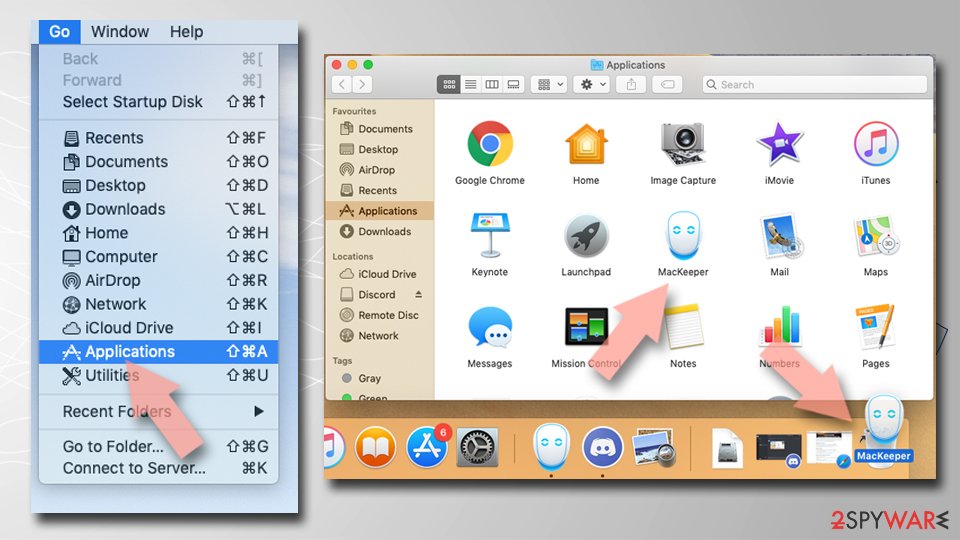

Delete leftover files and folders:
- Select Go > Go to Folder.
- Enter /Library/Application Support and remove any suspicious folders related to the unwanted program.
- Repeat the same check in the /Library/LaunchAgents and /Library/LaunchDaemons folders, deleting any suspicious entries.
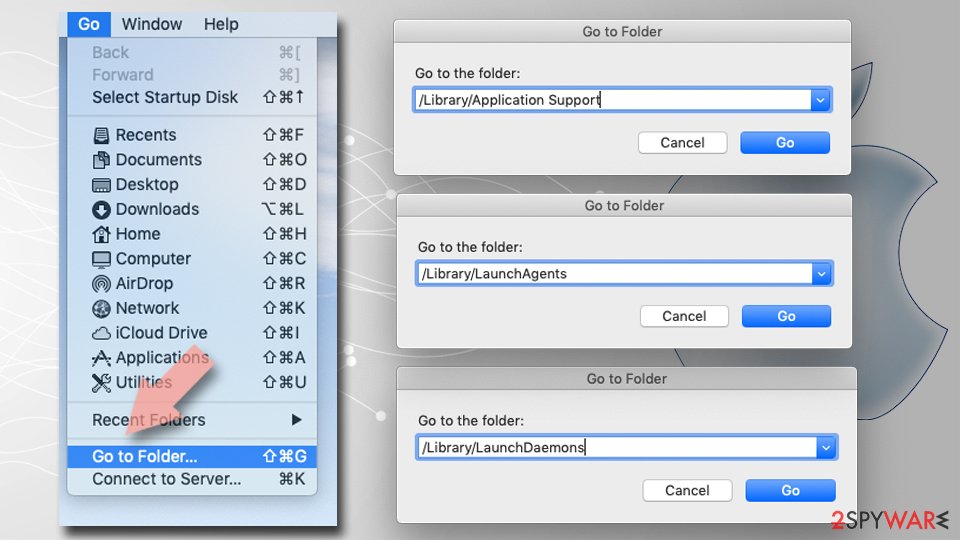
- Finally, empty the Trash to permanently remove the leftovers.

Remove from Microsoft Edge
Delete unwanted extensions from MS Edge:
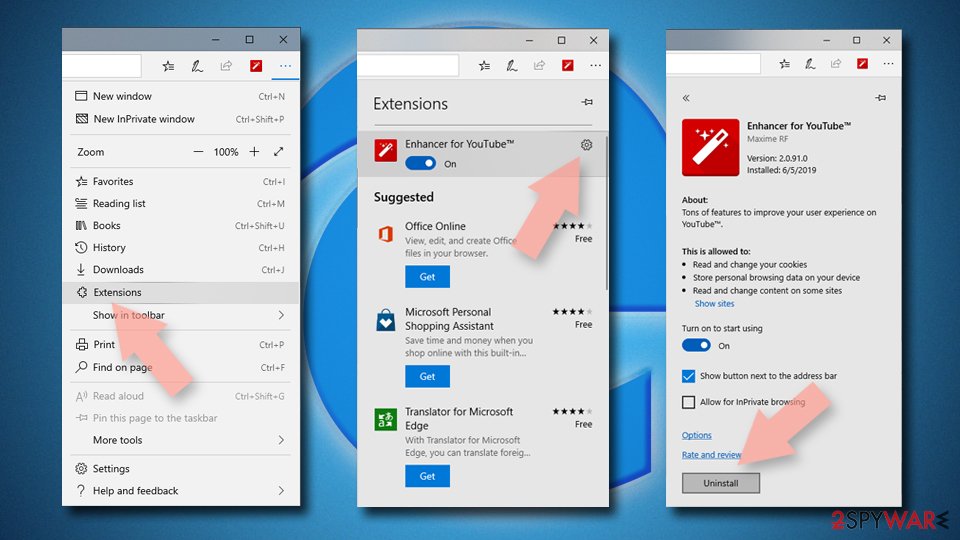
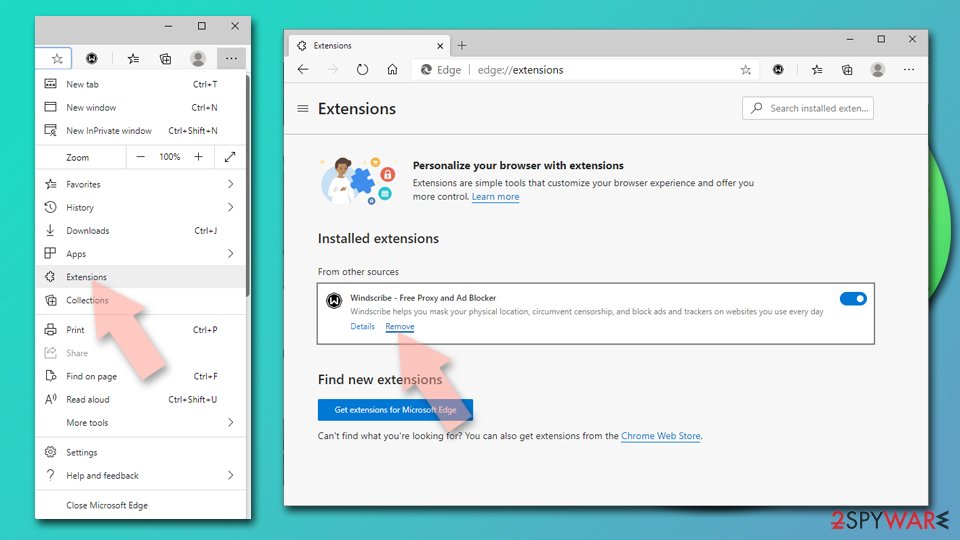
- Select Menu (three horizontal dots at the top-right of the browser window) and pick Extensions.
- From the list, pick the extension and click on the Gear icon.
- Click Remove.

Clear cookies and other browser data:
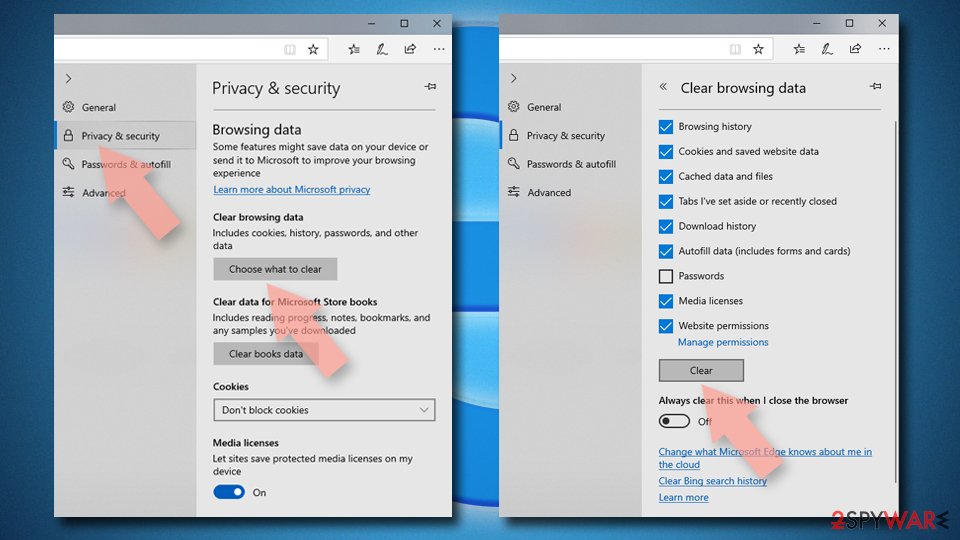
- Click on the Menu (three horizontal dots at the top-right of the browser window) and select Settings > Privacy, search, and services..
- Under Clear browsing data, pick Choose what to clear.
- Select Cookies and other site data and Cached images and files. (apart from passwords, although you might want to include Media licenses as well, if applicable) and click on Clear.

Restore new tab and homepage settings:
- Click the menu icon and choose Settings.
- Then find On startup section.
- Click Remove next to any suspicious startup page.
Reset MS Edge if the above steps did not work:
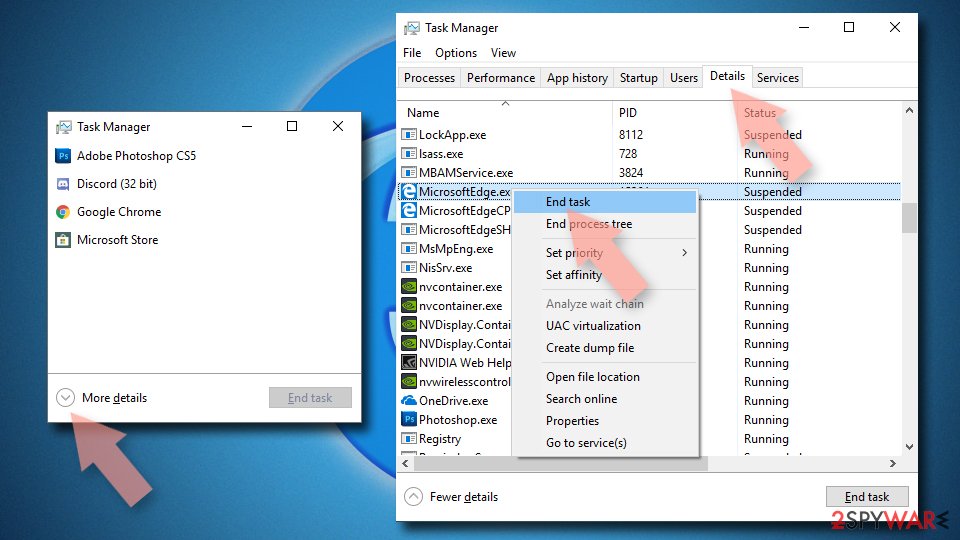
- Press on Ctrl + Shift + Esc to open Task Manager.
- Click on More details arrow at the bottom of the window.
- Select Details tab.
- Now scroll down and locate every entry with Microsoft Edge name in it. Right-click on each of them and select End Task to stop MS Edge from running.

Instructions for Chromium-based Edge
Delete extensions from MS Edge (Chromium):
- Open Edge and click select Settings > Extensions.
- Delete unwanted extensions by clicking Remove.

Clear cache and site data:
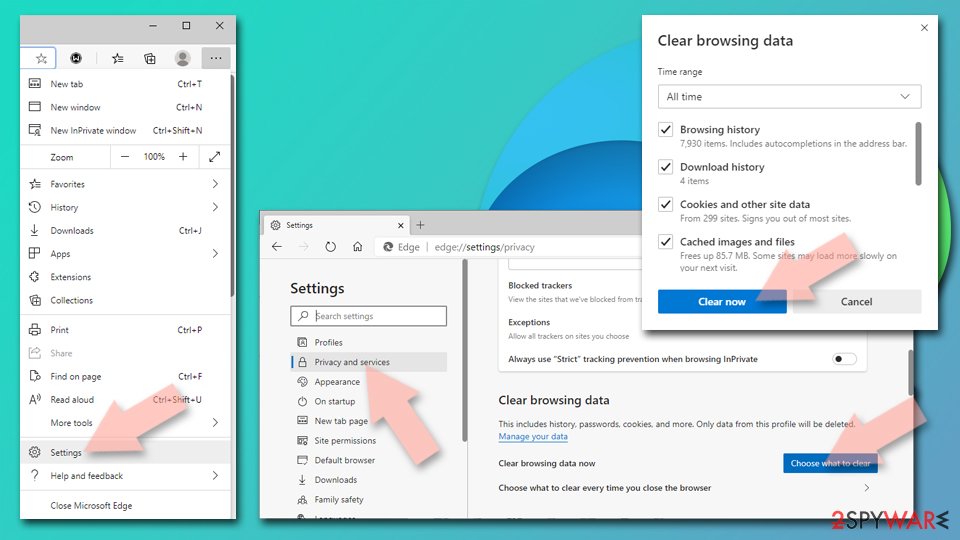
- Click on Menu and go to Settings.
- Select Privacy, search and services.
- Under Clear browsing data, pick Choose what to clear.
- Under Time range, pick All time.
- Select Clear now.

Reset Chromium-based MS Edge:
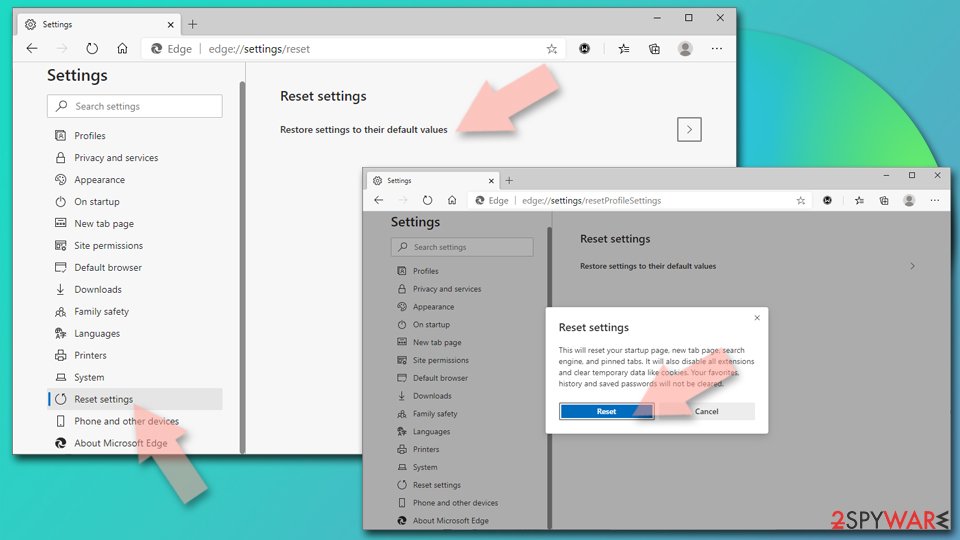
- Click on Menu and select Settings.
- On the left side, pick Reset settings.
- Select Restore settings to their default values.
- Confirm with Reset.
- This will disable extensions and reset startup pages but will not delete bookmarks, saved passwords, or browsing history.

Remove from Mozilla Firefox (FF)
Remove dangerous extensions:
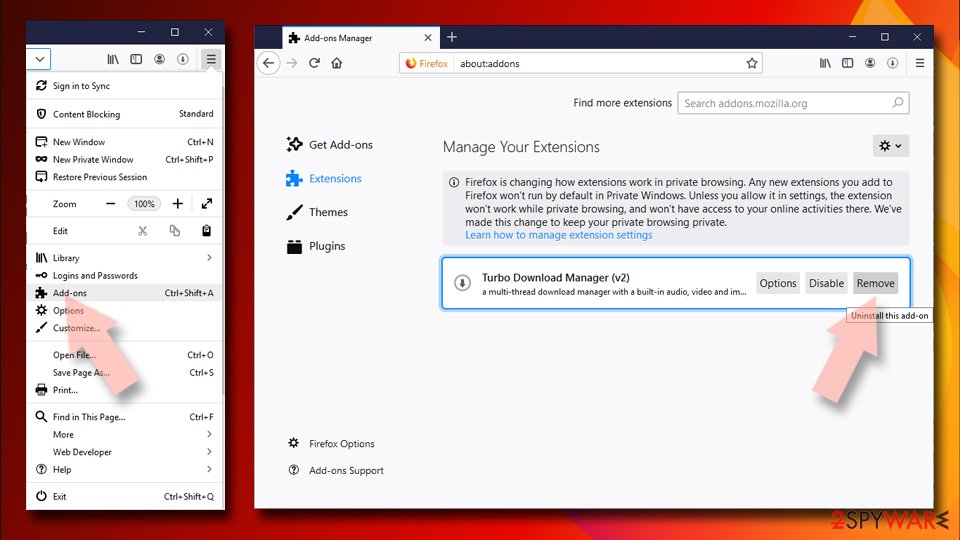
- Open Mozilla Firefox browser and click on the Menu (three horizontal lines at the top-right of the window).
- Select Add-ons.
- In here, select the unwanted extension and click Remove.

Reset the homepage:
- Click three horizontal lines at the top right corner to open the menu.
- Choose Settings.
- Under Home, set your preferred homepage and new tab settings.
Clear cookies and site data:
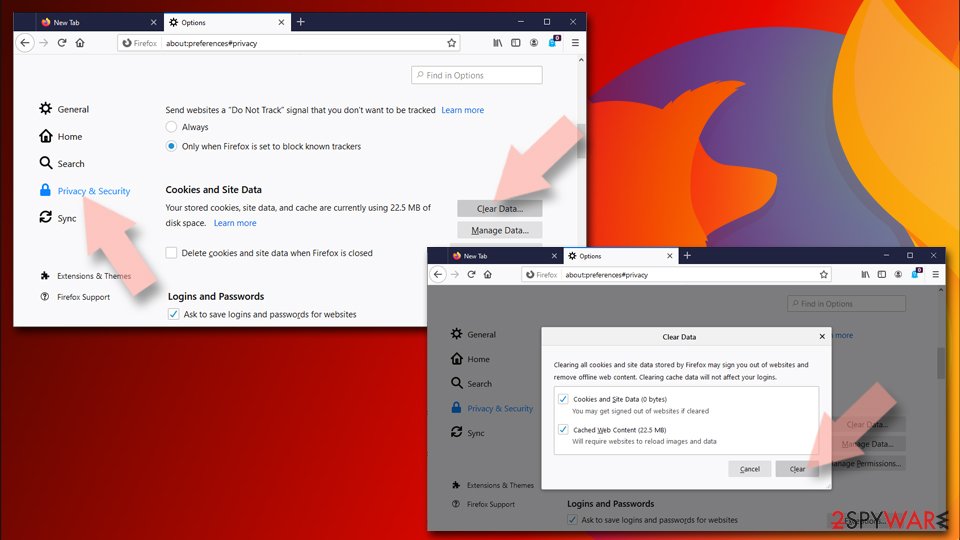
- Click Menu and pick Settings.
- Go to Privacy & Security section.
- Scroll down to locate Cookies and Site Data.
- Click on Clear Data...
- Select Cookies and Site Data and Temporary cached files and pages, then click Clear.

Reset Mozilla Firefox
If clearing the browser as explained above did not help, reset Mozilla Firefox:
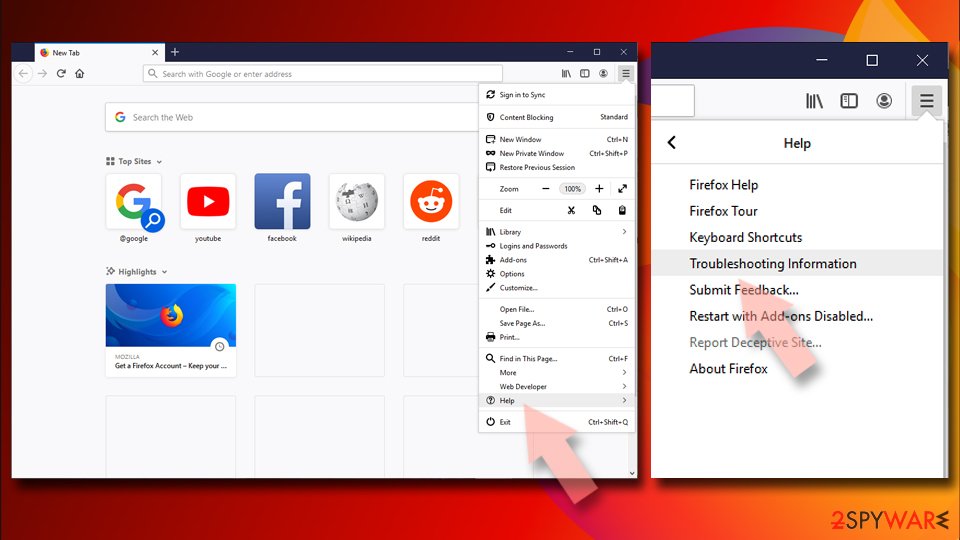
- Open Mozilla Firefox browser and click the Menu.
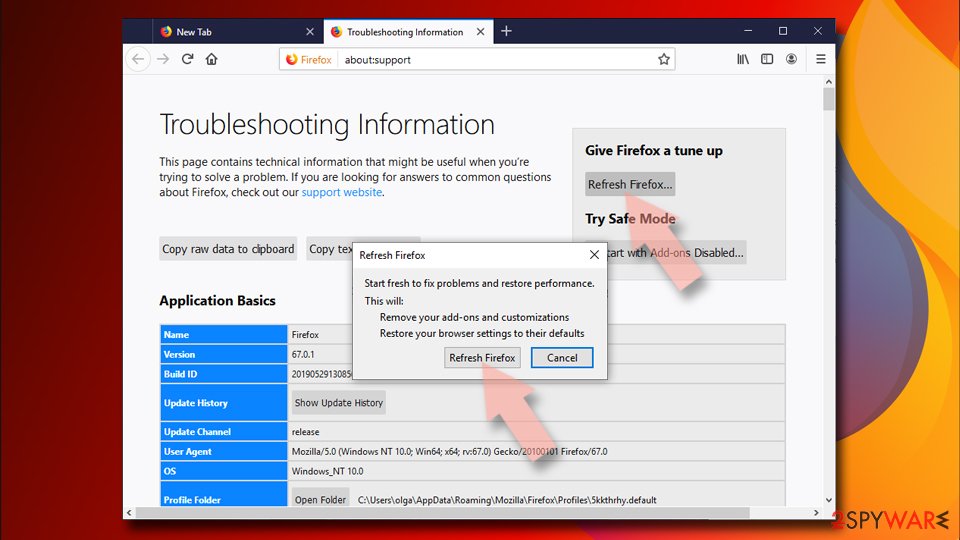
- Go to Help and then choose Troubleshooting Information.
- Under Give Firefox a tune up section, click on Refresh Firefox...
- Once the pop-up shows up, confirm the action by pressing on Refresh Firefox.


Remove from Google Chrome
Delete malicious extensions from Google Chrome:
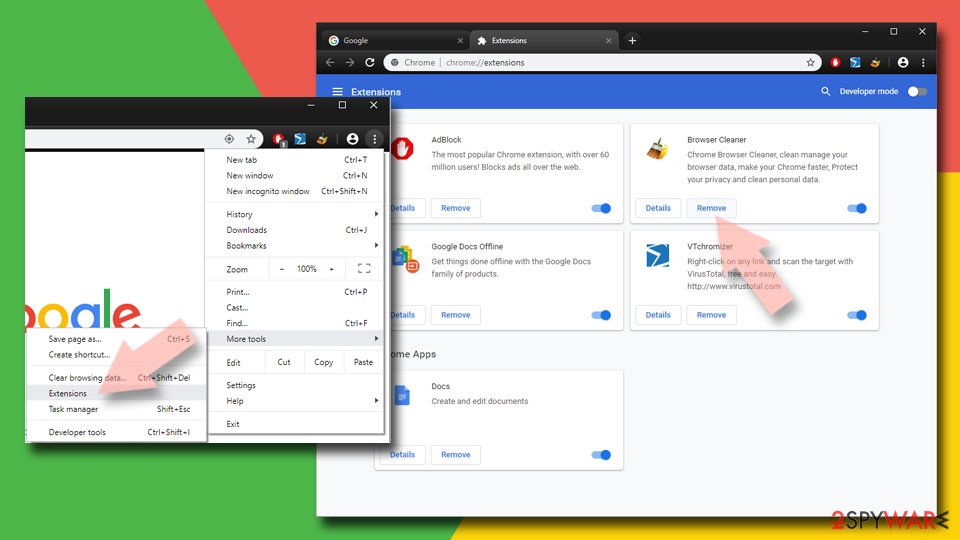
- Open Google Chrome, click on the Menu (three vertical dots at the top-right corner) and select More tools > Extensions.
- In the newly opened window, you will see all the installed extensions. Uninstall all suspicious extensions related to the unwanted program by clicking Remove.
Clear cache and web data from Chrome:
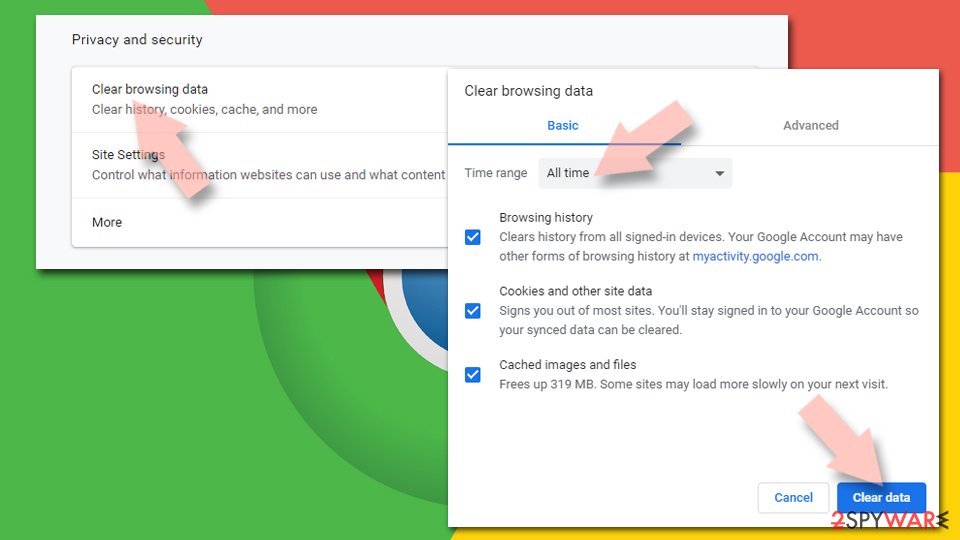
- Click on Menu and pick Settings.
- Under Privacy and security, select Clear browsing data.
- Select Browsing history, Cookies and other site data, as well as Cached images and files.
- Click Clear data.

Change your homepage:
- Click menu and choose Settings.
- Look for a suspicious site in the On startup section.
- Click on Open a specific or set of pages and click on three dots to find the Remove option.
Reset Google Chrome:
If the previous methods did not help you, reset Google Chrome to eliminate all the unwanted components:
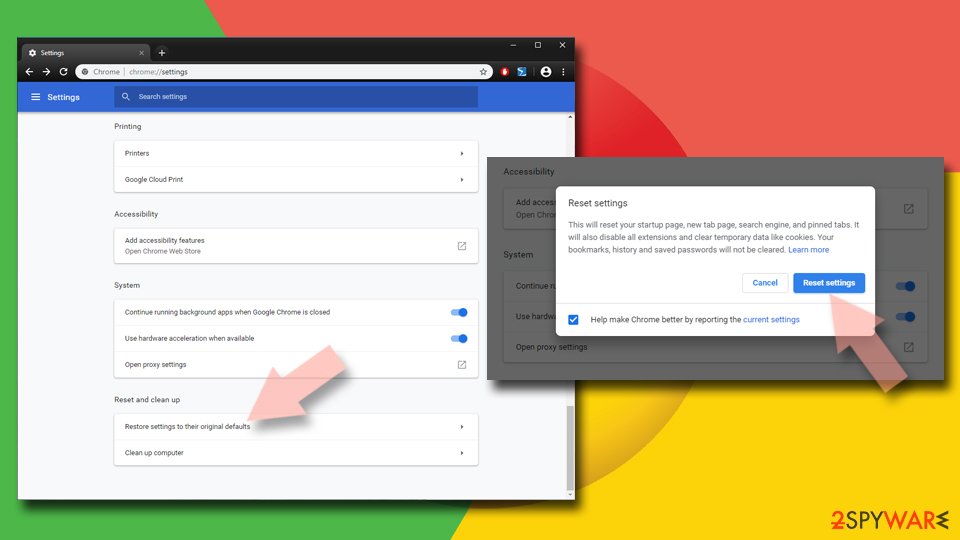
- Click on Menu and select Settings.
- In the Settings, scroll down and click Advanced.
- Scroll down and locate Reset and clean up section.
- Now click Restore settings to their original defaults.
- Confirm with Reset settings.

Delete from Safari
Remove dangerous extensions:
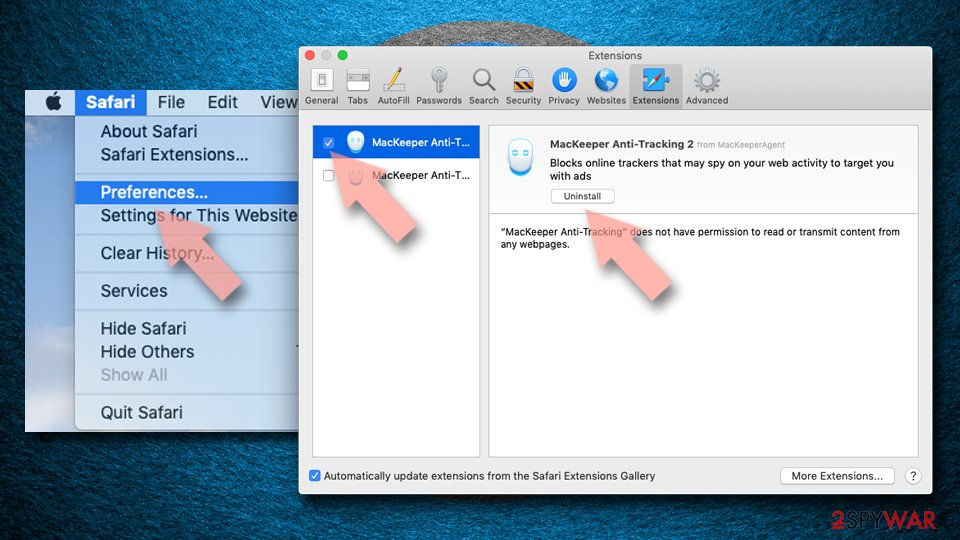
- Open Safari, click Safari in the menu at the top-left of the screen, and select Preferences.
- Go to the Extensions tab, look for any suspicious entries, and click Uninstall to remove them.

Clear history and website data:
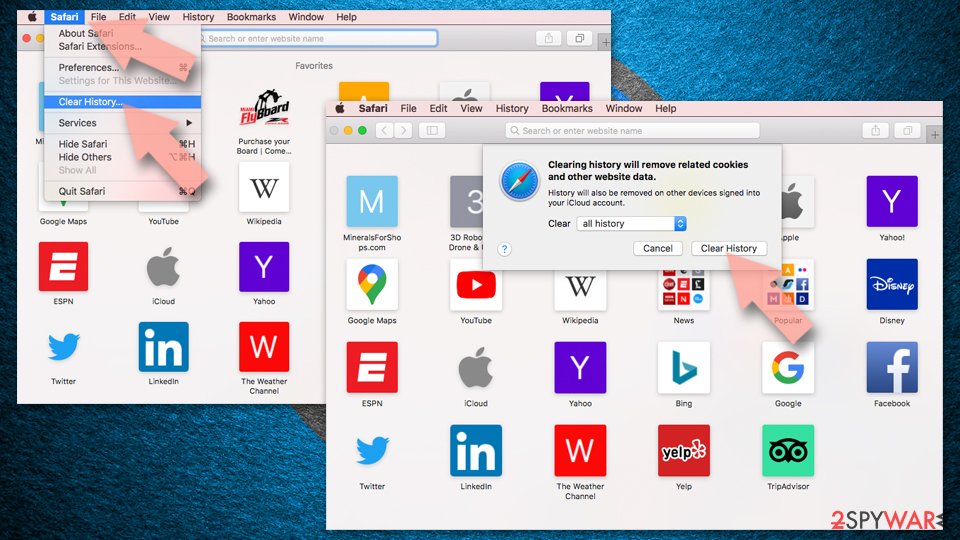
- Click Safari in the menu and pick Clear History.
- Set Clear to all history and confirm with Clear History.

Reset Safari:
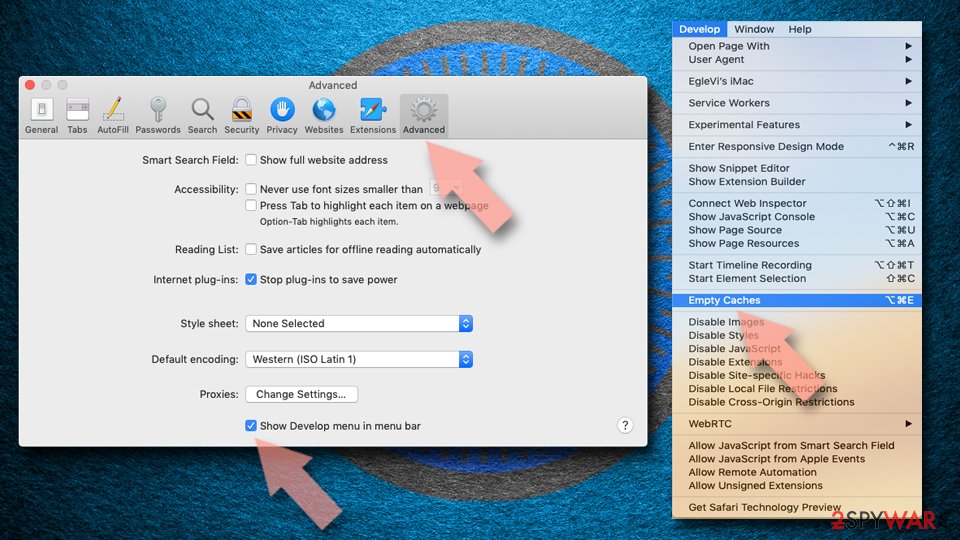
- Click Safari in the menu and select Preferences > Advanced.
- Enable Show Develop menu in menu bar.
- From the menu bar, click Develop and select Empty Caches.

Did this guide help?
51 comments
Bee
ok, I downloaded and installed Spyhunter to remove start.funmoods.com...so, now what do I do?
james
i ran rkill process killer followed by malwarebytes with the most current update as of 7/11/12. no luck getting rid of funMoods. trying spyhunter now
Howard
Funmoods showed-up on Firefox, unrequested. What a mess. Deleted entry in Firefox Extensions list and the parasite was still there. Tried everything I could think of and then gave up. I simply used Windows Restore to restore my computer to an earlier time. It worked perfectly and without all the frustration.
JD Straw
I cant, at this time afford to pay for spyhunter, so I tried every other option suggested including other methods that I have used in the past, including system restore, but so far nothing has worked. Just FYI, I got this while downloading a program called Freecorder (video downloader/converter program); and in spite of declining to install all offers that were included in the download/install process, this mess called funmoods was still installed, along with several other programs associated with funmoods. I was able to remove most of the other funmood programs with the revouninstall freeware program, but the evil toolbar still remained. I even used my systems regedit program, was able to delete a lot, BUT NOT ALL, of funmoods mess, but my computer now is very much infected and it seems there is nothing I can do about it until I have money to go to a professional to have my computer cleaned up. I havent worked in three years so I have no idea when Ill have money for something like removing viruses from my old computer. This kind of stuff makes me want to choke the living daylights out of the evil perpetrators and developers of this demonic program with its bold intrusion and mass unwanted installation.
Everybody: PLEASE BEWARE OF DOWNLOADING THE FREECORDER VIDEO DOWNLOADER/CONVERTER PROGRAM BECAUSE IT WILL INSTALL THIS MESS EVEN THOUGH I took the time to make sure all the BOXES ARE UNCHECKED during the installation process, and ALL THE OFFERS of installing all their extra mess ARE DECLINED DURING THE INSTALLATION PROCESS. PLEASE BE CAREFUL!
BabaBoohey
This "Funmoods" garbage is responsible for spreading the Virus "Generic29GJG".
Dont go near this crap!!!!!
ChrisBMW840
How do I get this thing removed from my D drive?! Ive run spyhunter several times, clicked fix, and it will say the fix was successful. Yet. every time I open a new tab, theres that darnedable "start.funmoods...etc.", not "about:blank." This happens in Firefox. Grrrrrr!
ChrisBMW840
And, JD, youre exactly right. My son downloaded VLC, so we could watch video from my Canon camera.
Keith
I think that you were extremely fortunate as I have bought Spyhumter AND just recovered to a previous pre Funmoods date and both have failed. I still have the damned thing and may the creators of this malaise remain in purgatory for ever-and-a-day.
Lisa
Me too HELP! VLC did it to me 8-19-12 I removed alot of crap, cant get online at all now
Lisa
I just found out this virus/trojan/redirector from hell is part of a hidden program called Yontoo I found thees in the temp folder along with 7za, OptChrome, and sqlite3 to see this, use the Run function located in the start tray on the bottom of your screen
lisa
love yoiur softwear. workd greate thanks so much.removed the bad streak in my OS like tide of ocean
lisa
lisa i too suffer from malware due to buttock abuse. praised from God for Spyware.com and the wornderful anus care they gave.
thanks.
VLC is going to be hearing from my proctologist/
Allen S Wolen
sounds hurt time on the old shattube.Spyware Maylware runnin up my Netware. Botchek, Rushia.
joz8888
A simple reset of firefox seems to have worked for now, I know its not gone but I dont have to look at it every time I open a new tab. On the firefox toolbar click Help>Troubleshooting Information>Reset. You will have to set your homepage after.
Jeffery
I used Malwarebytes, the free version on Windows 7. It worked grate!
Will
Purgatoy? NO, I want them in HELL!!!
Will
I had exactly the same problem and would be glad to have read this comment before. Anyway, Im happy youve got rid of this total crap and will try the same method.
THANKS
Rob
I downloaded VLC as well, declined all offers and ended up in this flipping mess. Its people that do crap like this that should be strung up from their feet and beaten with a stick...for days on end! Beyond annoying as you all know.
Rob
I read that the Yontoo is used for Facebook. So tell us what happened when you deleted these? Did the bug go away? Not a helpful post really.
Betty
Yes CC Cleaner newest download worked on the funmoods crap, i used all the tools there and did not save/backup anything that was removed.
concerned
this is an absolutely shame...downloading bad programs to get rid of other bad programs that try to control you and your computer...hahaha
malwarebytes
Use malwarebytes!!!! It is the only thing that works, unless you edit your registry.
malwarebytes free program is always available at cnetdownloads.com
THAT IS ALL YOU NEED
will
what if the funmoods virus has gotten so bad that i cant download anything and its logged me onto a temporary account?
ANISANA
PLEASE LET MY PC FREE FROM U...
Greg
Im currently trying to get it off a work computer and unfortunately, Malwarebytes does not fix it. Also, after you get it uninstalled, you have check your Network Card Settings as it will add a bunch of other DNS servers in there.
Gerie
I thought I had managed to get rid of Funmoods by deleting the add on and restarting my computer could not find it anywhere when I checked. Until I went onto Youtube and saw 5 ads for Russian girls looking for men and realised it was still there. All I want is to get rid of those offensive ads. Help!!. It also freezes videos that I play and cant scroll up or down. It is driving me mad.
Melanie
Cant get rid of it! I have used malewarebytes, CC Cleaner, spybot, and removed several items from registry. I didnt want to purchase spyhunter, but used the free version after each scan & reboot to see if the problems would disappear. They finally did, but they are BACK again! Not sure what to do now! Just sent Funmoods a message for removal assistance - fat chance-Im sure! Good luck everyone!
tqs
To anyone using google chrome and got affected by funmoods, I tried going to Setting - Extension. Theres the funmoods and New Tab 5.1 (i think) but below it theres "funmoods" so it shouldnt be so hard to find. Just remove both of them by clicking the "Trash" icon beside it. :) I managed to get rid of it! So, good luck to you.
overload
to remove funmoods and all related search agents and files just goto/start /search/ type - funmoods / then delete all entrys related to this program job done
Kathleen
Update your anti-spyware program. If you do not cuernrtly have a spyware removal program, there are many free, highly regarded software downloads.Disconnect your computer from the Internet. Even if you have Internet Explorer closed, as long as there is a connection available, the spyware may be connecting and causing damage. Unplug your computer from its modem or the modem from the wall.Check your Add/Remove Programs list from the control panel. If you see a spyware program listed, uninstall it. If you see a program you are not familiar with but are unsure whether it is spyware, check it out before removing it.Run your antispyware program. If you run it and are still receiving pop-ups, especially if you are still disconnected from the Internet, turn your computer off. Start it again and press the F8 key repeatedly until you see the Safe Mode option. Run the antispyware program while your computer is in safe mode. Revert your system to a date in time prior to the spyware infiltration. Go to the Start menu and point to All Programs. Point to Accessories and then point to System Tools. Click System Restore and follow the instructions on the System Restore Wizard.
behrang
i have got an ipad 2 from this website
is this true that this website give some people gifts!!!!!!?!?!?!?!
behrang
answer me!?!?!?!
GONE!!!
Howdy yall,
I went ahead and ran the free version of malwarebytes, then went into firefox and removed the addons (it had installed dealcabby, funmoods, a couple others) and its gone. malwarebytes wiped funmoods out of the registry (there were about 30 hits). A quick scan does the trick
Geoff
I downloaded Spybot, but that didnt work and Spybots own websit suggests downloading and scanning with Malwarebytes, which did find funmoods and deleted it. I just had to go into browser settings and delete funmoods manually from Search Providers (under Manage add-ons in Vista) and change my home page back to what I wanted, and hey presto, sorted.
Lyn
I DID IT! On Google Chrome though, I went through settings and extensions and saw that blue chat demon and I clicked the trash bin next to it. and to be sure I used Malware, Spybot, CCleaner, and Spyhunter. I dont really know what made the demon leave but SUCCESS
ira
I had install new Malwarebites Anti-Malware - it did not even recognized funmoods. bad advise.
Rory
I got it the same way.. bummed hey.. why do they call it Funmoods anyway? They should call it KakMood.. corny.. but on a more serious note, to the creators of Funmoods YOU SUCK!!!
Rory
Seems to have done the trick.. shot Kat! Also managed to get rid of it on my Firefox using a similar technique.. again... thanks Kat :)
Rory
My bad.. meant tqs... YOU ROCK!.. who ever you are
Rory
Oh sh*t... spoke too soon :(
Cévéo
A user of FIREFOX, I ran the latest version of version of MBAM which detected 6 and deleted 6 entries. This I did yesterday. Funwoods however continued to substitute itself to Google. Whereupon, as mad as hell, I sent a message to their support center to tell them in harsh and angry terms to get their stowaway add-on from my computer.
This very morning, having repeated yesterday’s run of MBAM, the program again detected 2 presences, which I had removed. I then started up FIREFOX and discovered that Funwoods seemed to have disappeared from the navigator or Google search engine. Haven’t the faintest idea of what happened and if Funwoods is going to stay totally away from my PC.
Combined effect of both MBAM and my angry mail, or only one or the other?
Whatever the case, this raises the following point : could it be that Funwoods is in a position or has the means and tools to have access to the innards of my Windows XP ? And do whatever it wants: such as removing the unwanted malware when called for or requested? A rather very disturbing and disquieting thougt for all of us.
Ally
I installed a youtube downloader program, that I downloaded from cnet.com, I thought it was a safe website that tried out programs before suggesting them, I was soooo wrong, even though I declined all the free crap it offered to install when installing the youtube downloader, it installed the fun moods search engine that took over my home page and other crap as well, Im giving malware bytes a try, hope it helps, ad-aware didnt help, neither did hijack this which used to work before.
i had installed ad-aware last night, and this morning the funmoods search home page came up again but after a couple of minutes seemed to go away on its own......(could it be the ad-aware program working on the background?) Im still not convinced with a sensation of (the killer seems to be dead but hes not really dead) so I installed and currently running malware bytes.
Omaps
Malware Bytes detected 11 items from Funmoods. I deleted them and opened Firefox - its still there if you open a new tab!
EmperorNorton47
I seem to have picked it up in connection with a download on Cnet. Lot of work to be rid of it. Norton caught it starting to insert itself, but it still appeared. There should be laws against this kind of thing.
Omaps
I contacted Funmoods and received this response. The instructions seem to have worked.
NOV 27, 2012 | 12:18PM EET
Alex replied:
Hello
Thanks for contacting us. Please follow the instructions below.
In Firefox:
To removetoolbar/New Tab
Open Firefox, go to Add-ons Manager (Ctrl+Shift+A) > Select “Funmoods” and click on Remove
To remove from Home page:
Open FireFox, go to Tools > Options > on “startup” section click on “Restore to Default” button Then click on “OK”
To remove from search engine:
Search button--- Manage Search Engines---- select “Funmoods”---- Remove
For a step by step uninstall guide, please watch our tutorial: http://www.youtube.com/watch?v=dT5PWzLDptc
---------------------------------
To remove from Internet Explorer Win7/Vista from toolbar:
Go to Start > Control Panel > Uninstall a program OR Programs and Features > Select “Funmoods” and click on Uninstall
To remove from Home page:
go to Tools > Internet Options > on “Home page” section click on “Use Default” Then click on “OK”
To remove from search engine:
go to Tools > Internet Options > on “Search” section click on “Settings” > select “Live Search” or “Google” or “Bing” and click on “Set Default” > select “Search” and click on “Remove” > OK > OK
New tab (Internet Explorer 8-9)
go to Tools > Internet Options > on “Tabs” section click on “Settings” > on “When a new tab is opened, open:” select “The new tab page” > OK > OK
----------------------------------
In Chrome, to remove toolbar:
Open Chrome, go to Options menu > Tools > Extensions > Click on the “bin” to remove
To remove as homepage:
Open Chrome, go to Options menu > Settings > on the “Appearance” section, check the “Show Home button” > Change > select “Use the New Tab page”
To remove as search engine:
Go to your browser----Click on the tools icon---- options------Change search defaults ----- settings ----- click the name of your preferred search engine---- set as default---- (to remove Funmoods search)----select Funmoods ----remove---- okay
-Or-
Open Chrome, go to Options menu > Settings > on the “Search” section choose Google on the drop down menu
For a step by step uninstall and reset homepage guide, please watch our tutorial: http://www.youtube.com/watch?v=dT5PWzLDptc
Kindly
Alex
Support Agent
Princess
Thank you! Funmoods almost drove me insane - this method is much simpler and faster, and EFFECTIVE! Finally I can enjoy browsing again!
Irfan
the last post is the bomb,
wow...i click on the first page and boom it i run it and after rebooting my pc it gives me result of many many files remove,files that i do not even know about including the funmoods shit.
Thanks,9jeria.
or
Thanks... works great for me :)
Normani
Yontoo was hijacking my websites. I found it listed in tools/tracking protection/toolbars and Extensions. I found and deleted Yontoo by using my computer uninstall program. Then I went into search, typed Yontoo and found a "silent installer" which I also deleted. These actions seemingly has removed Yontoo, at least I cannot find it any traces left. But, Funmoods registry errors (25 of them) are still present and I have not been able to remove them yet. Google Chrome is somehow attached to Funmoods, but after deleting Google Chrome, Funmood registry issues remain. Still trying.
Cleo
I got it trying to download the game Facade............grrrr its soo annoying
Someone
I tried malwarebytes, it also made my system restore unfunctional, and after a number of other attempts to fix this issue I was told to try combofix. It ran through reboot and it was completely resolved. No browser redirects, system restore was then available. If all else fails give it a try.