Title: IncrediFind

Remove IncrediFind. Removal instructions


Severity scale:IncrediFind severity is 40  (40 / 100)
 
IncrediFind is a malicious browser hijacker that redirects a web browser to advertising web sites and changes Internet Explorer address bar search settings. The parasite also modifies system networking options by altering the Hosts file. It has the ability to silently update itself via the Internet. IncrediFind automatically runs on every Windows startup..

IncrediFind properties:
• Changes browser settings
• Connects itself to the internet
• Hides from the user
• Stays resident in background

Automatic IncrediFind removal:

SpyHunter is recommended remover to uninstall IncrediFind. You should confirm using free trial that it detects current version of parasite.

Note: Manual assistance required means that one or all of removers were unable to remove parasite without some manual intervention, please read manul removal instructions below.

If you failed to remove IncrediFind using SpyHunter please report this to us.

We might be affiliated with any product we recommend on the site. Full disclosure in our Agreement of Use.
STOPzilla
We are testing STOPzilla's efficiency at removing IncrediFind (2006-02-19 14:03:29)
Malwarebytes Anti Malware
We are testing Malwarebytes Anti Malware's efficiency at removing IncrediFind (2006-02-19 14:03:29)
Spyware Doctor
We are testing Spyware Doctor's efficiency at removing IncrediFind (2006-02-19 14:03:29)
XoftSpySE Anti Spyware

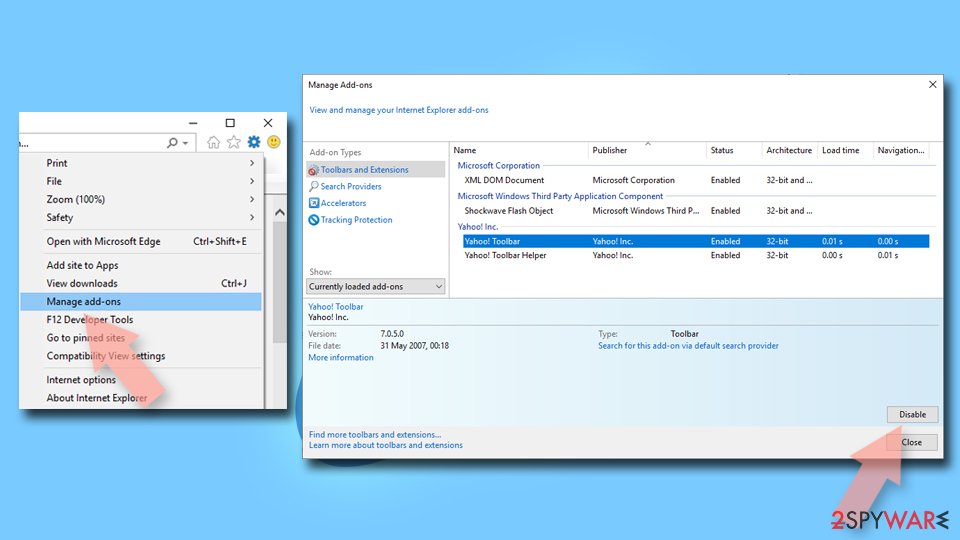
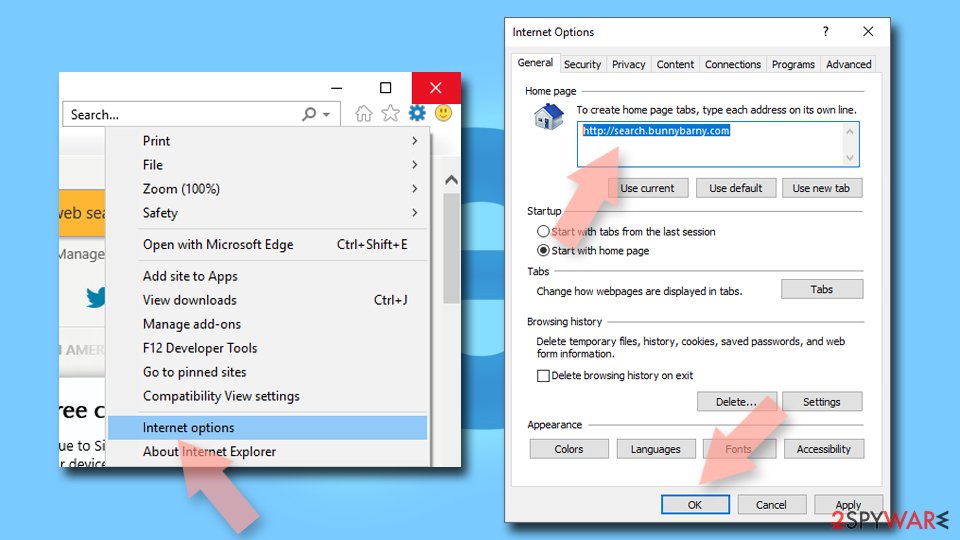
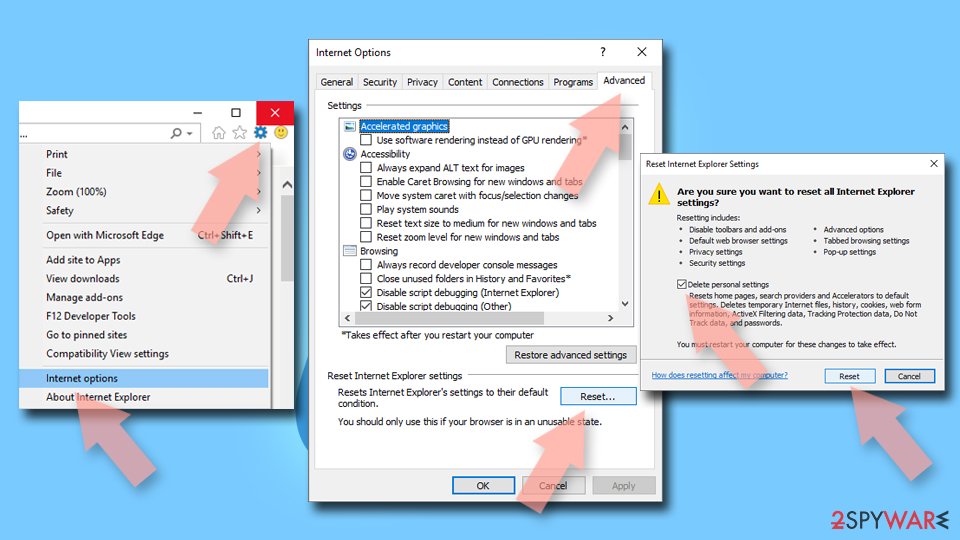
IncrediFind manual removal:

Kill processes:
delupdat.exe, sui.exe, wupdater.exe
Delete registry values:
HKEY_LOCAL_MACHINE\SOFTWARE\Microsoft\Windows\CurrentVersion\Run\updater
HKEY_LOCAL_MACHINE\Software\IncrediFind
HKEY_LOCAL_MACHINE\Software\updater
HKEY_CLASSES_ROOT\BHO.IncrediFindBHO
HKEY_CLASSES_ROOT\BHO.IncrediFindBHO.1
HKEY_CLASSES_ROOT\CLSID\{5D60FF48-95BE-4956-B4C6-6BB168A70310}
HKEY_CLASSES_ROOT\Interface\{8B8F6968-2F24-41E3-B653-E9613226F14D}
HKEY_CLASSES_ROOT\TypeLib\{DE289BFA-737B-4ABB-A4EC-F8753551B875}
HKEY_CURRENT_USER\Software\Microsoft\Internet Explorer\URLSearchHooks\{5D60FF48-95BE-4956-B4C6-6BB168A70310}
HKEY_LOCAL_MACHINE\SOFTWARE\Microsoft\Windows\CurrentVersion\Explorer\Browser Helper Objects\{5D60FF48-95BE-4956-B4C6-6BB168A70310}
Unregister DLLs:
incfindbho.dll

Delete files:
delupdat.exe, sui.exe, wupdater.exe, incfindbho.dll
Delete directories:
C:\Program Files\IncrediFind
C:\Program Files\Common Files\updater
Misc:
Filenames may vary.
Information added: 2004-03-19 10:00:00
Information updated: 2006-02-19 11:26:14

Additional resources related to IncrediFind:

Attention: If you know or you have a website or page about IncrediFind removal, feel free to add a link to this list: add url

more resources
0
0
Guest
Hackers are alwys saying that they are doing bad things to help people. Well, I would love for them to start doing DOS attacks and taking these spyware people down.
0
0
Guest
Seriously. If any hackers need a "to-do" project, please send the digital equivalent of a nailbomb to Incredifind.
0
0
breezee
I dont know what the hell incredifind is but it has already screwed up my old computer and now its trying for this one some one needs to to stop this!!!!! Where does this this come from?? Ao I can keep from going to that web site!!!
0
0
virus hater
this shit has been on my computer for time and now thanx to this i finally got rid of it
0
0
schambo
man!!! still workin on gettin rid of it, I HATE THAT!!! Isn't stuff like this illegal!?

i cna't believe!!!
0
0
sam
i think everyone is right about what they have said but i personally think that incredifind should be shut down once and for all otherwise its going to break every computer.
And yes crystalclear Bill Gates in my opinion is the best software engineer.
0
0
jeff
i'm still trying to get my internet access back on my pc. My networked laptop is unaffected thankfully so I can download fixes and try them. I hope this one works. Cool Web Shredder didn't fix it.
0
0
vwbus
i had to go to the registry to delete this program, you wont find it in your add/remove programs. it seems to be associated with www.funnyjoke.com. i think this because as soon as my daughter went there, it showed up on my computer. it may be associated with other sites as well, but I KNOW it's associated with this site FOR SURE.
0
0
Muzza
The browser of my desktop has been hijacked by Incredifind and now IE loops when I try to access the Net - that means, I CAN'T ACCESS THE INTERNET (I am writing from my laptop).

Bill said above that NAV 2004 catches and cleans this, but I have NAV2004 and it does not detect it...

What an annoying piece of crap. This guys must be sued like that dad-and-son operation at Thousand Oaks CA that did similar thing a while ago.
0
0
Zilch
I'd like to suggest something to all of you. Uninstall IE (if windows will let you) then download it (on another computer) and install it again. If this doesn't work, download Mozilla, Netscape, or something of the like. There are ways to remove this from the registry, but as Caz said, be very very careful. In an extreme case, backup all your data and format the hard drive. Start from scratch. Then, when a site asks you to download something (it'll say security alert or something) just say no unless you know EXACTLY what it is.
0
0
JOe
I tried finding the file and code in my registry but it wasn't in there either.

nor in add/remove.

i did find a folder called "incredifind" in my programs folder with the bho in there, but it won't let me delete it.

an suggests?
0
0
julian
thanks 54.mom, with your help I am halfway there but do not understand "start windows explorer and delete etc...." windows explorer does not offer me a delete option, I am just a non techie amateur mega frustrated with this incredifind invader which just stopped one member of my family from doing their universtity assignment on time..
0
0
althalus
Domains@euniverse.com try mail bombingt this guy as its the same people
0
0
Jen
It worked. Thanks!
0
0
KariSue
Last October I was looking for FREE MP3s and came across this site that offered all the FREE MP3s I wanted. I downloaded it and guess what happened? YES it turned into Incredifind!! NO FREE MP3s!!!! Just six months of computer slow ups and annoying pop ups...
And it wouldn't even allow me to delete the file! It took my comp tech friend to delete it!...fuck why aren't these people being charged if its so fuckn' illegal to do this
0
0
Mom
Julian: Go into your windows directory and find incfindbho.dll

Windows explorer is not Internet Explorer
0
0
Mr. Helper
Do a search on the internet for a program called "end it all" - it quits all unnecessary applications from running in the background. I use it before I burn cd's, it helps when the burner is buffering. Download the program, install it, run it and click on "end it all" and then it'll quit the incredifind application as well as all other unnecessary files. Then, do a search for "incredifind" on your computer and you will be able to delete it! When you find the results, click on the items related to the incredifind program and delte it! It worked great for my computer!!! Free, too!
0
0
Helper!
It's true, the "end it all" application works!
download it from here:
http://www.docsdownloads.com/enditall.htm
: )
0
0
juliana
1.Download the evaluation version of Spyware. It can scan and identify the parasites and its locations.
2.If you purrchase and get the full version, , you should be able to remove all parasites. I decided not to purchase.
3.I followed mom's instruction (msg 56) for manual removal, and get it done. Also i removed other parasited by same method.
4. Then i scan with spyware again. Its gone for good.
5. Also you can download ad-aware 6.0 from www.docsdownloads.com. It can remove a lot of parasites . Its FREE too.
0
0
mario
I downloaded the Spyware and remove all the parasite shits manually. It works great.

Thanks Juliana.
0
0
CRAP
Incredifind is on my Laptop and I really hate it! I'm going to try the manual remove. Does anyone know if this is what could be causing my inability to upload pictures like I used to? Does it prevent emailing attachments? I cannot do freakin much and now the Internet is starting to bite! What programs do you recommend to keep crap off? I got Zone Alarm Firewall at the moment and SpyBot.
0
0
susiepatootie
of course went on the www.incredifind.com where they say they have an uninstaller.. doubled clicked on it like 20 times.. was not opening or working... Did vent out though by writting feedback and leaving them one nasty email... Thanks for the removal solutions guys... will certainly try those...
0
0
bujezzas
ugh!!! this program is so annoying!!!!!! if a page is not available then it slips to their stupid search site.... i used spybot search and destroy and nav2004 which has removed all but one thing.... i will try the end it all program to see if that works!
0
0
liana
i've had the same problems with this incredifind hijacking my browser.
i looked up the "whois" record for incredifind.com (the contact information for the domain owner) and i got the following contact information:

eUniverse Inc
(www.euniverse.com -- don't visit unless you want more spyware on your pc)
6060 Center Drive Third Floor
Los Angeles CA 90045

Here are 2 phone #'s for contact:
(310) 215-1001
(323) 658-9089
(this might be some helpful info, esp. for non-techies that want to contact them and complain)

this is a PUBLICLY TRADED company (EUNI on NYSE) this means that they are trying to benefit their STOCKHOLDERS by advertising like this. I AGREE that somethinig needs to be done!
0
0
3ccdpro
I have one answer to the problem with Incredifind. Do as I did. Send them a bill for $2000 in damages to your computer. When they don't pay the bill, file it with a bill collector, the BBB and the local FBI office. They have changed their name three times in the last week so make sure to get the right one.
Send your invoice to:eUniverse,Inc (or current name) 6060 Center Drive Third Floor, LA, Ca 90045.
It has not paid off for me yet and we are still fighting to get this thing removed. But it is a step in the right direction, for U.S. companies anyway. We don't have to just take this stuff. We can do something about it. This is one way and who knows, you might get the money.
0
0
3ccdpro
Is there any information about who these people are. Source code indicates they are www.Wc3.org but I believe this is incorrect and added on purpose. Any information about these people would be helpful.
0
0
Guest
i could send these people a bill for 100 for screwin up my computer. we had to bring it to a computer company because it wouldnt start because of "a change in software" it was relly just incredifind installing itself onto my computer
0
0
Guest
Anyone interested in starting a class action lawsuit against incredifind and others like them. This crap has got to stop not to mention the price it is costing me to have my computer fixed all of the time it gets on machine, plus the time i lose by not having my computer for work.
0
0
Guest
On my machine the registry entries were as follows:

HKEY_CLASSES_ROOTBHO.IncrediFindBHO
HKEY_CLASSES_ROOTBHO.IncrediFindBHO.1
0
0
Guest
I CAN'T FIND ANY OF THOSE KEYS, PLEASE HELP ME !!!!!!
0
0
Guest
Found references to it here:
HKEY_CURRENT_USERSoftwareMicrosoftSearch Assistant5603hpztshol.exe
HKEY_CURRENT_USERSoftwareMicrosoftSearch Assistant5603incfindho.dll
HKEY_CURRENT_USERSoftwareMicrosoftSearch Assistant5603incfin~1.dll
HKEY_CURRENT_USERSoftwareMicrosoftSearch Assistant5604incredfind.dll
0
0
Guest
I am fed up with this nonsense.
I am going to send them a bill.
We have our rights!
I am all for the class action suit.
Where do I sign?
James
0
0
Guest
As a matter of fact I think we should get a bunch of us together and go visit their office on a regular basis.
We'll see how they like their business being interupted by unwanted crap.
0
0
Guest
How do I know for sure if I have incredifind on my system? The web address used to come up when I started IE. Now I don't see it. But I do have pop up ads when I didn't used to. I'm not real advanced on computers, so I don't want to fool with the register or anything like that. I don't want to download anything either. Is there a way to check my system and remove it if I have it?
0
0
Guest
download the program, it should come up with all the parasite that are found on ur computer.. this is good stuff
0
0
Guest
I think games.com is associated with incredifind as well. I used to go there a lot but haven't been there lately. Went yesterday and ended up with incredifind on my machine. Had no idea what the hell was going on. I'm using spyhunter right now to do a scan and it's finding all kinds of crap. Hopefully that fixes it.

Anyway if anyone is keeping a list, add games.com to the list.
0
0
Guest
i found a hidden file inside the recycle bin you can only 'see' if you boot to Dos. press the F8 key when you boot the computer before windows starts and pick boot to dos prompt. then do a cd
ecycled and then do a dir/p/w and you should see the extra folder with a later date than recycle has. delete the extra folder with the del c:
ecyclefolder name here
0
0
Guest
If you can't delete thr incredifind folder in program files download zap.zip from http://www.just2good.co.uk/ then unzip it into your program files folder. Next type "zap incredifind" at the C:program files command prompt. it worked for me.
0
0
Guest
I just scanned my computer with Ad-Aware and it is now free from this stupid incredifind thing. Hope it works for you too
0
0
Guest
Does anybody have home phone numbers of the people from euniverse. start calling them in the middle of the night to talk about their worderful products. why can't they just pimp their mothers and sisters. It would be a better living for these scumbags.
0
0
Guest
I do tech support for AT&T and get customers with this all the time. I feel so bad that they can't even download any removal tools because they can't even go to webpages!!!
0
0
Guest
The best way to find the source of these types of things is to follow the money trail. Also, if you can find it, read the liscensing agreement associated with this program, and if there isnt one, they are in deep doodoo. Doing a whois search on thier domain also brings up very detailed info about thier address, telephone, and the like, but this registration info can be faked, and may vey well be some innocent business with no idea why they are getting calls about this.
0
0
Guest
I hate the silly website, it gives me many trouble,so stupid. and thanks for above suggestion deleting it , i will try.
0
0
Guest
I'm getting really ticked off w/ these two sites. I used Ad-aware 6.0 but it only removed others except for these two. I'm planning to rehaul my entire old account into a new one. For some reason, that actually works. I'm not kidding. But it's going to require maybe three days to haul everything into the new account. Especially those musics, videos, games, re-installation for printer, scanner, and everything else that I can't think of yet.

Well this is the most laziest method but it works, just the rehauling is going to be a pain.
0
0
Guest
Obviously those idiots engineered it so all the spyware programs wouldn't detect it.
0
0
Guest
I just called them. Just dialed (310) 215-1001 (thanks for the Number BTW). Its good to go. Dial that, use 0 for the operator and told them its on my comp. They sent me to tech support and I got a voice mailbox for some lady (no offence to the female persuasion). I have left a message. Ill keep everyone updated with that happens.
0
0
Guest
We've lost hours of productivity since being blessed with incredifind.com . Class action suit has a nice ring to it. But, I think we'll get better results by a BOYCOTT of their clients/CO-DEFENDANTS.
0
0
Guest
Thanks a million, this little hellish IncrediFind Program has annoyed me so much, i was going to chuck my comp out the window!
0
0
Guest
http://www.experts-exchange.com/Security/Win_Security/Q_21029311.html

I deleted some of the files listed on that page, and so far I haven't received any 680180.net pop ups.. after going thru numerous spyware downloads that all seem to fail, i went searching for other solutions that will give me file names where I could go look for and delete. So I came accross that tech support page. I was very frustrated and fed up with these people!! its too bad they get away with it.
well i hope this helps
good luck!
0
0
Guest
Worked for me. Thanks!
0
0
Guest
my computer is completely trashed because of this screwy piece of pointless cheap programming. STOP THE MADNESS NOW! its such a terrible, sick, diabolcial, saddening program taht nobody would ever want in their life. employees, i say to you 'you poor poor guys'
0
0
Guest
Great tool dudes...
One question.. why does that kind of sites install psyware on our computers???
The only effect the create is that we get more offensive toughts against them!!!!
0
0
Guest
I have no idea idea where it comes from but im sure glad its gone
0
0
Guest
That spyhunter software is great it found a few other things as well as incredifind
0
0
Guest
I also don't know where it comes from exactly. What I do know is that it came at the same moment I downloaded and installed ServicePack2 for WindowsXP. If there is any relationship, both parties the incredifinders and microsoft should be boycotted !
0
0
Guest
Thanks, I didn't know how it came and I didn't know how to delete it. It took over "my operation". Frustrated user
0
0
Guest
I am very annoyed with this crap!! I just dl SpyHunter as suggested above. Hopefully this takes care of the problem. I don't understand why we have to go through this hell in the first place. UNBELIEVABLE!
0
0
Guest
i cant follow the crazy directions properly, and it turns out spyware wont remove anything for free! UGH I'm back to where i started!! I'm on the verge of tears here. PLEAASE someone with simple instructions or suggestions please email me at maidenmcqueen@yahoo.com. THANKS
0
0
Guest
i swear all this adware/spyware should be illegal. i mean they install without your knowing and some how we "accept" their agreement. how can we even accept when we dont even notice or know its installing and etc.
0
0
Guest
Actually I also noticed that incredifind showed up on my computer the same time I installed the xp service pack 2. Not sure if theres a connection. I'm lucky that it hasn't stopped me from accessing pages (yet) so I'm deleting this crap right now.
0
0
Guest
Hello All. For the last couple of month's I have had a terrible time finding a site, or program that will help me remove incredifind. After many failed attempts, and many many failed programs....I believe I have the cure. I got so frustrated I called the the dirty people at incredigarbage myself and they told me not to use the uninstaller found on the website, but use http://download.centralserver.net/uninst/unsetup.exe. Seems like they only give this url to people you call and complain. Once you download, and run it it should remove this terrible program in full. Hope this helps.
0
0
Guest
first i did a whois on incredifind brought up this:


Registrant:
eUniverse
(DOM-309135)
6060 Center Drive
Third Floor Los Angeles
CA
90045 US

Domain Name: incredifind.com

Registrar Name: Alldomains.com
Registrar Whois: whois.alldomains.com
Registrar Homepage: http://www.alldomains.com

Administrative Contact:
eUniverse Inc.
(NIC-1465646)
eUniverse
6060 Center Drive
Third Floor Los Angeles
CA
90045 US
Domains@euniverse.com +1.3102151001 Fax- +1.3102582758
Technical Contact, Zone Contact:
Center Network Operations
(NIC-398252)
Alldomains.com
1800 Sutter St.
Suite 100 Concord
CA
94520 US
hostmaster@alldomains.com +1.9256859600 Fax- +1.9256859620

Created on..............: 2003-Jun-09.
Expires on..............: 2005-Jun-09.
Record last updated on..: 2004-Aug-14 00:58:45.

Domain servers in listed order:

NS1.EUNIVERSE.COM 12.129.205.221
NS3.EUNIVERSE.COM 12.129.205.222

next did whois on euniverse
shit almost same thing

Registrant:
euniverse inc
(DOM-115932)
6060 Center Drive
Suite 300 Los Angeles
CA
90045 US

Domain Name: euniverse.com

Registrar Name: Alldomains.com
Registrar Whois: whois.alldomains.com
Registrar Homepage: http://www.alldomains.com

Administrative Contact:
eUniverse Inc.
(NIC-1325368)
eUniverse Inc.
6060 Center Drive
Suite 300 Los Angeles
CA
90045 US
admin@euniverse.com +1.3102151001 Fax- +1.3102582758
Technical Contact, Zone Contact:
eUniverse Inc.
(NIC-1325369)
eUniverse Inc.
6060 Center Drive
Suite 300 Los Angeles
CA
90045 US
tech@euniverse.com +1.3102151001 Fax- +1.3102582758

Created on..............: 1998-Nov-26.
Expires on..............: 2011-Jul-11.
Record last updated on..: 2004-Jul-01 17:37:40.

Domain servers in listed order:

NS1.EUNIVERSE.COM 12.129.205.221
NS3.EUNIVERSE.COM 12.129.205.222

except now i have extra email adress getting closer.

euniverse has recently changed its name to http://www.intermix.com/

whois on that:

not loading! ah gettting closer.

now try with stronger software

error?

whois.net is down

http://www.intermix.com/

has strange anti-spam policy which disagrees with what they do!

ah intermix whois!

Registrant:
eUniverse (DOM-1282086)
6060 Center Drive Third Floor
Los Angeles CA 90045
US

Domain Name: intermix.com

Registrar Name: Markmonitor.com
Registrar Whois: whois.markmonitor.com
Registrar Homepage: http://www.markmonitor.com

Administrative Contact:
eUniverse Inc. (NIC-1465646) eUniverse
6060 Center Drive Third Floor
Los Angeles CA 90045
US
Domains@euniverse.com
+1.3102151001
Fax- +1.3102582758
Technical Contact, Zone Contact:
eUniverse Inc. (NIC-1465646) eUniverse
6060 Center Drive Third Floor
Los Angeles CA 90045
US
Domains@euniverse.com
+1.3102151001
Fax- +1.3102582758

Created on..............: .1998-Jun-11
Expires on..............: 2006-Jun-10.
Record last updated on..: 2004-Sep-06 08:58:03.

Domain servers in listed order:

NS1.EUNIVERSE.COM 12.129.205.221
NS3.EUNIVERSE.COM 12.129.205.222

all part of same!

why need so many names?

ah a lie it says it was created on

1998-Jun-11

but euniverse was created on

1998-Nov-26

so how was intermix created by euniverse?

anyway this is enough for annoying and maybe enouth if you continue to take law suit against for fraud website registration

use my info!
0
0
Guest
Posting number 52 has a link to uninstall, received right from the company. I copied and pasted, worried that I wouldn't be able to pull it up because stupid incredifind has screwed up my internet so bad...IT WORKED!!! So easy, I copied the link and pasted, 2 seconds later I got a message that said uninstall complete, pleast reboot, I clicked OK...when I came back on I tried to go to a website and BAM!! there it was!!!

Thank you so much!!!
0
0
Guest
If you're still having problems, check out Post 52 like the above person mentioned as well. Finally the only thing that has worked for me as well. Thank you! :)
0
0
Guest
See comment #52. It seems to have worked!! THANK YOU!!
0
0
Guest
I'm glad my posting (#52) has helped. After removal of incredifind you should run ad-aware 5.0 or later, as well as Spybot search and destroy. Both programs help clean out your system from adware. Make sure you update them often. These 2 programs work the best because they are free-ware...anything you downloand that is trial-ware will "show" you have more ad-ware on system then what actually is there....helps them sell and gets you to buy.
0
0
Guest
Well, I got this stupid thing on my PC this AM. I wanted nice Christmas screens...haha screensaverl.com is the culprit! Anyways if you are running XP, just restore to previous day and VOILA POOF bye bye INCREDIFIND! Spybot did not find it, but it found tons of other things added from the same site!
0
0
Guest
none of the signature indicated here are not found on my computer and I have unsuccesfully tried to remove it using the named program plus 6 more: none of them has worked!
And incrdifind is still alive on my laptop...
0
0
Guest
Guest 69 have you tried: http://download.centralserver.net/uninst/unsetup.exe
run the program when prompted and it should remove incredifind for good.
0
0
Guest
Try
http://download.centralserver.net/uninst/unsetup.exe
0
0
Guest
I've tried the URL posted by no. 52. Seemed to work, but run Spyhunter again and it's still showing up!! Has everyone checked that it's actually been removed??
0
0
Guest
Thank you incredifind for my new Trojan virus!!!
0
0
Guest
I seach for something and click on it and it comes up to incredifind.com i am very tempted to email them and tell them the many words i have said to myself about their virus
0
0
Guest
I searched the web for days trying to find a way to get rid of this aweful program!!! I could not find any of the listed files to remove manually, nor could I find any spyware removal program to get rid of it. Until I found www.lavasoft.com. You can download a free copy of their program for personal use. Incredifind is gone from my computer forever!!!!!! I run it every day to keep any other pests out of my system. I hope this will work for everyone else as it has for me!!!!!
0
0
Corey
I ran the system that was recommended and rebooted, and I don't get those incredifind search pages anymore. But my main problem still exists. I type in web addresses that exist, and I'm told they don't. Here's an example:


I am at student at the University of Oklahoma and needed to use our e-mail service. The address is oumail.ou.edu. I type that in and it works fine. However, after typing in my ID and pw, it used to say it didn't exist and it took me to the incredifind search page. Now it just tells me the site doesn't exist. However, what I have noticed is that the prefix of the web address AFTER putting in my ID and pw changes to "https://". There is an s there that shouldn't be. That's what is screwing things up. What is the deal? Is something causing this?
0
0
Craig
When i meet the makers of this thing i will kill them!!! i can't sign into anything its really annoying
0
0
Curtis
I generally don't have a problem as long as I know what I'm typing. It would be nice if all the downloadable spyware removers didn't involve spending cash. I don't have enough to fuck around with a computer program. If you want to help me, send me an e-mail with a link to a FREE spyware remover, and I mean totally free, as in i don't have to purchase it to have everything removed. E-mail is mncfrstyl@yahoo.com.
0
0
Sharon
What a bunch of crap!!! Don't download Screensavers (Star Sky)! And don't even bother trying to get ahold of the assholes. (Having trouble Removing Incredifind-contact us),,,I'll contact ya alright but it won't be by email! Fuck Heads!
0
0
Tom
why the hell isnt there any free spyware removers, they all claim to be free and then after the scan its all about the cash...please someone post how i can get a free one
0
0
i don't know why you all are saying that there are no free spyware removal softwares out there. try spybot search & destroy and adaware - both free, and both work good.
0
0
Guest F
Try This guys http://download.centralserver.net/uninst/unsetup.exe
run the program when prompted and it should remove incredifind for good.
0
0
Guest
This is such an inconvenience. I am not happy that incredifind was installed on its own. This is a horrible program. They should give the consumer an option if they would like Incredifind or NOT

Post Comment:

Attention: Use this form only if you have additional information about IncrediFind parasite, its removal instructions, additional resources or behavior. By clicking "post comment" button you agree not to post any copyrighted, unlawful, harmful, threatening, abusive, harassing, defamatory, vulgar, obscene, profane, hateful, racially, ethnically or otherwise objectionable material of any kind.
Home page Name


«


* All field required
Related news:
Similar parasites:
Related articles:
Related discussions:
Compare spyware removers
Compare free products

HijackThis Log Analyzer Beta 2 HijackThis Log Analyzer Beta 2

I failed to remove IncrediFind using SpyHunter.

Email


Close

Spreading the knowledge:

It is very hard to fight Computer parasites alone in internet space. If you have a website we would be more than happy if you would help us to spread the knowledge about latest threats. You can help your visitors to manage their Computer system manually without aditional expences. Knowledge is the power, we just need to spread it.
add text box
rss feed
help other