

Smart Internet Protection 2011 – a fake security tool that shows inaccurate scan results to make you pay for its license
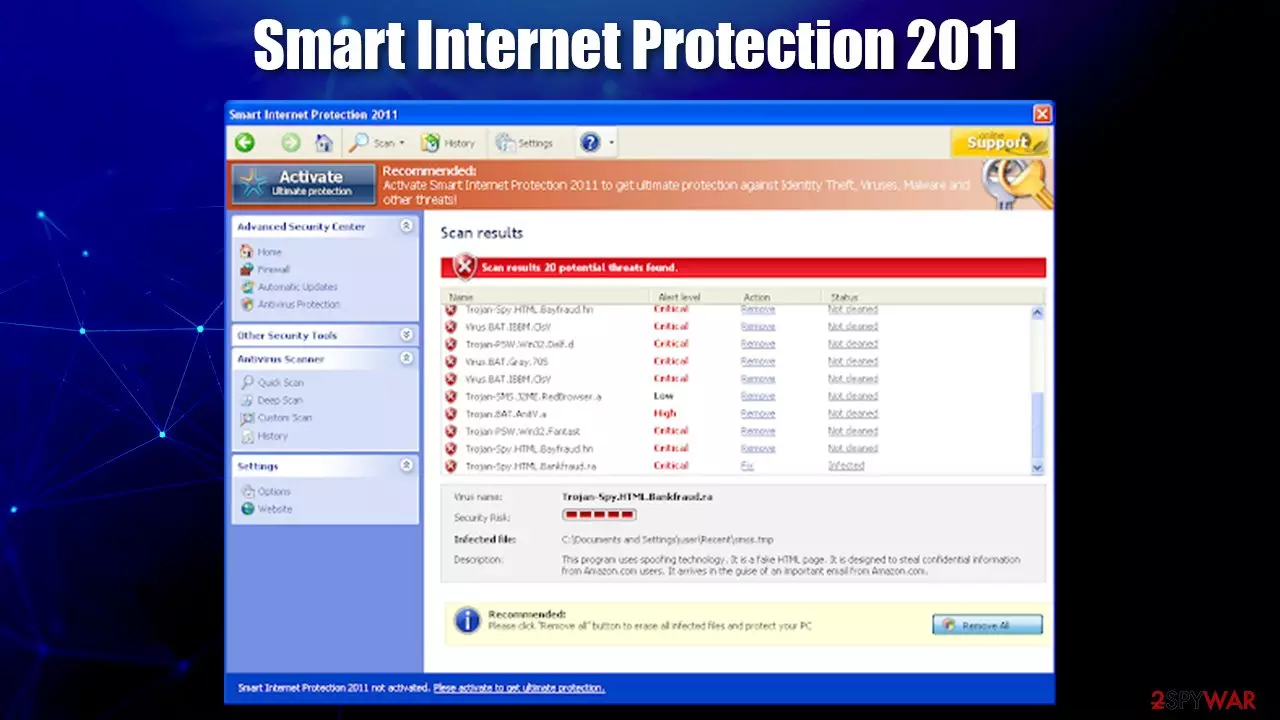
Smart Internet Protection 2011 is a rogue anti-spyware program that should never be trusted for your Windows protection. This rogue program deliberately displays fake alerts and uses scare tactics to make you think your computer is infected with malware. In other words, it is a scam you should never trust.
That's why Smart Internet Protection 2011 is classified as a rogue anti-spyware program. The rogue program is promoted through the use of fake scanners and other malware, stating that your computer has a security risk or that your private information can be stolen. If you found this malicious app on your machine seemingly out of nowhere, you should use this guide to delete all malicious files.
| Name | Smart Internet Protection 2011 |
| Type | Rogue anti-spyware, malware, scareware |
| Distribution | Fake notifications about virus infections on malicious websites |
| Similar | PC Antivirus Pro, Spyware Protect 2009, Vista Guardian |
| Dangers | Personal information disclosure to cybercriminals, financial losses, identity theft, other malware infections |
| Removal | Perform a full system scan with SpyHunterCombo Cleaner anti-malware software |
| System fix | To revert malware damage to system files and avoid Windows reinstallation, we recommend using FortectIntego |
Just as many other fake anti-spyware programs, this one uses fake online scanning animations in order to make people believe that they have a virus on their computers. Users get scared and download the promoted application. As soon as they do that, Smart Internet Protection 2011 begins its malicious deeds on a Windows PC.
As evident, the programs tries to imitate a security app that allegedly protects you from all threats online. Unfortunately, not only does not have a working virus database or malware recognition mechanists, but it acts as malware itself.
After the fake scan these rogue scanners display a screen stating that your computer is infected with numerous viruses and that you should download and install the promoted app in order to remove the infections from your computer. If you have this rogue program on your computer please use the removal instructions below to remove it manually for free or with an automatic removal tool upon detection.
Smart Internet Protection 2011 is configured to start automatically when you login to Windows. When running, will scan your computer and display numerous infections that cannot be removed unless you first purchase the program. These infections are all fake and are only being shown to scare you into into purchasing the bogus software.
Besides this, the malware would perform the following on your computer:
- display fake security alerts on your computer containing fake information to further convince you that your computer has some serious security and privacy issues;
- hijack Google Chrome, Internet Explorer, or another used browser to protect itself from being removed using legitimate anti-spyware programs;
- prevent you from using the Task Manager, Registry Editor or other vital Windows functions;
- change the proxy settings of your web browser to redirect you to malicious websites;
- block legitimate security programs, misleadingly claiming that they are viruses.
As you can see, this program is nothing more but a scam. It uses misleading methods to trick users into purchasing useless software. Do not purchase it; otherwise, you will lose your money and give your credit card details to scammers. In order to remove Smart Internet Protection 2011, scan your machine with security software (we recommend SpyHunterCombo Cleaner) and then use FortectIntego to fix the damage done to Windows system files.
Learn to recognize deception online to prevent malware infections
While the leading malware distribution technique remains malicious spam emails, fake update prompts and fake online notifications still pose a great risk to users. First of all, you might end up on a malicious website at any time, especially if you are keen on browsing high-risk sites – good examples are torrent sites that distribute pirated programs and cracks.
Potentially unwanted programs such as adware might also engage in browser redirects, so you should check your system for those. In any case, once you land on a website that claims that something is missing (Flash Player) or that your computer is infected with malware, never download anything that is offered, as these claims are fake.
Always visit official websites in order to download the latest updates for all your software. Likewise, use reputable security software to detect and remove malware, as well as protect from its entry with the real-time protection feature.
Smart Internet Protection 2011 removal process explained
Since this rogue changes your LAN settings and prevents legitimate security software from launching correctly, you should access Safe Mode with Networking first:
- Restart your computer. As your computer restarts but before Windows launches, tap “F8” key constantly. Use the arrow keys to highlight the “Safe Mode with Networking” option as shown in the image below, and then press ENTER. If you need more detailed instructions, please check the guide below.
- Open Internet Explorer. Click on the Tools menu and then select Internet Options.
- In the the Internet Options window click on the Connections tab. Then click on the LAN settings button.
- Now you will see Local Area Network (LAN) settings window. Uncheck the checkbox labeled Use a proxy server for your LAN under the Proxy Server section and press OK.
- Download an automatic removal tool from this page and run a full system scan.
Do not forget that you need to revert changes made to your web browsers as well – clean web data and cookies. To do this step quickly and also fix all the Windows system damage that could have been sustained due to the infection, use FortectIntego.
Was this guide helpful?
Be the first to comment