

VirusBurst – malicious program that manipulates users with fake scan results
VirusBurst (also known as VirusBurster) is a rogue antispyware program that was created by its developers with malicious intent. Not only does this app uses unfair distribution techniques – it is usually installed without asking for direct permission from the users – but it actively tries to mislead users by showing fake virus infection notifications. In other words, this program is malicious itself, and you should do everything to get rid of it as soon as possible.
| Name | VirusBurst |
| Type | Malware, rogue anti-spyware, scam |
| Distribution | Social engineering campaigns, already installed Trojans |
| Operation | Shows fake virus infection alerts with an intent to mislead users and make them purchase the “full version” of the app to remove those alleged viruses |
| Elimination | Follow the instructions below and scan the infected device with a legitimate anti-malware |
| System fix | If Windows started delivering errors or showing other stability issues after this rogue elimination, we recommend using FortectIntego to fix all the damaged Windows system files automatically |
In most cases, users get infected with this malware after they are tricked by online scam campaigns – they accidentally end up on a malicious website which shows a message about the allegedly found virus. Alternatively, users could also install the app themselves, mistakenly believing that it is a legitimate antivirus app.
The program initially only displays an icon in the system tray. This icon shows a message, which says that the compromised computer is infected with dangerous spyware parasites and asks the user to download and install a removal program, which actually is VirusBurst, the same named corrupt illegally distributed spyware remover.
Once the user clicks on that message, the trojan opens a web site distributing VirusBurst. It may also try to download the application. The trojan is able to change the Internet Explorer default home page and redirect the web browser to malicious web sites. The program automatically runs on every Windows startup.
In order to eliminate this virus, follow the instructions below. Keep in mind that you should always perform a full system scan with a legitimate antivirus program if you were infected with a Trojan. Also, cleaning web browsers is highly advised, as web data and change settings might remain even after you delete the malware from your system.
Uninstall from Windows
Uninstall from Windows 10/8:
- Type Control Panel into the Windows search box and open the result.
- Under Programs, select Uninstall a program.


Uninstall from Windows 7/XP:
- Click on Windows Start > Control Panel (Windows XP users should click on Add/Remove Programs).
- In Control Panel, select Programs > Uninstall a program.


Remove the unwanted program:
- In the Programs and Features window, look for any recently installed suspicious entries, select them, and click Uninstall.
- If User Account Control appears, click Yes to confirm, then complete the removal.


Remove from Microsoft Edge
Delete unwanted extensions from MS Edge:
- Select Menu (three horizontal dots at the top-right of the browser window) and pick Extensions.
- From the list, pick the extension and click on the Gear icon.
- Click Remove.
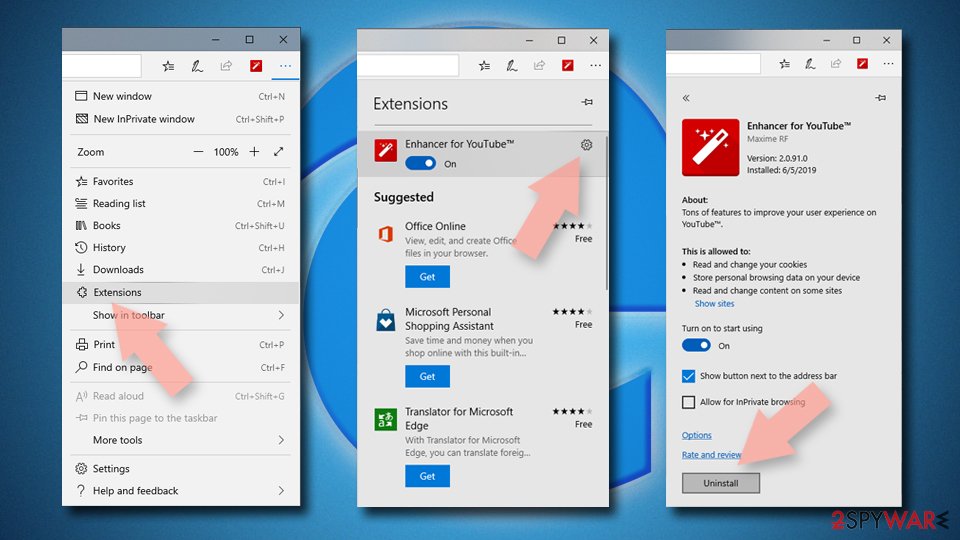

Clear cookies and other browser data:
- Click on the Menu (three horizontal dots at the top-right of the browser window) and select Settings > Privacy, search, and services..
- Under Clear browsing data, pick Choose what to clear.
- Select Cookies and other site data and Cached images and files. (apart from passwords, although you might want to include Media licenses as well, if applicable) and click on Clear.
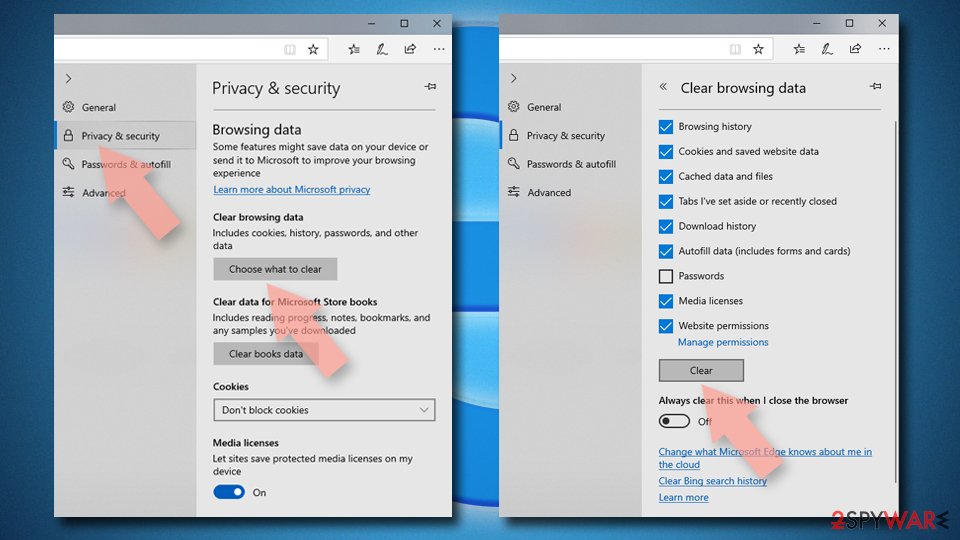

Restore new tab and homepage settings:
- Click the menu icon and choose Settings.
- Then find On startup section.
- Click Remove next to any suspicious startup page.
Reset MS Edge if the above steps did not work:
- Press on Ctrl + Shift + Esc to open Task Manager.
- Click on More details arrow at the bottom of the window.
- Select Details tab.
- Now scroll down and locate every entry with Microsoft Edge name in it. Right-click on each of them and select End Task to stop MS Edge from running.
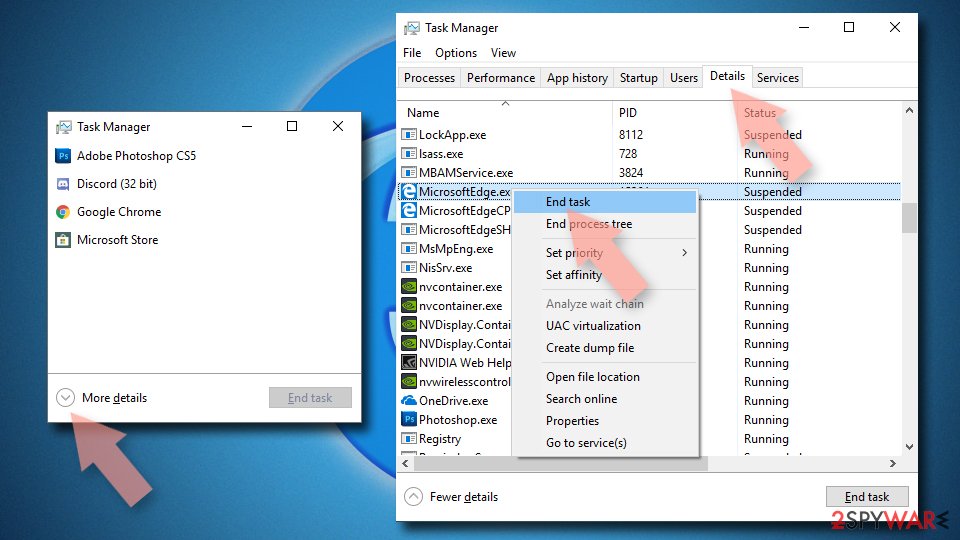

Instructions for Chromium-based Edge
Delete extensions from MS Edge (Chromium):
- Open Edge and click select Settings > Extensions.
- Delete unwanted extensions by clicking Remove.
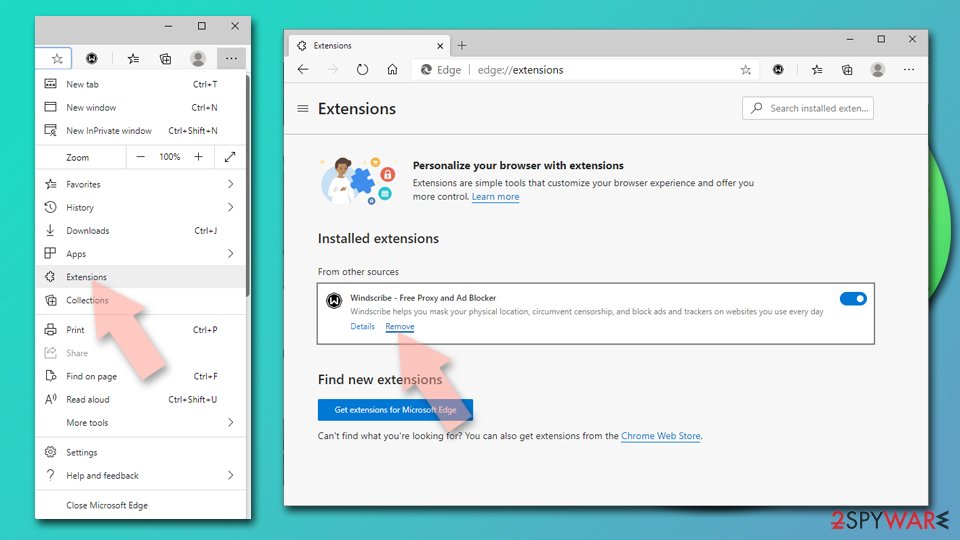

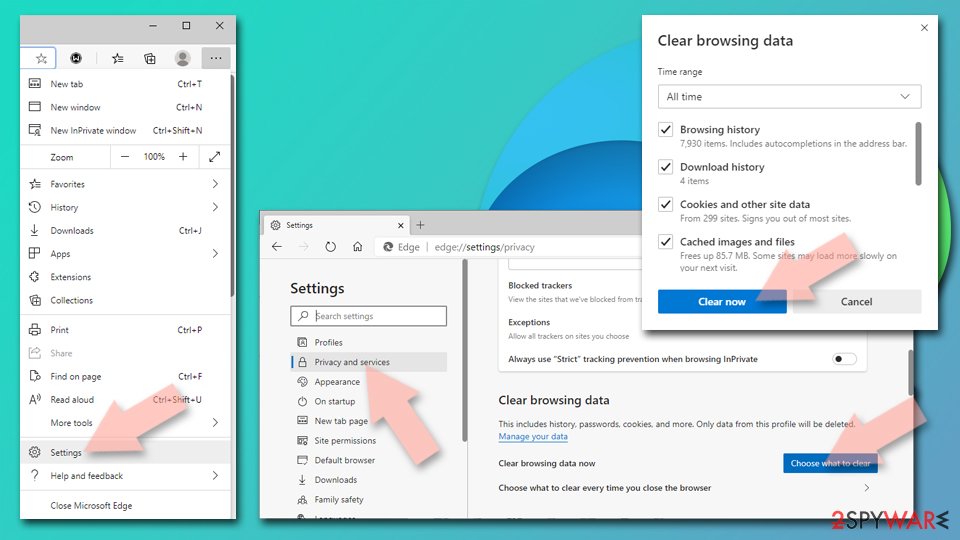
Clear cache and site data:
- Click on Menu and go to Settings.
- Select Privacy, search and services.
- Under Clear browsing data, pick Choose what to clear.
- Under Time range, pick All time.
- Select Clear now.

Reset Chromium-based MS Edge:
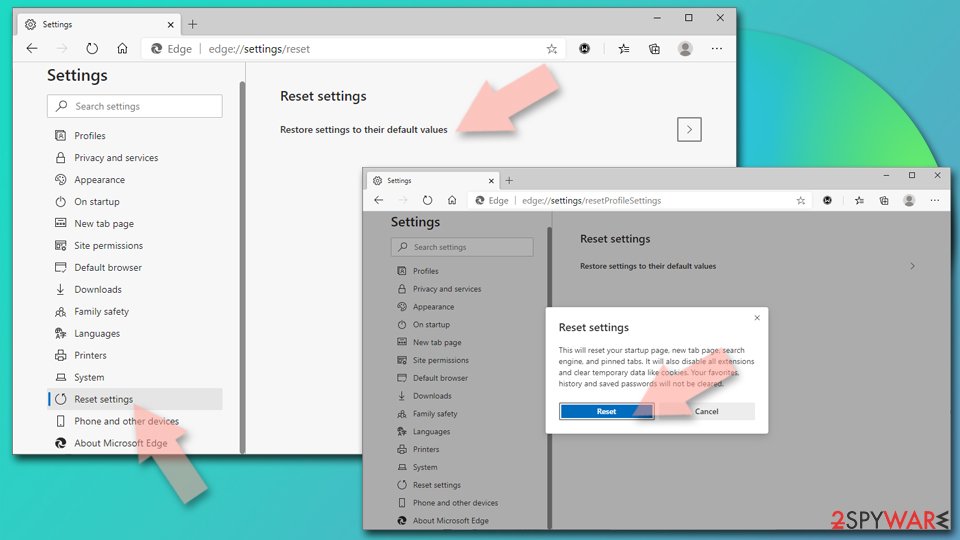
- Click on Menu and select Settings.
- On the left side, pick Reset settings.
- Select Restore settings to their default values.
- Confirm with Reset.
- This will disable extensions and reset startup pages but will not delete bookmarks, saved passwords, or browsing history.

Remove from Mozilla Firefox (FF)
Remove dangerous extensions:
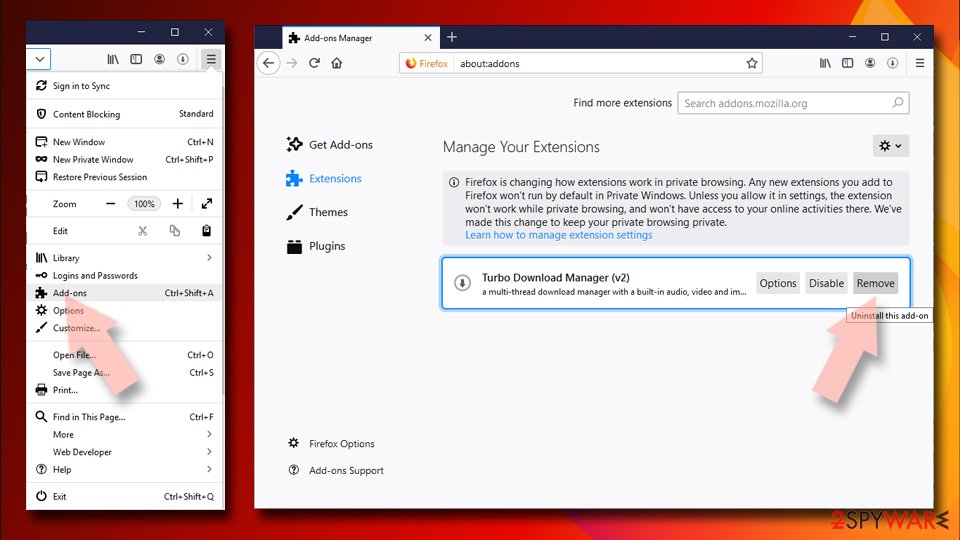
- Open Mozilla Firefox browser and click on the Menu (three horizontal lines at the top-right of the window).
- Select Add-ons.
- In here, select the unwanted extension and click Remove.

Reset the homepage:
- Click three horizontal lines at the top right corner to open the menu.
- Choose Settings.
- Under Home, set your preferred homepage and new tab settings.
Clear cookies and site data:
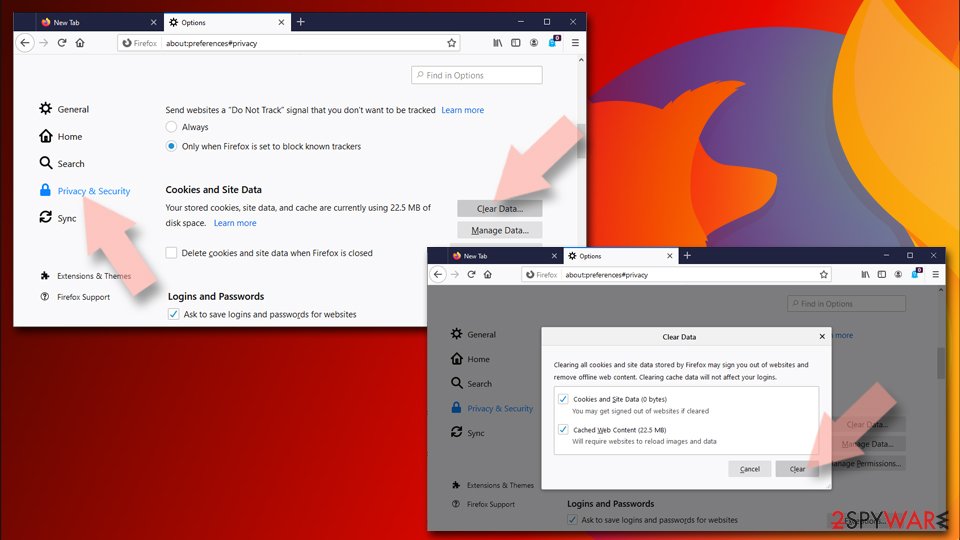
- Click Menu and pick Settings.
- Go to Privacy & Security section.
- Scroll down to locate Cookies and Site Data.
- Click on Clear Data...
- Select Cookies and Site Data and Temporary cached files and pages, then click Clear.

Reset Mozilla Firefox
If clearing the browser as explained above did not help, reset Mozilla Firefox:
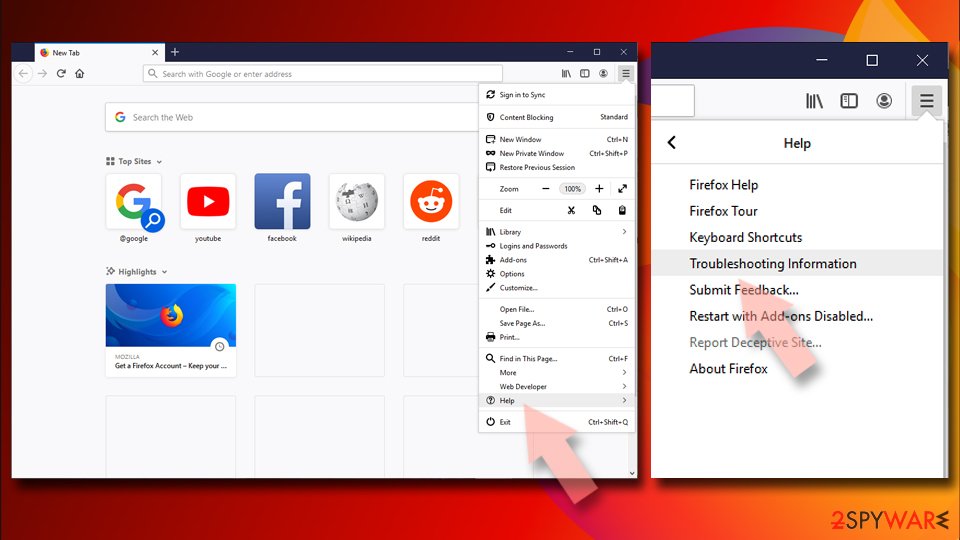
- Open Mozilla Firefox browser and click the Menu.
- Go to Help and then choose Troubleshooting Information.
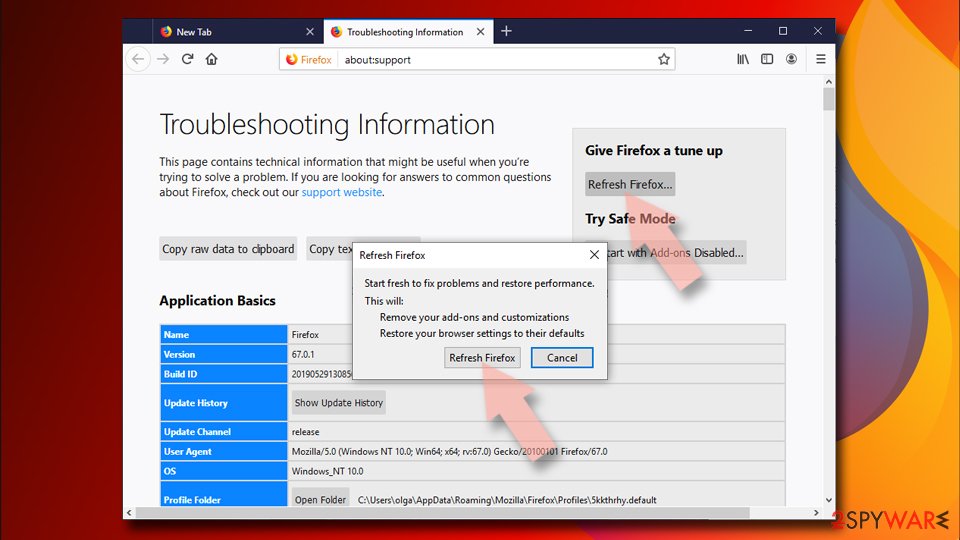
- Under Give Firefox a tune up section, click on Refresh Firefox...
- Once the pop-up shows up, confirm the action by pressing on Refresh Firefox.


Remove from Google Chrome
Delete malicious extensions from Google Chrome:
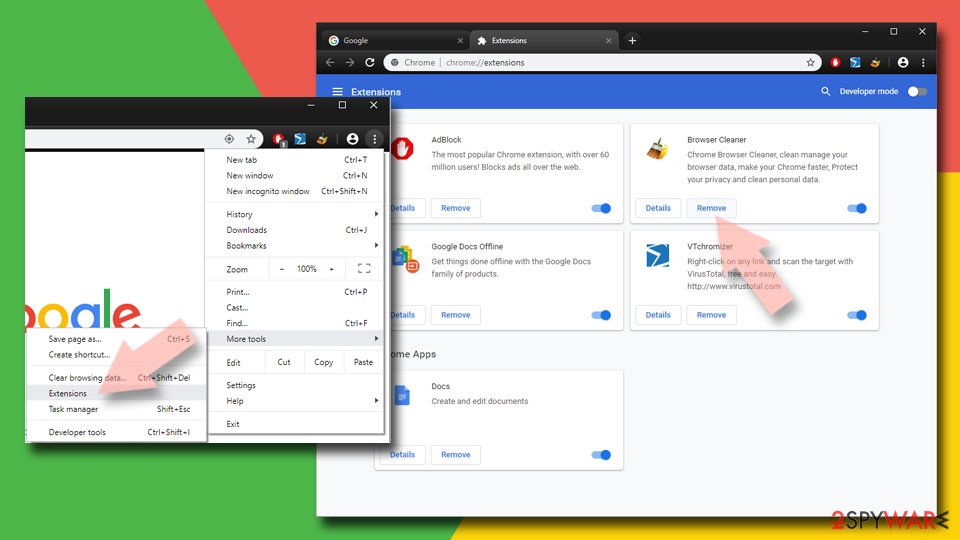
- Open Google Chrome, click on the Menu (three vertical dots at the top-right corner) and select More tools > Extensions.
- In the newly opened window, you will see all the installed extensions. Uninstall all suspicious extensions related to the unwanted program by clicking Remove.
Clear cache and web data from Chrome:
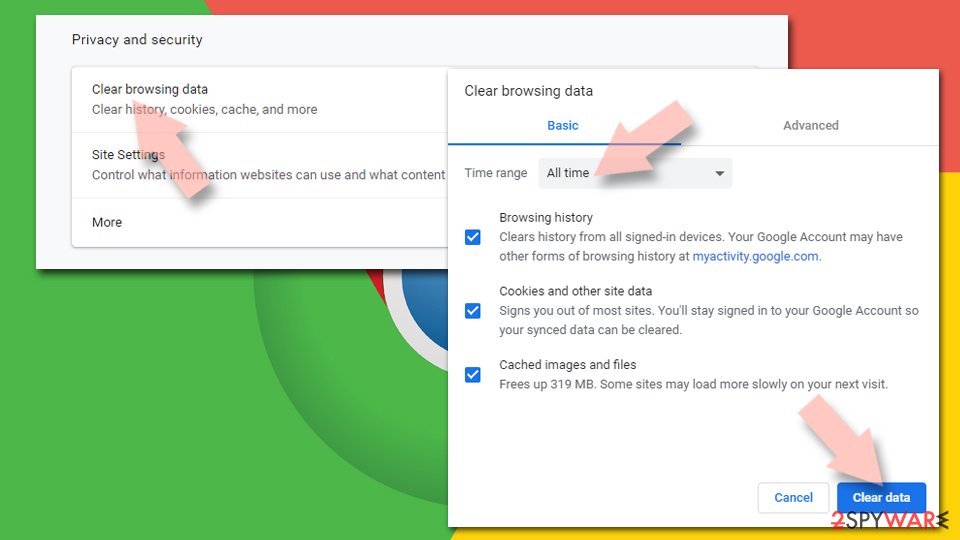
- Click on Menu and pick Settings.
- Under Privacy and security, select Clear browsing data.
- Select Browsing history, Cookies and other site data, as well as Cached images and files.
- Click Clear data.

Change your homepage:
- Click menu and choose Settings.
- Look for a suspicious site in the On startup section.
- Click on Open a specific or set of pages and click on three dots to find the Remove option.
Reset Google Chrome:
If the previous methods did not help you, reset Google Chrome to eliminate all the unwanted components:
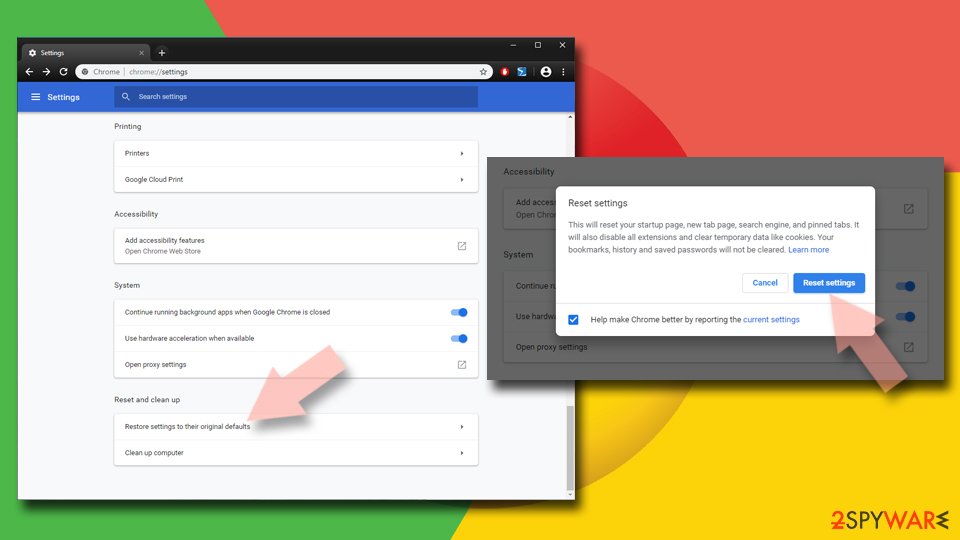
- Click on Menu and select Settings.
- In the Settings, scroll down and click Advanced.
- Scroll down and locate Reset and clean up section.
- Now click Restore settings to their original defaults.
- Confirm with Reset settings.

Did this guide help?
Be the first to comment