

XP Security 2012 – malicious program designed to scam innocent users

XP Security 2012 is a fake security program that pretends to be a malware removal tool. This rogue anti-spyware usually comes unnoticeably without any permission asked, so if you find it on your computer, you are most likely to have got it through a Trojan.
These Trojans not only install this fake anti-spyware thing but also change the Registry and drop fake random files, which later are detected by the program. The main goal of XP Security 2012 is to make users believe that their systems are badly infected and need to be fixed; allegedly, the only way to do that is by purchasing the full version of the app.
| Name | XP Security 2012 |
| Type | Fake anti-virus, scamware |
| Distribution | Trojans, software bundles, fake scanners on random websites |
| Dangers | Financial losses, installation of other malware, personal data disclosure to cybercriminals |
| Elimination | Perform a full system scan with a legitimate antivirus program such as SpyHunterCombo Cleaner |
| System fix | Malware modifies Windows OS in order to perform its malicious tasks. In order to fix damage done to the system files, you can either start a Windows reinstall or employ FortectIntego to do it for you automatically |
Security experts reported that when installed on different OS, XP Security 2012 appears in a different name, though the malware code stays the same. So, when using Win 7 Antispyware name, the trial version of this parasite infects only Windows XP OS.
Installed without any knowledge and consent, the program firstly applies the tactics typical for this type of malware. It usually triggers fabricated general system scans that return the results, which can be easily predetermined. Don’t get surprised after being informed that various threats of different severity are detected, please ignore such alerts:
Stealth intrusion!
Infection detected in the background. Your computer is now attacked by spyware and rogue software. Eliminate the infection safely, perform a security scan and deletion now.
XP Security 2012 Alert
Security Hole Detected!
A program is trying to exploit Windows security holes! Passwords and sensitive data may be stolen. Do you want to block this attack?
The virus also generates fake positives that report infections that are expected to make you doubt about your PC security. Keep in mind that clicking on any pop-up ad will automatically get you into the fake “official” website. These sites must be avoided because they only aggressively promote their “full” commercial version.
Don’t buy this scamware because you will only support the scammers. Having XP Security 2012 “licensed” version is useless because it will lead you to find your computer dramatically slow and vulnerable to other viruses.
To sum up, it must be clear that this malware must be removed as soon as possible, so please, don’t waste any minute and delete this scam. Also, you can use one of these codes to register the program and stop the annoying notifications:
3425-814615-3990, 2233-298080-3424 or 9443-077673-5028
Once activated, it won't block web browsers and anti-spyware software, so download SpyHunterCombo Cleaner or another reputable app and perform a full system scan.
Delete all malicious programs from your system at once
You should not keep any rogue applications installed on your machine. Not only do such programs fail to protect you from real infections, but they initiate malicious changes on the system, sometimes disabling vital Windows components such as the Task Manager or the registry editor.
To remove unwanted applications, you should access Control Panel and uninstall problematic software. If you have never done that, check the instructions below. You should also perform a full system scan with a reputable antivirus program to remove all the virus leftovers. Resetting or cleaning web browsers is also something you should consider doing.
Uninstall from Windows
Uninstall from Windows 10/8:
- Type Control Panel into the Windows search box and open the result.
- Under Programs, select Uninstall a program.


Uninstall from Windows 7/XP:
- Click on Windows Start > Control Panel (Windows XP users should click on Add/Remove Programs).
- In Control Panel, select Programs > Uninstall a program.


Remove the unwanted program:
- In the Programs and Features window, look for any recently installed suspicious entries, select them, and click Uninstall.
- If User Account Control appears, click Yes to confirm, then complete the removal.


Remove from Microsoft Edge
Delete unwanted extensions from MS Edge:
- Select Menu (three horizontal dots at the top-right of the browser window) and pick Extensions.
- From the list, pick the extension and click on the Gear icon.
- Click Remove.
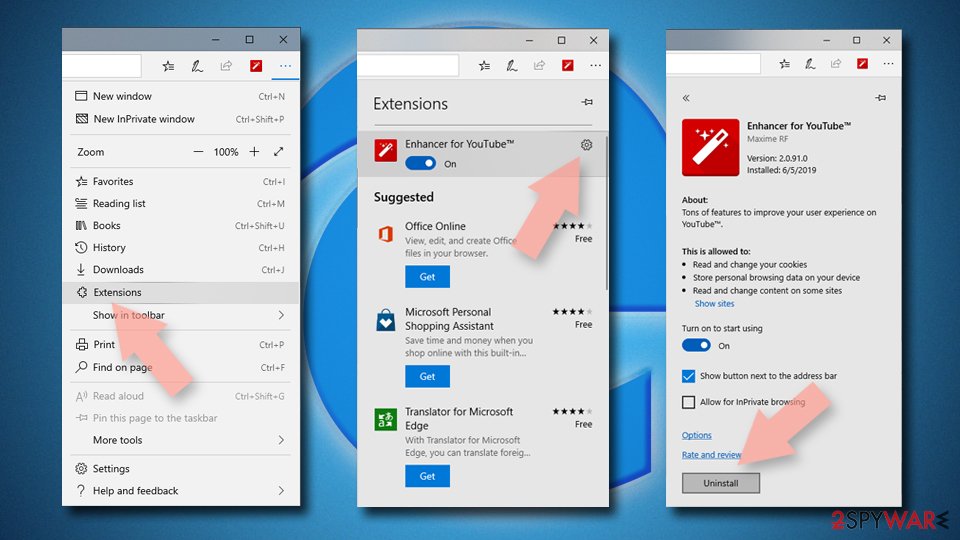

Clear cookies and other browser data:
- Click on the Menu (three horizontal dots at the top-right of the browser window) and select Settings > Privacy, search, and services..
- Under Clear browsing data, pick Choose what to clear.
- Select Cookies and other site data and Cached images and files. (apart from passwords, although you might want to include Media licenses as well, if applicable) and click on Clear.
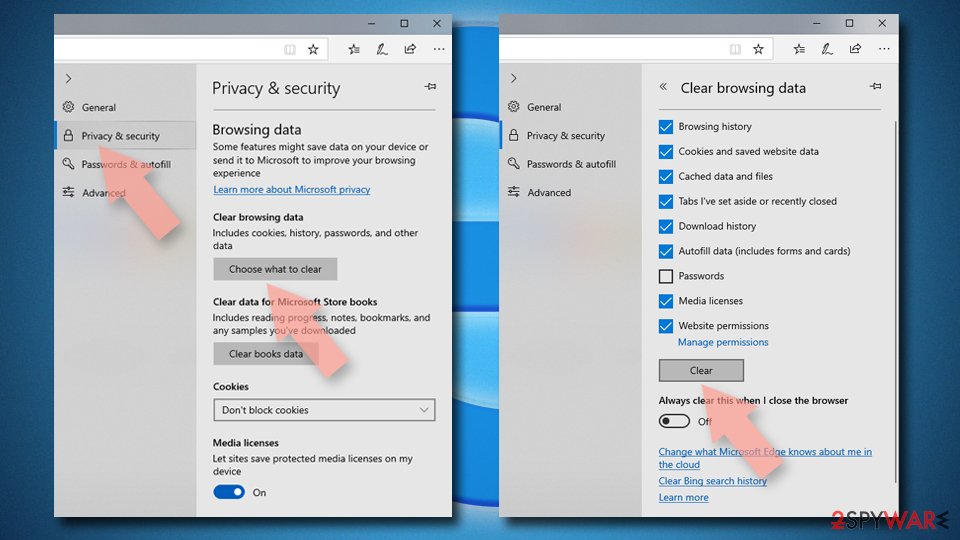

Restore new tab and homepage settings:
- Click the menu icon and choose Settings.
- Then find On startup section.
- Click Remove next to any suspicious startup page.
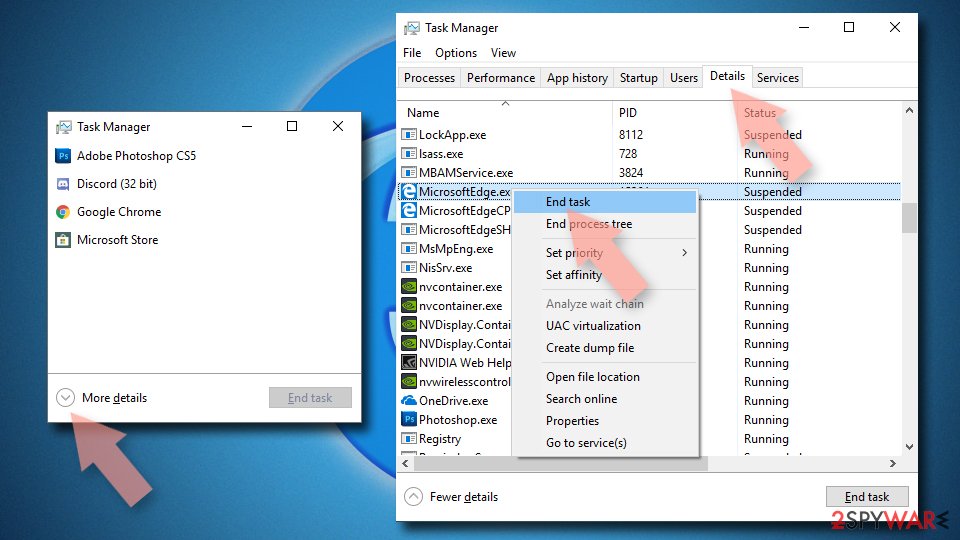
Reset MS Edge if the above steps did not work:
- Press on Ctrl + Shift + Esc to open Task Manager.
- Click on More details arrow at the bottom of the window.
- Select Details tab.
- Now scroll down and locate every entry with Microsoft Edge name in it. Right-click on each of them and select End Task to stop MS Edge from running.

Instructions for Chromium-based Edge
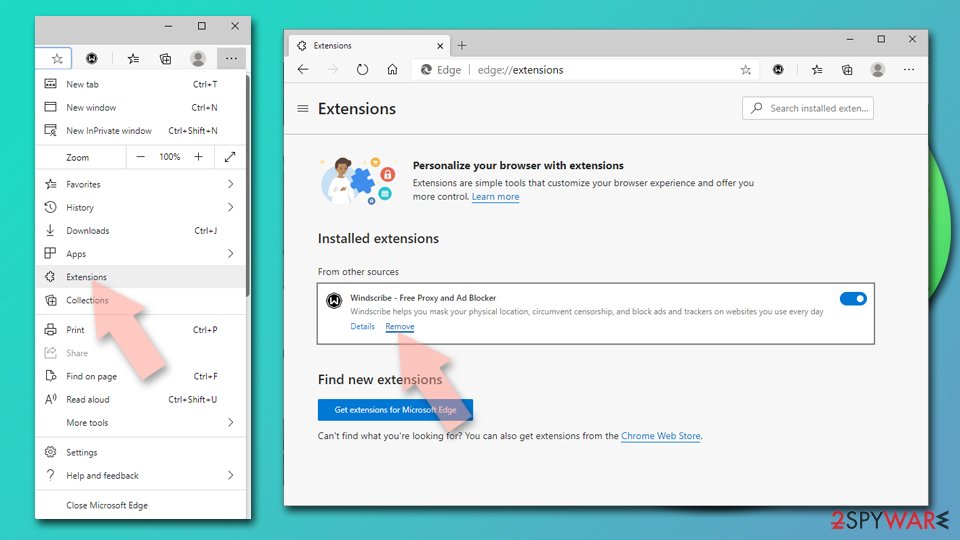
Delete extensions from MS Edge (Chromium):
- Open Edge and click select Settings > Extensions.
- Delete unwanted extensions by clicking Remove.

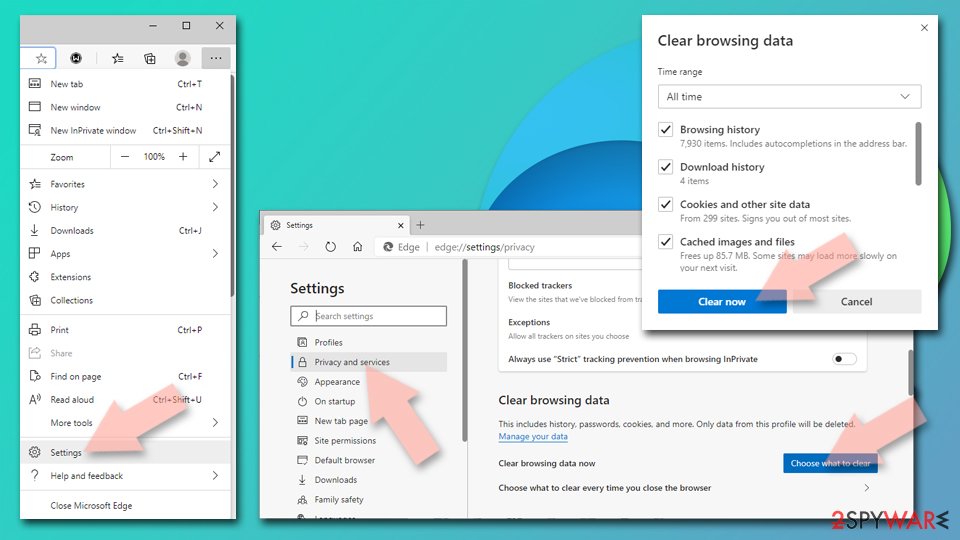
Clear cache and site data:
- Click on Menu and go to Settings.
- Select Privacy, search and services.
- Under Clear browsing data, pick Choose what to clear.
- Under Time range, pick All time.
- Select Clear now.

Reset Chromium-based MS Edge:
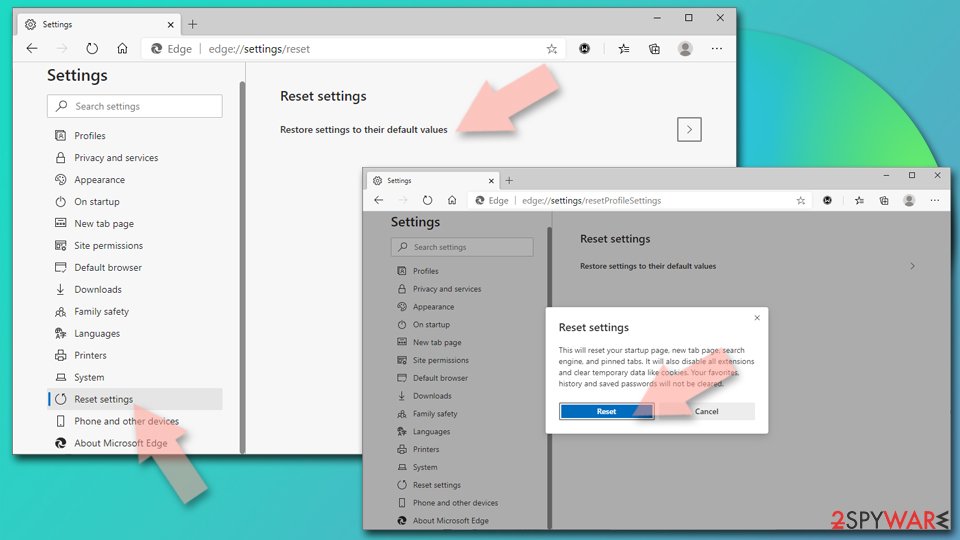
- Click on Menu and select Settings.
- On the left side, pick Reset settings.
- Select Restore settings to their default values.
- Confirm with Reset.
- This will disable extensions and reset startup pages but will not delete bookmarks, saved passwords, or browsing history.

Remove from Mozilla Firefox (FF)
Remove dangerous extensions:
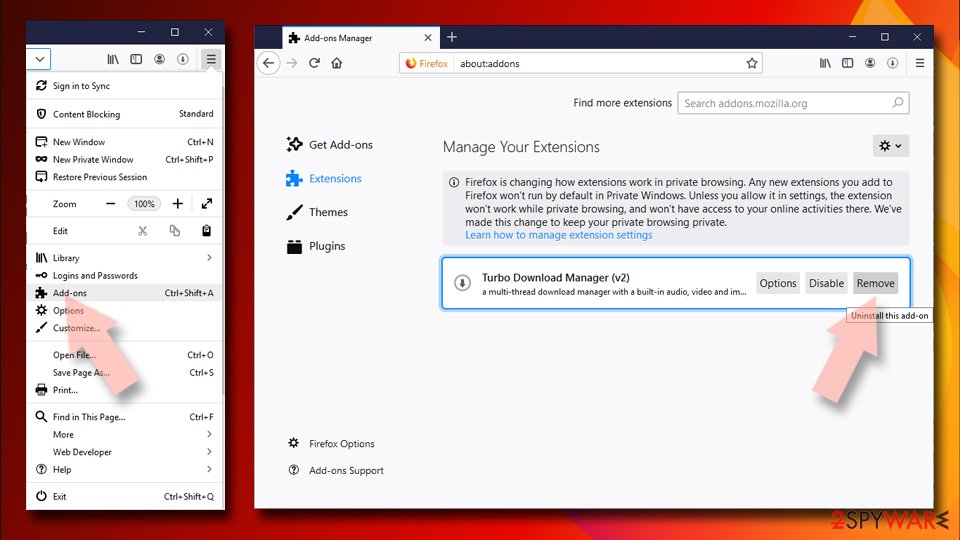
- Open Mozilla Firefox browser and click on the Menu (three horizontal lines at the top-right of the window).
- Select Add-ons.
- In here, select the unwanted extension and click Remove.

Reset the homepage:
- Click three horizontal lines at the top right corner to open the menu.
- Choose Settings.
- Under Home, set your preferred homepage and new tab settings.
Clear cookies and site data:
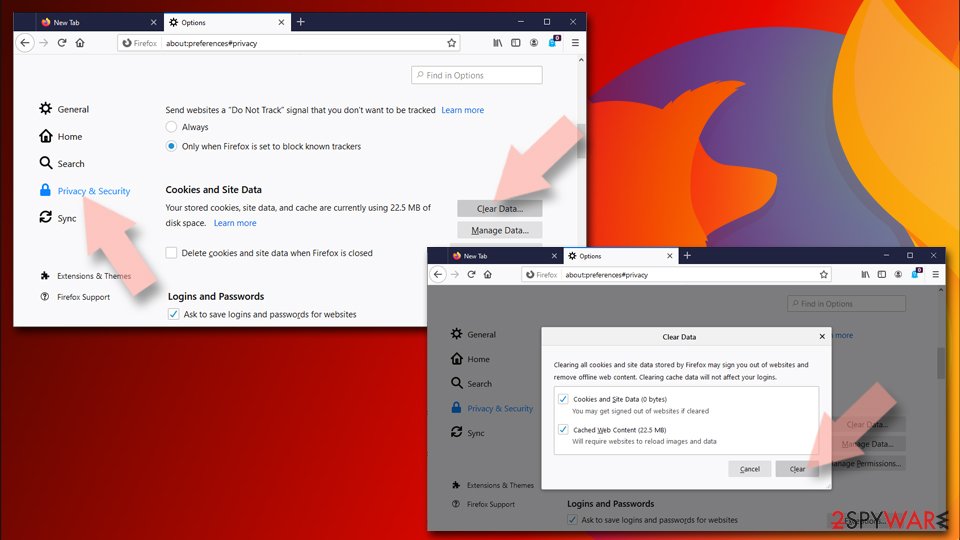
- Click Menu and pick Settings.
- Go to Privacy & Security section.
- Scroll down to locate Cookies and Site Data.
- Click on Clear Data...
- Select Cookies and Site Data and Temporary cached files and pages, then click Clear.

Reset Mozilla Firefox
If clearing the browser as explained above did not help, reset Mozilla Firefox:
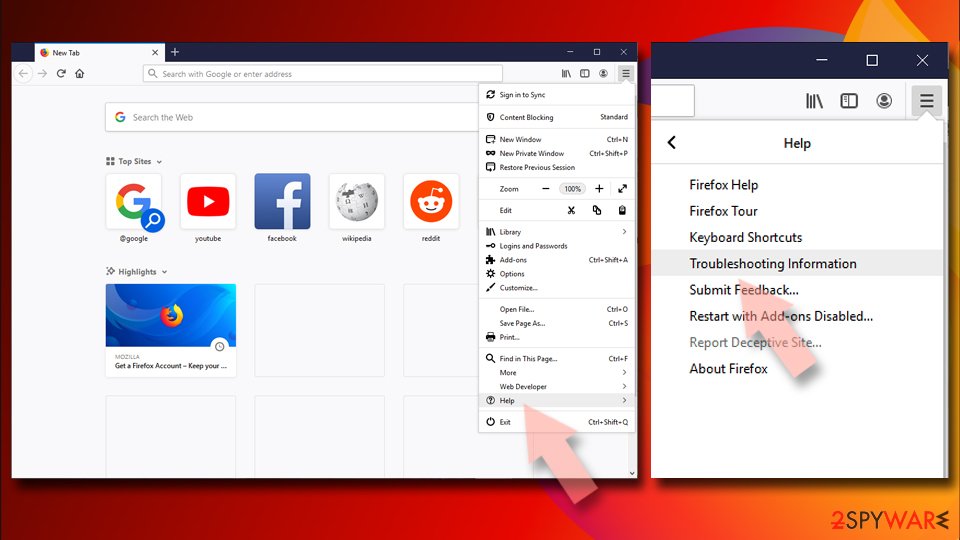
- Open Mozilla Firefox browser and click the Menu.
- Go to Help and then choose Troubleshooting Information.
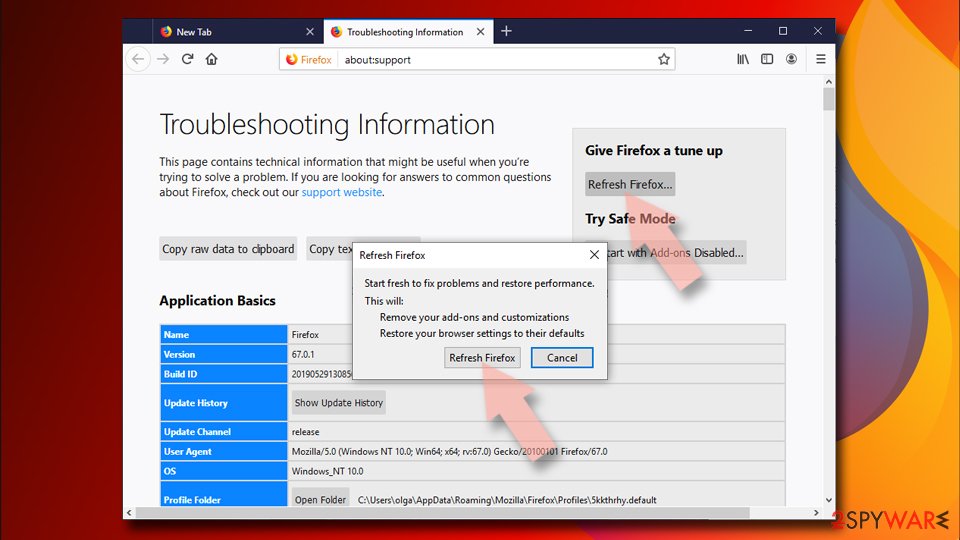
- Under Give Firefox a tune up section, click on Refresh Firefox...
- Once the pop-up shows up, confirm the action by pressing on Refresh Firefox.


Remove from Google Chrome
Delete malicious extensions from Google Chrome:
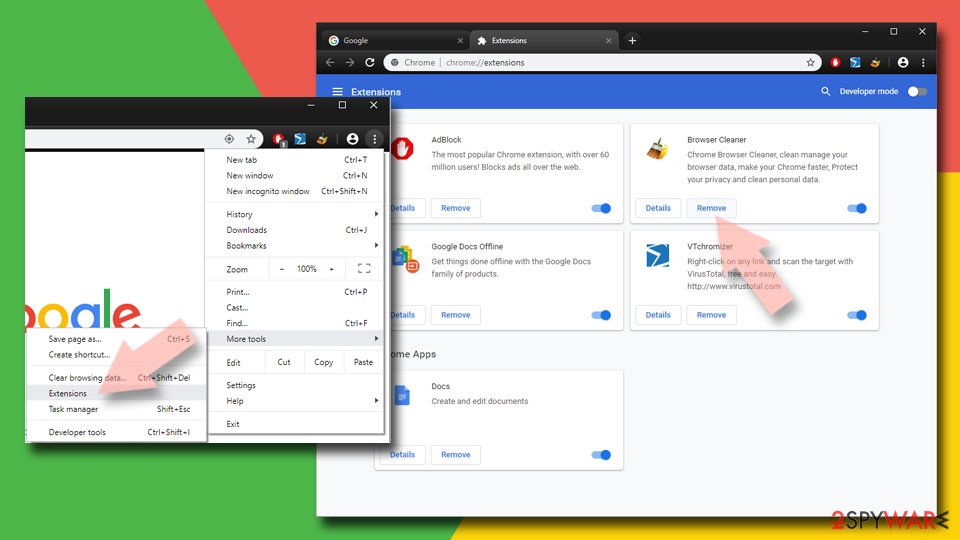
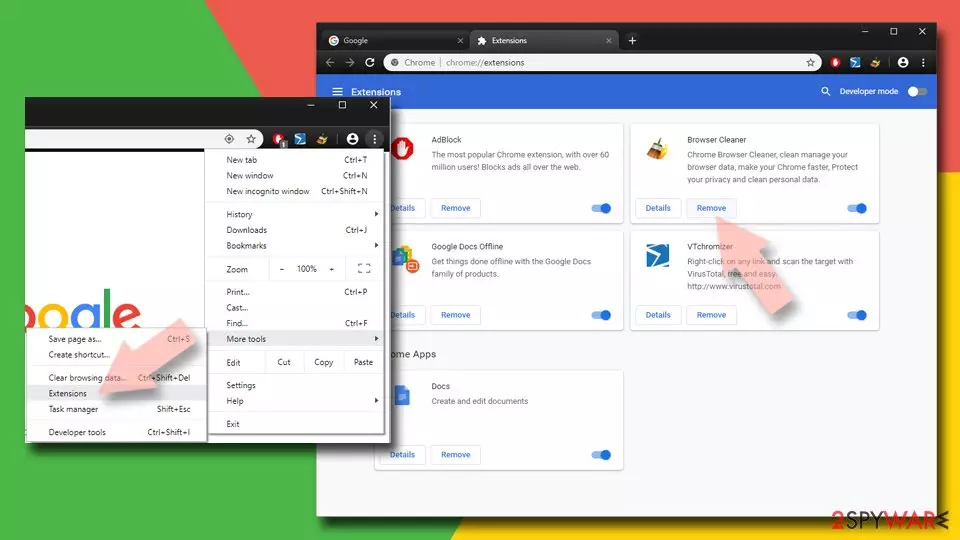
- Open Google Chrome, click on the Menu (three vertical dots at the top-right corner) and select More tools > Extensions.
- In the newly opened window, you will see all the installed extensions. Uninstall all suspicious extensions related to the unwanted program by clicking Remove.
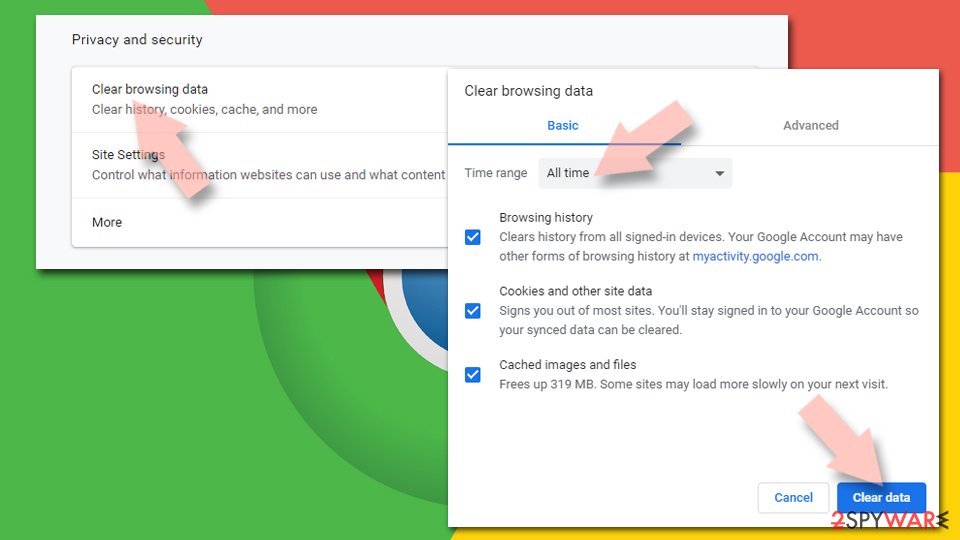
Clear cache and web data from Chrome:
- Click on Menu and pick Settings.
- Under Privacy and security, select Clear browsing data.
- Select Browsing history, Cookies and other site data, as well as Cached images and files.
- Click Clear data.

Change your homepage:
- Click menu and choose Settings.
- Look for a suspicious site in the On startup section.
- Click on Open a specific or set of pages and click on three dots to find the Remove option.
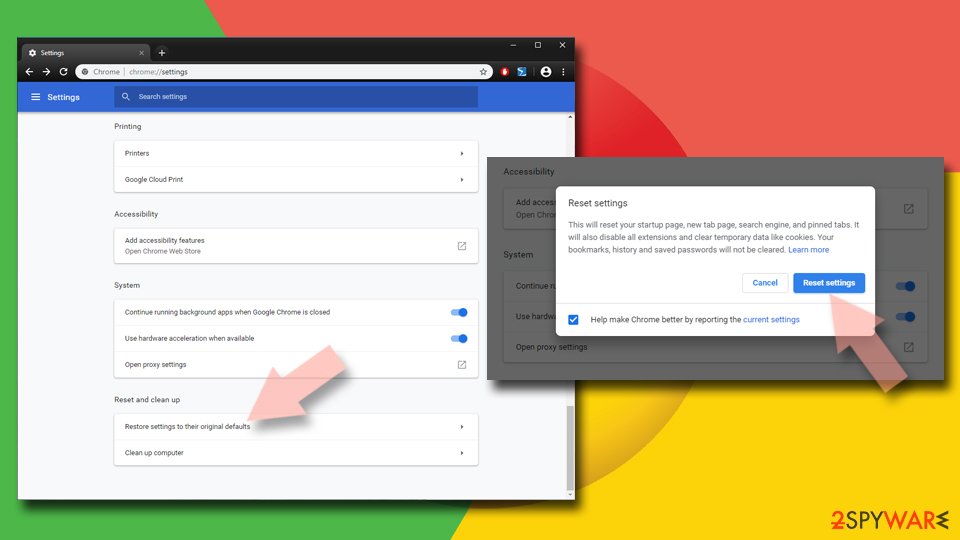
Reset Google Chrome:
If the previous methods did not help you, reset Google Chrome to eliminate all the unwanted components:
- Click on Menu and select Settings.
- In the Settings, scroll down and click Advanced.
- Scroll down and locate Reset and clean up section.
- Now click Restore settings to their original defaults.
- Confirm with Reset settings.

Delete from Safari
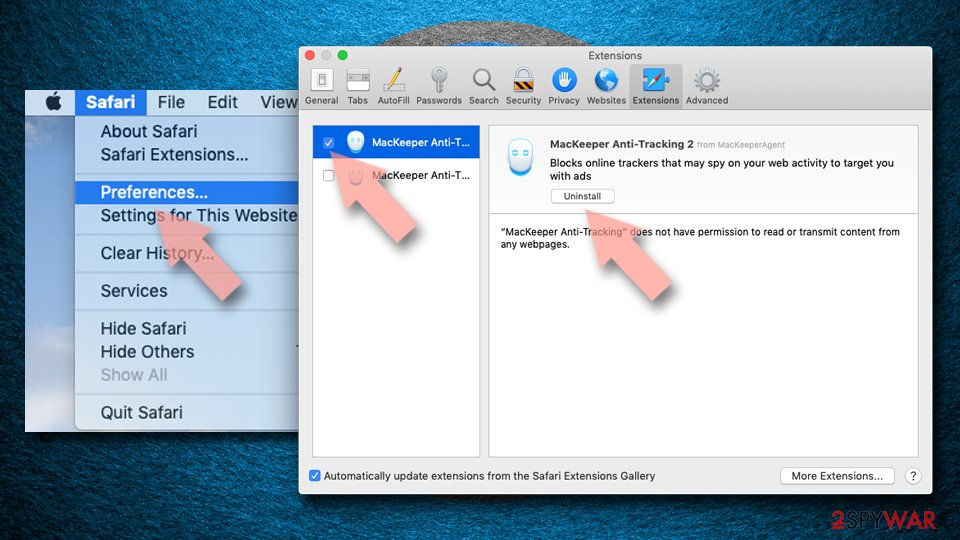
Remove dangerous extensions:
- Open Safari, click Safari in the menu at the top-left of the screen, and select Preferences.
- Go to the Extensions tab, look for any suspicious entries, and click Uninstall to remove them.

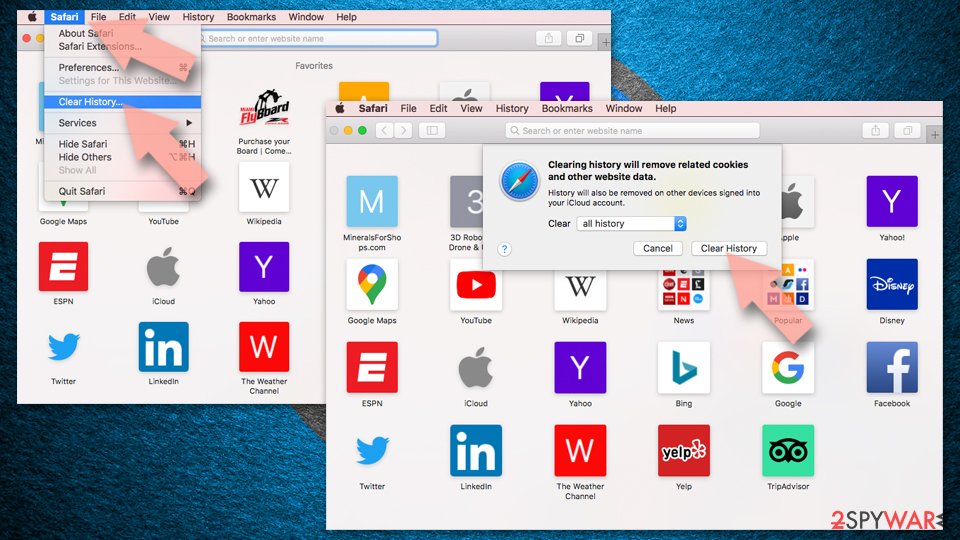
Clear history and website data:
- Click Safari in the menu and pick Clear History.
- Set Clear to all history and confirm with Clear History.

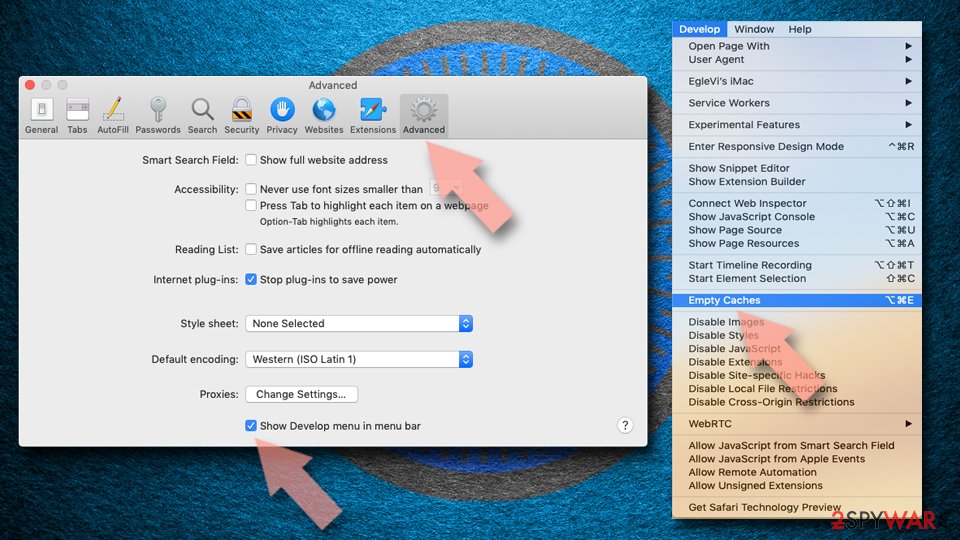
Reset Safari:
- Click Safari in the menu and select Preferences > Advanced.
- Enable Show Develop menu in menu bar.
- From the menu bar, click Develop and select Empty Caches.

Did this guide help?
Be the first to comment