

Godra – ransomware that targets Croatian computer users
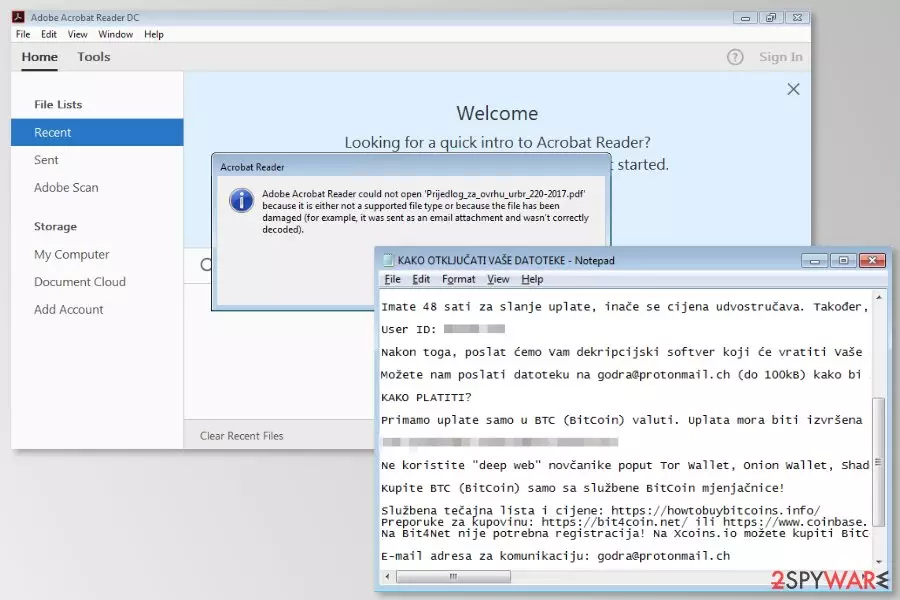
Godra is a file-encrypting virus that has been noticed spreading in Croatia,[1] in December 2017. Malware affects Windows x64 systems and uses AES cryptography to corrupt files on the targeted device. After the attack, all data is locked with .godra file extension.
Following data encryption, Godra ransomware drops two files on the affected device:
- KAKO OTKLJUČATI Vaše DATOTEKE.txt
- KAKO OTKLJUČATI Vaše DATOTEKE.log
The .log file is responsible for delivering a pop-up notification that informs about data encryption and asks to send an email to godra@protonmail.com. Meanwhile, the .txt file includes a detailed explanation that users have to transfer 2.000 euros in 48 hours to restore files encrypted by Godra virus.
Data recovery instructions also include the link to the Bitcoin wallet address where victims are supposed to send ransoms and unique ID number. Once people make a transaction, they are asked to contact developers of Godra and provide their identification number via mentioned email address.
However, if victims do not pay in two days, the size of the ransom will double. If crooks do not receive the payment within 72 hours, they will delete encrypted files, says the ransom note. In order to give victims guarantee that Godra decryptor exists, criminals allow sending one file (up to 100 KB) for a free decryption.
However, security experts suggest not following these instructions because it may lead not only to data loss but money loss as well. Once you transfer the ransom, crooks might disappear and use your money for further cyber crimes. Instead of risking to increase the damage, you should remove Godra from the PC.
After the attack, you should restart your computer to Safe Mode with Networking and run a full system scan with malware removal software. The reputable program such as FortectIntego can perform Godra removal quickly.

Ransomware spread via malicious emails that pretend to be sent from well-known company Fina
Malware payload spreads as Prijedlog_za_ovrhu_urbr_220-2017.pdf file which is attached to the malicious email. The subject line of these emails are “Elektronička obavijest o pokretanju ovršnog postupka,” (translation to English: “Electronic Notice of Enforcement of Enforcement Procedure”) and they look like sent from Croatian Financial Agency (FINA).
The company released an official statement on their website[2] warning users and customers to be careful. All their sent emails have a domain name fina.hr. Thus, any other endings of the emails are sent by cyber criminals.
However, users who open a malicious attachment, receive a notification from Adobe Acrobat Reader that it is unable to open this file. But opening this file is enough for ransomware to infiltrate the system.
Therefore, Croatian computer users should be cautious and do not rush to click attached .pdf file without checking if it was really sent from the legitimate company. The main signs of the malicious email are:[3]
- grammar or spelling mistakes,
- lack of credentials,
- suspicious email address,
- you do not use FINA's services.
Therefore, before opening an email attachment, you have to check information about the sender online and make sure that it’s actually safe to open.
Elimination of the Godra ransomware virus
To remove Godra from the device, you have to obtain reputable malware removal software. Trying to locate and delete ransomware-related components might lead to irreparable damage to the system. Thus, you have to use automatic virus removal tools.
We recommend FortectIntego or MalwarebytesMalwarebytes for Godra removal. However, feel free to use your preferred software as well. However, don’t forget to update it before running a system scan! Additionally, if malware prevents from installing or running security tool, follow the guide below.
Did this guide help?
Be the first to comment