

BlackHeart – new ransomware virus relying on AES cryptography
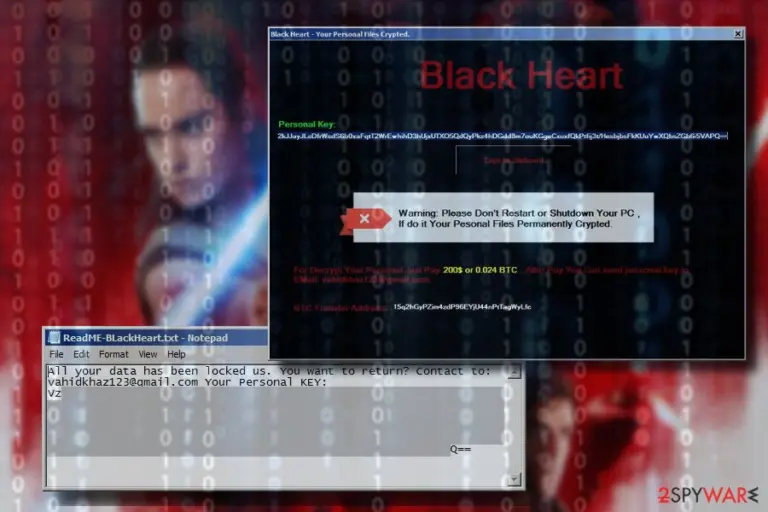
BlackHeart is yet another crypto-ransomware virus[1] that has been detected at the end of April 2018. Also known as BlackRouter, the crypto-extortionist spreads as SF.exe, TR.exe or BLACKROUTER.EXE file and locks personal data using AES cryptography. It is easy to recognize this virus by the .BlackRouter or .pay2me extension it appends at the end of the filename following the encryption. Those who are infected with BlackHeart ransomware receive the ReadME-BLackHeart.txt file, which demands to contact to vahidkhazl23@qmail.com for further instructions.
| Name | BlackHeart |
|---|---|
| Also known as | BlackRouter |
| Classification | Ransomware |
| Danger level |
High. Encrypts personal files and demands for a redemption. Corrupts system's settings |
| File extension used | .BlackRouter or .pay2me |
| Contact email | vahidkhazl23@qmail.com |
| Related files | SF.exe, TR.exe, BLACKROUTER.EXE, aut3.tmp, aut4.tmp, aut5.tmp, jrw.gif |
| Distribution | Spam email attachments, unprotected Remote Desktop Services, fake software updates, phishing sites, etc. |
| Download FortectIntego and run a full system scan to eliminate BlackHeart ransomware | |
The BlackHeart or BlackRouter virus has been revealed by ransomware researchers after detection of SF.exe, TR.exe or BLACKROUTER.EXE files. In-Depth analysis showed all of them to be malicious files carrying ransomware payload. Usually, these files can be found disguised under malicious spam email attachments or fake software update installers, though sometimes that can be installed on PCs using brute-forcing technique and RDP exploitation.
Following the installation, the BlackHeart ransomware targets pictures, photos, documents, videos, etc. and encrypts them using AEC cipher. Each locked file is marked with .BlackRouter or .pay2me file extension, which cannot be removed or changed manually.
The victim can also find a ReadME-BLackHeart.txt file, which stands for a ransom note. It does not contain much information on what has happened to data on the PC or how the payment is expected to be made. It only states:
All your data has been locked us. You want to return? Contact to:
vahidkhazl23@qmail.com Your Personal key:
Vz**********************************************q==
In case the owner of the infected PC opts for a personal ID that is supposed to unlock files, he or she has to send an email to vahidkhazl23@qmail.com for payment instructions. According to experts, crooks ask to pay the ransom[2] that ranges from $300 to $500 in Bitcoins.
However, we do not recommend sending money to crooks. Instead, perform BlackHeart removal immediately using a professional anti-virus, such as FortectIntego, SpyHunterCombo Cleaner or MalwarebytesMalwarebytes. Otherwise, criminals can trick you into giving away your money for another malicious software instead of BlackHeart decryptor.
Do not try to remove BlackHeart virus manually because that's practically impossible. It installs a package of malicious files (aut3.tmp, aut4.tmp, aut5.tmp, jrw.gif, SF.exe, TR.exe, etc.) on \ User_folders \, \ Temp \, \ AppData \ Local \, and other system's folders to evade removal. Therefore, you need a professional anti-virus to immunize all BlackHeart ransomware components.
Upon virus elimination, try to decrypt files locked by .BlackRouter file extension virus with the help of third-party data recovery tools or other alternative methods that we've listed at the end of this article.

Most common ransomware virus distribution techniques
Most frequently ransomware-type viruses are spread via malicious spam emails. This distribution technique is practiced for more than a decade and is employed by criminals to disseminate virus as widely as possible.
Zondervirus.nl[3] team points out that malicious spam emails typically contain a .doc, .pdf, .docx, .png, and similar attachment. It may contain body text or not, but usually, the victim is being tricked into opening the attachment in disguise of authorities or well-known companies. Therefore, it's essential not to open attachments before verifying if it contains grammar/typo or spelling mistakes, as well as the sender, Subject, and other relevant information that may turn out to be suspicious.
In addition to spam, ransomware may be disseminated via unprotected Remote Desktop Services. Hackers may easily exploit PCs connected to RDS directly to the Internet and inject malicious files using the brute-forcing attack. Finally, don't forget the existence of fake software updates, phishing websites, and other means that are used for spreading the virus.
Learn how to get rid of BlackHeart virus
The most important thing is not to remove BlackHeart virus alone. An attempt to eliminate it manually can end up with a severe system's crash and permanent data loss. To get rid of this cyber infection, use a professional software removal tool, say FortectIntego.
Upon complete BlackHeart removal, you can begin to file decryption procedure. You can find all recommended methods down below.
Did this guide help?
Be the first to comment