

Google has found a serious virus on your Android system is a fake message that is shown to Android phone and tablet users that are infected with adware

Google has found a serious virus on your Android system is a fake alert that might appear as a pop-up message when browsing on Google Chrome, Mozilla Firefox, Opera, UC Browser, and others. If you encountered the message for the first time and your Android phone or tablet does not show any other annoying/suspicious symptoms – you simply landed on a malicious site, and you should leave it immediately.
However, most users who see Google has found a serious virus on your Android system virus on their devices continuously are most likely infected with adware[1] which is typically installed from third-party sites instead of Google Play or other legitimate sources. In such a case, you will notice the fake message being shown persistently, no matter which sites you enter.
The goal of Google has found a serious virus on your Android system scam is to make you download a rogue antispyware tool that will spam you with more ads, urge you to buy its full version and bring you to more malicious websites. Therefore, do not believe the fake pop-up, close down your browser and remove Google has found a serious virus on your Android system by terminating adware from your device.
| Name | Google has found a serious virus on your Android system |
| Type | Adware, Scam |
| Category | Android virus |
| Targeted systems | Android OS |
| Infection means | Third-party sites, malicious ads |
| Symptoms | Redirects to scam sites, pop-up ads, slow operation of the device |
| Risks | Installation of other PUPs, malware infection, money loss |
| Termination | Use anti-malware software such as FortectIntego or check our manual removal guide below |
As soon as you get redirected to a malicious site, you will see the following message:
Your Android is in grave danger!
Google has found a serious virus on your Android system! If you do not upgrade to the latest applications, personal photos, passwords and credit card information is at risk, and can cause system to crash.
Model: Generic Android 2.0
Risk Level: 5/5
How to upgrade?
Step 1: Click the button to download the application
Step 2: Open the application to start the upgrade
While Google has found a serious virus on your Android system might seem like an evident scam message, less savvy computer users might believe it is legitimate, as it poses as the reputable IT giant Google. Nevertheless, users should always pay attention to evident signs of deception:
- Plenty of grammar and spelling mistakes;
- The phone model is not Android, it is Samsung, Motorola, Huawei, etc.;
- Outdated applications usually do not pose a risk of losing credit card details, passwords, etc.;
- Browser or Google cannot detect malware on your device, that is what anti-virus applications are for.
Those who believe the While Google has found a serious virus on your Android system scam will download an additional potentially unwanted program, which will continuously spam users phones with other fake virus warnings and ask them to buy its full version.
Therefore, never download anything that Google has found a serious virus on your Android system messages suggests. If you encountered the message, you should not panic, as all your personal details that described in the fake pop-up are safe. Nevertheless, you should remove Google has found a serious virus on your Android system messages by terminating adware application, which is installed on your Android device.
For that, you can either use automatic tools, such as FortectIntego, or make use of our manual removal guide at the bottom of this article.

Only pick legitimate download sources for the applications for your Android phone
Google is a giant company, and it has significantly been investing in security. The Chrome web browser now warns users if they are about to enter a known malicious site, although the block does not happen instantaneously, considering the vast amount of sites created every day. For that reason, scam sites are not immediately flagged, and many users visit them before they do.
Therefore, users should only download applications from the official sources, such as Google Play, Amazon, or Samsung. Third-party site downloads might not only inject your phone with intrusive adware programs but also install malware that might actually steal your credit card details, login information, and other important data.
Despite that, Google had its own troubles when trying to avoid malicious apps from entering its store, as multiple adware apps infected millions of users.[2] Without a doubt, such applications are quickly pulled out of the store, but not before security researchers uncover the malicious nature of such dangerous programs. Therefore, you should always be careful, even if you download apps from Chrome web store or Google Play.
Stop Google has found a serious virus on your Android system fake alerts from showing up on your Android phone or tablet
As we previously mentioned, if you noticed a fake message that claims virus infection once, you should simply close down the tab or the browser it came from, as there is no danger as long as you don't download anything. However, if you did download the suggested content or you see persistent ads and redirects, you need to remove Google has found a serious virus on your Android system virus from your Android device, which is a sneaky adware application.
Here's what to do:
- Go to Settings > Apps & Notifications
- Find Google Chrome (applies to every other browser) and tap on it
- Then select Storage
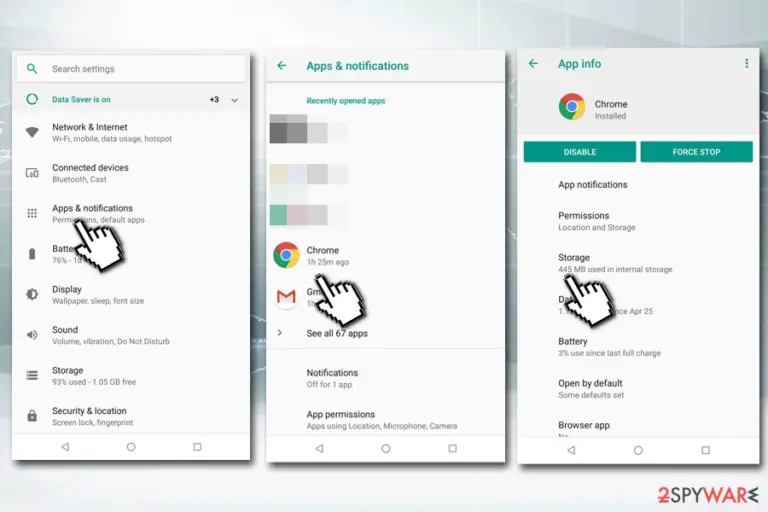
- Tap on Clear Cache
- Once done, select Manage Space or Clear Storage (depending on your phone model, these options can be named differently)
- Delete all storage data, including cookies and other locally stored data (note: if the virus does not disappear, we suggest clearing ALL data which will delete your bookmarks, saved passwords, etc.)
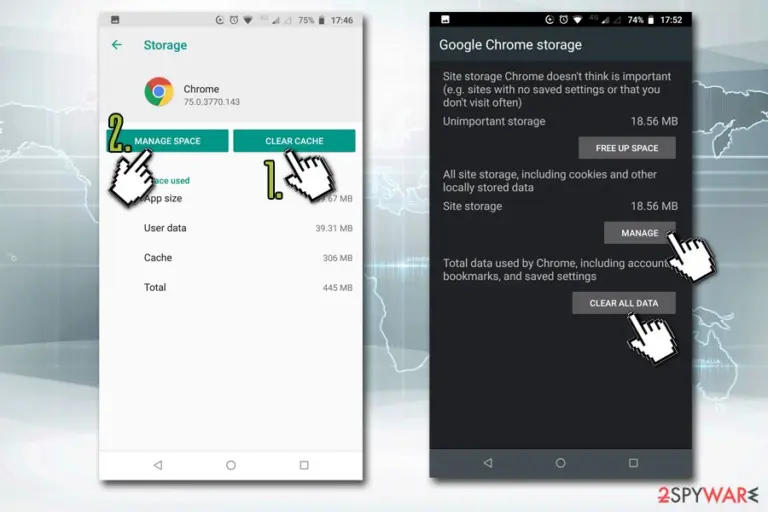


After your browser data is reset, you should go through the list of the installed applications by going to this location Settings > Apps & Notifications. If you find any suspicious apps, uninstall them.
If that does not help and Google has found a serious virus on your Android system removal was unsuccessful, experts[3] suggest you scan your device with reputable anti-malware software that can detect and eliminate all the app traces automatically.
Did this guide help?
Be the first to comment