

Red Cross Antivirus –

Red Cross Antivirus is a rogue antivirus program that reports false system security threats to make you think that your computer is infected with severe malware. Recently, this rogue program is being distributed through the use of the fake Microsoft Security Essentials Alert Trojan.
Red Cross Antivirus is a typical rogue program, just like Peak Protection 2010, Pest Detector 4.1, Major Defense Kit, or AntiSpy Safeguard. Once installed, it will pretend to scan your computer, and after that, it will list numerous infections that supposedly can delete your important files or steal your sensitive information.
Don't worry, the scan results are false. You can safely ignore them. This also applies to fake warnings and pop-ups shown by the fake security tool. Some of those fake alerts will state that your computer is under attack from a remote computer and that the RedCrossAntivirus has blocked a remote login attempt to your computer. Please don't purchase this bogus program. Instead, remove it either manually or automatically.
| name | Red Cross Antivirus |
|---|---|
| Type | Fake security software, rogue antispyware |
| Purpose | Deceive users into thinking their computers are infected with malware to sell its paid version |
| Risks | Money loss, real malware infections |
| Distribution | Fake online virus scanners, software bundles, deceptive ads |
| Elimination | Scan the computer with proper security software to remove this parasite |
| System fix | With PC tune-up tools like the FortectIntego app, you can restore any damages caused by cyber infections |
While Red Cross Antivirus is running, it will also block legitimate programs and security-related websites, including 2-spyware.com. It will probably block Task Manager and Registry Editor too. Also, note that you shouldn't use system restore to remove this virus.
Of course, it might be an option, but usually, rogue programs infect system restore points as well. If you find that your computer is infected with Red Cross Antivirus malware, please uninstall it from the system upon detection. If you have already purchased the rogue program, then please contact your credit card company and dispute the charges.
We strongly recommend using an automatic removal tool to remove the rogue program and any related malware from the computer. Proper, time-proven security software will protect your computer from such threats and hazardous malware. Once the rogue antispyware removal is completed, run system diagnostics with appropriate software to repair system-related issues.
Delete from Safari
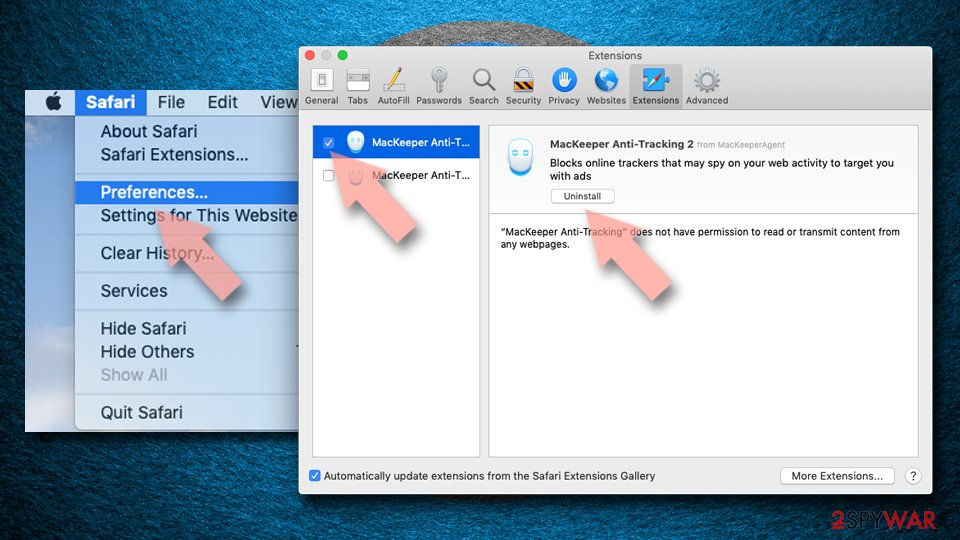
Remove dangerous extensions:
- Open Safari, click Safari in the menu at the top-left of the screen, and select Preferences.
- Go to the Extensions tab, look for any suspicious entries, and click Uninstall to remove them.

Clear history and website data:
- Click Safari in the menu and pick Clear History.
- Set Clear to all history and confirm with Clear History.


Reset Safari:
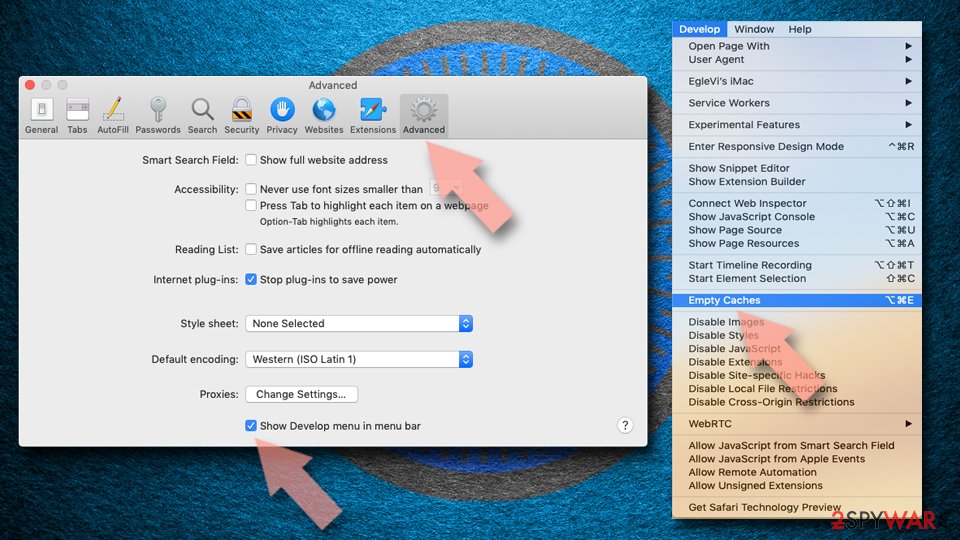
- Click Safari in the menu and select Preferences > Advanced.
- Enable Show Develop menu in menu bar.
- From the menu bar, click Develop and select Empty Caches.

Did this guide help?
Be the first to comment