

T800 ransomware is a file-encrypting malware that asks $250 for a decryption key

T800 is a new ransomware strain that has been spotted in the wild in the second half of February 2022. Just as any other malware of this type, it enters a Windows machine after users are tricked into installing it – spam emails, phishing messages, fake links, repacked installers, software cracks, and similar are commonly used. Cybercriminals can sometimes use more advanced distribution techniques such as exploit kits, RDP attacks, or targeted phishing emails, although it is less rare when it comes to attacks against regular uses.
The main goal of T800 ransomware is to make users pay money in the form of a cryptocurrency known as Bitcoin. In order to achieve that, cybercriminals deploy malicious code on the vulnerable Windows machine, which automatically infects its various components. This allows the virus to begin the encryption process, which is performed with the help of a combination of AES and RSA ciphers. Combining two encryption methods is common, as it ensures the integrity of the process, making the recovery of files almost impossible.
As a result of this process, all non-system files are then appended with a .t800 extension, which also makes them lose their original icon. For example, a DOC file would no longer show the distinctive icon of MS Word or a similar associated program. No matter which application is used to open these files, it would not work.
It is important to note that the data is not corrupted (even though it might look that way initially) but rather locked behind a complex password. This password, known as a decryption key, is stored on remote servers controlled by hackers, and they are obviously not willing to give it away for free.
After the data locking process, the malware then finishes its malicious deed by dropping a ransom note on users' desktops and other places, which reveals that a payment of $250 is required in order to receive a decryption key from cybercriminals. We strongly recommend avoiding any contact with cybercrooks, as there is no guarantee that they will keep their promises.
The ransom note
It has been established by security researchers that the T800 virus steps from BigLock ransomware, otherwise known as Corona-lock. It was initially released at the begging of the pandemic back in May 2020 and since then amassed several versions that use extensions .t1000, .pandemic, and a few others. The strain itself is not very prevalent, although that does not matter much for the affected victims.

A ransom note is the first means of communication between the attackers and victims, so crooks usually make it quite informative. There are cases when ransom notes are simply missing, which commonly happens due to bugs in the code or when malware is not fully developed. In this case, the note is fleshed out well and explains everything users need to know in order to allegedly retrieve their locked files:
########################################################
############### You became victim of the .T800 Ransomware-Virus ###############
########################################################
## Special ID:
########################################################
## The harddisks of your computer have been encrypted with an military grade
## encryption algorithm TermCryptS3v2+RSA2048.
## There is no way to restore your data without a special key.
########################################################
########################################################
## To decrypt the files, you need to pay 250 USD in bitcoins to the BTC wallet below,
## then after 1 confirmation of the bitcoin network, you can get the decryptor
## by writing to the following contact contacts!
## –
## BTC Wallet –
## –
## Exchangers for exchanging for cryptocurrency: >>> https://www.bestchange.net <<< ## – ## If you want to decrypt your files, you have to get RSA private key. ## After the successful payment and decrypting your files, we will give ## you FULL instructions HOW to IMPROVE your security system. ## – ## ## TELEGRAM us: >> @t1000rn << ## Jabber: >> t1000rn@404.city FULL ONLINE << ## – >>> Do not pay data recovery companies to get the key, they will email me! <<< ################## We ready to answer all your questions! ##################### ———————————————— ################# HOW to understand that we are NOT scammers? ################# ######### You can ask SUPPORT for the TEST-decryption for ONE file! ########### ########################### LIST OF ENCRYPTED FILES ########################### ————————————————
As it is common, cybercriminals even offer a free test decryption service, which would allow users to recover one file for free – this is done as alleged proof that the decryptor works. However, it is not recommended to contact the attackers due to the risk of losing money along with files, as some victims don't receive the promised decryption key even after they pay the full demanded sum.
| Name | T800 ransomware |
|---|---|
| File extension | .t800 appended to each of the personal files on the system |
| Related files | !!!HOW_TO_DECRYPT!!!.txt |
| Contact | Cybercriminals provide several communication methods: Telegram (@t1000rn), Jabber (t1000rn@404.city) or specially crafted Tor page (kwk62hefhey3zh4ki332d7uluww5oilm4c6t5tnhb4g5hrf7a2szvlqd.onion/chat) |
| File Recovery | The only secure way to restore files is by using data backups. If such is not available or were encrypted as well, options for recovery are very limited – we provide all possible solutions below |
| Ransom payment | $250 to be transferred to Bitcoin wallet 38wDGRKde7UijxBrup9BNnEUopKexyRpZz |
| ransomware removal | Disconnect the computer from the network and internet and then perform a full system scan with SpyHunterCombo Cleaner security software |
| System fix | Malware can seriously tamper with Windows systems, causing errors, crashes, lag, and other stability issues after it is terminated. To remediate the OS and avoid its reinstallation, we recommend scanning it with the FortectIntego repair tool |
Removal and remediation
1. Disconnect from the network
The Internet connection can be used for malware to communicate with remote servers, which could grant remote access to attacks in some cases.
Therefore, before you proceed with anything else, you should disconnect your PC from the network and the internet. This is easy to do by simply plugging the ethernet cable out of the machine or disconnecting the WiFi. If you have a network that you use, you can instead disconnect it the following way:
- Type in Control Panel in Windows search and press Enter
- Go to Network and Internet
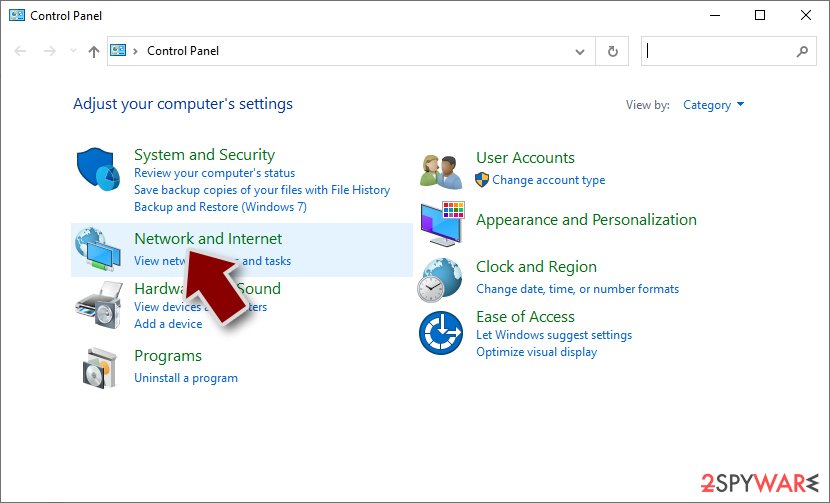
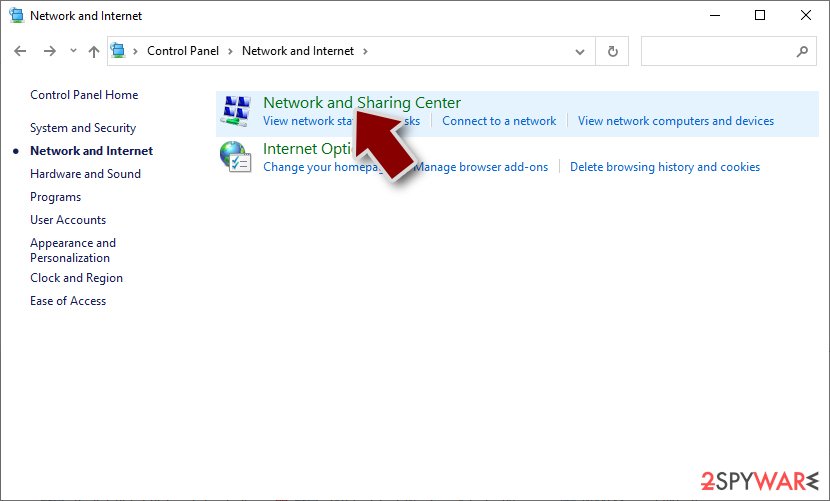
- Click Network and Sharing Center
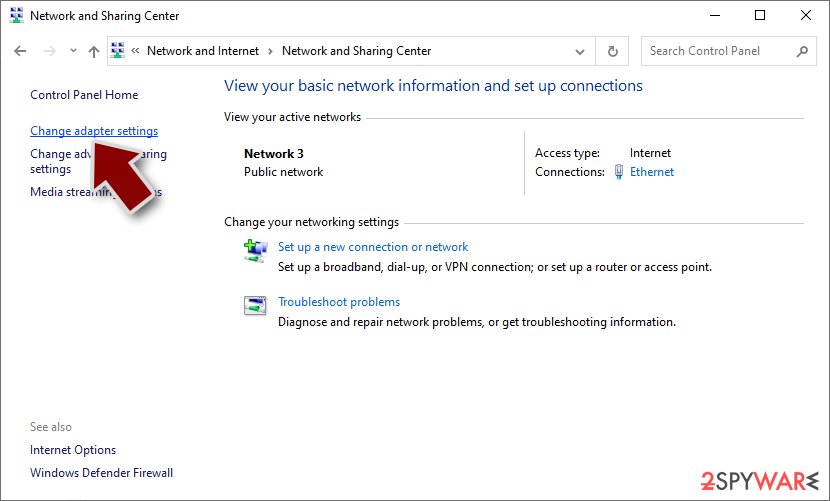
- On the left, pick Change adapter settings
- Right-click on your connection (for example, Ethernet), and select Disable
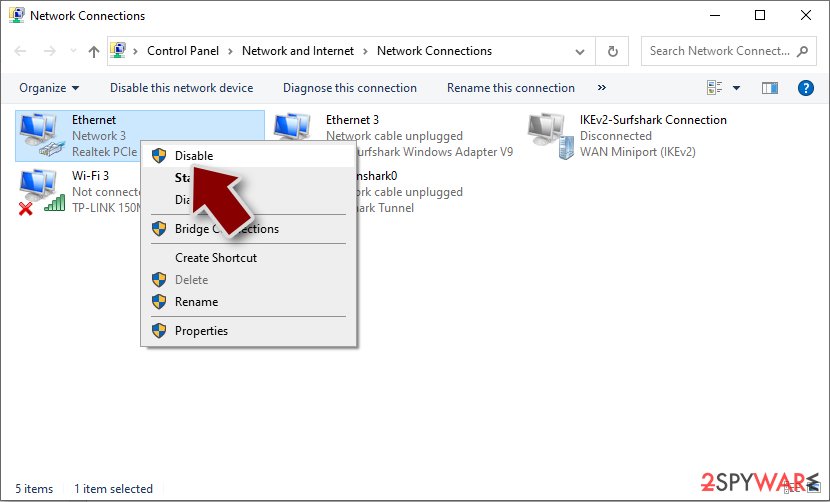
- Confirm with Yes.


2. Remove malware
Once the affected computer is disconnected from the network, it is safe to begin the T800 ransomware removal process. It is known that some of the ransomware-type viruses self-delete once they finish the encryption process, but it might not be the case with this version.
Even after destructing itself, malware can still leave some modules programmed to perform other malicious actions in the background, such as personal data theft or installation of additional payloads after the network connection is reimbursed. Likewise, ransomware is commonly spread along with other malware, thus there could be several infections present on the system.
The only way to find out whether or not this is true is by scanning the system with SpyHunterCombo Cleaner, MalwarebytesMalwarebytes, or another reliable anti-malware solution. Security software can quickly and easily find all the malicious files and remove them promptly, preventing any damage that could potentially occur in the future if the infection is not contained properly.
3. Repair system damage
Malware can cause tremendous damage to Windows systems to the point where a full reinstallation could be required. For example, an infection can alter the Windows registry[1] database, damage vital bootup and other sections, delete or corrupt DLL files, etc. Antivirus software can't repair damaged files, and a specialized app should be used instead.
- Download FortectIntego
- Click on the ReimageRepair.exe

- If User Account Control (UAC) shows up, select Yes
- Press Install and wait till the program finishes the installation process

- The analysis of your machine will begin immediately

- Once complete, check the results – they will be listed in the Summary
- You can now click on each of the issues and fix them manually
- If you see many problems that you find difficult to fix, we recommend you purchase the license and fix them automatically.



4. Alternative file recovery options
While the FBI,[2] security researchers, and our team here at 2-spyware highly recommend avoiding paying ransoms or even contacting cybercriminals, the choice is always in the hands of the victim. Keep in mind, however, that by paying the ransom, you only encourage the attackers to create more malware and infect more people – it's simply proof that the illegal and malicious business is lucrative.
The only way to fully prevent the devastating consequences of a ransomware attack is by keeping secure data backups – it can be done via reliable services such as Google Drive or OneDrive. If you need help with this process, you can find detailed instructions at the very bottom of this post.
As for now, you should concentrate on attempting to recover the t800 files. The first method we recommend is trying to use recovery software. It does not work for all ransomware victims, but some people manage to recover at least a portion of their lost files using this option.
Try recovery software
- Download Data Recovery Pro.
- Double-click the installer to launch it.

- Follow on-screen instructions to install the software.

- As soon as you press Finish, you can use the app.
- Select Everything or pick individual folders where you want the files to be recovered from.

- Press Next.
- At the bottom, enable Deep scan and pick which Disks you want to be scanned.

- Press Scan and wait till it is complete.
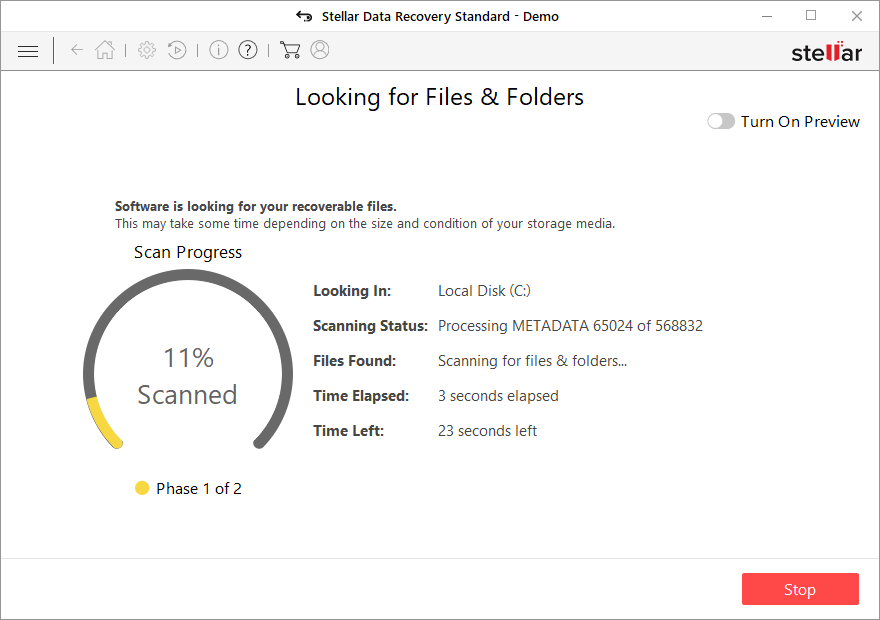
- You can now pick which folders/files to recover – don't forget you also have the option to search by the file name!
- Press Recover to retrieve your files.



Search for a decryptor
Luckily, some ransomware is far from perfect and has bugs[3] within their encryption process, which allows security experts to create a working decryption tool, providing it for victims for free. Alternatively, law enforcement has previously seized the servers of malware authors, which allowed them to release keys to the public. Thus, use the following links to find a decryption tool, although you should keep in mind that it might take time before a working one is available, if at all.
- No More Ransom Project
- Free Ransomware Decryptors by Kaspersky
- Free Ransomware Decryption Tools from Emsisoft
- Avast decryptors

Did this guide help?
Be the first to comment