

News-relimo.cc asks you to enable notifications so it can later send you ads

News-relimo.cc is a malicious website you might come across accidentally while browsing the web on Google Chrome, Mozilla Firefox, MS Edge, or another web browser. These pop-ups might show up at any point whenever users have their web browsers running or even idling in the background. However, they are not triggered by user actions and can occur regardless of which website is being visited at the time.
The activity is initiated by a push notification feature, which is being used by News-relimo.cc to deliver advertisements and links. For this to happen, users need to accept the request to show notifications upon visiting the website, which many don't recall doing, as they are tricked by phishing[1] messages which portray the prompt as something entirely different.
Most users simply forget the encounter with these fake sites, only later to notice the suspicious and intrusive activity. If you have been a victim of this scam, check out the instructions that would help you get rid of the annoying News-relimo.cc ads. We also advise checking the system for adware, as redirects to scam sites are a common symptom of infection.
| Name | News-relimo.cc |
| Type | Push notifications, ads, scam, pop-ups |
| Distribution | At some point after the push notifications are permitted by pressing the “Allow” button within the site's prompt |
| Symptoms | Pop-ups show up on a regular basis on the screen – these ads often include inappropriate, scam, phishing, or other similar content |
| Risks | If you click on links provided by the website, you might end up infecting your system with malware/PUPs, disclosing your personal information to cybercriminals, or losing money for useless services |
| Elimination | Access browser settings to stop intrusive push notifications. After that, make sure that your system is not infected with adware or malware – scan it with SpyHunterCombo Cleaner, MalwarebytesMalwarebytes |
| Other tips | Remove cookies and other web data with FortectIntego. Repairing system damage is also advantageous |
How the push notification scam operates
As soon as users get on News-relimo.cc, they are presented with something that might seem quite familiar. Indeed, they are often enough to trick users into subscribing. The shown components include a prompt that asks whether users would like to enable notifications and a background message, and a background picture with a message that tries to trick them into clicking the “Allow” button, which would instantly enable push notifications from the site.
Scammers attempt to present the action of clicking the “Allow” button as something entirely different, under the premise that it is permission to confirm not being a robot or ensure that video playback is enabled. Here are a few examples of such misleading statements (they are randomized, so you might expect any of these to show up):
- Your download is ready! Click Allow
- Click Allow if you are not a robot
- If you are 18+, click Allow
- Can't play this video! Perhaps your browser doesn't allow video playback. Please click the Allow button to watch the video
- Just one more step! Allow to continue, etc.

Those who accept the request are usually redirected to similar websites, such as News-ropaki.cc, Computeradz.com, Adsforyouguide.com, etc., where they would be asked for the same thing. This would increase the number of malicious ads seen on users' desktops.
Adware checks to make
If you have noticed that you see ads on your browser more frequently and suspicious offers, misleading links, and similar are frequent occurrences while you browse the web, it is time to check your system for infections. In particular, adware is the most common type of potentially unwanted software which causes redirects and shows ads on various sites.
The easiest way to check for infections is by scanning the system with SpyHunterCombo Cleaner, MalwarebytesMalwarebytes, or another powerful security software that would remove all the malicious malware elements at once. Manual removal is possible but not recommended, as it might not be successful if the software causing this behavior uses obfuscation and persistence techniques.
After you are sure your device is free from infections, you should clean your browser caches from cookies and other tracking elements stored locally on your computer. You can do that manually or employ FortectIntego as a quicker solution – it can also fix virus damage just within a few minutes, stopping crashes, BSODs,[2] and other post-infection issues.
News-relimo.cc ads removal
The push notification feature is a legitimate API[3] component of any modern web browser, so thinking it is a virus is fundamentally wrong. Although, it does not take long to realize why people would think that – ads of dubious content showing up on their desktops without warning is usually a sign of infection.
However, this time the activity won't go away by scanning the system with anti-malware software. The only way to stop is by resetting the web browser or blocking a particular website from showing notifications. Of course, the former solution is not necessary at all, so proceed with the following steps to remove News-relimo.cc ads:
Google Chrome
- Open the Google Chrome browser and go to Menu > Settings.
- Scroll down and click on Advanced.
- Locate the Privacy and security section and pick Site Settings > Notifications.
- Look at the Allow section and look for a suspicious URL.
- Click the three vertical dots next to it and pick Block. This should remove unwanted notifications from Google Chrome.


Mozilla Firefox
- Open Mozilla Firefox and go to Menu > Options.
- Click on Privacy & Security section.
- Under Permissions, you should be able to see Notifications. Click the Settings button next to it.
- In the Settings – Notification Permissions window, click on the drop-down menu by the URL in question.
- Select Block and then click on Save Changes. This should remove unwanted notifications from Mozilla Firefox.


Safari
- Click on Safari > Preferences…
- Go to the Websites tab and, under General, select Notifications.
- Select the web address in question, click the drop-down menu and select Deny.


MS Edge
- Open Microsoft Edge, and click the Settings and more button (three horizontal dots) at the top-right of the window.
- Select Settings and then go to Advanced.
- Under Website permissions, pick Manage permissions and select the URL in question.
- Toggle the switch to the left to turn notifications off on Microsoft Edge.
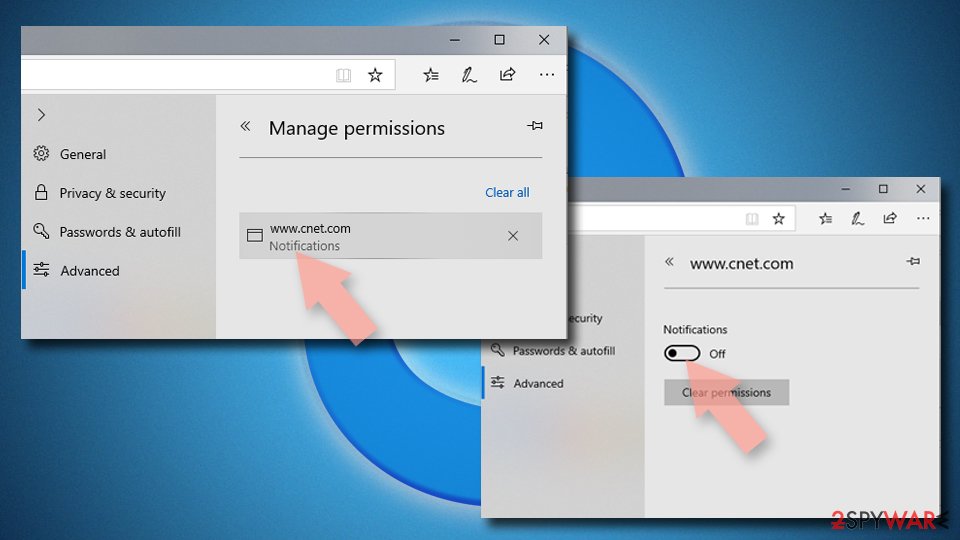

MS Edge (Chromium)
- Open Microsoft Edge, and go to Settings.
- Select Site permissions.
- Go to Notifications on the right.
- Under Allow, you will find the unwanted entry.
- Click on More actions and select Block.


Internet Explorer
- Open Internet Explorer, and click on the Gear icon at the top-right of the window.
- Select Internet options and go to the Privacy tab.
- In the Pop-up Blocker section, click on Settings.
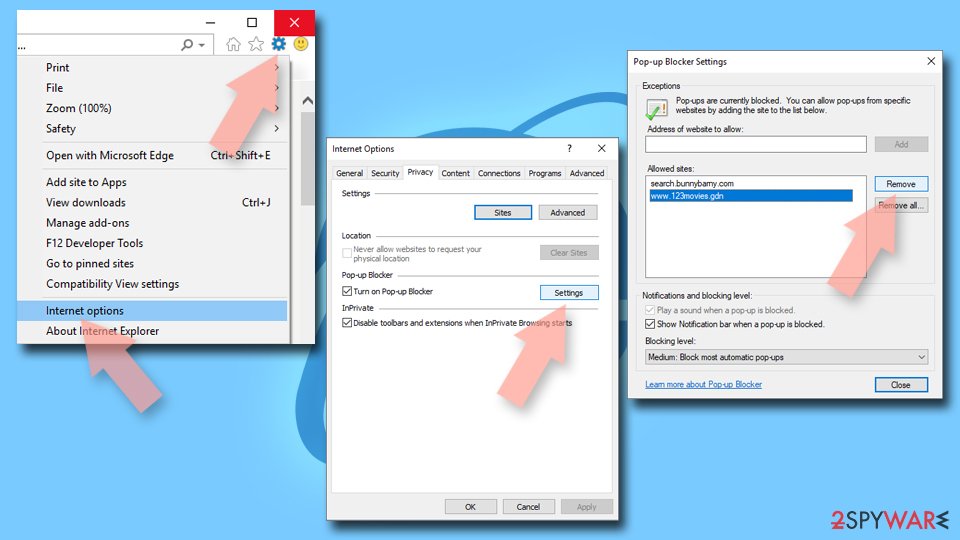
- Locate web address in question under Allowed sites and pick Remove.

Did this guide help?
Be the first to comment