

Mysmarterdeals.shop shows fake messages of users allegedly winning expensive gifts

Mysmarterdeals.shop hosts a variety of different survey scams designed to trick users into providing their personal information, subscribing to useless services, or downloading potentially unwanted software. Likewise, users are asked to enable push notifications that can later result in intrusive ads and might be redirected to other scam sites.
Most commonly, people enter this scam page after visiting another high-risk website (torrents, X-rated, gambling, etc.), although adware secretly installed on the system can also cause these redirects. Therefore, you should never interact with any buttons or links shown by Mysmarterdeals.shop and also make sure you clean your system from adware and other infections if such are present.
| Name | Mysmarterdeals.shop |
| Type | Survey scam, phishing, adware |
| Operation | Mimics the official website of communications provider T-Moble and attempts to engage users in a fake survey where they can allegedly win expensive prizes |
| Distribution | Adware, malicious links, redirects from other websites |
| Dangers | Redirects to survey scams and similar malicious websites could cause various issues, including monetary losses, virus infections, or personal data loss |
| Removal | To remove unwanted apps manually, you can follow our removal guide below. If the unwanted ads and other disruptive behavior do not stop, you should scan your computer with SpyHunterCombo Cleaner security software and delete all threats automatically |
| Other tips | After the removal of PUPs and malware, we recommend scanning the system with FortectIntego to clean browser caches and fix virus damage automatically |
The fake message
While technical support scams rely on scaring users into believing that their systems are heavily infected and need to be remediated by fake professionals, survey scams rely on people's excitement. Fake giveaways prey on those who are more gullible and believe that they actually got lucky.
In the case of Mysmarterdeals.shop, it employs very typical phishing[1] scheme where users are told that they have been selected to participate in a special survey/giveaway provided by T-Mobile. While the pop-up message provides a brief description, the underlying message is rather expansive and claims the following:
T-Mobile customer reward program
Congratulations!
19 August 2022
We wish to thank you for the long use of a services from T-Mobile!Every Friday we randomly select several users to take a short survey. In return, we offer them the chance to receive a valuable gift from our sponsors. This survey allows us to better understand users and make our products better. It will not take more than 30 seconds of your time.
You can win the new Samsung Galaxy S22 or Apple iPad Pro. All you need to do to receive a gift is to answer the following 8 questions.
Remember: 100 randomly selected users have received this invitation. The number of gifts is limited.
You have 0 minutes and 00 seconds to answer the following questions before we give your gift to another happy user! Good luck!
In a typical social engineering fashion, users are promised an expensive gift, which can only be claimed within a limited time frame. The time limitation is there for a reason – it makes people make irrational decisions, creating a sense of urgency.

It does not really matter how people answer questions shown on the Mysmarterdeals.shop scam page, they would always be later shown a result: they have won an iPad or Samsung phone. Misleading working within buttons such as “Take it” gives the idea to users that the items are practically theirs.
Those who proceed with the scheme would be asked to enter a bunch of their personal information, including their home address and contact details. Likewise, people would be asked to pay a $1 “shipment fee” for the item. All of this is just an attempt to make users provide their personal details so they could later be sold on the underground forums to the highest bidder. Unsurprisingly, the promised gift is never to be seen by those who got scammed.
How to deal with the scam and adware
It is very important to ignore the fake messages completely whenever presented with these fake surveys. There could be numerous outcomes of interacting with the scam, and none of them are beneficial for the user. For example, by providing your home address and other contact details, you may start receiving more scam calls, letters, and emails. In the worst-case scenario, you may end up loans taken in your name or having your identity stolen for other malicious purposes.
Therefore, please do not download software, give out your personal information or subscribe to services that are deceiving – you'll be charged monthly (or in other time intervals). If you were already tricked and disclosed your personal details, you should be wary of more scams coming your way – be it phone calls, emails, or fake websites online.
However, you should not make sure that your system is not infected with adware or even something nastier. Therefore, employ SpyHunterCombo Cleaner or MalwarebytesMalwarebytes and initiate a full system scan of your computer. This will quickly and effectively get rid of all potentially unwanted or malicious programs from your device at once.
Once you are sure that your system is clear, you should then use FortectIntego to clean your browser caches to stop the unwanted data tracking. The tool can also help you fix system damage if such occurred previously due to malware or other reasons. If you prefer the manual method, please follow these steps:
Google Chrome
- Click on Menu and pick Settings.
- Under Privacy and security, select Clear browsing data.
- Select Browsing history, Cookies and other site data, as well as Cached images and files.
- Click Clear data.


Mozilla Firefox
- Click Menu and pick Options.
- Go to Privacy & Security section.
- Scroll down to locate Cookies and Site Data.
- Click on Clear Data…
- Select Cookies and Site Data, as well as Cached Web Content and press Clear.


MS Edge (Chromium)
- Click on Menu and go to Settings.
- Select Privacy and services.
- Under Clear browsing data, pick Choose what to clear.
- Under Time range, pick All time.
- Select Clear now.


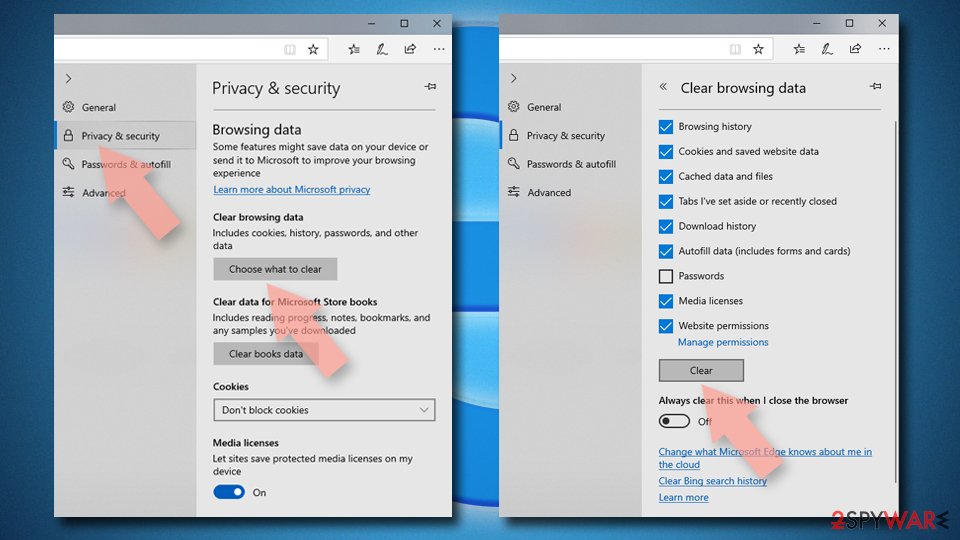
MS Edge (legacy)
- Click on the Menu (three horizontal dots at the top-right of the browser window) and select Privacy & security.
- Under Clear browsing data, pick Choose what to clear.
- Select everything (apart from passwords, although you might want to include Media licenses as well, if applicable) and click on Clear.

Safari
- Click Safari > Clear History…
- From the drop-down menu under Clear, pick all history.
- Confirm with Clear History.


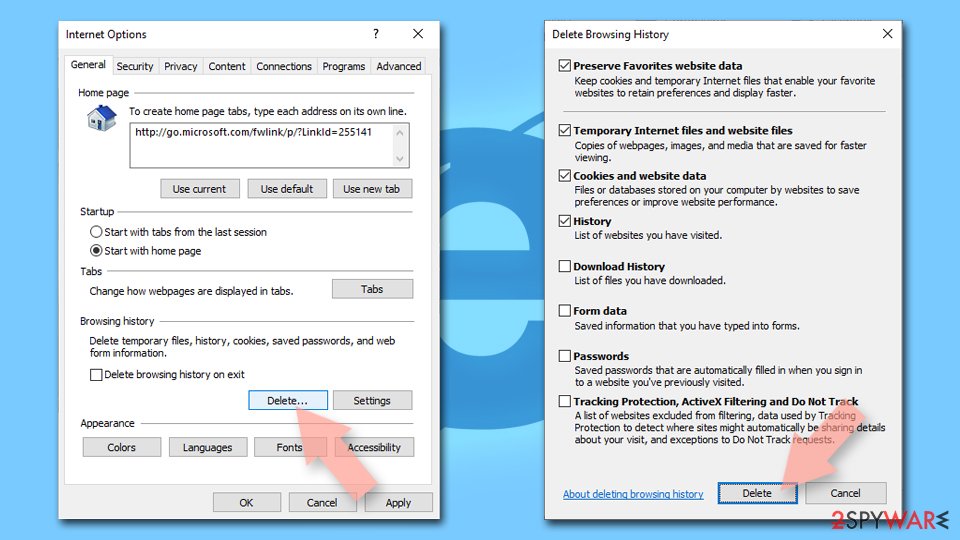
Internet Explorer
- Press on the Gear icon and select Internet Options.
- Under Browsing history, click Delete…
- Select relevant fields and press Delete.

Get rid of push notifications [if applicable]
Upon entering the Mysmarterdeals.shop page, users would also be asked to enable push notifications. While it is not the main goal of the scammers, they attempt to gain every benefit they can, and in this case, they would be showing intrusive advertisements via the browser's API[2] if the notifications would be accepted either intentionally or by accident.
These notifications would bring more misleading content: advertise get-rich-quick[3] schemes, show fake virus infection warnings, and more fake giveaways/surveys. Thus, ignore everything shown within these pop-ups and use the instructions below to get rid of these notifications for good.
Did this guide help?
Be the first to comment