

Pizzasucker ransomware is the virus that encodes files and makes them inaccessible
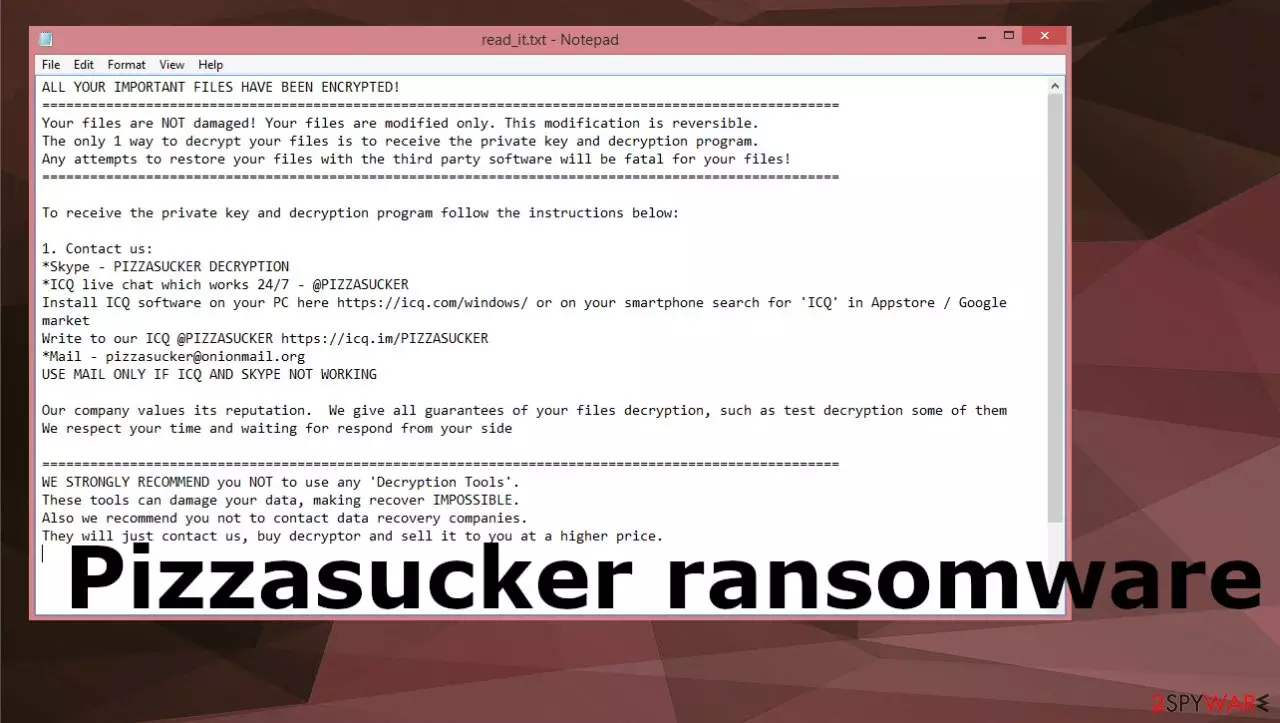
Pizzasucker ransomware virus is the infection focused on file encryption and money demands because this is how criminals behind the threat make money this way. The threat is based on Chaos ransomware- a previously known file-encryption[1] threat. This version of the virus is called PIZZASUCKER because this is the particular extension that appears on encoded files once the access is blocked.
This ransomware encrypts commonly used and valuable files and appends their filenames with a .ICQ@PIZZASUCKER extension, which is also the attackers' contact information. For example, a file initially titled 1.jpg would appear as 1.jpg.ICQ@PIZZASUCKER, 2.png as 2.png.ICQ@PIZZASUCKER, etc.
Afterward, PIZZASUCKER ransomware changes the desktop wallpaper and creates a ransom-demanding message named read_it.tx. The note left by the attackers promises that the files cannot be accessed because they have been encrypted, but they have not been damaged. It also warns victims that any attempts to decrypt the data using third-party tools will make it impossible to decrypt.
The only way to recover the encrypted files is with the decryption software and key, which are in possession of the attackers. From our experience researching ransomware infections, we can infer that decryption is usually not possible without the help of cybercriminals. However, these people are not trustworthy, so the machine should be cleared fully from any threats.
In-depth overview
Paying the ransom is the only way to get the decryption software and key from the attackers, according to the virus creators. However, experts[2] advise against doing this for several reasons. First, there is no guarantee that you will actually receive the decryption software and key after paying the ransom.
Second, even if you do receive them, there is no guarantee that they will work. Third, by paying the ransom, you are encouraging the attackers to continue their illegal activities. Contacting them via provided platform or email could also lead directly to them and result in issues with security or additional infections.
| Name | Pizzasucker ransomware |
|---|---|
| Type | Cryptovirus, file-locker |
| Family | Chaos ransomware |
| File marker | .ICQ@PIZZASUCKER |
| Contact information | PIZZASUCKER DECRYPTION Skype username, @PIZZASUCKER ICQ platform, pizzasucker@onionmail.org |
| Ransom note | read_it.txt |
| Removal | Threats like this can and should be removed as soon as possible. Antivirus tools help with that because infections can be found and removed automatically |
| Repair | The infection can damage various processes of the machine, so run FortectIntego and repair corrupted system data or virus damage in system folders |
Stopping the infection
The best way to protect yourself from ransomware is to have a backup of your important files. That way, if your computer does get infected, you can simply restore your files from the backup and won't need to worry about paying the ransom. You should also have security software installed on your computer and keep it up-to-date to help prevent infections in the first place.
Anti-malware tools work perfectly for keeping the machine virus-free because these applications can indicate insecure or malicious file attachments from emails and trigger quarantine when you download pirating packages with ransomware or other threat files. Tools based on AV detection can also find the ransomware and related files to remove them.[3]
Pizzasucker ransomware removal process can be performed using applications like SpyHunterCombo Cleaner or MalwarebytesMalwarebytes. The proper system scan helps with the infection termination, so the particular infection is no longer affecting your time on the machine, and all potentially malicious files can be removed.
Terminating the active virus makes the system safe again, and you can rely on file recovery and additional procedures needed for the proper elimination and system recovery. Note that decrypting the Pizzasucker ransomware virus is not the same as removing the threat or recovering files, so once the threat is eliminated, you need additional help for the affected data.

Recovering the system
Once a computer is infected with malware, its system is changed to operate differently. For example, an infection can alter the Windows registry database, damage vital bootup and other sections, delete or corrupt DLL files, etc. Once a system file is damaged by malware, antivirus software is not capable of doing anything about it, leaving it just the way it is. Consequently, users might experience performance, stability, and usability issues, to the point where a full Windows reinstall is required.
Therefore, we highly recommend using a one-of-a-kind, patented technology of FortectIntego repair. Not only can it fix virus damage after the infection, but it is also capable of removing malware that has already broken into the system thanks to several engines used by the program. Besides, the application is also capable of fixing various Windows-related issues that are not caused by malware infections, for example, Blue Screen errors, freezes, registry errors, damaged DLLs, etc.
- Download the application by clicking on the link above
- Click on the ReimageRepair.exe

- If User Account Control (UAC) shows up, select Yes
- Press Install and wait till the program finishes the installation process

- The analysis of your machine will begin immediately

- Once complete, check the results – they will be listed in the Summary
- You can now click on each of the issues and fix them manually
- If you see many problems that you find difficult to fix, we recommend you purchase the license and fix them automatically.



What else can be done?
Pizzasucker ransomware is a serious threat. If you have been infected with ransomware, our best advice is to try to restore your files from a backup, if you have one. If you don't have a backup, you may be able to use file recovery software to recover some of your files. However, we cannot guarantee that this will work.
If you decide to try file recovery software, make sure that you only download it from a reliable source, such as the developer's website. These threats can use pirating platforms and other services related to software provided to spread the payload of malicious applications. Avoid any suspicious content and remove Pizzasucker ransomware as soon as those files get locked.
The threat is coming from a known family, but these creators have improved their versions with each release, and research teams cannot properly develop the needed d tools for file decryption and virus termination. The threat is not decryptable because there are no official tools, but it is possible to find a working application for the Pizzasucker ransomware virus online.
File encryption is a process that is similar to applying a password to a particular file or folder. However, from a technical point of view, encryption is fundamentally different due to its complexity. By using encryption, threat actors use a unique set of alphanumeric characters as a password that can not easily be deciphered if the process is performed correctly.
There are several algorithms that can be used to lock data (whether for good or bad reasons); for example, AES uses the symmetric method of encryption, meaning that the key used to lock and unlock files is the same. Unfortunately, it is only accessible to the attackers who hold it on a remote server – they ask for a payment in exchange for it. This simple principle is what allows ransomware authors to prosper in this illegal business.
While many high-profile ransomware strains such as Djvu or Dharma use immaculate encryption methods, there are plenty of failures that can be observed within the code of some novice malware developers. For example, the keys could be stored locally, which would allow users to regain access to their files without paying. In some cases, ransomware does not even encrypt files due to bugs, although victims might believe the opposite due to the ransom note that shows up right after the infection and data encryption is completed.
Therefore, regardless of which crypto-malware affects your files, you should try to find the relevant decryptor if such exists. Security researchers are in a constant battle against cybercriminals. In some cases, they manage to create a working decryption tool that would allow victims to recover files for free.
Once you have identified which ransomware you are affected by, you should check the following links for a decryptor:
- No More Ransom Project
- Free Ransomware Decryptors by Kaspersky
- Free Ransomware Decryption Tools from Emsisoft
- Avast decryptors

If you can't find a decryptor that works for you, you should try the alternative methods we list below. Additionally, it is worth mentioning that it sometimes takes years for a working decryption tool to be developed, so there are always hopes for the future.
Did this guide help?
Be the first to comment