

Admilli – a variant of windupdates
Admilli is a Windows computer infection that displays commercial advertisements. It adds several registry entries on the infected device, which allows it to run on every startup. This makes adware removal a bit more difficult but not impossible. Ads from such potentially unwanted programs can cause the most damage as you might be redirected to explicit, questionable, or even dangerous websites. This article contains the culprit's summary, spreading techniques, removal options, and system recovery methods.
| Name | Admilli |
|---|---|
| Type | Adware, potentially unwanted program |
| Symptoms | More than usual ads on frequently visited pages; redirects to untrustworthy websites; reduced device performance |
| Risks | Other PUP installation, malware infections, privacy issues |
| Distribution | Fake Flash Player updates, freeware, deceptive ads, file-sharing platforms |
| Removal | You can remove this threat either manually by using our guides below or automatically by scanning your infected device with a reliable anti-malware tool |
| System repair | Fix virus damage by performing system diagnostics with the FortectIntego system tune-up tool |
Adware is classified as a potentially unwanted program because users either install it willingly or they're tricked into doing that through deceptive ads, freeware, software bundling, and other shady techniques. However, Admilli Service has the ability to install itself automatically thru Internet Explorer Medium security settings.
This computer infection is capable of showing various kinds of advertisements – pop-ups, banners, surveys, coupons, etc. Some of the ads might even cover your whole browser window, and clicking the “X” button could automatically open any affiliated sites of the adware.
The worst part of these ads is that they originate from a different source than the pages you're visiting. That means that they could lead to dangerous websites with gambling, porn, push notification viruses, malware, other PUPs, tech support scams, etc.
Admilli virus could trigger sudden redirects to any of its affiliated sites at any given moment. That's why you have to remove it immediately. Do that by scanning your device with free but trustworthy security tools like MalwarebytesMalwarebytes or SpyHunterCombo Cleaner. These tools should ensure that you don't install such PUPs in the future.
All infections cause havoc on your system files and settings. That could result in BSoDs, severe lag, and other system failures. You can resolve all system-related irregularities by running system diagnostics with the time-proven FortectIntego system tune-up software.

Sneaky techniques used for PUP distribution
One of the most popular PUP spreading techniques is via software bundles. Third-party software vendors (and some legitimate app developers) gain revenue from distributing such unwanted apps. Thus you have to be cautious when installing any downloaded programs.
You cannot rush through the installation process, or you will install all apps within the bundle. Take your time and choose the Advanced or Custom modes as only then can you control what's being installed on your device. Deselect all untrustworthy apps and agree to install only the one you initially wanted.
Remove Admilli with a couple of easy steps
Removing adware or any other PUP manually could prove to be a tough task. Thus we highly recommend leaving this dirty work to trustworthy anti-malware software that will automatically identify, locate, and remove any cyber threat that shouldn't be on your device.
If you're eager to do it yourself, use our comprehensive Admilli removal guides below. When the infection is removed, you have to care for your device's overall health to avoid abnormal behavior exhibitions. A proper system repair tool will undo any virus damage and delete tracking cookies in the process.
Uninstall from Windows
Uninstall from Windows 10/8:
- Type Control Panel into the Windows search box and open the result.
- Under Programs, select Uninstall a program.


Uninstall from Windows 7/XP:
- Click on Windows Start > Control Panel (Windows XP users should click on Add/Remove Programs).
- In Control Panel, select Programs > Uninstall a program.


Remove the unwanted program:
- In the Programs and Features window, look for any recently installed suspicious entries, select them, and click Uninstall.
- If User Account Control appears, click Yes to confirm, then complete the removal.


Remove from Microsoft Edge
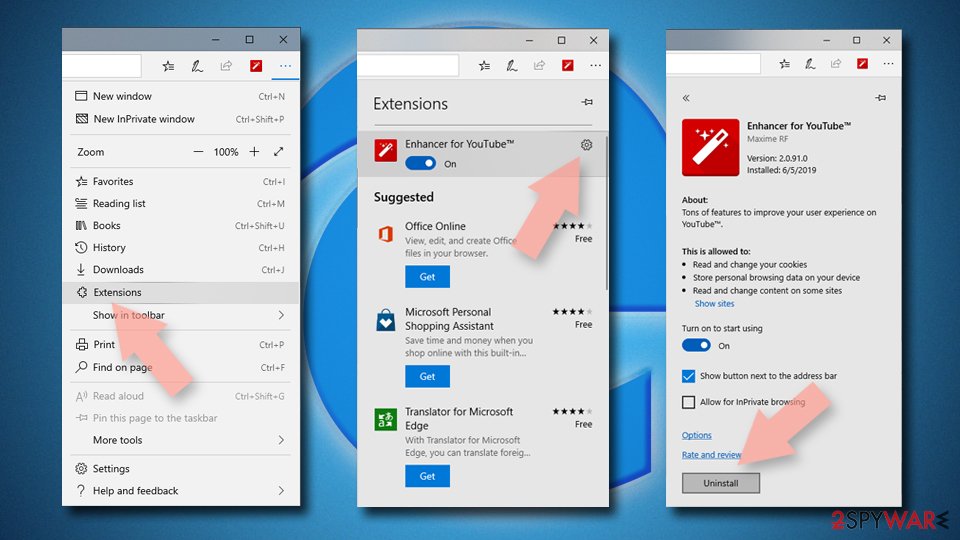
Delete unwanted extensions from MS Edge:
- Select Menu (three horizontal dots at the top-right of the browser window) and pick Extensions.
- From the list, pick the extension and click on the Gear icon.
- Click Remove.

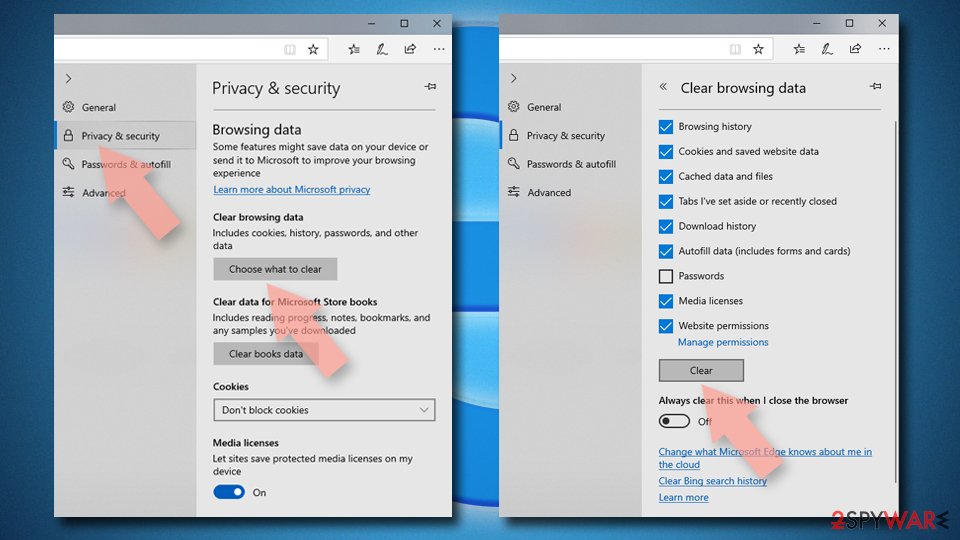
Clear cookies and other browser data:
- Click on the Menu (three horizontal dots at the top-right of the browser window) and select Settings > Privacy, search, and services..
- Under Clear browsing data, pick Choose what to clear.
- Select Cookies and other site data and Cached images and files. (apart from passwords, although you might want to include Media licenses as well, if applicable) and click on Clear.

Restore new tab and homepage settings:
- Click the menu icon and choose Settings.
- Then find On startup section.
- Click Remove next to any suspicious startup page.
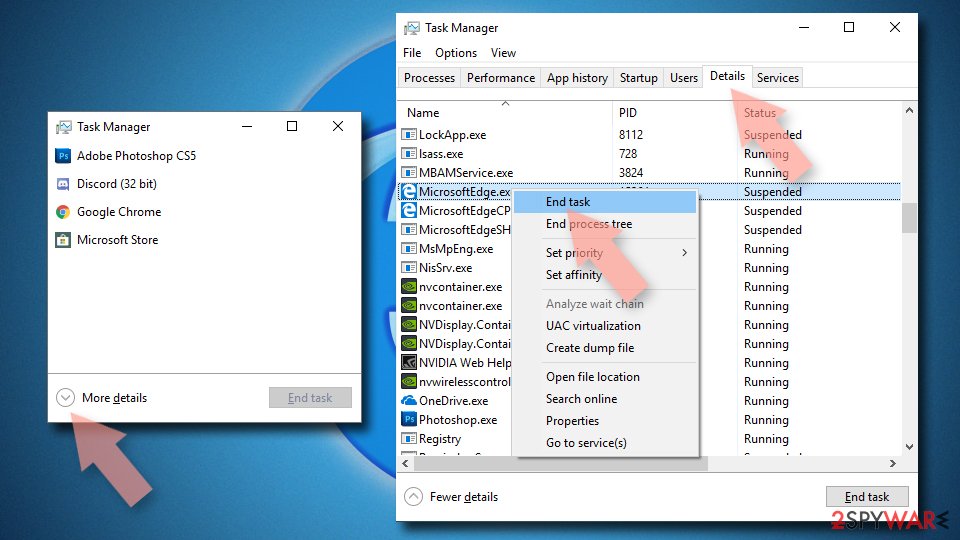
Reset MS Edge if the above steps did not work:
- Press on Ctrl + Shift + Esc to open Task Manager.
- Click on More details arrow at the bottom of the window.
- Select Details tab.
- Now scroll down and locate every entry with Microsoft Edge name in it. Right-click on each of them and select End Task to stop MS Edge from running.

Instructions for Chromium-based Edge
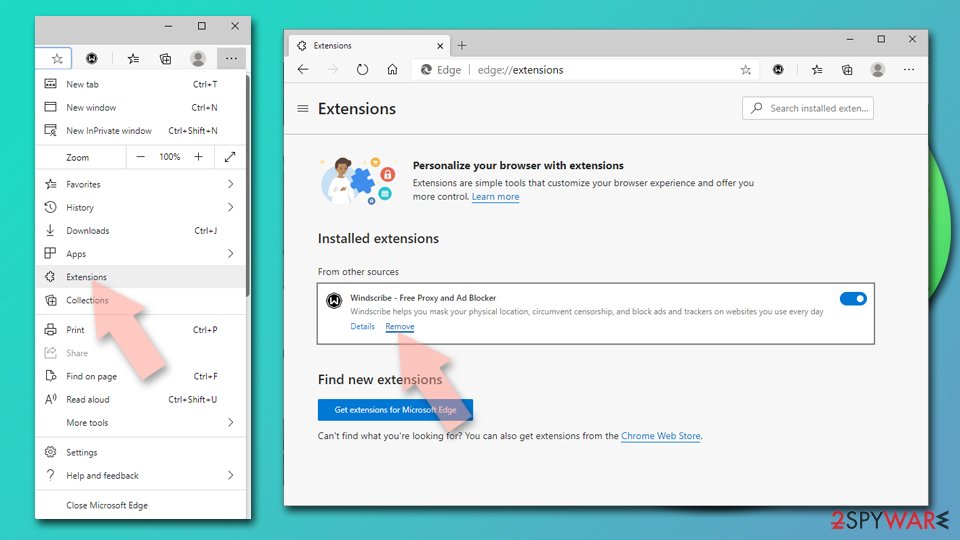
Delete extensions from MS Edge (Chromium):
- Open Edge and click select Settings > Extensions.
- Delete unwanted extensions by clicking Remove.

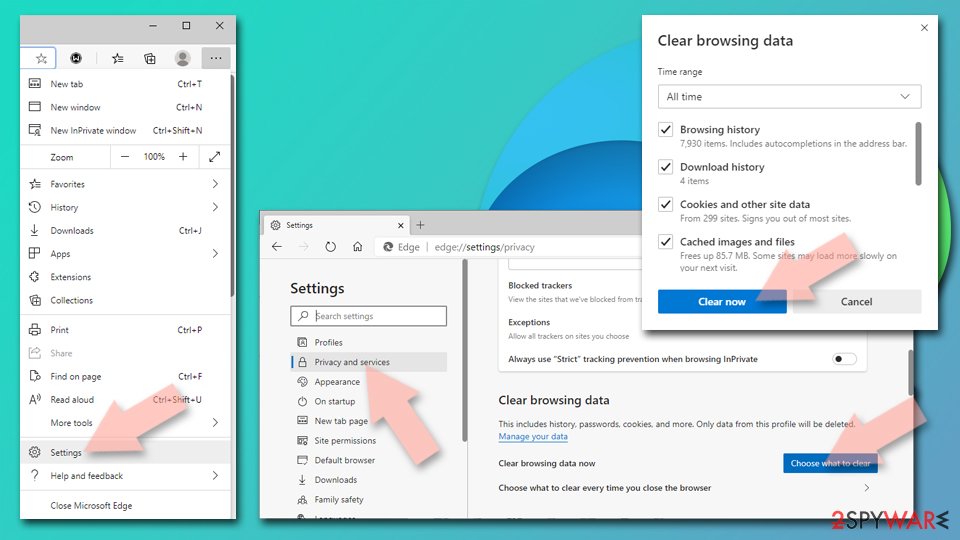
Clear cache and site data:
- Click on Menu and go to Settings.
- Select Privacy, search and services.
- Under Clear browsing data, pick Choose what to clear.
- Under Time range, pick All time.
- Select Clear now.

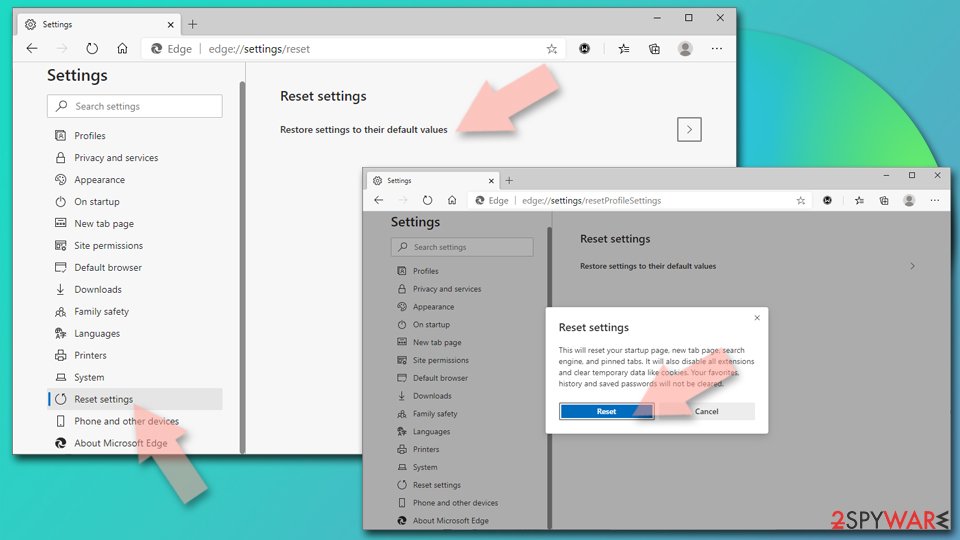
Reset Chromium-based MS Edge:
- Click on Menu and select Settings.
- On the left side, pick Reset settings.
- Select Restore settings to their default values.
- Confirm with Reset.
- This will disable extensions and reset startup pages but will not delete bookmarks, saved passwords, or browsing history.

Remove from Mozilla Firefox (FF)
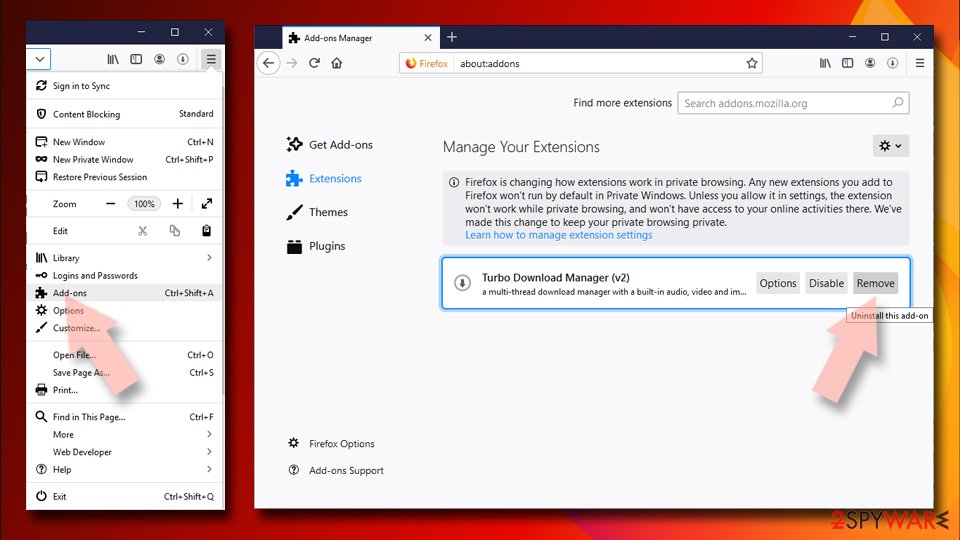
Remove dangerous extensions:
- Open Mozilla Firefox browser and click on the Menu (three horizontal lines at the top-right of the window).
- Select Add-ons.
- In here, select the unwanted extension and click Remove.

Reset the homepage:
- Click three horizontal lines at the top right corner to open the menu.
- Choose Settings.
- Under Home, set your preferred homepage and new tab settings.
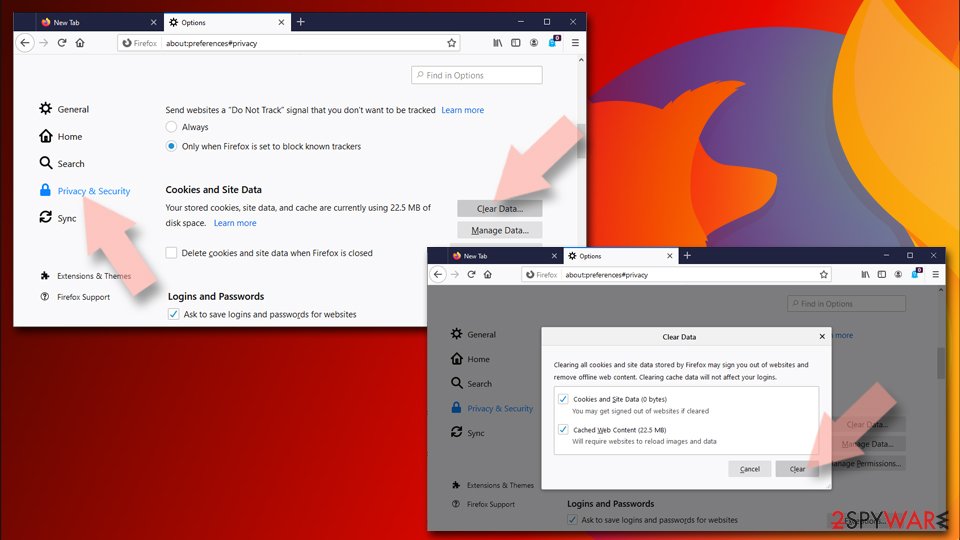
Clear cookies and site data:
- Click Menu and pick Settings.
- Go to Privacy & Security section.
- Scroll down to locate Cookies and Site Data.
- Click on Clear Data...
- Select Cookies and Site Data and Temporary cached files and pages, then click Clear.

Reset Mozilla Firefox
If clearing the browser as explained above did not help, reset Mozilla Firefox:
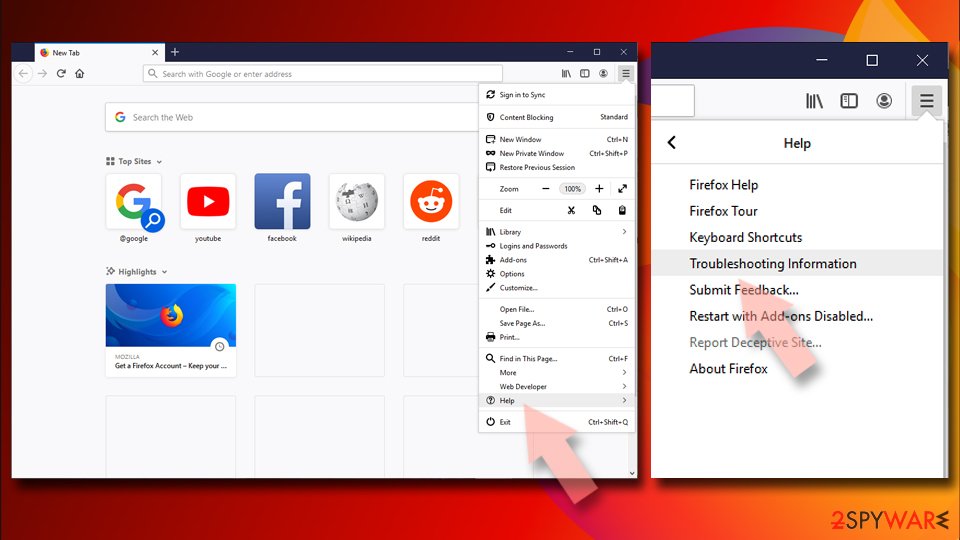
- Open Mozilla Firefox browser and click the Menu.
- Go to Help and then choose Troubleshooting Information.
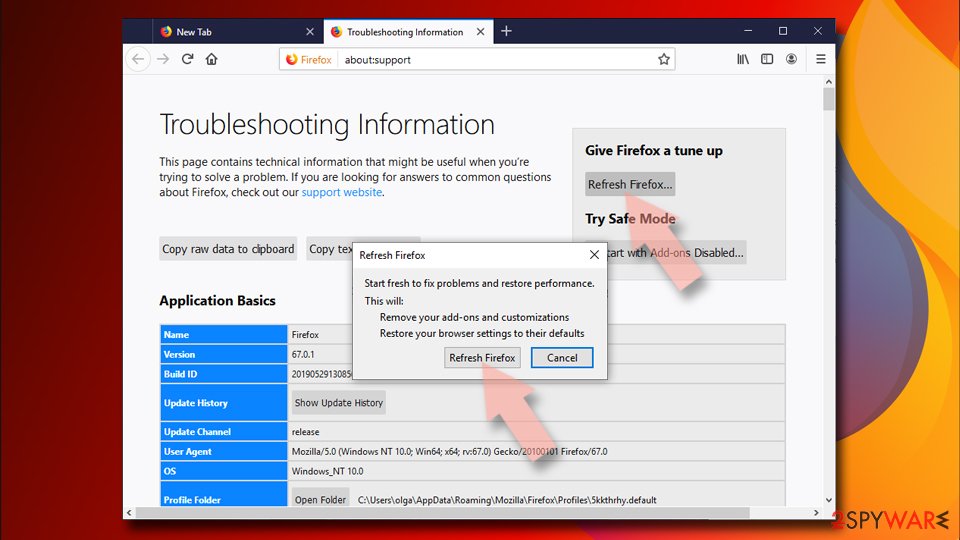
- Under Give Firefox a tune up section, click on Refresh Firefox...
- Once the pop-up shows up, confirm the action by pressing on Refresh Firefox.


Remove from Google Chrome
Delete malicious extensions from Google Chrome:
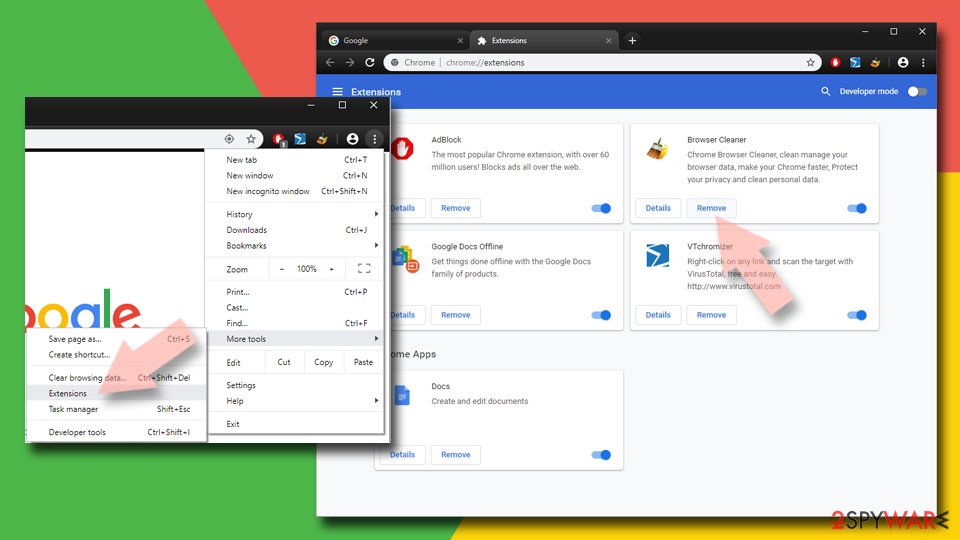
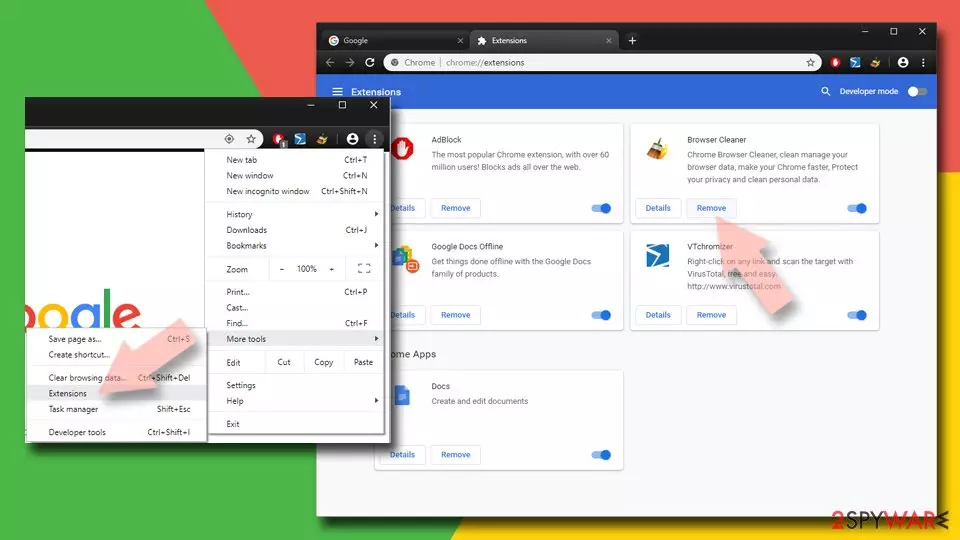
- Open Google Chrome, click on the Menu (three vertical dots at the top-right corner) and select More tools > Extensions.
- In the newly opened window, you will see all the installed extensions. Uninstall all suspicious extensions related to the unwanted program by clicking Remove.
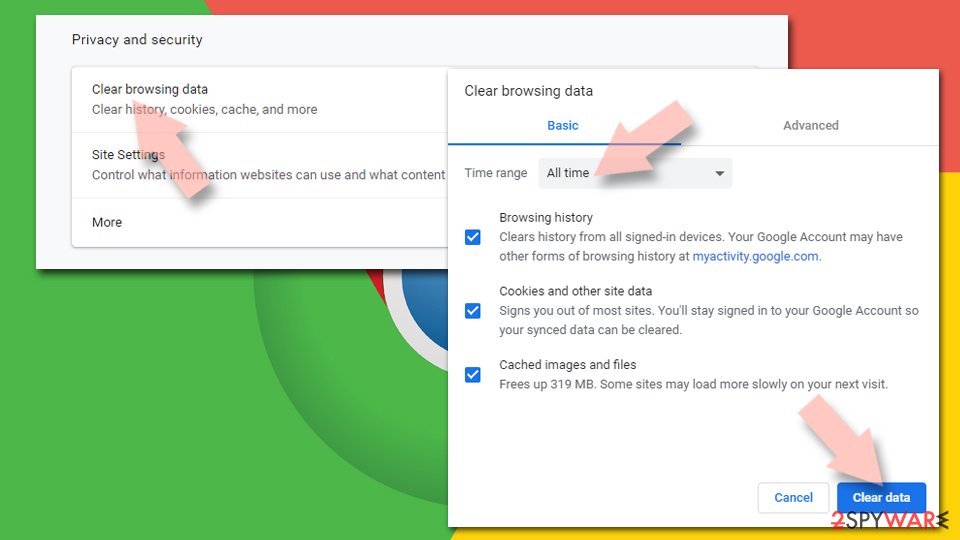
Clear cache and web data from Chrome:
- Click on Menu and pick Settings.
- Under Privacy and security, select Clear browsing data.
- Select Browsing history, Cookies and other site data, as well as Cached images and files.
- Click Clear data.

Change your homepage:
- Click menu and choose Settings.
- Look for a suspicious site in the On startup section.
- Click on Open a specific or set of pages and click on three dots to find the Remove option.
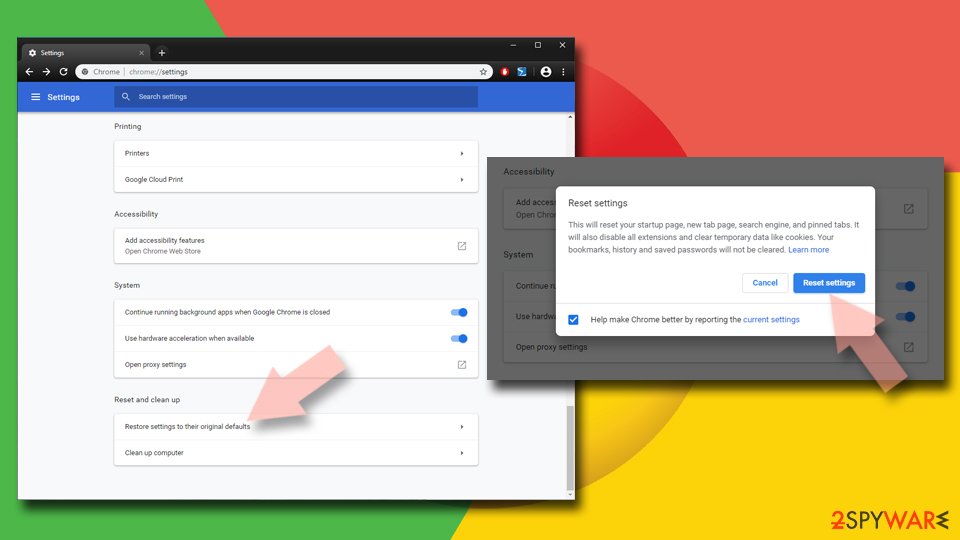
Reset Google Chrome:
If the previous methods did not help you, reset Google Chrome to eliminate all the unwanted components:
- Click on Menu and select Settings.
- In the Settings, scroll down and click Advanced.
- Scroll down and locate Reset and clean up section.
- Now click Restore settings to their original defaults.
- Confirm with Reset settings.

Delete from Safari
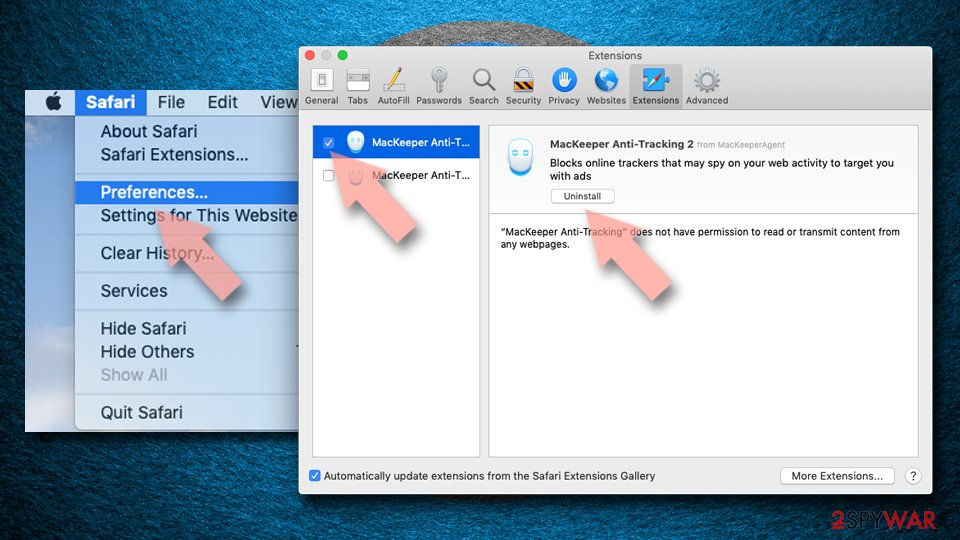
Remove dangerous extensions:
- Open Safari, click Safari in the menu at the top-left of the screen, and select Preferences.
- Go to the Extensions tab, look for any suspicious entries, and click Uninstall to remove them.

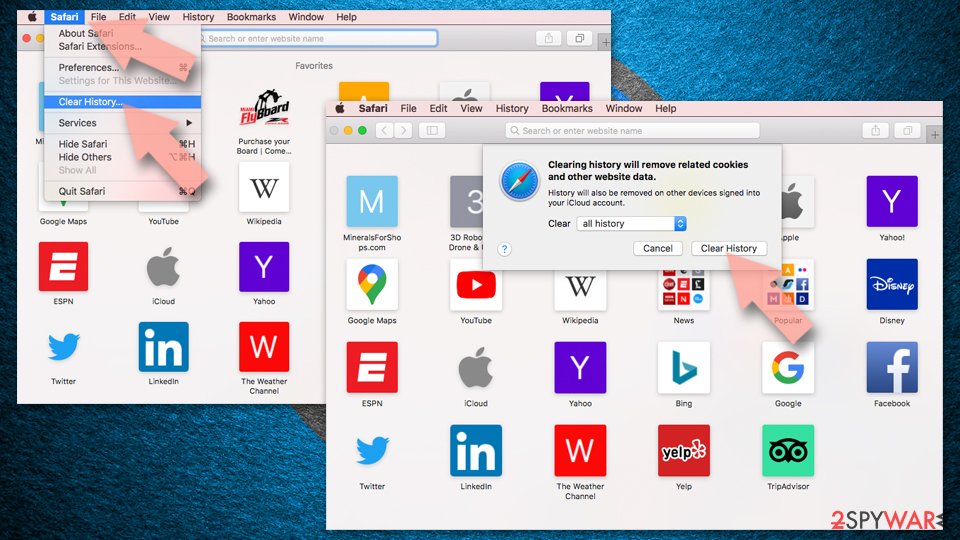
Clear history and website data:
- Click Safari in the menu and pick Clear History.
- Set Clear to all history and confirm with Clear History.

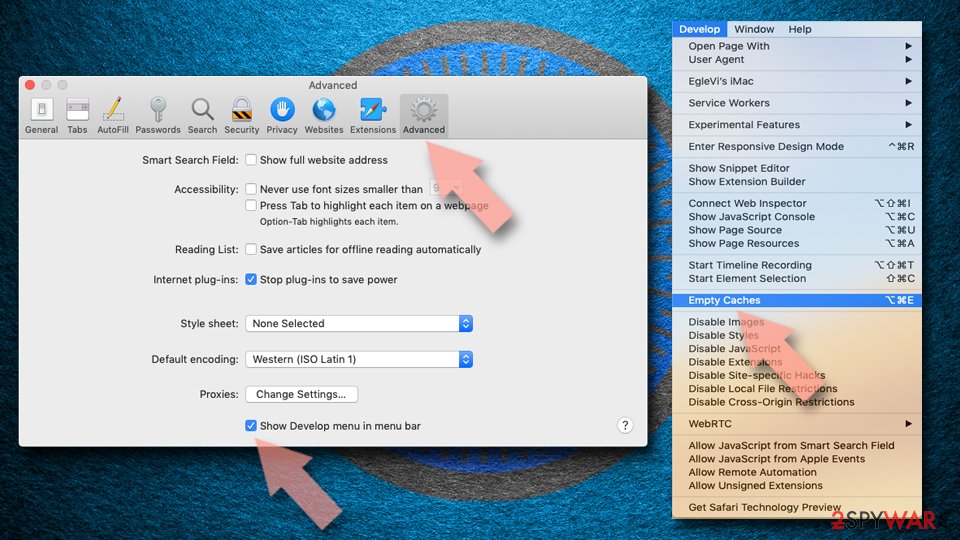
Reset Safari:
- Click Safari in the menu and select Preferences > Advanced.
- Enable Show Develop menu in menu bar.
- From the menu bar, click Develop and select Empty Caches.

Was this guide helpful?
Be the first to comment