
Alexa Toolbar: what it is and how to remove it
Alexa Toolbar is a service that people tend to call an intruder or potentially unwanted program. This is the service which is owned by Amazon and is compatible with Internet Explorer, Google Chrome, and Mozilla Firefox web browsers.
Facts checked October 6, 2026. Removal steps tested on Windows 11 (26H2) and checked against Microsoft's and the browser makers' current documentation. Sections marked as our earlier report are the original text: they describe the threat as it was then and have not been reviewed since. The 2026 status, the removal steps and the questions are current.
Automatic
Get a free scan and check if your PC is infected.
Fortect finds malware, unwanted programs and the Windows damage they leave behind, and repairs it in one pass.
Programs like Alexa Toolbar usually arrive in groups; a free scan lists the companions that are easy to miss.
Do it yourself · free Remove Alexa Toolbar yourself 4 steps, about 12 minutes, no software needed.
Start the steps
Alexa Toolbar: summary
| Distribution | The program can be installed from freeware sites, deceptive pages, or during the installation of a different program |
|---|---|
| Name | Alexa Toolbar |
| Type | Browser plugin |
| Symptoms | The toolbar gets installed on the browser and controls online traffic, redirects users to unwanted sites |
| Issues | The program appears out of nowhere and triggers reroute to various suspicious sites leading up to PUP infiltrations and privacy issues |
| Detection names | No Microsoft detection name is known |
| Removal | Scan the PC with security software to find and remove the malware and anything installed with it. Fortect scans Windows for malware and repairs the system files and settings it damaged. Remove it nowTo use the full-featured product, you have to purchase a license for Fortect. The scan is free. |
Show 5 more facts
| Damage | Not recorded in the old report |
|---|---|
| Evidence | One write-up by a security site; details still limited |
| Program | Alexa Toolbar |
| First seen | 11 January 2021 |
| Facts checked | 6 October 2026 |
Is Alexa Toolbar safe? Why it is flagged
From our report of Jan 2021 · not reviewed since
Alexa toolbar is the browser add-on that creates issues with the system when it controls various browsing online features
Alexa Toolbar is a service that people tend to call an intruder or potentially unwanted program.
This is the service which is owned by Amazon and is compatible with Internet Explorer, Google Chrome, and Mozilla Firefox web browsers. Mostly, users install this program on their computers because they expect helpful information from it - Alexa Toolbar promises them to provide varied information about websites, such as traffic rankings, various user reviews, visitors' numbers, and similar data that is very useful for the most of PC users.
Alexa Toolbar is developed by webcrawler known for shady business with affiliates, sponsored material, and third-parties that can possibly affect your time on the internet and the general performance of the device. The program should be helpful, and people believe those claims about the browser add-on's usefulness.
However, this is not the only feature that Alexa Toolbar is known for. Some things may make you think twice before downloading this program to the system. But the PUP can easily enter the system during insecure processes or browsing on shady websites.
Beware that this program may also initiate some annoying activities on the computer, for example, slowdowns, continuous pop-up advertisements, and so on. It can also collect data about the user and consume such data as people's most visited websites, data that they enter when visiting them, and even PC's IP address.
Typically, this program can also get data about a user's web browser and operating system, his/her email address, location, and products or services that were purchased via its service. However, this data is considered as personally non-identifiable, so there is no reason to worry about your financial data when having this toolbar installed on the system.
This data tracking issue uses the recorded information because sponsored material triggers more advertisements, and commercial content creators associated with Alexa Toolbar can be involved in shady misleading and deceptive campaigns.
Nevertheless, it seems that those who have issues with the Alexa Toolbar removal are especially annoyed. The frustration is also triggered by its Amazon shopping button, which appears when you hover your mouse over some product. If you want to get rid of it, you will have to remove a responsible program for showing it.
For the sake of general system cleaning, you should remove Alexa Toolbar using tools that are developed to eliminate threats like this. Anti-malware is the way to go, especially when you do not know how long this application has been running there. As for the issues with your PC - run .


From our report of Jan 2021 · not reviewed since
More from our earlier report on Alexa Toolbar
- Alexa Toolbar removal can be achieved with anti-malware tools
- Clearing the system includes PC repair functions that can possibly offer
- Alexa collects information about surfing habits.
- Use of some features may transmit personal information to Alexa.
- Default with Internet Explorer an Alexa component is installed but is only active when the function Show Related Links is used.
How Alexa Toolbar got installed
From our report of Jan 2021 · not reviewed since
Alexa Toolbar can be downloaded from various websites that are used for promoting such and similar programs.
Note that this distribution technique is still legitimate, but it has also initiated various doubts and discussions. Also, it seems that it can be easily avoided. You can do that by paying more attention to the installation process of freeware and shareware.
You should simply select the Custom or Advanced installation option and then carefully check the installation windows of the freeware you will install on your computer. Make sure you get rid of each of the checkmarks that agree to download and install Alexa Toolbar to the system.
If you use Alexa Toolbar and don't think it's annoying, you can leave it on your computer without any concerns. This program is NOT a virus, just a potentially unwanted application. However, this is not the best tool you can use, and remember to take those affiliate and deceptive websites in question.
How to uninstall Alexa Toolbar
How to remove Alexa Toolbar
Uninstall it, then set your own browser and search engine back, because it changes both.
Step 1: Uninstall Alexa Toolbar
Alexa Toolbar is removed like any other program, from the list of installed apps. In Windows 11 that is Settings > Apps > Installed apps, in Windows 10 Settings > Apps > Apps & features, and in both you can also use Control Panel > Programs and Features.
Select Alexa Toolbar, click Uninstall and follow the uninstaller to the end. Then look at the entries just above and below it when the list is sorted by date: bundled programs install at the same minute.
Full procedure with screenshots: Uninstall a program or app in Windows On uGetFix
Step 2: Remove it from startup
Press Ctrl + Shift + Esc to open Task Manager and select Startup apps (Windows 11) or the Startup tab (Windows 10). Disable entries you do not recognise, especially ones with no publisher or with a name that copies a Windows component.
Right-click an entry and choose Open file location to see where it runs from: programs in
%AppData%or%Temp%deserve a closer look. Some entries are not listed there but in the registry Run keys, which the procedure below shows how to check.Full procedure with screenshots: Stop apps from opening at startup On uGetFix
Step 3: Delete the folders left behind
Uninstalling often leaves the program's folders, and some threats reinstall themselves from them.
Press Windows + R, type
%LocalAppData%and press Enter, then do the same for%AppData%and %ProgramData%, and look for folders named after Alexa Toolbar, its publisher or created on the day the problem started.Delete those folders, and check
C:\Program FilesandC:\Program Files (x86)too.If Windows says a file is in use, end it in Task Manager or delete the folder after a restart in Safe Mode. The folders are the same in Windows 11 and Windows 10.
Full procedure with screenshots: Remove what malware leaves behind in Windows
Step 4: Scan the PC, then run the offline scan
A scan finds the parts of Alexa Toolbar that the manual steps cannot see. In Windows Security > Virus & threat protection > Scan options, start a Full scan and quarantine what it reports.
Follow it with Microsoft Defender Antivirus (offline scan) > Scan now, which restarts the PC and checks the disk while Windows and the malware are not running.
It takes about 15 minutes and works the same in Windows 11 and Windows 10. If either scan finds something, run the full scan again after removal until it comes back clean.
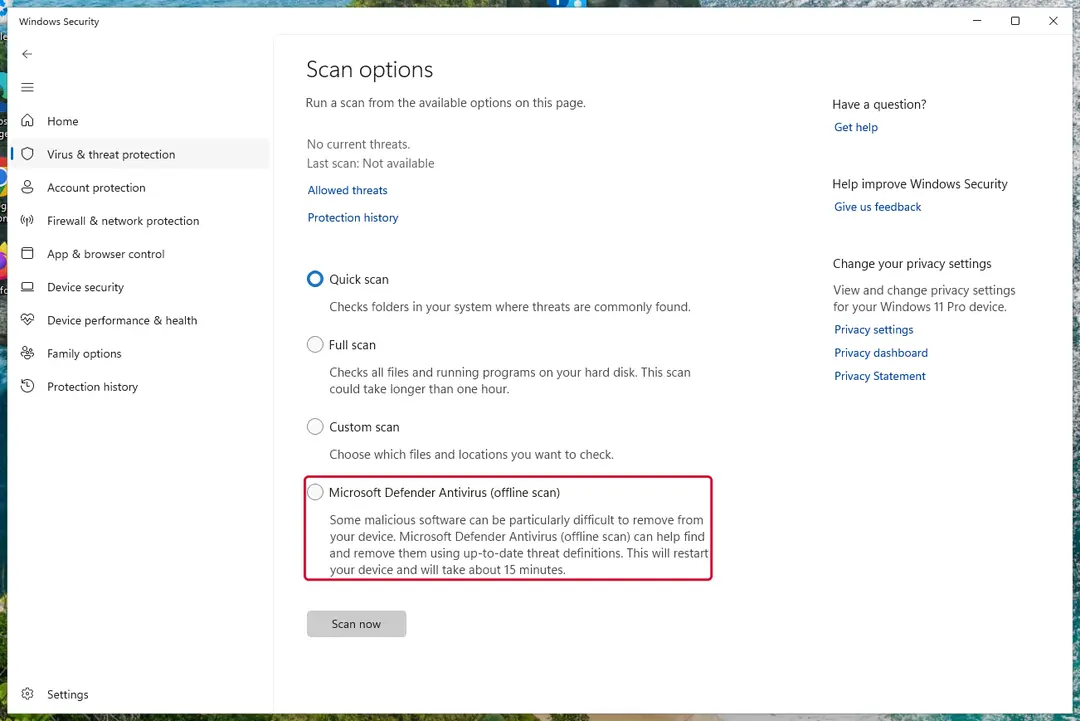
Windows 11: Windows Security > Virus & threat protection > Scan options. Full procedure with screenshots: Run a Microsoft Defender Offline scan
Instructions for each browser and system
The detailed steps for every browser and system this guide covers. Open the one you use.
Uninstall from Windows
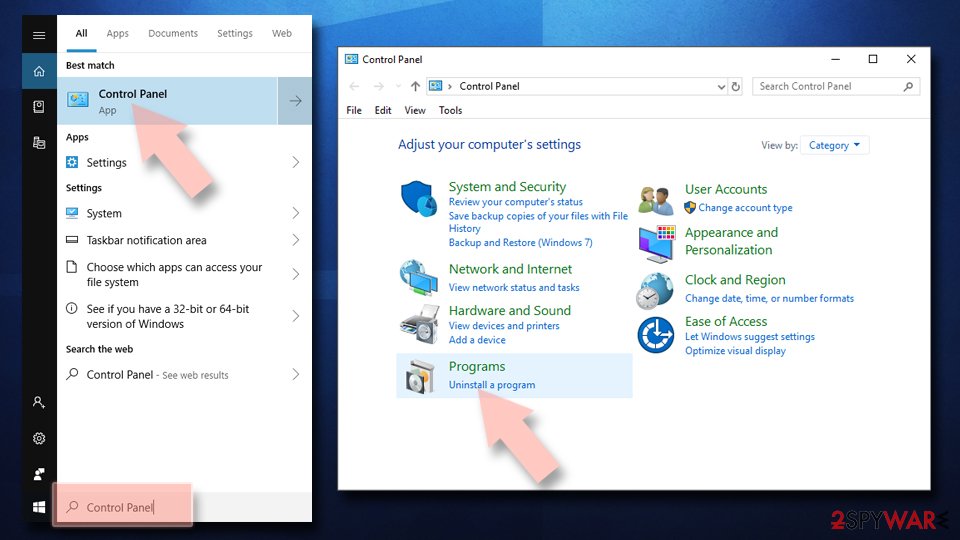
Uninstall from Windows 10/8:
- Type Control Panel into the Windows search box and open the result.
- Under Programs, select Uninstall a program.
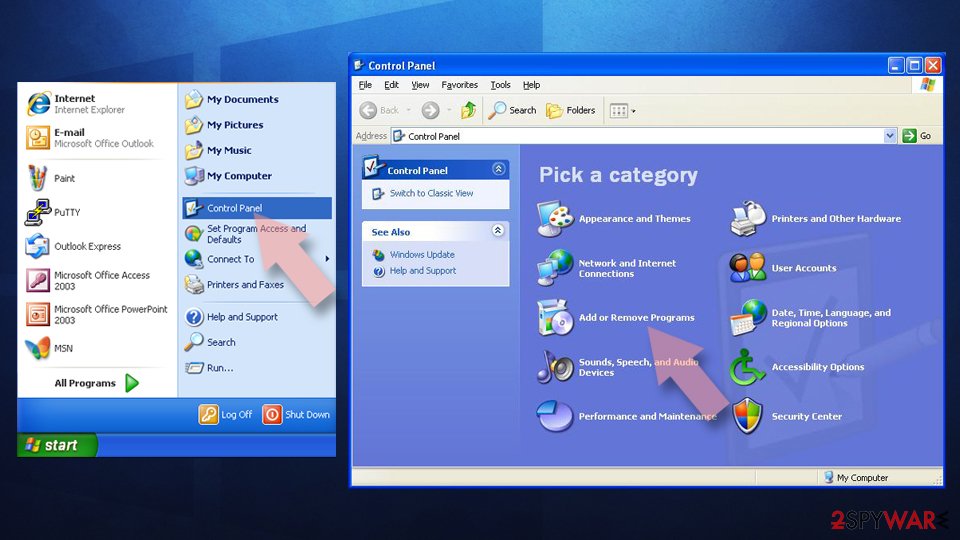
Uninstall from Windows 7/XP:
- Click on Windows Start > Control Panel (Windows XP users should click on Add/Remove Programs).
- In Control Panel, select Programs > Uninstall a program.
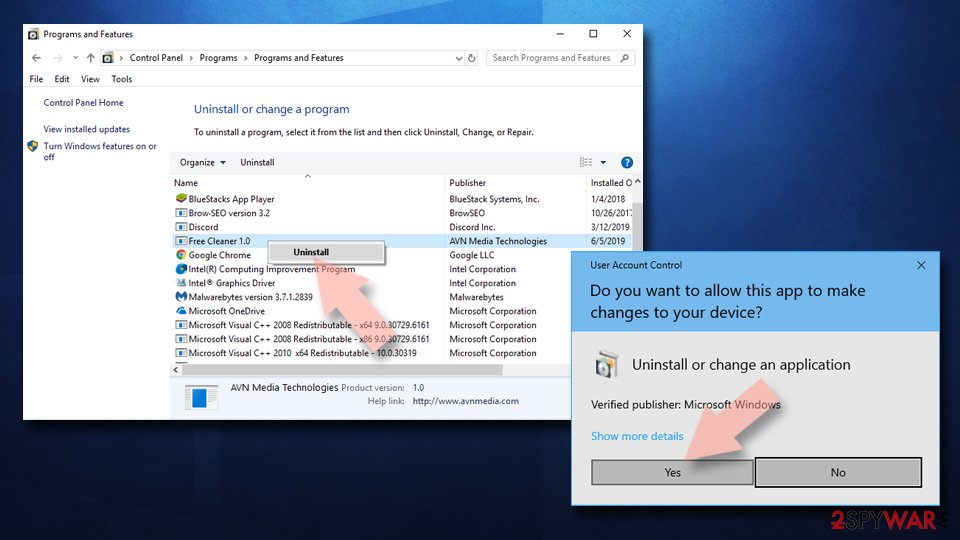
Remove the unwanted program:
- In the Programs and Features window, look for any recently installed suspicious entries, select them, and click Uninstall.
- If User Account Control appears, click Yes to confirm, then complete the removal.
Remove from Google Chrome
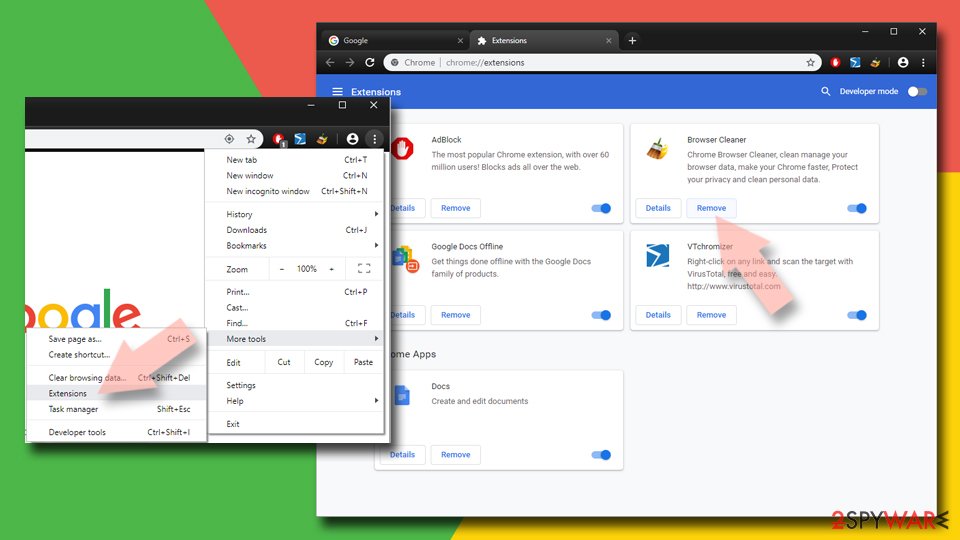
Delete malicious extensions from Google Chrome:
- Open Google Chrome, click on the Menu (three vertical dots at the top-right corner) and select More tools > Extensions.
- In the newly opened window, you will see all the installed extensions. Uninstall all suspicious extensions related to the unwanted program by clicking Remove.
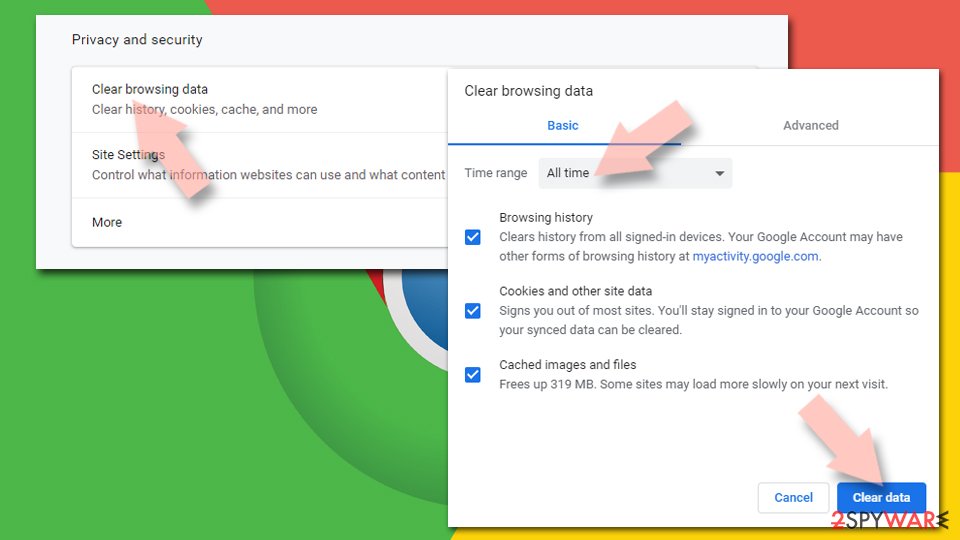
Clear cache and web data from Chrome:
- Click on Menu and pick Settings.
- Under Privacy and security, select Clear browsing data.
- Select Browsing history, Cookies and other site data, as well as Cached images and files.
- Click Clear data.
Change your homepage:
- Click menu and choose Settings.
- Look for a suspicious site in the On startup section.
- Click on Open a specific or set of pages and click on three dots to find the Remove option.
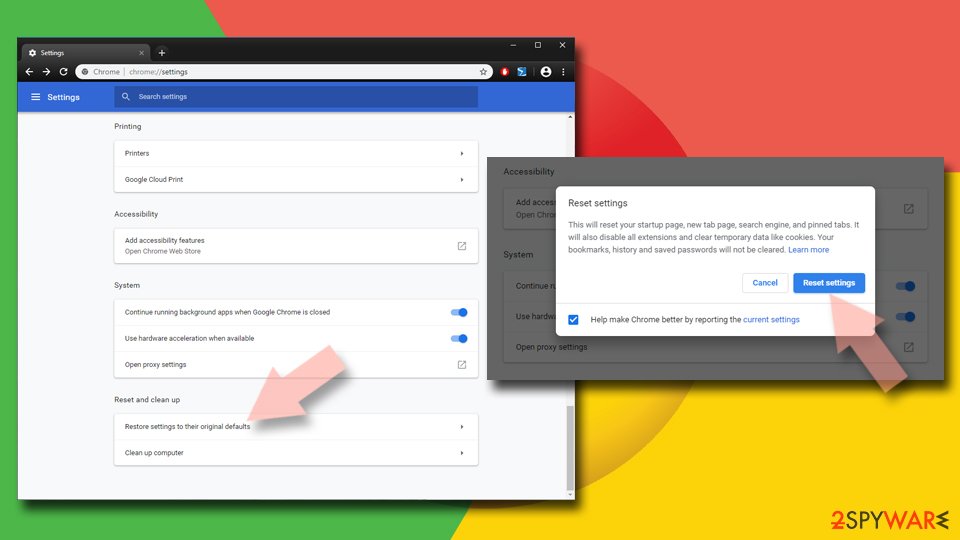
Reset Google Chrome:
If the previous methods did not help you, reset Google Chrome to eliminate all the unwanted components:
- Click on Menu and select Settings.
- In the Settings, scroll down and click Advanced.
- Scroll down and locate Reset and clean up section.
- Now click Restore settings to their original defaults.
- Confirm with Reset settings.
Remove from Microsoft Edge
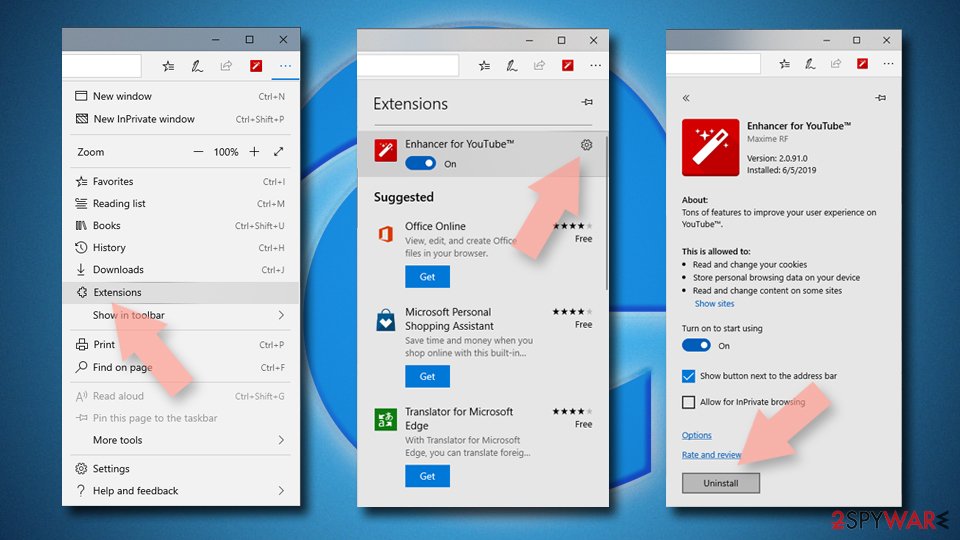
Delete unwanted extensions from MS Edge:
- Select Menu (three horizontal dots at the top-right of the browser window) and pick Extensions.
- From the list, pick the extension and click on the Gear icon.
- Click Remove.
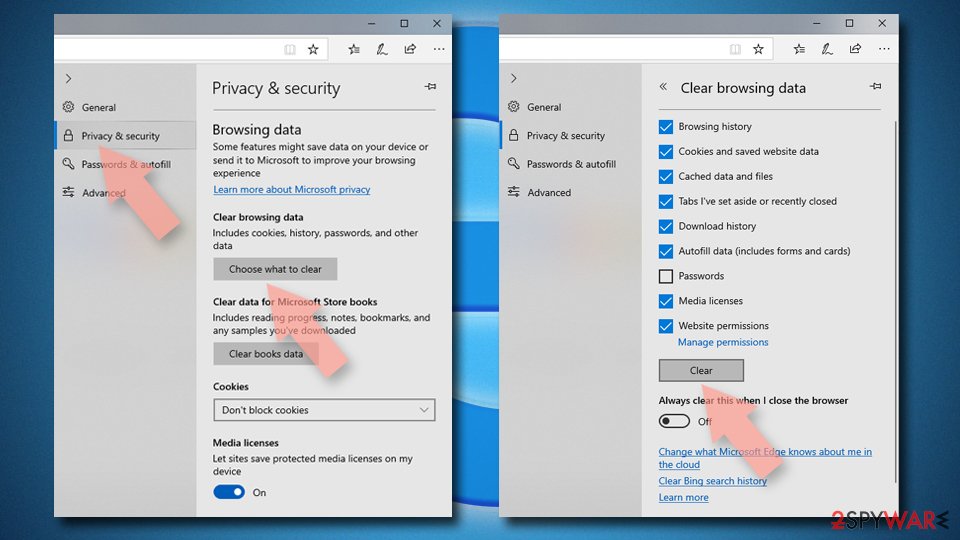
Clear cookies and other browser data:
- Click on the Menu (three horizontal dots at the top-right of the browser window) and select Settings > Privacy, search, and services..
- Under Clear browsing data, pick Choose what to clear.
- Select Cookies and other site data and Cached images and files. (apart from passwords, although you might want to include Media licenses as well, if applicable) and click on Clear.
Restore new tab and homepage settings:
- Click the menu icon and choose Settings.
- Then find On startup section.
- Click Remove next to any suspicious startup page.
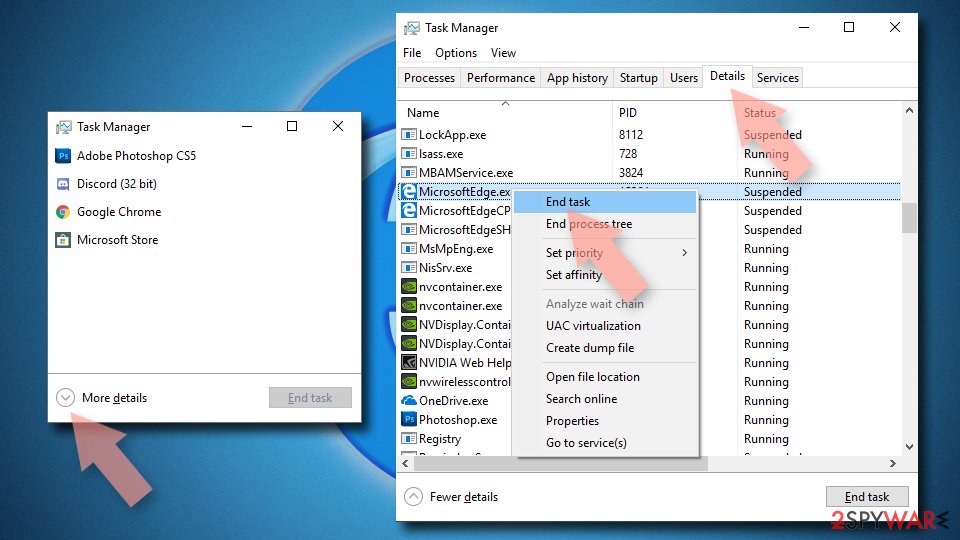
Reset MS Edge if the above steps did not work:
- Press on Ctrl + Shift + Esc to open Task Manager.
- Click on More details arrow at the bottom of the window.
- Select Details tab.
- Now scroll down and locate every entry with Microsoft Edge name in it. Right-click on each of them and select End Task to stop MS Edge from running.
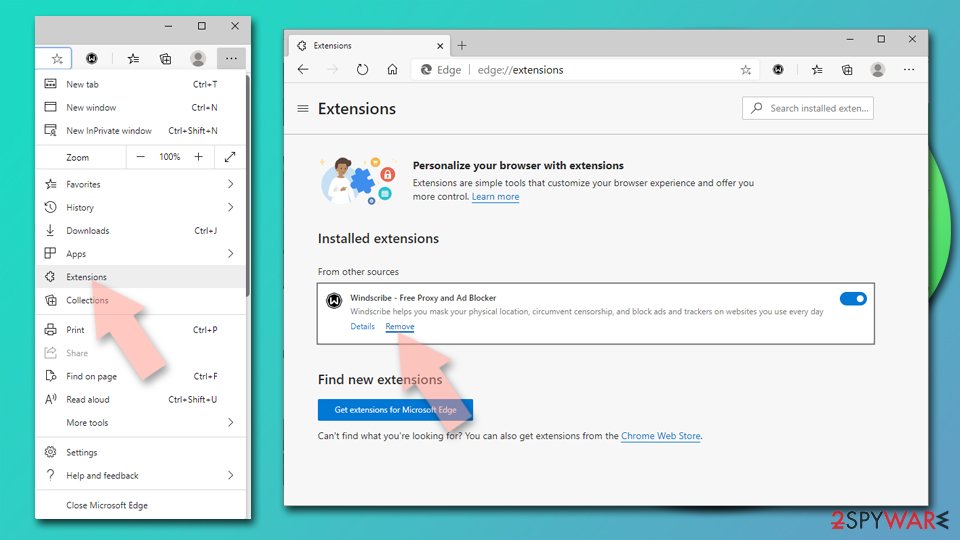
Delete extensions from MS Edge (Chromium):
- Open Edge and click select Settings > Extensions.
- Delete unwanted extensions by clicking Remove.
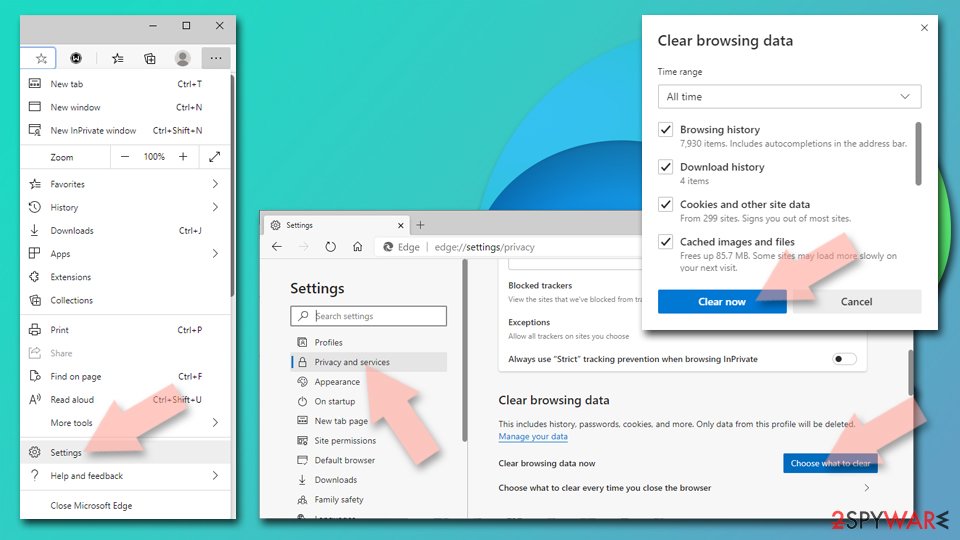
Clear cache and site data:
- Click on Menu and go to Settings.
- Select Privacy, search and services.
- Under Clear browsing data, pick Choose what to clear.
- Under Time range, pick All time.
- Select Clear now.
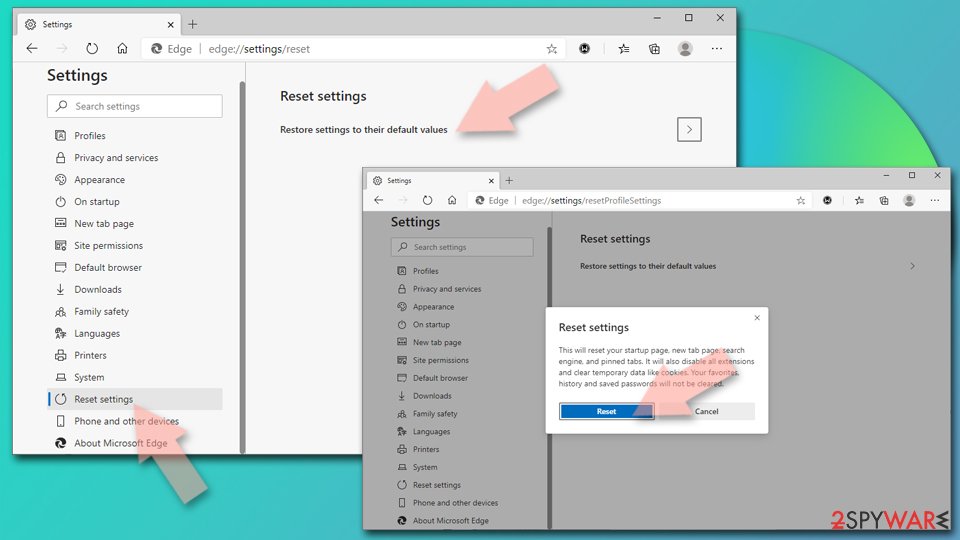
Reset Chromium-based MS Edge:
- Click on Menu and select Settings.
- On the left side, pick Reset settings.
- Select Restore settings to their default values.
- Confirm with Reset.
- This will disable extensions and reset startup pages but will not delete bookmarks, saved passwords, or browsing history.
Remove from Mozilla Firefox (FF)
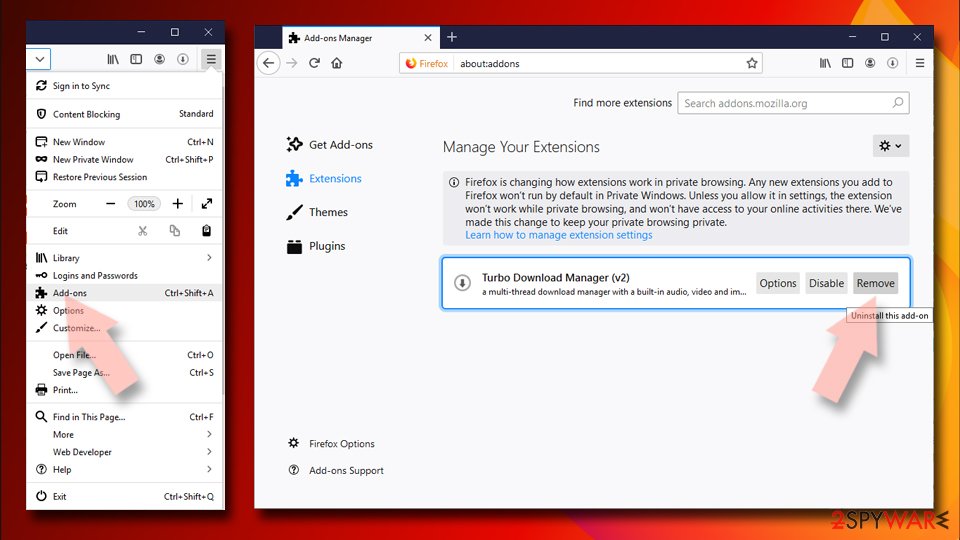
Remove dangerous extensions:
- Open Mozilla Firefox browser and click on the Menu (three horizontal lines at the top-right of the window).
- Select Add-ons.
- In here, select the unwanted extension and click Remove.
Reset the homepage:
- Click three horizontal lines at the top right corner to open the menu.
- Choose Settings.
- Under Home, set your preferred homepage and new tab settings.
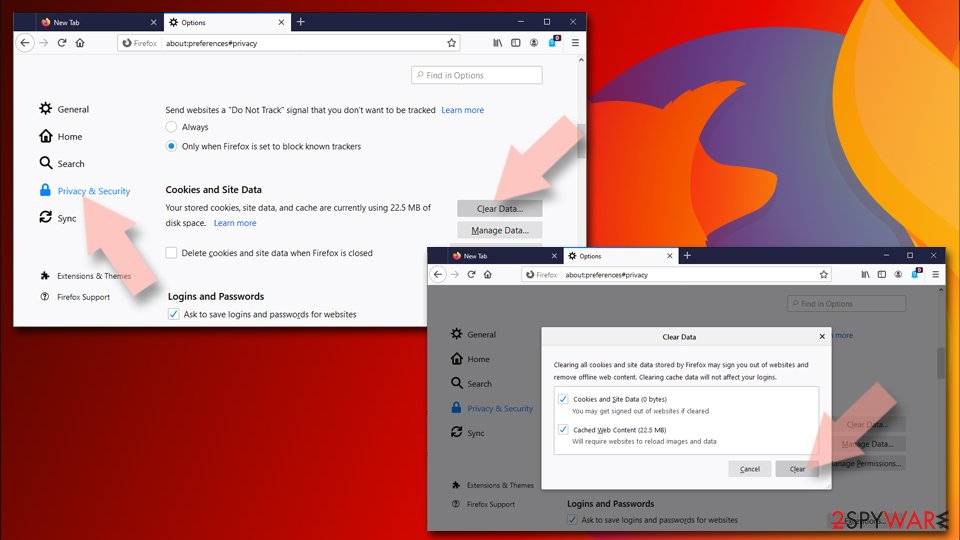
Clear cookies and site data:
- Click Menu and pick Settings.
- Go to Privacy & Security section.
- Scroll down to locate Cookies and Site Data.
- Click on Clear Data...
- Select Cookies and Site Data and Temporary cached files and pages, then click Clear.
Reset Mozilla Firefox
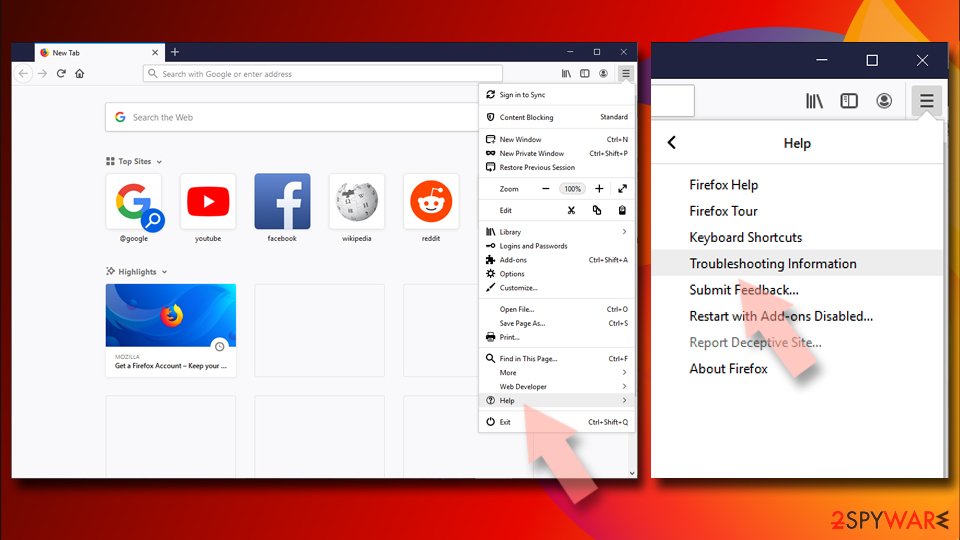
If clearing the browser as explained above did not help, reset Mozilla Firefox:
- Open Mozilla Firefox browser and click the Menu.
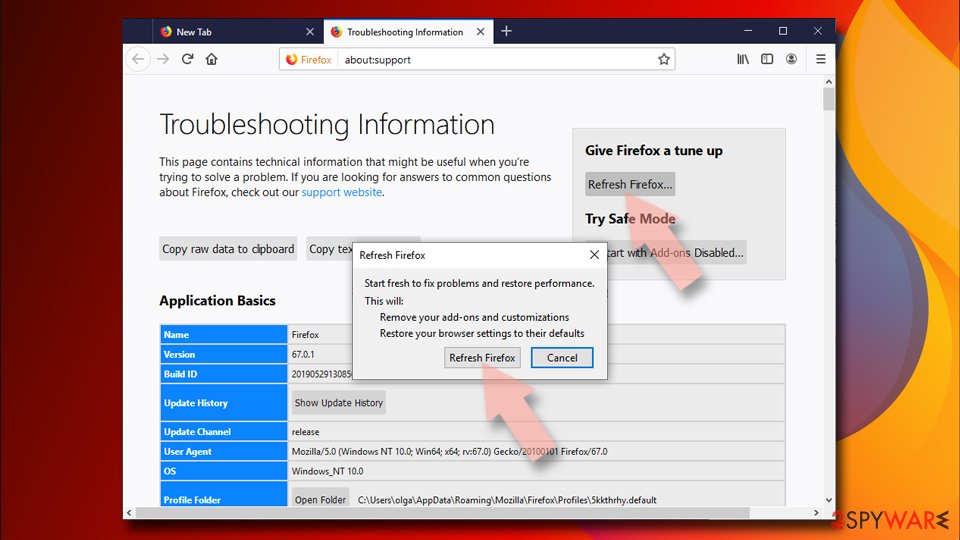
- Go to Help and then choose Troubleshooting Information.
- Under Give Firefox a tune up section, click on Refresh Firefox...
- Once the pop-up shows up, confirm the action by pressing on Refresh Firefox.
Delete from Safari
Remove dangerous extensions:
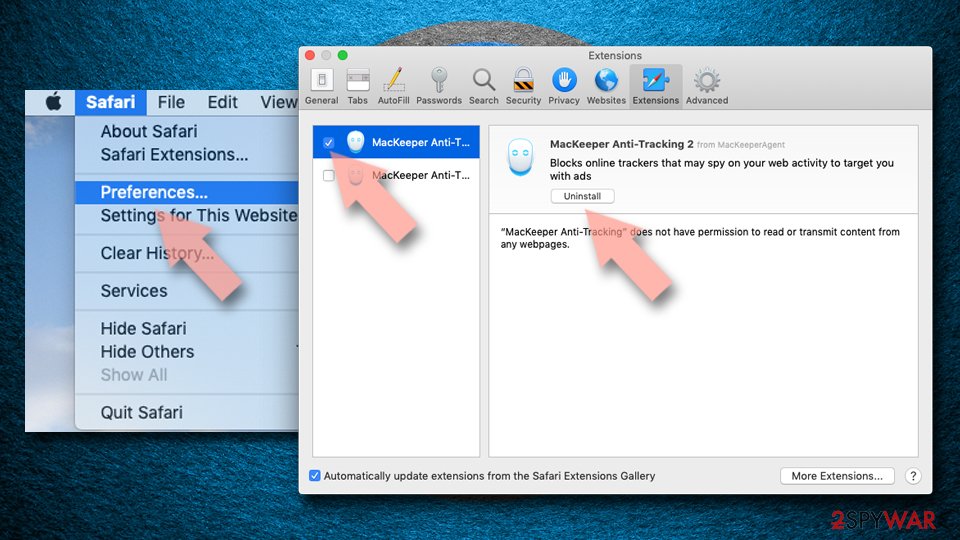
- Open Safari, click Safari in the menu at the top-left of the screen, and select Preferences.
- Go to the Extensions tab, look for any suspicious entries, and click Uninstall to remove them.
Clear history and website data:
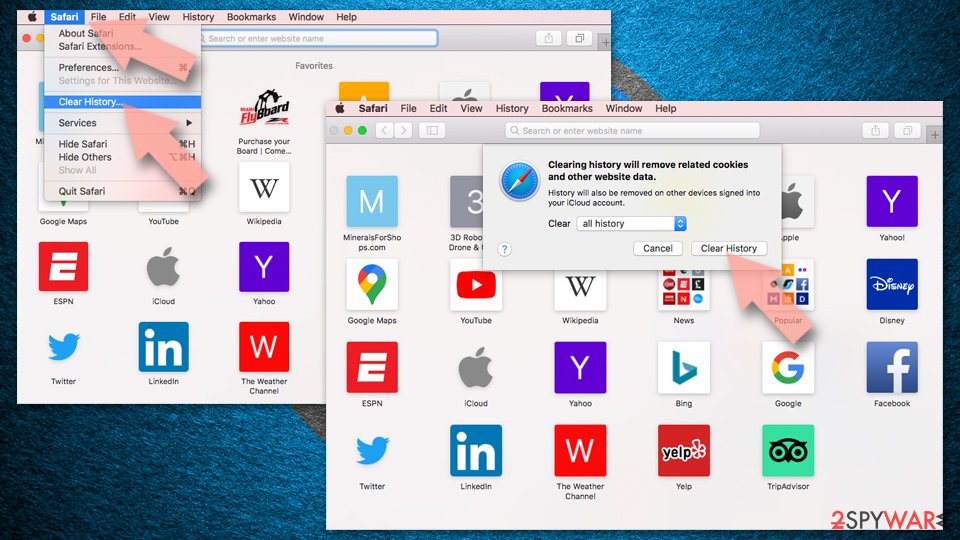
- Click Safari in the menu and pick Clear History.
- Set Clear to all history and confirm with Clear History.
Reset Safari:
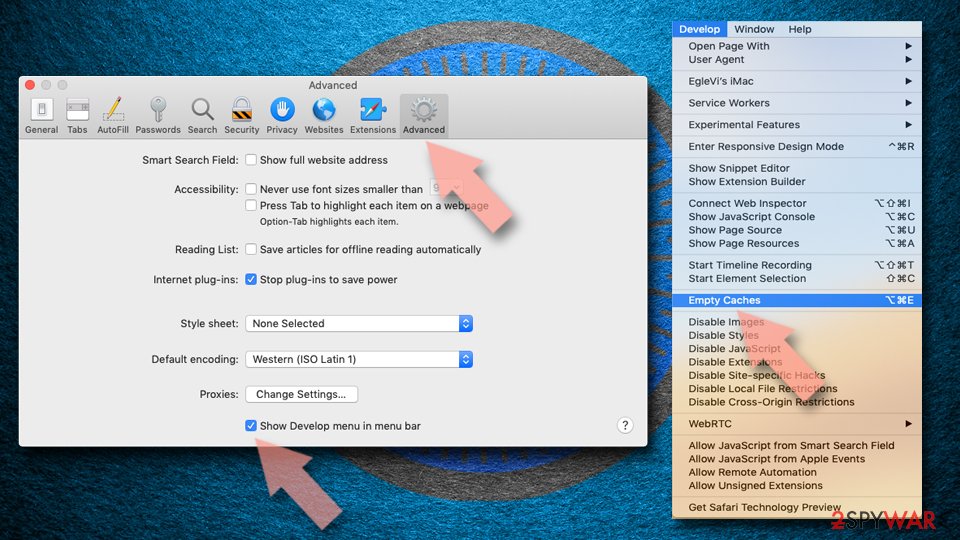
- Click Safari in the menu and select Preferences > Advanced.
- Enable Show Develop menu in menu bar.
- From the menu bar, click Develop and select Empty Caches.
Delete from macOS
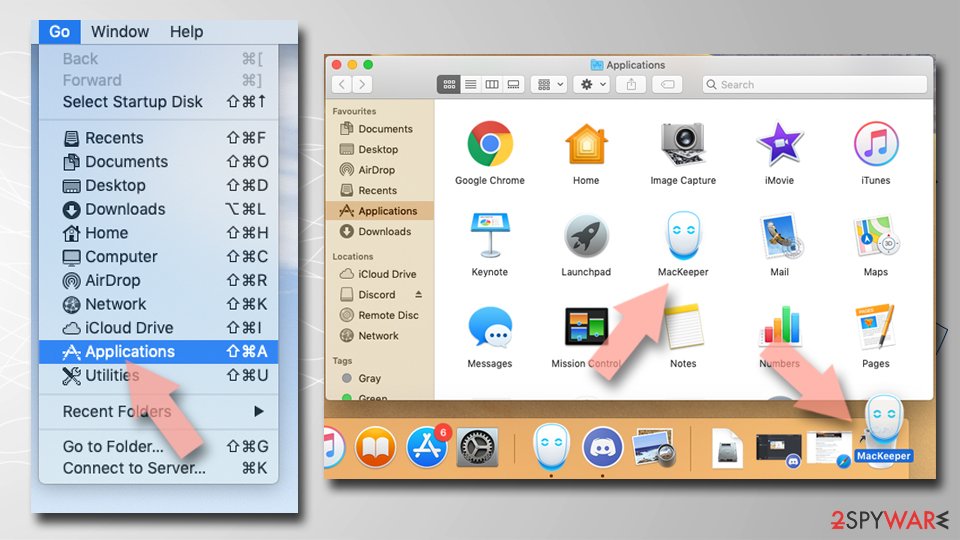
Remove the unwanted application:
- From the menu bar, select Go > Applications.
- In the Applications folder, look for any suspicious entries, then drag them to Trash (or right-click and pick Move to Trash).
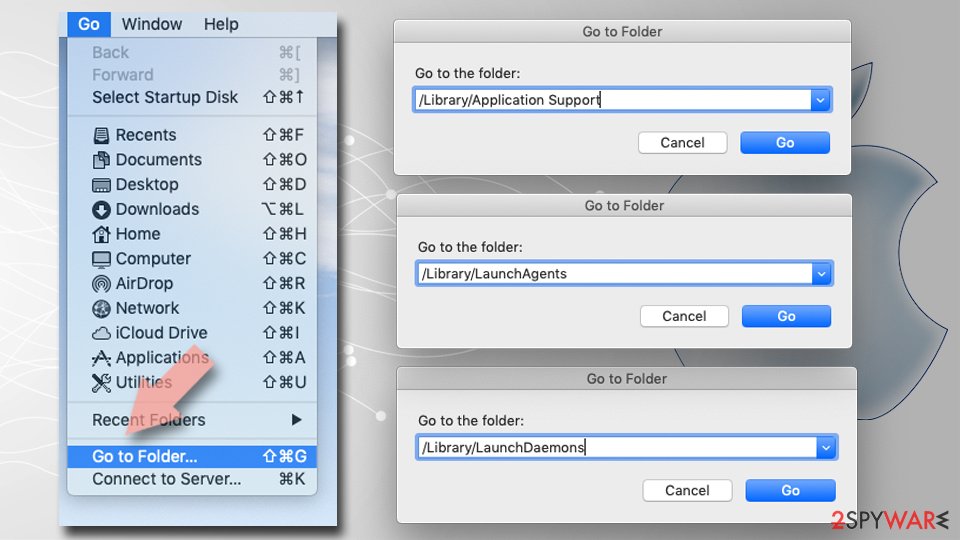
Delete leftover files and folders:
- Select Go > Go to Folder.
- Enter /Library/Application Support and remove any suspicious folders related to the unwanted program.
- Repeat the same check in the /Library/LaunchAgents and /Library/LaunchDaemons folders, deleting any suspicious entries.
- Finally, empty the Trash to permanently remove the leftovers.
Reset Internet Explorer
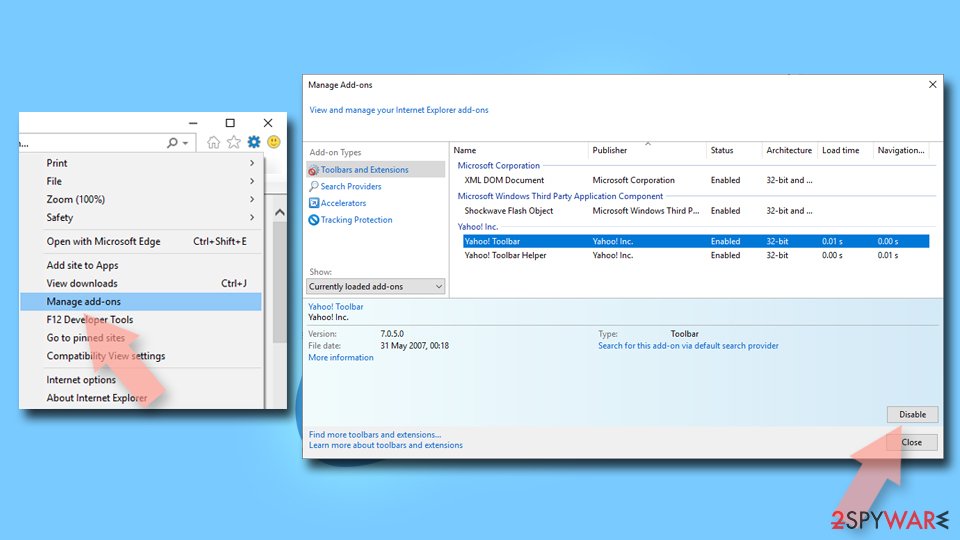
Remove dangerous add-ons:
- Open Internet Explorer, click on the Gear icon (IE menu) on the top-right corner of the browser
- Pick Manage Add-ons.
- You will see a Manage Add-ons window. Here, look for suspicious plugins. Click on these entries and select Disable.
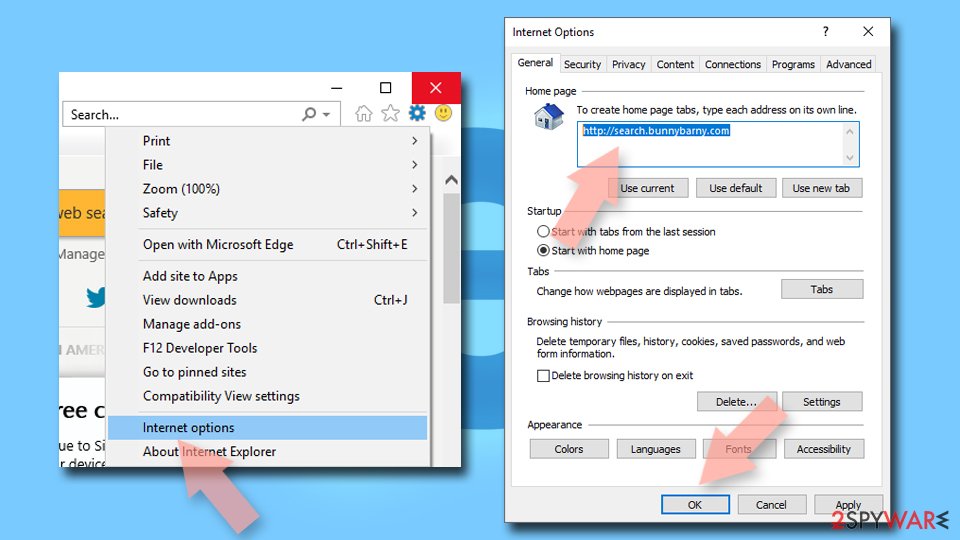
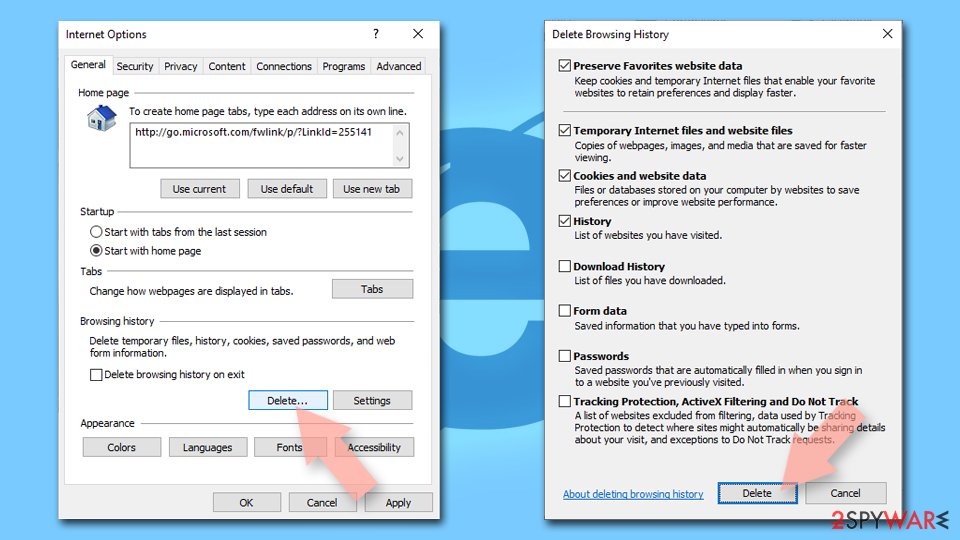
Change your homepage if it was altered:
- Open IE and click on the Gear icon.
- Select Internet Options.
- In the General tab, delete the Home page address and replace it by your preferred one (for example, Google.com).
- Click Apply and then select OK.
Delete temporary files:
- Press on the Gear icon and select Internet Options.
- Under Browsing history, click Delete...
- Select relevant fields and press Delete.
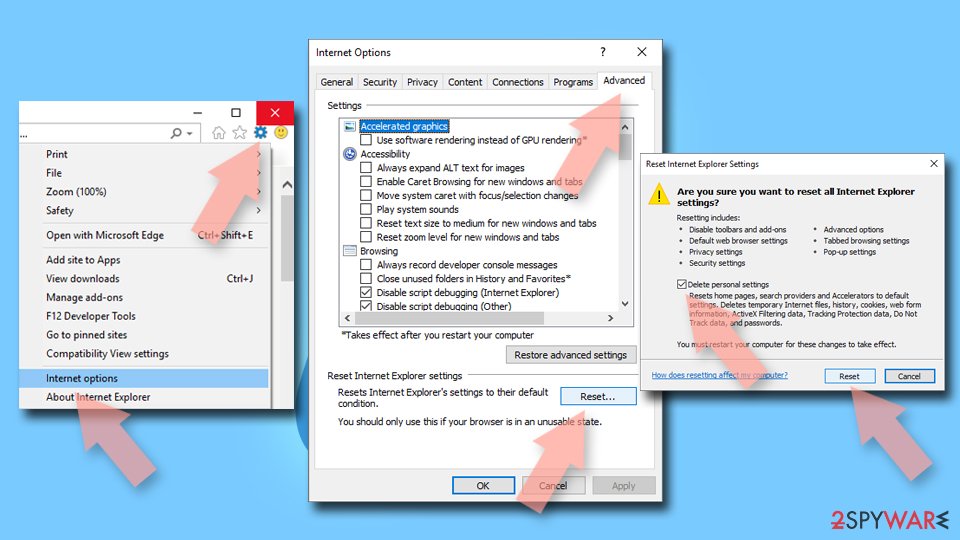
Reset Internet Explorer:
- Click on Gear icon > Internet options and select Advanced tab.
- Select Reset.
- In the new window, check Delete personal settings and select Reset.
Access your website securely from any location
When you work on the domain, site, blog, or different project that requires constant management, content creation, or coding, you may need to connect to the server and content management service more often. The best solution for creating a tighter network could be a dedicated/fixed IP address.
If you make your IP address static and set to your device, you can connect to the CMS from any location and do not create any additional issues for the server or network manager that needs to monitor connections and activities. VPN software providers like can help you with such settings and offer the option to control the online reputation and manage projects easily from any part of the world.
Recover files after data-affecting malware attacks
While much of the data can be accidentally deleted due to various reasons, malware is one of the main culprits that can cause loss of pictures, documents, videos, and other important files.
More serious malware infections lead to significant data loss when your documents, system files, and images get encrypted. In particular, ransomware is is a type of malware that focuses on such functions, so your files become useless without an ability to access them.
Even though there is little to no possibility to recover after file-locking threats, some applications have features for data recovery in the system. In some cases, can also help to recover at least some portion of your data after data-locking virus infection or general cyber infection.
From our report of Jan 2021 · not reviewed since
The process of Alexa Toolbar removal might take time
If you want to remove Alexa Toolbar from your computer, the first thing you should do is to uninstall it via Add/Remove Programs feature.
You can do that with the help of those listed below or using the manual removal guide.
However, a better option would be an automatic system cleaning with anti-malware tools. You can remove Alexa Toolbar and eliminate other possibly related applications using anti-malware tools that can find intruders, other installed viruses and clear the machine fully. The only step for you is to reset your browsers and repair the damage in system files with proper applications.
Questions about Alexa Toolbar
Is Alexa Toolbar a virus?
Most programs that appear the way Alexa Toolbar did are not viruses in the strict sense. They are potentially unwanted programs:
- real software that arrives bundled with other downloads and then shows offers
- changes browser settings
- starts with Windows
Some are harmless, some are annoying and a few carry adware. What makes it worth removing is that you did not choose it.
Uninstall it from Installed apps and check the startup list and the browsers for anything added the same day. If it refuses to uninstall or returns after a restart, treat it as more serious and run a Microsoft Defender offline scan.
Alexa Toolbar came back after I uninstalled it. Why?
Something else is reinstalling it. Common causes are a second program from the same publisher, a scheduled task that downloads it again, or a browser extension that keeps prompting for it. Sort Installed apps by install date and uninstall each entry from the same day that you did not choose.
Then open Task Scheduler and look in the Task Scheduler Library for tasks with updater-style names that you do not recognise. Check Startup apps in Task Manager too. If Alexa Toolbar still returns, start Windows in Safe Mode, uninstall it there and run a Microsoft Defender offline scan, which looks for loaders that ordinary scans can miss.
Is Alexa Toolbar safe to keep?
It is not dangerous in the way malware is: it does not steal passwords or encrypt files. It can still cost money through subscriptions, show ads that lead to scam pages, collect usage data and slow the start of Windows. If you installed Alexa Toolbar on purpose and find it useful, you can keep it:
- turn off start with Windows
- offers and data sharing in its settings
- choose Custom during updates
If you do not know where it came from, remove it, together with anything installed on the same day.
Could Alexa Toolbar be a legitimate program?
Possibly. Some programs that cause alexa Toolbar in the list of installed apps are real products from real companies that simply use aggressive distribution. Check the publisher in Installed apps and the digital signature in the file's Properties.
A known publisher and a program you actually use mean you can keep it and only adjust its settings. An unknown publisher, a program you never opened and no clear purpose mean it should go.
If it came bundled with something else, the decision is easy: you did not choose it, so remove it and keep the program you actually wanted.
Is Alexa Toolbar harmful?
It is unwelcome rather than destructive, based on what has been reported: alexa Toolbar in the list of installed apps. Unwanted programs like this slow Windows down, use your connection, show offers or change settings, and they make money for their publisher at your expense. The bigger concern is what arrived with them.
Bundled installers often add two or three programs at once, and some of those change the browser or install updaters that fetch more software later. Remove Alexa Toolbar, then sort Installed apps by date and remove anything else from the same day. A full scan in Windows Security afterwards confirms that nothing more serious came along.
Alexa Toolbar will not uninstall. What can I do?
Close it first: in Task Manager, select every process with its name and click End task, and exit its tray icon. Then uninstall it from Settings > Apps > Installed apps. If the uninstaller fails, shows an error or just reopens offers, restart Windows in Safe Mode, where third-party programs do not start, and uninstall from there.
Afterwards, delete its folders in C:\Program Files and %AppData%, remove its scheduled tasks and run a full scan in Windows Security. As a last step, System Restore to a date before the install can help.
Why does Alexa Toolbar reinstall itself?
Programs like Alexa Toolbar are often installed with an updater or a companion app whose job is to keep them present. When you uninstall the main program, the helper downloads it again at the next scheduled run or restart.
Find the helper by sorting Installed apps by date and by checking Task Scheduler and Services for entries with the same name or publisher. Remove them all, then delete leftover folders. Turning on Potentially unwanted app blocking in Windows Security also stops many reinstall attempts.
Why can't I uninstall Alexa Toolbar?
Usually because it is still running or because a helper reinstalls it. Close it from the notification area first, then end its process in Task Manager and try Settings > Apps > Installed apps again. If there is no uninstall entry, look for a folder under Program Files or AppData with the same name and an uninstaller inside.
If the program comes back after removal, the cause of alexa Toolbar in the list of installed apps is a scheduled task, a startup entry or the program it was bundled with. Remove those, restart and check again. Starting Windows in Safe Mode stops most helpers and makes stubborn programs easier to remove.
Can Windows Security remove Alexa Toolbar?
Often yes, if Potentially unwanted app blocking is on. Microsoft Defender detects many bundled and unwanted programs as PUA, but by default it only blocks them during download in some cases. For a program already installed, uninstall it yourself from Installed apps first, then run a full scan in Windows Security to catch leftovers.
If alexa Toolbar in the list of installed apps returns after that, run the Microsoft Defender offline scan, which works before Windows starts. Switching on the PUA setting afterwards helps keep similar programs out.
Will Fortect remove Alexa Toolbar?
Fortect scans Windows for malware and unwanted programs and repairs the system files and settings they change, and its free scan shows what it finds on your PC before you decide anything.
For Alexa Toolbar, follow the plan above as well: the browser steps take back permissions and settings that no scanner treats as a threat, and uninstalling the program that brought it removes the source.
Run Microsoft Defender's full scan and, if anything was found, its offline scan as a second opinion. If the symptoms are gone after the plan and both scans are clean, there is nothing more to do.
Sources
- FTC: How to recognize, remove and avoid malware (read October 6, 2026)
- Microsoft Learn: Microsoft Defender Offline (read October 6, 2026)
- Microsoft Learn: How Microsoft names malware (read October 6, 2026)