
Remove Antivir Solution Pro. Description and removal instructions

 
Title: Antivir Solution Pro
Also known as: AntivirSolutionPro
Type: Spyware
Severity scale:Antivir Solution Pro severity is 72  (72 / 100)
 
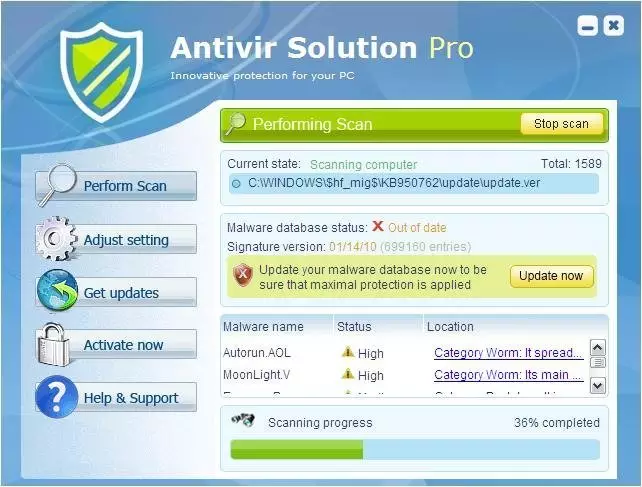
Antivir Solution Pro is a rogue anti-spyware application from the same family as AV Security Suite and Antispyware Soft. This fake program is typically promoted via fake online scanners and misleading web pop ups that appear when browsing bogus websites. Those pop ups will state that your computer is infected with adware, spyware and other malware. Then you will be prompted to download and run their malware removal tool which is Antivir Solution Pro of course. Please also note that the rogue program may come bundled with other malware or it can enter your computer through software vulnerabilities. However, most of the time it has to be manually installed. If you find that your computer is infected with this virus, please follow the removal instructions below.

Once Antivir Solution Pro is active, it will be configured to start automatically when loading Windows. The rogue program will scan your computer and detect non-existent or system files files as infections, but won't let you remove them until you purchase the program. This is obviously a scam because it asks you to pay for a license of a program that removes non-existent infections. What is more, the rogue program will display fake security alerts on your computer screen like every one or two minutes. These alerts will range from warnings about your computer be hacked to active malware processes being detected. Some of the fake security alerts read:


Windows Security Alert. Windows reports that computer is infected. Antivirus software helps to protect your computer against viruses and other security threats. Click here for the scan your computer. Your system might be at risk now.


Antivirus software alert
INFILTRATION ALERT Virus Attack
Your computer is being attacked by an internet virus. It could be a password-stealing attack, a trogan - dropper or similar.
DETAILS
Attack from:152.179.59.20, port 4703
Attacked port: 29484
Threat: BankerFox.A
Do you want block this attack?
Last, but not least, Antivir Solution Pro will blocks anti-spyware programs, Task Manager, Registry Editor and other useful system tools to protect itself from being removed. It will also block nearly all websites and especially security related ones. It won't let you download malware removal tools that why you will have to end Antivir Solution processes first or reboot your computer is Safe Mode with Networking. As you can see, the main purpose of AntivirSolutionPro is to trick you into purchasing the program. Don't purchase it. If you have already paid for it then contact your credit card company and dispute the charges. Then please use Antivir Solution Pro removal instructions below to remove this malware from your computer as soon as possible. Also, beware of such misleading websites as antiviractive.com.

Antivir Solution Pro removal instructions

1. Restart your computer. As your computer restarts but before Windows launches, tap "F8" key constantly. Use the arrow keys to highlight the "Safe Mode with Networking" option as shown in the image below, and then press ENTER.


2. Open Internet Explorer. Click on the Tools menu and then select Internet Options.


3. In the the Internet Options window click on the Connections tab. Then click on the LAN settings button.


4. Now you will see Local Area Network (LAN) settings window. Uncheck the checkbox labeled Use a proxy server for your LAN under the Proxy Server section and press OK.


5. Download an automatic removal tool from this page and run a full system scan. Or download it from alternative location.


Related files: [random]tssd.exe, [random].exe

Antivir Solution Pro properties:
• Changes browser settings
• Shows commercial adverts
• Connects itself to the internet
• Stays resident in background

Antivir Solution Pro snapshot:
Antivir Solution Pro removal

Automatic Antivir Solution Pro removal:

remover for Antivir Solution Pro

Antivir Solution Pro manual removal:

Kill processes:
[random]tssd.exe
Delete registry values:
HKEY_CURRENT_USER\Software\Microsoft\Windows\CurrentVersion\Run"[EIGHT RANDOM CHARACTERS]" = "%UserProfile%\Local Settings\Application Data\[RANDOM CHARACTERS]\[RANDOM CHARACTERS]tssd.exe"
HKEY_LOCAL_MACHINESOFTWARE\Microsoft\Windows\CurrentVersion\Run"[HARACTERS]" = "%UserProfile%\Local Settings\Application Data\[RANDOM CHARACTERS]\[SECOND SET OF RANDOM CHARACTERS]tssd.exe"
HKEY_CURRENT_USER\Software\Microsoft\Internet Explorer\Download "CheckExeSignatures" = "no"
HKEY_CURRENT_USER\Software\Microsoft\Internet Explorer\Download "RunInvalidSignatures" = "1"
HKEY_CURRENT_USER\Software\Microsoft\Internet Explorer\PhishingFilter "EnabledV8" = "0"
HKEY_CURRENT_USER\Software\Microsoft\Internet Explorer\PhishingFilter "Enabled" = "0"
HKEY_CURRENT_USER\Software\Microsoft\Windows\CurrentVersion\Policies\Attachments "SaveZoneInformation" = "1"
HKEY_CURRENT_USER\Software\Microsoft\Windows\CurrentVersion\Policies\Associations "LowRiskFileTypes" = ".exe"
HKEY_LOCAL_MACHINE\SOFTWARE\AVSuitE
HKEY_LOCAL_MACHINE\SOFTWARE\avSofT
HKEY_CURRENT_USER\Software\avSofT
Delete files:
[random]tssd.exe
Delete directories:
%UserProfile%\Local Settings\Application Data\[RANDOM CHARACTERS]

Other programs to remove Antivir Solution Pro:

• Malwarebytes Anti Malware - Review - Download
• Windows Defender - Review - Download

Information added: 13/07/10
Information updated: 12/08/10

Additional resources related to Antivir Solution Pro:

Attention: If you know or you have a website or page about Antivir Solution Pro removal, feel free to add a link to this list: add url


more resources

Post Comment:

Attention: Use this form only if you have additional information about Antivir Solution Pro parasite, its removal instructions, additional resources or behavior. By clicking "post comment" button you agree not to post any copyrighted, unlawful, harmful, threatening, abusive, harassing, defamatory, vulgar, obscene, profane, hateful, racially, ethnically or otherwise objectionable material of any kind.


Enter security code:


Comments from visitors:


1. by . 2010-08-12 16:08:24
I have tried everything and having no success. It will not let me run spyware doctor. When I try to go into safemode with networking, it will not let me connect to the internet. Some adivce would be greatly appreciated.

2. by . 2010-08-12 01:08:09
I've done this, tried malware bytes tried spyware doc. I havn't tried windows defender but I am doubting it seeing is how it is a 3rd source.
I've tried spybot.
Any suggestions? God knows I need em.

3. by . 2010-08-11 20:08:50
What if after I use Malwarebytes and it says it is removed and Malware says to restart and I did. Well, after that it came back. As of right now I am not sure so I had spyware doctor as a back up. I am going to run it and see if it works be back soon.

4. by . 2010-08-11 15:08:58
How do I do a system restore?

5. by . 2010-08-11 06:08:54
Quite simple if you don't want to go through that, log off the account that's been hacked get on another administrative account and do a system restore, was about to re-install my whole computer for no reason. =)

6. by . 2010-08-10 19:08:23
i got this spyware stuck on my computer...
I WILL DESTROY who ever made this program
i don't care if i lose everything, ima sue the person
if you find him, find me before you kill him
i wanna watch him/her die

7. by Matt. 2010-08-10 13:08:03
And this is why I'm buying an Apple computer. I think I'd literally take the life of the person that created this program, literally, with my bare hands. I'd make their family watch. This person deserves to die.

8. by . 2010-08-09 14:08:37
this happened to me a few days ago and i followed these instructions and it worked.. but it happened again!! how?? i never clocked on anything, it just installs itself!

9. by Hey. 2010-08-09 14:08:56
I had this same thing on vista, but what I did was to ignore the whole program (don't click anything) and did a system restore. That helped with me.

What a system restore point actually does is backup the registry and system settings.
(Just as Spybot and other spyware things repair the registry)

10. by . 2010-08-08 23:08:00
thanks for this. this happened in my entire department too.

11. by . 2010-08-08 21:08:33
Spybot (freeware) worked for me (my wifes machine) an old Dell using Window XP. It took a while as the scan had to run twice - once from Windows and then since it couldn't remove everything it asked permission to run again on reboot startup.

12. by . 2010-08-08 15:08:59
I actually love you for this page. best advice on the net and got my lapop back to normal, couldn't be bothered paying £40 so did the manual way which worked aswell. thank you!

13. by . 2010-08-08 10:08:30
Don't panic. Start the system in safe mode and run the Spybot Search & Destroy a very small very smart program. It will solve the problem in 10 min. Have fun!

14. by . 2010-08-07 21:08:37
While the initial advise was good, it was misleading because there is no mention of having to purchase the software to solve the problem. And at $39.95 - pretty pricey for a one time fix. I used Spybot Search & Destroy - everything is back to normal.

15. by . 2010-08-07 19:08:40
Thank you so much for this advice. I used AVG instead of Spyware doctor and it worked just as fine. =) I greatly appreciate it your help! You helped me alot, I thought my comptuer was a goner!

16. by . 2010-08-07 16:08:03
A combination of things here helped. I put my laptop into safe mode and done the recommended things but it was still there. A system restore worked, and I am goin to look into decent laptop protection.

17. by . 2010-08-07 14:08:54
For your internet to work, you have unclick the box for the proxy server thing, and press ok.

18. by . 2010-08-07 06:08:05
You are a life saver !!!!!

19. by UGH!. 2010-08-06 20:08:11
my internet is still NOT working...how am I going to download the removal thing...with no internet?

20. by . 2010-08-06 14:08:28
Thanks, I followed your instructions and used malwarebytes...so far so good.

See more comments about Antivir Solution Pro >>>
Latest spyware news:
Similar parasites: