

AV Security Suite is a rogue anti-spyware program from the same family as other threats that show a predetermined scan results
AV Security Suite is an application that claims to offer security features and should keep the machine free of malware and other infections. However, this tool is categorized as a potentially unwanted program instead of considered a good system tool. Once installed, this fake program will display fake security alerts and state that your computer is infected with spyware, adware, and other types of malware. It will then prompt you to pay for a full version of the program to remove the infections and make your computer more secure. Of course, that's not true, because this alleged security tool is an infection itself and obviously won't protect your computer from malware.
| Name | AV Security Suite |
|---|---|
| Type | Rogue antispyware tool |
| Category | Potentially unwanted program |
| Alleged functions | The tool should keep the system secure and act like an antispyware application that removes threats and blocks intruders from entering the system |
| Elimination | You can remove the virus with the help of anti-malware tools |
| Repair | Tun a tool similar to FortectIntego, so the virus damage is taken care of |
Most importantly, don't purchase this bogus program. If you have already purchased it, then you should contact your credit card company and dispute the charges. Finally, please follow the removal instructions below to remove AV Security Suite from your computer as soon as possible, either manually or with an automatic removal guide.
Probably the most annoying thing about this tool is that it actually blocks legitimate software and certain system tools. It may even make your computer very slow. When running, it will display several fake pop-ups and state that your anti-virus or anti-spyware program is infected and that you should uninstall it. You can try running SpyHunterCombo Cleaner or MalwarebytesMalwarebytes for removal purposes.
Furthermore, it will impersonate Windows Security Center and state that your computer is not protected against malware. It will then recommend you to buy a full version of AV Security Suite. Again, don't do that. Otherwise, you will simply lose your money.
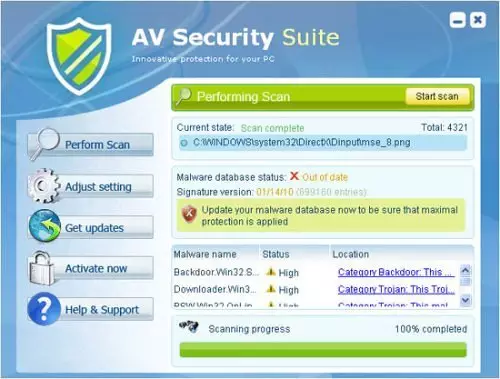
AV Security Seite is pretty much identical to other tools like this, so those results delivered to your screen may resemble other scans and infections from other applications. None of the listed infections are related to your device, and the promoted full version of the app is useless. Do not keep this program.
Promotional content might push useless tools too
Your device can get infected quickly and easily because the internet is filled with questionable material, PUP promotions, and other dangerous content. People, in most cases, cannot even notice the installation of such a tool as a rogue optimizer or spyware application since it happens without users' permission.
You should pay attention to details like site names, tools that the download page offers and instead go for the official source like application store, official developer's site, and similar services. Torrent sites are not the best way to go since people there use software bundling and deceptive promotional methods. Rely on Advanced or Custom installs at least. This way, you can see the full list of bundled apps.
Clear the system and terminate the rogue tool using security tools
It's very important to mention that you may have to reboot your computer in safe mode with networking in order to remove this virus from your computer. AV Security Suite Basic changes Internet Explorer settings and enables proxy server. You can rely on the guide below that shows how to find and remove the app from the PC and your web browsers.
You need to restore those altered settings, otherwise, you won't be able to download malware removal tools from the Internet. If you find that your computer is infected with this bogus and very annoying program, then please follow the removal instructions below.
Uninstall from Windows
Uninstall from Windows 10/8:
- Type Control Panel into the Windows search box and open the result.
- Under Programs, select Uninstall a program.


Uninstall from Windows 7/XP:
- Click on Windows Start > Control Panel (Windows XP users should click on Add/Remove Programs).
- In Control Panel, select Programs > Uninstall a program.


Remove the unwanted program:
- In the Programs and Features window, look for any recently installed suspicious entries, select them, and click Uninstall.
- If User Account Control appears, click Yes to confirm, then complete the removal.


Delete from macOS
Remove the unwanted application:
- From the menu bar, select Go > Applications.
- In the Applications folder, look for any suspicious entries, then drag them to Trash (or right-click and pick Move to Trash).
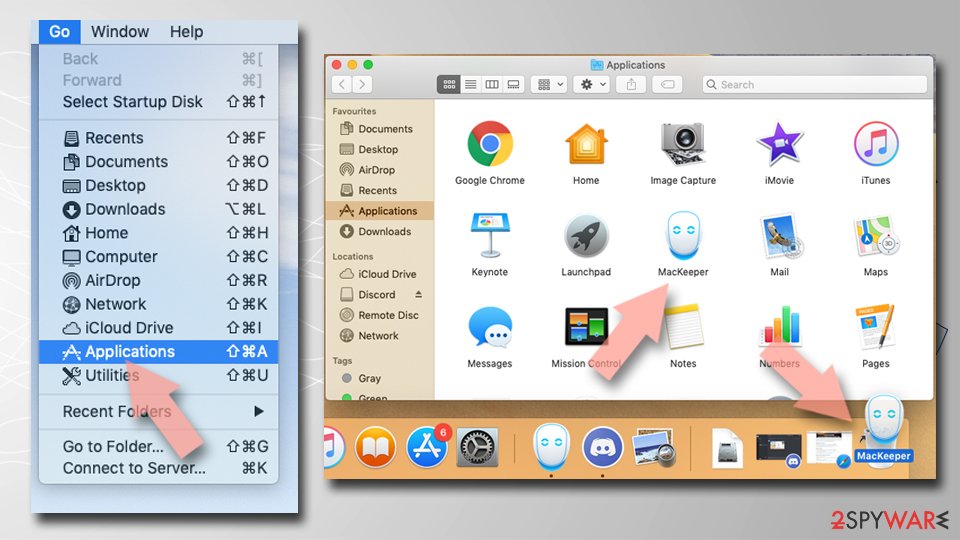

Delete leftover files and folders:
- Select Go > Go to Folder.
- Enter /Library/Application Support and remove any suspicious folders related to the unwanted program.
- Repeat the same check in the /Library/LaunchAgents and /Library/LaunchDaemons folders, deleting any suspicious entries.
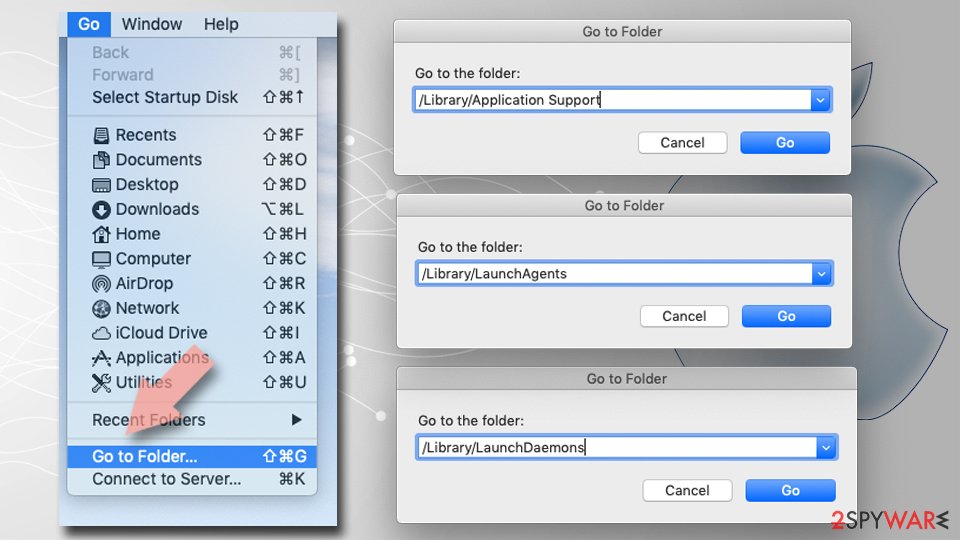
- Finally, empty the Trash to permanently remove the leftovers.

Remove from Microsoft Edge
Delete unwanted extensions from MS Edge:
- Select Menu (three horizontal dots at the top-right of the browser window) and pick Extensions.
- From the list, pick the extension and click on the Gear icon.
- Click Remove.
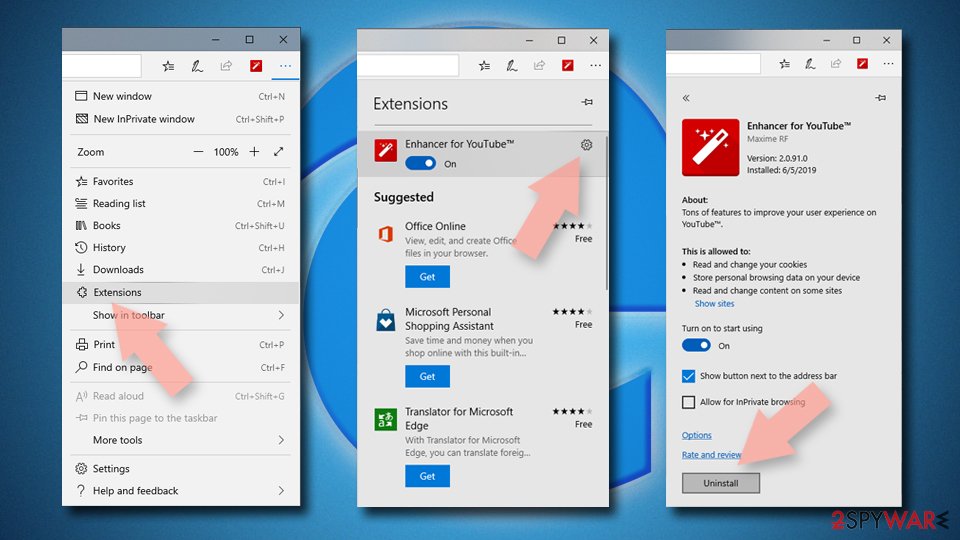

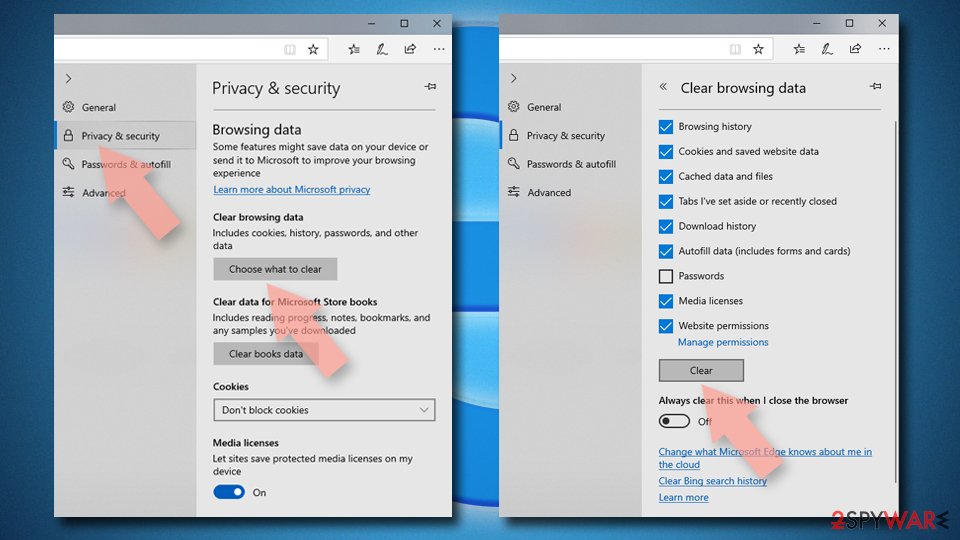
Clear cookies and other browser data:
- Click on the Menu (three horizontal dots at the top-right of the browser window) and select Settings > Privacy, search, and services..
- Under Clear browsing data, pick Choose what to clear.
- Select Cookies and other site data and Cached images and files. (apart from passwords, although you might want to include Media licenses as well, if applicable) and click on Clear.

Restore new tab and homepage settings:
- Click the menu icon and choose Settings.
- Then find On startup section.
- Click Remove next to any suspicious startup page.
Reset MS Edge if the above steps did not work:
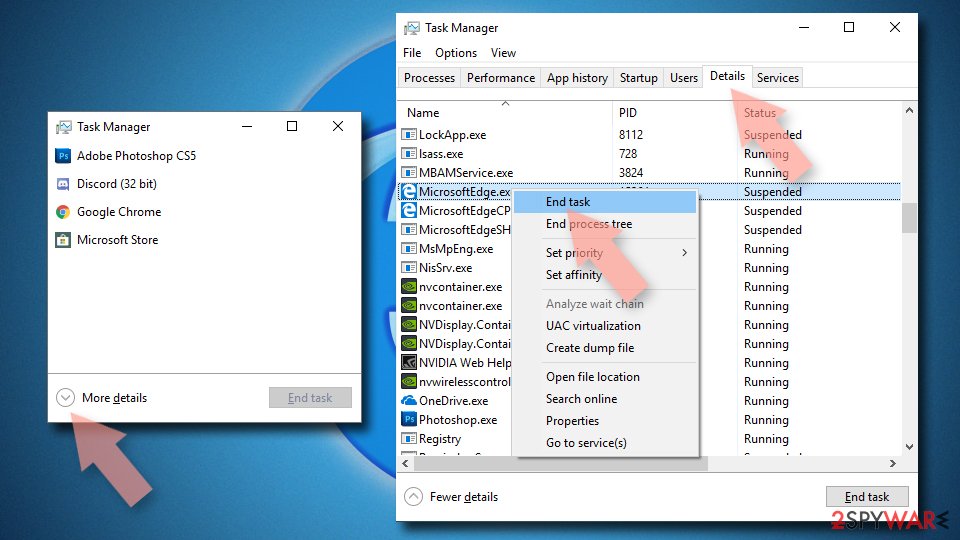
- Press on Ctrl + Shift + Esc to open Task Manager.
- Click on More details arrow at the bottom of the window.
- Select Details tab.
- Now scroll down and locate every entry with Microsoft Edge name in it. Right-click on each of them and select End Task to stop MS Edge from running.

Instructions for Chromium-based Edge
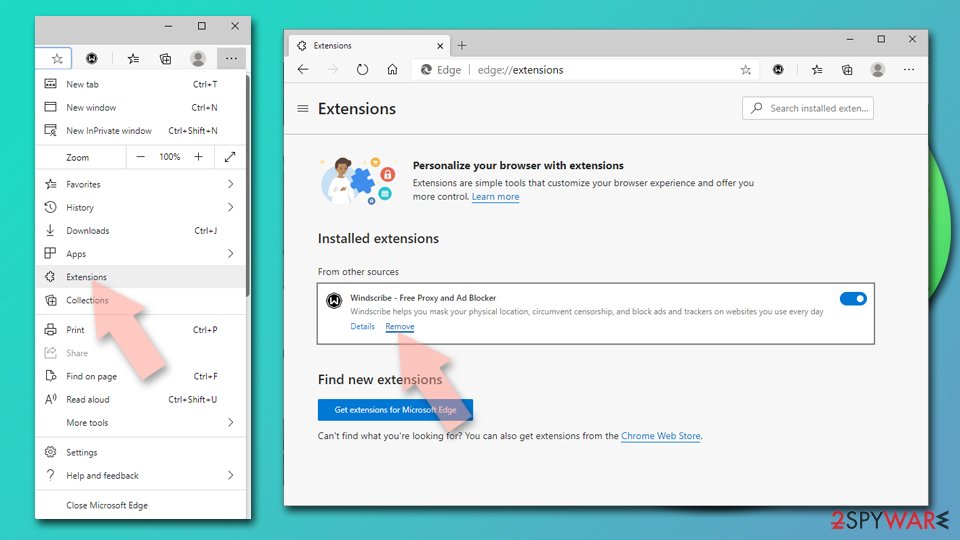
Delete extensions from MS Edge (Chromium):
- Open Edge and click select Settings > Extensions.
- Delete unwanted extensions by clicking Remove.

Clear cache and site data:
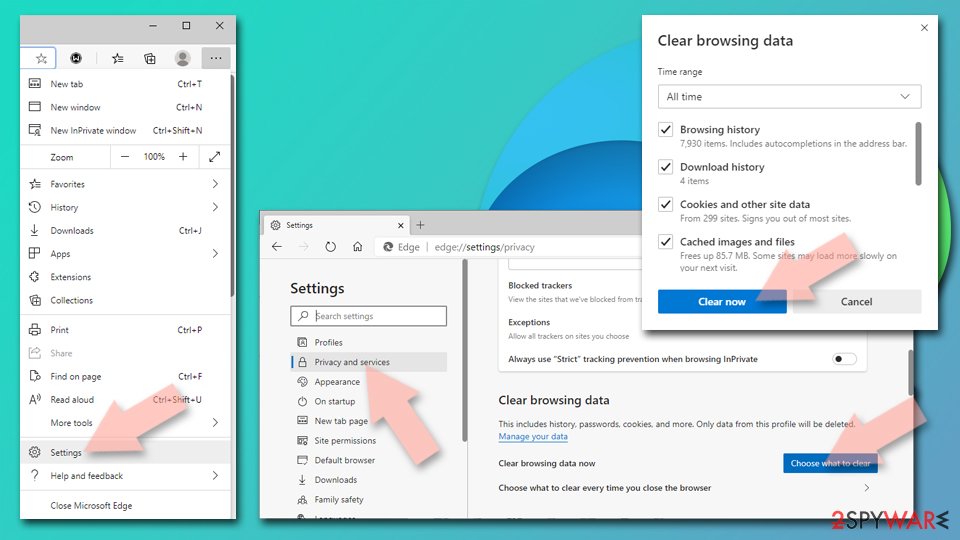
- Click on Menu and go to Settings.
- Select Privacy, search and services.
- Under Clear browsing data, pick Choose what to clear.
- Under Time range, pick All time.
- Select Clear now.

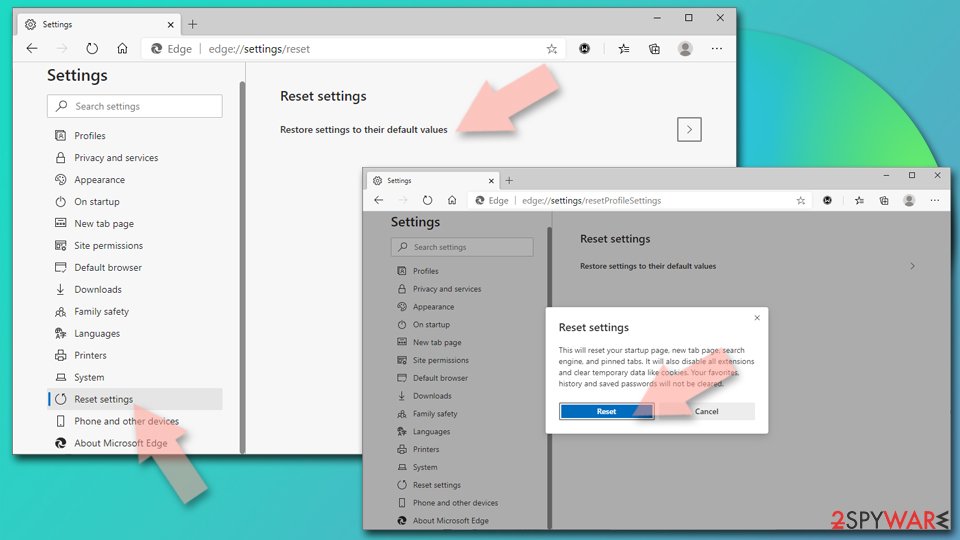
Reset Chromium-based MS Edge:
- Click on Menu and select Settings.
- On the left side, pick Reset settings.
- Select Restore settings to their default values.
- Confirm with Reset.
- This will disable extensions and reset startup pages but will not delete bookmarks, saved passwords, or browsing history.

Remove from Mozilla Firefox (FF)
Remove dangerous extensions:
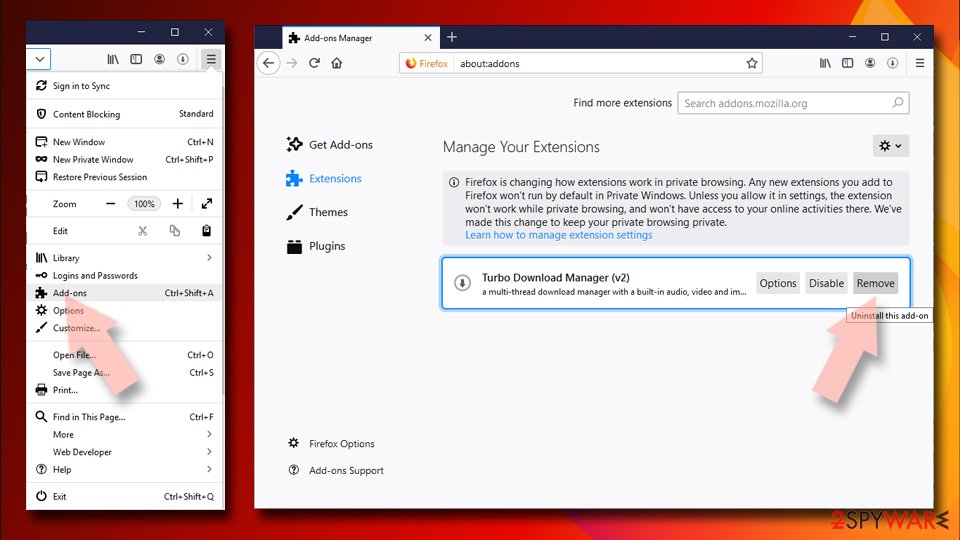
- Open Mozilla Firefox browser and click on the Menu (three horizontal lines at the top-right of the window).
- Select Add-ons.
- In here, select the unwanted extension and click Remove.

Reset the homepage:
- Click three horizontal lines at the top right corner to open the menu.
- Choose Settings.
- Under Home, set your preferred homepage and new tab settings.
Clear cookies and site data:
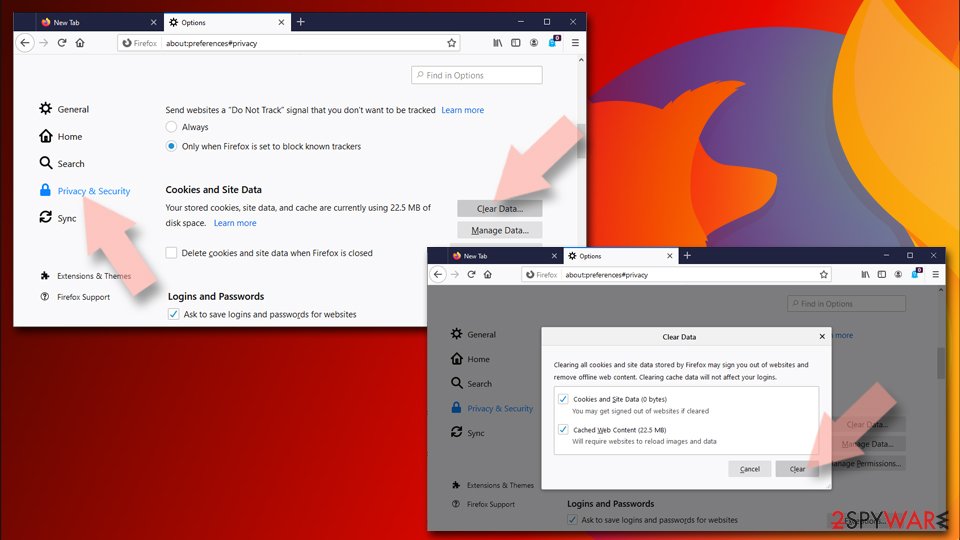
- Click Menu and pick Settings.
- Go to Privacy & Security section.
- Scroll down to locate Cookies and Site Data.
- Click on Clear Data...
- Select Cookies and Site Data and Temporary cached files and pages, then click Clear.

Reset Mozilla Firefox
If clearing the browser as explained above did not help, reset Mozilla Firefox:
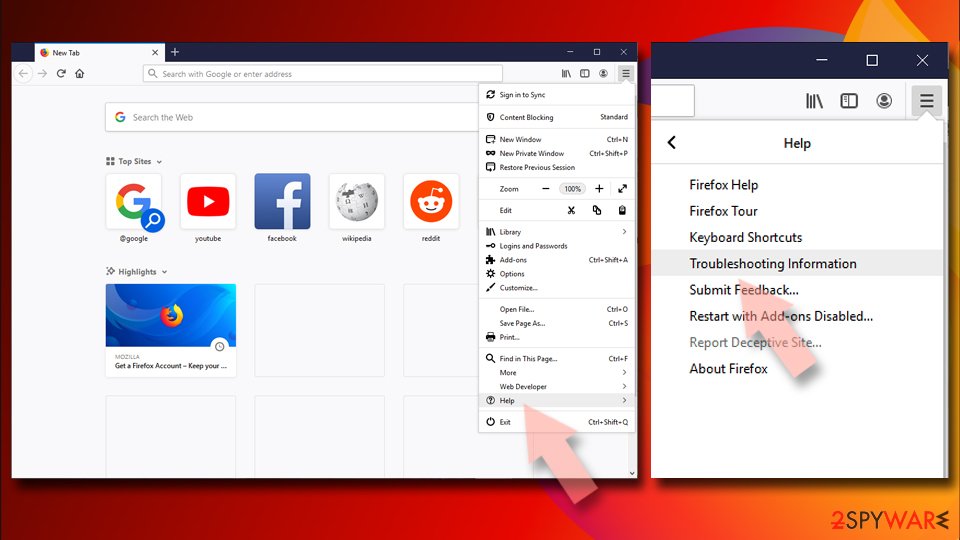
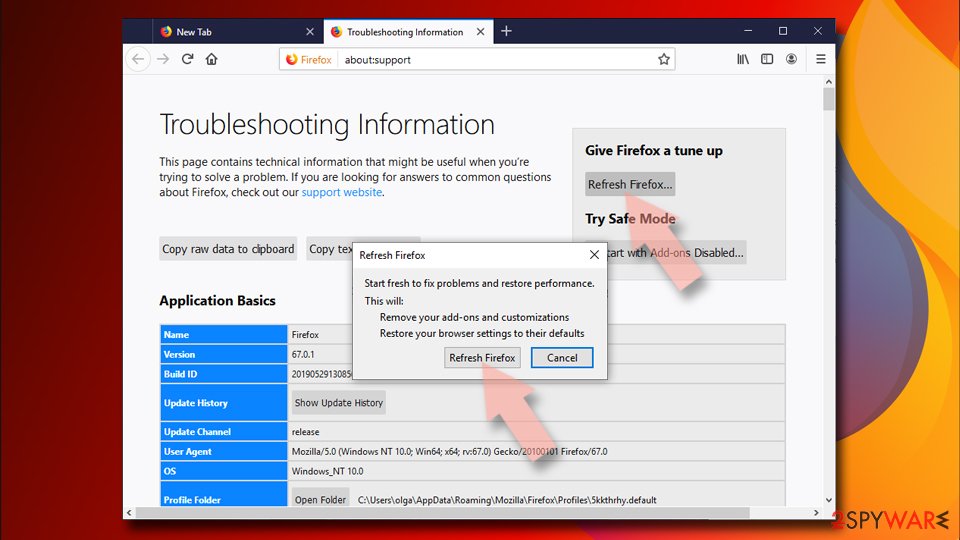
- Open Mozilla Firefox browser and click the Menu.
- Go to Help and then choose Troubleshooting Information.
- Under Give Firefox a tune up section, click on Refresh Firefox...
- Once the pop-up shows up, confirm the action by pressing on Refresh Firefox.


Remove from Google Chrome
Delete malicious extensions from Google Chrome:
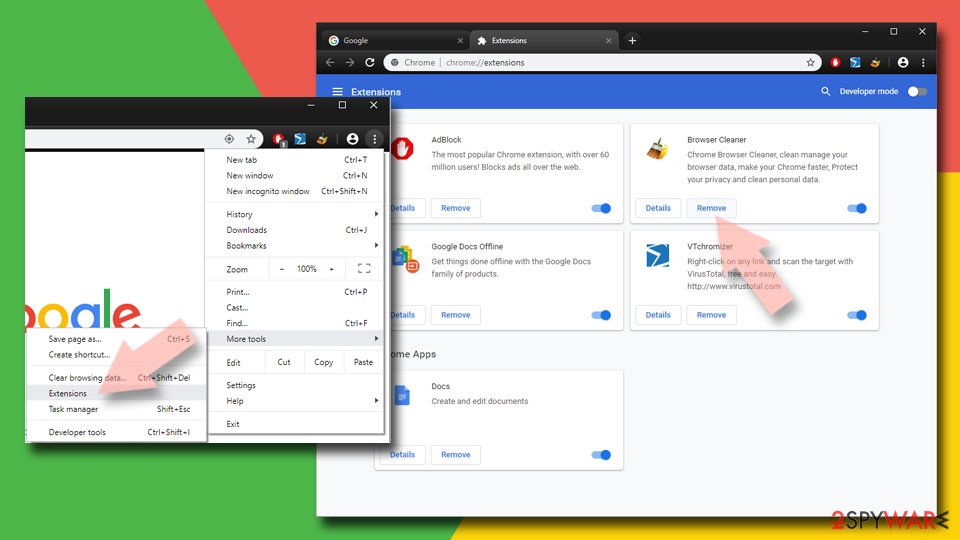
- Open Google Chrome, click on the Menu (three vertical dots at the top-right corner) and select More tools > Extensions.
- In the newly opened window, you will see all the installed extensions. Uninstall all suspicious extensions related to the unwanted program by clicking Remove.
Clear cache and web data from Chrome:
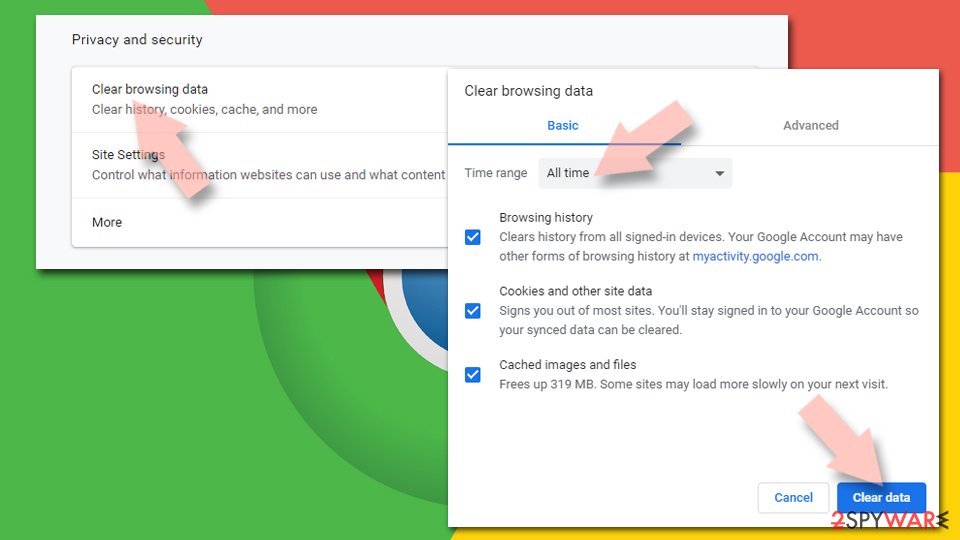
- Click on Menu and pick Settings.
- Under Privacy and security, select Clear browsing data.
- Select Browsing history, Cookies and other site data, as well as Cached images and files.
- Click Clear data.

Change your homepage:
- Click menu and choose Settings.
- Look for a suspicious site in the On startup section.
- Click on Open a specific or set of pages and click on three dots to find the Remove option.
Reset Google Chrome:
If the previous methods did not help you, reset Google Chrome to eliminate all the unwanted components:
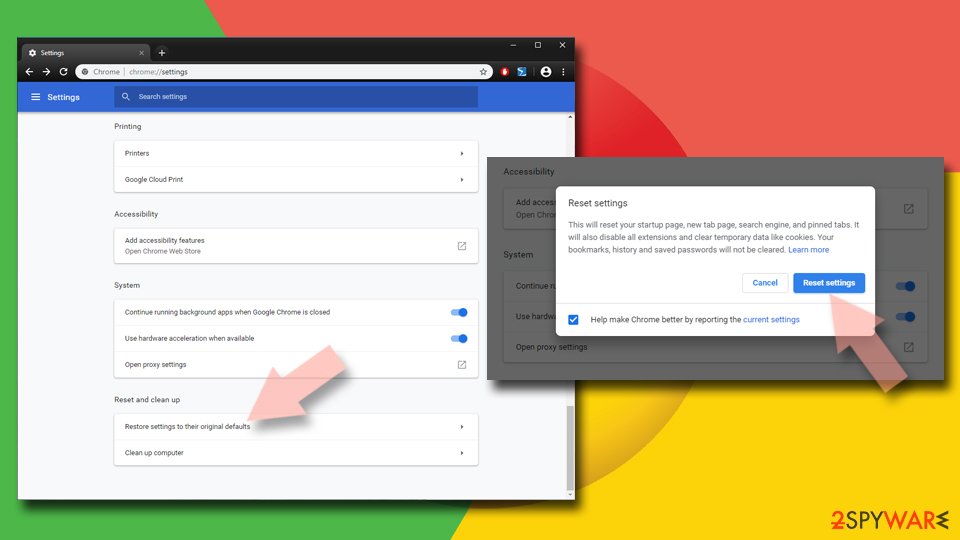
- Click on Menu and select Settings.
- In the Settings, scroll down and click Advanced.
- Scroll down and locate Reset and clean up section.
- Now click Restore settings to their original defaults.
- Confirm with Reset settings.

Delete from Safari
Remove dangerous extensions:
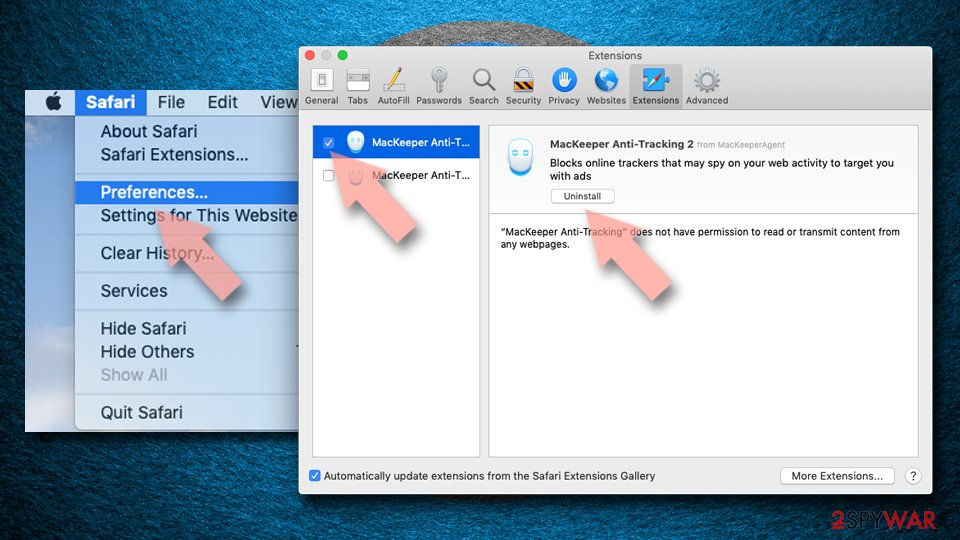
- Open Safari, click Safari in the menu at the top-left of the screen, and select Preferences.
- Go to the Extensions tab, look for any suspicious entries, and click Uninstall to remove them.

Clear history and website data:
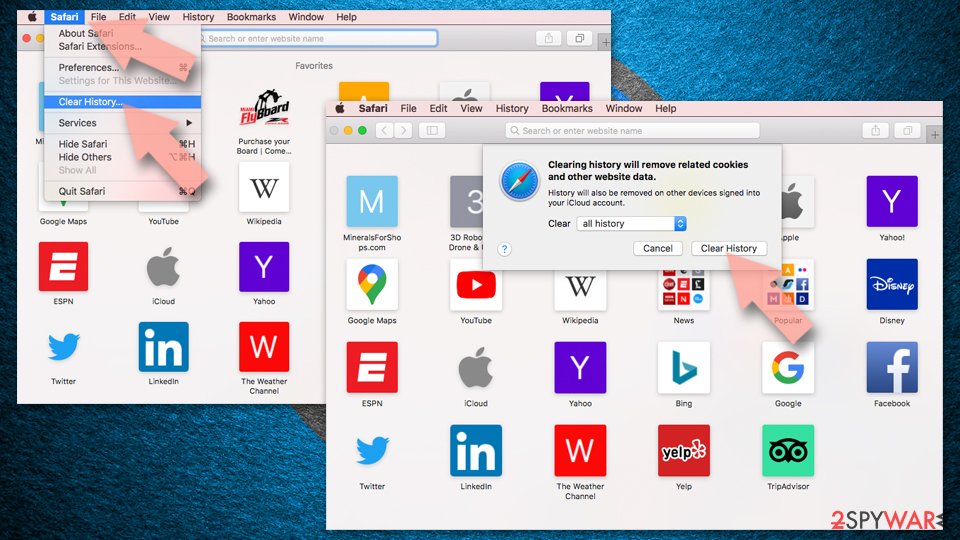
- Click Safari in the menu and pick Clear History.
- Set Clear to all history and confirm with Clear History.

Reset Safari:
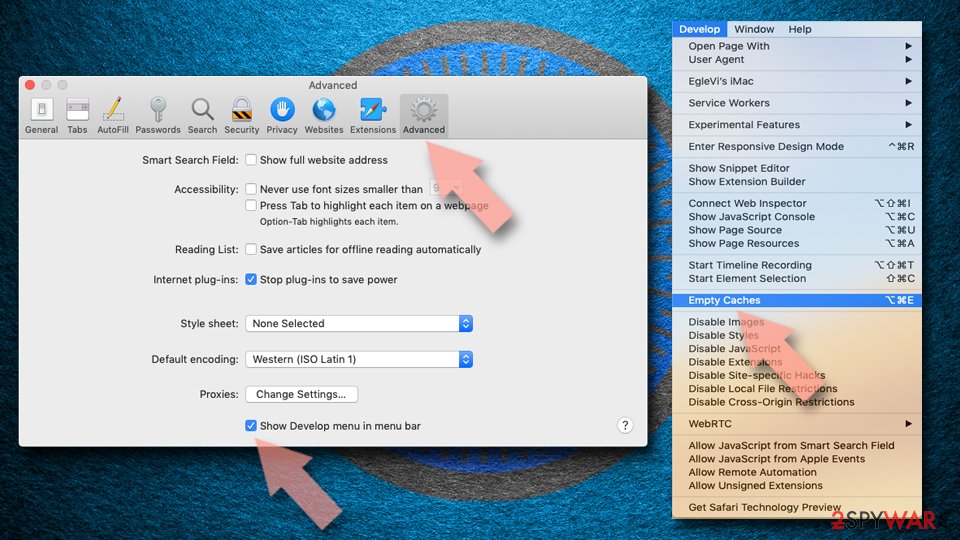
- Click Safari in the menu and select Preferences > Advanced.
- Enable Show Develop menu in menu bar.
- From the menu bar, click Develop and select Empty Caches.

Did this guide help?
Be the first to comment