

e2give is a malicious program that can install other software without your permission

e2give is a spyware program that tracks user Internet activity and collects their confidential information. The numerous collected details are then sent to the servers that are controlled by the attackers. It goes without saying that such actions can seriously compromise user privacy.
Besides stealing user data, this threat is also equipped with additional functionality – it can download and install additional payloads and malicious programs without user permission. These programs can expose users to even more risks; thus, all the malicious components should be eradicated from Windows as soon as possible.
| Name | e2give |
| Type | Spyware, malware downloader |
| Distribution | Trojans, drive-by downloads, malicious installers, etc. |
| Functions | Records and sends out user data, downloads and installs other malicious software on the compromised system |
| Removal | Perform a full system scan with SpyHunterCombo Cleaner or another reputable antimalware |
| System fix | In case your Windows malfunctions after your get rid of all malware components, you can use FortectIntego to fix crashes, errors, and other malware-related issues |
Distribution methods
Just like many other malicious programs of this type, cybercriminals choose different methods to distribute malware for more overall prevalence. Users might get infected when their systems are vulnerable due to a lack of security patches or when they download and execute a compromised file from a malicious website.
However, it is most commonly installed automatically by an already present Trojan on the system. Thus, if you have e2give installed on your computer, it is likely that it is not a single virus that needs to be removed. Besides, these threats can pose an extra risk for those infected.
To eliminate the infection from Windows, you should perform a full system scan with anti-malware software. The best way to do that is by performing a full system scan with SpyHunterCombo Cleaner or another reliable antivirus software.
Finally, if you notice that your PC is suffering from crashes or delivers errors after elimination, you should either reinstall Windows or repair its damaged components with FortectIntego automatically. Since this virus also affects web browsers, don't forget to clean them as well.
Threat functions
As already mentioned, the e2give virus's main objective is to spy on users' data and send it to cybercriminals. The threat can log:
- users' names;
- country of origin;
- Zip code;
- passwords;
- information about the system
- other personal details.
All recorded data is transferred to a predefined remote server. Malware might also engage in displaying commercial pop-up advertisements, some of which may not be secure to click on. It can redirect a web browser to certain marketing websites that could be dangerous/infected with malware.
The virus can download and install other malware from a remote location without users noticing anything. This can be particularly dangerous for those infected, as the functionality of the incoming threats expands over time. This is why e2give removal is so important.
Uninstall from Windows
Uninstall from Windows 10/8:
- Type Control Panel into the Windows search box and open the result.
- Under Programs, select Uninstall a program.


Uninstall from Windows 7/XP:
- Click on Windows Start > Control Panel (Windows XP users should click on Add/Remove Programs).
- In Control Panel, select Programs > Uninstall a program.


Remove the unwanted program:
- In the Programs and Features window, look for any recently installed suspicious entries, select them, and click Uninstall.
- If User Account Control appears, click Yes to confirm, then complete the removal.


Remove from Microsoft Edge
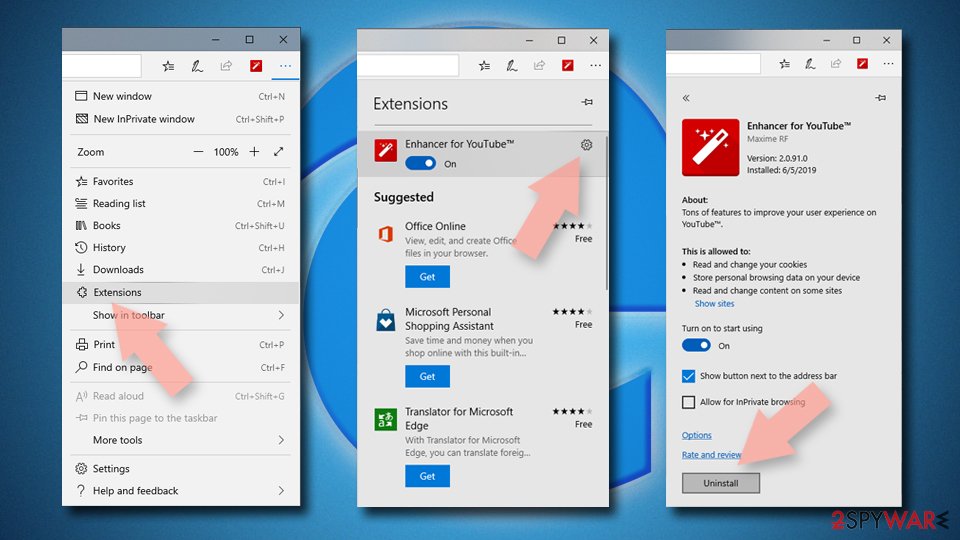
Delete unwanted extensions from MS Edge:
- Select Menu (three horizontal dots at the top-right of the browser window) and pick Extensions.
- From the list, pick the extension and click on the Gear icon.
- Click Remove.

Clear cookies and other browser data:
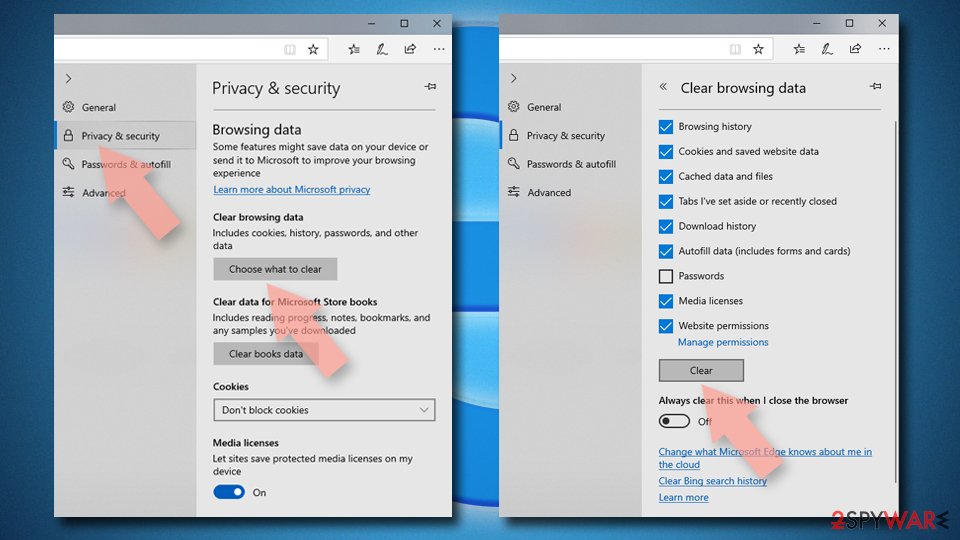
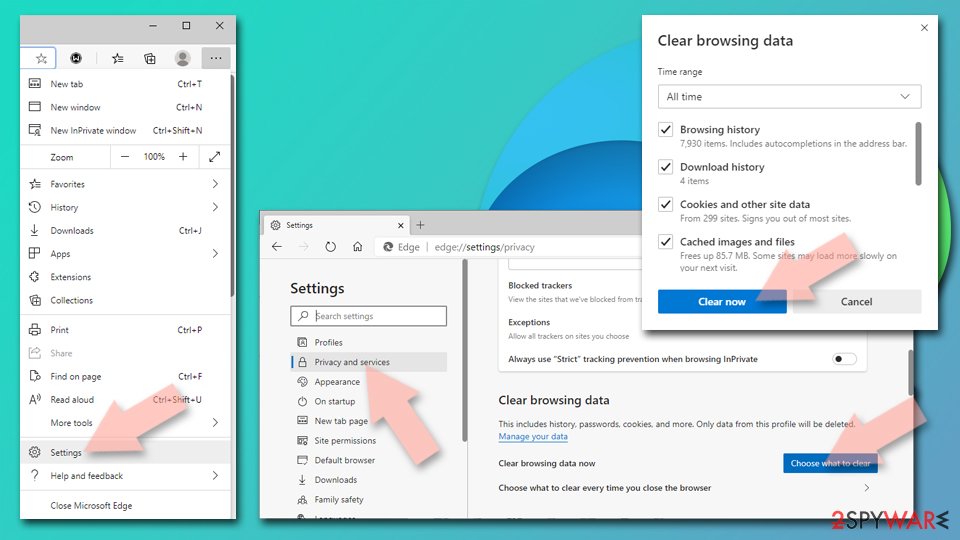
- Click on the Menu (three horizontal dots at the top-right of the browser window) and select Settings > Privacy, search, and services..
- Under Clear browsing data, pick Choose what to clear.
- Select Cookies and other site data and Cached images and files. (apart from passwords, although you might want to include Media licenses as well, if applicable) and click on Clear.

Restore new tab and homepage settings:
- Click the menu icon and choose Settings.
- Then find On startup section.
- Click Remove next to any suspicious startup page.
Reset MS Edge if the above steps did not work:
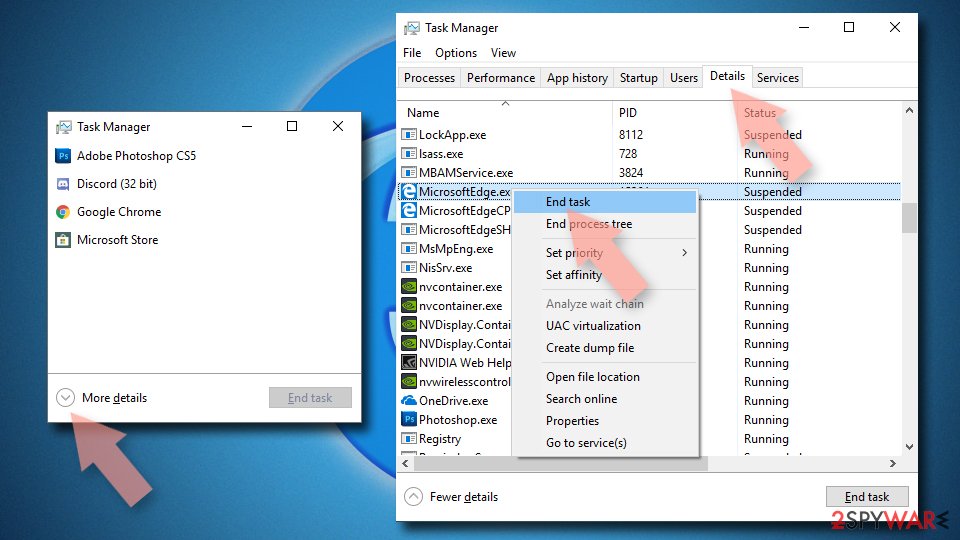
- Press on Ctrl + Shift + Esc to open Task Manager.
- Click on More details arrow at the bottom of the window.
- Select Details tab.
- Now scroll down and locate every entry with Microsoft Edge name in it. Right-click on each of them and select End Task to stop MS Edge from running.

Instructions for Chromium-based Edge
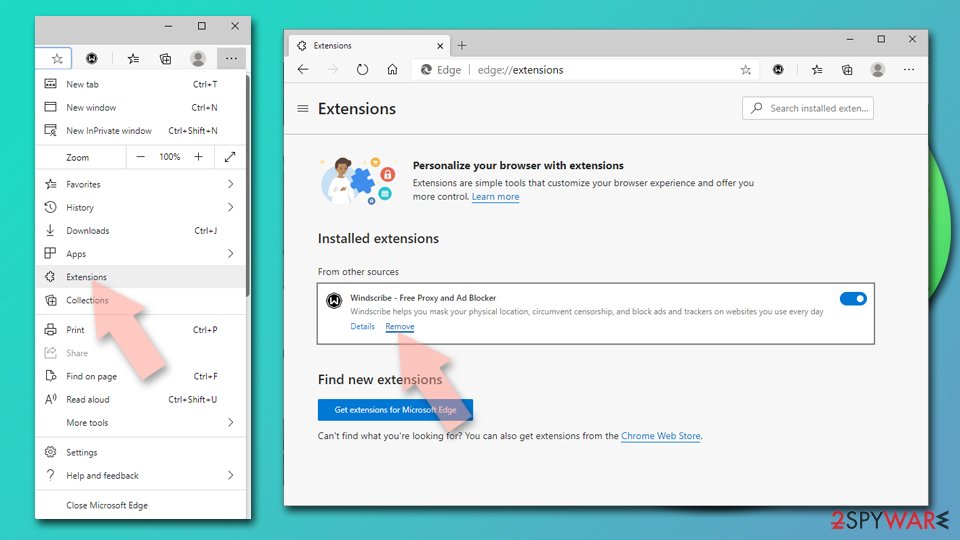
Delete extensions from MS Edge (Chromium):
- Open Edge and click select Settings > Extensions.
- Delete unwanted extensions by clicking Remove.

Clear cache and site data:
- Click on Menu and go to Settings.
- Select Privacy, search and services.
- Under Clear browsing data, pick Choose what to clear.
- Under Time range, pick All time.
- Select Clear now.

Reset Chromium-based MS Edge:
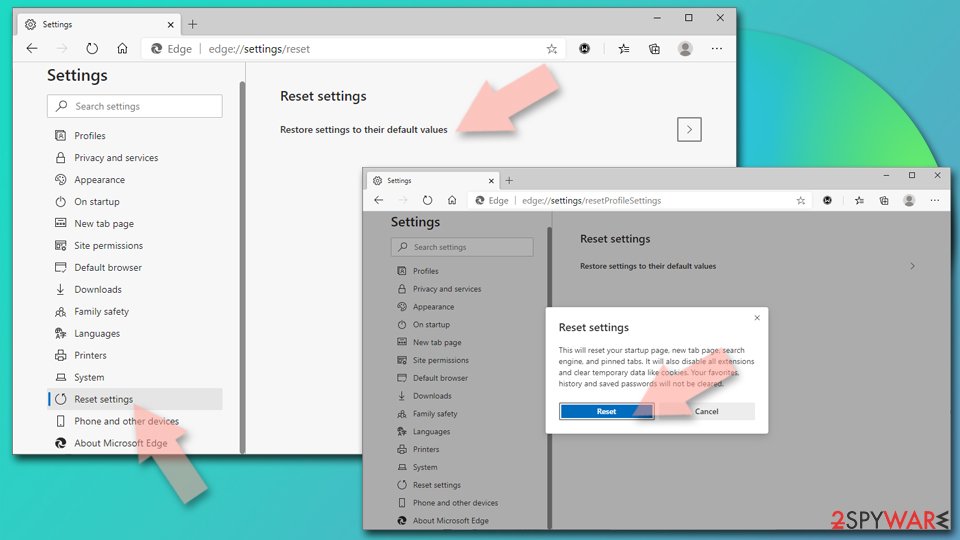
- Click on Menu and select Settings.
- On the left side, pick Reset settings.
- Select Restore settings to their default values.
- Confirm with Reset.
- This will disable extensions and reset startup pages but will not delete bookmarks, saved passwords, or browsing history.

Remove from Mozilla Firefox (FF)
Remove dangerous extensions:
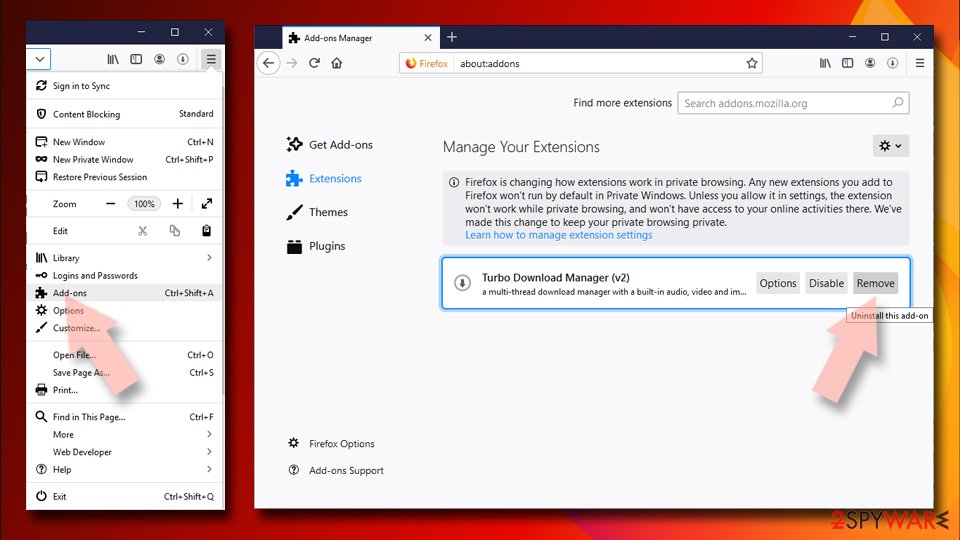
- Open Mozilla Firefox browser and click on the Menu (three horizontal lines at the top-right of the window).
- Select Add-ons.
- In here, select the unwanted extension and click Remove.

Reset the homepage:
- Click three horizontal lines at the top right corner to open the menu.
- Choose Settings.
- Under Home, set your preferred homepage and new tab settings.
Clear cookies and site data:
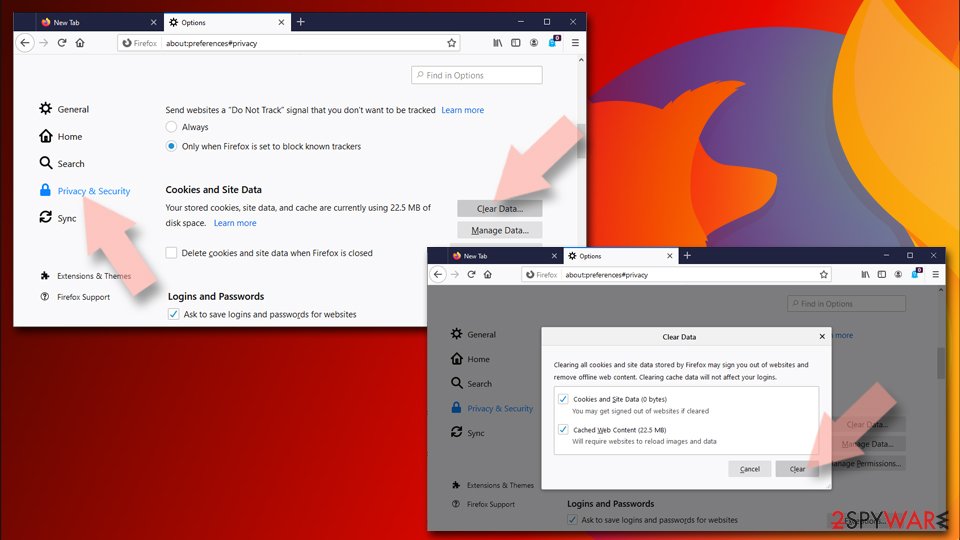
- Click Menu and pick Settings.
- Go to Privacy & Security section.
- Scroll down to locate Cookies and Site Data.
- Click on Clear Data...
- Select Cookies and Site Data and Temporary cached files and pages, then click Clear.

Reset Mozilla Firefox
If clearing the browser as explained above did not help, reset Mozilla Firefox:
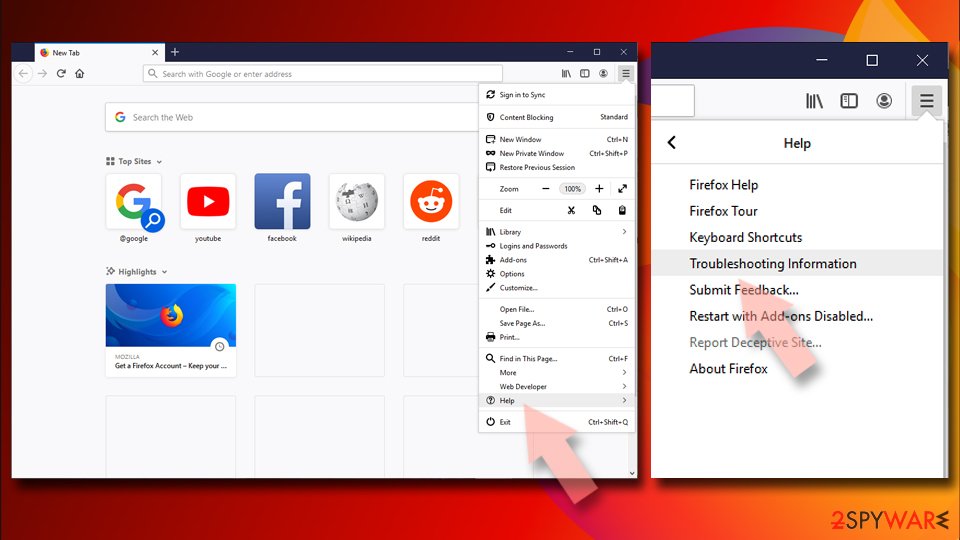
- Open Mozilla Firefox browser and click the Menu.
- Go to Help and then choose Troubleshooting Information.
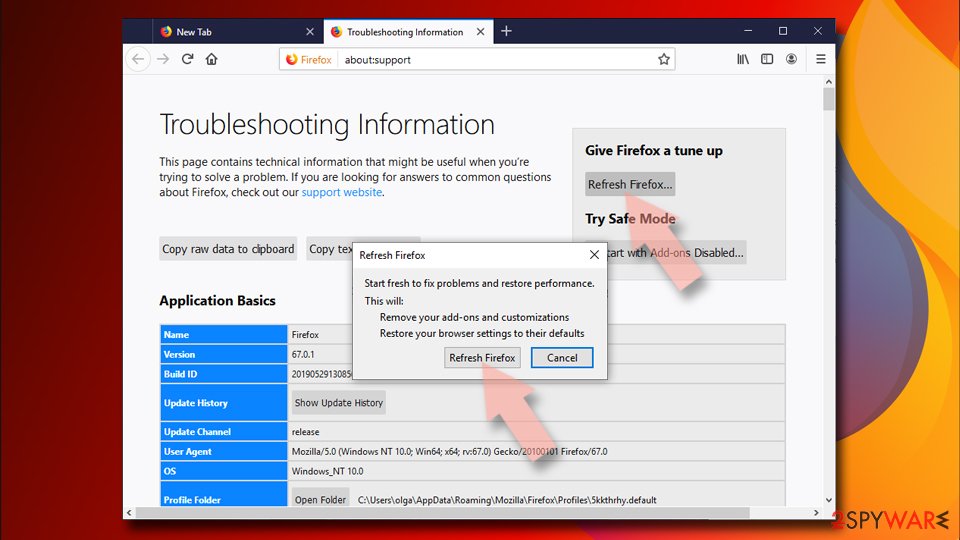
- Under Give Firefox a tune up section, click on Refresh Firefox...
- Once the pop-up shows up, confirm the action by pressing on Refresh Firefox.


Remove from Google Chrome
Delete malicious extensions from Google Chrome:
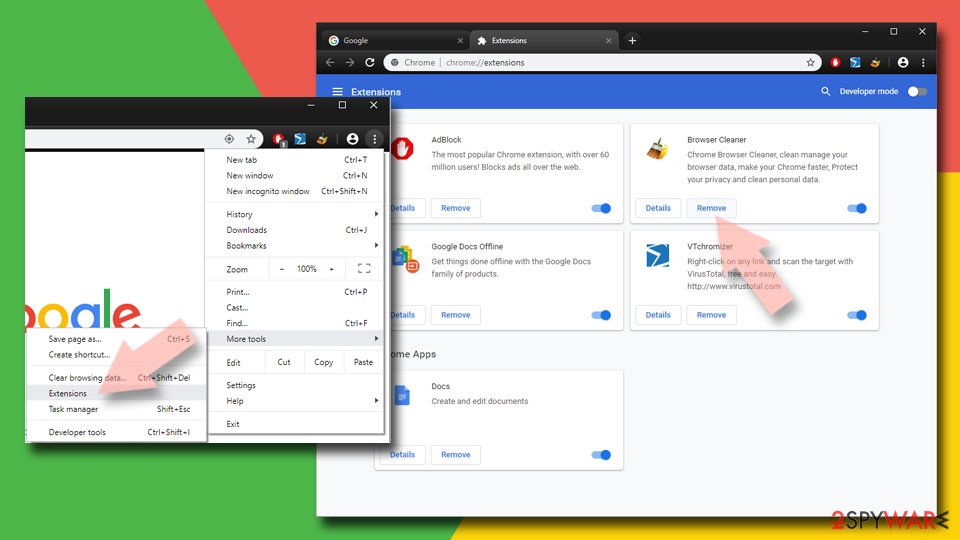
- Open Google Chrome, click on the Menu (three vertical dots at the top-right corner) and select More tools > Extensions.
- In the newly opened window, you will see all the installed extensions. Uninstall all suspicious extensions related to the unwanted program by clicking Remove.
Clear cache and web data from Chrome:
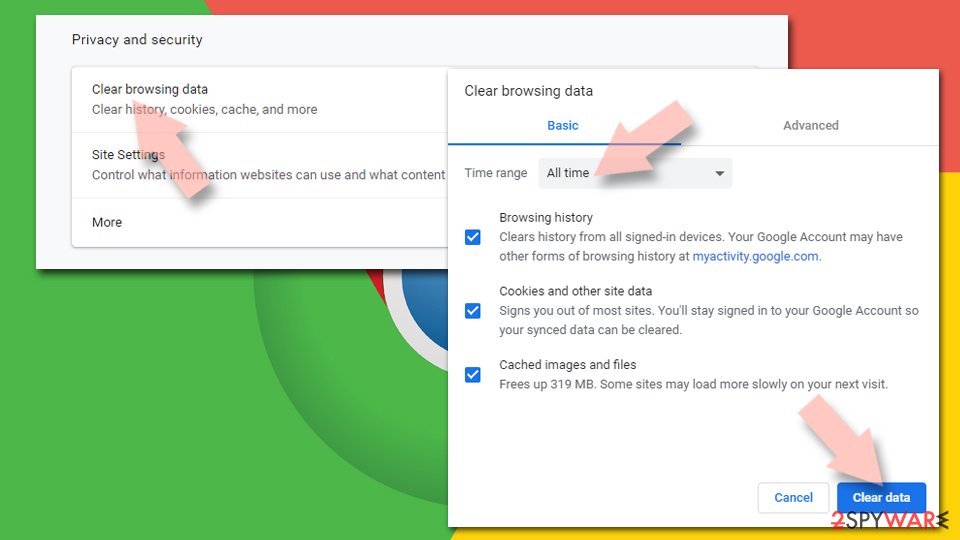
- Click on Menu and pick Settings.
- Under Privacy and security, select Clear browsing data.
- Select Browsing history, Cookies and other site data, as well as Cached images and files.
- Click Clear data.

Change your homepage:
- Click menu and choose Settings.
- Look for a suspicious site in the On startup section.
- Click on Open a specific or set of pages and click on three dots to find the Remove option.
Reset Google Chrome:
If the previous methods did not help you, reset Google Chrome to eliminate all the unwanted components:
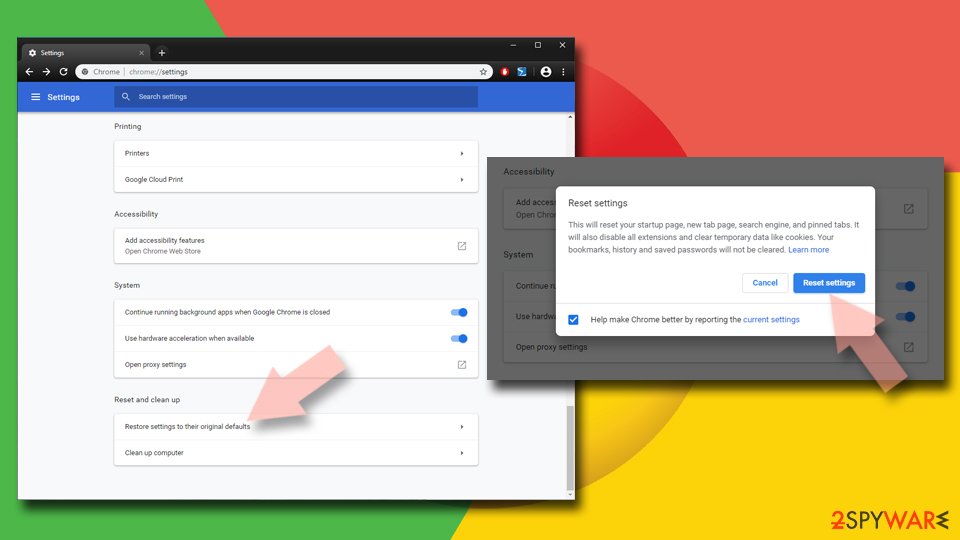
- Click on Menu and select Settings.
- In the Settings, scroll down and click Advanced.
- Scroll down and locate Reset and clean up section.
- Now click Restore settings to their original defaults.
- Confirm with Reset settings.

Delete from Safari
Remove dangerous extensions:
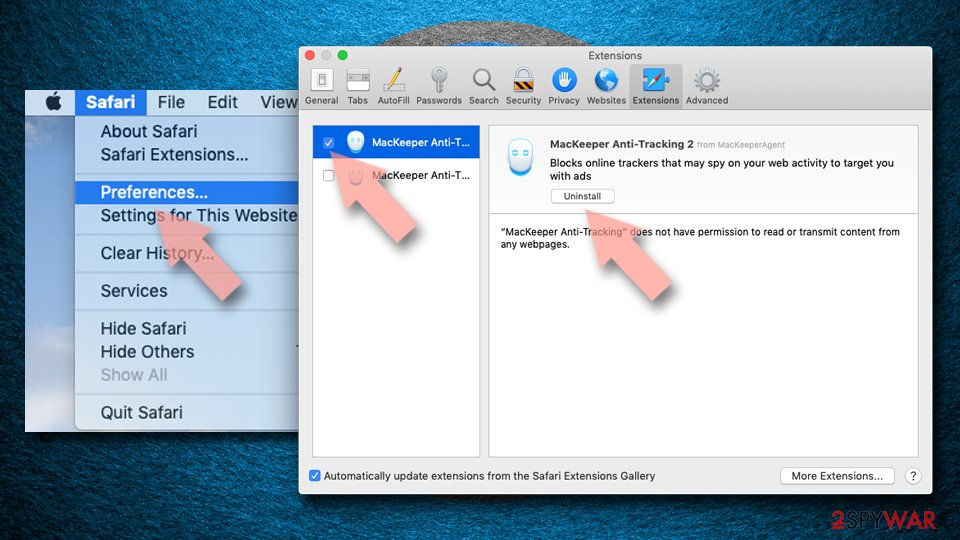
- Open Safari, click Safari in the menu at the top-left of the screen, and select Preferences.
- Go to the Extensions tab, look for any suspicious entries, and click Uninstall to remove them.

Clear history and website data:
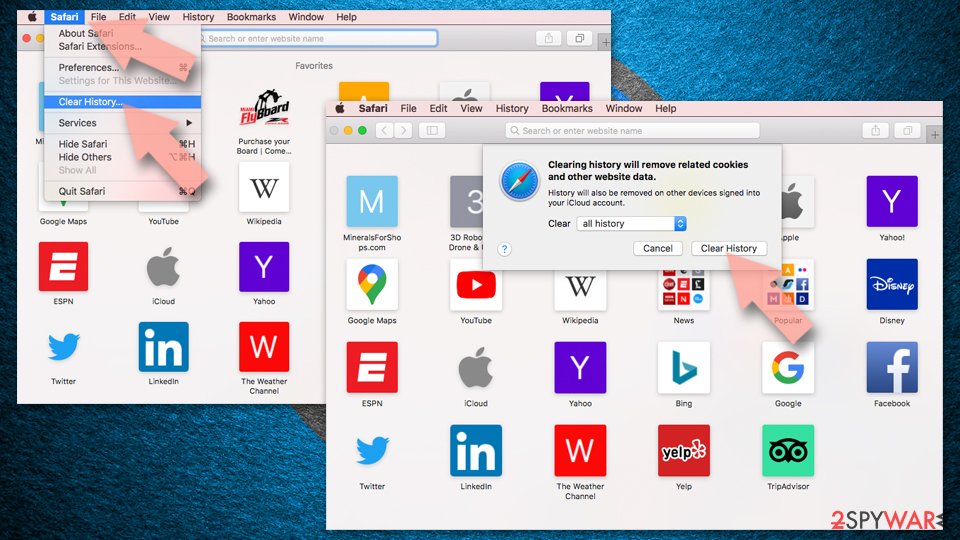
- Click Safari in the menu and pick Clear History.
- Set Clear to all history and confirm with Clear History.

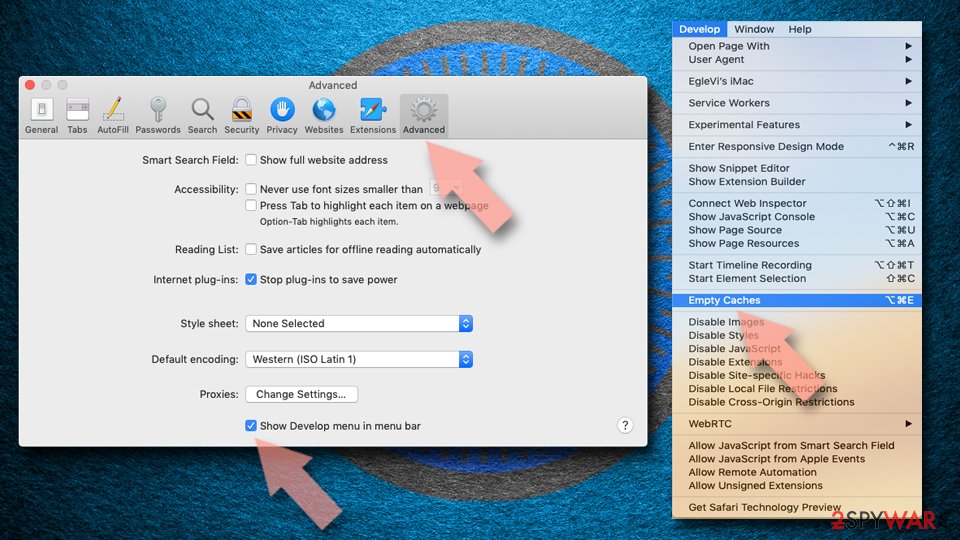
Reset Safari:
- Click Safari in the menu and select Preferences > Advanced.
- Enable Show Develop menu in menu bar.
- From the menu bar, click Develop and select Empty Caches.

Did this guide help?
Be the first to comment