

PCKeeper applies questionable software marketing method
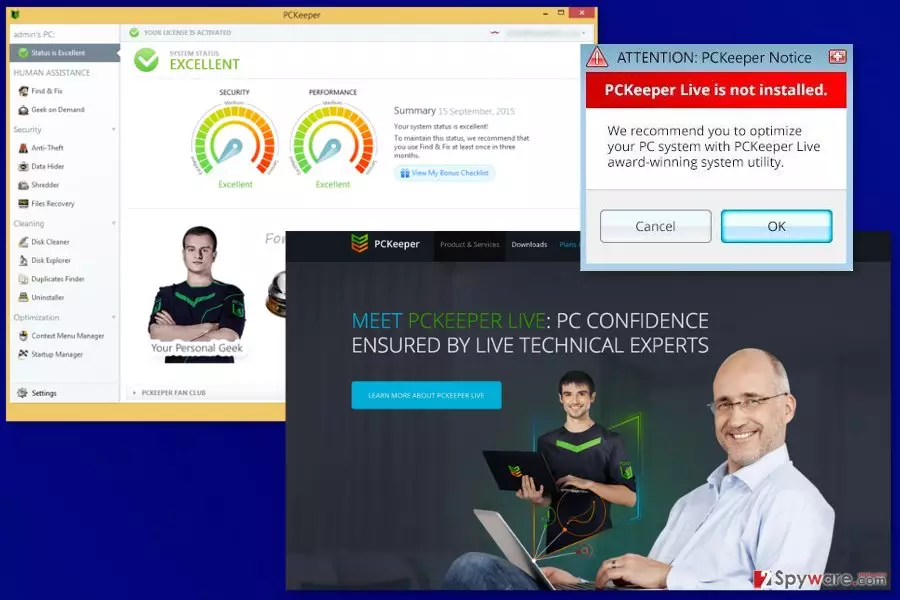
PCKeeper is a legitimate program that is supposed to help people to eliminate errors, bad registry entries[1] and junk files from the computer. Nevertheless, it seems like a useful tool; its functionality and operation features are discussed on the Internet.[2]
According to its developer Essentware (previously, Kromtech), PC Keeper is a powerful optimization and protection software package. It is compatible with every Windows OS and is capable of increasing PC's speed and preventing infiltration of malware. Although that sounds very promising, you should know that you will need to purchase its licensed version for $39.95 in order to remove what it was detected on your PC system by this program.
We think that you should think twice before purchasing PCKeeper. First of all, there are lots of free tools that can be found on the Internet without a problem. When talking about system's optimization, you should also know that, after removing several hundreds of registry entries, you won't see a clear improvement in your PC's functionality. For that, you will need to remove thousands of different registry entries.
In addition, this tool may cause these unwanted activities on your computer:
- PCKeeper pop up ads promoting its paid version;
- Continuous system scanners reporting about bad registries, useless files, and similar components;
- System slowdowns;
- Redirects to its official website.
What is more, the program was noticed spreading bundled with freeware. Thus, it might get inside the computer without asking direct permission. On the computer, it might initiate system scans and cause previously mentioned problems. For these reasons, it is sometimes called as PCKeeper virus or PCKeeper malware. However, we want to point out that this program is NOT malicious.
If this PC optimization software sneaked inside your device, you should get rid of it immediately. We recommend automatic PCKeeper removal with the help of FortectIntego. This anti-malware will help to delete all suspicious components that may have arrived in a software bundle as well.
If you have already been convinced that you need to get a license key or use its phone number for fixing your computer, you should better check the Internet for free tools. Spending your money on this program may lead you to the loss of your money and problems when trying to remove PCKeeper. In fact, there is no surprise that some part of PC experts call this program a scam[3].

Developers use various methods to promote and distribute this software
No matter that PCKeeper is NOT A VIRUS, download websites are filled with negative reviews about it. Some people declare that they are bothered by its annoying advertisements, others claim that this program appeared on their PCs out of nowhere.
Yes, you can easily get program's installer from its official website pckeeper.com. Nevertheless, you should also take into account that this program may appear on your computer right after installing a free program from the internet. This distribution method is totally legitimate. However, sometimes it is used for tricking people into downloading free additions that they don't really need.
If you don't want to install it as an extra attachment of some freeware[4], you should always monitor installation of free programs. For that, you should select Custom or Advanced installation when downloading such apps as download managers, PDF creators, video streaming software, video recording software, etc.[5]
If this optimization tool enters the computer, it offers you to scan the system and then displays informative scan results. As you can imagine, it will inform you about bad registry entries, junk files and other things that should be eliminated. However, as we have already said, there is no guarantee that elimination of these files will increase your computer's speed.
Uninstall PCKeeper easily
If you have installed the free version of the program, it should not be hard to remove PCKeeper. All you have to do is to uninstall it like any other unnecessary software from your computer. We have prepared detailed instructions as well as screenshots to get rid of this tool faster.
If this program sneaked bundled with freeware or shareware, you should opt for the automatic PCKeeper removal option. It’s possible that other potentially unwanted applications were installed silently too. Thus, you have to get rid of them as well.
Uninstall from Windows
Uninstall from Windows 10/8:
- Type Control Panel into the Windows search box and open the result.
- Under Programs, select Uninstall a program.


Uninstall from Windows 7/XP:
- Click on Windows Start > Control Panel (Windows XP users should click on Add/Remove Programs).
- In Control Panel, select Programs > Uninstall a program.


Remove the unwanted program:
- In the Programs and Features window, look for any recently installed suspicious entries, select them, and click Uninstall.
- If User Account Control appears, click Yes to confirm, then complete the removal.


Did this guide help?
32 comments
JR
Dont Download this! Its not free and its next to impossible to remove. I had to use an uninstaller to remove it because my computer couldnt remove it on its own.After finaly getting it removed it had left a virus behind that damaged my Windows Vista so bad I had to down load the whole windows program again. This is a rip off of the highest order.PC Keeper is writing their own reviews to trick people into down loading this garbage, So Dont Be Fooled! Stay away from PC Keeper.
Paul
I have this rubbish on my laptop and i cannot get rid of it... It piggybacked on a VLC media reinstall. dont believe that the positive reviews that it writes about itself.
Sharon
Which uninstaller did you use? I am having the same problems on my windows7 computer. Thanks!
realystraitbob
JR dont be a member tell us witch unistaller you used. I dont understad guys tell us every thing about them selves but do not give info on the names off apps they used. Or did you do it on perpus kinda like a ha ha look what I did bet you cant do it to.
Thank you very much very very very much
david
I would like to know who came up with this program and personally look them up
Alex
Why would anyone pay a company that hijacks their system? Im sure its illegal, or at least could have civil liability attached. It probably just needs someone to come up with the right legal theory on why doing that is bullshit. There you go lawyers, why arent you working on things like that?
Gaz
Useless guide. PCkeeper wont let you uninstall it this way.
Steph
How can I get this mess removed from my computer? I can not uninstall it.
Martha
I downloaded PC Keeper but could not afford the price of installing in completely. I removed it from my computer but it still keeps popping up!! Your uninstall instructions are of no use to me. What do I do now that it will not come off my computer!!!???
Rissa
If I were you guys I would remove all personal information off of your computers now, if you transfer anything you want to keep onto an external hard drive, flash drive, or something of that sort make sure to scan each file so you dont take an unwanted friend with you. Re-do the entire operating system and move forward from there if your computers arent already screwed, but each minute you wait is another minute something can happen.
Rick
pckeeper magically appeared on my pc. Ive already tried looking for it in programs, it does NOT appear there, fore that would be to easy to remove it there correct ? So your instructions on how to remove are incorrect. It seems to be hiding in the IE browser. Ive even tried to uninstall IE, much to my IT techs horror ! I USED to use stopzilla, until IT wouldnt get ride of a pesky maleware and stopped buying it.
Jordan
If youve downloaded PCKeeper, you will not be able to uninstall it by going into the Control Panel and uninstall it.You will not find it there. The only thing that you can do is to Disable it, and it will never appear on your StartUp bar. To disable,
1. Go to Windows Task Manager. To do it, right click the Start Up bar (its the bar way down your screen), and click Task Manager.
2. Click Services tab on top, and the Services tab at the bottom.
3. Press Continue
4. Find and click PCKeeper. I found two in my computer. Double Click one of them, and a pop-up will appear.
5. On the General tab, find Startup type and choose Disable, Apply, then OK.
6. Go back to Step 4, and Double Click the other PCKeeper, and follow Step 5.
Re-start your computer, and youll see the PCKeeper icon on your Startup bar disappears. You will also notice a faster PC youre using. Hope it helps.
Sonia
Yay!!! This worked!!!
William
THANK YOU SO MUCH! I o not recommend pckeeper to anyone. but i would like toad on to this ^ If you tried uninstalling all the files of pckeeper but couldnt because it said the files were still running even though they were not, after doing what he said above my comment you CAN! And it will be permanently 100% GONE
RJB
stay away from PC Keeper it is garbage,the way i did it was just disable it,i knew something was up when they wanted me to forward to a advisor....for a evaluation...go to 2-spyware.com and follow the disable the program...and run a full scan to make sure nothing is left behind,afer disabling....Good Luck!
Loren
PC Keeper covers up my webpages and renders them unusable. You cannot delete it; any attempt to cancel or close PC Keeper windows only opens up another webpage. It does not show up in the Uninstall program list nor any of the tabs in the Task Manager. I did not even download this program so I do not know how it snuck onto my computer. I only enjoyed Windows 10 for 1 day and this happened; now my Windows 10 computer is virtually useless. I am so frustrated. I have productive time sensitive work to accomplish and I cant do it.
Sarah
Help ... I am following the instructions above but PCkeeper is not listed in Services. Now what! Any advice?
po;d at PC Keeper
It installed on my PC after I installed windows10, then adobe reader, on a non adobe site....only download from peoper sites, i learned the hard way and cant get this stuff off my PC. It rendered firefox useless, but I intsalled googel chrome and its blocked for there
Shonna
PC keeper can be easily uninstalled by going to control panel>programs and features . select the program and uninstall........ I just did it five minutes ago.
Rudy
I tried out the test from PC Keeper but i didnt activate it, but still it remaind on my PC, then i uninstalled it but the pop ups en redirect programs continue to come jan 16
Rudy
After free scan from PC keeper i noticed also that 7 Zip whas installed on my PC
Mary
The PC Keeper would Not uninstall from my computer - I cancelled it and it still is running trying to cancel it. I did at least disabled PC Keeper and computer seems to be running a little faster. PC Keeper just appeared 1 day on my computer and has caused lots of problems since. I am hoping with disabling it, I wont have any more problems - I do Not recommend PC Keeper at all
NJP
I checked nad PCKeeper is not in my programs. Yet it appears with additional pop up asking to Install Media Down Loader. A full scan was done with no indicators of virus or malware. Its really being an annoyance.
Vanessa
KEEP WELL AWAY FROM THIS AT ALL COST. It just appears, refuses to be uninstalled and causes no end of problems. I have spent most of today trying to get rid of it without success. I have emailed them 3 times and been told how to uninstall a program, which I already know then told Have a nice day after their program has completely destroyed my day and wasted hours of my time. IT IS A CROSS BETWEEN BEING HACKED AND BEING BLACKMAILED> DO NOT TOUCH IT.
Khris
Lost my money after buying PCKeeper, it is a scam program!!!!
parker
this programm ist an horror
Uranos7
I am having the same problem with my Moms laptop. It either will not unistall or will immediately re-install (without asking) after I get it out.
Martin
When it is a scam. I did fell for it though. Well almost...
I have agreed to accept their initial first offer which was at a special price of 29,95/year.
When I clicked made payment and fill in my details and gave them my payment details, I had received a reply email that told me to confirm my payment, which made me suspicious because it doesnt show how much the payment was, so i checked again thoroughly and found out that had i made the payment, it isnt for 29,95 but for 79,95.
If i was in a hurry after my frustration of wasting hours trying to solve my pc problem for hours and click the confirm payment without double-checking it, it will cost me a lot. I just can believe it. This is a scam alright.
Btw, what are my alternative free software or apps I can use that works similar to pckeeper? Can someone tell me plz.
Thanks
Sindy
I need help i removed pckeeper but the icon still on my desktop when i click on it i get a message saying if i deleted the icon it wont remove the software . i followed everyone instruction and it not showing in my folder "uninstall " is there other way to take it off my computer?
Sindy
NVM it was under other name "Essentware"
Anonymous
This rubbish software is now one of the popups if you use ahoy.one (a piratebay proxy)
Do NOT install!
AS
I was scammed into thinking I had 3 viruses (Tapsnake, CronDNS, and Dubfishicv) on an non official Mirosoft website which claimed to be and looked official. I found i didnt really have any virus when the Mircosoft home button including the store, Products and Support buttons turned out to be just pictures with no links. I have also had issues with trying to uninstall the program.