

Search.certified-toolbar.com – a browser hijacker that alters new tab bar settings to open its own search page automatically
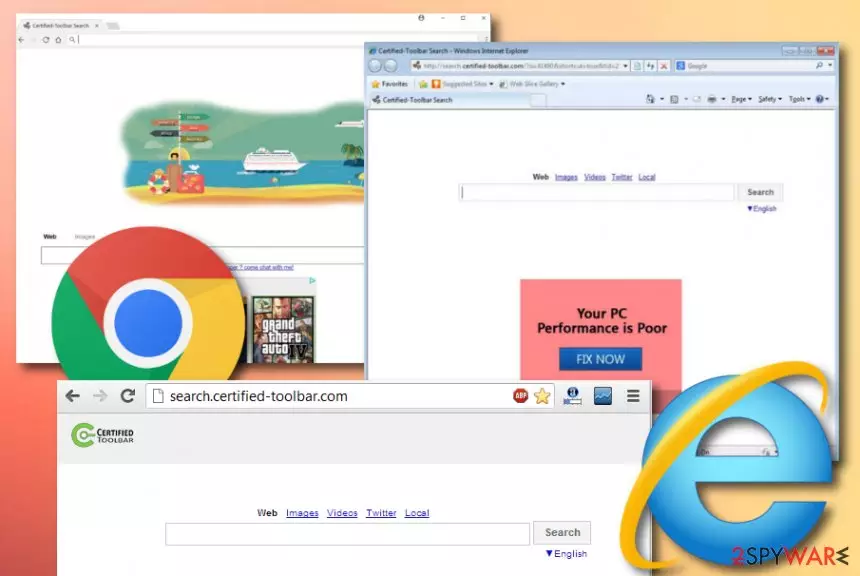
Search.certified-toolbar.com is a browser hijacker[1] that creates an image of a legitimate search engine. However, not everything is as harmless as it might seem from the first view. Even though technically, this PUP is not a dangerous malware form, it still performs some alterings and activities that are unpleasant or potentially malicious. Search certified toolbar can modify the Task Manager and Registry to drop its own load that allows executing the PUP whenever the machine is booted.
Continuously, Search.certified-toolbar.com virus can append the http://search.certified-toolbar.com?si=41460&shortcut=true&tid=2937 shortcut to your Windows desktop and Start bar. If you open a file that has this shortcut attached to it, you will be directly sent to the homepage of the browser hijacker.
The main purpose of certified search toolbar is to change the default search provider, homepage, and new tab URL bar to search.certified-toolbar.com. Afterward, the new settings will always appear while you open the hijacked web browser and even trying to set Google as your default provider again does not help to reverse the changes, according to one infected user.[2] Another dissatisfied person claims that this program has hijacked even two web browsers, the outlook mail account, and is very difficult to get rid of due to hiding in the computer system[3]
| Name | Search.certified-toolbar.com |
|---|---|
| Also known as | Search certified toolbar/certified search toolbar |
| Type/category | Browser hijacker/potentially unwanted program |
| Activities | This suspicious product alters major browser settings such as the homepage, new tab URL, and search zone. Continuously, the PUP adds odd shortcuts to the Windows desktop and start menu, provides intrusive advertisements, can redirect to affiliate and potentially dangerous sources, might collect non-personal information that is related to the user's browsing activities, habits, and experience |
| Spreading | Browser hijackers are often delivered by a stealth distribution technique known as “software bundling”. The PUP can come from rogue downloading sources such as cnet.com, download.com, softonic.com, or camouflage as legitimate-looking Adobe Flash Player, Java Script updates |
| Elimination | You can terminate the browser hijacker with the help of automatical malware removal software or by employing the manual step-by-step guidelines that have been appended to the end of this article |
| Fix tool | If you have found any signs of system compromisation, you can try repairing the corrupted areas with the help of software such as FortectIntego or any other automatical program that is reliable and you are likely to use |
The new search engine that is appended by Search.certified-toolbar.com will likely aim to generate search results from another legitimate search provider such as Google, Bing,[4] or Yahoo. Regarding this fact, the hijacked engine does not provide any true value to you and can bring more disadvantages than positive features.
Besides, Search.certified-toolbar.com can easily make you install its toolbar (Certified Toolbar) which is capable of showing altered search results. Even though the browser hijacker developers might try to convince you that their product is here to help you to search faster throughout the Internet, this is only a marketing trick used for “selling” the app.

Search certified toolbar also aims to produce intrusive advertisements while using its services. You can be provided with various online game offers, shopping deals, rogue security system products, urges to fix your poor computer performance, etc. Keep in mind that all of these offers and deals are income-based and created to satisfy the developers only.
Another bad side of Search.certified-toolbar.com is that it can produce advertisements that aim to redirect people to questionable-looking domains. Even though most of them will likely appear just filled with sponsored content, some of the websites might include malware-laden programs and bring serious harm to your computer system.
Finally, just like other questionable search engines, Search.certified-toolbar.com may start tracking your browsing habits and online experience. Typically, it collects search terms, mostly visited websites, data that is added when visiting each of the user's favorite sites and so on. Typically, this information is considered as personally non-identifiable.
However, it may be used for unfair marketing companies and similar aims. Search.certified-toolbar.com might use the gathered information for sharing it with other parties for more monetary income. Also, the developers can employ this type of data to “work” for them and let them benefit from targeted advertising campaigns.

That is why we would like to offer you to remove Search.certified-toolbar.com. If it has shown up on your computer without your approval, you should use the manual guide below or employ trustworthy antimalware software. This will help you to get rid of all potentially unwanted programs, like browser hijackers, adware, and similar intruders. Also, you can try out another piece of software such as FortectIntego that might help you to fix all compromised entries on your machine.
Search.certified-toolbar.com removal has to be completed in all the sections that the browser hijacker when through. This includes various directories of your Windows or Mac machine, and also possibly-infected web browser applications such as Google Chrome, Mozilla Firefox, Internet Explorer, Microsoft Edge, and Safari.
Ways through which browser hijackers enter devices
Cybersecurity specialists from NoVirus.uk[5] claim that browser hijackers are distributed by using stealth techniques such as “software bundling”. This type of process succeeds when the PUP is downloaded together with some type of freeware or shareware of the Internet. Users are likely to receive a browser hijacker while downloading various PDF converters, download managers, and similar products from third-party sources such as cnet.com, download.com, and softonic.com.
What you have to do in order to prevent secret browser hijacker installation is very simple. First, always take care of your downloads and installations properly. This means pay attention to every step while you are downloading/installing a program and do not skip any. Afterward, ensure that you have chosen the right configuration settings. Always use those that are marked as “custom” or “advanced” and do not forget to deselect all questionable incoming products.
Furthermore, browser hijackers can pretend to be legitimate software updates (e.g. JavaScript, Adobe Flash Player, etc.) and trick users into upgrading some type of program when, in reality, he/she receives the potentially unwanted program instead. Always be careful while downloading updates from the Internet. You are advised to get them from the software's original website. Also, use antivirus software that will warn you if something suspicious is waiting on a certain website.
Search.certified-toolbar.com removal instructions
Search.certified-toolbar.com removal is necessary if you want to get rid of all the unexpected changes that the browser hijacker has initiated on your web browsers. Completely removing the threat is the only way to clean both your operating system and browsing apps. If you leave any questionable registries or files on your computer, the browser-hijacking application might automatically launch itself within the next machine boot process.
If you want to remove Search.certified-toolbar.com by yourself, we have provided specific step-by-step guidelines at the end of this article that should help you to clean your Windows/macOS computer system and web browser apps such as Chrome, Firefox, Explorer, Edge, and Safari. Alternatively, you can download trustworthy malware removal software and successfully get rid of the cyber threat automatically. Note that using antimalware programs is very recommendable as it requires less of the user's effort and can bring even more efficiency to the process.
Uninstall from Windows
Uninstall from Windows 10/8:
- Type Control Panel into the Windows search box and open the result.
- Under Programs, select Uninstall a program.


Uninstall from Windows 7/XP:
- Click on Windows Start > Control Panel (Windows XP users should click on Add/Remove Programs).
- In Control Panel, select Programs > Uninstall a program.


Remove the unwanted program:
- In the Programs and Features window, look for any recently installed suspicious entries, select them, and click Uninstall.
- If User Account Control appears, click Yes to confirm, then complete the removal.


Delete from macOS
Remove the unwanted application:
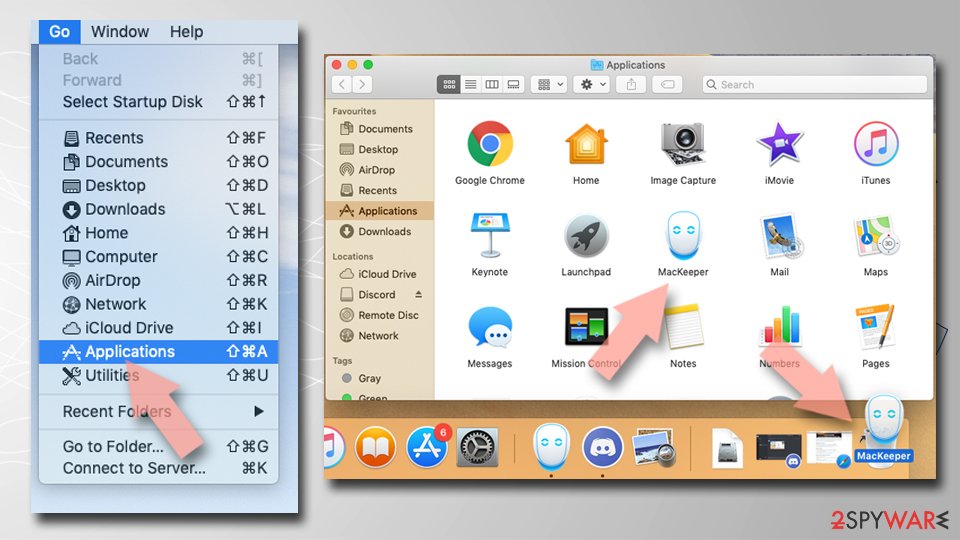
- From the menu bar, select Go > Applications.
- In the Applications folder, look for any suspicious entries, then drag them to Trash (or right-click and pick Move to Trash).

Delete leftover files and folders:
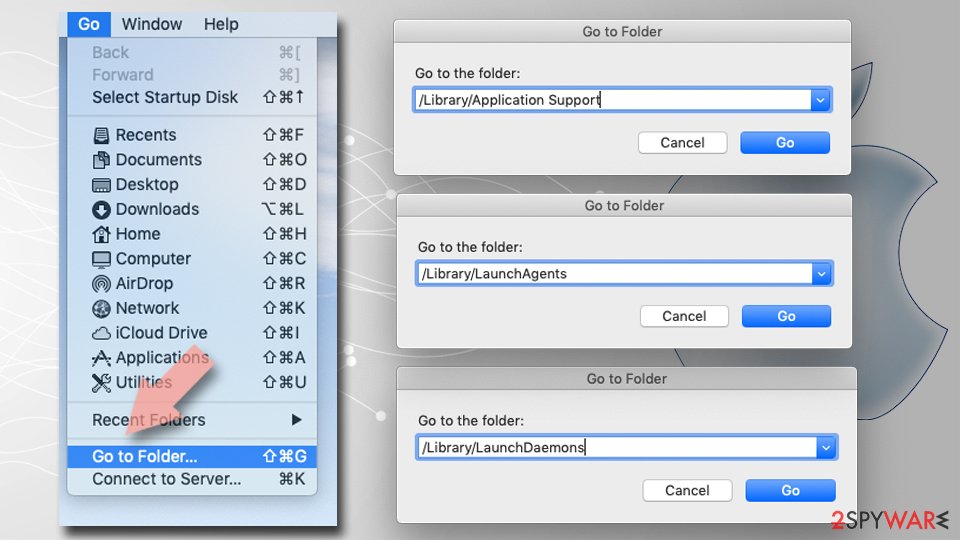
- Select Go > Go to Folder.
- Enter /Library/Application Support and remove any suspicious folders related to the unwanted program.
- Repeat the same check in the /Library/LaunchAgents and /Library/LaunchDaemons folders, deleting any suspicious entries.
- Finally, empty the Trash to permanently remove the leftovers.

Reset Internet Explorer
Remove dangerous add-ons:
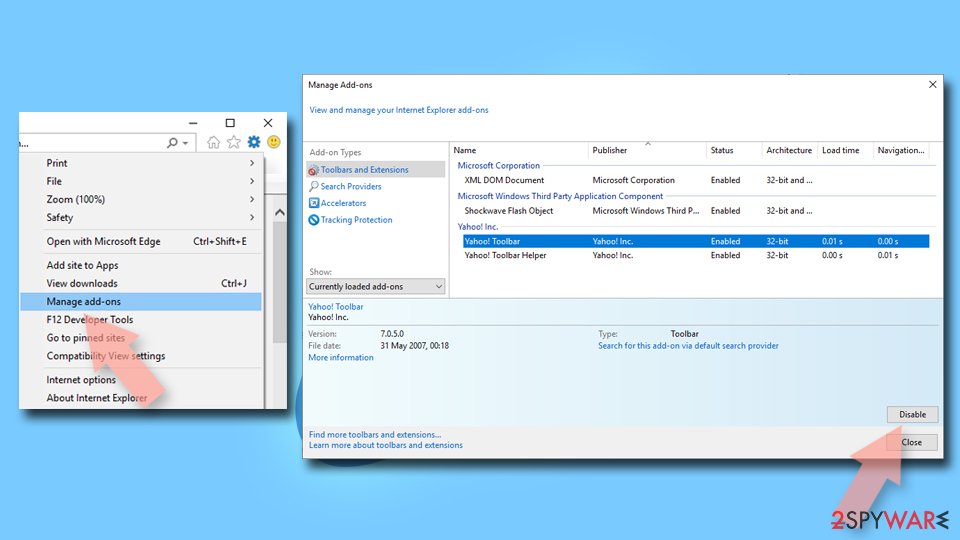
- Open Internet Explorer, click on the Gear icon (IE menu) on the top-right corner of the browser
- Pick Manage Add-ons.
- You will see a Manage Add-ons window. Here, look for suspicious plugins. Click on these entries and select Disable.

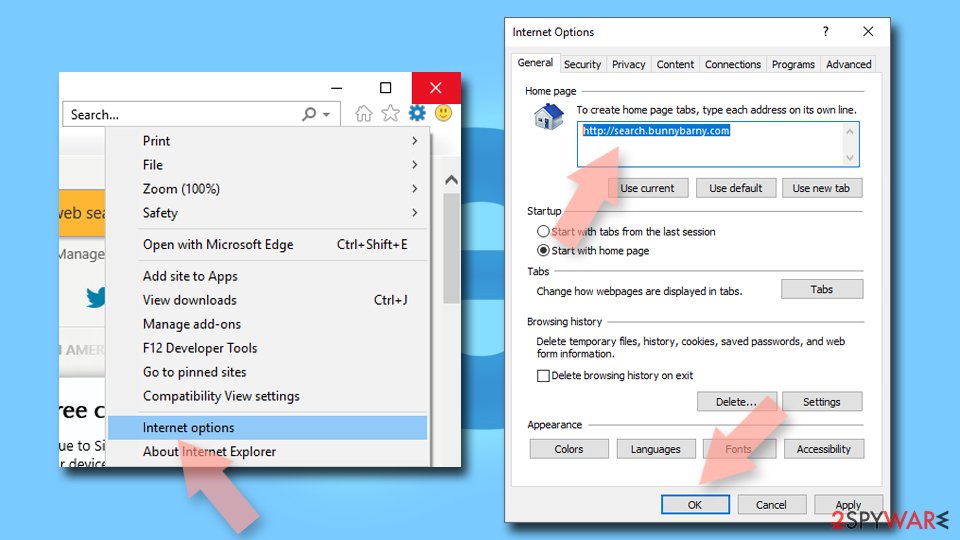
Change your homepage if it was altered:
- Open IE and click on the Gear icon.
- Select Internet Options.
- In the General tab, delete the Home page address and replace it by your preferred one (for example, Google.com).
- Click Apply and then select OK.

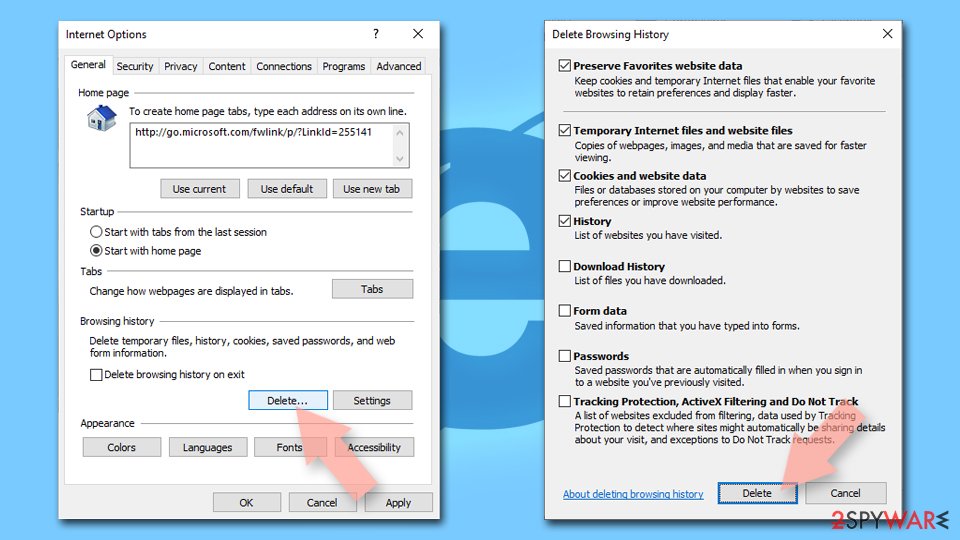
Delete temporary files:
- Press on the Gear icon and select Internet Options.
- Under Browsing history, click Delete...
- Select relevant fields and press Delete.

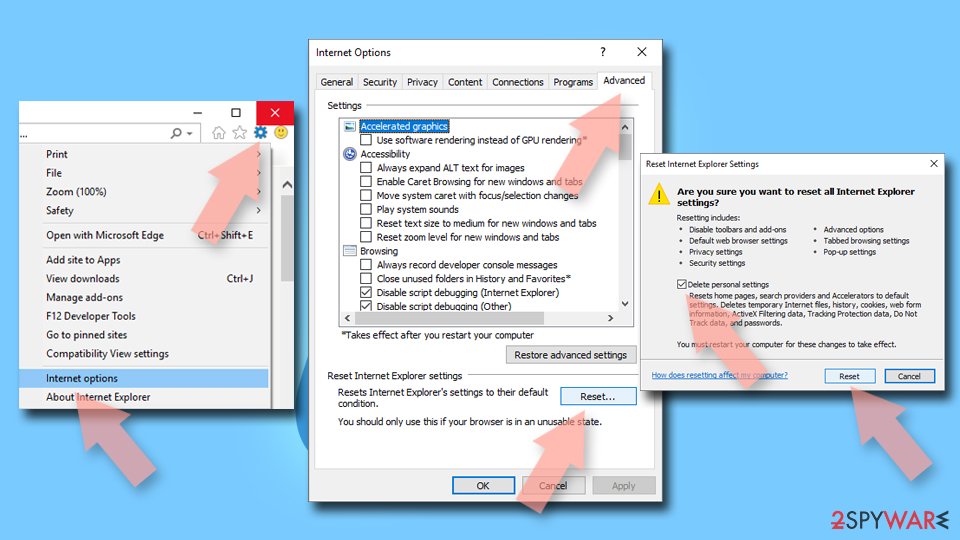
Reset Internet Explorer:
- Click on Gear icon > Internet options and select Advanced tab.
- Select Reset.
- In the new window, check Delete personal settings and select Reset.

Remove from Microsoft Edge
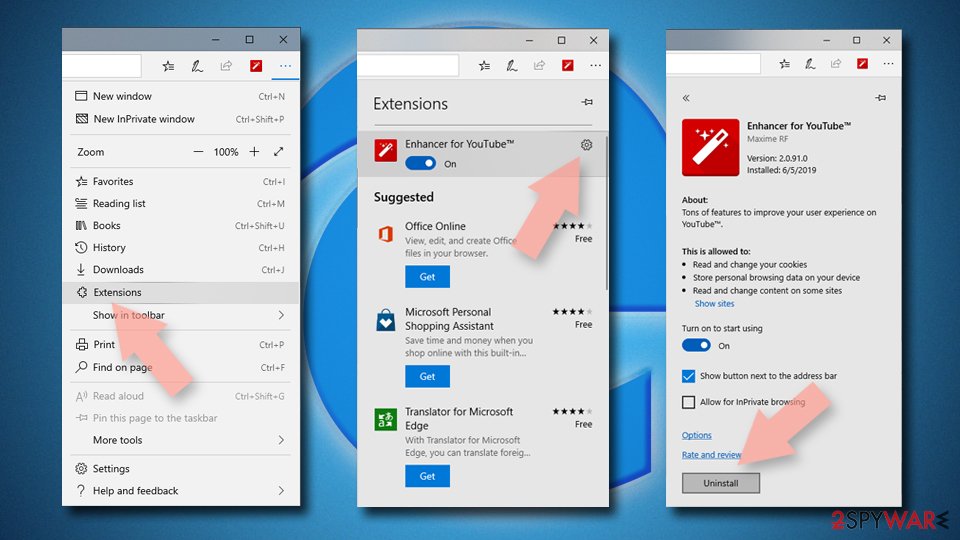
Delete unwanted extensions from MS Edge:
- Select Menu (three horizontal dots at the top-right of the browser window) and pick Extensions.
- From the list, pick the extension and click on the Gear icon.
- Click Remove.

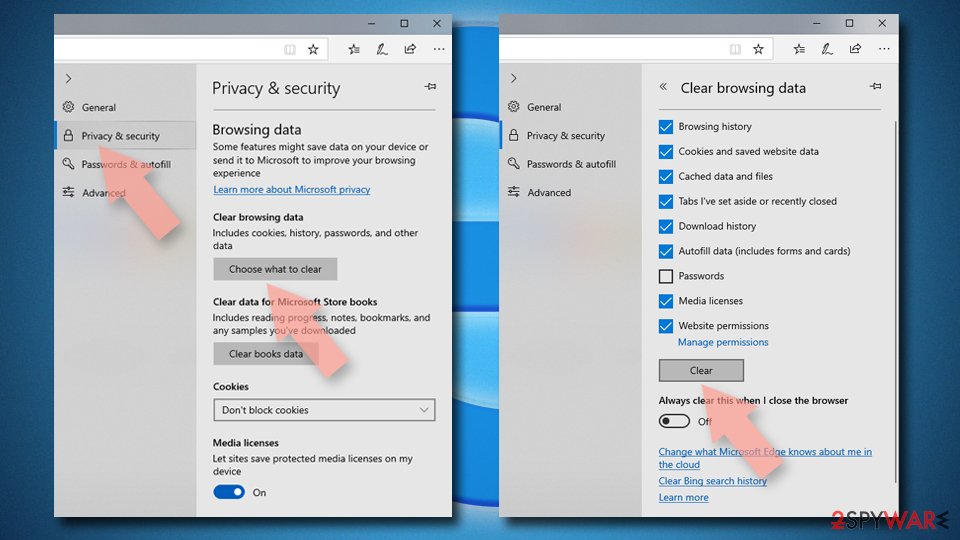
Clear cookies and other browser data:
- Click on the Menu (three horizontal dots at the top-right of the browser window) and select Settings > Privacy, search, and services..
- Under Clear browsing data, pick Choose what to clear.
- Select Cookies and other site data and Cached images and files. (apart from passwords, although you might want to include Media licenses as well, if applicable) and click on Clear.

Restore new tab and homepage settings:
- Click the menu icon and choose Settings.
- Then find On startup section.
- Click Remove next to any suspicious startup page.
Reset MS Edge if the above steps did not work:
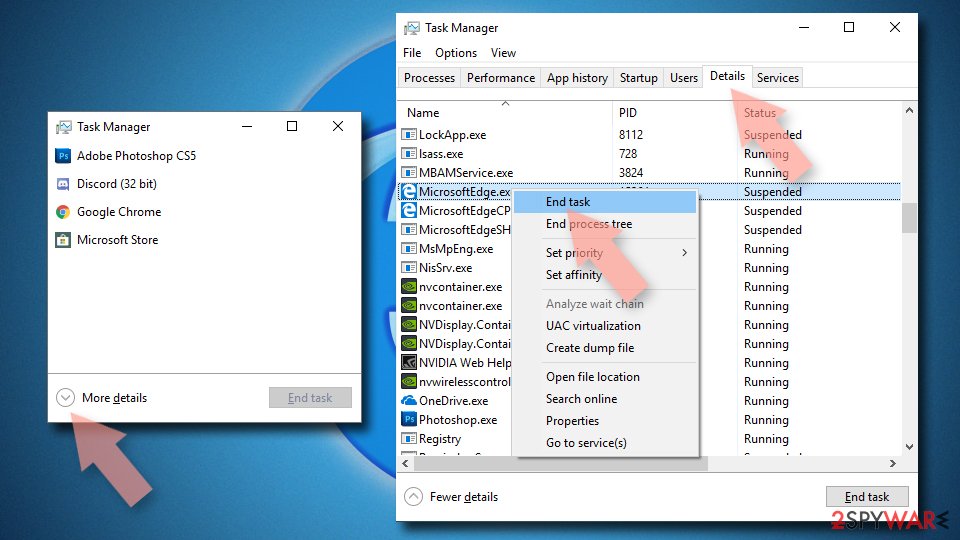
- Press on Ctrl + Shift + Esc to open Task Manager.
- Click on More details arrow at the bottom of the window.
- Select Details tab.
- Now scroll down and locate every entry with Microsoft Edge name in it. Right-click on each of them and select End Task to stop MS Edge from running.

Instructions for Chromium-based Edge
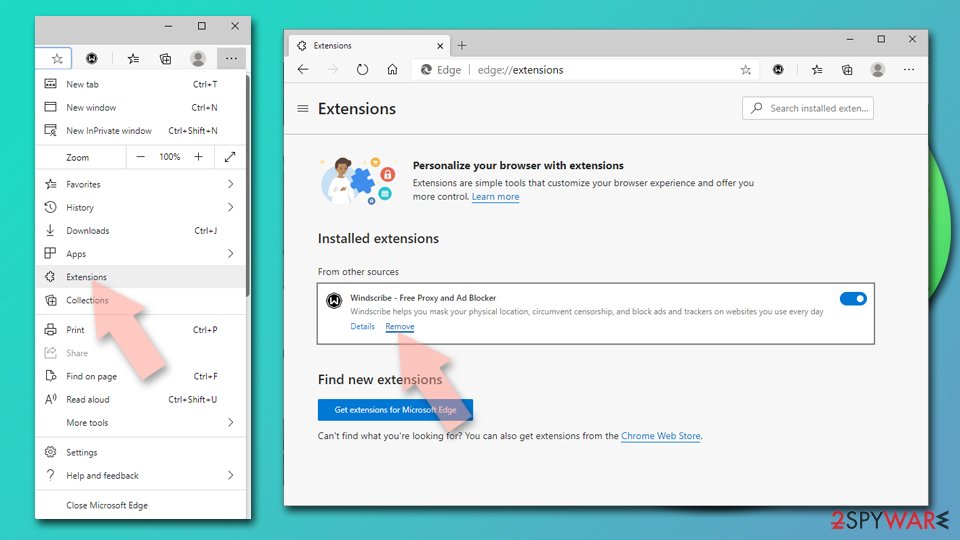
Delete extensions from MS Edge (Chromium):
- Open Edge and click select Settings > Extensions.
- Delete unwanted extensions by clicking Remove.

Clear cache and site data:
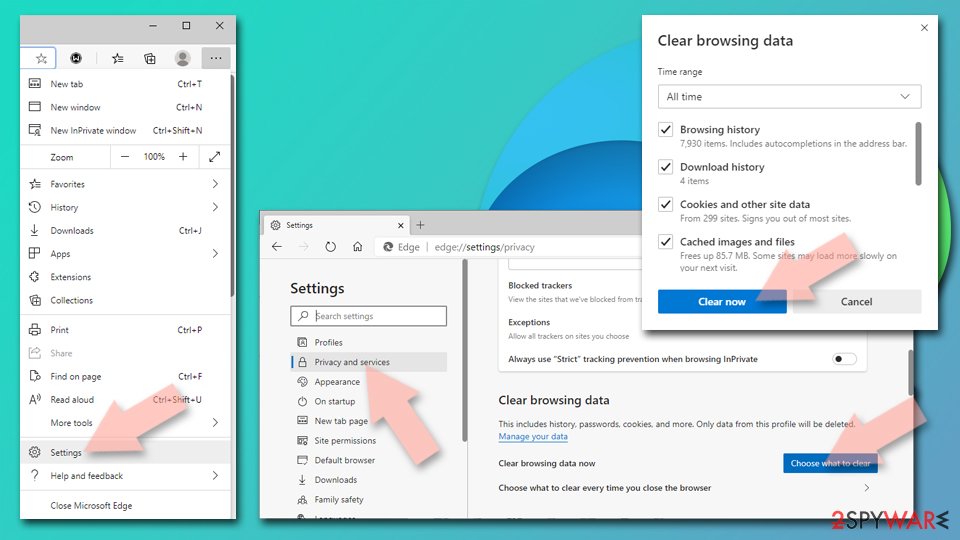
- Click on Menu and go to Settings.
- Select Privacy, search and services.
- Under Clear browsing data, pick Choose what to clear.
- Under Time range, pick All time.
- Select Clear now.

Reset Chromium-based MS Edge:
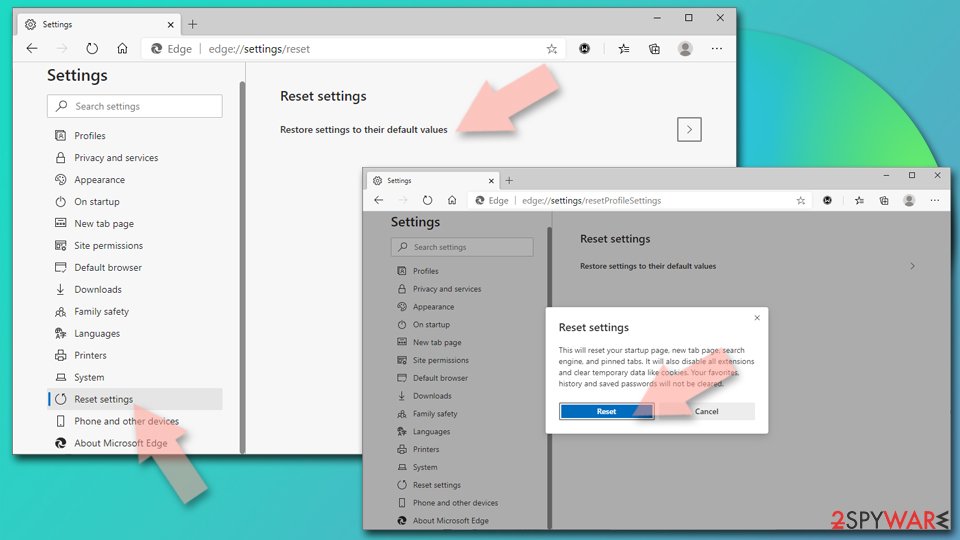
- Click on Menu and select Settings.
- On the left side, pick Reset settings.
- Select Restore settings to their default values.
- Confirm with Reset.
- This will disable extensions and reset startup pages but will not delete bookmarks, saved passwords, or browsing history.

Remove from Mozilla Firefox (FF)
Remove dangerous extensions:
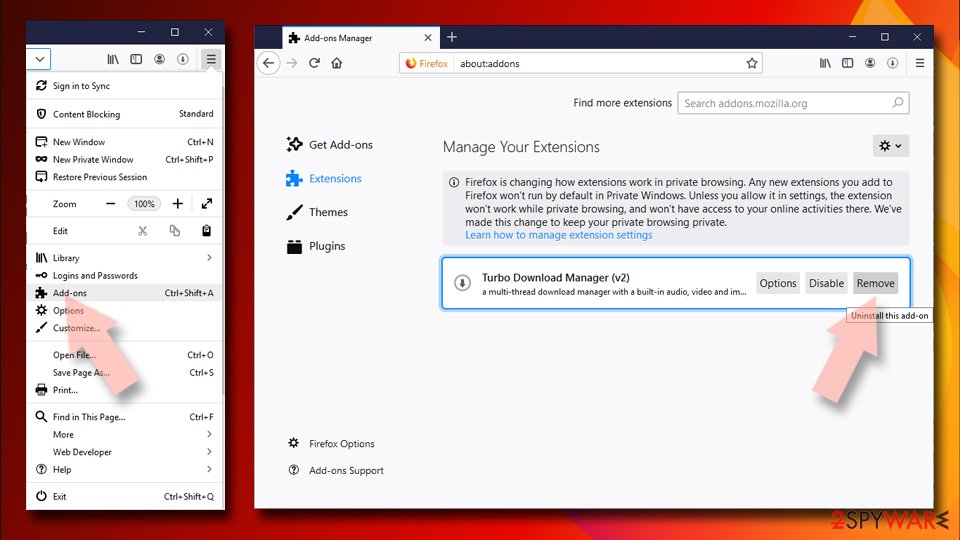
- Open Mozilla Firefox browser and click on the Menu (three horizontal lines at the top-right of the window).
- Select Add-ons.
- In here, select the unwanted extension and click Remove.

Reset the homepage:
- Click three horizontal lines at the top right corner to open the menu.
- Choose Settings.
- Under Home, set your preferred homepage and new tab settings.
Clear cookies and site data:
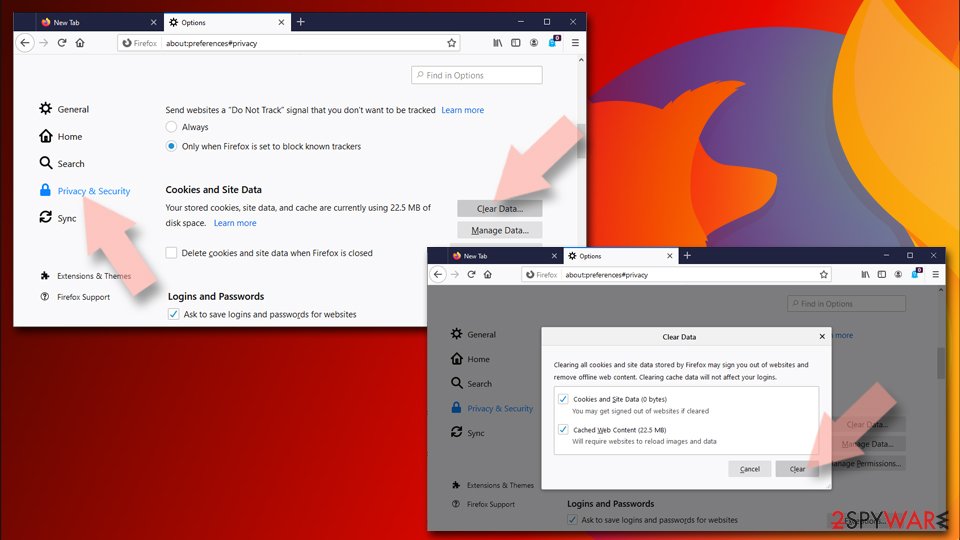
- Click Menu and pick Settings.
- Go to Privacy & Security section.
- Scroll down to locate Cookies and Site Data.
- Click on Clear Data...
- Select Cookies and Site Data and Temporary cached files and pages, then click Clear.

Reset Mozilla Firefox
If clearing the browser as explained above did not help, reset Mozilla Firefox:
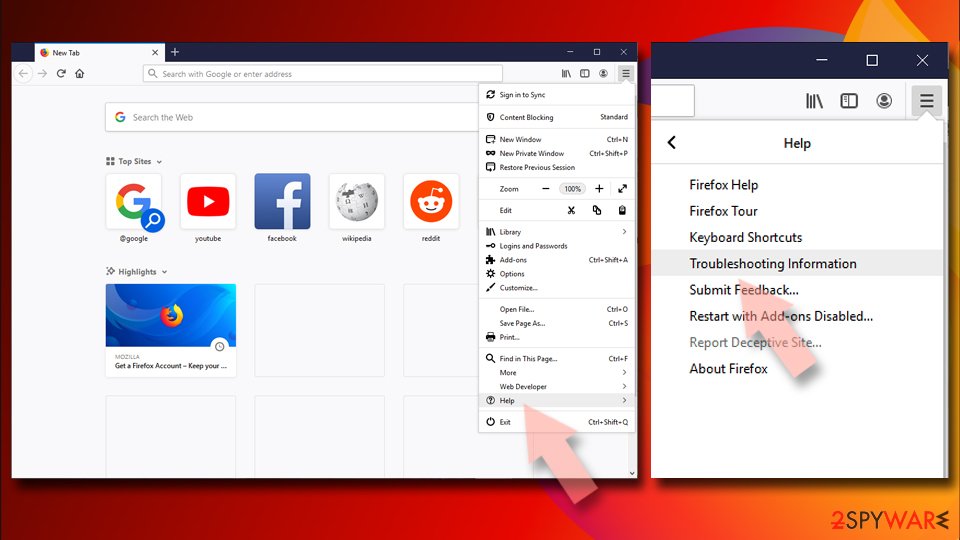
- Open Mozilla Firefox browser and click the Menu.
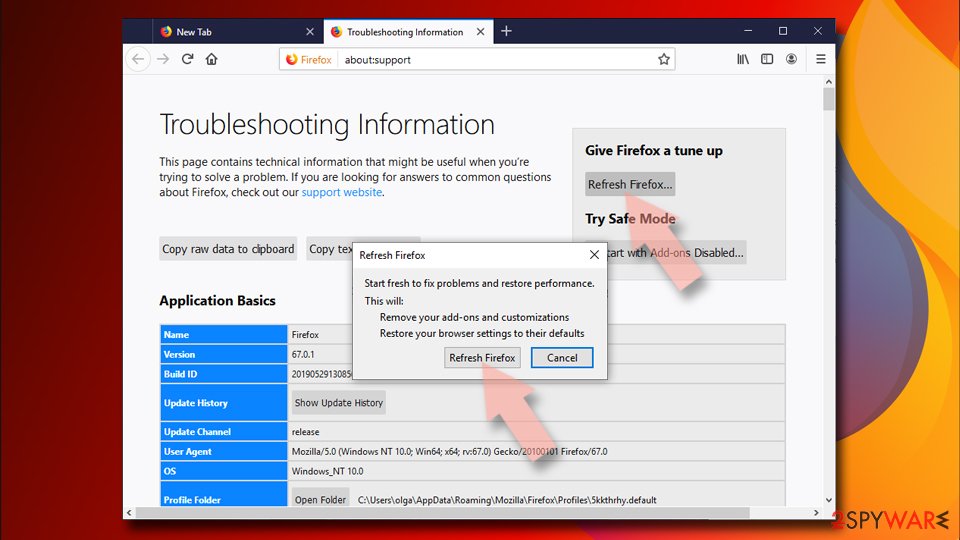
- Go to Help and then choose Troubleshooting Information.
- Under Give Firefox a tune up section, click on Refresh Firefox...
- Once the pop-up shows up, confirm the action by pressing on Refresh Firefox.


Remove from Google Chrome
Delete malicious extensions from Google Chrome:
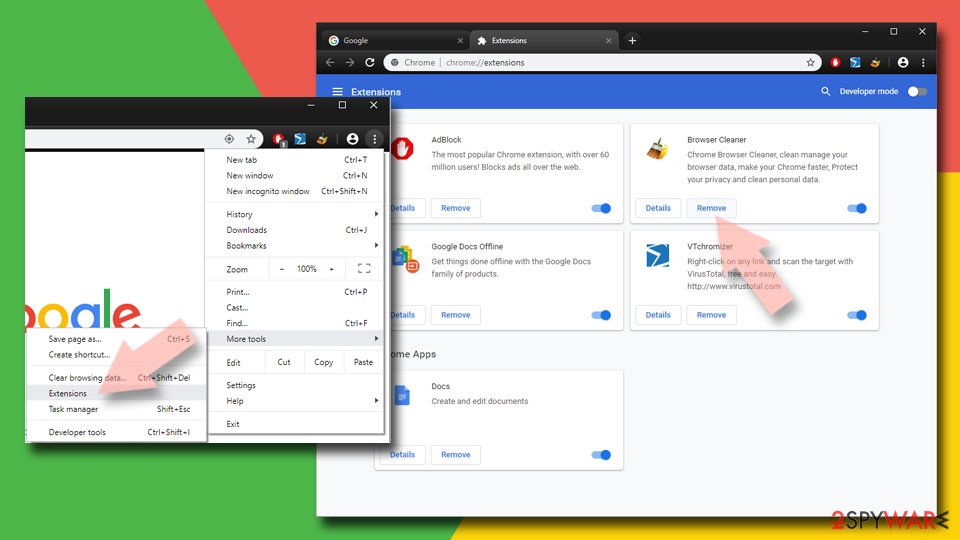
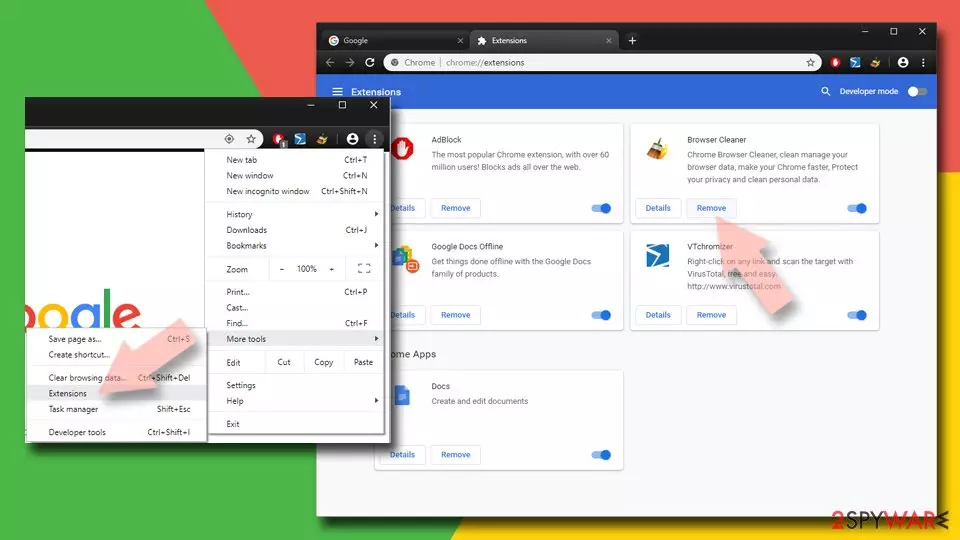
- Open Google Chrome, click on the Menu (three vertical dots at the top-right corner) and select More tools > Extensions.
- In the newly opened window, you will see all the installed extensions. Uninstall all suspicious extensions related to the unwanted program by clicking Remove.
Clear cache and web data from Chrome:
- Click on Menu and pick Settings.
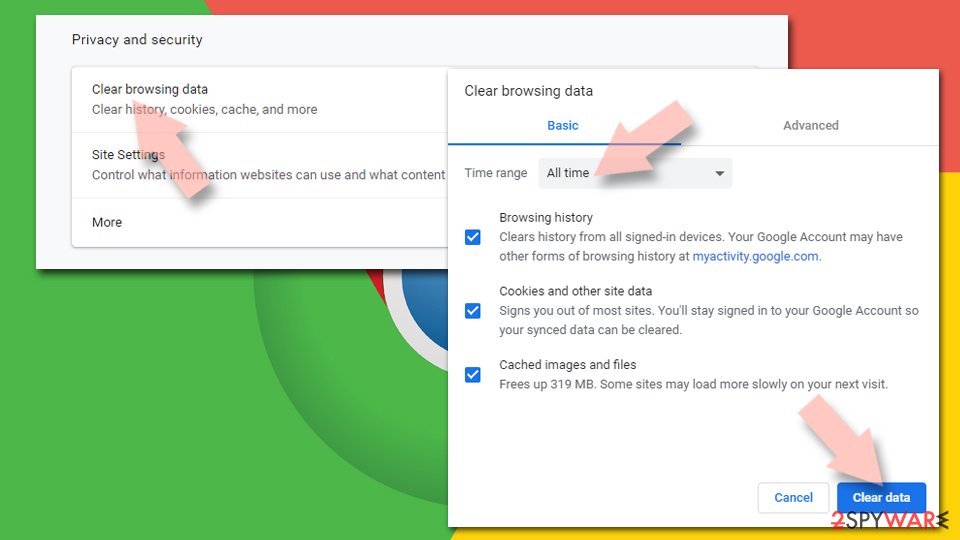
- Under Privacy and security, select Clear browsing data.
- Select Browsing history, Cookies and other site data, as well as Cached images and files.
- Click Clear data.

Change your homepage:
- Click menu and choose Settings.
- Look for a suspicious site in the On startup section.
- Click on Open a specific or set of pages and click on three dots to find the Remove option.
Reset Google Chrome:
If the previous methods did not help you, reset Google Chrome to eliminate all the unwanted components:
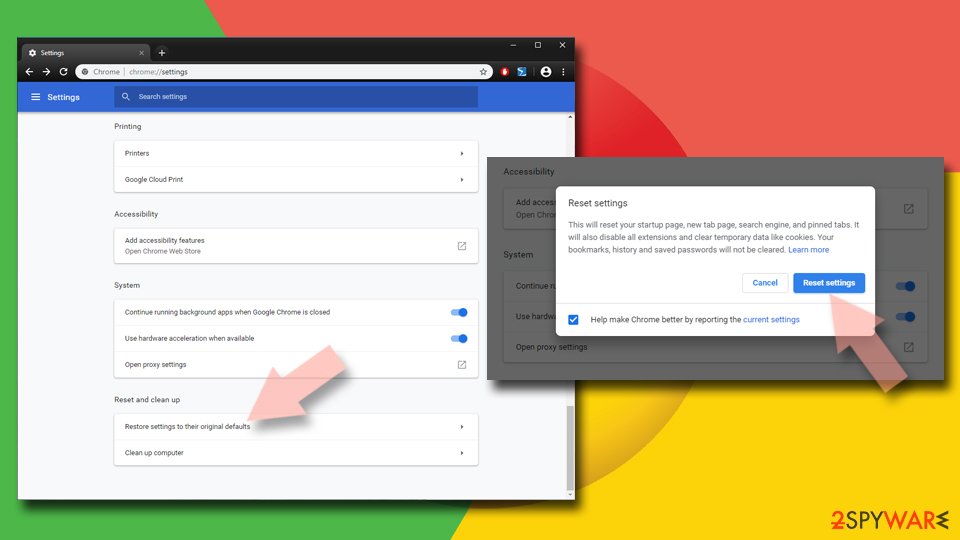
- Click on Menu and select Settings.
- In the Settings, scroll down and click Advanced.
- Scroll down and locate Reset and clean up section.
- Now click Restore settings to their original defaults.
- Confirm with Reset settings.

Delete from Safari
Remove dangerous extensions:
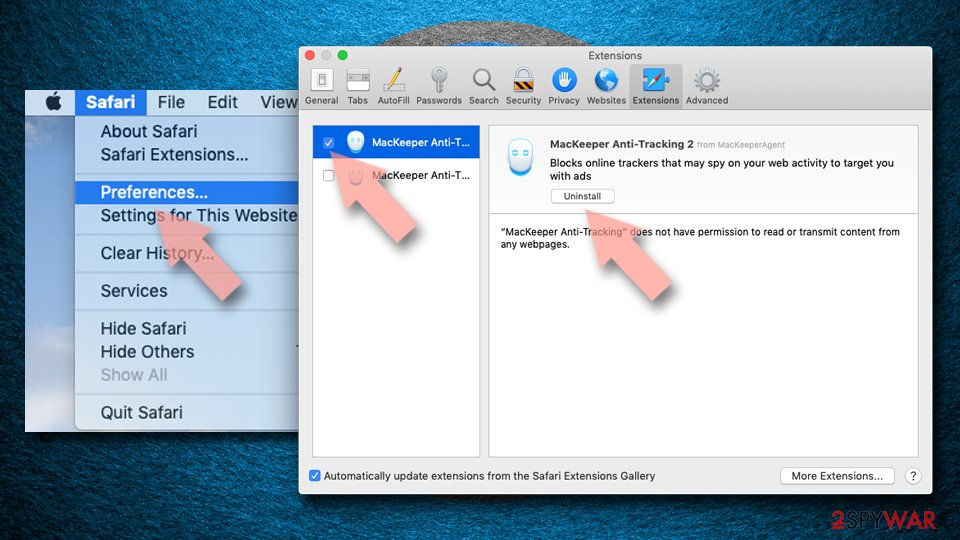
- Open Safari, click Safari in the menu at the top-left of the screen, and select Preferences.
- Go to the Extensions tab, look for any suspicious entries, and click Uninstall to remove them.

Clear history and website data:
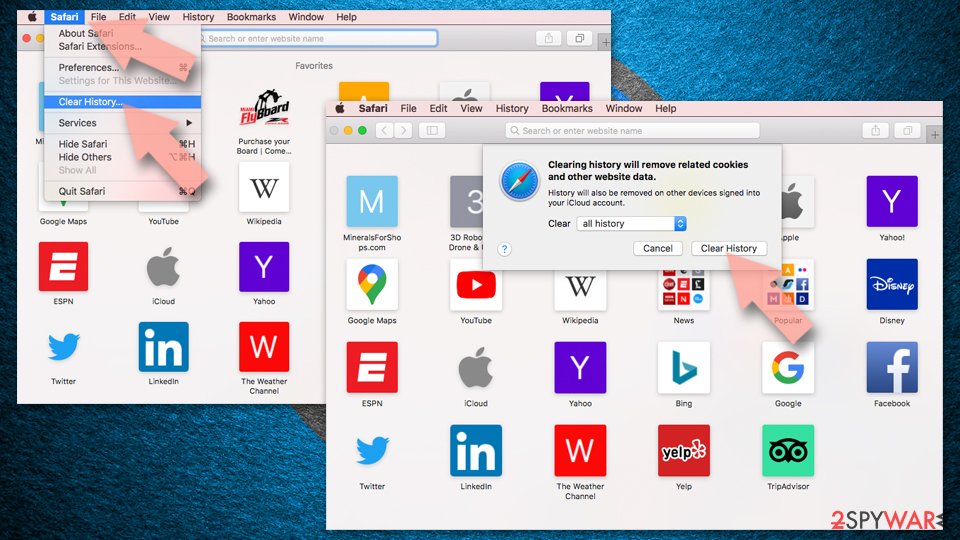
- Click Safari in the menu and pick Clear History.
- Set Clear to all history and confirm with Clear History.

Reset Safari:
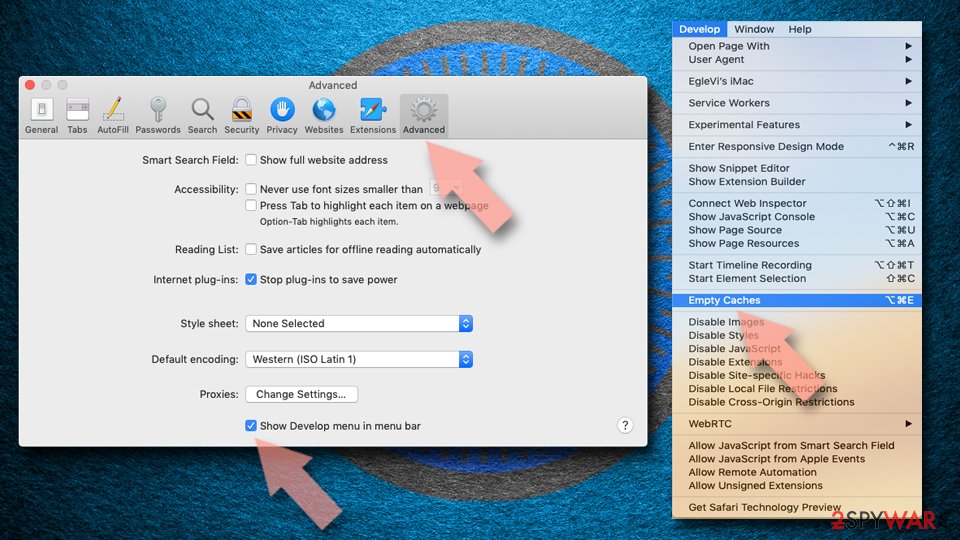
- Click Safari in the menu and select Preferences > Advanced.
- Enable Show Develop menu in menu bar.
- From the menu bar, click Develop and select Empty Caches.

Did this guide help?
18 comments
ShelleyC
Unfortunately, search.certified-toolbar.com hijacker stops my malwarebytes full scan as well as Microsoft Security Essentials full scans as well. Both will perform a quick scan completely, but show no infections. Read that this malware can mutate and is hard to remove. I first noticed it in Task Manager with "Glary" in the file/path after name of toolbar (Im kind of a newbie and dont really know all of the technical/proper computer lingo, so...Im going to try and do it manually from registry and files and am using an older desktop with this message. This hijacker is not on this computer in use now, but on a new laptop w/Win7 64bit. If deleting registry/and/or files works, I believe I will still contact a computer tech repair to get rid of this monster. Unless some software can come up with a good, clean fix, Ive no choice. Regards and thanks for info. Wonder if downloading Glary file opener or Glary Utilities downloaded this thing as the path/file name located to the right of the entry in Task Manager did state "glary," perhaps I will contact Glarysoft and see if that did, indeed, happen and if they have any recourse for removing this beast. Oh, did delete process in Task Manager, but still experience re-directs in browser (IE9) to the website, but I believe Ive gotten out of the redirect as soon as I see it has changed.
Again, thanks for info and if I get any truly good info on how to remove once and for all, I will contact via this site. Good luck to all, in the meantime!
ShelleyC
Hi: Back again on new laptop that has this virus and am going to download SpyHunter trial to see if that works. Hope dont have to purchase to actually remove any threats like StopZilla did (and it only found cookies). Will advise if SpyHunter works on this thing; keeping fingers and toes crossed!
Christopher
Hey Thanks Very Much! I Finally Installed spyware . I Was Wondering Why It Wouldn’t Install. Thanks!!!
Thank you very much! This is the only working description for this problem.
But give me information that how same virus can deteted my PC????
Margie
as anyone been able to delete search.certified-toolbar.com because everything I tried hasnt worked PLEASE HELP
Best beta
works fine. thanks
Martin Stander
Windows 7. I uninstalled it and removed it from my browsers. Unfortunately this had no effect. My infestation was so bad that the complete Office suite was infected. I open Outlook and is greeted with Certified-Toolbar Search. I open Excel and the same thin happens. I tried deleting it in the Registry with no luck. I would reboot and it is still there. Do another search of the Registry and there is nothing. But still it is everywhere in the browsers and Office.
As a last resort I rolled back Windows to the day I knew I got infected. Voila, its gone. If you get infected, spare yourself the trouble and just roll back
murf
I tried to roll it back, but it said it couldnt do it because some files were still in use, even tried spybot in safe mode, still there.
grant mitchell
How much information do you need from the good people, for gods sake. CertifiedTToolbar, by its own accounts, is based in Ben Gurion Rd. somewhere in Israel. The interpretation you give of the identity of this extremedly hostle malware is pure disinformation. This toolbar/ hijacker does not log into the Windows reference pages, cannot be searched for, located, or removed, regardless of what you say. It even destroys my ability to print news, albeit political, articles. Please, please, no more baby talk.
Giulio
.
I tried SpyHunter and MalwareBytes Anti-malware. but both failed. At best, they crippled the bastard virus a bit and it became not that annoying, but knowing that he was still there was unsettling. The directions to MANUALLY kill it that are available in some forum on the web would be the best, but they are really difficult to follow, since they are intended for specialists and many step are missing. I sorted it out by entrusting the specialized company, http://www.yYoocare.com, to do the job and at a cost of about 70 USD they took over my PC and got rid of this virus in 20 minutes. I suggest it to everyone who is not an expert. At the moment no antivirus software can kill it. I am a private and I have nothing to do with Yoocare.com, I support them because they sorted me out fast and professionally.
K J Boland
tried everything, Malware bytes, superantispyware and paid for SpyHunter.
Spyhunter finds and says it removes, but it always is there when I reload firefox.
Note: it is not showing as an add on. or as a program to remove.
Capeloni
I spend U$39 wirh spyhuner and irt didnt remove it
NoOneSpecial
I tried over and over but it just was not going to be . it has infected my microsoft word too
Claudia
Thank you! I didnt know what was happening when I kept getting re-directed to search.certified-toolbar.com, until I googled it and came here. Following your instructions, I had it removed in just a few minutes.
unknown
restore it to factory SETTINGS
deshichain
send gift to bangladesh
online shopping in bangladesh
online gift in bangladesh
torafujin
Spent 2 months trying to get rid of this (couldnt roll-back because of some necessary security files added later). Gave up. Last week, however, got infected by some other browser-hijacker. 2 hours of cleaning out Control Panel, browsers, registry files. Final result: not only removed the new hijacker, but that hijacker had managed to kick out Search.Certified-Toolbar. Admittedly, not the best solution to this problem, but thought it might help to know that curing the re-infection appears to cure the original disease.
l.kheinz
Nach Ihren Vorgaben, hatte ich es in ein paar Minuten entfernt.
search.certified-toolbar.com umgeleitet gehalten, bis ich es gegoogelt
Nach Ihren Vorgaben, hatte ich es in ein paar Minuten entfernt
Was sind die Vorgaben???
vesa virtanen
EI AVAUDU, tuskin poistaasertified toolbar search ohjelmaa