

Vagus – a dangerous Remote Access Trojan that can steal personal info and perform other malicious actions

Vagus is a type of malware attributed to the RAT category. It is a type of malware that allows attackers to gain remote access and control over a victim's computer, which would allow them to perform all kinds of malicious actions, including stealing sensitive user data via the browser and other installed programs, disabling Windows security software, gaining control over victims' personal accounts, and much more.
Since Vagus is a Remote Access Trojan, it can be difficult to know whether you got infected due to its stealthiness, and its removal might also be relatively difficult. That's why we provide all the relative information and instructions on its elimination below, as keeping it installed can seriously compromise one's personal and computer security.
| Name | Vagus virus |
| Type | Remote Access Tool, Remote Access Trojan, data stealer |
| Infiltration | Can be distributed via software cracks and similar illegal software, malicious websites, fake ads, infected USB drives, etc. |
| Symptos | Can cause slow operation of the system due to the cryptocurrency mining process, system crashes with BSODs, Microsoft Defender malfunctions, etc. |
| Functionality |
|
| Removal | To eliminate malware, download and install powerful security software SpyHunterCombo Cleaner and perform a full system scan |
| System fix | Malware might seriously damage some Windows system files, rendering the whole operating system defective. To remediate the system, scan the PC with FortectIntego or similar repair software |
How does Vagus spreads, and how to avoid being infected?
Remote Access Trojans are typically spread through phishing emails, malicious websites, software vulnerabilities, and social engineering. Attackers can use phishing emails to trick victims into downloading and installing the RAT or by embedding a link to a malicious website that downloads the RAT when clicked on. Additionally, they can also be spread by taking advantage of vulnerabilities in software that the victim has installed.
Vagus, on the other hand, is mostly spread via fake links and malicious websites, especially those that distribute repackaged software. Software cracks, torrents, and similar websites are the main culprits of users getting infected. In other cases, the virus was observed attacking users via contaminated USB drives, which is quite an outdated, yet effective method of distribution.
To protect yourself from Trojans such as Vagus, it is important to practice safe browsing habits and to keep your software and operating system up to date. This includes not clicking on links from unknown or suspicious sources and avoiding downloading files from untrusted websites. Additionally, it's also important to have reputable anti-virus software installed on your device, which can detect and remove RATs and other types of malware.
What does the Vagus virus do?
Vagus RAT is malware that infiltrates a machine and begins collecting relevant device data. It employs anti-detection and persistence-ensuring techniques by disabling the Microsoft Defender and Windows Task Manager.
It can also create hidden environments and clone various browsers, email clients, and cryptocurrency wallets in order to gain control over victims' accounts and abuse them for malicious purposes. The gathered login information might be sold to the highest bidder online, or it can also be used to perform phishing attacks against individuals.
Additionally, malware can manage files, infiltrate/execute them, target passwords, record keystrokes, record audio and video, and operate as a cryptocurrency miner. This may seriously slow down the machine and increase the resource consumption to the max in some cases, making Windows operation rather slow or even impossible at times.
The presence of the virus on a device may result in multiple system infections, decreased system performance, data loss, hardware damage, severe privacy issues, financial losses, and identity theft.
If you suspect your computer is infected with Vagus RAT or other malware, it is recommended to use an anti-virus and remove it immediately – we explain how below.
Removal of the virus
Remote Access Trojans are dangerous threats, and they shouldn't be treated lightly. The longer one of such threats runs on your system, the worse it might become, as all the data you put into your browser or other apps can be stolen at any time. Even your hardware might sometimes malfunction due to RATs.
The easiest way to remove the Vagus virus is by employing powerful security software such as SpyHunterCombo Cleaner or MalwarebytesMalwarebytes, as Windows Defender is disabled upon installation of the malicious software. Security software is specially designed to locate all malicious files and remove them at once. However, one thing it cannot do is fixed damaged system files that might have been affected by malware – we recommend a PC repair software for that task. Follow these steps:
- Download FortectIntego
- Click on the ReimageRepair.exe

- If User Account Control (UAC) shows up, select Yes
- Press Install and wait till the program finishes the installation process

- The analysis of your machine will begin immediately

- Once complete, check the results – they will be listed in the Summary
- You can now click on each of the issues and fix them manually
- If you see many problems that you find difficult to fix, we recommend you purchase the license and fix them automatically.



By employing FortectIntego, you would not have to worry about future computer issues, as most of them could be fixed quickly by performing a full system scan at any time. Most importantly, you could avoid the tedious process of Windows reinstallation in case things go very wrong due to one reason or another.
If malware is interfering with its removal, you can instead access Safe Mode as explained below and perform all the necessary scans from there:
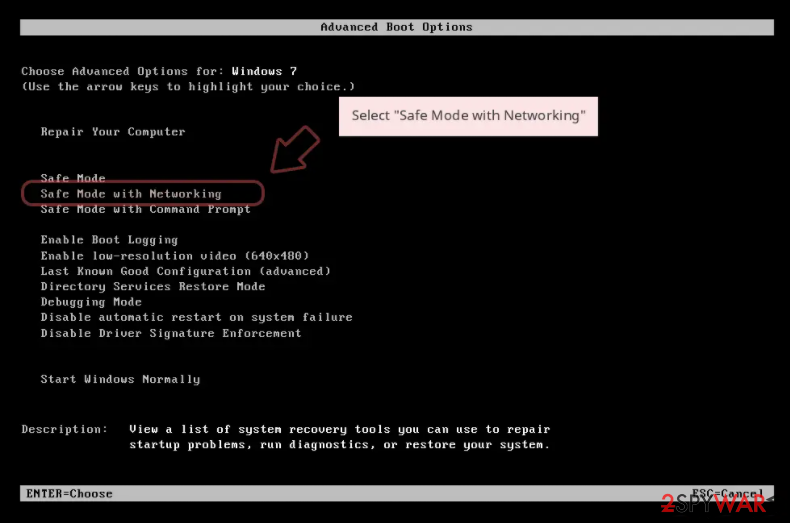
Windows 7 / Vista / XP
- Click Start > Shutdown > Restart > OK.
- When your computer becomes active, start pressing F8 button (if that does not work, try F2, F12, Del, etc. – it all depends on your motherboard model) multiple times until you see the Advanced Boot Options window.
- Select Safe Mode with Networking from the list.

Windows 10 / Windows 8
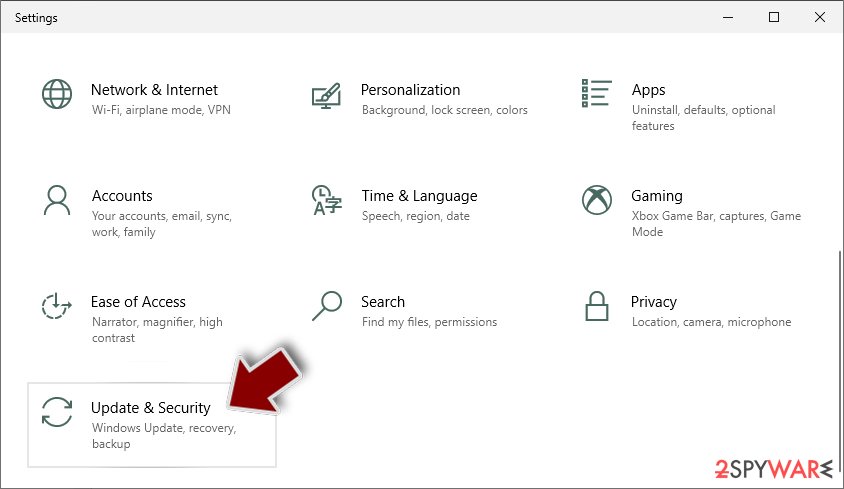
- Right-click on Start button and select Settings.
- Scroll down to pick Update & Security.
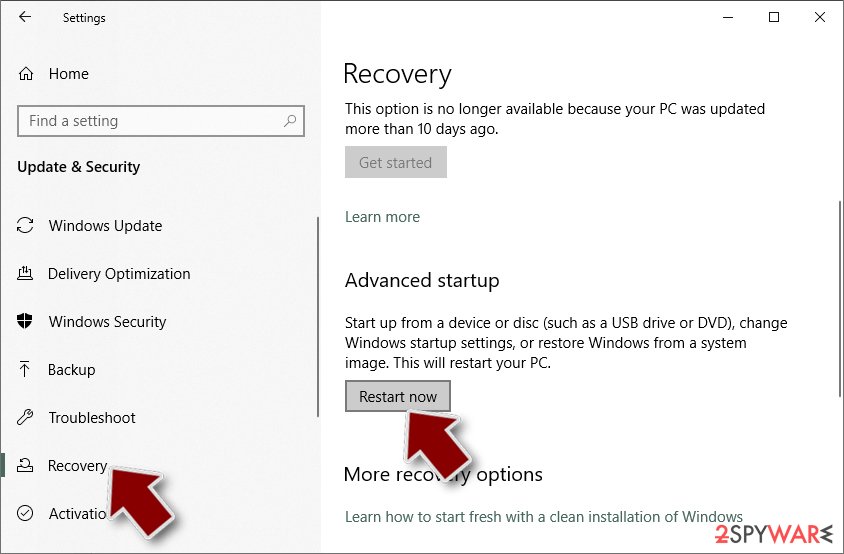
- On the left side of the window, pick Recovery.
- Now scroll down to find Advanced Startup section.
- Click Restart now.
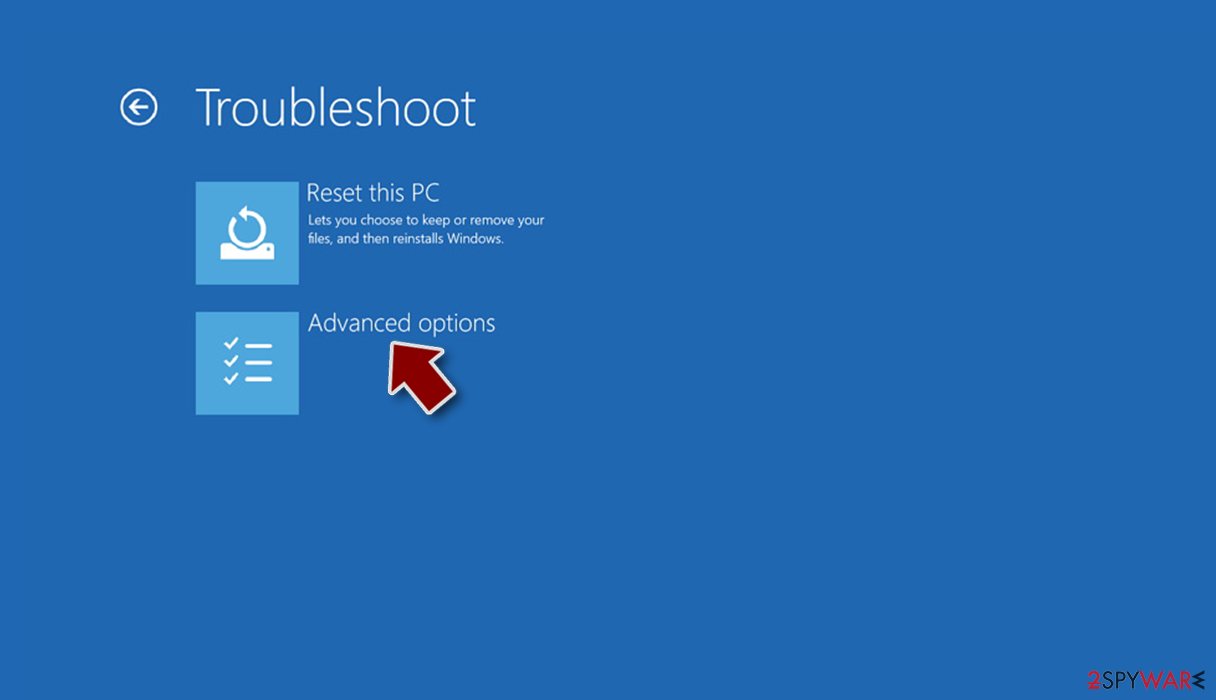
- Select Troubleshoot.
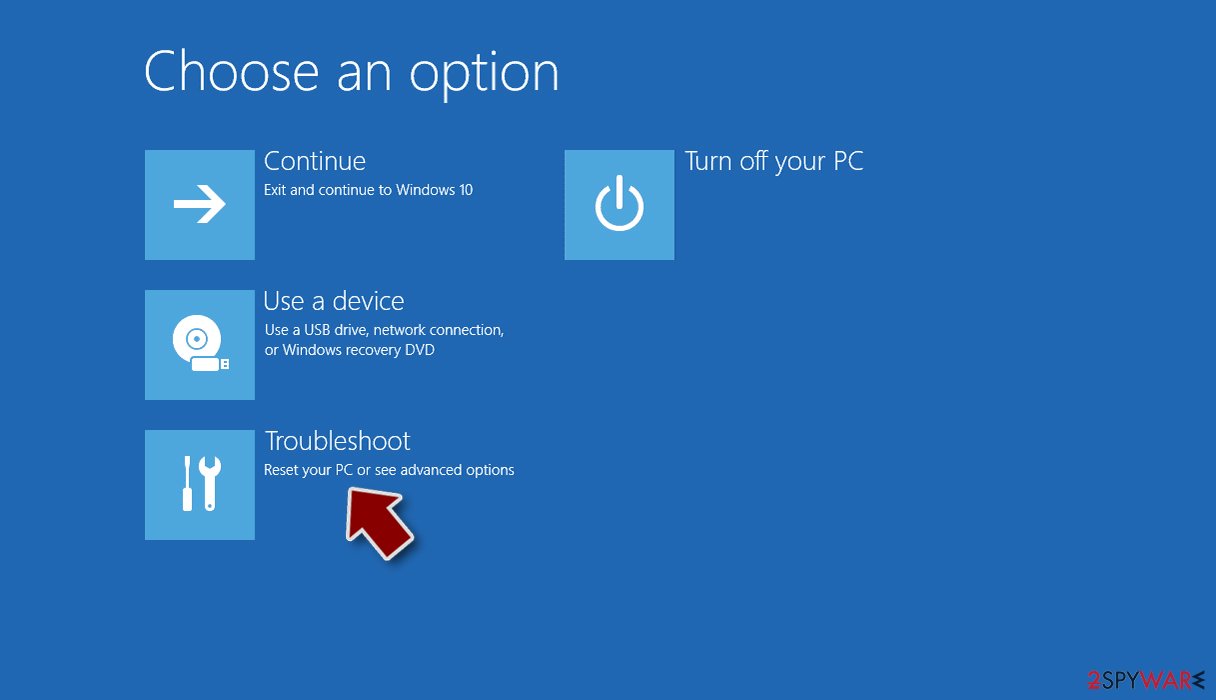
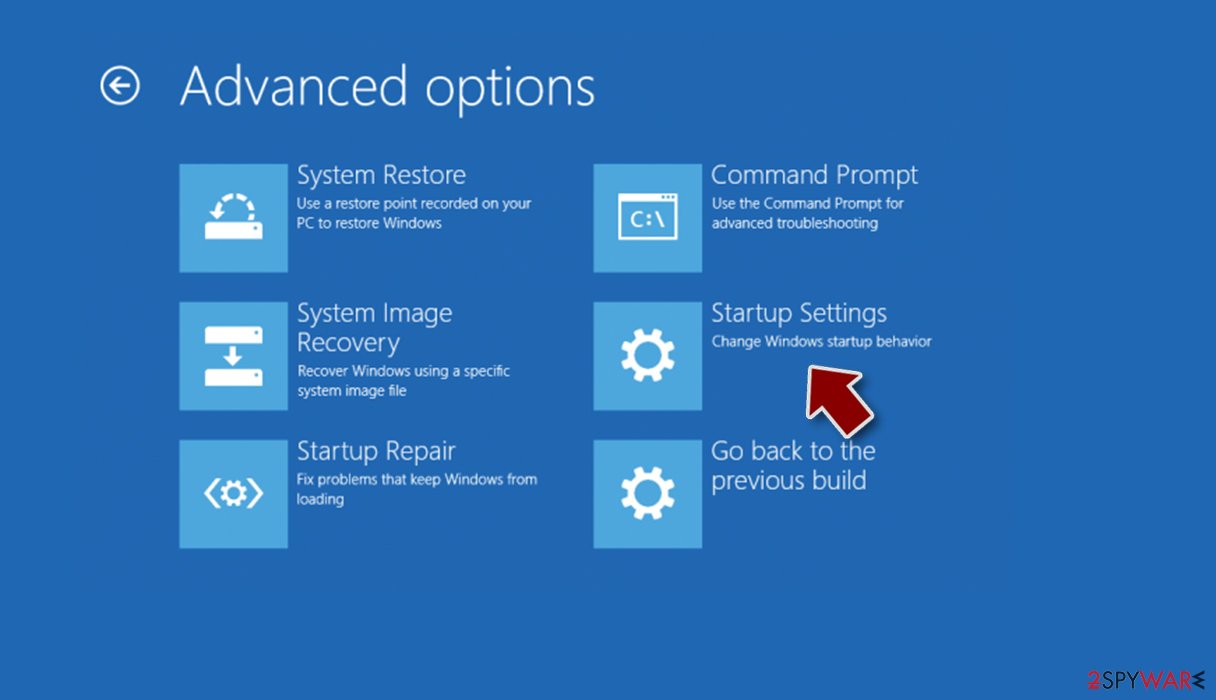
- Go to Advanced options.
- Select Startup Settings.
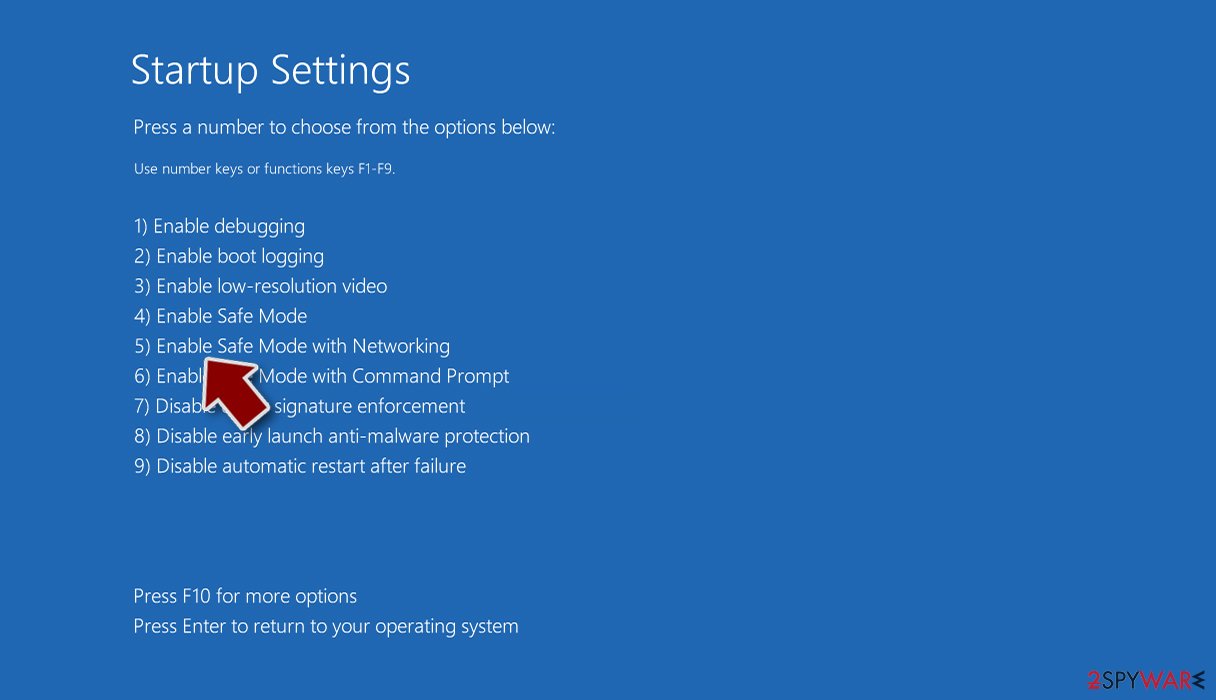
- Click Restart.
- Press 5 or click 5) Enable Safe Mode with Networking.


Did this guide help?
Be the first to comment