

Marnet ransomware encrypts users' personal files using the RSA and AES algorithms

Marnet ransomware is a file-locking virus that infiltrates the machine and encrypts users' personal files, including photos, videos, and documents. It belongs to the MedusaLocker ransomware family that emerged in 2019. The affected files get appended with the .marnet2 extension. It is important to note, that the number in the extension may vary. If a file was previously named picture.jpg, it will now be named picture.jpg.marnet2 after the encryption process is completed.
The icons also change to blank pages, preventing users from viewing the content even in preview mode. When users attempt to open the damaged files, a message appears stating that Windows is unable to open the file. Such an infection can be extremely damaging and result in permanent data loss, which is why it is critical to always keep backups.
| NAME | Marnet |
| TYPE | Ransomware, cryptovirus, data locking malware |
| MALWARE FAMILY | MedusaLocker ransomware |
| FILE EXTENSION | .marnet2 |
| RANSOM NOTE | how_to_back_files.html |
| DISTRIBUTION | Infected email attachments, peer-to-peer file-sharing platforms, torrents, malicious ads |
| FILE RECOVERY | It is next to impossible to recover the files if you do not have backups or the decryption keys were not leaked; in some cases, recovery is successful with third-party software |
| ELIMINATION | Scan your machine with anti-malware software to eliminate the virus safely; this will not recover the locked files |
| SYSTEM FIX | You can avoid windows reinstallation with FortectIntego maintenance tool, which can fix damaged files and system errors |
The ransom note
Marnet ransomware drops a ransom note file how_to_back_files.html after the encryption is complete. The message reads as follows:
YOUR PERSONAL ID:
–
/!\ YOUR COMPANY NETWORK HAS BEEN PENETRATED /!\
All your important files have been encrypted!Your files are safe! Only modified. (RSA+AES)
ANY ATTEMPT TO RESTORE YOUR FILES WITH THIRD-PARTY SOFTWARE
WILL PERMANENTLY CORRUPT IT.
DO NOT MODIFY ENCRYPTED FILES.
DO NOT RENAME ENCRYPTED FILES.No software available on internet can help you. We are the only ones able to
solve your problem.We gathered highly confidential/personal data. These data are currently stored on
a private server. This server will be immediately destroyed after your payment.
If you decide to not pay, we will release your data to public or re-seller.
So you can expect your data to be publicly available in the near future..We only seek money and our goal is not to damage your reputation or prevent
your business from running.You will can send us 2-3 non-important files and we will decrypt it for free
to prove we are able to give your files back.Contact us for price and get decryption software.
qd7pcafncosqfqu3ha6fcx4h6sr7tzwagzpcdcnytiw3b6varaeqv5yd.onion
* Note that this server is available via Tor browser onlyFollow the instructions to open the link:
1. Type the addres “hxxps://www.torproject.org” in your Internet browser. It opens the Tor site.
2. Press “Download Tor”, then press “Download Tor Browser Bundle”, install and run it.
3. Now you have Tor browser. In the Tor Browser open qd7pcafncosqfqu3ha6fcx4h6sr7tzwagzpcdcnytiw3b6varaeqv5yd.onion
4. Start a chat and follow the further instructions.
If you can not use the above link, use the email:
ithelp01@decorous.cyou
ithelp01@wholeness.business
* To contact us, create a new free email account on the site: protonmail.com
IF YOU DON'T CONTACT US WITHIN 72 HOURS, PRICE WILL BE HIGHER.
The ransom note informs victims that their company's network has been compromised and that all important files have been encrypted using RSA and AES encryption. It states that attempts to restore the files with third-party software will permanently corrupt them and that the only way to retrieve the files is through a ransom demand.
The note also mentions that the attackers have gathered confidential and personal data and will release it to the public or resell it if the ransom is not paid. The attackers offer to decrypt a few non-important files for free as proof of their ability to restore the files. They provide a Tor link and an email address for contact and warn that the ransom price will be higher if they are not contacted within 72 hours.
To pay or not to pay?
Paying the ransom is not recommended for several reasons. Firstly, there is no guarantee that the attackers will actually decrypt the files and return them to the victim once the ransom is paid. In some cases, victims have paid the ransom but still did not receive the decryption key[1] or had their files permanently lost.
Secondly, paying the ransom encourages and funds the attackers to continue their malicious activities and potentially target other victims. It also creates a financial incentive for other cybercriminals to engage in similar tactics. Additionally, paying a ransom may also be illegal in some countries and may be against company policy.
Also, if the company is publicly traded, it may be required to disclose the ransom payment, which could have a negative impact on the company's reputation and stock price. Instead, it is recommended to have a backup of your data and regularly update it, to have a cyber incident response plan in place, and to inform authorities so they can track and stop these cyber criminals.

Distribution methods
Most ransomware is spread via an executable file (.exe) that may have been in a zip folder, embedded within the macros of a Microsoft Office document, or disguised as a fax or other viable attachment. This is usually due to user error and a lack of awareness of security risks.
Many people enjoy using unsafe download sites and installing “cracked” software.[2] Torrent sites, peer-to-peer file-sharing networks,[3] and freeware platforms are ideal breeding grounds for all types of malware. It is impossible to know whether the program you are installing is safe when using these sites. Use official web stores and developer websites whenever possible. Even though it may be costly, keeping your system running smoothly may save you money in the long run.
Social engineering is also used by cybercriminals to spread malicious programs. They frequently disguise malware as a legitimate and “useful” program. Crooks can also create emails that appear to be urgent messages from well-known companies. Typically, they will include a malicious link or an infected attachment that, when opened, will launch the infection.
Another common way for users to become infected with ransomware is by failing to install the most recent security patches for their operating system and software. Threat actors can use software flaws to deliver malicious programs. To avoid this, software developers release updates on a regular basis.
Start the removal process
The most important thing to do is disconnect the affected machine from the local network. For home users, disconnecting the ethernet cable should do the job. If this happened at your workplace, doing that might be complicated, so we have instructions for corporate environments at the bottom of this post.
If you try to recover your data first, it can result in permanent loss. It can also encrypt your files the second time. It will not stop until you remove the malicious files causing it first. You should not attempt removing the malicious program yourself unless you have experience.
Use anti-malware tools like SpyHunterCombo Cleaner or MalwarebytesMalwarebytes to scan your system. This security software should find all the related files and entries and remove them automatically for you. In some cases, malware is not letting you use antivirus in normal mode, so you need to access Safe Mode and perform a full system scan from there:
Windows 7 / Vista / XP
- Click Start > Shutdown > Restart > OK.
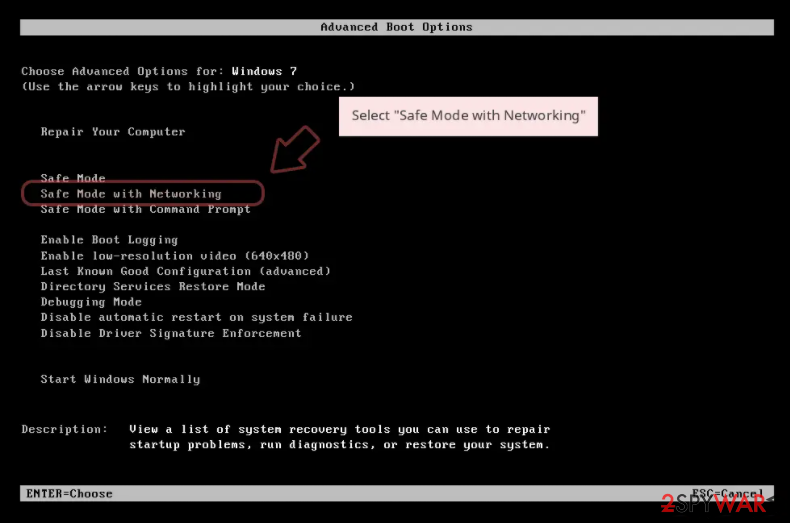
- When your computer becomes active, start pressing F8 button (if that does not work, try F2, F12, Del, etc. – it all depends on your motherboard model) multiple times until you see the Advanced Boot Options window.
- Select Safe Mode with Networking from the list.

Windows 10 / Windows 8
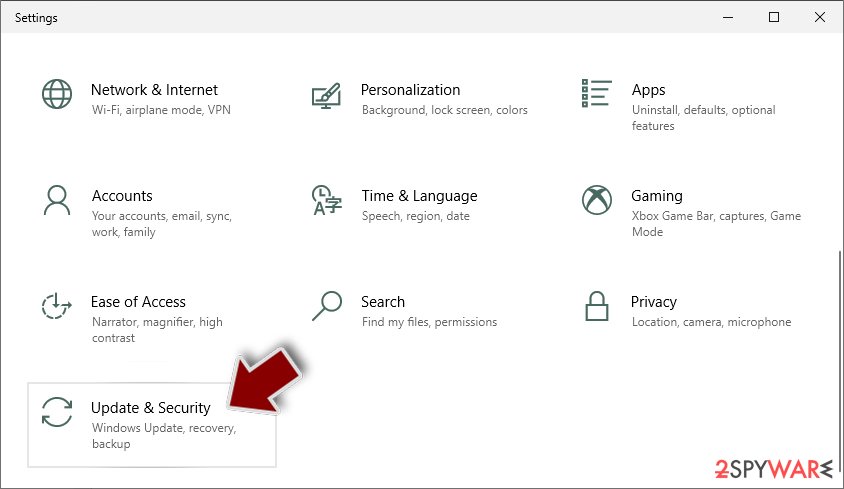
- Right-click on Start button and select Settings.
- Scroll down to pick Update & Security.
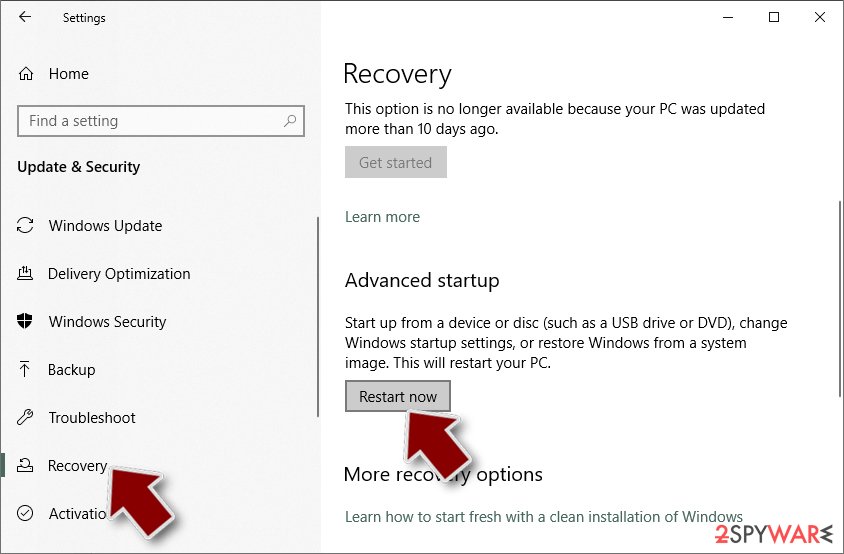
- On the left side of the window, pick Recovery.
- Now scroll down to find Advanced Startup section.
- Click Restart now.
- Select Troubleshoot.
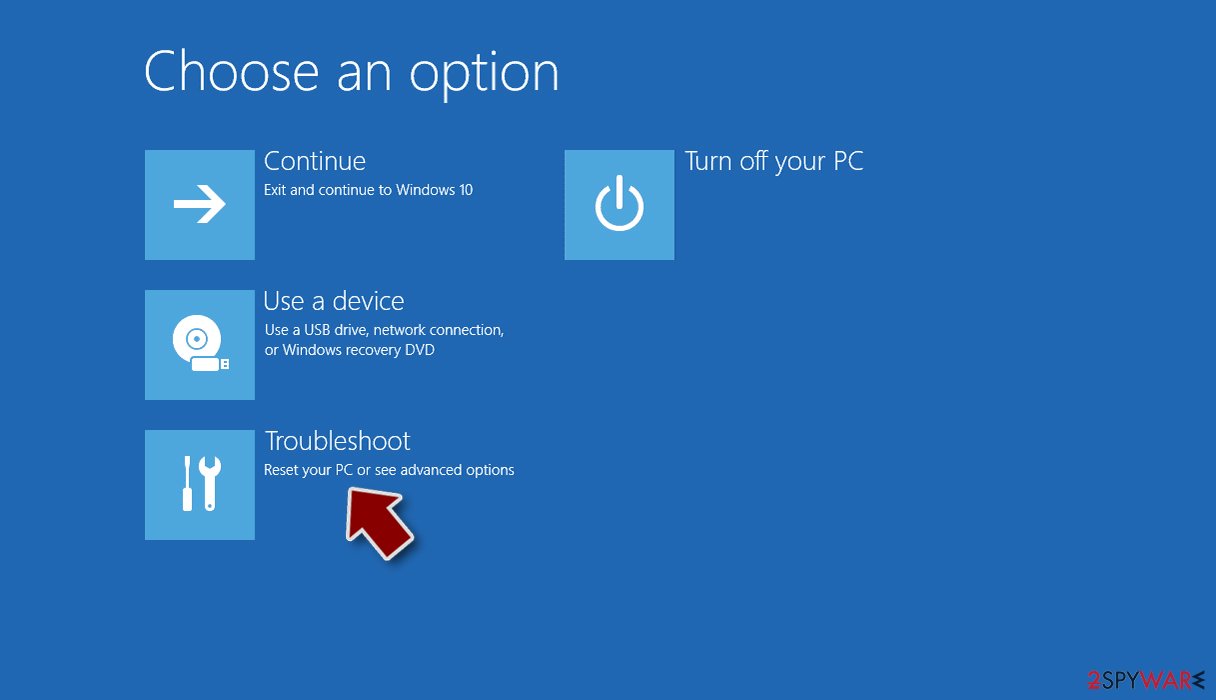
- Go to Advanced options.
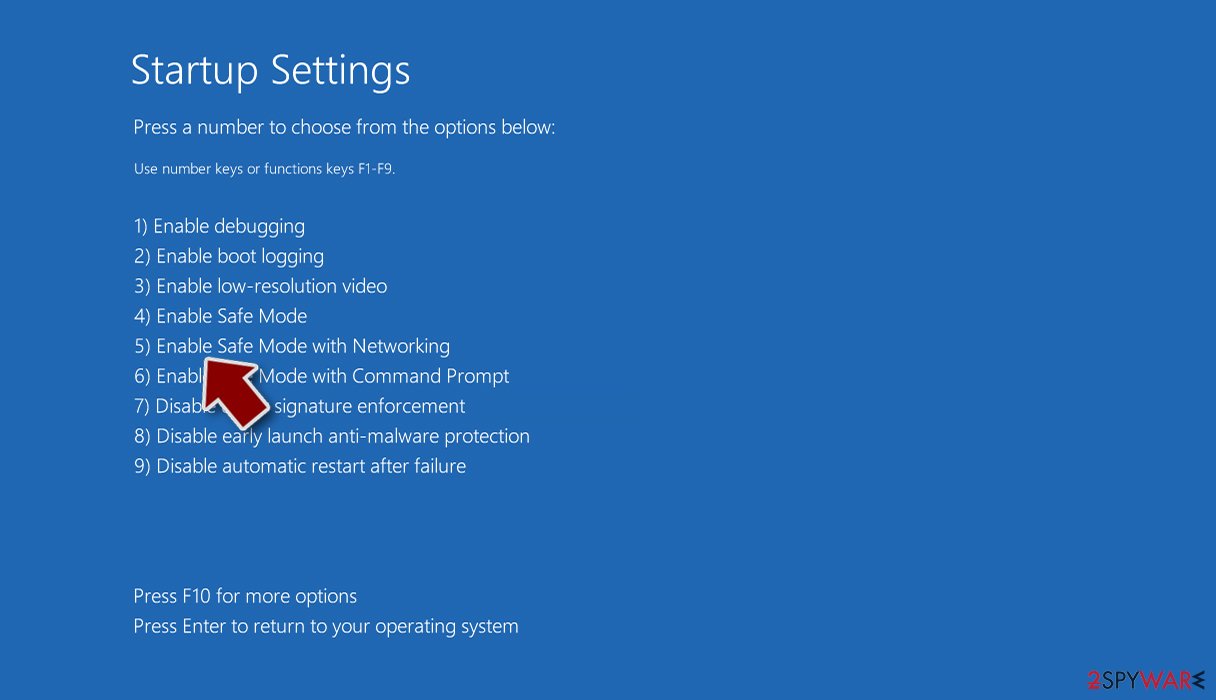
- Select Startup Settings.
- Click Restart.
- Press 5 or click 5) Enable Safe Mode with Networking.


Is your operating system damaged?
Performance, stability, and usability issues, to the point where a full Windows reinstall is required, are expected after malware infection. These types of infections can alter the Windows registry database, damage vital bootup, and other sections, delete or corrupt DLL files, etc. Once a system file is damaged by malware, antivirus software is not able to repair it.
This is why FortectIntego was developed. It can fix a lot of the damage caused by an infection like this. Blue Screen errors, freezes, registry errors, damaged DLLs, etc., can make your computer completely unusable. By using this maintenance tool, you could avoid Windows reinstallation.
- Download the application by clicking on the link above
- Click on the ReimageRepair.exe
- If User Account Control (UAC) shows up, select Yes
- Press Install and wait till the program finishes the installation process
- The analysis of your machine will begin immediately
- Once complete, check the results – they will be listed in the Summary
- You can now click on each of the issues and fix them manually
- If you see many problems that you find difficult to fix, we recommend you purchase the license and fix them automatically.


Try recovering data with third-party software
Only hackers hold the decryption key, which can unlock your files, so if you did not back them up previously, you possibly lost your files forever. You can try using data recovery software, but third-party programs cannot always decrypt the files. We suggest at least trying this method. Before proceeding, you have to copy the corrupted files and place them in a USB flash drive or another storage. And remember – only do this if you have already removed the Marnet ransomware.
Before you begin, several pointers are important while dealing with this situation:
- Since the encrypted data on your computer might permanently be damaged by security or data recovery software, you should first make backups of it – use a USB flash drive or another storage.
- Only attempt to recover your files using this method after you perform a scan with anti-malware software.
Install data recovery software
- Download Data Recovery Pro.
- Double-click the installer to launch it.
- Follow on-screen instructions to install the software.

- As soon as you press Finish, you can use the app.
- Select Everything or pick individual folders where you want the files to be recovered from.

- Press Next.
- At the bottom, enable Deep scan and pick which Disks you want to be scanned.

- Press Scan and wait till it is complete.
- You can now pick which folders/files to recover – don't forget you also have the option to search by the file name!
- Press Recover to retrieve your files.



Did this guide help?
Be the first to comment