

Searchstartnow.com is a browser hijacker that shows unwanted ads while you browse the web
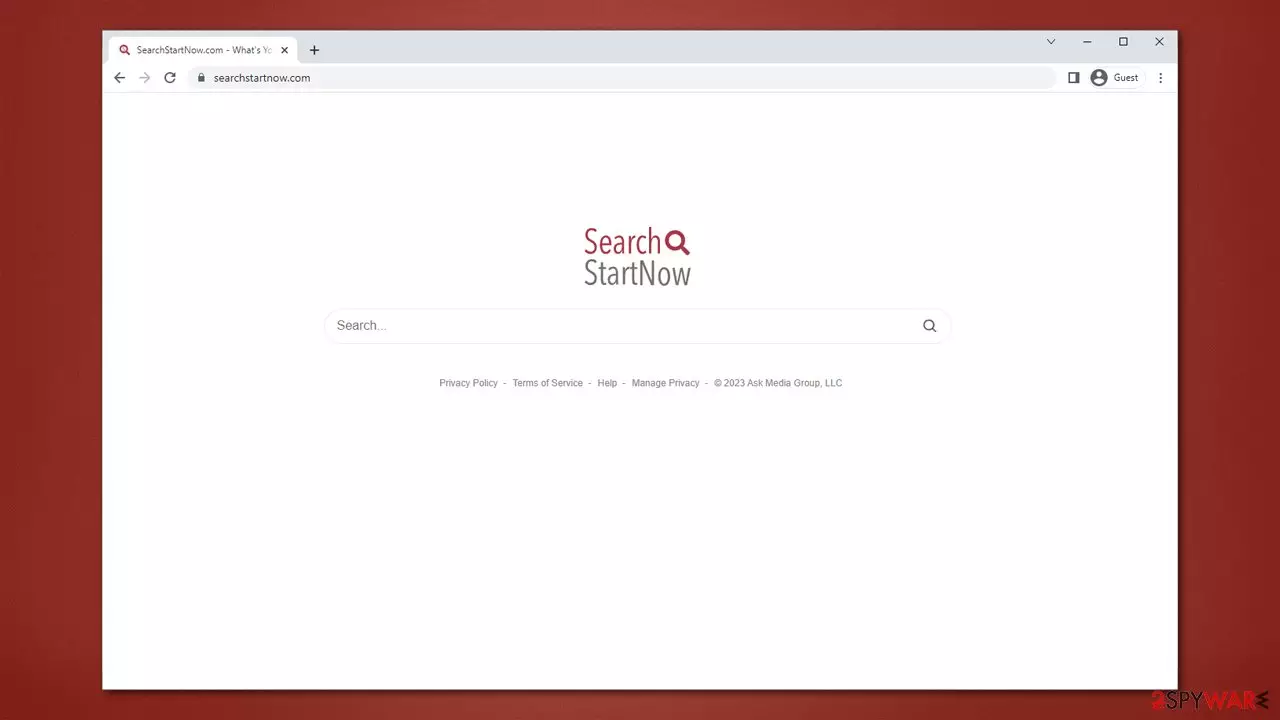
Searchstartnow.com is a web address that you may suddenly notice taking over your homepage and new tab every time you open your web browser. This is a common phenomenon known as browser hijacking, which occurs when a potentially unwanted application is installed on your device without your consent.
These applications are typically not intentionally installed by users and are often spread through software bundles. Unfortunately, many users accidentally allow the infiltration of these programs by neglecting to carefully read through the installation instructions. In some cases, people may also fall victim to a fake update or other misleading ads that convinces them to install the hijacker.
Once installed on your system, Searchstartnow.com will become your homepage and a new tab for your browser, drastically altering the way you browse the web. Instead of using the default search provider, this hijacker will use its own customized one, which is not a good thing. The search results will be altered, and the top results will be filled with ads and sponsored links. This is typical behavior for browser hijackers and can severely hinder your ability to find the information you need online.
| Name | Searchstartnow.com |
| Type | Browser hijacker, potentially unwanted application |
| Distribution | Bundled software, third-party websites, misleading ads |
| Symptoms | A browser extension or an application installed on the device; homepage and new tab address set to Searchstartnow.com; ads and sponsored links in search results and elsewhere; promotion of other PUPs |
| Risks | Installation of other potentially unwanted programs/malware, personal data disclosure to unknown parties, monetary loss |
| Removal | Remove the undesirable browser extension by going to your browser's settings. Using SpyHunterCombo Cleaner security software to check the system can also ensure that no malware is running in the background |
| Other tips | After removing all potentially unwanted applications, we recommend you employ the FortectIntego utility to clean your web browsers and repair any damaged system files |
Browser hijackers are minor infections that can negatively impact your security and browsing quality
If you notice that your web browser is behaving erratically and redirecting you to Searchstartnow.com, you may have a potentially unwanted application installed. These apps often take the form of browser extensions and can negatively impact your browsing experience.
While these apps are not necessarily harmful, they are not beneficial either. They often display suspicious and deceptive characteristics, leading to unwanted changes to your browser's settings.
One of the most noticeable changes that Searchstartnow.com can make is to replace your browser's default search engine. Instead of seeing search results that accurately reflect your query, you may see numerous ads and clicks that benefit Searchstartnow.com's creators. This can be frustrating and can make it difficult to find the information you need.
Additionally, browser hijackers can expose you to questionable and potentially dangerous content. They may redirect you to websites that contain malware or other harmful content, putting your system at risk.
Fortunately, it is relatively easy to remove these unwanted applications from your system. You can start by checking your list of installed programs and removing any suspicious applications – we explain the procedure below.

Remove Searchstartnow.com from your browser and system
Removing the Searchstartnow.com browser hijacker can be a bit challenging, especially if you are not sure which application is causing the issue. If you have numerous applications installed on your device, it might be difficult to determine the one responsible for the changes in your browser settings. However, removing the hijacker is essential since it can compromise your online security and privacy.
Manually removing browser hijackers can be easy in most cases. However, some of these programs can root themselves into your system, making it impossible to remove them manually. In such cases, it is advisable to use anti-malware software like SpyHunterCombo Cleaner or MalwarebytesMalwarebytes. These tools can quickly scan your system, identify malicious programs, and remove them completely.
If you suspect that Searchstartnow.com is installed on your browser as an extension, the first step towards removal is accessing your browser settings. Look for an extension named “Search Start Now” or something similar, and remove it immediately. Note that this may not always be the case, and the application responsible for the browser changes could have a different name. Therefore, running a full system scan is essential to identify and remove any malicious programs.
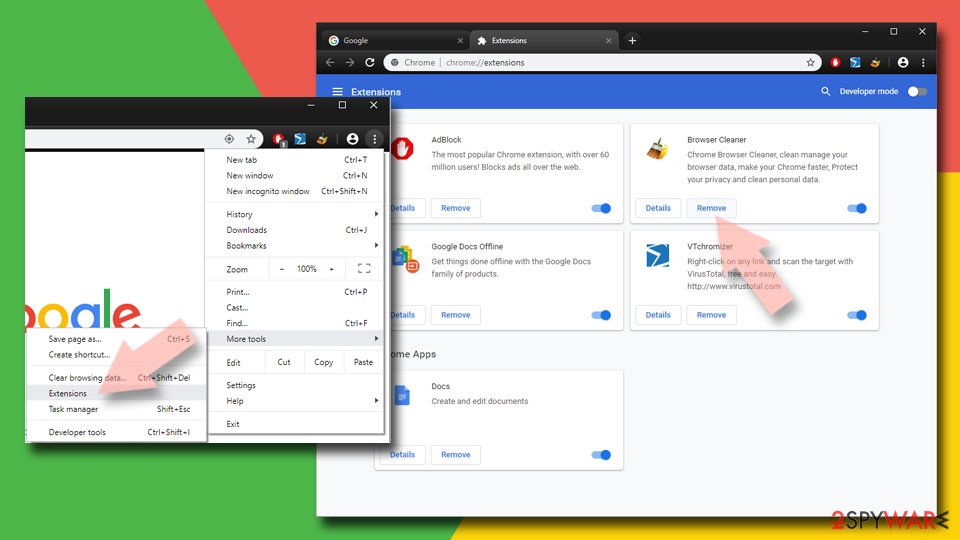
Google Chrome
- Open Google Chrome, click on the Menu (three vertical dots at the top-right corner) and select More tools > Extensions.
- In the newly opened window, you will see all the installed extensions. Uninstall all the suspicious plugins that might be related to the unwanted program by clicking Remove.

Mozilla Firefox
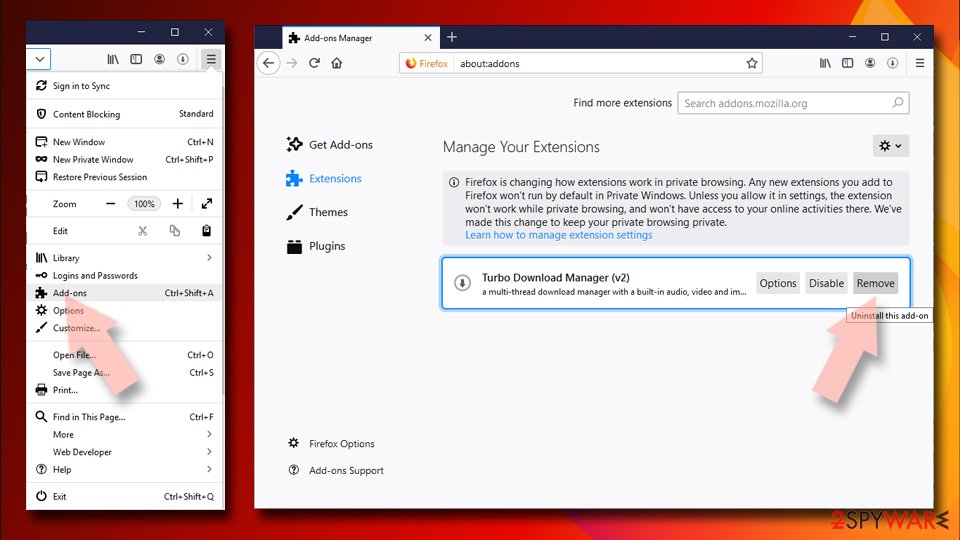
- Open Mozilla Firefox browser and click on the Menu (three horizontal lines at the window's top-right).
- Select Add-ons.
- In here, select the unwanted plugin and click Remove.

MS Edge (Chromium)
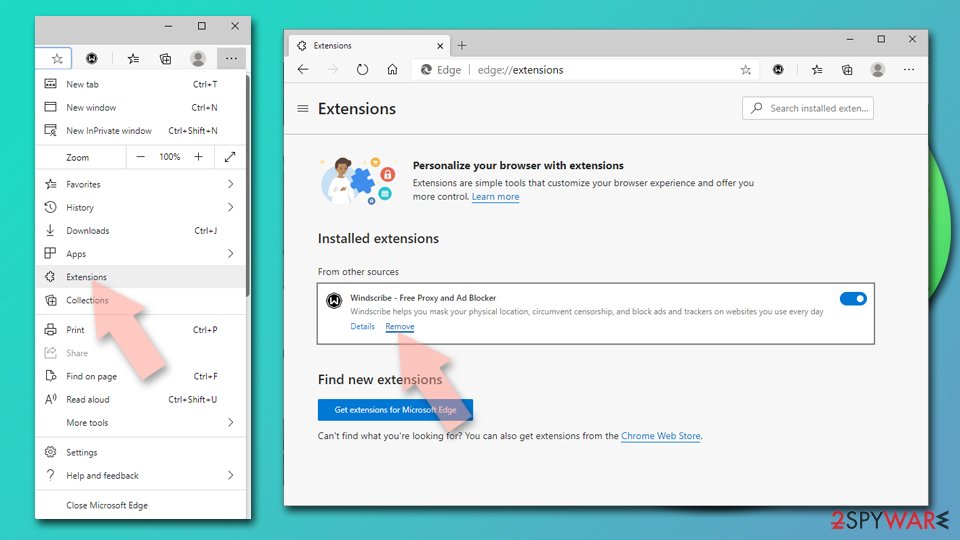
- Open Edge and click select Settings > Extensions.
- Delete unwanted extensions by clicking Remove.

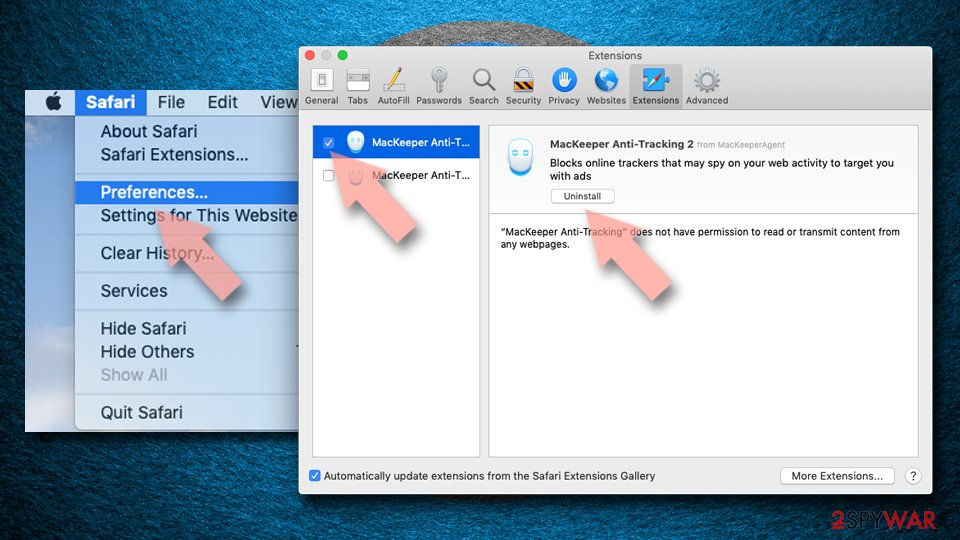
Safari
- Click Safari > Preferences…
- In the new window, pick Extensions.
- Select the unwanted extension and select Uninstall.

After successfully removing Searchstartnow.com and other unwanted applications from your system, you must clear your browser's caches, cookies, and other web data. These items store information about your browsing behavior and can remain on your system even after the elimination of the unwanted program. This can allow for further data gathering, which may compromise your privacy and security.
To ensure the complete removal of these leftover files, it's recommended to use reliable software such as FortectIntego to clean your browser's data. Alternatively, you can also follow the manual steps provided by your browser to clear your cache and cookies. It's important to regularly clean your browser's data to avoid any unwanted tracking and improve your browsing experience.
Google Chrome
- Click on Menu and pick Settings.
- Under Privacy and security, select Clear browsing data.
- Select Browsing history, Cookies and other site data, as well as Cached images and files.
- Click Clear data.


Mozilla Firefox
- Click Menu and pick Options.
- Go to Privacy & Security section.
- Scroll down to locate Cookies and Site Data.
- Click on Clear Data…
- Select Cookies and Site Data, as well as Cached Web Content, and press Clear.


MS Edge (Chromium)
- Click on Menu and go to Settings.
- Select Privacy and services.
- Under Clear browsing data, pick Choose what to clear.
- Under Time range, pick All time.
- Select Clear now.


Safari
- Click Safari > Clear History…
- From the drop-down menu under Clear, pick all history.
- Confirm with Clear History.


How to prevent PUP infections
Searchstartnow.com is a browser hijacker that can easily sneak into your system without your knowledge. The developers of this hijacker use deceptive techniques to distribute their program to a large number of unsuspecting users. Once the program is installed on your system, it can cause significant damage to your browsing experience.
The primary way that browser hijackers spread is through free software downloads from third-party websites. Most users often neglect the installation process and blindly click through the steps without reading the instructions, allowing optional components to slip in. This is precisely how Searchstartnow.com can find its way onto your computer.
To avoid being infected with Searchstartnow.com or any other browser hijacker, it is essential to follow some basic precautions. First, you should download software only from official sources whenever possible. Second, install reputable anti-malware software, such as SpyHunterCombo Cleaner or MalwarebytesMalwarebytes, to receive a warning about PUPs and malware. Third, read the instructions for each step of the installation process, including the fine print, uncheck pre-ticked checkboxes, and be wary of misplaced buttons. Finally, always choose Advanced/Custom settings instead of Recommended/Quick settings if available.
It is also important to be careful when browsing unsafe websites, as you could unintentionally install a browser hijacker by clicking on a deceptive advertisement or a false update notification. Always avoid downloading anything from sites that claim your system is incomplete or needs an update, as this could lead to malware infections.
Did this guide help?
Be the first to comment