

DOOK ransomware infection can cause permanent loss of personal files in the system
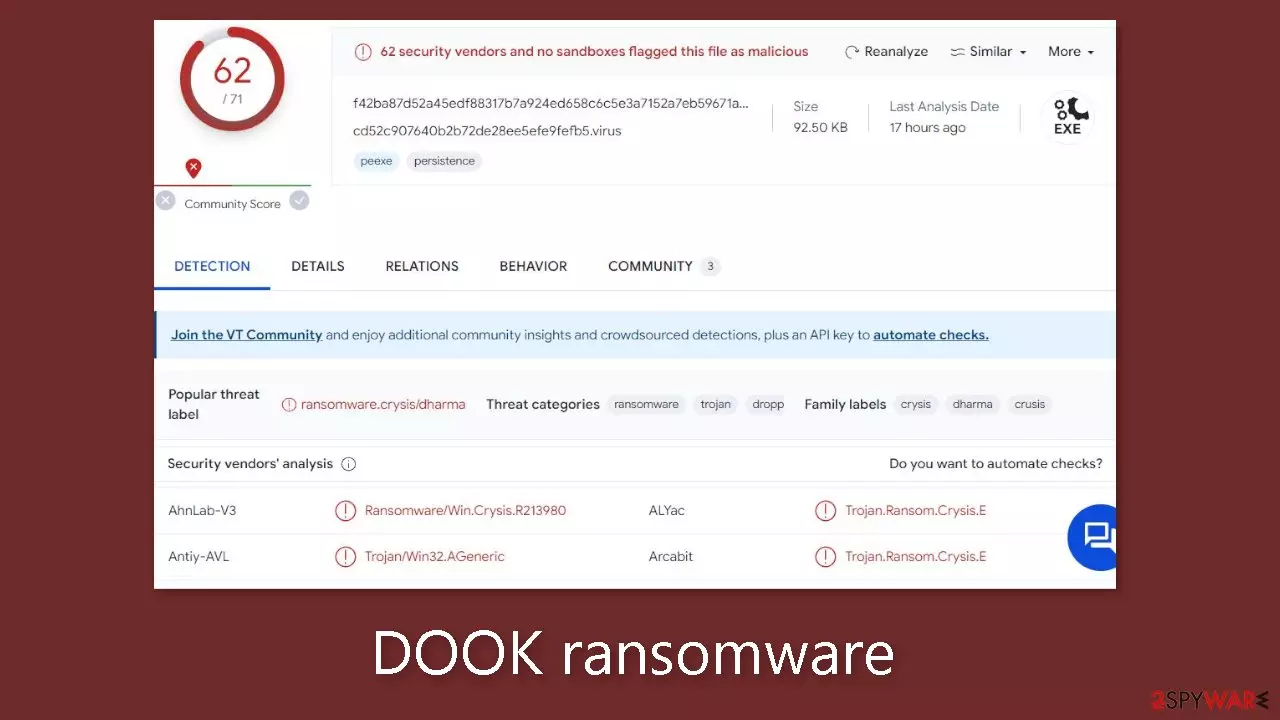
DOOK ransomware is a dangerous file-locking malware that uses complicated encryption algorithms to lock users' personal files, such as photos, videos, and documents. The main goal of this virus is to extract money from victims for a decryption tool. This variant was found to belong to the Dharma ransomware family.
When it infiltrates the system, the affected files are appended with the .DOOK extension. So if a file was previously named picture.jpg, after encryption it would look like this – picture.jpg.id-5YFEV65B.[Alexdec23@aol.com].DOOK. After the encryption process is finished, a pop-up window appears with a ransom note in it.
| NAME | DOOK |
| TYPE | Ransomware, data locking virus, crypto virus |
| MALWARE FAMILY | Dharma ransomware |
| FILE EXTENSION | .DOOK |
| RANSOM NOTE | Pop-up window and README!.txt |
| DISTRIBUTION | Infected email attachments, peer-to-peer file-sharing platforms, torrents, malicious ads |
| FILE RECOVERY | It is next to impossible to recover the files if you do not have backups or the decryption keys were not leaked; in some cases, recovery is successful with third-party software |
| ELIMINATION | Scan your machine with anti-malware software to eliminate the virus safely; this will not recover the locked files |
| SYSTEM FIX | You can avoid Windows reinstallation with FortectIntego maintenance tool, which can fix damaged files and system errors |
The ransom note
DOOK ransomware shows a pop-up ransom note which reads as follows:
We downloaded to our servers and encrypted all your databases and personal information!
If you do not write to us within 24 hours, we will start publishing and selling your data on the darknet on hacker sites and offer the information to your competitors
email us: Alexdec23@aol.com YOUR ID –
If you haven't heard back within 24 hours, write to this email:Alexdec23@cock.liIMPORTANT INFORMATION!
Keep in mind that once your data appears on our leak site,it could be bought by your competitors at any second, so don't hesitate for a long time.The sooner you pay the ransom, the sooner your company will be safe..
Guarantee:If we don't provide you with a decryptor or delete your data after you pay,no one will pay us in the future. We value our reputation.
Guarantee key:To prove that the decryption key exists, we can test the file (not the database and backup) for free.
Do not try to decrypt your data using third party software, it may cause permanent data loss.
Don't go to recovery companies – they are essentially just middlemen.Decryption of your files with the help of third parties may cause increased price (they add their fee to our) we're the only ones who have the decryption keys.
Alexdec23@aol.com is the email address supplied for victims to contact, along with the phrase “YOUR ID,” which probably means that victims must submit a specific identification code when doing so. A backup email address, Alexdec23@cock.li, is provided as well in case the first email isn't answered within the time frame given.
A “Guarantee,” which states that if the victim pays, they will receive a decryption key[1] or their data will be wiped, is an attempt by the attackers to reassure them. They claim that upholding this assurance is essential to sustaining their reputation. But in the world of cybercrime, such guarantees frequently turn out to be unreliable because attackers might not keep their half of the agreement even after being paid.
Although the ransom note presents a bleak image and makes an effort to persuade victims to comply, it is crucial for victims to use caution and weigh the risks involved with complying. Paying does not ensure the secure return of data, it encourages criminal activity, and it could have moral and legal ramifications. In order to lessen the effects of such attacks without giving in to the demands of the cybercriminals, victims are recommended to consider alternate choices, such as enlisting the help of law enforcement, cybersecurity professionals, and backup restoration procedures.

Distribution methods
A variety of tactics are used by cybercriminals to spread their harmful malware. Installing “cracked” software[2] is one of the most typical ways that people become infected. Peer-to-peer file-sharing networks and torrent websites are unregulated, making it difficult to tell whether downloaded packages contain any dangerous components.
The best course of action is to just use developer websites and official web stores. Applications that are offered on online marketplaces go through stringent evaluation procedures to guarantee a greater level of security. Even though this strategy could cost a little money upfront, by maintaining the reliability and efficiency of your system, it can eventually save you money over time. Furthermore, there are a ton of free options that can be taken into account.
Cybercriminals also use email-based attacks as a method. Threat actors create convincing emails that look like urgent messages from major companies using social engineering techniques. These misleading emails frequently contain harmful links or infected attachments. Never ever click on an attachment in an email from a sender you do not know.
Additionally, a lot of people undervalue how crucial it is to maintain their operating systems and software up to date. Software flaws[3] are taken advantage of by hackers as entry points for their destructive applications. Software makers often offer security patches to address this issue, which should be implemented right away to strengthen system security and protect against potential threats.
Use professional security tools to eliminate malicious files
The most crucial step to take is to isolate the affected machine from the local network. In the case of home users, disconnecting the Ethernet cable should effectively accomplish this task. However, in a workplace setting, this process may be more intricate. For corporate environments, please find detailed instructions provided at the end of this article.
Attempting to recover your data before addressing the root cause can lead to permanent data loss and may trigger secondary encryption of your files. The malicious program will persist until you successfully eliminate the underlying malicious files. It is strongly advised not to undertake the removal of the malicious software without prior experience in handling such matters.
Use anti-malware tools like SpyHunterCombo Cleaner or MalwarebytesMalwarebytes to scan your system. This security software should find all the related files and entries and remove them automatically for you. In some cases, malware is not letting you use antivirus in normal mode, so you need to access Safe Mode and perform a full system scan from there:
Windows 7 / Vista / XP
- Click Start > Shutdown > Restart > OK.
- When your computer becomes active, start pressing the F8 button (if that does not work, try F2, F12, Del, etc. – it all depends on your motherboard model) multiple times until you see the Advanced Boot Options window.
- Select Safe Mode with Networking from the list.
Windows 10 / Windows 8
- Right-click on the Start button and select Settings.
- Scroll down to pick Update & Security.
- On the left side of the window, pick Recovery.
- Now scroll down to find the Advanced Startup section.
- Click Restart now.
- Select Troubleshoot.
- Go to Advanced options.
- Select Startup Settings.
- Click Restart.
- Press 5 or click 5) Enable Safe Mode with Networking.
Fix system damage
After falling victim to malware, one can anticipate a cascade of issues related to performance, stability, and overall usability. These problems often escalate to the extent that a complete reinstallation of the Windows operating system becomes a necessity. Malware infections of this nature have the capacity to manipulate the Windows registry database, inflict harm upon critical bootup processes and other integral components, and even erase or corrupt essential DLL files. Once a system file has been compromised by malware, conventional antivirus software proves incapable of restoring it to its original state.
This predicament underscores the significance of FortectIntego, a purpose-built solution tailored for such scenarios. FortectIntego is proficient in rectifying a myriad of impairments inflicted by malware infections. These encompass issues like Blue Screen errors, system freezes, registry irregularities, and damaged DLL files, all of which can render a computer completely inoperable. By harnessing the capabilities of this maintenance tool, you may circumvent the need for a time-consuming Windows reinstallation, thereby saving valuable time and effort in the process.
File recovery options
Many people think that they can fix their files with anti-malware tools, but that is not what they are designed for. All the security tools can do is detect suspicious processes in your system and eliminate malicious files. The truth is, that the files can be restored only with a decryption key or software that only the cybercriminals have.
If you did not back up your data previously, you possibly lost your files forever. You can try using data recovery software, but third-party programs cannot always decrypt the files. We suggest at least trying this method. Before proceeding, you have to copy the corrupted files and place them in a USB flash drive or another storage. And remember – only do this if you have already removed the DOOK ransomware.
Before you begin, several pointers are essential while dealing with this situation:
- Since the encrypted data on your computer might permanently be damaged by security or data recovery software, you should first make backups of it – use a USB flash drive or another storage.
- Only attempt to recover your files using this method after you perform a scan with anti-malware software.
Install data recovery software
- Download Data Recovery Pro.
- Double-click the installer to launch it.
- Follow on-screen instructions to install the software.

- As soon as you press Finish, you can use the app.
- Select Everything or pick individual folders where you want the files to be recovered from.

- Press Next.
- At the bottom, enable Deep scan and pick which Disks you want to be scanned.

- Press Scan and wait till it is complete.
- You can now pick which folders/files to recover – don't forget you also have the option to search by the file name!
- Press Recover to retrieve your files.



Did this guide help?
Be the first to comment