

ElementsPerf is a dangerous Mac app that can compromise your safety
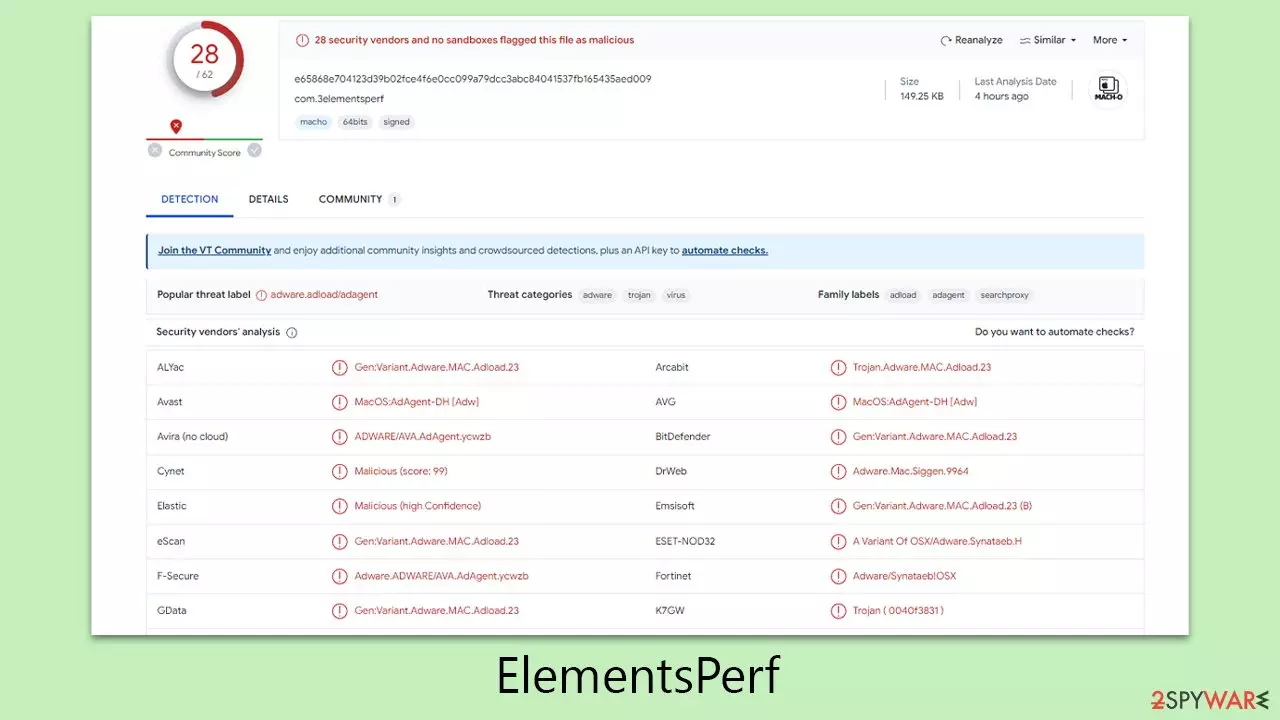
ElementsPerf is a malicious Mac application, part of the extensive Adload malware family, known for its ability to hijack web browsers and distribute intrusive advertisements. Its robust persistence techniques make it particularly challenging to remove. Numerous variants of this strain have been widely distributed by hackers, each variant possessing its own damaging characteristics.
The primary methods of spreading ElementsPerf include the use of pirated software installers and deceptive prompts for Flash Player updates. Despite the simplicity of these tactics, they are remarkably effective, leading to widespread infections among users.
Upon activation, the virus typically modifies browser settings, such as changing the homepage and default search engine, often to Safe Finder or similar services. This alteration leads to the display of numerous sponsored links and persistent advertisements. The presence of ElementsPerf can sometimes result in users encountering phishing content, which may include fraudulent schemes or fake virus infection alerts.
Additionally, the browser extension component of malware is designed to collect sensitive personal information, including login credentials and credit card details. This aspect of the virus poses significant privacy and security risks. The following sections will provide detailed guidance on how to effectively remove ElementsPerf and prevent future infections.
| Name | ElementsPerf |
| Type | Mac virus, adware, browser hijacker |
| Malware family | Adload |
| Distribution | Fake Flash Player installers or bundled software from malicious sources |
| Symptoms | Installs a new extension and application on the system; changes homepage and new tab of the browser; inserts ads and malicious links; tracks sensitive user data via extension |
| Removal | Mac malware can be eliminated with robust security tools, such as SpyHunterCombo Cleaner. A manual option is also available; however, it is not recommended for novice users |
| Optimization | It is important to clean your browsers after removing potentially unwanted applications from your system – use FortectIntego for quick and reliable results |
Hundreds of versions released by malware authors
Since its emergence in 2017, the Adload malware family has continually expanded, developing into hundreds of distinct variants. These variants, created by unidentified authors, have been evolving and infecting thousands of users worldwide, despite concerted efforts to stop their spread. The ElementsPerf virus is closely associated with this family, and like others, is notably linked with the Shlayer Trojan, a malware targeting Mac systems.
ElementsPerf and its variants primarily aim to generate revenue through the discreet insertion of advertisements into the web browsers of affected users. These ads are often of low quality, stemming from untrustworthy ad networks used by the malware authors. This annoying activity is not only annoying for users but also manipulates their browsers for financial gain.
Beyond acting as an adware tool, this malware exhibits a more menacing function. It establishes a man-in-the-middle proxy, redirecting internet traffic through servers controlled by cybercriminals. This approach not only aids the perpetrators in profiting from redirected web traffic but also exposes users to risky websites and potentially dangerous advertisements.
The threat of ElementsPerf is further heightened by its ability to install itself with elevated permissions. Consequently, the malware's browser extension can gather sensitive personal data, including credit card details and login information. Such security breaches pose significant privacy risks, potentially leading to substantial financial loss or identity theft.

Choose an automatic removal method
ElementsPerf virus, typical of the Adload malware family, demonstrates its resilience by circumventing the native security features of Mac computers. As a result, utilizing specialized third-party anti-malware tools, such as SpyHunterCombo Cleaner or MalwarebytesMalwarebytes, becomes crucial for a thorough and secure removal. These tools can swiftly detect and eliminate components related to the virus, mitigating the risks and complexities associated with manual removal.
Nevertheless, it's important to note that manual removal of ElementsPerf is possible, but it requires extreme caution. Incorrect removal procedures can inadvertently lead to the virus re-infecting the system.
It's also vital to understand that even after using automated removal tools, the security of your web browsers might not be completely reinstated. Additional steps, such as employing a dedicated browser cleaning tool FortectIntego or following specific manual cleaning procedures, are necessary to ensure the total removal of the malware from your browsers.
To proactively guard against future attacks, keeping your anti-malware software up to date with the latest security patches and updates is crucial. Regular updates provide a strong defense not only against the ElementsPerf virus but also against other members of the Adload family and similar threats.
For those who opt for manual removal, the process should begin with accessing the Activity Monitor to terminate any suspicious processes related to the malware.
- Open Applications folder.
- Select Utilities.
- Double-click Activity Monitor.
- Here, look for suspicious processes related to adware and use the Force Quit command to shut them down.
- Go back to the Applications folder.
- Find it in the list and move it to Trash.


Login Items ensure that the malicious app is started every time the Mac is booted – this entry is essential to remove. Profiles belonging to the virus should also be eliminated.
- Go to Preferences and pick Accounts.
- Click Login items and delete everything suspicious.
- Next, pick System Preferences > Users & Groups.
- Find Profiles and remove unwanted profiles from the list.
Once you have removed the main app, you should then take care of leftover components. Plist files especially are important to eliminate correctly, as they can help reinstate the virus afterward.
- Select Go > Go to Folder.
- Enter /Library/Application Support and click Go or press Enter.
- In the Application Support folder, look for any dubious entries and then delete them.
- Now enter /Library/LaunchAgents and /Library/LaunchDaemons folders the same way and delete all the related .plist files.


Taking care of the browsers
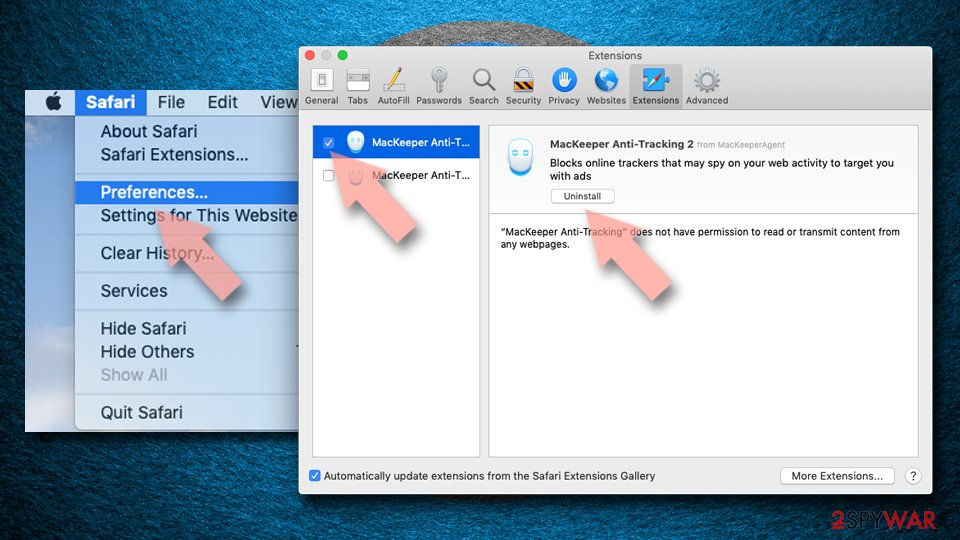
- Click Safari > Preferences…
- In the new window, pick Extensions.
- Select the unwanted extension and select Uninstall.

If you were unable to remove malware from your web browser, you might reset it as we describe below. You won't lose your bookmarks or other settings.
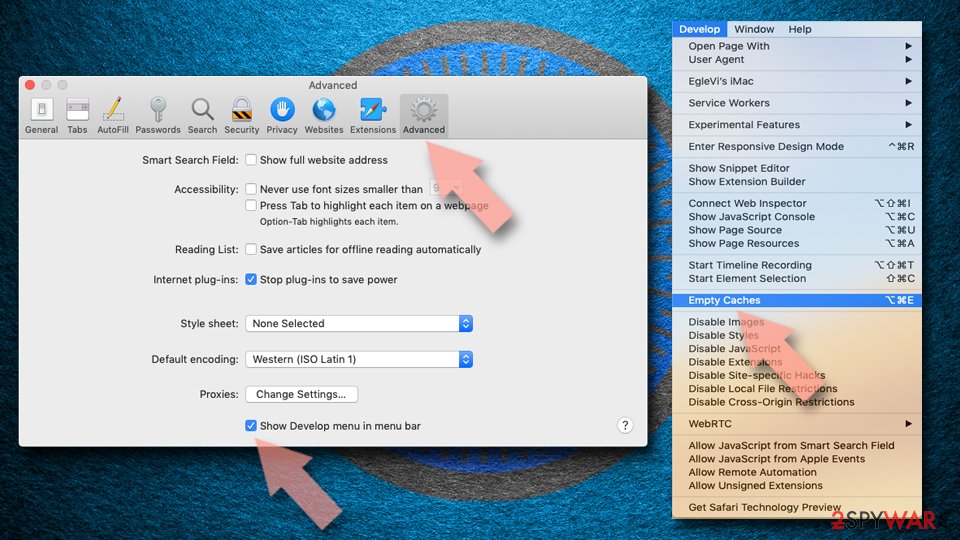
- Click Safari > Preferences…
- Go to the Advanced tab.
- Tick the Show Develop menu in the menu bar.
- From the menu bar, click Develop, and then select Empty Caches.

If you successfully removed the extension traditionally, you should also clear your browser caches to stop any more data from being tracked.
- Click Safari > Clear History…
- From the drop-down menu under Clear, pick all history.
- Confirm with Clear History.


Tips to avoid future Mac infections
ElementsPerf virus owes its widespread impact to highly effective distribution methods. The two primary channels for spreading this malware are deceptive Flash Player update prompts and infected pirated software installers.
A common sign of a potential ElementsPerf infection attempt is a notification falsely claiming the need for a Flash Player update. This assertion is misleading, as Adobe has ceased supporting Flash Player, favoring more secure technologies like HTML 5. Given Flash Player's obsolescence, it has become a frequent tool for phishing attacks, making it crucial to remain cautious about such update prompts.
Another prevalent method for disseminating ElementsPerf involves pirated software. Cybercriminals often conceal this malware within unauthorized software downloads found on torrent sites and peer-to-peer networks. These platforms are breeding grounds for various dangerous malware types, including ransomware. Therefore, avoiding these sources is strongly advised to prevent the accidental download and installation of malicious programs.
Users can significantly lower their risk of encountering the ElementsPerf virus and similar threats by being aware of and avoiding these common traps.
Did this guide help?
Be the first to comment