

Yourequiredatanalysis.info is a malicious website that you should not ever trust
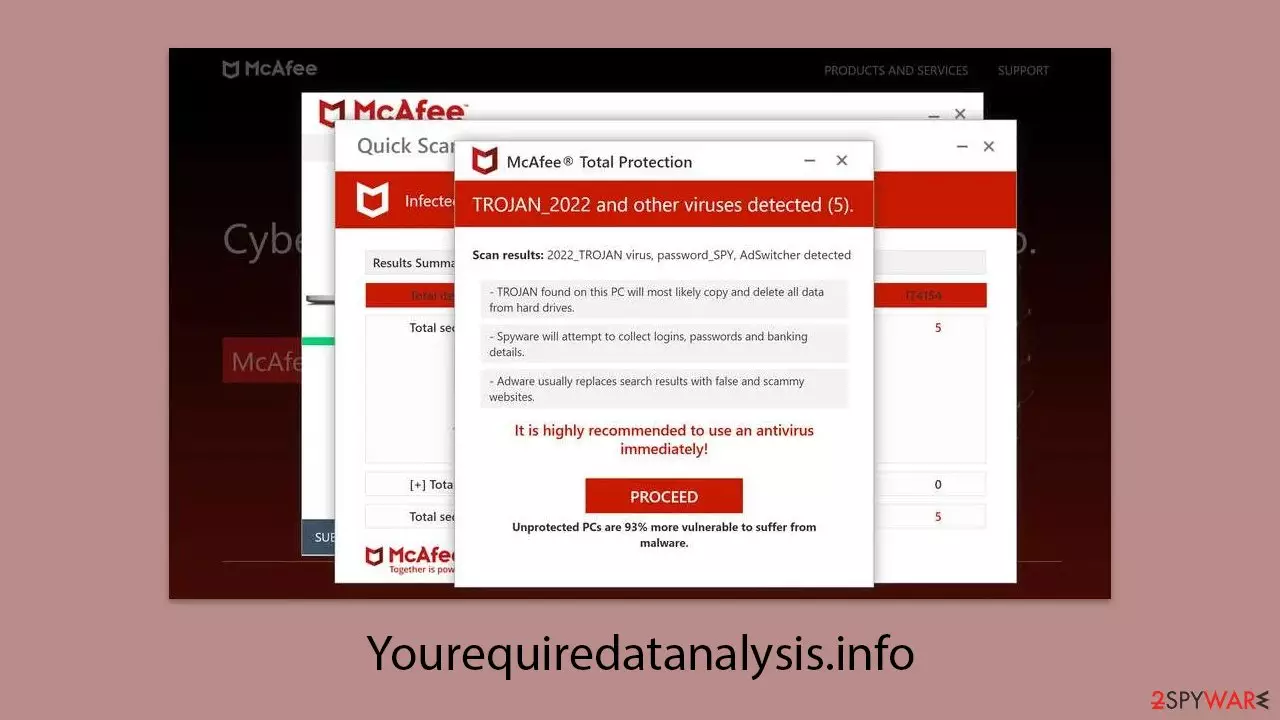
Yourequiredatanalysis.info is an untrustworthy site crafted by online scammers aiming to swindle money from innocent users. Individuals often find themselves on this page either due to unintended redirects triggered by adware or because they were tricked into following a misleading link from a different site. To bolster its appearance of credibility, the scam mimics a virus scanning procedure supposedly conducted by a well-known antivirus program, swiftly delivering alarming, yet entirely fabricated, findings that seem authentic.
This tactic is not unique but a widespread ruse employed by numerous sham websites. The goal behind Yourequiredatanalysis.info is to make users believe that their computers are infected with viruses and, as a result, convince them to purchase antivirus software licenses and sign up for additional services under the guise that a reputable entity has detected malware on their systems. This strategy falls under the category of scareware, aimed at exploiting users' fears of cyber threats.
| Name | Yourequiredatanalysis.info |
| Type | Scam, phishing, redirect, adware |
| Operation | A message claims the subscription for security software has expired and needs to be immediately renewed to remove the allegedly found viruses on the system |
| Distribution | Compromised websites, pop-up ads, potentially unwanted applications |
| Risks | Installation of PUPs or malware, sensitive information disclosure, financial losses |
| Removal | Check your system with SpyHunterCombo Cleaner security software to ensure no adware or malware is running in the background |
| Other tips | To make sure that third parties can no longer track your online activities, we suggest clearing browser caches and other leftover PUP files with FortectIntego |
How scammers use a reputable name to mislead users into spending money
Upon visiting Yourequiredatanalysis.info, users are met with a barrage of pop-up windows that simulate a system scan purportedly by the renowned security vendor McAfee. Following this, they encounter an alarm claiming their system is overrun with a multitude of viruses, and to heighten the sense of urgency, it is suggested that their subscription has expired, urging immediate renewal to protect their computer from further viruses and malware.
However, this warning is a carefully crafted ruse designed to instill fear in users and prompt them to rashly buy the software license. Those ensnared by this ploy are redirected to a page to purchase the software, thus financially benefiting the scammers behind the deceitful site, who earn a commission for each transaction.
The routes to purchasing the software may be dubious, potentially leading to the download and installation of unwanted or malicious software on the user's system. Furthermore, Yourequiredatanalysis.info might also try to persuade users to activate push notifications, which could lead to annoying pop-ups appearing at any time the browser is in use. Detailed advice is available on how to halt these notifications and remove adware from your system effectively.
Staying alert when dealing with such sites is crucial. The fear-mongering tactics are intended to prey on your anxieties and coerce you into making impulsive decisions. Always consult with experts if you think your system may be at risk.
Genuine security providers will not use scare tactics to force you into buying their products, and any such approach should be seen as a major warning sign. Take your time to verify the legitimacy of any claims made, and never rush into disclosing personal or financial details.

The probability of a real virus infection and its removal
Even though the Yourequiredatanalysis.info message is fabricated and lacks credibility, it’s wise not to completely dismiss the possibility of your computer being compromised. Particularly, individuals with adware installed often encounter phishing attempts more frequently online and are bombarded with numerous ads during their web browsing sessions.
You might not suspect your device is infected if there are no apparent symptoms, yet it’s strongly recommended to conduct a malware scan regardless. The most effective method to achieve this is by performing a full system scan with reputable anti-malware tools such as SpyHunterCombo Cleaner, MalwarebytesMalwarebytes, or other robust anti-malware software. To manually address potential issues, begin by removing any applications from your system that appear suspicious or unnecessary.
Windows
- Enter Control Panel into the Windows search box and hit Enter or click on the search result.
- Under Programs, select Uninstall a program.

- From the list, find the entry of the suspicious program.
- Right-click on the application and select Uninstall.
- If User Account Control shows up, click Yes.
- Wait till uninstallation process is complete and click OK.



Mac
While moving apps into Trash is usually how you delete most normal applications, adware tends to create additional files for persistence. Thus, you should look for .plist and other files that could be related to the virus. If you are not sure, skip this step entirely.
- From the menu bar, select Go > Applications.
- In the Applications folder, look for all related entries.
- Click on the app and drag it to Trash (or right-click and pick Move to Trash)


To fully remove an unwanted app, you need to access Application Support, LaunchAgents, and LaunchDaemons folders and delete relevant files:
- Select Go > Go to Folder.
- Enter /Library/Application Support and click Go or press Enter.
- In the Application Support folder, look for any dubious entries and then delete them.
- Now enter /Library/LaunchAgents and /Library/LaunchDaemons folders the same way and terminate all the related .plist files.
Following that, it's a good idea to scrutinize your browser for any installed extensions. Adware often propagates through browser extensions because they are straightforward to develop and manage. You can easily eliminate unwelcome add-ons by clicking on the “Extensions” option located near your browser's menu.
To rid your browsers of cookies and other tracking elements, consider utilizing automatic repair and maintenance tools like FortectIntego. Alternatively, you can always do that manually as follows:
Google Chrome
- Click on Menu and pick Settings.
- Under Privacy and security, select Clear browsing data.
- Select Browsing history, Cookies and other site data, as well as Cached images and files.
- Click Clear data.


Mozilla Firefox
- Click Menu and pick Options.
- Go to Privacy & Security section.
- Scroll down to locate Cookies and Site Data.
- Click on Clear Data…
- Select Cookies and Site Data, as well as Cached Web Content, and press Clear.


MS Edge (Chromium)
- Click on Menu and go to Settings.
- Select Privacy and services.
- Under Clear browsing data, pick Choose what to clear.
- Under Time range, pick All time.
- Select Clear now.


Safari
- Click Safari > Clear History…
- From the drop-down menu under Clear, pick all history.
- Confirm with Clear History.


Another significant aspect of the yourequiredatanalysis.info strategy involves asking users to enable push notifications. It’s important to be wary of granting such permissions, as doing so gives the site another channel to perpetuate its deceitful activities. These push notifications can be leveraged to show more false alarms, intensifying the illusion of immediate danger and urgency. Additionally, they can inundate users with unsolicited ads and might even redirect them to further harmful websites. Consequently, if you've allowed push notifications from this site, blocking them is crucial, as outlined in the steps below.
Did this guide help?
Be the first to comment