

News-guwuhu.com is a fake website that can use legitimate feature to deliver intrusive ads

News-guwuhu.com represents a tricky scam operation, luring unsuspecting internet users via seemingly innocuous visits to lower-quality websites or through inadvertent clicks on dangerous links. This risk is further magnified if the user's computer is infected with adware, a type of malware known for pushing unsafe ads to the forefront of one's browsing experience.
The encounter with News-guwuhu.com typically unfolds through unexpected notification pop-ups that begin to appear on the user's desktop. Contrary to initial assumptions, these pop-ups are not necessarily indicative of a direct malware infection. For these notifications to start showing up, two specific actions must have taken place:
- The user must have interacted with a notification prompt on the website by clicking “Allow.”
- There must be an open web browser on the computer, which doesn't need to be actively used at the moment.
What makes this scam particularly deceitful is its strategic use of phishing techniques, cleverly designed to trick users into activating notifications. These methods often employ misleading prompts that cleverly disguise their true intentions.
Moreover, the aftermath of clicking “Allow” doesn't immediately manifest through ads from News-guwuhu.com, leading users to unintentionally ignore or forget about their consent. This delayed reaction plays into the scam's hands, ensuring users are less vigilant and more susceptible to the underlying scheme.
| Name | News-guwuhu.com |
| Type | Push notifications, ads, pop-ups, scam |
| Distribution | Intrusive pop-ups can start showing up at some point after the “Allow” button is pressed within the notification prompt |
| Symptoms | Once enabled, notifications from malicious websites would bring misleading or other suspicious content to your screen. These links could lead to malware-laden, scam, phishing, or similar malicious sites |
| Dangers | Push notification prompts might include links to malicious websites, resulting in financial losses, personal information disclosure, or malware infections |
| Removal | You can disable notifications within your browser settings. If you encounter an increase in advertisements and are redirected to dubious websites, it's advisable to utilize anti-malware software like SpyHunterCombo Cleaner to scan your computer for potential adware infections |
| Recovery | Following adware removal, use FortectIntego to erase caches and web data, thereby preventing tracking. Additionally, this tool can repair any compromised system components |
How users get exposed to online scams
News-guwuhu.com, along with similar nefarious platforms, often ensnares users through harmful links scattered across various corners of the internet. These links are hidden within sites known for their dubious offerings, such as torrent websites, platforms distributing pirated software, and unauthorized video streaming services. The allure of free software downloads or access to movies can be a trap, leading unsuspecting visitors directly into the jaws of risk.
To shield oneself from these digital pitfalls, adopting cautious web browsing habits is crucial. Understanding the dangers of sourcing content from questionable sites is the first step toward safer online navigation. Opting for reputable, recognized channels for downloading or streaming media is a reliable strategy to avoid malicious links. Additionally, keeping your browser and operating system updated can significantly enhance your defense against these threats, thanks to the security improvements these updates often bring.
Indirect exposure to sites like News-guwuhu.com can also occur through adware infections. Adware, a software variant designed to bombard users with unsolicited advertisements, can be particularly sneaky. It has the potential to redirect users to dangerous domains or embed harmful links within safe-looking websites.
To dodge adware traps, integrating cautious browsing with robust cybersecurity measures is key. Ensuring that all software is downloaded from trustworthy sources is essential to avoid hidden adware. Opting for the custom installation process when adding new software can also help, as it allows you to monitor what is being installed and avoid unwanted extras.
Employing antivirus or antimalware solutions provides an additional layer of protection, helping to detect, isolate, and remove adware and other malicious software from your computer. Regularly updating these security tools is critical to keep pace with the latest threats.
Finally, approaching online advertisements with skepticism is wise. Ads that appear too good to be true or particularly invasive may be fronts for adware dissemination. When in doubt, it's best to err on the side of caution and avoid interacting with suspicious advertisements altogether.
Official push notification feature is used not only by legitimate websites but also by scammers
Social engineering is a critical tool in the arsenal of online scam artists, leveraging psychological manipulation to trick individuals into giving away personal information or compromising their digital security. Sites like News-guwuhu.com masterfully employ social engineering tactics through cunning messages within their push notification scams. Below are some examples of these messages, each designed to deceive users in unique ways:
If you are 18+, click Allow
This message specifically targets adult users, hinting at an age gate that seems to be bypassable with a simple click on 'Allow', misleadingly granting the site permission to deliver notifications.
Browser verification in progress – click the button “Allow” to access
Suggesting that enabling notifications is the final hurdle, this message manufactures a false sense of necessity, urging completion or progress in some undisclosed process.
Press Allow if you are not a robot
By imitating widespread CAPTCHA verification methods, this prompt dupes users into believing that activating notifications is akin to passing a security check.
Click 'Allow' to view hidden content
The promise of accessing exclusive or concealed information serves as the carrot to entice users into consenting to notifications.
Click Allow to watch the video
Leveraging typical technical glitches, this message convinces users that the resolution to their supposed issue—video playback – is just a click on “Allow” away.

Each crafted message ingeniously preys on familiar user interactions or concerns, tricking them into accepting intrusive notifications. It's important to recognize that legitimate websites will never require you to enable push notifications in order to access their content, highlighting the deceptive nature of these scams.
Carefully check your system and remove News-guwuhu.com ads
Before tackling the removal of ads from News-guwuhu.com, it's wise to examine your device for signs of infection. An uptick in ad frequency and unwanted redirects to dubious sites during your browsing activities can signal the infiltration of adware or malware.
Utilize robust security tools, such as SpyHunterCombo Cleaner or MalwarebytesMalwarebytes, to swiftly detect and eradicate any malicious software present. For the protection of your privacy, tools like FortectIntego are instrumental in removing tracking elements and repairing damage inflicted by malicious programs. Employing such protective measures ensures your system's efficiency is restored, addressing any concerns related to its stability and security promptly.
To stop unwanted push notifications, go to your web browser's settings or preferences. Most browsers offer a specific section within their settings menu focused on privacy and security, where you can adjust permissions for various websites. Here, you will typically find a subsection dedicated to managing notifications.
In the notifications management area, you can review a list of all websites that have been granted permission to send you push notifications. If you come across a site like News-guwuhu.com sending intrusive notifications, you have the option to change its permission status from “Allow” to “Block” or “Ask,” effectively stopping the unwanted notifications. For detailed instructions on completing this process, follow the steps outlined in the guidance provided below.
Google Chrome (desktop)
- Open the Google Chrome browser and go to Menu > Settings.
- Scroll down and click on Advanced.
- Locate the Privacy and security section and pick Site Settings > Notifications.
- Look at the Allow section and look for a suspicious URL.
- Click the three vertical dots next to it and pick Block. This should remove unwanted notifications from Google Chrome.


Mozilla Firefox
- Open Mozilla Firefox and go to Menu > Options.
- Click on Privacy & Security section.
- Under Permissions, you should be able to see Notifications. Click the Settings button next to it.
- In the Settings – Notification Permissions window, click on the drop-down menu by the URL in question.
- Select Block and then click on Save Changes. This should remove unwanted notifications from Mozilla Firefox.


MS Edge (Chromium)
- Open Microsoft Edge, and go to Settings.
- Select Site permissions.
- Go to Notifications on the right.
- Under Allow, you will find the unwanted entry.
- Click on More actions and select Block.


Safari
- Click on Safari > Preferences…
- Go to the Websites tab and, under General, select Notifications.
- Select the web address in question, click the drop-down menu and select Deny.


Internet Explorer
- Open Internet Explorer, and click on the Gear icon at the top-right of the window.
- Select Internet options and go to the Privacy tab.
- In the Pop-up Blocker section, click on Settings.
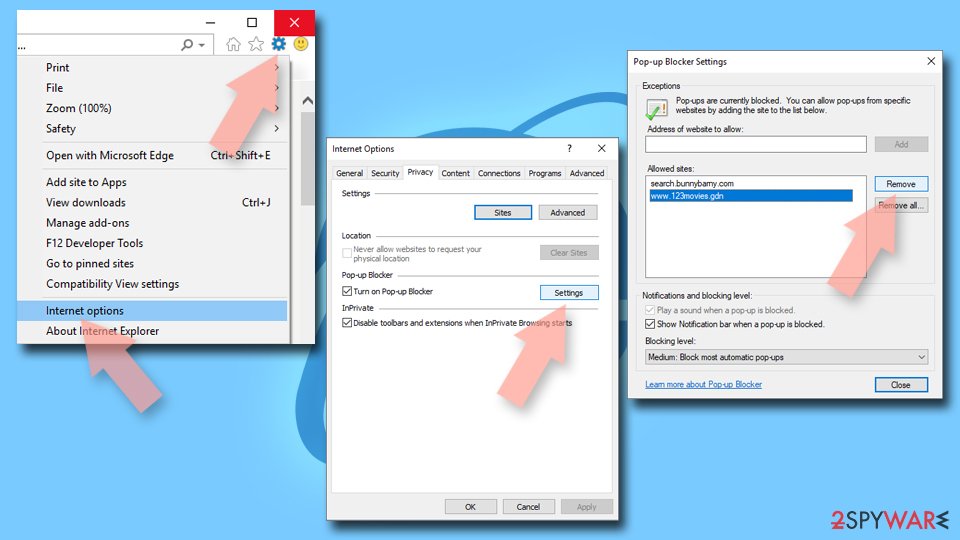
- Locate the web address in question under Allowed sites and pick Remove.

Did this guide help?
Be the first to comment