

Bi.epilreoffer.com tries to convince users to enable notifications to permit itself to deliver intrusive ads

Bi.epilreoffer.com stands as a notorious example of a push notification scam platform, skillfully deceiving web users into enabling its notifications. Unwary visitors may stumble upon this domain, unwittingly becoming ensnared in a web of persistent and misleading ads and fraudulent content.
Upon subscribing, victims are bombarded with incessant pop-up notifications that intrude upon their browsing, irrespective of the websites they visit or activities they undertake online. Alarmingly, these notifications craft a series of falsehoods — ranging from counterfeit virus infection alerts designed to instill panic, to sham lottery winnings aimed at exploiting the unsuspecting.
Far from mere irritation, Bi.epilreoffer.com employs a sophisticated form of phishing to exploit its victims further. It concocts nonexistent security threats and peddles fake remedies, creating scenarios where individuals might inadvertently divulge sensitive information.
Understanding the tactics utilized by such fraudulent websites is critical for safeguarding one's digital footprint. This analysis delves into the deceitful realm of Bi.epilreoffer.com, shedding light on its manipulative practices and offering guidance on how to navigate online spaces securely.
| Name | Bi.epilreoffer.com |
| Type | Push notifications, ads, pop-ups, scam |
| Distribution | The unwanted activity starts at some point after the Allow button is pressed within the notification prompt |
| Symptoms | Once enabled, notifications from malicious websites would bring misleading or other suspicious content to your screen. These links could lead to malware-laden, scam, phishing, or similar malicious sites |
| Risks | Malware infections, financial losses, or personal data exposure |
| Elimination | Access browser settings to stop intrusive push notifications. After that, make sure that your system is not infected with adware or malware – scan it with SpyHunterCombo Cleaner |
| Security tips | To prevent third parties from tracking your online activities, we recommend clearing browser caches and other leftover files with FortectIntego |
The web can provide a platform for malicious actors
The internet, a revolutionary force in our ways of communication and information gathering, also plays host to numerous hazards, with cyber fraud standing out as a particularly pervasive issue. The vast and continually evolving digital landscape provides a breeding ground for scam platforms like Bi.epilreoffer.com, which swiftly prey on unwary individuals.
This problem is often exacerbated by dubious advertising networks and websites that are not rigorously regulated, allowing the spread or hosting of hazardous content. Such content may include deceitful advertisements, corrupted files, or tricky “Download” buttons that extend the reach of these scams.
Particularly perilous are the sites offering illicit content, like pirated software or illegal downloads, which not only may redirect users to phishing sites but also act as conduits for malware, making any engagement with them a risky endeavor.
Adware, another significant concern, operates by embedding itself unnoticeably in systems. It clutters the online experience by overlaying advertisements on regular content or inserting links within the text, inadvertently guiding users toward suspicious domains. Navigating the web with caution becomes imperative to maintain a safe and secure digital presence.
Push notifications, ads, and adware
Since its introduction in 2015, the push notification feature in Google Chrome has become a focal point for scam operations. Users are frequently met with prompts to enable push notifications, which, while seemingly benign, can be manipulative, tricking users into accepting malicious content. Despite this, it's important to note that there are also legitimate uses of push notifications by various websites.
These notifications are powered by the Application Programming Interface (API), allowing websites the capability to send alerts directly to a user's device. Once a user consents to these notifications, the website gains the ability to push information straight to the user's screen. This system-level integration means pop-ups are readily visible, demanding immediate attention from users.

Such pop-ups are not solely indicative of virus infections; they could also stem from adware or malware, leading to unwanted advertisements and redirections. Although push notifications and pop-ups serve different functions, both can be exploited to distribute harmful content.
Should you find yourself bombarded by persistent push notifications from sources like Bi.epilreoffer.com, you have the option to block these within your browser's settings. Excessive ads and redirection to suspicious sites may suggest a malware issue, warranting a thorough system scan with reputable security software to identify and eradicate any threats. It's also wise to employ tools for cleaning browser caches to halt further tracking and eliminate malware residues.
Scam techniques that trick numerous people
When individuals arrive at Bi.epilreoffer.com, they are greeted with a series of fabricated alerts designed to mislead them into thinking that pressing the “Allow” button is necessary for their current activity.
The site might display messages like “Click Allow to confirm you are not a robot,” “Click 'Allow' to claim your prize from our store!,” or “Press 'Allow' to start the video.” These prompts mimic legitimate requests seen on websites requiring captcha verification, age verification, or other forms of user confirmation, exploiting users' familiarity with such interactions as part of a social engineering ploy to convince them that enabling push notifications is a must.
Yet, agreeing to push notifications from dubious sources can have severe repercussions. Scammers exploit this permission to redirect users to harmful websites, bombard them with obtrusive advertising, and even pilfer sensitive information. This underscores the critical importance of caution when faced with requests to enable push notifications.
For those who have inadvertently consented to push notifications from Bi.epilreoffer.com, revoking these permissions can be done through the settings menu of your browser, where detailed steps to block these notifications are provided.
Removal of Bi.epilreoffer.com ads
To rid yourself of those pesky pop-up ads, venturing into the settings area of your internet browser is key. Although push notifications themselves don’t necessarily spell trouble, the devil lies in the details – or in this case, the links they deliver. These links can be cloaked in malice, particularly when they hail from questionable sources.
Their crafty design allows them to evade detection by standard anti-malware programs, making a manual approach not just advantageous but essential for their thorough eradication.
Google Chrome (desktop)
- Open the Google Chrome browser and go to Menu > Settings.
- Scroll down and click on Advanced.
- Locate the Privacy and security section and pick Site Settings > Notifications.
- Look at the Allow section and look for a suspicious URL.
- Click the three vertical dots next to it and pick Block. This should remove unwanted notifications from Google Chrome.


Google Chrome (Android)
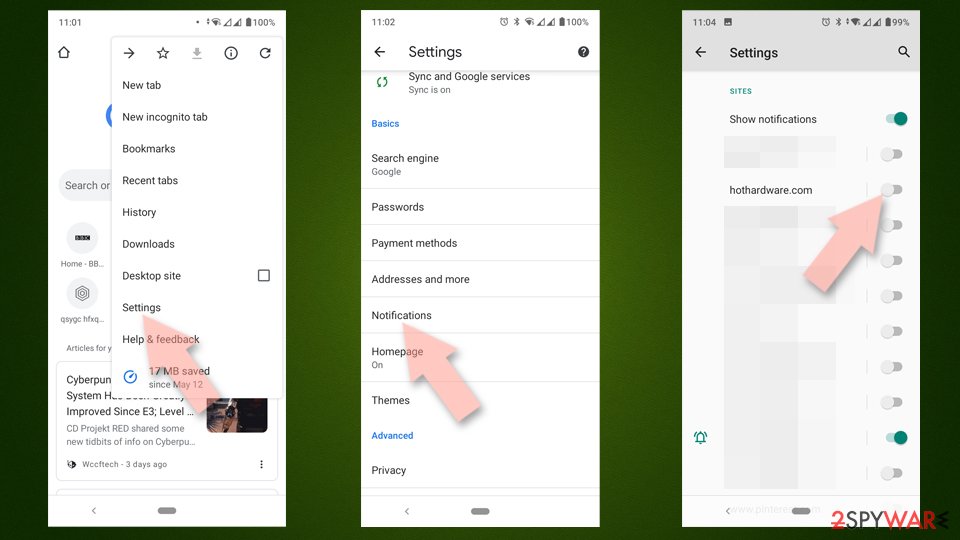
- Open Google Chrome and tap on Settings (three vertical dots).
- Select Notifications.
- Scroll down to the Sites section.
- Locate the unwanted URL and toggle the button to the left (Off setting).

Mozilla Firefox
- Open Mozilla Firefox and go to Menu > Options.
- Click on Privacy & Security section.
- Under Permissions, you should be able to see Notifications. Click the Settings button next to it.
- In the Settings – Notification Permissions window, click on the drop-down menu by the URL in question.
- Select Block and then click on Save Changes. This should remove unwanted notifications from Mozilla Firefox.


MS Edge (Chromium)
- Open Microsoft Edge, and go to Settings.
- Select Site permissions.
- Go to Notifications on the right.
- Under Allow, you will find the unwanted entry.
- Click on More actions and select Block.


Safari
- Click on Safari > Preferences…
- Go to the Websites tab and, under General, select Notifications.
- Select the web address in question, click the drop-down menu and select Deny.


Internet Explorer
- Open Internet Explorer, and click on the Gear icon at the top-right of the window.
- Select Internet options and go to the Privacy tab.
- In the Pop-up Blocker section, click on Settings.
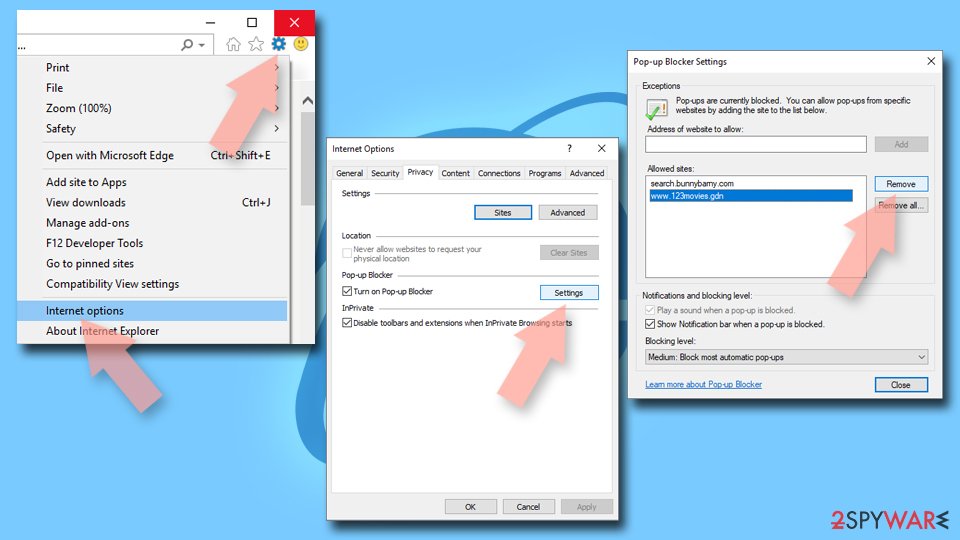
- Locate the web address in question under Allowed sites and pick Remove.

Did this guide help?
Be the first to comment