

Topoutastudio.com ads can result in malicious link clicks and excessive ads
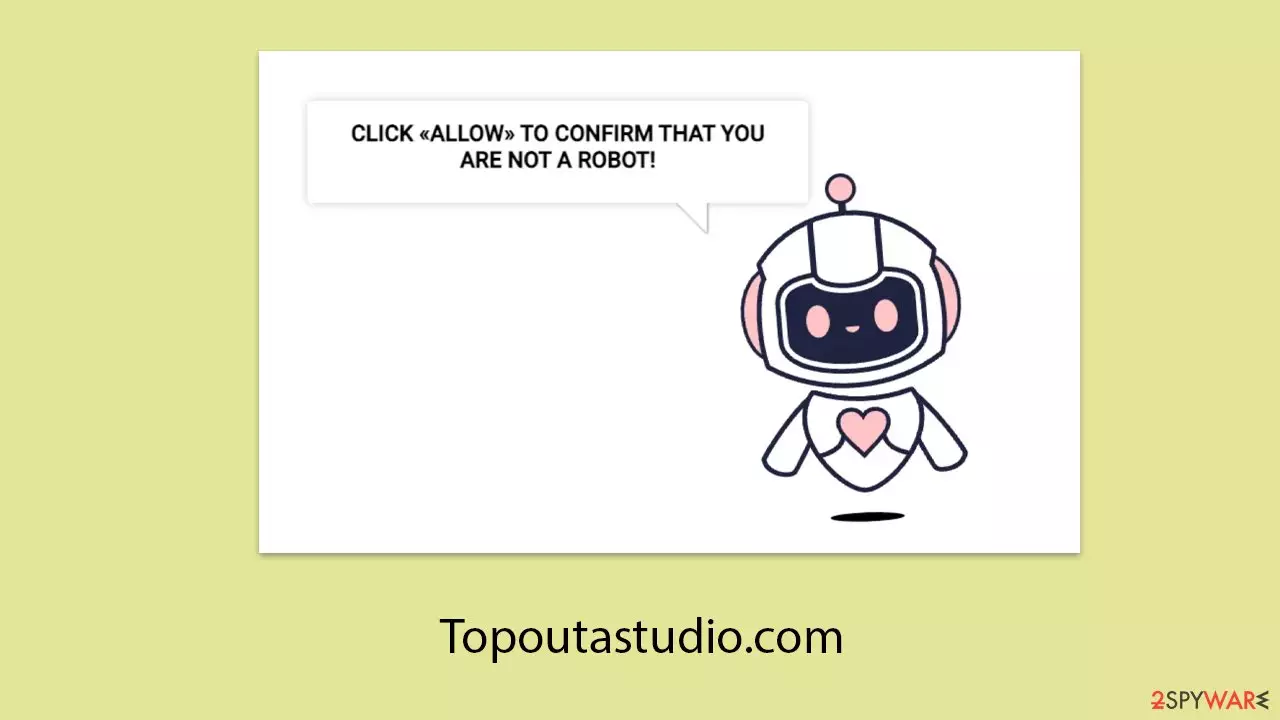
Topoutastudio.com is a deceptive site created by fraudsters. When users visit the site, they are greeted with a misleading message that encourages them to click the “Allow” button on the push notification prompt in the top-left corner of their screen. The reasons provided for clicking are all fraudulent. Unfortunately, many people fall victim to such scams, often because they do not scrutinize the information presented to them carefully.
Those who fall for the scam may start seeing intrusive ads from Topoutastudio.com at unexpected times. These ads are not only annoying but can also contain harmful links. If you are experiencing this issue, you've come to the right place. We offer guidance on how to manage unwanted activity and provide detailed information about push notification scams to help you avoid them in the future.
| Name | Topoutastudio.com |
| Type | Push notifications, ads, pop-ups, scam |
| Distribution | The unwanted activity starts at some point after the Allow button is pressed within the notification prompt |
| Symptoms | Pop-up notifications are shown on a desktop at random times |
| Risks | If you click on links provided by the website, you might end up infecting your system with malware/PUPs, disclosing your personal information to cybercriminals, or losing money for useless services |
| Removal | Navigate to your browser's settings to halt unwanted push notifications. Subsequently, ensure your system hasn't been compromised by adware or malware by running a scan with SpyHunterCombo Cleaner |
| Repair & tips | Third parties can use cookies to continue tracking your online activities, so you should browser caches and other leftover files with FortectIntego to secure your privacy |
Cheap tricks used by scammers
There are countless websites that use the same images and phrases to trick users into subscribing to push notification spam. Topoutastudio.com is just one example among many. These sites often look nearly identical and operate using the same scheme. For instance, you might find that sites like Wenicarity.co.in, News-varaga.com, or Inasmedia.com use the same wording in their scam messages to convince users to allow notifications. Here are some common examples:
- “Click Allow to confirm you are not a robot” is one of the most widespread phrases in push notification scams. Users are accustomed to human verification procedures like captchas, making the request seem normal. Scammers exploit this familiarity in new ways.
- “If you are 18+, click Allow” is often used as a fake age verification method. Many legitimate websites must verify users' age before allowing access to their content, so this process seems routine.
- “Click “Allow” to win a prize and get it in our shop!” promotes a fake giveaway, promising expensive prizes for free. However, there are no prizes or winners.
- “Press Allow to watch the video” is another common phrase in push notification scams. Often, people are shown a fake video GIF that appears to be loading or a YouTube video format is mimicked.
It's important not to be deceived by these misleading statements from Topoutastudio.com. There is no actual content on the site, and you won't see a video or win a prize. Instead, you will likely be redirected to another phishing site where similar requests will be made. Ignore these prompts and use the information below to stop push notifications from malicious websites.

The dangers of push notifications from malicious sites
Users might believe that push notifications from harmful websites appear without any prior warning, but these notifications actually occur because consent was given, either intentionally or by accident. If you notice unexpected pop-ups from Topoutastudio.com, it means you had permitted these notifications at some point.
These notifications can show up regardless of which websites you are visiting and can appear even if your browser is simply open in the background. They typically pop up in specific corners of the screen, with the exact location depending on your operating system.
The main problem with these ads is the potentially dangerous content they can carry. You might encounter misleading messages, such as enticing work-from-home offers that require an upfront payment. Sadly, many people fall for these scams, only to discover later that the promised opportunities are fake.
Additionally, some of these notifications pretend to be security alerts, falsely claiming that your system is infected and recommending you download protective software. These alerts are often just fronts for tech support scams, attempting to trick users into downloading adware or other unwanted programs.
Clearing your system from threats and Topoutastudio.com ads
Before you can stop the annoying push notifications from malicious websites, you need to check your system for adware or other infections. Adware is often the reason why people end up on phishing websites in the first place. It spreads through deceptive methods, so many users are unaware they have it on their devices.
One of the easiest ways to remove all threats from your system is to scan it with SpyHunterCombo Cleaner or MalwarebytesMalwarebytes security software, which can eliminate all malware at once. Additionally, FortectIntego can help clean your browsers, remove junk files, and fix any issues that might be found on your system, whether caused by malware or other factors.
Once your system is clean, follow the instructions below to stop the annoying pop-ups from Topoutastudio.com:
Google Chrome (desktop)
- Open the Google Chrome browser and go to Menu > Settings.
- Scroll down and click on Advanced.
- Locate the Privacy and security section and pick Site Settings > Notifications.
- Look at the Allow section and look for a suspicious URL.
- Click the three vertical dots next to it and pick Block. This should remove unwanted notifications from Google Chrome.


Google Chrome (Android)
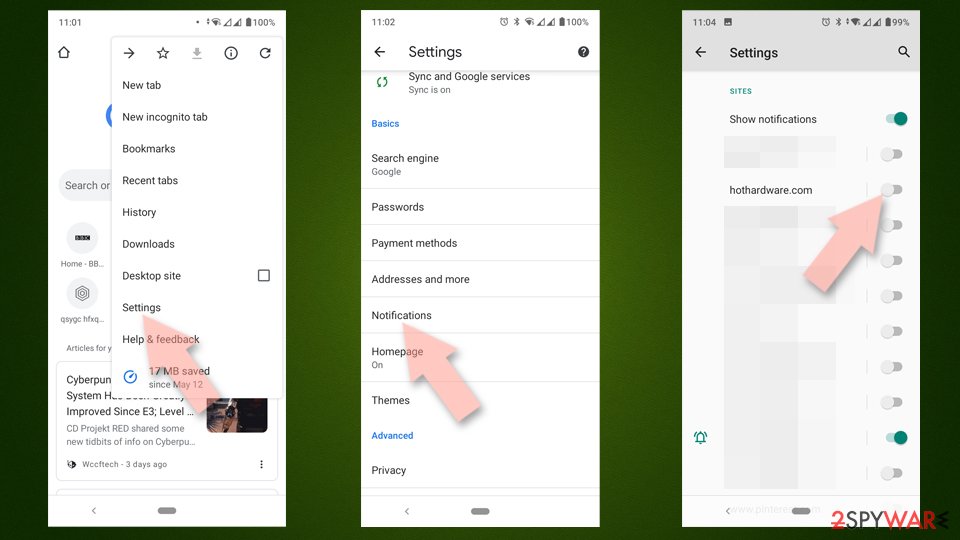
- Open Google Chrome and tap on Settings (three vertical dots).
- Select Notifications.
- Scroll down to the Sites section.
- Locate the unwanted URL and toggle the button to the left (Off setting).

Mozilla Firefox
- Open Mozilla Firefox and go to Menu > Options.
- Click on Privacy & Security section.
- Under Permissions, you should be able to see Notifications. Click the Settings button next to it.
- In the Settings – Notification Permissions window, click on the drop-down menu by the URL in question.
- Select Block and then click on Save Changes. This should remove unwanted notifications from Mozilla Firefox.


MS Edge (Chromium)
- Open Microsoft Edge, and go to Settings.
- Select Site permissions.
- Go to Notifications on the right.
- Under Allow, you will find the unwanted entry.
- Click on More actions and select Block.


Safari
- Click on Safari > Preferences…
- Go to the Websites tab and, under General, select Notifications.
- Select the web address in question, click the drop-down menu and select Deny.


Internet Explorer
- Open Internet Explorer, and click on the Gear icon at the top-right of the window.
- Select Internet options and go to the Privacy tab.
- In the Pop-up Blocker section, click on Settings.
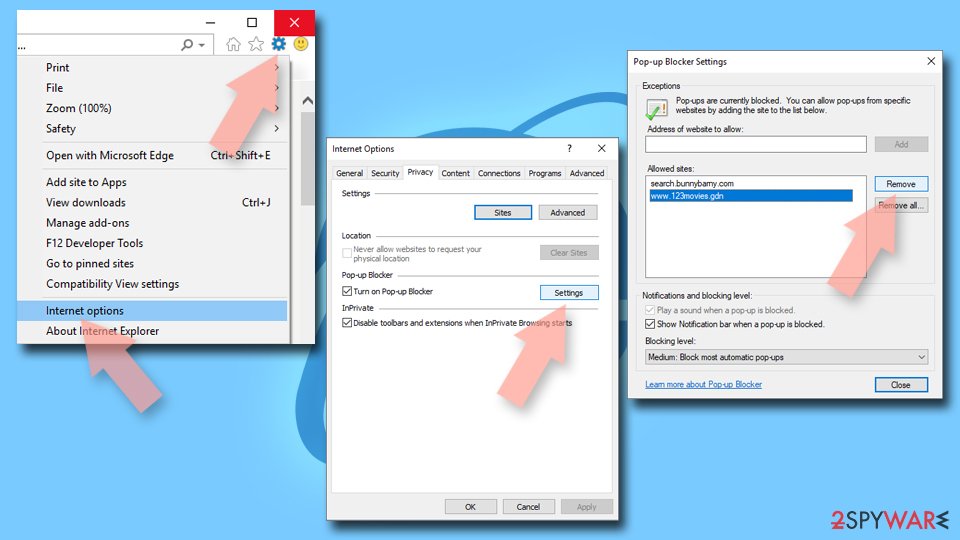
- Locate the web address in question under Allowed sites and pick Remove.

Did this guide help?
Be the first to comment