

Siteforyou3d.com is a deceptive website that presents fake robot verification page to ensure users are later flooded with ads

Siteforyou3d.com is an example of the many deceptive push notification scam sites that populate the internet. Designed by cybercriminals, its primary tactic is to display misleading prompts that urge users to click the “Allow” button as soon as they access the page. This button typically appears at the top of the site, and some users, confused by the message, might click it without fully understanding the consequences. Doing so can lead to unexpected pop-up ads appearing directly on their devices.
If you notice ads from Siteforyou3d.com on your screen, it’s best to avoid interacting with them. Websites like these often display fake or malicious links, which could trick users into subscribing to even more spam, wasting money on worthless services, or potentially installing harmful software onto their systems.
| Name | Siteforyou3d.com |
| Type | Push notifications, ads, pop-ups, scam |
| Distribution | Desktop notifications start showing up at random times after clicking on the “Allow” button upon the site entry |
| Symptoms | Pop-ups show up on a regular basis on the screen – these ads often include inappropriate, scam, phishing, or other similar content |
| Risks | Push notification prompts might include links to malicious websites, resulting in financial losses, personal information disclosure, or malware infections |
| Removal | You can stop the site from sending you notifications by following the steps below. To keep your computer safe, we also recommend scanning it for adware with SpyHunterCombo Cleaner security software |
| Tips | Make sure you clean your browsers after you delete PUPs from the system. You can do that quickly with FortectIntego maintenance utility |
Scam techniques are simple but effective
Users typically don't access websites that trigger unwanted push notifications or other intrusive actions on purpose. To get people onto their fraudulent sites, scammers rely on various deceptive tactics.
Siteforyou3d.com, for instance, often appears as a result of redirects from visits to unsafe online platforms such as illegal streaming sites, gambling pages, or peer-to-peer networks. These redirects might occur when users click on a compromised link or are automatically redirected through a malicious script embedded in the page.
Once directed to Siteforyou3d.com, visitors are usually unprepared for what they encounter. The site may present what seems to be a harmless request, such as asking to confirm their age or prove they aren’t a robot. In other instances, it might claim there's a video to watch, suggest the browser is blocking playback, or offer a prize. Common prompts include:
- Press “Allow” bot verify, that you are not robot
- If you are 18+, click Allow
- Browser verification in progress – click the button “Allow” to access
- Click “Allow” to win a prize and get it in our shop!
- Can't play this video! Perhaps your browser doesn't allow video playback. Please click the Allow button to watch the video
- Click Allow to watch the video
Remember, accepting a push notification prompt will enable push notifications on your device. This means Siteforyou3d.com can continuously send messages, including links and fake alerts, as long as your browser is active or running in the background. It’s best to ignore these notifications and follow proper removal steps to stop them.
How to remove Siteforyou3d.com ads?
When users start receiving intrusive push notifications as part of a scam, they often find themselves confused about the source of these disruptions. It's common for people to assume that their device has been infected with malware, as the sudden appearance of suspicious pop-ups typically suggests this. In response, they may try scanning their systems using security software, but these scans often fail to identify or resolve the issue.
To stop Siteforyou3d.com notifications, users need to access their browser settings and block the website from sending push notifications. Here’s how you can do it:
Google Chrome
- Open the Google Chrome browser and go to Menu > Settings.
- Scroll down and click on Advanced.
- Locate the Privacy and security section and pick Site Settings > Notifications.
- Look at the Allow section and look for a suspicious URL.
- Click the three vertical dots next to it and pick Block. This should remove unwanted notifications from Google Chrome.


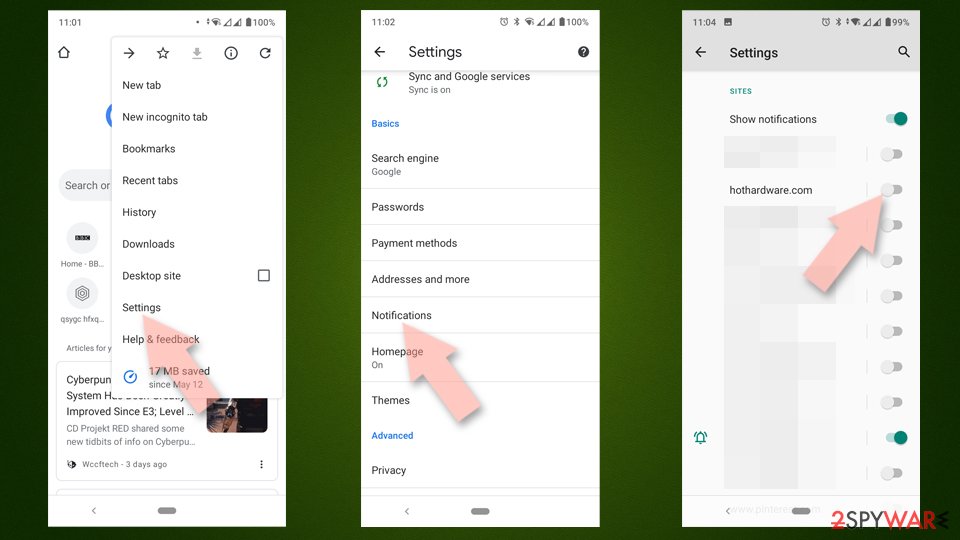
Google Chrome (Android)
- Open Google Chrome and tap on Settings (three vertical dots).
- Select Notifications.
- Scroll down to the Sites section.
- Locate the unwanted URL and toggle the button to the left (Off position).

Mozilla Firefox
- Open Mozilla Firefox and go to Menu > Options.
- Click on Privacy & Security section.
- Under Permissions, you should be able to see Notifications. Click the Settings button next to it.
- In the Settings – Notification Permissions window, click on the drop-down menu by the URL in question.
- Select Block and then click on Save Changes. This should remove unwanted notifications from Mozilla Firefox.


Safari
- Click on Safari > Preferences…
- Go to the Websites tab and, under General, select Notifications.
- Select the web address in question, click the drop-down menu and select Deny.


MS Edge
- Open Microsoft Edge, and go to Settings.
- Select Site permissions.
- Go to Notifications on the right.
- Under Allow, you will find the unwanted entry.
- Click on More actions and select Block.


Internet Explorer
- Open Internet Explorer, and click on the Gear icon at the top-right of the window.
- Select Internet options and go to the Privacy tab.
- In the Pop-up Blocker section, click on Settings.
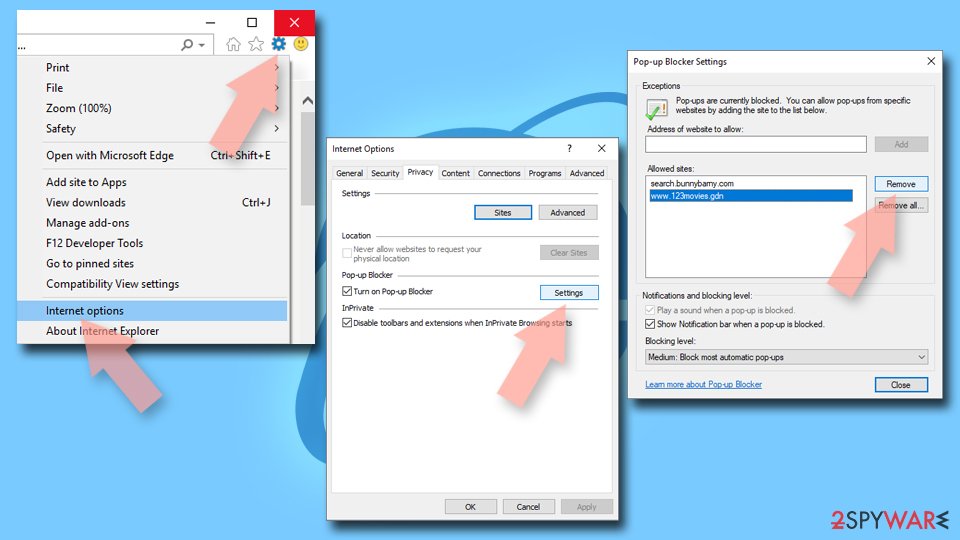
- Locate the web address in question under Allowed sites and pick Remove.

Could your system be infected?
Although a virus infection isn’t the direct cause of the push notification spam from Siteforyou3d.com, it could be indirectly linked. Users often find themselves on untrustworthy sites, sometimes due to accidental clicks or malicious redirects, making it hard to completely avoid these encounters. Steering clear of high-risk websites is recommended, but some redirects are simply beyond users’ control.
To minimize risks, ensure that your browsers and other installed software are always up to date. Regular updates help close security loopholes that scammers might exploit. Additionally, using security software and ad-blocking extensions can be effective preventative measures.
If you haven’t done so, consider downloading and installing SpyHunterCombo Cleaner, MalwarebytesMalwarebytes, or another trusted antivirus solution to check for any hidden malware on your system. Adware and other intrusive programs can sometimes be bundled together without users realizing it, leading them to believe their device is clean when it’s not.
For further protection, conducting a system health check and clearing your browser’s cache can help enhance security. This can be efficiently done using the advanced repair and maintenance features of the FortectIntego optimization tool.
Did this guide help?
Be the first to comment