

Olympushigh.top – a fraudulent website that deceives users into enabling spam notifications

Olympushigh.top is a questionable website that users might come across while visiting unreliable platforms, such as torrent sites or illegal streaming pages. Once redirected, visitors are often met with a deceptive prompt urging them to click the “Allow” button in a notification request.
Agreeing to this action would mean granting permission for Olympushigh.top to send notifications, leading to intrusive ads appearing later on. These pop-ups can be particularly disruptive as they may overlay all active programs and could even force users out of full-screen mode.
The main risk is that users might be exposed to various phishing content, including scams that promise fast money, fake virus warnings, and similar misleading information. This can potentially lead to significant security and privacy concerns. For this reason, it is advisable to avoid engaging with ads or links generated by Olympushigh.top and instead follow steps to remove them.
| Name | Olympushigh.top |
| Type | Push notifications, ads, pop-ups, scam |
| Distribution | Users allow push notifications after they click the “Allow” button within the prompt on the website |
| Symptoms | Once enabled, notifications from malicious websites would bring misleading or other suspicious content to your screen. These links could lead to malware-laden, scam, phishing, or similar malicious sites |
| Risks | You might suffer from monetary losses, install malware or potentially unwanted programs, or disclose sensitive data to cybercriminals |
| Termination | Access browser settings to stop intrusive push notifications. After that, make sure that your system is not infected with adware or malware – scan it with SpyHunterCombo Cleaner |
| Recovery | Following adware removal, use FortectIntego to erase caches and web data, thereby preventing tracking. Additionally, this tool can repair any compromised system components |
The way users accidentally end up on scam websites
The internet's vastness makes it difficult to fully prevent and manage online scams. Due to its constantly evolving nature, fraudulent sites like Olympushigh.top can emerge at any moment, drawing in unsuspecting users swiftly.
A major contributor to the success of these scams is the presence of rogue advertising networks and inadequately controlled websites. Platforms known for distributing pirated content, such as torrent sites, are especially notorious for their risks. These sites frequently host infected files, misleading “Download” buttons, malicious advertisements, and other dangerous elements that can lead visitors to phishing pages or result in malware infections, including ransomware.
Additionally, adware plays a significant role in redirecting users to phishing sites. This type of deceptive software runs quietly in the background, causing various browsing disturbances. It may, for instance, display ads over other content using an invisible layer or inject unwanted hyperlinks into text. As long as such an infection remains on a device, users face numerous ways they could be redirected to potentially harmful sites like Olympushigh.top.
Tricks used by scammers
Many websites use similar wording and images to trick users into allowing push notification spam, often featuring identical layouts and functionality. Websites like Olympushigh.top present prompts with messages that, while varying slightly in phrasing, ultimately have the same goal:
- If you are 18+, click Allow
- Click Allow to verify that you are not a robot
- Tap Allow to continue
- Click “Allow” to claim your prize
- Click Allow to start the download, and so forth.

These prompts can be understandably confusing. Most internet users are accustomed to verification requests, such as proving their age or selecting specific images for CAPTCHA tests. However, these prompts are far from genuine verification procedures, despite efforts by malicious actors to make them appear legitimate.
It’s crucial to understand that these push notification requests are solely designed to gain permission to send notifications via the browser's API, regardless of the claim or image shown. In reality, clicking “Allow” does not grant access to any promised content or action but instead allows the website to deliver unwanted notifications directly to the user.
Remove Olympushigh.top ads
Many users might mistakenly believe that the sudden appearance of intrusive pop-ups is due to a virus, but that isn’t entirely correct. Although it is possible that adware or malware could be present on your device, these aren’t the direct reasons behind the push notifications from Olympushigh.top.
Push notifications are a legitimate browser feature and cannot be entirely eliminated. However, you can modify your browser settings to block websites from sending notification prompts in the future. Thankfully, preventing a site from delivering notifications is nearly as straightforward as allowing them. You only need to go into your browser’s settings and take a few simple steps.
- Open the Google Chrome browser and go to Menu > Settings.
- Scroll down and click on Advanced.
- Locate the Privacy and security section and pick Site Settings > Notifications.
- Look at the Allow section and look for a suspicious URL.
- Click the three vertical dots next to it and pick Block. This should remove unwanted notifications from Google Chrome.


Mozilla Firefox
- Open Mozilla Firefox and go to Menu > Options.
- Click on Privacy & Security section.
- Under Permissions, you should be able to see Notifications. Click the Settings button next to it.
- In the Settings – Notification Permissions window, click on the drop-down menu by the URL in question.
- Select Block and then click on Save Changes. This should remove unwanted notifications from Mozilla Firefox.


MS Edge (Chromium)
- Open Microsoft Edge, and go to Settings.
- Select Site permissions.
- Go to Notifications on the right.
- Under Allow, you will find the unwanted entry.
- Click on More actions and select Block.


Safari
- Click on Safari > Preferences…
- Go to the Websites tab and, under General, select Notifications.
- Select the web address in question, click the drop-down menu and select Deny.


Internet Explorer
- Open Internet Explorer, and click on the Gear icon at the top-right of the window.
- Select Internet options and go to the Privacy tab.
- In the Pop-up Blocker section, click on Settings.
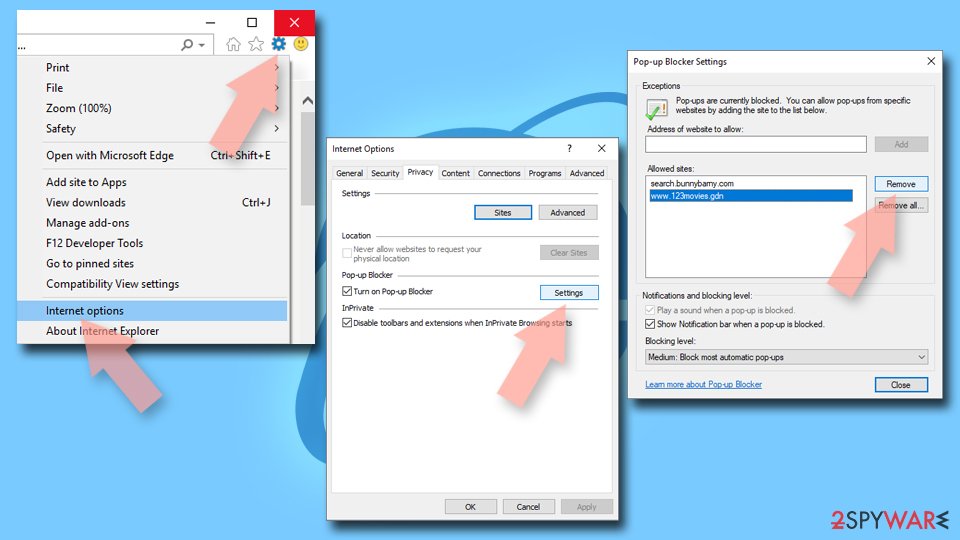
- Locate the web address in question under Allowed sites and pick Remove.

How can adware be related to push notification scams?
Users may often find themselves redirected to phishing sites like Olympushigh.top after clicking on links from other webpages. Platforms that host torrents and sites offering illegal software downloads are frequent sources of these redirections, potentially leading users to harmful sites. Sometimes, these automatic redirects happen without any user action, triggered by hidden malicious scripts embedded in the pages.
Adware or other unwanted programs can also cause similar issues, running undetected in the background. This typically occurs when users unknowingly download adware while seeking free software from third-party websites.
To safeguard your device, it is recommended to use strong anti-malware tools such as SpyHunterCombo Cleaner or MalwarebytesMalwarebytes. Before running a scan, make sure your anti-malware software is updated with the latest virus definitions. Most security programs have settings for automatic updates, which should be enabled for the best protection.
After removing any detected malware, using the FortectIntego tool to clean up cookies and tracking elements from your browser is wise. This can also help repair potential damage to system files caused by the infection, ensuring your device remains secure and performs optimally.
Did this guide help?
Be the first to comment