

Scp ransomware – a dangerous data-encrypting virus that demands money for a decryption tool
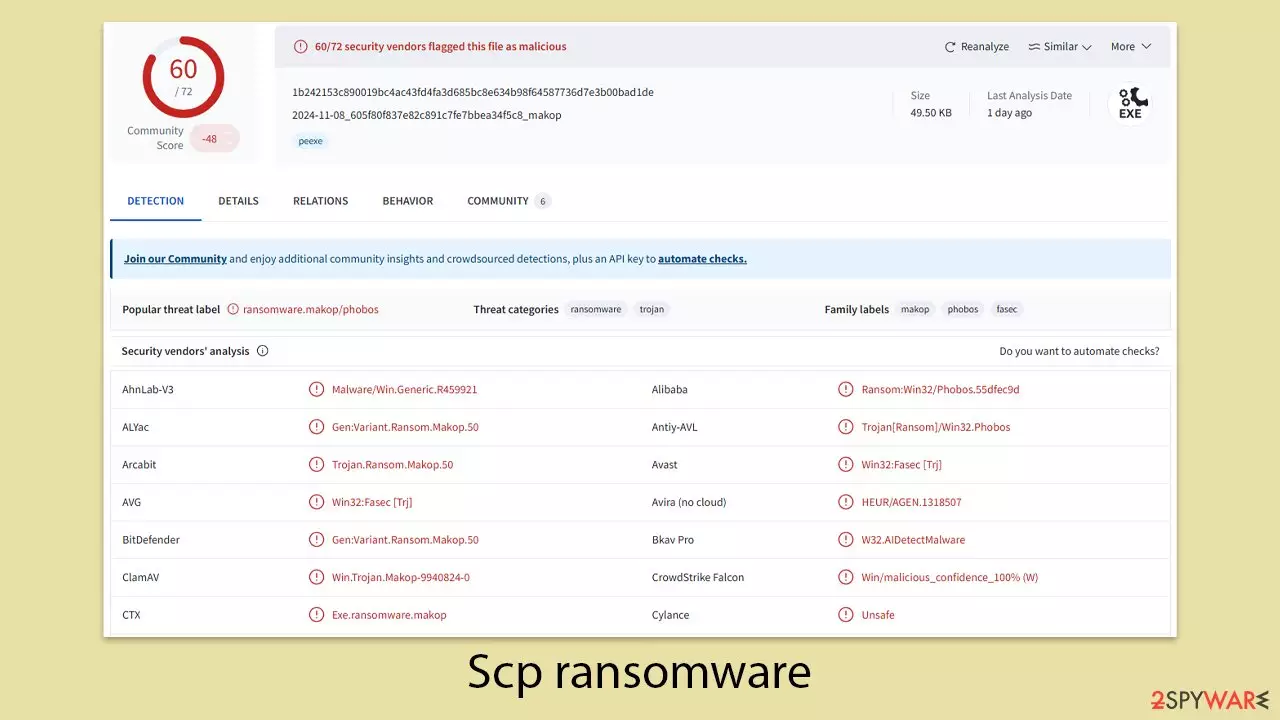
Scp ransomware is a type of malicious software that cybercriminals use to extort money from their victims. This dangerous program, first detected in November 2024, is part of the broad Makop ransomware family, which has numerous variations. Although its main targets are businesses and smaller enterprises, individual computer users can also fall victim to its attacks.
After it infiltrates a Windows system, the ransomware quickly deploys thousands of harmful files to achieve its primary task – encrypting as much user data as possible. It utilizes a sophisticated encryption method to lock all non-system files, rendering them unusable. The encrypted files are marked with the .[userID].scp extension and lose their original icons, effectively blocking access to the data.
Victims will find a ransom note, named +README-WARNING+.txt, placed on their desktop, which informs them about the attack. This message urges them to reach out to the attackers to retrieve their files by contacting them via studiocp25@hotmail.com email or Tox account.
In addition, the desktop wallpaper is changed to a red background with the message “Your files were encrypted! Please contact us for decryption.” However, this service comes at a price, as the perpetrators demand payment in Bitcoin for the decryption tool.
| Name | Scp virus |
|---|---|
| Type | Ransomware, file-locking malware |
| File extension | [userID].scp extension is appended to every personal file on the system |
| Ransom note | +README-WARNING+.txt |
| Malware family | Makop |
| File Recovery | The only method to recover files is through data backups. If such is not accessible, or if it has also been encrypted, your options for recovery are extremely limited, although we recommend trying them first |
| Malware removal | Disconnect the computer from the network and internet and then perform a full system scan with SpyHunterCombo Cleaner security software |
| System fix | Malware can seriously tamper with Windows systems, causing errors, crashes, lag, and other stability issues after it is terminated. To remediate the OS and avoid its reinstallation, we recommend scanning it with the FortectIntego repair tool |
How ransomware spreads
The creators of Scp ransomware rely on various distribution tactics to spread the malware to as many users as possible. One common method involves sending malicious email attachments, often as part of large-scale spam campaigns, which remains a significant source of malware infections. Additionally, other ways Scp ransomware can be distributed include:
- Exploiting software vulnerabilities;
- Fake updates for applications like Flash, Java, Chrome, or Firefox;
- Poorly secured Remote Desktop Protocols (RDP) or unprotected WiFi networks;
- Cracked software, key generators, or pirated software installers;
- Backdoors, among others.
To reduce the risk of ransomware and other malware, it is essential to take preventive steps. Keeping your operating system and software updated, using reliable security programs, steering clear of high-risk websites, and frequently backing up crucial data are all effective measures.
Even though there might not be an immediate solution to reverse the infection, focusing on removing Scp ransomware and finding data recovery options without paying the ransom is the best course of action.
What does the ransom note say?
Cybercriminals aiming to extort money from victims always ensure their ransomware drops a ransom note upon infection. This note acts as the primary means of communication and assigns a unique identification ID to each victim, which is crucial for the attackers to manage decryption keys effectively. Without this method, they would be unable to match the correct decryption key to the respective victim.
To guarantee victims can access the ransom note, it is usually delivered in a simple TXT format, ensuring compatibility with Notepad or any basic text reader. The content of the note typically outlines the hackers' demands, which include:
!!!Attention!!!
Files on your server are encrypted and compromised, stolen for the purpose of publishing on the internet.
You can avoid many problems associated with hacking your server.We can decrypt your files, we can not publish files on the internet – To do this, you need to contact us as soon as possible.
To clarify the details of decryption, write to us using email or tox.!!!Attention!!!
Avoid contacting intermediary companies that promise to decrypt files without our help – This is not true and you can lose access to your files forever.
They know how to tell a beautiful story, but they are not able to do anything without our help.
Be sure to contact us before using their help and we will show you that intermediaries can do nothing except their beautiful stories.Email: studiocp25@hotmail.com
Tox: 0B2A96C6BCEB27BA9C8E27A9EFC509A02B4915D2A2C9E1923E9F283C397F76321F22D70FB7FCSubject: [ID]
This particular note warns users that not only are their files encrypted, but they have also been stolen with the threat of being publicly exposed. This tactic adds additional pressure to victims, emphasizing that immediate action is necessary to avoid further repercussions.

The message urges victims to contact the attackers promptly via email or a specific Tox address for further instructions on decryption and preventing the public release of stolen data. A strong warning is also included against seeking assistance from third-party intermediaries, labeling their promises as false and ineffective. The attackers claim that only direct contact with them will ensure file recovery and prevent data exposure.
This ransom note highlights a critical aspect of modern ransomware attacks: the combination of encryption and data theft to create dual leverage over victims. The inclusion of communication details and an ID reference for each victim further demonstrates how these operations are structured for both intimidation and efficient management.
Malware removal steps
When users discover that ransomware has encrypted their files and blocked access to their data, they naturally experience anxiety and distress. However, at this stage, panic is unhelpful and could even lead to actions that worsen data loss. It is essential to approach the situation calmly and follow the correct steps to minimize further damage.
Cybercriminals use Command & Control (C&C) servers to establish remote connections with infected Windows devices, facilitating communication over the internet. Therefore, one of the first steps is to disconnect the affected machine from any network connections to prevent further interaction with the C&C server. To do this quickly:
- Type in Control Panel in Windows search and press Enter
- Go to Network and Internet
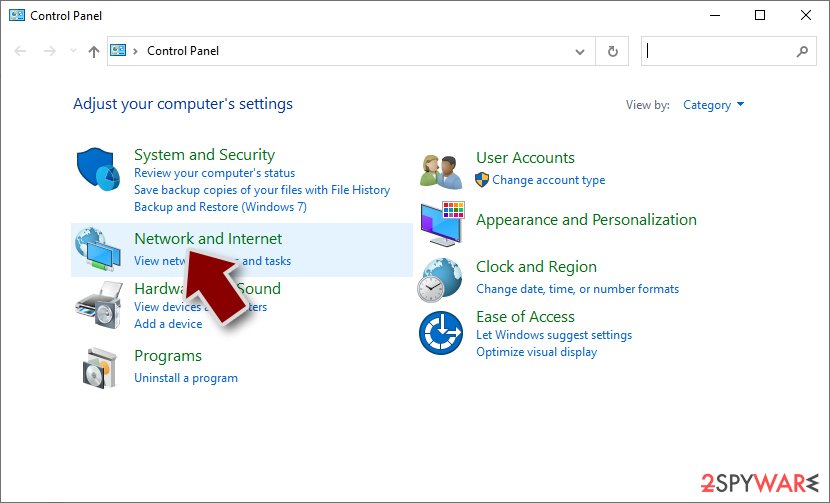
- Click Network and Sharing Center
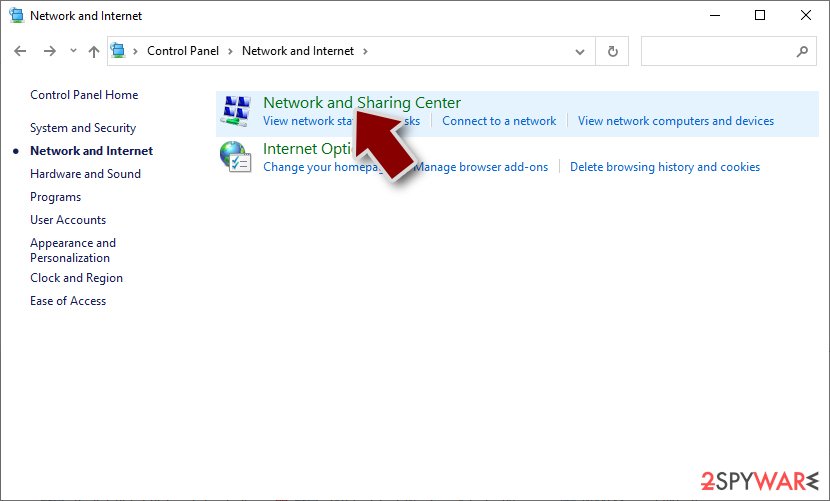
- On the left, pick Change adapter settings
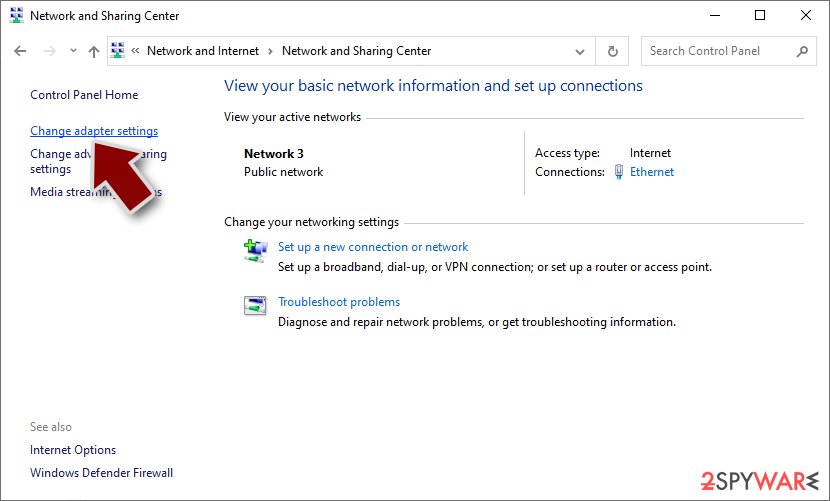
- Right-click on your connection (for example, Ethernet), and select Disable
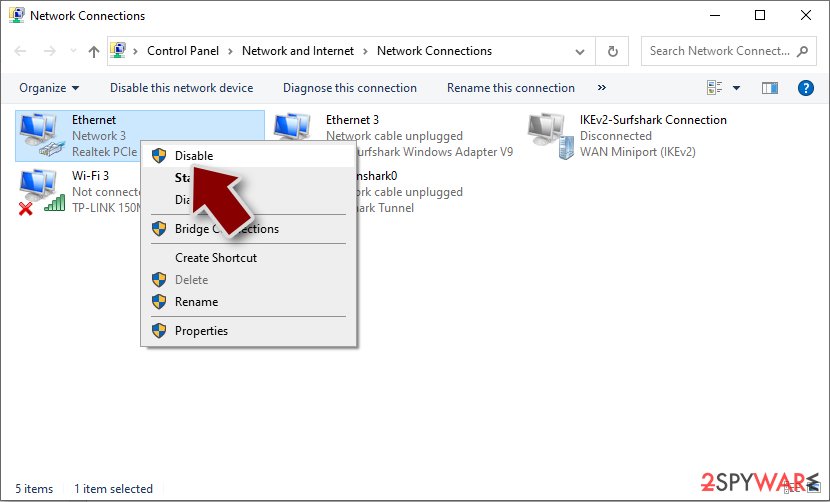
- Confirm with Yes.


After the system is safely disconnected from all networks, use robust security software such as SpyHunterCombo Cleaner or MalwarebytesMalwarebytes to scan and remove the Scp ransomware. These programs will detect and eliminate all malicious components, ensuring the infection is fully cleared and cannot re-encrypt the system. This step is especially important, as some ransomware attacks come bundled with additional threats like banking Trojans, making a thorough scan vital for system security.
Be aware that ransomware persistence mechanisms may interfere with anti-malware programs. This issue can usually be addressed by starting the system in Safe Mode, where the malware removal process can be carried out with fewer interruptions.
Data recovery and additional solutions
Data encryption is a complex process designed to ensure that victims cannot decode the encrypted files with basic methods. Each decryption key is unique, consisting of a long string of alphanumeric characters. The length and complexity of these strings make decryption extremely difficult, and at certain thresholds, virtually impossible without the correct key. This method allows cybercriminals to demand high payments in exchange for the decryption keys from their victims.
If you decide not to pay the ransom, which is strongly advised, there are still alternative methods that could help in recovering your data. At present, there is no working decryptor available for the newest variants of the Makop family, making data recovery challenging. However, you might find the following suggestions useful.
- Download Data Recovery Pro.
- Double-click the installer to launch it.

- Follow on-screen instructions to install the software.

- As soon as you press Finish, you can use the app.
- Select Everything or pick individual folders where you want the files to be recovered from.

- Press Next.
- At the bottom, enable Deep scan and pick which Disks you want to be scanned.

- Press Scan and wait till it is complete.
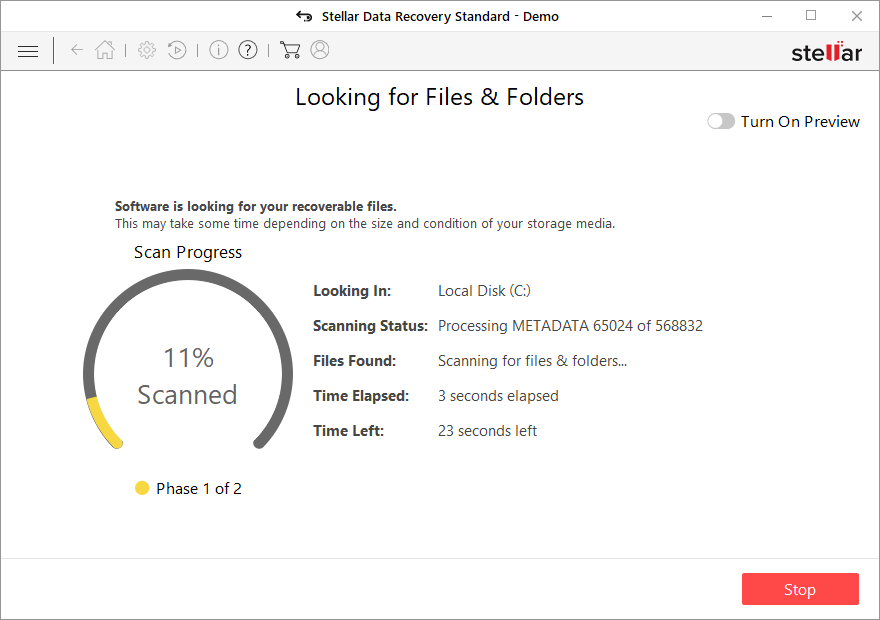
- You can now pick which folders/files to recover – don't forget you also have the option to search by the file name!
- Press Recover to retrieve your files.


Decryption tools for specific ransomware strains can sometimes be developed through the work of cybersecurity researchers. In some instances, law enforcement agencies are able to take control of servers used by cybercriminals, leading to the release of decryption keys to the public. These keys are typically shared by trustworthy security vendors, offering victims a chance to recover their data without paying a ransom. Below are a few links that may be helpful:
- No More Ransom Project
- Free Ransomware Decryptors by Kaspersky
- Free Ransomware Decryption Tools from Emsisoft
- Avast decryptors

Ransomware is among the most harmful types of malware due to its potential to cause extensive damage to systems. Beyond encrypting data, it can spread across networks and often comes bundled with additional malicious software.
It may also inject unauthorized code or corrupt essential Windows files, which can lead to system crashes and other stability problems. To address these issues and restore normal system function, it is advised to use a reliable PC repair tool like FortectIntego to correct any inconsistencies.
Did this guide help?
Be the first to comment