

Pulsenotifynow.top is designed to trick users into subscribing to notifications, enabling ads to be sent directly to their desktops

Many individuals may not immediately realize that they have unintentionally allowed Pulsenotifynow.top to send notifications. This permission is often granted unknowingly during a brief interaction with the site, which can easily be forgotten until persistent pop-up messages start appearing on various websites. These intrusive alerts spread widely, making it challenging to pinpoint their origin.
The problem stems from the deceptive strategies used by Pulsenotifynow.top to manipulate visitors into subscribing to notifications. These tactics are designed to mislead users, resulting in a continuous flow of disruptive alerts. It is often only after these interruptions become unmanageable that people begin to recall the initial interaction and connect it to the source of the issue.
What raises further concerns is the potentially harmful nature of these notifications. Pulsenotifynow.top may include fraudulent links or content that can compromise personal information, install malware, or promote fake services. Clicking on such alerts could lead to significant consequences, such as data breaches or financial losses.
Understanding the connection between these pop-ups and their source is vital to addressing the problem early and avoiding additional risks. Staying cautious when encountering unfamiliar sites or unexpected notifications is key to maintaining online security.
| Name | Pulsenotifynow.top |
| Type | Push notifications, ads, pop-ups, scam |
| Distribution | Desktop notifications start showing up at random times after clicking on the “Allow” button upon the site entry |
| Symptoms | You may start seeing intrusive pop-ups on your desktop – clicking these may lead to insecure or even malicious websites |
| Risks | Push notification prompts may contain links to harmful websites, leading to potential financial loss, exposure of personal information, or malware infections. |
| Removal | Access browser settings to stop intrusive push notifications. After that, make sure that your system is not infected with adware or malware – scan it with SpyHunterCombo Cleaner |
| Other tips | Use FortectIntego to remove data trackers from your system and repair any damage caused by adware or other unwanted software. |
Cheap but effective tactics are used to mislead visitors
Users seldom anticipate encountering a site like Pulsenotifynow.top, which floods them with intrusive push notifications. Scammers behind such operations employ deceptive techniques to drive users to these purpose-built websites. Sites like Pulsenotifynow.top are not typically visible in search results due to strict filters, but occasional lapses allow some to slip through. Consequently, scammers rely on alternative methods to attract visitors.
People often find themselves redirected to Pulsenotifynow.top after visiting peer-to-peer networks, illegal streaming services, gambling platforms, or other questionable sites. These redirects may occur through phishing links clicked by the user or malicious scripts embedded in the sites they browse, redirecting them automatically without their consent.
The redirection catches users off guard by presenting seemingly normal requests, such as verifying their age or confirming they are not a robot. Other messages might claim users need to verify a video, resolve a browser issue, or claim a prize. Common prompts include:
- Press “Allow” to confirm you are not a robot
- If you are 18+, click Allow
- Press “Allow” to claim your prize
- Your file is ready to download – press Allow to continue.
- Click Allow to watch the video
Despite appearing legitimate, these messages are entirely fake. Pulsenotifynow.top, like other fraudulent sites, lacks any real content. Granting permission to its notification requests only enables the site to bombard users with disruptive alerts at any time.

Removing Pulsenotifynow.top ads
Many people mistakenly believe that intrusive pop-ups from Pulsenotifynow.top are caused by a virus on their device. While adware or malware might be present on the system, it’s not the primary reason behind the push notifications originating from this website.
Push notifications themselves are a legitimate browser feature that cannot be entirely removed. However, users can manage or disable this feature within their browser settings to block websites from sending notification requests. Thankfully, preventing a site from delivering these alerts is just as straightforward as granting permission initially. By accessing the appropriate settings in the browser, users can quickly regain control over their notifications.
Google Chrome
- Open the Google Chrome browser and go to Menu > Settings.
- Scroll down and click on Advanced.
- Locate the Privacy and security section and pick Site Settings > Notifications.
- Look at the Allow section and look for a suspicious URL.
- Click the three vertical dots next to it and pick Block. This should remove unwanted notifications from Google Chrome.


Google Chrome (Android)
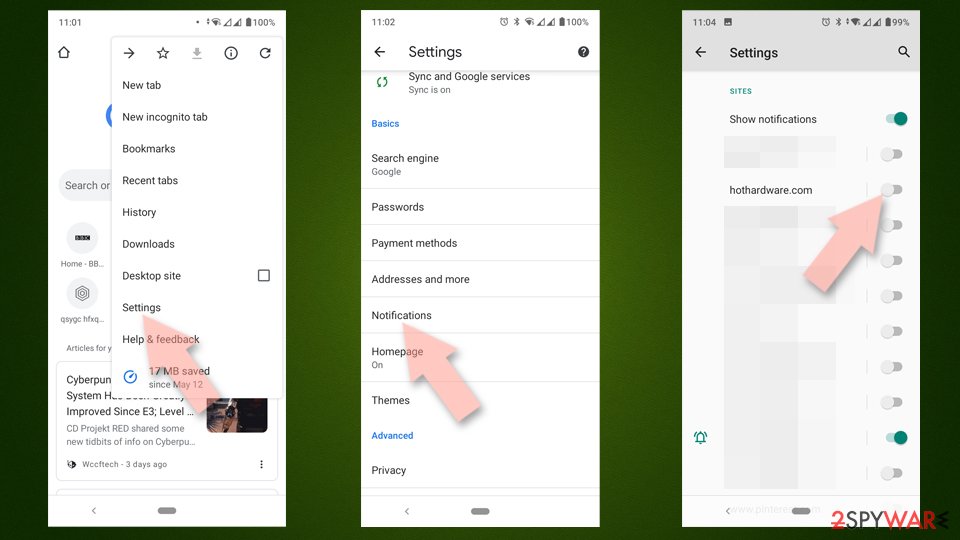
- Open Google Chrome and tap on Settings (three vertical dots).
- Select Notifications.
- Scroll down to the Sites section.
- Locate the unwanted URL and toggle the button to the left (Off position).

Mozilla Firefox
- Open Mozilla Firefox and go to Menu > Options.
- Click on Privacy & Security section.
- Under Permissions, you should be able to see Notifications. Click the Settings button next to it.
- In the Settings – Notification Permissions window, click on the drop-down menu by the URL in question.
- Select Block and then click on Save Changes. This should remove unwanted notifications from Mozilla Firefox.


Safari
- Click on Safari > Preferences…
- Go to the Websites tab and, under General, select Notifications.
- Select the web address in question, click the drop-down menu and select Deny.


MS Edge
- Open Microsoft Edge, and go to Settings.
- Select Site permissions.
- Go to Notifications on the right.
- Under Allow, you will find the unwanted entry.
- Click on More actions and select Block.


Internet Explorer
- Open Internet Explorer, and click on the Gear icon at the top-right of the window.
- Select Internet options and go to the Privacy tab.
- In the Pop-up Blocker section, click on Settings.
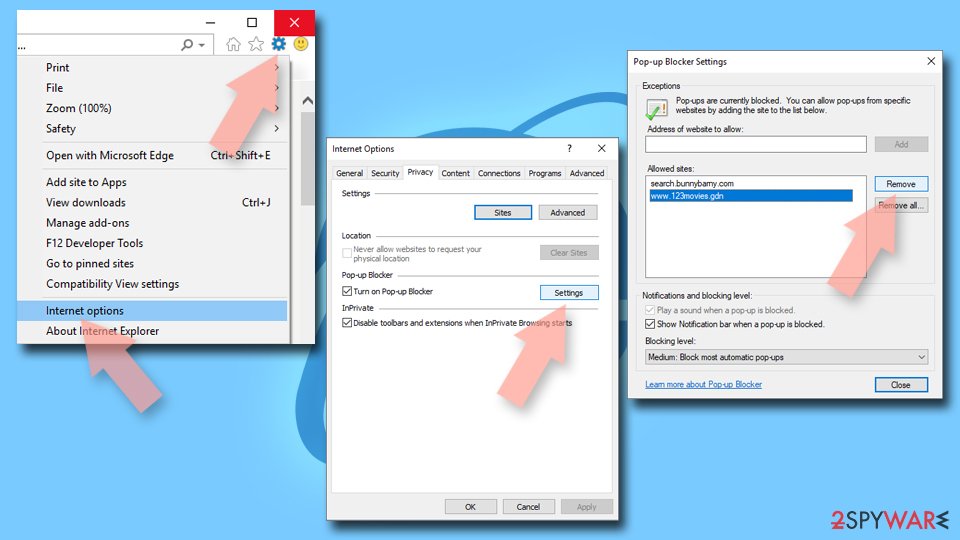
- Locate the web address in question under Allowed sites and pick Remove.

After eliminating unwanted push notifications from Pulsenotifynow.top, it’s important to verify that your system is free from adware or other malicious software. Adware often infiltrates devices through misleading tactics such as software bundling or counterfeit updates, operating unnoticed by many users.
Adware frequently disguises itself as a browser extension, making it essential to review your browser’s settings. Navigate to the “Extensions” section and remove any unfamiliar or suspicious add-ons. If you need assistance, you can follow the manual steps provided below or use automated tools like SpyHunterCombo Cleaner or MalwarebytesMalwarebytes to simplify the process.
Using security programs ensures that your system is thoroughly scanned for hidden threats. These tools efficiently detect and eliminate malware, providing peace of mind. Once your system is secure, FortectIntego can help clean up cookies and repair any residual damage caused by the infection.
If you prefer a manual approach, detailed instructions are available below. However, keep in mind that manual removal may not always be comprehensive, and some infections could persist if not completely eradicated.
Did this guide help?
Be the first to comment