

Recturadvely.co.in is a deceptive website designed to lure users into enabling push notifications, later bombarding them with intrusive advertisements
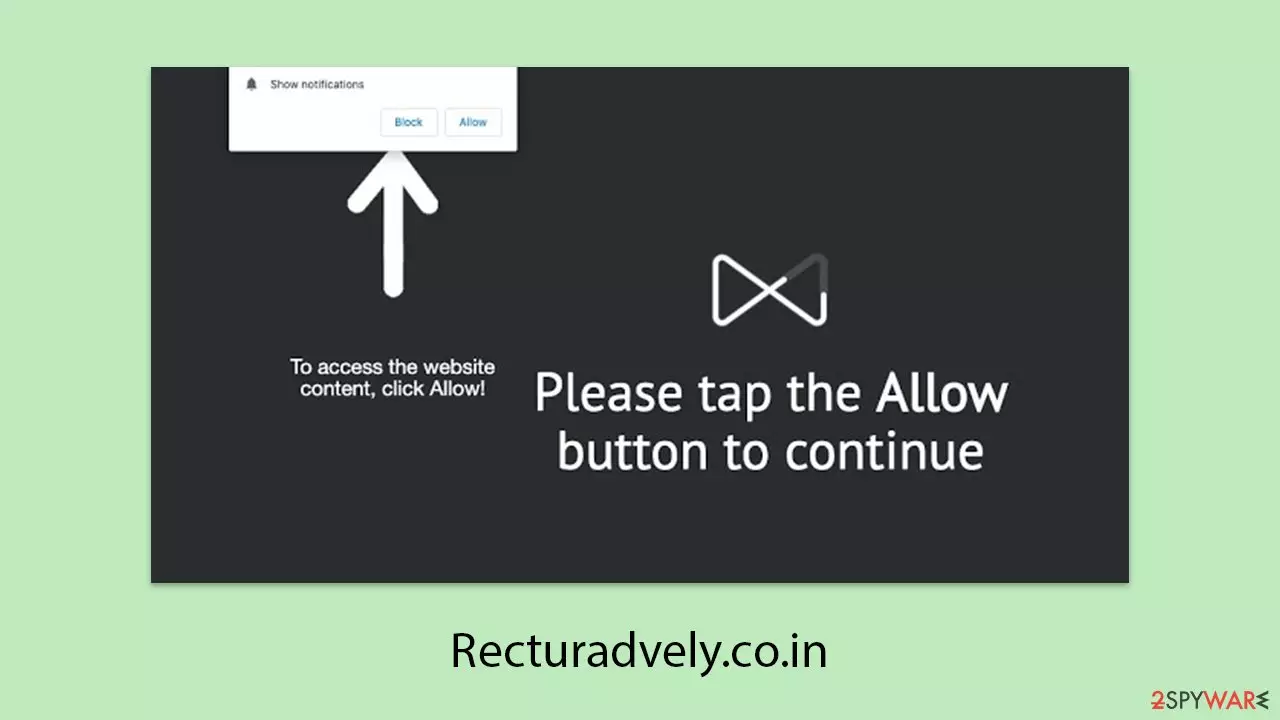
Recturadvely.co.in is one of many phishing sites that operate through push notifications and can be viewed using Google Chrome, Mozilla Firefox, Microsoft Edge, or other browsers. Most users are not able to remember the title of the site itself but know only about unwanted and unexpected pop-up ads coming on their gadgets.
Users tend to come to this page after they clicked on a false link, on which they get a false message asking them to click the “Allow” button. In a few cases, frequent visits to such phishing sites can be an indication of adware infection in the infected machine.
It is advisable not to click on Recturadvely.co.in ads, as they might be deceptive or even hazardous. The user can be lured into fraudulent get-rich-quick schemes, fake virus notifications, or false prize alerts. Falling victim to these could lead to downloading possibly malicious software, loss of money, or leaking personal data to cybercriminals.
| Name | Recturadvely.co.in |
| Type | Push notifications, ads, scam, pop-ups |
| Distribution | Push notifications show up at some point after the “Allow” button in the notification prompt is clicked |
| Symptoms | Notifications show up at the bottom-right corner of the screen – these include fraudulent content and links to potentially dangerous websites |
| Risks | Push notification prompts might include links to malicious websites, resulting in financial losses, personal information disclosure, or malware infections |
| Removal | Disabling push notifications on your desktop involves getting into browser settings and blocking the website URL. It is also advisable to scan the system with SpyHunterCombo Cleaner to look for adware or malware infections |
| Other tips | By cleaning web browser caches and web data, you would ensure that third parties can no longer track you – use FortectIntego for this task |
Tricks scammers use to confuse people
The push notification API was originally developed for legitimate purposes, much like other web features. For example, news websites may request permission to send alerts, allowing users to stay updated on recent events more quickly. This benefits both users and website owners, as increased engagement helps drive more interactions.
However, Mozilla's research indicates that 99% of push notification requests are ignored, which is understandable since most users find them intrusive. The ability of a website to trigger pop-ups at any time can feel invasive, leading many people to decline notifications altogether.
While trustworthy websites simply ask users whether they wish to enable notifications, deceptive pages employ misleading messages to trick them. One of the most common tactics involves displaying the following prompt:
Click Allow if you are not a robot
It’s easy to see why someone might mistake this for a CAPTCHA verification. Since users often encounter similar requests, they may not hesitate to click “Allow,” unknowingly granting permission for intrusive ads. Once access is given, they are frequently redirected to other malicious sites, repeating the deceptive cycle.

How are users unwittingly exposed to online fraud?
Users do not usually go out of their way to visit Recturadvely.co.in intentionally. More often than not, this website is visited by mistake rather than on purpose – typing the URL manually into a browser would not normally lead the user to this website. Scammers take advantage of these mistaken visits, exploiting common browsing errors to lure unsuspecting users.
A common way to enter Recturadvely.co.in is to click on a harmless-appearing link that is hosted on some other website. For example, most peer-to-peer file sharing websites are notorious for employing bogus “Download” buttons and deceptive URLs. They do this in order to reroute users through a series of redirects – normally managed by automatic scripts – until the user winds up at Recturadvely.co.in, where the potential threats escalate.
Given that sites like Recturadvely.co.in are frequently associated with malware and can serve as gateways to additional harmful domains, exercising caution is essential. Employing a reputable ad-blocker together with up-to-date security software can significantly reduce the chances of encountering these malicious redirection schemes.
Eliminating intrusive ads and browser interruptions
When your system begins showing an overload of pop-ups, unexpected offers, and suspicious links, it's a clear sign that an adware infection may be at play. Often, these disruptions are not random glitches but rather deliberate redirections that steer your browser toward sites like Recturadvely.co.in – places you never intended to visit.
Such behavior typically stems from malicious redirects or deceptive elements embedded within web pages. These can trigger a cascade of notifications, coupon alerts, and sponsored links, all of which indicate that your system might be compromised by harmful software like adware, browser hijackers, or even trojans.
To regain control, it is crucial to run a comprehensive system scan using a robust security solution—specifically, a package like FortectIntego, SpyHunterCombo Cleaner, and MalwarebytesMalwarebytes. This suite not only helps in detecting and eliminating malware but also aids in cleaning your browser and repairing any residual issues once the malicious apps have been removed.
Additionally, you can further safeguard your browsing experience by adjusting your browser settings. Locate the notifications section and block the Recturadvely.co.in URL to prevent any future intrusive alerts. This proactive step will help ensure that your online activities remain smooth and secure.
By combining regular system scans with careful browser management, you can significantly reduce the risk of encountering disruptive ads and maintain a safer online environment.
Google Chrome
- Open the Google Chrome browser and go to Menu > Settings.
- Scroll down and click on Advanced.
- Locate the Privacy and security section and pick Site Settings > Notifications.
- Look at the Allow section and look for a suspicious URL.
- Click the three vertical dots next to it and pick Block. This should remove unwanted notifications from Google Chrome.


Google Chrome (Android)
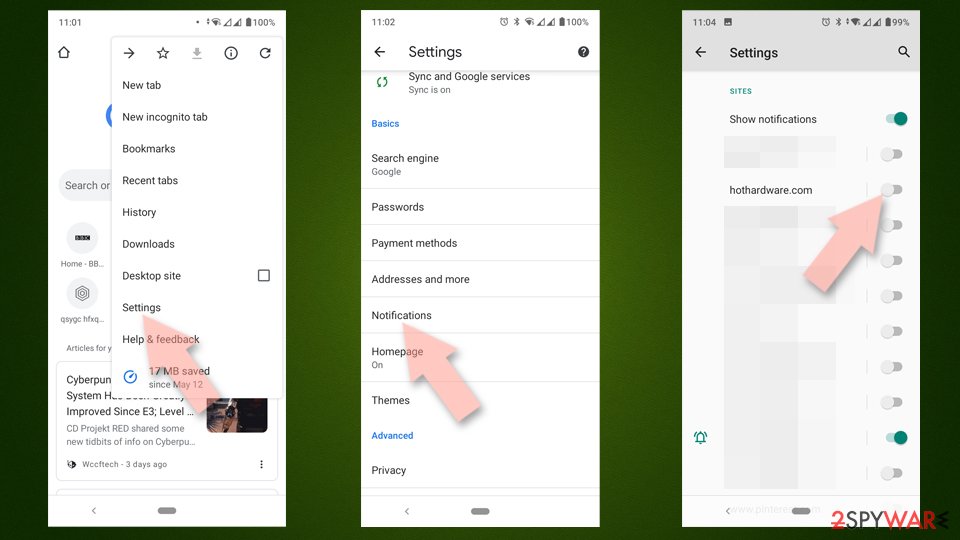
- Open Google Chrome and tap on Settings (three vertical dots).
- Select Notifications.
- Scroll down to the Sites section.
- Locate the unwanted URL and toggle the button to the left (Off position).

Mozilla Firefox
- Open Mozilla Firefox and go to Menu > Options.
- Click on Privacy & Security section.
- Under Permissions, you should be able to see Notifications. Click the Settings button next to it.
- In the Settings – Notification Permissions window, click on the drop-down menu by the URL in question.
- Select Block and then click on Save Changes. This should remove unwanted notifications from Mozilla Firefox.


Safari
- Click on Safari > Preferences…
- Go to the Websites tab and, under General, select Notifications.
- Select the web address in question, click the drop-down menu and select Deny.


MS Edge
- Open Microsoft Edge, and go to Settings.
- Select Site permissions.
- Go to Notifications on the right.
- Under Allow, you will find the unwanted entry.
- Click on More actions and select Block.


Internet Explorer
- Open Internet Explorer, and click on the Gear icon at the top-right of the window.
- Select Internet options and go to the Privacy tab.
- In the Pop-up Blocker section, click on Settings.
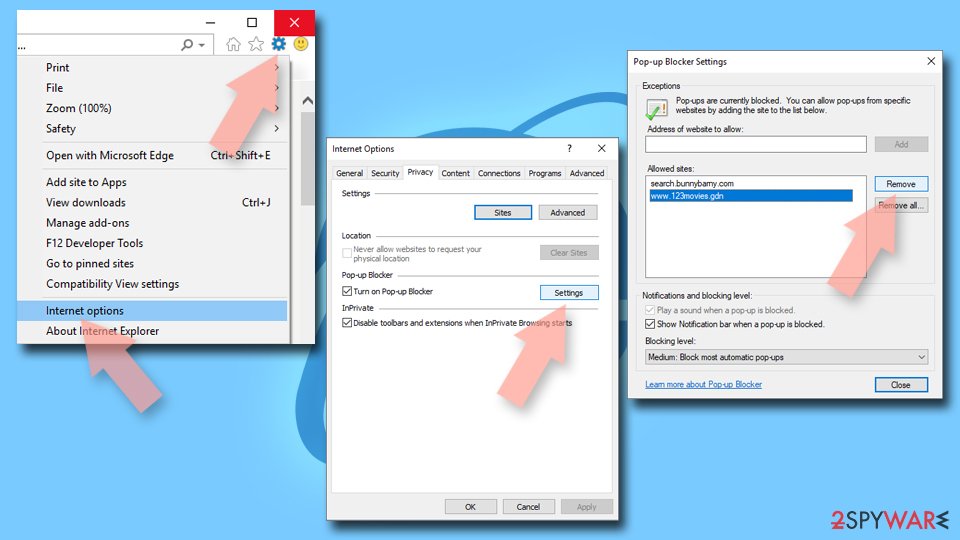
- Locate the web address in question under Allowed sites and pick Remove.

Did this guide help?
Be the first to comment