

Sayadsleads.top is a malicious website you should not interact with

Sayadsleads.top is a questionable site that you may stumble upon when visiting insecure sections of the internet, such as torrent pages or unlawful streaming sites. Once redirected to the site, the visitors are presented with a false message requesting that they click the “Allow” button on a notification pop-up.
If you do, you'll be inadvertently allowing Sayadsleads.top to show notifications, which will subsequently manifest in the form of obnoxious ads. These unsolicited pop-ups can appear on top of any active software, potentially interrupting your workflow and even booting you out of full-screen mode.
The real threat lies in the content of these ads since they are inclined to promote phishing scams, for example, fake virus warnings, get-rich-quick schemes, and other forms of scams. Such exposure could lead to terrible privacy and security problems. To this, we strongly suggest that you ignore any ad or link from Sayadsleads.top and follow our step-by-step guidelines to eliminate them.
| Name | Sayadsleads.top |
| Type | Push notifications, ads, pop-ups, scam |
| Distribution | Push notifications show up at some point after the “Allow” button in the notification prompt is clicked |
| Symptoms | Pop-ups that are shown include fake notifications and push scams. Links can also direct you to sites filled with malware |
| Risks | You may start seeing intrusive pop-ups on your desktop – clicking these may lead to insecure or even malicious websites |
| Removal | Push notifications can be stopped by blocking the web address of the malicious website via browser settings. Checking the device with SpyHunterCombo Cleaner security software is also recommended |
| Other tips | After removing adware, use FortectIntego to clear caches and web data, effectively preventing tracking. This tool can also restore any compromised system components. |
Sayadsleads.top employs deceptive tactics through misleading prompts to ensnare unsuspecting users.
Mostly, users end up on Sayadsleads.top by accident, at times after clicking on a link from a hacked or suspicious website. For instance, accessing torrent websites will increase the chances of being redirected to such dubious websites, as they are usually full of malicious code and misleading buttons that will trick users.
The surprise and unexpected element of this fraud is what helps it succeed so well, because surprised individuals make more errors. Sayadsleads.top messages also work to make themselves appear legit and normal in order to make them harder to detect as being fraudulent. Here are some sample messages you might get:
- Just one more step! “Allow” to continue.
- Click Allow to start downloading
- Click Allow to confirm that you are not a robot
- Click “Allow” to win a prize and get it in our shop!
- If you are 18+, click Allow, etc.
Each of these prompts is, at best, misleading and, at worst, blatantly fraudulent. Scammers behind Sayadsleads.top exploit familiar verification tactics – like confirming age or humanity – to masquerade as legitimate requests. These are classic social engineering strategies commonly wielded by cybercriminals.

How to eliminate unwanted push notifications
When users encounter dubious pop-up ads, many instantly assume their device has been compromised. This reaction is understandable, especially since scam websites often bombard users with push notifications promoting get-rich-quick schemes, fake prize winnings, and similar deceptive content.
It’s not surprising that suspicious or harmful ads are often mistaken for signs of a system infection, given their intrusive nature. However, running a scan with security software won’t stop the push notifications from Sayadsleads.top, and the disruptive activity will persist.
The issue stems from the moment a user clicks the “Allow” button in the notification prompt on such a site, granting it unrestricted permission to send push notifications as long as the browser remains active. Since the push notification feature itself is a legitimate browser function, security software cannot detect or alter these permissions – scammers simply exploit this feature for malicious intent. To resolve this, you must manually navigate to your browser’s settings and revoke the site’s ability to send push notifications.
Google Chrome
- Open the Google Chrome browser and go to Menu > Settings.
- Scroll down and click on Advanced.
- Locate the Privacy and security section and pick Site Settings > Notifications.
- Look at the Allow section and look for a suspicious URL.
- Click the three vertical dots next to it and pick Block. This should remove unwanted notifications from Google Chrome.


Google Chrome (Android)
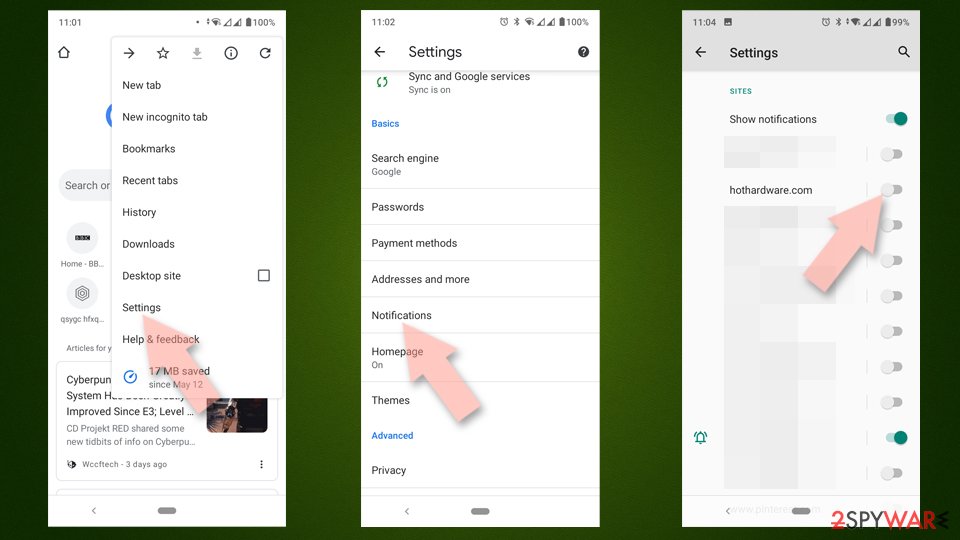
- Open Google Chrome and tap on Settings (three vertical dots).
- Select Notifications.
- Scroll down to the Sites section.
- Locate the unwanted URL and toggle the button to the left (Off position).

Mozilla Firefox
- Open Mozilla Firefox and go to Menu > Options.
- Click on Privacy & Security section.
- Under Permissions, you should be able to see Notifications. Click the Settings button next to it.
- In the Settings – Notification Permissions window, click on the drop-down menu by the URL in question.
- Select Block and then click on Save Changes. This should remove unwanted notifications from Mozilla Firefox.


Safari
- Click on Safari > Preferences…
- Go to the Websites tab and, under General, select Notifications.
- Select the web address in question, click the drop-down menu and select Deny.


MS Edge
- Open Microsoft Edge, and go to Settings.
- Select Site permissions.
- Go to Notifications on the right.
- Under Allow, you will find the unwanted entry.
- Click on More actions and select Block.


Internet Explorer
- Open Internet Explorer, and click on the Gear icon at the top-right of the window.
- Select Internet options and go to the Privacy tab.
- In the Pop-up Blocker section, click on Settings.
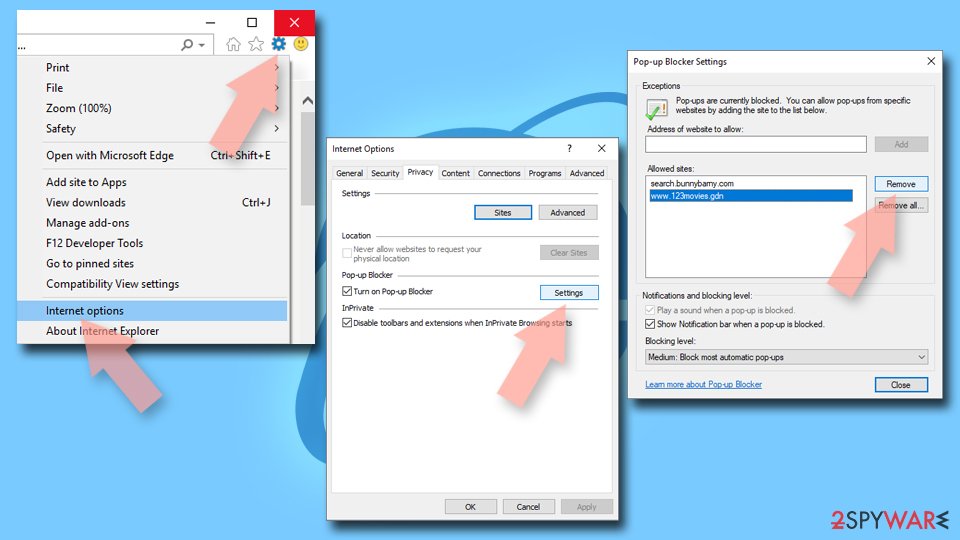
- Locate the web address in question under Allowed sites and pick Remove.

Additional security tips
Although the push notification spam from Sayadsleads.top isn’t directly caused by a virus, there could still be a connection. Most users end up on shady websites unintentionally, but this risk can be minimized by steering clear of high-risk online areas. However, since some redirects are beyond a user’s control, encountering a potentially harmful site is sometimes unavoidable.
To start, always ensure that your browser and all other installed software are updated to the latest versions. Keeping everything current helps eliminate vulnerabilities that could be exploited. Additionally, using security tools and ad-blocking extensions can provide significant protection.
If you haven’t already, consider downloading and installing SpyHunterCombo Cleaner, MalwarebytesMalwarebytes, or another reputable anti-virus program to confirm that your device is free of malware. Many users overlook the presence of adware or other invasive programs, which are often bundled with seemingly harmless downloads. This can lead them to mistakenly believe their system is clean when it’s not.
Lastly, for enhanced security, perform a system health check and clear your browser’s cache. This can be easily accomplished using the advanced repair and maintenance features of the FortectIntego optimization tool.
Did this guide help?
Be the first to comment